service MITSUBISHI LANCER 2015 8.G User Guide
[x] Cancel search | Manufacturer: MITSUBISHI, Model Year: 2015, Model line: LANCER, Model: MITSUBISHI LANCER 2015 8.GPages: 434, PDF Size: 16.59 MB
Page 149 of 434
Twin Clutch SST (Sportronic Shif
t Transmission) (if so equipped)
5-80 Features and controls
5
N00541600039
The Twin Clutch SST may not upshift to a higher shift position if the computer deter- mines the current speed cannot be maintainedonce a higher shift position is engaged. For smoother vehicle performance, if you release the throttle while climbing a steepgrade, the Twin Clutch SST may not upshift.This is normal, as the computer is temporarily preventing shifting. After reaching the top of the hill, normal shift function will resume.
When traveling down steep grades, the com- puter may automatically select a lower shift position. This function
assists engine braking
efforts, reducing the need for using the ser- vice brakes.
N00541000033
For short waiting periods, such as at trafficlights, the vehicle can be left in gearshift
lever position and held stationary with the service brake. For longer waiting periods with the engine running, place the gearshift lever in the “N”(NEUTRAL) position and apply the parking brake, while holding the vehicle stationary with the service brake.Prior to moving off after having stopped the vehicle, make sure that the gearshift lever is in “D” (DRIVE) position or manual shiftposition.
Uphill/downhill driving
DRIVING UPHILL
CAUTION Do not use the tendency of the vehicle to creep forward in order to drive at low speeds up hills.The transmission may be damaged and an accident may occur due to the following con- ditions.• The Twin Clutch SST fluid temperaturewill rise and can cause transmission dam-age.
• If the vehicle is continuously driven at low speeds using the tendency of the vehicle to creep forward, the vehicle will vibrate or the warning display will appear on the information screen in the multi-information display to alert the driver that the Twin Clutch SST fluid temperature has risen.After that, if the Twin Clutch SST fluid temperature rises even higher, the transmis- sion protection control will operate.If this occurs, the vehicle may suddenly reverse as if the gearshift lever was in the “N” (NEUTRAL) position and cause an accident. If the warning display appears or the transmission protection control operates, refer to “When warning display is showing” on page 5-72.
DRIVING DOWNHILLWa i t i n g
CAUTION
CAUTION Do not rev the engine unnecessarily while the vehicle is stationary. Unexpected acceler- ation may occur if the gearshift lever is in aposition other than “P” (PARK) or “N” (NEUTRAL). Do not keep the vehicle in a stopped position on an uphill slope by depressing the acceler- ator pedal instead of the brake pedal.The transmission may be damaged and an accident may occur due to the following con- ditions.• The Twin Clutch SST fluid temperaturewill rise and can cause transmission dam- age.
BK0210300US.bo
ok 80 ページ 2014年4月8日 火曜日 午前10時46分
Page 150 of 434
Twin Clutch SST (Sportronic Shif
t Transmission) (if so equipped) Features and controls 5-81
5
N00541100018
To park the vehicle, first bring it to a com- plete stop, fully engage the parking brake, and then move the gearshift lever to the “P”(PARK) position.
N00541201087
If there is a malfunction in the Twin Clutch SST or engine electronic control module, the following may occur. Twin Clutch SST does not shift. Vehicle cannot move. Twin Clutch SST acceleration is slow. Vehicle does not creep. “Shift shock” is large. Shifting occurs at higher engine speed. Response is slow.
If any of these occurs, perform the following procedure. The temperature of Twin Clutch SST fluid is high. Refer to “Warning display” on page 5-72 and follow the appropriate measures. There could be a malfunction in the engine electronic control module.
Refer to “Engine malfunction indicator (“SERVICE ENGINE SOON” or “Check engine light”)” on page 5-144 and follow the appropriate measures. A safety device in the Twin Clutch SST has been activated due to a possible malfunctionin the Twin Clutch SST. Refer to “If the gearshift lever position dis- play is not showing” on
page 5-72 and follow
the appropriate measures. A safety device in the Twin Clutch SST has been activated due to a possible malfunctionin the Twin Clutch SST or in the engine elec-tronic control module. Perform the following procedure.1. Park your vehicle in a safe place and stop the engine. 2. Restart the engine. If the vehicle moves and accelerates normally after this procedure is performed, there is no malfunction in the transmission.
• If the vehicle is kept in a stopped position by depressing the accelerator pedal instead of the brake pedal, the vehicle will vibrate or the warning display will appear on the information screen in the multi-infor- mation display to alert the driver that the Twin Clutch SST fluid temperature hasrisen. After that, if the Twin Clutch SST fluid temperature rises even higher, the transmis-sion protection control will operate. If this occurs, the vehicle may suddenly reverse as if the gearshift lever was in the “N” (NEUTRAL) position and cause an accident. If the warning display appears or the transmission protection control operates, refer to “When warning display is showing” on page 5-72.
Parking
CAUTION
What to do if the following occur with the Twin Clutch SST
When warning display is showing When the engine malfunction indicator (“SERVICE ENGINE SOON” or “Check engine light”) comes on or blinking
When the gearshift lever position displayis not showing When warning display is showing or when no warning is showing in the multi- information display
BK0210300US.bo
ok 81 ページ 2014年4月8日 火曜日 午前10時46分
Page 158 of 434
Service brake
Features and controls 5-89
5
N00517500262
Overuse of the brake can cause poor brake response and premature wear of the brakepads and linings. When driving down a long or steep hill, use engine braking by downshifting.
N00517600377
Your vehicle is equipped with power brakes for more braking force with minimal brake pedal effort.Your brakes are designe
d to operate at full
capacity, even if the power assist is lost. If the power assist is lost, the effort needed topress the brake pedal is greater. If you should loose the power assist for some reason, the brakes will still work. If the power brake unit or either of the two brake hydraulic systems stops working prop-
erly, the rest of the br
ake system will still
work, but the vehicle will not slow down as quickly. You will know this has happened if you findyou need to depress the brake pedal down further, or harder when slowing down or stop- ping, or if the brake
warning light and the
warning display in the multi-information dis- play come on.
N00532500087
The disc brakes have an alarm that makes ametallic squeal when the brake pads have worn down enough to need service. If youhear this sound, have the brake pads replaced at an authorized Mitsubishi Motors dealer or a repair facility of your choice.
NOTE
Even if there is a difference in the amount of traction the wheels can get, if both of them are spinning, the limited-slip differential will not be effective.CAUTION Never start the engine while one of the front or rear wheels is jacked up and the other in contact with the ground; doing so may cause the vehicle to jump forward. Continuously attempting to extract the vehi- cle from snow, mud, etc. while using highengine rpm may damage the limited-slip dif- ferential. Using a compact spare wheel will adversely affect the limited-slip differential; replace the compact spare wheel with a standard sizewheel as soon as possible.
Service brake Brake pedal
WA R N I N G Do not leave any objects near the brake pedal or let a floor mat slide under it; doing so could prevent the full pedal stroke that would be necessary in an emergency. Make sure that the pedal canbe operated freely at all times. Make sure the floor mat is securely held in place.CAUTION It is important not to drive the vehicle with your foot resting on the brake pedal when braking is not required. This practice can result in very high brake temperatures, pre-mature pad and lining wear, and possible damage to the brakes.
Power brakes
WA R N I N G Never coast downhill with the engine OFF. Keep the engine running whenever your vehicle is in motion. If you turn off the engine while driving, the power brakebooster will stop working and your brakes will not work as well. If the power assist is
lost or if either brake
hydraulic system stops working properly, take your vehicle to an authorized Mit-subishi Motors dealer or a repair facility of your choice immediately.
Brake pad wear alarm
BK0210300US.bo
ok 89 ページ 2014年4月8日 火曜日 午前10時46分
Page 179 of 434
Multi-information display 5-110 Features and controls
5
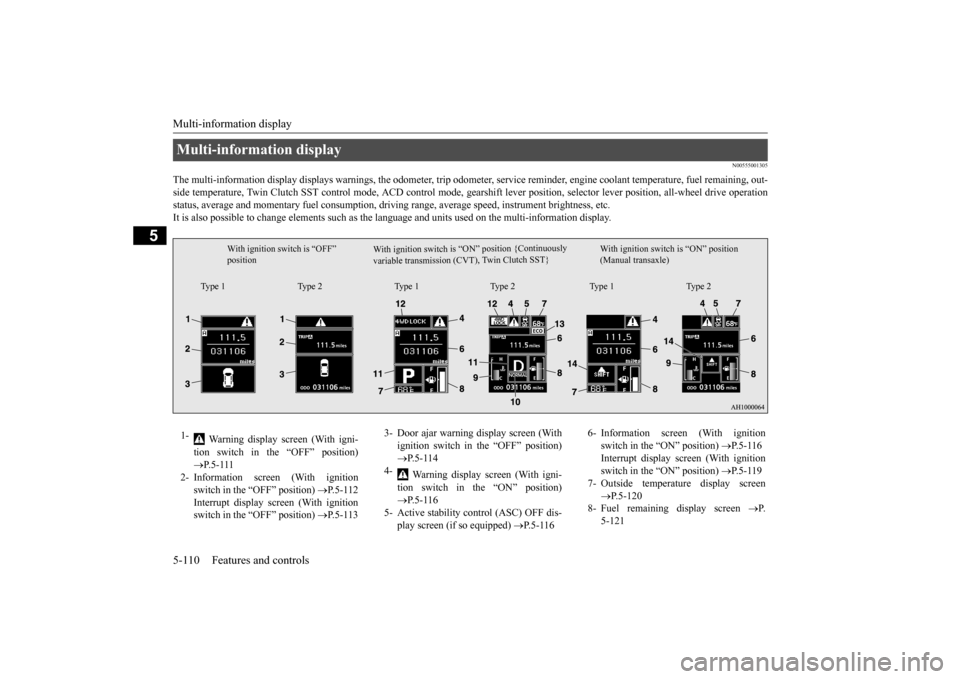
N00555001305
The multi-information display displays warn
ings, the odometer, trip odometer, service re
minder, engine coolant temperature, fue
l remaining, out-
side temperature, Twin Clutch SST control mode, ACD control
mode, gearshift lever position, selector lever position, all-wheel
drive operation
status, average and momentary fuel consumption, driving range, average speed, instrument brightness, etc. It is also possible to change elements such as th
e language and units used on the multi-information display.
Multi-information display
W i t h i g n i t i o n s w i t c h i s “ O N ” p o s i t i o n { C o nt i n u o us l y
v a r i a b l e t r a n s m i s s i o n ( C V T ) , Tw
i n C l u t c h S ST }
With ignition switch is “OFF” position
With ignition switch is “ON” position (Manual transaxle)
Type 1 Type 2 Type 1 Type 2 Type 1 Type 2
1-
Warning display screen (With igni- tion switch in the “OFF” position) P.5-111
2- Information screen (With ignition
switch in the “OFF” position)
P.5-112
Interrupt display screen (With ignition switch in the “OFF” position)
P.5-113
3- Door ajar warning display screen (With
ignition switch in the “OFF” position) P.5-114
4-
Warning display screen (With igni- tion switch in the “ON” position) P.5-116
5- Active stability control (ASC) OFF dis-
play screen (if so equipped)
P.5-116
6- Information screen (With ignition
switch in the “ON” position)
P.5-116
Interrupt display screen (With ignition switch in the “ON” position)
P.5-119
7- Outside temperature display screen
P.5-120
8- Fuel remaining display screen
P.
5-121
BK0210300US.book
110 ページ 2014年4月8日 火曜日 午前10時46分
Page 180 of 434
Multi-information display
Features and controls 5-111
5
N00555100136
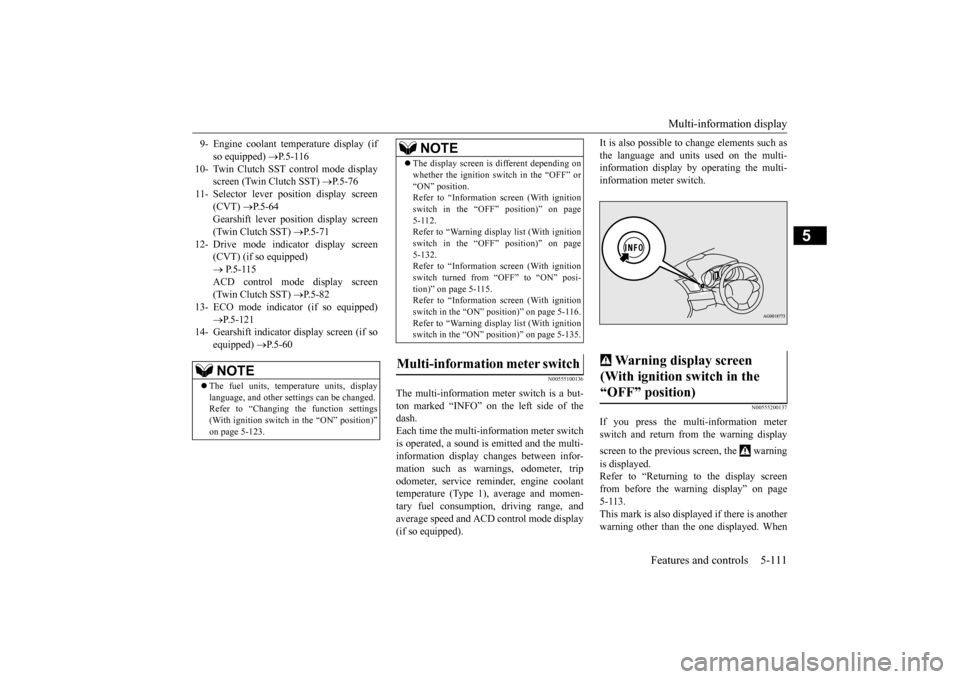
The multi-information meter switch is a but- ton marked “INFO” on the left side of the dash. Each time the multi-information meter switchis operated, a sound is emitted and the multi- information display changes between infor- mation such as warnings, odometer, tripodometer, service reminder, engine coolant temperature (Type 1), average and momen- tary fuel consumption, driving range, andaverage speed and ACD control mode display (if so equipped).
It is also possible to change elements such as the language and units used on the multi- information display by operating the multi- information meter switch.
N00555200137
If you press the multi-information meterswitch and return from the warning display screen to the previous screen, the warning is displayed. Refer to “Returning to the display screen from before the warning display” on page 5-113.This mark is also displayed if there is anotherwarning other than the one displayed. When
9- Engine coolant temperature display (if
so equipped)
P.5-116
10- Twin Clutch SST control mode display
screen (Twin Clutch SST)
P.5-76
11- Selector lever position display screen
(CVT)
P.5-64
Gearshift lever position display screen (Twin Clutch SST)
P.5-71
12- Drive mode indicator display screen
(CVT) (if so equipped) P.5-115 ACD control mode display screen(Twin Clutch SST)
P.5-82
13- ECO mode indicator (if so equipped)
P.5-121
14- Gearshift indicator display screen (if so
equipped)
P.5-60
NOTE
The fuel units, temperature units, display language, and other settings can be changed.Refer to “Changing the function settings (With ignition switch in the “ON” position)” on page 5-123.
The display screen is different depending on whether the ignition switch in the “OFF” or “ON” position. Refer to “Information screen (With ignition switch in the “OFF” position)” on page5-112. Refer to “Warning displa
y list (With ignition
switch in the “OFF” position)” on page5-132. Refer to “Information screen (With ignition switch turned from “OFF” to “ON” posi-tion)” on page 5-115. Refer to “Information screen (With ignition switch in the “ON” position)” on page 5-116.Refer to “Warning displa
y list (With ignition
switch in the “ON” position)” on page 5-135.
Multi-information meter switch
NOTE
Warning display screen (With ignition switch in the “OFF” position)
BK0210300US.book
111 ページ 2014年4月8日 火曜日 午前10時46分
Page 181 of 434
Multi-information display 5-112 Features and controls
5
the cause of the warning display is elimi- nated, the warning goes out automatically.
N00555300112
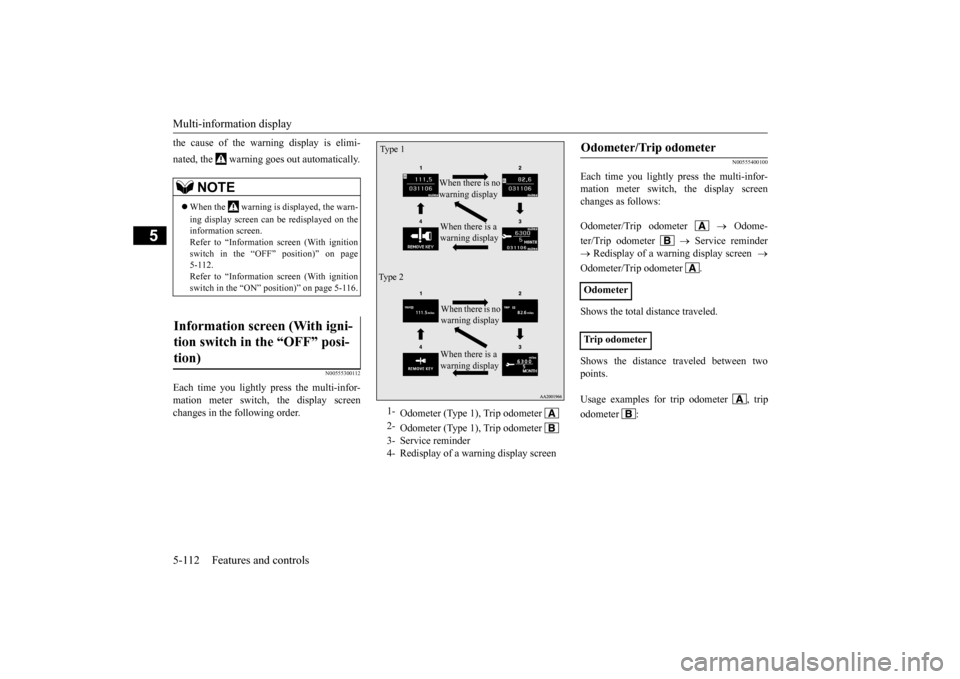
Each time you lightly press the multi-infor- mation meter switch, the display screen changes in the following order.
N00555400100
Each time you lightly press the multi-infor-mation meter switch, the display screenchanges as follows: Odometer/Trip odometer
Odome-
ter/Trip odometer
Service reminder
Redisplay of a warning display screen
Odometer/Trip odometer . Shows the total distance traveled. Shows the distance traveled between two points.
NOTE
When the warning is displayed, the warn- ing display screen can be redisplayed on the information screen. Refer to “Information screen (With ignitionswitch in the “OFF” position)” on page 5-112. Refer to “Information screen (With ignitionswitch in the “ON” position)” on page 5-116.
Information screen (With igni- tion switch in the “OFF” posi- tion)
1-
Odometer (Type 1), Trip odometer
2-
Odometer (Type 1), Trip odometer
3- Service reminder4- Redisplay of a warning display screenType 1
When there is no warning display When there is a warning display
Ty p e 2
When there is no warning display When there is a warning display
Odometer/Trip odometer Odometer Trip odometer Usage examples for
trip odometer , trip
odometer :
BK0210300US.book
112 ページ 2014年4月8日 火曜日 午前10時46分
Page 182 of 434
Multi-information display
Features and controls 5-113
5
N00555500039
Shows the distance and number of months until the next periodic inspection. Refer to “Service reminder” on page 5-121.
N00559600155
When there is information to be announced,such as a key reminder, the buzzer sounds and switches to the warning display screen. Refer to the appropriate page and take the necessarymeasures. When the cause of the warning display is eliminated, the warning display goes outautomatically.
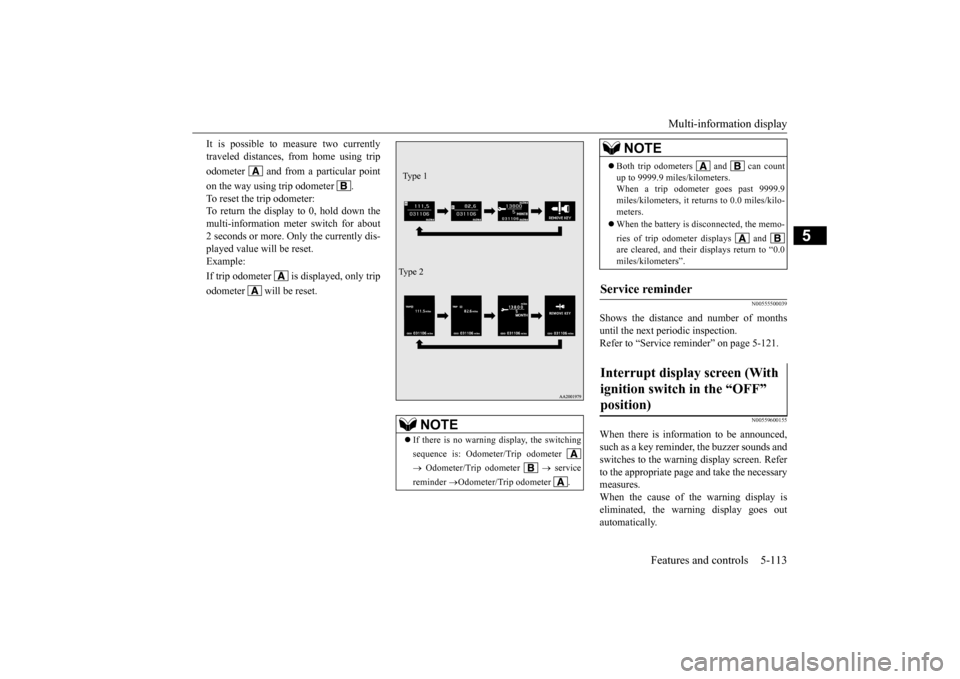
It is possible to measure two currently traveled distances, from home using trip odometer and from a particular pointon the way using trip odometer . To reset the trip odometer: To return the display to 0, hold down the multi-information meter switch for about2 seconds or more. Only the currently dis-played value will be reset. Example: If trip odometer is displayed, only tripodometer will be reset.
NOTE
If there is no warning display, the switching sequence is: Odometer/Trip odometer Odometer/Trip odometer
service
reminder
Odometer/Trip odometer .
Ty p e 1 Ty p e 2
Both trip odometers and can count up to 9999.9 miles/kilometers. When a trip odometer goes past 9999.9 miles/kilometers, it returns to 0.0 miles/kilo-meters. When the battery is disconnected, the memo- ries of trip odometer displays and are cleared, and their displays return to “0.0 miles/kilometers”.
Service reminder Interrupt display screen (With ignition switch in the “OFF” position)
NOTE
BK0210300US.book
113 ページ 2014年4月8日 火曜日 午前10時46分
Page 184 of 434
Multi-information display
Features and controls 5-115
5
N00555800133
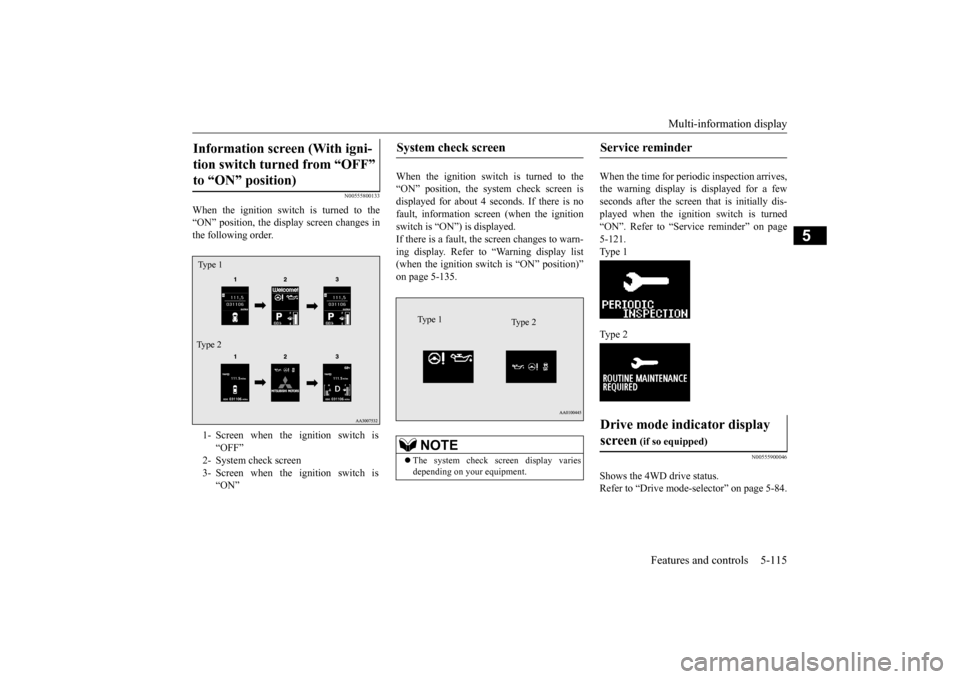
When the ignition switch is turned to the “ON” position, the display screen changes in the following order.
When the ignition switch is turned to the “ON” position, the system check screen isdisplayed for about 4 seconds. If there is no fault, information screen (when the ignition switch is “ON”) is displayed.If there is a fault, the screen changes to warn- ing display. Refer to “Warning display list (when the ignition switch is “ON” position)”on page 5-135.
When the time for periodic inspection arrives, the warning display is displayed for a fewseconds after the screen that is initially dis- played when the ignition switch is turned “ON”. Refer to “Service reminder” on page5-121. Type 1 Type 2
N00555900046
Shows the 4WD drive status. Refer to “Drive mode-s
elector” on page 5-84.
Information screen (With igni- tion switch turned from “OFF” to “ON” position) 1- Screen when the ignition switch is
“OFF”
2- System check screen 3- Screen when the ignition switch is
“ON”
Ty p e 1 Type 2
System check screen
NOTE
The system check screen display varies depending on your equipment.Type 1
Type 2
Service reminder Drive mode indicator display screen
(if so equipped)
BK0210300US.book
115 ページ 2014年4月8日 火曜日 午前10時46分
Page 185 of 434
Multi-information display 5-116 Features and controls
5
N00545900027
The operation status of the ACD control mode is displayed. Refer to “ACD control mode” on page 5-82.
N00555200140
This is displayed when you press the multi-information meter switch and switch the warning display screen. This mark is also displayed if there is anotherwarning other than the one displayed. When the cause of the warning display is eliminated, the warning goes out automat- ically.
N00556100074
This is displayed when the Active stability control (ASC) is turned “OFF” with the“ASC OFF” switch. Also, if an abnormal condition is occurred in the ASC while driving, the “ASC OFF” dis-play illuminates.Refer to “ASC OFF switch” on page 5-94.
N00556200176
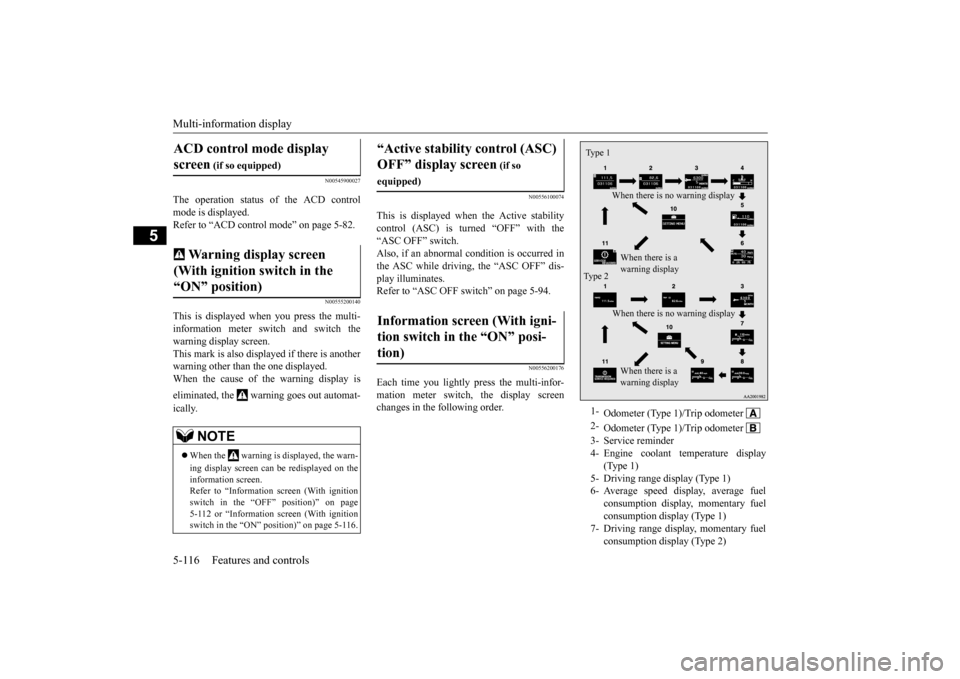
Each time you lightly press the multi-infor-mation meter switch, the display screenchanges in the following order.
ACD control mode display screen
(if so equipped)
Warning display screen (With ignition switch in the “ON” position)
NOTE
When the warning is displayed, the warn- ing display screen can be redisplayed on the information screen. Refer to “Information screen (With ignitionswitch in the “OFF” position)” on page 5-112 or “Information screen (With ignition switch in the “ON” position)” on page 5-116.
“Active stability control (ASC) OFF” display screen
(if so
equipped)Information screen (With igni- tion switch in the “ON” posi- tion)
1-
Odometer (Type 1)/Trip odometer
2-
Odometer (Type 1)/Trip odometer
3- Service reminder4- Engine coolant temperature display
(Type 1)
5- Driving range display (Type 1)6- Average speed display, average fuel
consumption display, momentary fuel consumption display (Type 1)
7- Driving range display, momentary fuel
consumption display (Type 2)
Ty p e 1
When there is no warning display When there is a warning display
Type 2
When there is no warning display When there is a warning display
BK0210300US.book
116 ページ 2014年4月8日 火曜日 午前10時46分
Page 186 of 434
Multi-information display
Features and controls 5-117
5
The operation method is the same as when the ignition switch is in the “OFF” position.For further details, refer to “Odometer/Trip odometer” on page 5-112.
Shows the distance and number of months until the next periodic inspection.Refer to “Service reminder” on page 5-121. Shows the engine coolant temperature. If the coolant becomes hot, “ ” will blink. Pay careful attention to the engine coolant temperature display while you are driving. Shows the approximate driving range (how many more miles or kilometers you can drive) with the current fuel level. When thisdriving range falls below 30 miles (50 km), “- --” is displayed. Refuel as soon as possible.
This displays the average speed from the last reset to the present.There are 2 types of mode settings as follows. For details on how to change the average speed display setting, refer to “Changing thefunction settings (With ignition switch in the “ON” position)” on page 5-123.
8- Average fuel consumption display,
momentary fuel consumption display(Type 2)
9- Average speed display, momentary fuel
consumption display (Type 2)
10- Function setting screen 11- Redisplay of a warning display screen
NOTE
While driving, the function setting screen is not displayed even if you operate the multi- information meter switch. Always park the vehicle in a safe place before operating.Refer to “Changing the function settings (With ignition switch in the “ON” position)” on page 5-123. When there is information to be announced, such as a system fault, the tone sounds andthe screen display is changed. Refer to “Interrupt display screen (With igni- tion switch in the “ON” position)” on page5-119.
Odometer/Trip odometer
Service reminder Engine coolant temperature dis- play
CAUTION If the engine is overheating, “ ” will blink. In this case, the bar graph is on the red zone. Immediately park the vehicle in a safe placeand take the required measures. Refer to “Engine overheating” on page 8-4.
Driving range display
NOTE
The driving range is determined based on the fuel consumption data. This may vary depending on the driving conditions and hab- its. Treat the distance displayed as just a rough guideline. When you refuel, the driving range display is automatically updated.However, if you only add a small amount of fuel, the correct value will not be displayed. Fill to a full tank whenever possible. When your vehicle is stopped on an extremely steep hill, the driving range valuemay change. This is due to the movement of fuel in the tank and does not indicate any problem. The display setting can be changed to the preferred units (miles or km).Refer to “Changing the function settings (With ignition switch in the “ON” position)” on page 5-123.
Average speed display
BK0210300US.book
117 ページ 2014年4月8日 火曜日 午前10時46分