clock MITSUBISHI LANCER 2015 8.G Owner's Guide
[x] Cancel search | Manufacturer: MITSUBISHI, Model Year: 2015, Model line: LANCER, Model: MITSUBISHI LANCER 2015 8.GPages: 434, PDF Size: 16.59 MB
Page 398 of 434
Replacement of light bulbs
Vehicle care and maintenance 9-41
9
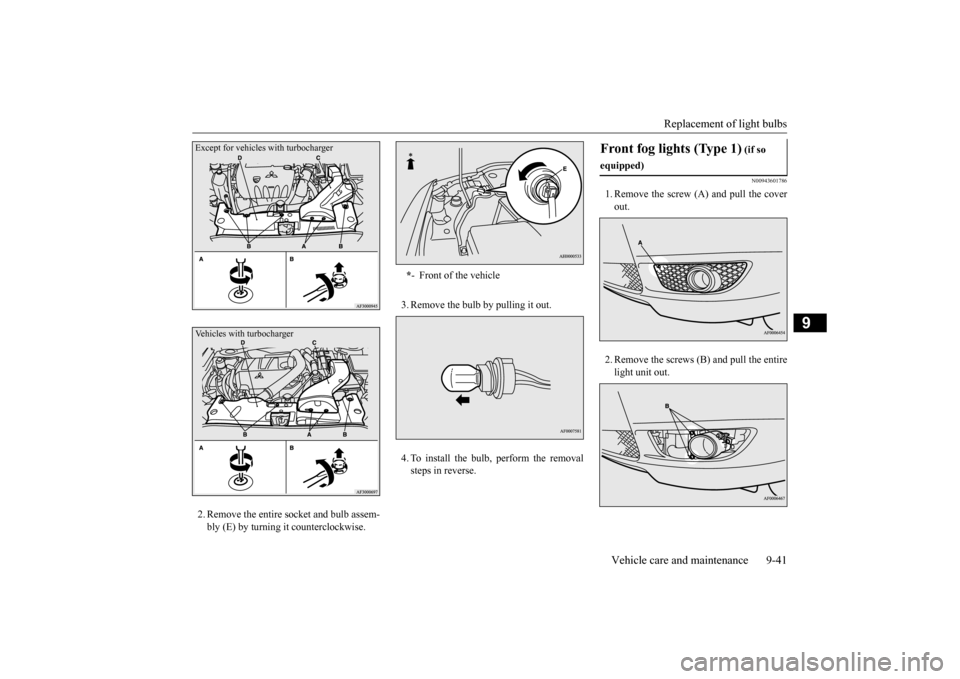
2. Remove the entire socket and bulb assem- bly (E) by turning it counterclockwise.
3. Remove the bulb by pulling it out. 4. To install the bulb, perform the removal steps in reverse.
N00943601786
1. Remove the screw (A) and pull the coverout. 2. Remove the screws (B) and pull the entire light unit out.
Except for vehicles with turbochargerVehicles with turbocharger
* - Front of the vehicle
Front fog lights (Type 1)
(if so
equipped)
BK0210300US.bo
ok 41 ページ 2014年4月8日 火曜日 午前10時46分
Page 399 of 434
Replacement of light bulbs 9-42 Vehicle care and maintenance
9
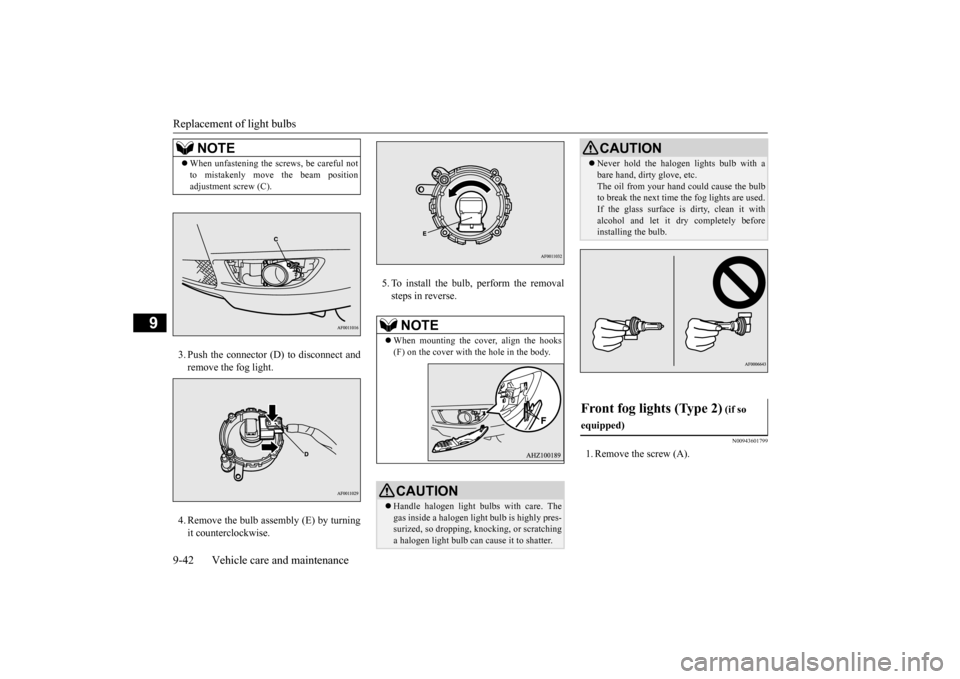
3. Push the connector (D) to disconnect and remove the fog light. 4. Remove the bulb assembly (E) by turning it counterclockwise.
5. To install the bulb, perform the removal steps in reverse.
N00943601799
1. Remove the screw (A).
NOTE
When unfastening the screws, be careful not to mistakenly move the beam position adjustment screw (C).
NOTE
When mounting the cover, align the hooks (F) on the cover with the hole in the body.CAUTION Handle halogen light bulbs with care. The gas inside a halogen light bulb is highly pres-surized, so dropping, knocking, or scratching a halogen light bulb can cause it to shatter.
Never hold the halogen lights bulb with a bare hand, dirty glove, etc. The oil from your hand could cause the bulb to break the next time the fog lights are used. If the glass surface is dirty, clean it withalcohol and let it dry completely before installing the bulb.
Front fog lights (Type 2)
(if so
equipped)
CAUTION
BK0210300US.bo
ok 42 ページ 2014年4月8日 火曜日 午前10時46分
Page 400 of 434
Replacement of light bulbs
Vehicle care and maintenance 9-43
9
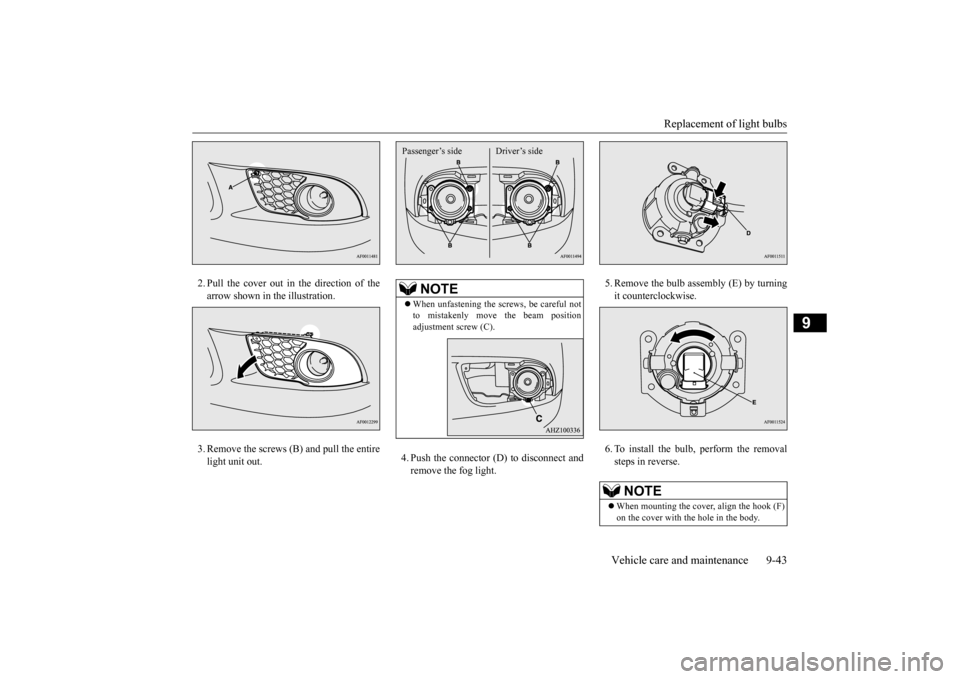
2. Pull the cover out in the direction of the arrow shown in the illustration. 3. Remove the screws (B) and pull the entire light unit out.
4. Push the connector (D) to disconnect and remove the fog light.
5. Remove the bulb assembly (E) by turning it counterclockwise. 6. To install the bulb, perform the removal steps in reverse.
NOTE
When unfastening the screws, be careful not to mistakenly move the beam position adjustment screw (C).Passenger’s side Driver’s side
NOTE
When mounting the cover, align the hook (F) on the cover with the hole in the body.
BK0210300US.bo
ok 43 ページ 2014年4月8日 火曜日 午前10時46分
Page 401 of 434
Replacement of light bulbs 9-44 Vehicle care and maintenance
9
N00943701514
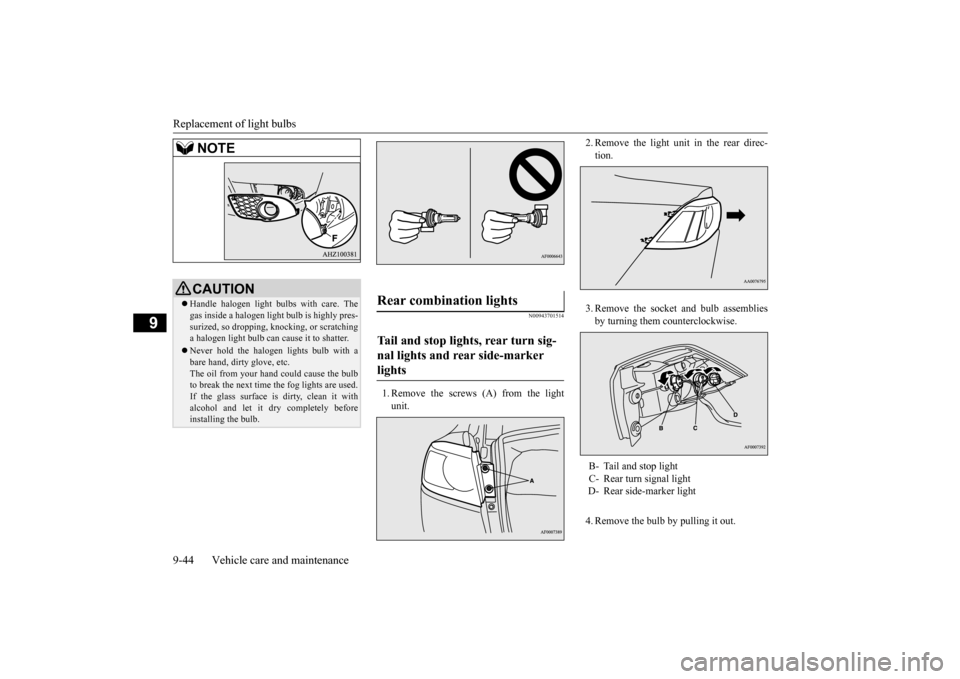
1. Remove the screws (A) from the light unit.
2. Remove the light unit in the rear direc- tion. 3. Remove the socket and bulb assemblies by turning them counterclockwise. 4. Remove the bulb by pulling it out.
CAUTION Handle halogen light bulbs with care. The gas inside a halogen light bulb is highly pres- surized, so dropping, knocking, or scratchinga halogen light bulb can cause it to shatter. Never hold the halogen lights bulb with a bare hand, dirty glove, etc. The oil from your hand could cause the bulb to break the next time the fog lights are used.If the glass surface is dirty, clean it with alcohol and let it dry completely before installing the bulb.NOTE
Rear combination lights Tail and stop lights, rear turn sig- nal lights and rear side-marker lights
B- Tail and stop light C- Rear turn signal lightD- Rear side-marker light
BK0210300US.bo
ok 44 ページ 2014年4月8日 火曜日 午前10時46分
Page 402 of 434
Replacement of light bulbs
Vehicle care and maintenance 9-45
9
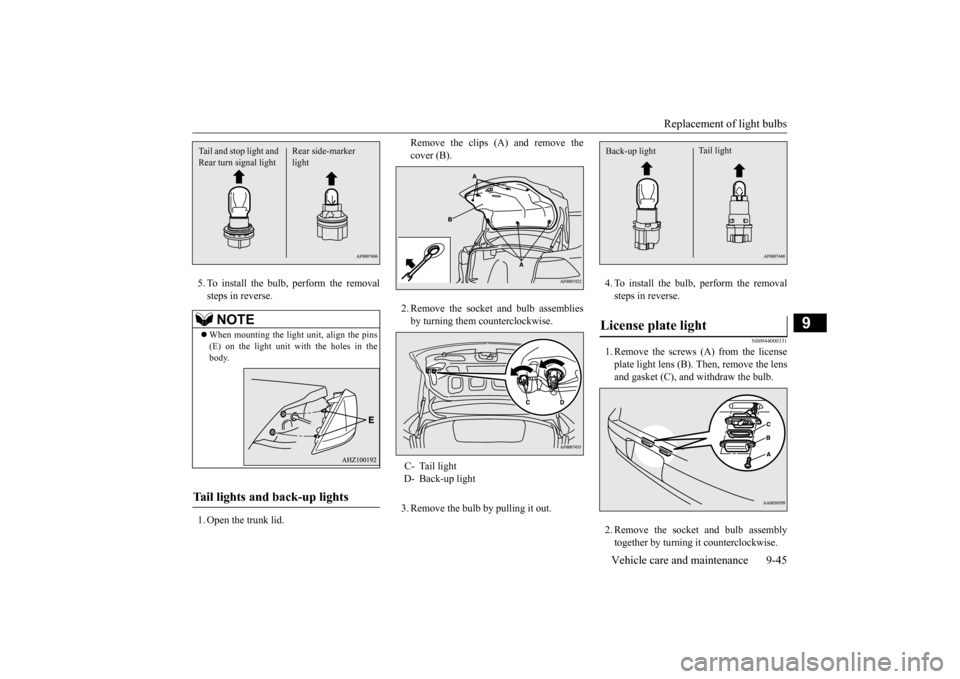
5. To install the bulb, perform the removal steps in reverse. 1. Open the trunk lid.
Remove the clips (A) and remove the cover (B). 2. Remove the socket and bulb assemblies by turning them counterclockwise. 3. Remove the bulb by pulling it out.
4. To install the bulb, perform the removal steps in reverse.
N00944000331
1. Remove the screws (A) from the licenseplate light lens (B). Then, remove the lensand gasket (C), and withdraw the bulb. 2. Remove the socket and bulb assembly together by turning it counterclockwise.
NOTE
When mounting the light unit, align the pins (E) on the light unit with the holes in the body.
Tail lights and back-up lights
Rear side-marker light
Tail and stop light and Rear turn signal light
C- Tail light D- Back-up light
License plate light
Tail light
Back-up light
BK0210300US.bo
ok 45 ページ 2014年4月8日 火曜日 午前10時46分
Page 427 of 434
Alphabetical index 12-2
12
Coming home light
...........................
5-151
Consumer information
........................
10-2
Continuously variable transmission (CVT)
....
5-61Fluid
.....................
...............
9-11
, 11-6
Selector lever operation
...................
5-61
Sports mode
..................
.................
5-66
Coolant (engine)
..........................
9-8
, 11-6
Cruise control
....................
.................
5-97
Indicator
...................
.....................
5-98
Cup holder
....................
...................
5-190
D
Daytime running lights
Bulb capacity
................
.................
9-34
Replacement
.................
.................
9-38
Defogger (rear window)
....................
5-158
Defrosting or defogging (windshield, door windows)
...............
7-12
, 7-17
, 7-22
, 7-27
Digital clock
Time setting
..................
.................
7-59
Dimensions
...................
.....................
11-4
Dimmer (high/low beam change)
.......
5-150
Disc brake pads
.................
.................
9-27
Dome light
Bulb capacity
................
.................
9-36
Replacement
.................
.................
9-47
Switch
......................
...................
5-186
Dome light/Reading lights
Bulb capacity
..................
................
9-36
Replacement
...................
................
9-46
Switch
.....................
.....................
5-186
Doors
Lock
.......................
.......................
5-35
Power door locks
............................
5-37
Drive mode indicator
...........................
5-85
Drive mode-selector
............................
5-84
Driving during cold weather
..................
6-4
Driving, alcohol and drugs
....................
6-2
E
Electric rear window defogger switch
..5-158
Electronic immobilizer (Anti-theft starting system)
.....................
................
5-4
, 5-28
Electronically controlled 4WD system
..5-84
Drive mode indicator
.......................
5-85
Drive mode-selector
........................
5-84
Emergency key
...................
................
5-23
Emission-control system maintenance
...
9-25
Engine
Compartment
..................
.................
9-5
Coolant
...................
................
9-8
, 11-6
Hood
.......................
........................
9-3
Oil and oil filter
.......................
9-6
, 11-6
Overheating
....................
.................
8-4
Serial number
.................
................
11-2
Specifications
.................
................
11-5
Engine coolant temperature display
....
5-117
Exhaust system
..................
.................
9-27
F
Filling the fuel tank
...............
................
3-4
Floor console box
.............................
5-189
Floor mat
......................
.......................
6-2
Fluid
..........................
........................
11-6
AWC control fluid
..........................
9-12
Brake fluid
............................
9-13
, 11-6
Clutch fluid
...........................
9-13
, 11-6
Continuously variable transmission (CVT) fluid
....................
...............
9-11
, 11-6
Engine coolant
........................
9-8
, 11-6
Power steering fluid
...............
9-14
, 11-6
Twin Clutch Sportron
ic shift transmission
(Twin Clutch SST) fluid
.......
9-12
, 11-6
Washer fluid
.................
.................
11-6
Fluid capacities and lubricants
.............
11-6
Fog lights
Bulb capacity
................
.................
9-34
Indicator
...................
...................
5-143
Replacement
.........................
9-41
, 9-42
Switch
......................
...................
5-153
Free-hand advanced security transmitter (F.A.S.T.-key)
.................
.................
5-12
Front console boxes
..........................
5-189
Front console tray
.............................
5-189
Front seats
.........................
...................
4-3
BK0210300US.bo
ok 2 ページ 2014年4月8日 火曜日 午前10時46分