ECU MITSUBISHI LANCER 2015 8.G Workshop Manual
[x] Cancel search | Manufacturer: MITSUBISHI, Model Year: 2015, Model line: LANCER, Model: MITSUBISHI LANCER 2015 8.GPages: 434, PDF Size: 16.59 MB
Page 158 of 434
Service brake
Features and controls 5-89
5
N00517500262
Overuse of the brake can cause poor brake response and premature wear of the brakepads and linings. When driving down a long or steep hill, use engine braking by downshifting.
N00517600377
Your vehicle is equipped with power brakes for more braking force with minimal brake pedal effort.Your brakes are designe
d to operate at full
capacity, even if the power assist is lost. If the power assist is lost, the effort needed topress the brake pedal is greater. If you should loose the power assist for some reason, the brakes will still work. If the power brake unit or either of the two brake hydraulic systems stops working prop-
erly, the rest of the br
ake system will still
work, but the vehicle will not slow down as quickly. You will know this has happened if you findyou need to depress the brake pedal down further, or harder when slowing down or stop- ping, or if the brake
warning light and the
warning display in the multi-information dis- play come on.
N00532500087
The disc brakes have an alarm that makes ametallic squeal when the brake pads have worn down enough to need service. If youhear this sound, have the brake pads replaced at an authorized Mitsubishi Motors dealer or a repair facility of your choice.
NOTE
Even if there is a difference in the amount of traction the wheels can get, if both of them are spinning, the limited-slip differential will not be effective.CAUTION Never start the engine while one of the front or rear wheels is jacked up and the other in contact with the ground; doing so may cause the vehicle to jump forward. Continuously attempting to extract the vehi- cle from snow, mud, etc. while using highengine rpm may damage the limited-slip dif- ferential. Using a compact spare wheel will adversely affect the limited-slip differential; replace the compact spare wheel with a standard sizewheel as soon as possible.
Service brake Brake pedal
WA R N I N G Do not leave any objects near the brake pedal or let a floor mat slide under it; doing so could prevent the full pedal stroke that would be necessary in an emergency. Make sure that the pedal canbe operated freely at all times. Make sure the floor mat is securely held in place.CAUTION It is important not to drive the vehicle with your foot resting on the brake pedal when braking is not required. This practice can result in very high brake temperatures, pre-mature pad and lining wear, and possible damage to the brakes.
Power brakes
WA R N I N G Never coast downhill with the engine OFF. Keep the engine running whenever your vehicle is in motion. If you turn off the engine while driving, the power brakebooster will stop working and your brakes will not work as well. If the power assist is
lost or if either brake
hydraulic system stops working properly, take your vehicle to an authorized Mit-subishi Motors dealer or a repair facility of your choice immediately.
Brake pad wear alarm
BK0210300US.bo
ok 89 ページ 2014年4月8日 火曜日 午前10時46分
Page 175 of 434
Rear-view camera (if so equipped) 5-106 Features and controls
5
N00533001259
Your tire pressure monitoring system oper- ates on a radio frequency subject to Federal Communications Commission (FCC) Rules(For vehicles sold in U.S.A.) and Industry Canada Rules (For vehicles sold in Canada). This device complies with Part 15 of FCCRules and Industry Canada licence-exempt RSS standard(s). Operation is subject to the following two con-ditions. This device may not cause harmful inter- ference. This device must accept any interference received, including interference that may cause undesired operation.
N00546201154
When the gearshift lever or the selector lever is in the “R” (REVERSE) position with the ignition switch in the “ON” position, the rear- view image will be displayed on the screen ofthe Mitsubishi Multi-Communication Sys- tem or the DISPLAY AUDIO in the center panel.When the gearshift lever or the selector leveris shifted out of the “R” (REVERSE) posi- tion, the rear-view image will go off.
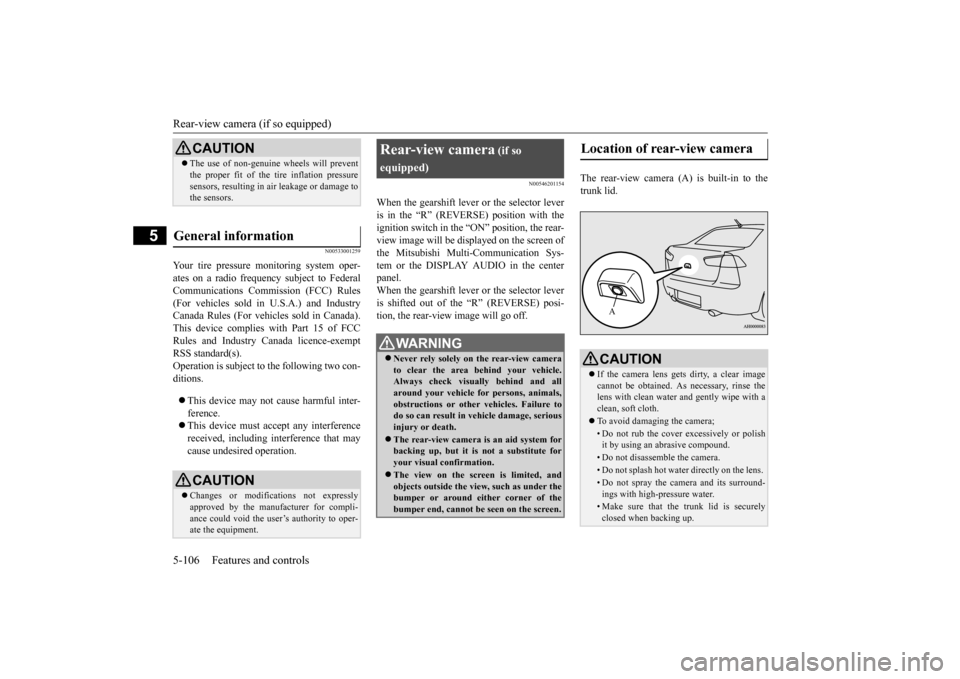
The rear-view camera (A) is built-in to the trunk lid.
CAUTION The use of non-genuine wheels will prevent the proper fit of the tire inflation pressure sensors, resulting in air leakage or damage to the sensors.
General information
CAUTION Changes or modifications not expressly approved by the manufacturer for compli- ance could void the user’s authority to oper- ate the equipment.
Rear-view camera
(if so
equipped)
WA R N I N G Never rely solely on the rear-view camera to clear the area behind your vehicle.Always check visually behind and all around your vehicle for persons, animals, obstructions or other vehicles. Failure todo so can result in vehicle damage, serious injury or death. The rear-view camera is an aid system for backing up, but it is not a substitute for your visual confirmation. The view on the screen is limited, and objects outside the view, such as under the bumper or around either corner of the bumper end, cannot be seen on the screen.
Location of rear-view camera
CAUTION If the camera lens gets dirty, a clear image cannot be obtained. As necessary, rinse the lens with clean water and gently wipe with aclean, soft cloth. To avoid damaging the camera;• Do not rub the cover excessively or polish it by using an abrasive compound. • Do not disassemble the camera.• Do not splash hot water directly on the lens. • Do not spray the camera and its surround-ings with high-pressure water.• Make sure that the trunk lid is securelyclosed when backing up.A
BK0210300US.book
106 ページ 2014年4月8日 火曜日 午前10時46分
Page 233 of 434

Bluetooth® 2.0 interface (if so equipped) 5-164 Features and controls
5
With the confirmation function activated, you are given more opportunities than normal to confirm a command when making various settings to the Bluetooth
® 2.0 interface. This
allows you to decrease the possibility that a setting is accidentally changed. The confirmation function can be turned onor off by following the steps below. 1. Press the SPEECH button (except for vehicles with Mitsubishi Multi-Commu- nication System) or PICK-UP button (forvehicles with Mitsubishi Multi-Commu-nication System). 2. Say “Setup.” 3. Say “Confirmation prompts.”4. The voice guide will say “Confirmation prompts are
N00564601118
It is possible to use a passcode as a securityfunction by setting a passcode of your choice for the Bluetooth
® 2.0 interface.
When the security function is turned on, it is necessary to make a voice input of a 4-digit
passcode in order to use all functions of the Bluetooth
® 2.0 interface, except for recep-
tion. Use the following procedure to turn on the security function by setting a passcode. 1. Press the SPEECH button (except for vehicles with Mitsubishi Multi-Commu- nication System) or PICK-UP button (forvehicles with Mitsubishi Multi-Commu-nication System). 2. Say “Setup.” 3. Say “Passcode.”4. The voice guide will say “Passcode is dis- abled. Would you like to enable it?” Answer “Yes.”Answer “No” to cancel the setting of the passcode and return to the main menu. 5. The voice guide will say “Please say a 4-digit passcode. Remember this passcode. It will be required to use this system.” Say a 4-digit number which you want toset as a passcode. 6. For confirmation purposes, the voice guide will say “Passcode <4-digit pass-code>. Is this correct?” Answer “Yes.” Answer “No” to return to the passcode input in Step 5.
7. When the registration of the passcode is completed, the voice guide will say “Pass- code is enabled” and the system will return to the main menu.
If a passcode has been set and the security function is enabled, the voice guide will say “Hands-free system is locked. State the pass- code to continue” when the SPEECH button(except for vehicles with Mitsubishi Multi- Communication System) or PICK-UP button (for vehicles with Mitsubishi Multi-Commu-nication System) is pressed to enter voice rec- ognition mode. Say the 4-digit passcode number to enter the passcode. If the entered passcode is wrong, the voice guide will say “<4-digit passcode>, Incorrect
Security function
Setting the passcode
NOTE
Passcode will be required to access the sys- tem after the next ignition cycle. It is required for a little time after engine stop that the entered passcode is actuallyrecorded in the system. If the ignition switch is made to “ACC” or “ON” or the engine is started immediately after engine stop, thereis a case when the entered passcode is not recorded in the system. At this time, please try to enter the passcode again.
Entering the passcode
BK0210300US.book
164 ページ 2014年4月8日 火曜日 午前10時46分
Page 234 of 434

Bluetooth® 2.0 interface (if so equipped)
Features and controls 5-165
5
passcode. Please try again.” Enter the correct passcode. Use the following procedure to turn off the security function by disabling the passcode. 1. Press the SPEECH button (except for vehicles with Mitsubishi Multi-Commu-nication System) or PICK-UP button (for vehicles with Mitsubishi Multi-Commu- nication System).2. Say “Setup.” 3. Say “Passcode.” 4. The voice guide will say “Passcode isenabled. Would you like to disable it?” Answer “Yes.” Answer “No” to cancel the disabling ofthe passcode and return to the main menu.
5. When the disabling of the passcode is completed, the voice guide will say “Pass- code is disabled” and the system will return to the main menu.
N00564700011
The Bluetooth
® 2.0 interface can use the
speaker enrollment function to create a voicemodel for one person per language. This makes it easier for the Bluetooth
® 2.0
interface to recognise voice commands said by you. You can turn a voice model registered with the speaker enrollment function on and off whenever you want.
N00564801080
It takes about 2 to 3 minutes to complete thespeaker enrollment process.To ensure the best results, run through the process while in the driver’s seat, in an envi- ronment that is as quiet as possible (whenthere is no rain or strong winds and the vehi- cle windows are closed). Please turn off your phone while in speaker enrollment to preventinterruption of the process. Use the following procedure for speaker enrollment.
1. Stop your vehicle in a safe area, put the shift lever (manual transaxle) in the “N” (Neutral) position, or the selector lever {continuously variable transmission(CVT)} or gearshift lever (Twin Clutch SST) in the “P”(PARK) position, and then pull the parking brake lever. 2. Press the SPEECH button (except for vehicles with Mitsubishi Multi-Commu- nication System) or PICK-UP button (forvehicles with Mitsubishi Multi-Commu- nication System). 3. Say “Voice training.”4. The voice guide will say “This operation must be performed in a quiet environment while the vehicle is stopped. See theowner’s manual for the list of required training phrases. Press and release the SPEECH button when you are ready tobegin. Press the HANG-UP button to can- cel at any time.” Press the SPEECH button to start thespeaker enrollment process.
NOTE
You can reenter the passcode as many times as you want. If you have forgotten your passcode, say “Cancel” to quit the voice input mode and then check with an authorized MitsubishiMotors dealer.
Disabling the passcode
NOTE
System must be unlocked to disable the pass- code.
Speaker enrollment function
Speaker enrollment
NOTE
Speaker enrollment is not possible unless the vehicle is parked. Make sure you park the vehicle in a safe area before attempting speaker enrollment.
BK0210300US.book
165 ページ 2014年4月8日 火曜日 午前10時46分
Page 247 of 434

Bluetooth® 2.0 interface (if so equipped) 5-178 Features and controls
5
N00580300028
1. Press the SPEECH button (except for vehicles with Mitsubishi Multi-Commu- nication System) or PICK-UP button (for vehicles with Mitsubishi Multi-Commu-nication System). 2. Say “Phonebook.” 3. The voice guide will say “Select one ofthe following: new entry, edit number, edit name, list names, delete, erase all, or import contact.” Say “Delete.”
4. The voice guide will say “Please say the name of the entry you would like to delete, or say list names.” Say the name of the phonebook entry in which the tele-phone number you want to delete is regis- tered. 5. If only one telephone number is registered in the selected phonebook entry, the voice guide will say “Deleting
6. The system will ask if you really want to delete the selected telephone number(s) to go ahead with the deletion, answer “Yes.” Answer “No,” the system will canceldeleting the telephone number(s) and then return to Step 4. 7. When the telephone number deletion iscomplete, the voice guide will say “
N00580400029
You can delete all registered information from the vehicle phonebook. 1. Press the SPEECH button (except for vehicles with Mitsubishi Multi-Commu- nication System) or PICK-UP button (forvehicles with Mitsubishi Multi-Commu- nication System). 2. Say “Phonebook.”3. The voice guide will say “Select one of the following: new entry, edit number, edit name, list names, delete, erase all, orimport contact.” Say “Erase all.”
NOTE
You can call, edit or delete a name that is being read out. Press the SPEECH button and say “Call” to call the name, “Edit name” to edit it, or “Delete” to delete it.The system will beep and then execute your command. If you press the SPEECH button and say “Continue” or “Previous” while the list is being read, the system will advance orrewind the list. Say “Continue” to proceed to the next entry or “Previous” to return to the previous entry.
Deleting a telephone number
NOTE
Say “List names,” and the names registered in the phonebook are read out in order. Refer to “Listening to the list of registered names”on page 5-177.NOTE
To delete the telephone numbers from all locations, say “All.”
Erasing the phonebook
BK0210300US.book
178 ページ 2014年4月8日 火曜日 午前10時46分
Page 259 of 434
Cup holder 5-190 Features and controls
5
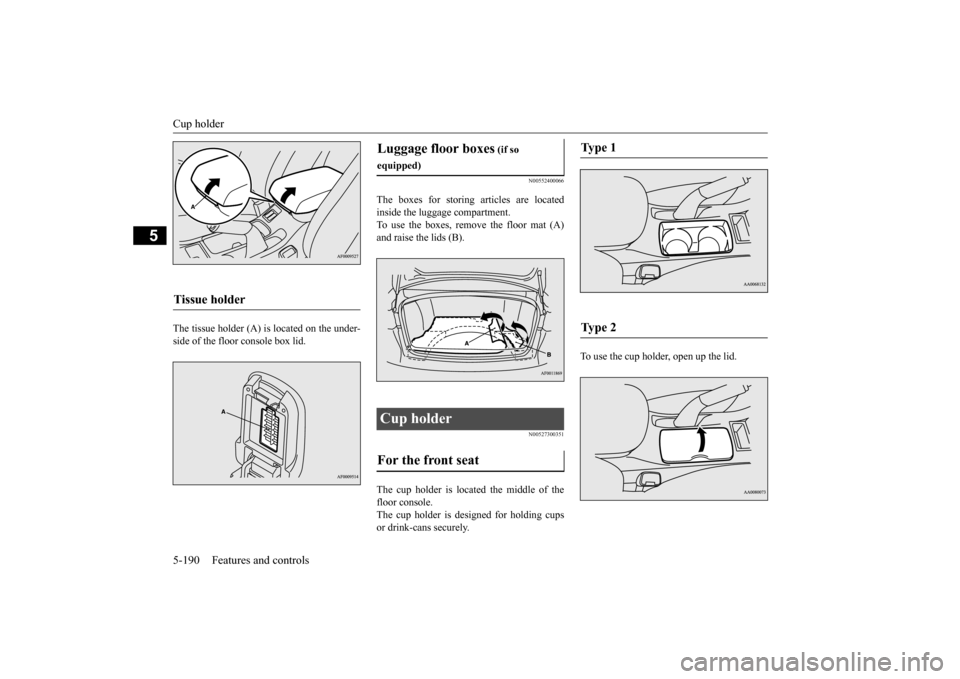
The tissue holder (A) is located on the under- side of the floor console box lid.
N00552400066
The boxes for storing articles are located inside the luggage compartment. To use the boxes, remove the floor mat (A)and raise the lids (B).
N00527300351
The cup holder is located the middle of thefloor console. The cup holder is designed for holding cups or drink-cans securely.
To use the cup holder, open up the lid.
Tissue holder
Luggage floor boxes
(if so
equipped)Cup holder For the front seat
Ty p e 1 Ty p e 2
BK0210300US.book
190 ページ 2014年4月8日 火曜日 午前10時46分
Page 265 of 434
Fuel economy 6-2 Driving safety
6
N00628800165
Fuel economy is dependent on many factors. Your personal driving habits can have a sig-nificant effect on your fuel use. Several rec- ommendations for achieving the greatest fuel economy are listed below. Whenever accelerating from a stop, always accelerate slowly and smoothly. When parked for even a short period, do not idle the engine. Shut it off. Plan your trips to avoid unnecessary stops. Keep your tires inflated to the recom- mended pressures. When you drive on highways or dry improved roads, set the drive mode-selec- tor “2WD” or “4WD AUTO” position (ifso equipped). For freeway driving, maintain a speed of approximately 50 mph (80 km/h) whentraffic, roadway and weather conditions safely permit. Keep your air filter clean and your vehicle lubricated according to the recommenda- tions in this manual. Always keep your vehicle well main- tained. A poorly maintained engine wastes fuel and costs money. Do not overload your vehicle.
N00628900052
Drunk driving is one of the most frequent causes of accidents.Your driving ability can be seriously impaired even with blood alcohol levels far below the legal minimum. If you have been drinking,don’t drive. Ride with a designated non- drinking driver, call a cab or a friend, or use public transportation. Drinking coffee or tak-ing a cold shower will not make you sober.Similarly, prescription and nonprescription drugs affect your alertness, perception and reaction time. Consult with your doctor orpharmacist before driving while under the influence of any of these medications.
N00628600017
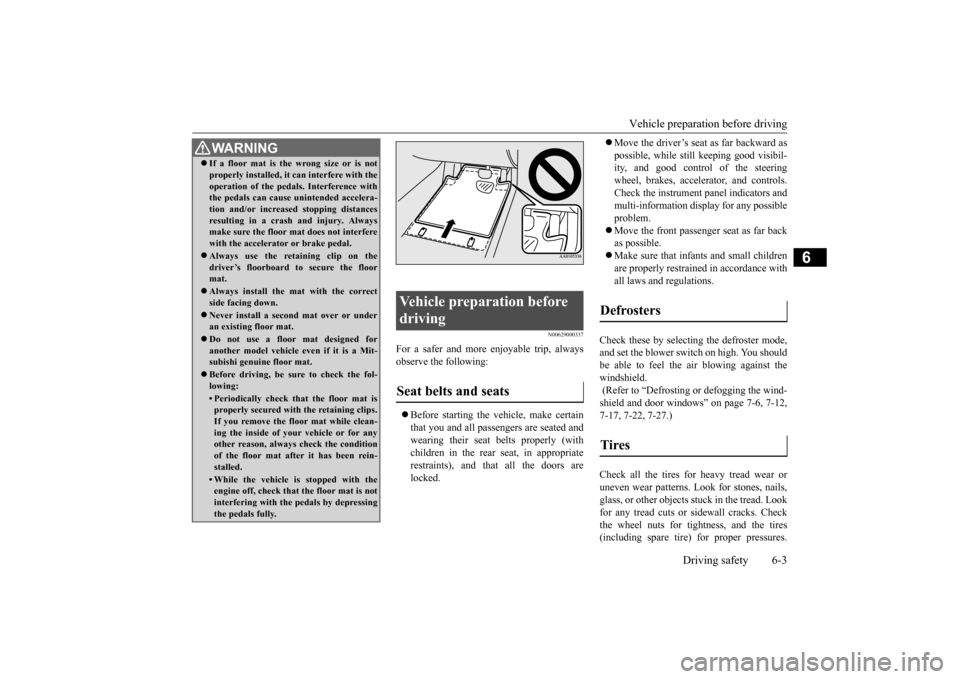
The original equipment floor mat providedwith your vehicle was specifically designed for your vehicle. Always properly positionthe floor mat and assure it does not interfere with operation of the pedals. Always use the
retaining clip on the driver’s floorboard to secure the floor mat. When used, this clip will help prevent the floor mat from moving for- ward and possibly interfering with the opera-tion of the pedals. To prevent the floor mat from moving forward and possibly interfering with the operation of the pedals, Mitsubishigenuine floor mats are recommended.
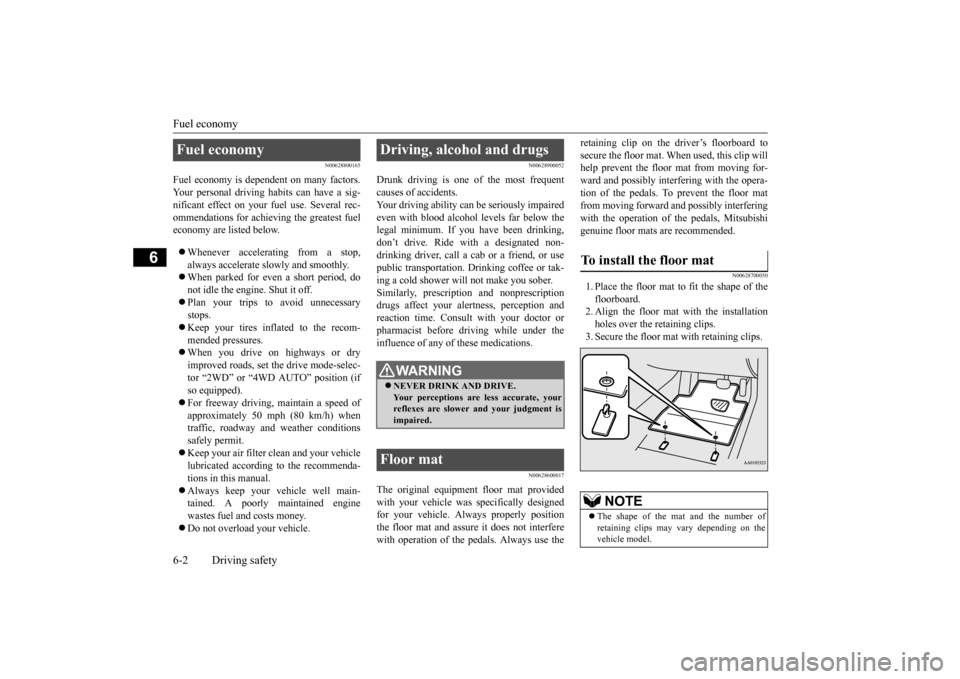
N00628700050
1. Place the floor mat to fit the shape of thefloorboard.2. Align the floor mat with the installation holes over the retaining clips. 3. Secure the floor mat with retaining clips.
Fuel economy
Driving, alcohol and drugs
WA R N I N G NEVER DRINK AND DRIVE. Your perceptions are less accurate, yourreflexes are slower and your judgment is impaired.
Floor mat
To install the floor mat
NOTE
The shape of the mat and the number of retaining clips may vary depending on the vehicle model.
BK0210300US.bo
ok 2 ページ 2014年4月8日 火曜日 午前10時46分
Page 266 of 434
Vehicle preparation before driving
Driving safety 6-3
6
N00629000337
For a safer and more enjoyable trip, always observe the following: Before starting the vehicle, make certain that you and all passengers are seated and wearing their seat belts properly (with children in the rear seat, in appropriaterestraints), and that all the doors are locked.
Move the driver’s seat as far backward as possible, while still keeping good visibil- ity, and good control of the steering wheel, brakes, accelerator, and controls.Check the instrument panel indicators and multi-information display for any possible problem. Move the front passenger seat as far back as possible. Make sure that infants and small children are properly restrained in accordance withall laws and regulations.
Check these by selecting the defroster mode, and set the blower switch on high. You should be able to feel the air blowing against the windshield. (Refer to “Defrosting or defogging the wind- shield and door windows” on page 7-6, 7-12, 7-17, 7-22, 7-27.) Check all the tires for heavy tread wear or uneven wear patterns. Look for stones, nails,glass, or other objects stuck in the tread. Look for any tread cuts or sidewall cracks. Check the wheel nuts for tightness, and the tires(including spare tire) for proper pressures.
WA R N I N G If a floor mat is the wrong size or is not properly installed, it can interfere with the operation of the pedals. Interference with the pedals can cause unintended accelera- tion and/or increased stopping distancesresulting in a crash and injury. Always make sure the floor mat does not interfere with the accelerator or brake pedal. Always use the retaining clip on the driver’s floorboard to secure the floormat. Always install the mat with the correct side facing down. Never install a second mat over or under an existing floor mat. Do not use a floor mat designed for another model vehicle ev
en if it is a Mit-
subishi genuine floor mat. Before driving, be sure to check the fol- lowing:• Periodically check that the floor mat isproperly secured with the retaining clips. If you remove the floor mat while clean-ing the inside of your vehicle or for any other reason, always check the condition of the floor mat after it has been rein-stalled.• While the vehicle is stopped with the engine off, check that the floor mat is not interfering with the pedals by depressingthe pedals fully.
Vehicle preparation before driving Seat belts and seats
Defrosters Tires
BK0210300US.bo
ok 3 ページ 2014年4月8日 火曜日 午前10時46分
Page 274 of 434
Trailer towing
Driving safety 6-11
6
N00630600102
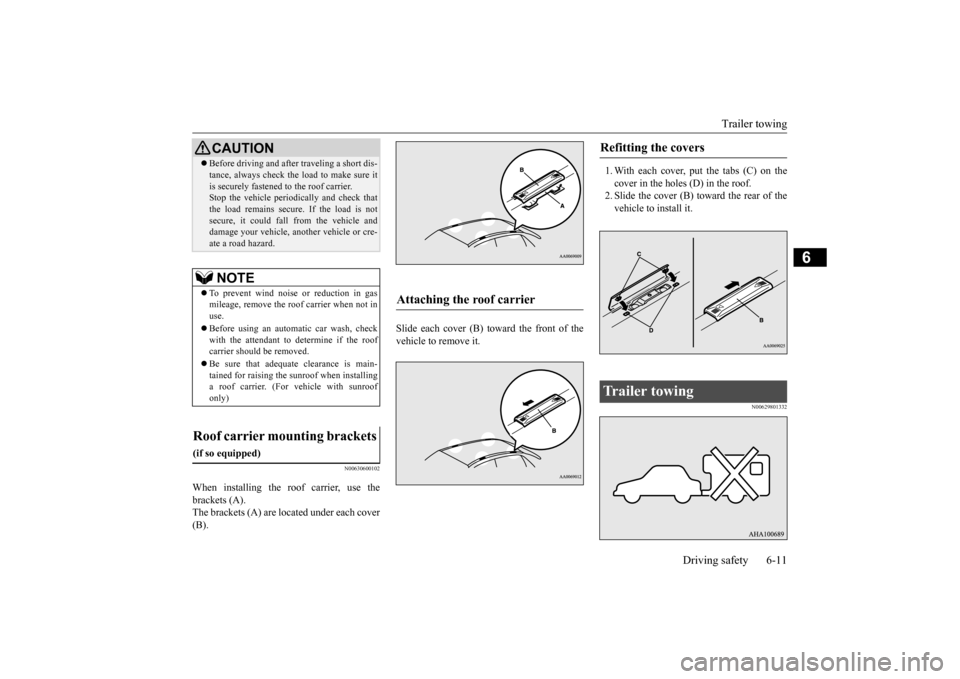
When installing the roof carrier, use the brackets (A). The brackets (A) are located under each cover (B).
Slide each cover (B) toward the front of the vehicle to remove it.
1. With each cover, put the tabs (C) on the cover in the holes (D) in the roof. 2. Slide the cover (B) toward the rear of thevehicle to install it.
N00629801332
Before driving and after traveling a short dis- tance, always check the load to make sure it is securely fastened to the roof carrier. Stop the vehicle periodically and check that the load remains secure. If the load is notsecure, it could fall from the vehicle and damage your vehicle, another vehicle or cre- ate a road hazard.NOTE
To prevent wind noise or reduction in gas mileage, remove the roof carrier when not in use. Before using an automatic car wash, check with the attendant to determine if the roof carrier should be removed. Be sure that adequate clearance is main- tained for raising the sunroof when installinga roof carrier. (For vehicle with sunroof only)
Roof carrier mounting brackets
(if so equipped)
CAUTION
Attaching the roof carrier
Refitting the covers
Trailer towing
BK0210300US.bo
ok 11 ページ 2014年4月8日 火曜日 午前10時46分
Page 309 of 434
Audio Files (MP3/WMA/AAC) 7-34 Comfort controls
7
Discs that have not been finalized cannot be played back. Even if recorded using the correct format on a recorder or computer, applicationsoftware settings and environments; disc peculiarities, damage, or marking; or dirt or condensation on the lens inside theproduct may render the disc unplayable. Depending on the disc, some functions may not be used, or the disc may not playback. Do not use discs with cracks or warps. If the disc has stickers affixed, remains from removed stickers, or affixed adhe-sive, then do not use the disc. Discs that have decorative labels or stick- ers may not be used.
This product will play back audio CDs, how- ever please be aware of
the following points
regarding CD standards. Ensure that you use discs with on the label surface. Playback of other than standard CDs is not guaranteed. Even if the audio can be played back, the audio quality cannot be guaranteed. When playing back other than standard CDs, the following may occur.
• There may be noise during playback. • There may be jumping in the audio. • The disc may not be recognized. • The first track may not be played back.• It may take longer than usual until start of playback of tracks. • Playback may start from within thetrack. • Some parts may not be played back. • Tracks may freeze during playback.• Tracks may be displayed erroneously.
N00715600027
This product can play back MP3/WMA/AACformat audio files recorded on CD-ROM,CD-R/RW, and USB devices. There are limitations on the files and media that can be used, therefore read the following prior to recording MP3/WMA/AAC formataudio files on discs or USB devices. Additionally, ensure you read the user manu- als for your CD-R/RW drive and the writingsoftware, and ensure these are used correctly. If the MP3/WMA/AAC format audio files includes title information or other data, thenthis can be displayed.
Nonstandard CDs
Audio Files (MP3/WMA/AAC)
CAUTION CD-ROM and CD-R/RW media can only play back MP3 format audio files. Actions such as copying audio CDs or files and either distributing these to others for freeor for charge, or uploading files via the Inter- net or other means to servers is an infringe- ment of the law. Do not append the file extensions “.mp3”, “.wma”, or “.m4a”, to other thanMP3/WMA/AAC format files. Playing back discs with these types of files recorded upon them may cause the files to be incorrectlyidentified for playback, which may lead to loud noise, resulting in speaker damage or accident.NOTE
Depending on the condition of the disc recorder or recording software used, correct playback may not be possible. In these cases,refer to the user manual for your product or software. Depending on your computer’s operating system, version, software, or settings, files may not have a file extension appended. In these cases, append the file extensions “.mp3”, “.wma”, or “.m4a” when copyingthe files. Files larger than 2GB in size cannot be played back.
BK0210300US.bo
ok 34 ページ 2014年4月8日 火曜日 午前10時46分