engine MITSUBISHI LANCER 2015 8.G Manual Online
[x] Cancel search | Manufacturer: MITSUBISHI, Model Year: 2015, Model line: LANCER, Model: MITSUBISHI LANCER 2015 8.GPages: 434, PDF Size: 16.59 MB
Page 167 of 434
Cruise control (if so equipped) 5-98 Features and controls
5
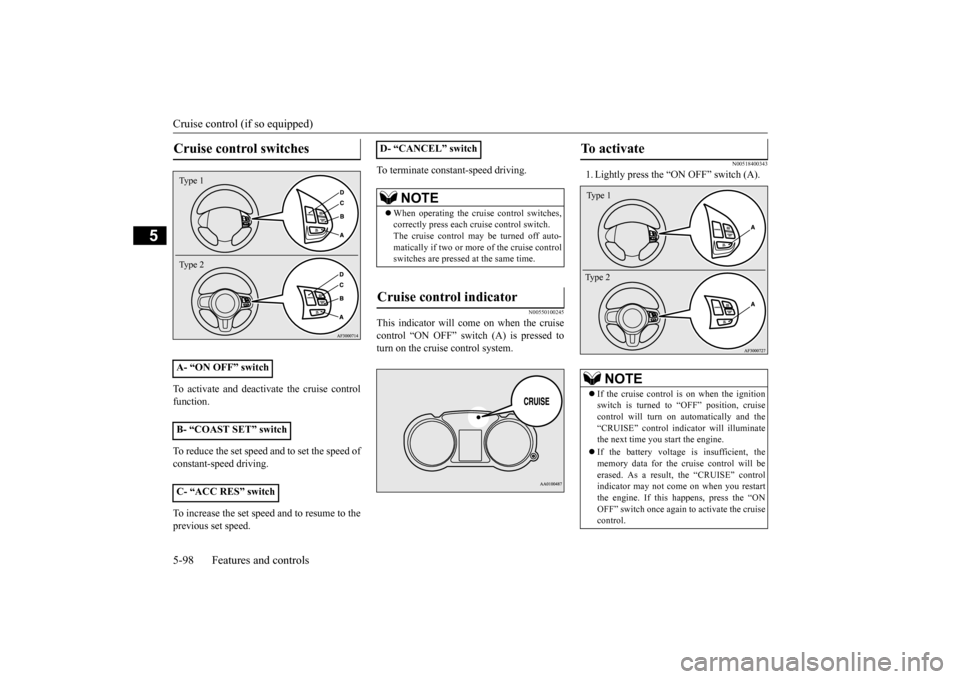
To activate and deactivate the cruise control function. To reduce the set speed and to set the speed of constant-speed driving. To increase the set speed and to resume to the previous set speed.
To terminate constant-speed driving.
N00550100245
This indicator will come on when the cruise control “ON OFF” switch (A) is pressed to turn on the cruise control system.
N00518400343
1. Lightly press the “ON OFF” switch (A).
Cruise control switches
A- “ON OFF” switch B- “COAST SET” switch C- “ACC RES” switchType 1 Type 2
D- “CANCEL” switch
NOTE
When operating the cruise control switches, correctly press each cruise control switch.The cruise control may be turned off auto- matically if two or more of the cruise control switches are pressed at the same time.
Cruise control indicator
To activate
NOTE
If the cruise control is on when the ignition switch is turned to “OFF” position, cruise control will turn on automatically and the “CRUISE” control indicator will illuminatethe next time you start the engine. If the battery voltage is insufficient, the memory data for the cruise control will be erased. As a result, the “CRUISE” control indicator may not come on when you restartthe engine. If this happens, press the “ON OFF” switch once again to activate the cruise control.Type 1 Type 2
BK0210300US.bo
ok 98 ページ 2014年4月8日 火曜日 午前10時46分
Page 170 of 434
Cruise control (if so equipped) Features and controls 5-101
5
N00518800493
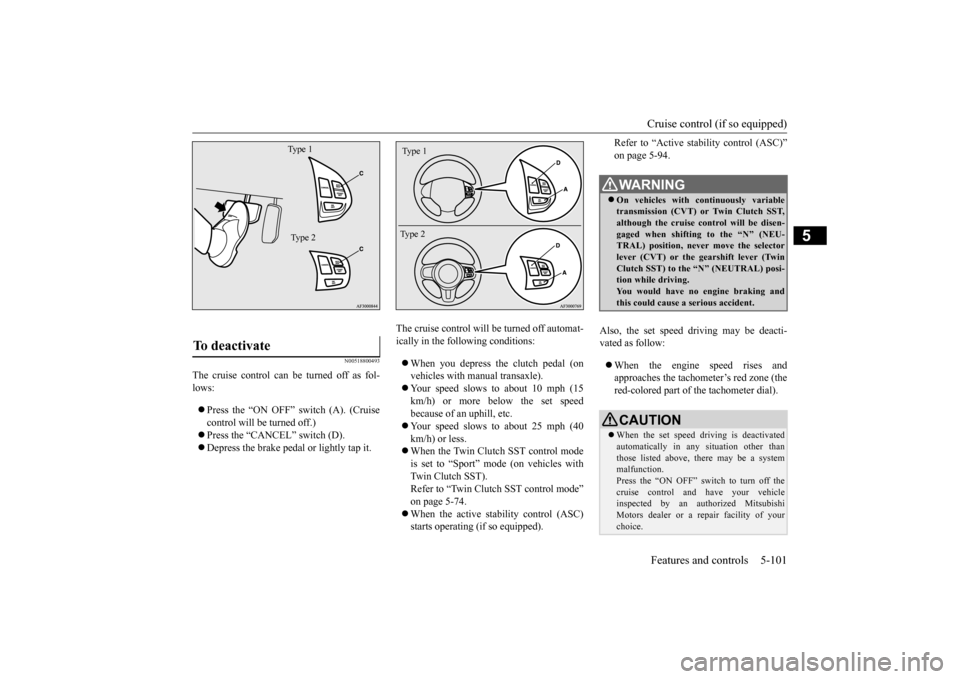
The cruise control can be turned off as fol- lows: Press the “ON OFF” switch (A). (Cruise control will be turned off.) Press the “CANCEL” switch (D). Depress the brake pedal or lightly tap it.
The cruise control will be turned off automat- ically in the following conditions: When you depress the clutch pedal (on vehicles with manual transaxle). Your speed slows to about 10 mph (15 km/h) or more below the set speedbecause of an uphill, etc. Your speed slows to about 25 mph (40 km/h) or less. When the Twin Clutch SST control mode is set to “Sport” mode (on vehicles with Twin Clutch SST).Refer to “Twin Clutch SST control mode” on page 5-74. When the active stability control (ASC) starts operating (if so equipped).
Refer to “Active stability control (ASC)” on page 5-94.
Also, the set speed driving may be deacti- vated as follow: When the engine speed rises and approaches the tachometer’s red zone (thered-colored part of the tachometer dial).
To deactivate
Type 1 Type 2
Type 1 Type 2
WA R N I N G On vehicles with continuously variable transmission (CVT) or Twin Clutch SST, although the cruise control will be disen-gaged when shifting to the “N” (NEU- TRAL) position, never move the selector lever (CVT) or the gearshift lever (TwinClutch SST) to the “N” (NEUTRAL) posi- tion while driving. You would have no engine braking andthis could cause a serious accident.CAUTION When the set speed driving is deactivated automatically in any situation other than those listed above, there may be a systemmalfunction. Press the “ON OFF” switch to turn off the cruise control and have your vehicleinspected by an authorized Mitsubishi Motors dealer or a repair facility of your choice.
BK0210300US.book
101 ページ 2014年4月8日 火曜日 午前10時46分
Page 172 of 434
Tire pressure monitoring system
Features and controls 5-103
5
N00532700122
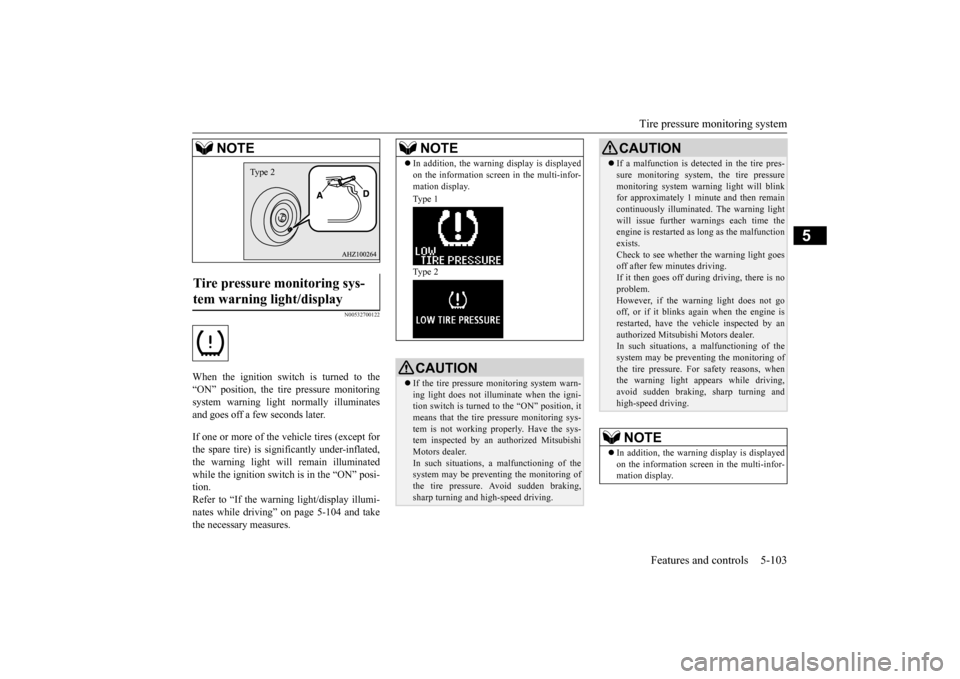
When the ignition switch is turned to the “ON” position, the tire pressure monitoring system warning light normally illuminatesand goes off a few seconds later. If one or more of the vehicle tires (except for the spare tire) is significantly under-inflated, the warning light will remain illuminatedwhile the ignition switch is in the “ON” posi- tion. Refer to “If the warning light/display illumi-nates while driving” on page 5-104 and take the necessary measures.Tire pressure monitoring sys- tem warning light/display
NOTE
Type 2
NOTE
In addition, the warning display is displayed on the information screen in the multi-infor- mation display. Type 1 Type 2CAUTIONIf the tire pressure monitoring system warn- ing light does not illuminate when the igni- tion switch is turned to the “ON” position, it means that the tire pressure monitoring sys-tem is not working properly. Have the sys- tem inspected by an authorized Mitsubishi Motors dealer.In such situations,
a malfunctioning of the
system may be preventing the monitoring ofthe tire pressure. Avoid sudden braking,sharp turning and high-speed driving.
If a malfunction is detected in the tire pres- sure monitoring system, the tire pressure monitoring system warning light will blink for approximately 1 minute and then remain continuously illuminated. The warning lightwill issue further warn
ings each time the
engine is restarted as long as the malfunctionexists.Check to see whether the warning light goes off after few minutes driving. If it then goes off during driving, there is noproblem. However, if the warning light does not go off, or if it blinks again when the engine isrestarted, have the vehicle inspected by an authorized Mitsubishi Motors dealer. In such situations,
a malfunctioning of the
system may be preventing the monitoring of the tire pressure. For safety reasons, when the warning light appears while driving,avoid sudden braking, sharp turning and high-speed driving.NOTE
In addition, the warning display is displayed on the information screen in the multi-infor- mation display.CAUTION
SC00000600-3.f
m 103 ページ 2014年4月16日 水曜日 午前9時38分
Page 177 of 434
Instrument cluster 5-108 Features and controls
5
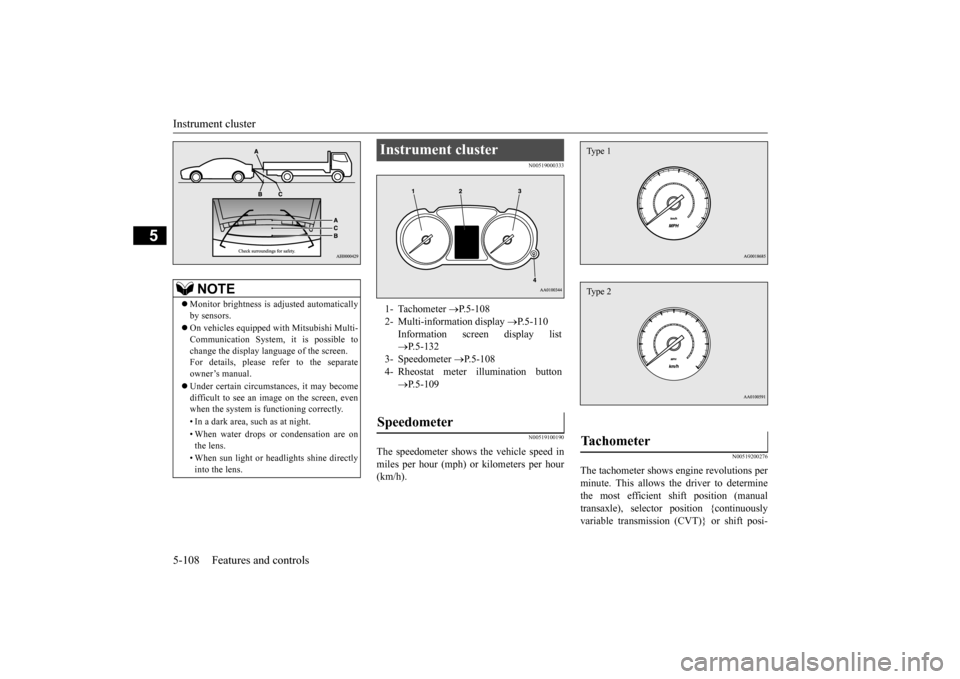
N00519000333 N00519100190
The speedometer shows the vehicle speed in miles per hour (mph) or kilometers per hour (km/h).
N00519200276
The tachometer shows engine revolutions perminute. This allows the driver to determinethe most efficient shift position (manual transaxle), selector position {continuously variable transmission (CVT)} or shift posi-
NOTE
Monitor brightness is adjusted automatically by sensors. On vehicles equipped with Mitsubishi Multi- Communication System, it is possible to change the display language of the screen.For details, please refer to the separate owner’s manual. Under certain circumstances, it may become difficult to see an image on the screen, even when the system is functioning correctly. • In a dark area, such as at night. • When water drops or condensation are on the lens. • When sun light or headlights shine directly into the lens.
Instrument cluster 1- Tachometer
P.5-108
2- Multi-information display
P.5-110
Information screen display list P.5-132
3- Speedometer
P.5-108
4- Rheostat meter illumination button
P.5-109
Speedometer
Tachometer Type 1Type 2
BK0210300US.book
108 ページ 2014年4月8日 火曜日 午前10時46分
Page 178 of 434
Instrument cluster
Features and controls 5-109
5
tion (Twin Clutch SST) and engine speed combinations. This gauge also assists in evaluating engine performance.
N00554900137
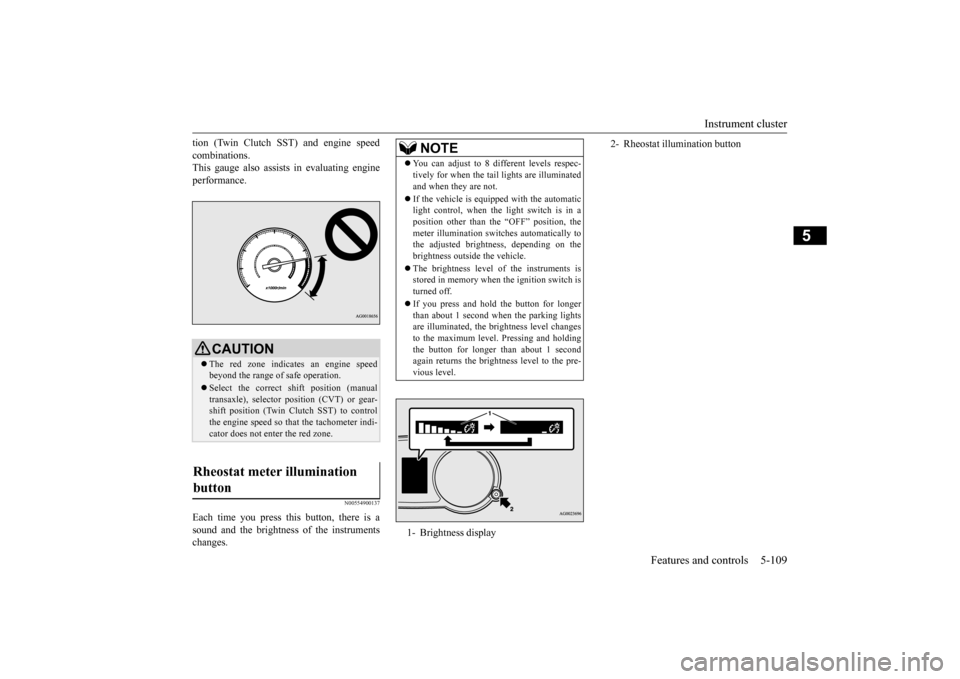
Each time you press this button, there is asound and the brightness of the instrumentschanges.
CAUTION The red zone indicates an engine speed beyond the range of safe operation. Select the correct shift position (manual transaxle), selector position (CVT) or gear- shift position (Twin Clutch SST) to controlthe engine speed so that the tachometer indi- cator does not enter the red zone.
Rheostat meter illumination button
NOTE
You can adjust to 8 different levels respec- tively for when the tail
lights are illuminated
and when they are not. If the vehicle is equipped with the automatic light control, when the light switch is in a position other than the “OFF” position, the meter illumination switches automatically tothe adjusted brightness, depending on the brightness outside the vehicle. The brightness level of the instruments is stored in memory when the ignition switch is turned off. If you press and hold the button for longer than about 1 second when the parking lightsare illuminated, the brightness level changes to the maximum level. Pressing and holding the button for longer than about 1 secondagain returns the brightness level to the pre- vious level.1- Brightness display
2- Rheostat illumination button
BK0210300US.book
109 ページ 2014年4月8日 火曜日 午前10時46分
Page 179 of 434
Multi-information display 5-110 Features and controls
5
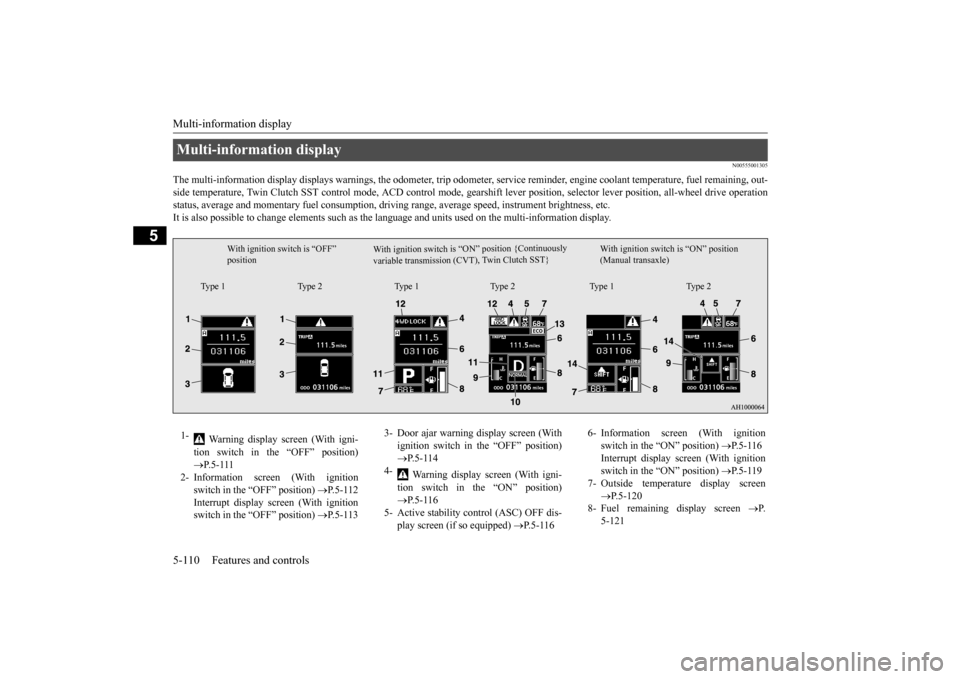
N00555001305
The multi-information display displays warn
ings, the odometer, trip odometer, service re
minder, engine coolant temperature, fue
l remaining, out-
side temperature, Twin Clutch SST control mode, ACD control
mode, gearshift lever position, selector lever position, all-wheel
drive operation
status, average and momentary fuel consumption, driving range, average speed, instrument brightness, etc. It is also possible to change elements such as th
e language and units used on the multi-information display.
Multi-information display
W i t h i g n i t i o n s w i t c h i s “ O N ” p o s i t i o n { C o nt i n u o us l y
v a r i a b l e t r a n s m i s s i o n ( C V T ) , Tw
i n C l u t c h S ST }
With ignition switch is “OFF” position
With ignition switch is “ON” position (Manual transaxle)
Type 1 Type 2 Type 1 Type 2 Type 1 Type 2
1-
Warning display screen (With igni- tion switch in the “OFF” position) P.5-111
2- Information screen (With ignition
switch in the “OFF” position)
P.5-112
Interrupt display screen (With ignition switch in the “OFF” position)
P.5-113
3- Door ajar warning display screen (With
ignition switch in the “OFF” position) P.5-114
4-
Warning display screen (With igni- tion switch in the “ON” position) P.5-116
5- Active stability control (ASC) OFF dis-
play screen (if so equipped)
P.5-116
6- Information screen (With ignition
switch in the “ON” position)
P.5-116
Interrupt display screen (With ignition switch in the “ON” position)
P.5-119
7- Outside temperature display screen
P.5-120
8- Fuel remaining display screen
P.
5-121
BK0210300US.book
110 ページ 2014年4月8日 火曜日 午前10時46分
Page 180 of 434
Multi-information display
Features and controls 5-111
5
N00555100136
The multi-information meter switch is a but- ton marked “INFO” on the left side of the dash. Each time the multi-information meter switchis operated, a sound is emitted and the multi- information display changes between infor- mation such as warnings, odometer, tripodometer, service reminder, engine coolant temperature (Type 1), average and momen- tary fuel consumption, driving range, andaverage speed and ACD control mode display (if so equipped).
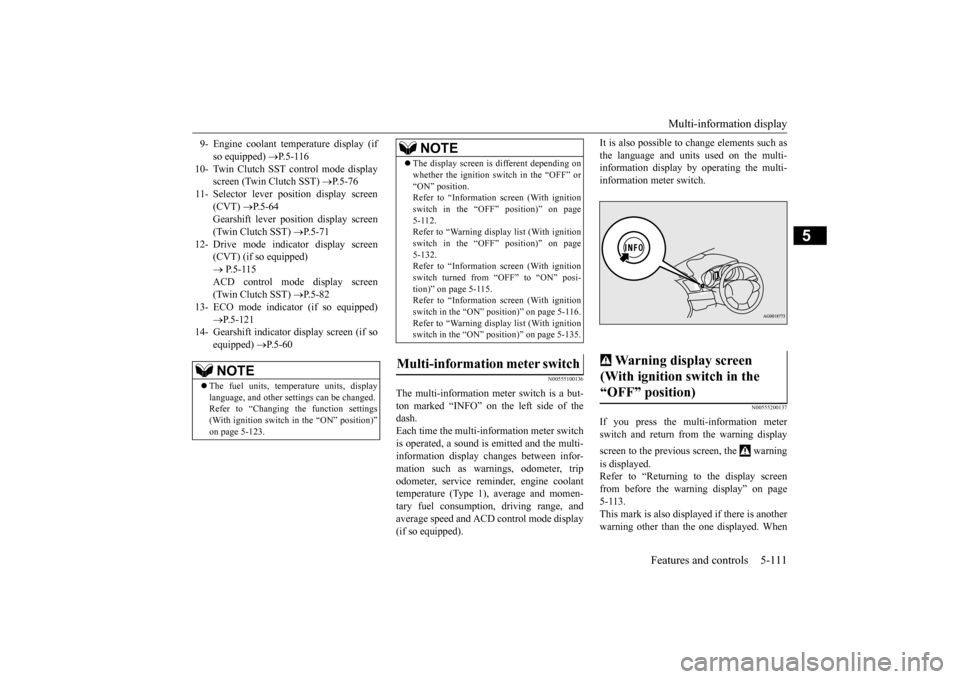
It is also possible to change elements such as the language and units used on the multi- information display by operating the multi- information meter switch.
N00555200137
If you press the multi-information meterswitch and return from the warning display screen to the previous screen, the warning is displayed. Refer to “Returning to the display screen from before the warning display” on page 5-113.This mark is also displayed if there is anotherwarning other than the one displayed. When
9- Engine coolant temperature display (if
so equipped)
P.5-116
10- Twin Clutch SST control mode display
screen (Twin Clutch SST)
P.5-76
11- Selector lever position display screen
(CVT)
P.5-64
Gearshift lever position display screen (Twin Clutch SST)
P.5-71
12- Drive mode indicator display screen
(CVT) (if so equipped) P.5-115 ACD control mode display screen(Twin Clutch SST)
P.5-82
13- ECO mode indicator (if so equipped)
P.5-121
14- Gearshift indicator display screen (if so
equipped)
P.5-60
NOTE
The fuel units, temperature units, display language, and other settings can be changed.Refer to “Changing the function settings (With ignition switch in the “ON” position)” on page 5-123.
The display screen is different depending on whether the ignition switch in the “OFF” or “ON” position. Refer to “Information screen (With ignition switch in the “OFF” position)” on page5-112. Refer to “Warning displa
y list (With ignition
switch in the “OFF” position)” on page5-132. Refer to “Information screen (With ignition switch turned from “OFF” to “ON” posi-tion)” on page 5-115. Refer to “Information screen (With ignition switch in the “ON” position)” on page 5-116.Refer to “Warning displa
y list (With ignition
switch in the “ON” position)” on page 5-135.
Multi-information meter switch
NOTE
Warning display screen (With ignition switch in the “OFF” position)
BK0210300US.book
111 ページ 2014年4月8日 火曜日 午前10時46分
Page 185 of 434
Multi-information display 5-116 Features and controls
5
N00545900027
The operation status of the ACD control mode is displayed. Refer to “ACD control mode” on page 5-82.
N00555200140
This is displayed when you press the multi-information meter switch and switch the warning display screen. This mark is also displayed if there is anotherwarning other than the one displayed. When the cause of the warning display is eliminated, the warning goes out automat- ically.
N00556100074
This is displayed when the Active stability control (ASC) is turned “OFF” with the“ASC OFF” switch. Also, if an abnormal condition is occurred in the ASC while driving, the “ASC OFF” dis-play illuminates.Refer to “ASC OFF switch” on page 5-94.
N00556200176
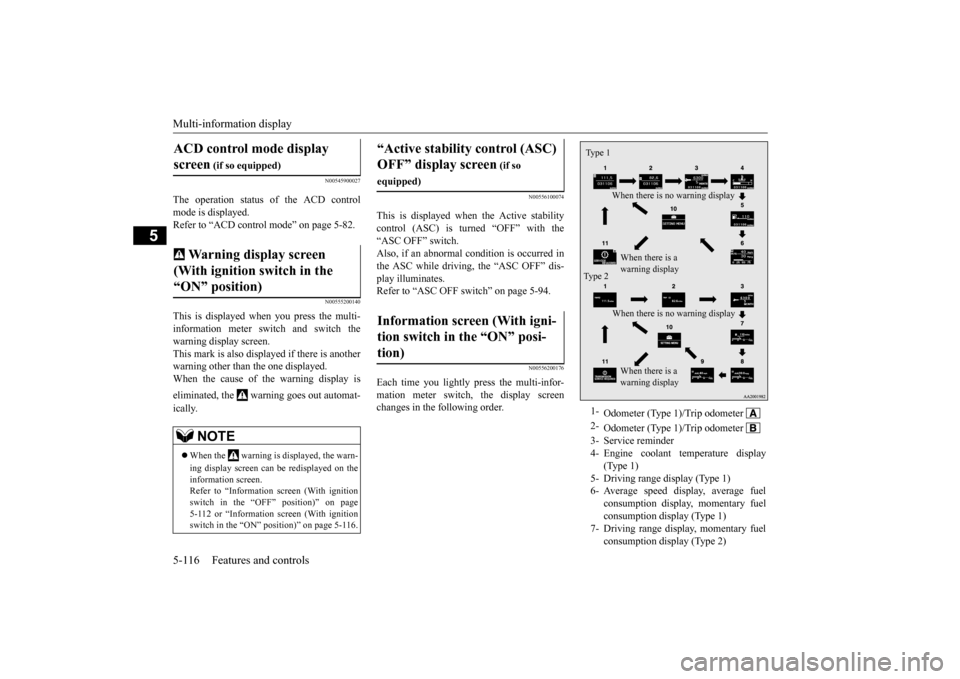
Each time you lightly press the multi-infor-mation meter switch, the display screenchanges in the following order.
ACD control mode display screen
(if so equipped)
Warning display screen (With ignition switch in the “ON” position)
NOTE
When the warning is displayed, the warn- ing display screen can be redisplayed on the information screen. Refer to “Information screen (With ignitionswitch in the “OFF” position)” on page 5-112 or “Information screen (With ignition switch in the “ON” position)” on page 5-116.
“Active stability control (ASC) OFF” display screen
(if so
equipped)Information screen (With igni- tion switch in the “ON” posi- tion)
1-
Odometer (Type 1)/Trip odometer
2-
Odometer (Type 1)/Trip odometer
3- Service reminder4- Engine coolant temperature display
(Type 1)
5- Driving range display (Type 1)6- Average speed display, average fuel
consumption display, momentary fuel consumption display (Type 1)
7- Driving range display, momentary fuel
consumption display (Type 2)
Ty p e 1
When there is no warning display When there is a warning display
Type 2
When there is no warning display When there is a warning display
BK0210300US.book
116 ページ 2014年4月8日 火曜日 午前10時46分
Page 186 of 434
Multi-information display
Features and controls 5-117
5
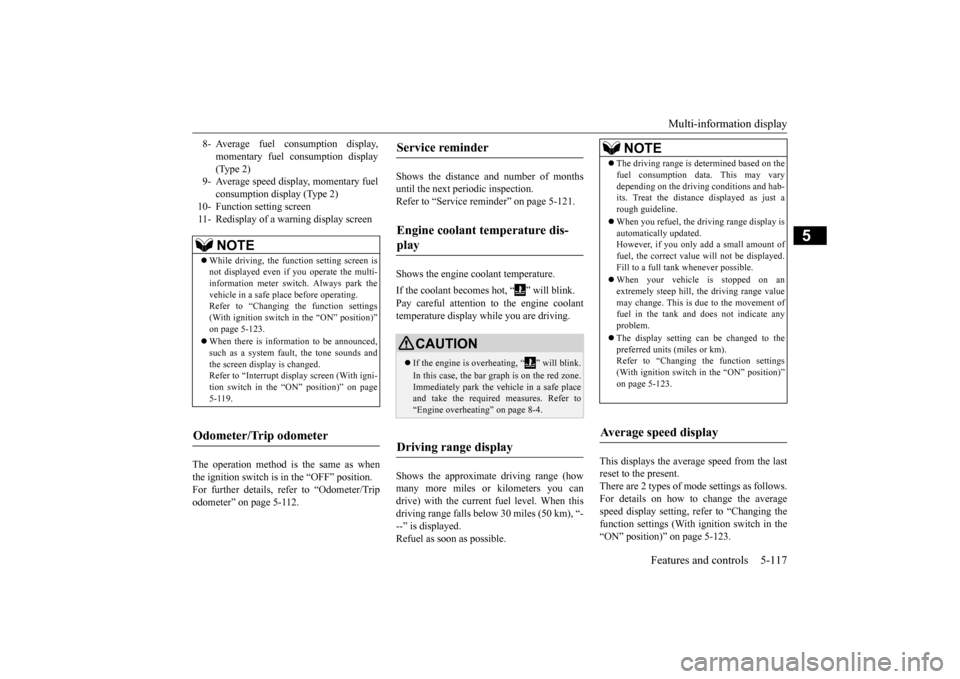
The operation method is the same as when the ignition switch is in the “OFF” position.For further details, refer to “Odometer/Trip odometer” on page 5-112.
Shows the distance and number of months until the next periodic inspection.Refer to “Service reminder” on page 5-121. Shows the engine coolant temperature. If the coolant becomes hot, “ ” will blink. Pay careful attention to the engine coolant temperature display while you are driving. Shows the approximate driving range (how many more miles or kilometers you can drive) with the current fuel level. When thisdriving range falls below 30 miles (50 km), “- --” is displayed. Refuel as soon as possible.
This displays the average speed from the last reset to the present.There are 2 types of mode settings as follows. For details on how to change the average speed display setting, refer to “Changing thefunction settings (With ignition switch in the “ON” position)” on page 5-123.
8- Average fuel consumption display,
momentary fuel consumption display(Type 2)
9- Average speed display, momentary fuel
consumption display (Type 2)
10- Function setting screen 11- Redisplay of a warning display screen
NOTE
While driving, the function setting screen is not displayed even if you operate the multi- information meter switch. Always park the vehicle in a safe place before operating.Refer to “Changing the function settings (With ignition switch in the “ON” position)” on page 5-123. When there is information to be announced, such as a system fault, the tone sounds andthe screen display is changed. Refer to “Interrupt display screen (With igni- tion switch in the “ON” position)” on page5-119.
Odometer/Trip odometer
Service reminder Engine coolant temperature dis- play
CAUTION If the engine is overheating, “ ” will blink. In this case, the bar graph is on the red zone. Immediately park the vehicle in a safe placeand take the required measures. Refer to “Engine overheating” on page 8-4.
Driving range display
NOTE
The driving range is determined based on the fuel consumption data. This may vary depending on the driving conditions and hab- its. Treat the distance displayed as just a rough guideline. When you refuel, the driving range display is automatically updated.However, if you only add a small amount of fuel, the correct value will not be displayed. Fill to a full tank whenever possible. When your vehicle is stopped on an extremely steep hill, the driving range valuemay change. This is due to the movement of fuel in the tank and does not indicate any problem. The display setting can be changed to the preferred units (miles or km).Refer to “Changing the function settings (With ignition switch in the “ON” position)” on page 5-123.
Average speed display
BK0210300US.book
117 ページ 2014年4月8日 火曜日 午前10時46分
Page 200 of 434
Indicator light, warning light, an
d information screen display list Features and controls 5-131
5
N00557700035 N00557800238
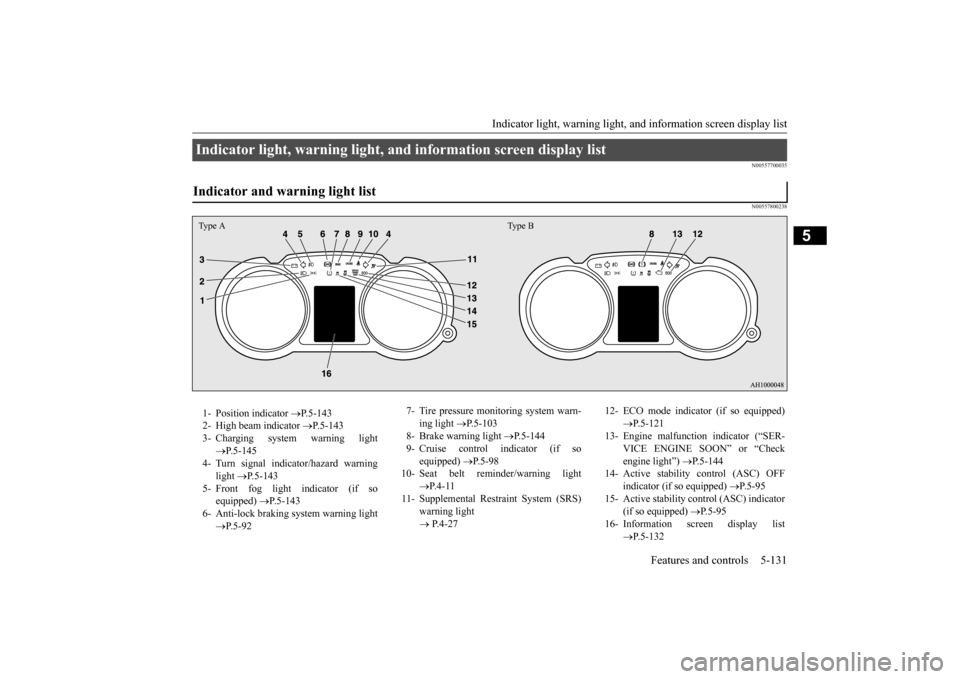
Indicator light, warning light, and information screen display list Indicator and warning light list Type A Type B1- Position indicator
P.5-143
2- High beam indicator
P.5-143
3- Charging system warning light
P.5-145
4- Turn signal indicator/hazard warning
light
P.5-143
5- Front fog light indicator (if so
equipped)
P.5-143
6- Anti-lock braking system warning light
P.5-92
7- Tire pressure monitoring system warn-
ing light
P.5-103
8- Brake warning light
P.5-144
9- Cruise control indicator (if so
equipped)
P. 5 - 9 8
10- Seat belt reminder/warning light
P. 4 - 1 1
11- Supplemental Restraint System (SRS)
warning light P.4-27
12- ECO mode indicator (if so equipped)
P.5-121
13- Engine malfunction indicator (“SER-
VICE ENGINE SOON” or “Check engine light”)
P.5-144
14- Active stability
control (ASC) OFF
indicator (if so equipped)
P.5-95
15- Active stability control (ASC) indicator
(if so equipped)
P. 5 - 9 5
16- Information screen display list
P.5-132
BK0210300US.book
131 ページ 2014年4月8日 火曜日 午前10時46分