lock MITSUBISHI LANCER 2016 8.G Owners Manual
[x] Cancel search | Manufacturer: MITSUBISHI, Model Year: 2016, Model line: LANCER, Model: MITSUBISHI LANCER 2016 8.GPages: 392, PDF Size: 13.12 MB
Page 225 of 392
USB input terminal
Features and controls 5-163
5
Refer to “Listen to Audio Files on a USB Device” on page 7-39. Refer to “To play iPod/USB memory device tracks via voice operation” on page 7-42.
N00566801127
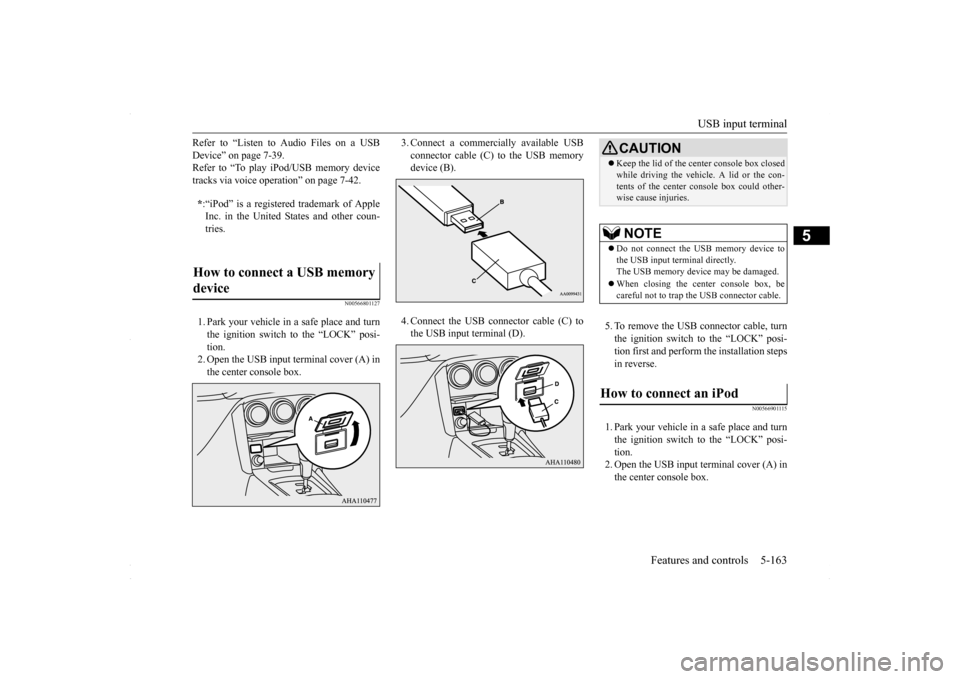
1. Park your vehicle in a safe place and turn the ignition switch to the “LOCK” posi- tion.2. Open the USB input terminal cover (A) in the center console box.
3. Connect a commercially available USB connector cable (C)
to the USB memory
device (B). 4. Connect the USB connector cable (C) to the USB input terminal (D).
5. To remove the USB connector cable, turn the ignition switch to the “LOCK” posi-tion first and perform the installation steps in reverse.
N00566901115
1. Park your vehicle in a safe place and turn the ignition switch to the “LOCK” posi-tion. 2. Open the USB input terminal cover (A) in the center console box.
* :“iPod” is a registered trademark of Apple Inc. in the United States and other coun-tries.
How to connect a USB memory device
CAUTION Keep the lid of the center console box closed while driving the vehicle. A lid or the con- tents of the center console box could other- wise cause injuries.NOTE
Do not connect the USB memory device to the USB input terminal directly. The USB memory device may be damaged. When closing the center console box, be careful not to trap the USB connector cable.
How to connect an iPod
BK0230300US.book
163 ページ 2015年7月30日 木曜日 午後8時38分
Page 226 of 392
USB input terminal 5-164 Features and controls
5
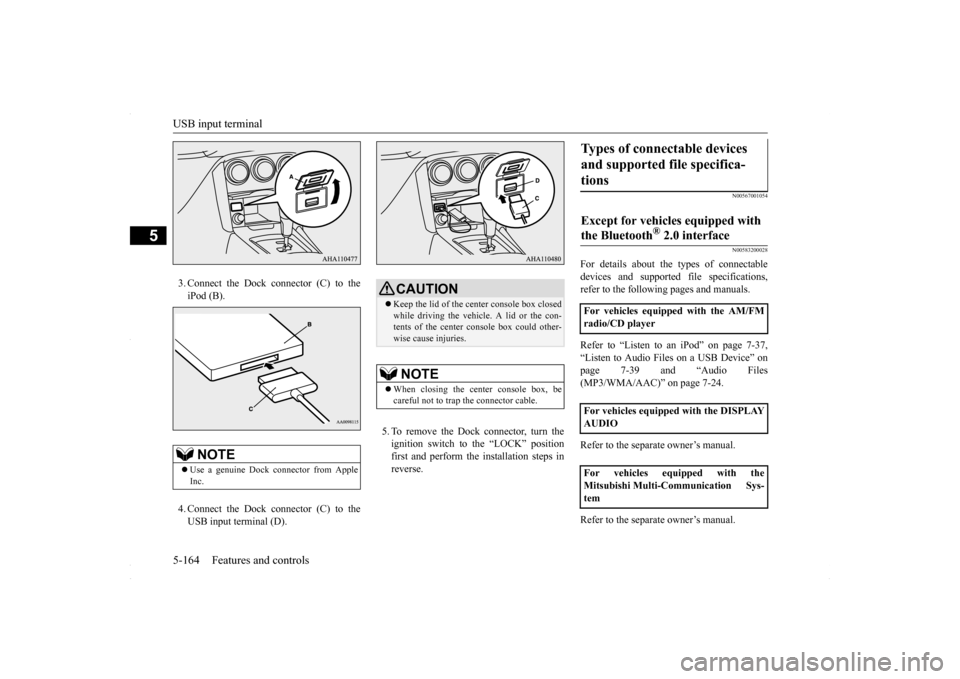
3. Connect the Dock connector (C) to the iPod (B). 4. Connect the Dock connector (C) to the USB input terminal (D).
5. To remove the Dock connector, turn the ignition switch to the “LOCK” position first and perform the installation steps inreverse.
N00567001054 N00583200028
For details about the types of connectable devices and supported file specifications,refer to the following pages and manuals. Refer to “Listen to an iPod” on page 7-37, “Listen to Audio Files on a USB Device” on page 7-39 and “Audio Files (MP3/WMA/AAC)” on page 7-24. Refer to the separate owner’s manual. Refer to the separate owner’s manual.
NOTE
Use a genuine Dock connector from Apple Inc.
CAUTION Keep the lid of the center console box closed while driving the vehicle. A lid or the con- tents of the center console box could other-wise cause injuries.NOTE
When closing the center console box, be careful not to trap the connector cable.
Types of connectable devices and supported file specifica- tions Except for vehicles equipped with the Bluetooth
® 2.0 interface
For vehicles equipped with the AM/FM radio/CD player For vehicles equipped with the DISPLAY AUDIO For vehicles equipped with the Mitsubishi Multi-Communication Sys-tem
BK0230300US.book
164 ページ 2015年7月30日 木曜日 午後8時38分
Page 227 of 392
USB input terminal
Features and controls 5-165
5
N00583300029
For details about the types of connectable devices and supported file specifications, refer to the following section.
N00583400020
Devices of the following types can be con-nected. For these connectable device types, “iPod*,” “iPod classic*,” “iPod nano*,” “iPod touch*” and “iPhone*,” refer to the following web- site:[For vehicles sold in U.S.A.] You can access the Mitsubishi Motors North America website.[For vehicles sold in Canada and Mexico] You can access the Mitsubishi Motors web- site. Please read and agree to the “Warningabout Links to the Web Sites of Other Com-
panies”. The websites mentioned above may connect you to websites other than the Mitsubishi Motors website. http://www.mitsubishi-motors.com/en/prod-ucts/index.html
N00583500021
You can play music files of the following specifications that are saved in a USB mem- ory device or other device supporting massstorage class. When you connect your iPod, playable file specifications depend on the connected iPod.
For vehicles equipped with the Bluetooth
® 2.0 interface
Device types Model name
Condition
USB memory device
Storage capacity of 256 Mbytes or more
Models other than USB memory devices and iPods
Digital audio player supporting mass storage class
* : “iPod,” “iPod classic,” “iPod nano,” “iPod touch,” and “iPhone” are regis- tered trademarks of Apple Inc. in the United States and other countries.NOTE
Depending on the type of the USB memory device or other device connected, the con- nected device may not function properly or the available functions may be limited. It is recommended to use an iPod with firm- ware updated to the latest version. You can charge your iPod by connecting it to the USB input terminal when the ignitionswitch is in the “ACC” or “ON” position. Do not keep your USB memory device or iPod in your vehicle. It is recommended that you back up the files in case of data damage. Do not connect to the USB input terminal any device (hard disk, card reader, memory reader, etc.) other than the connectabledevices specified in the previous section. The device and/or data may be damaged. If any of these devices was connected by mis-take, remove it after turning the ignition switch to the “LOCK” position.
File specifications Item
Condition
File format
MP3, WMA, AAC, WAV
Maximum number of levels(including the root)
Level 8
Number of folders 700 Number of files 65,535
BK0230300US.book
165 ページ 2015年7月30日 木曜日 午後8時38分
Page 230 of 392
Interior lights 5-168 Features and controls
5
N00553800067
Regardless of the dome
light switch position,
when you press the lens, the light on the sidethat is pressed illuminates; when you press the lens again, the light goes off.
N00525401485
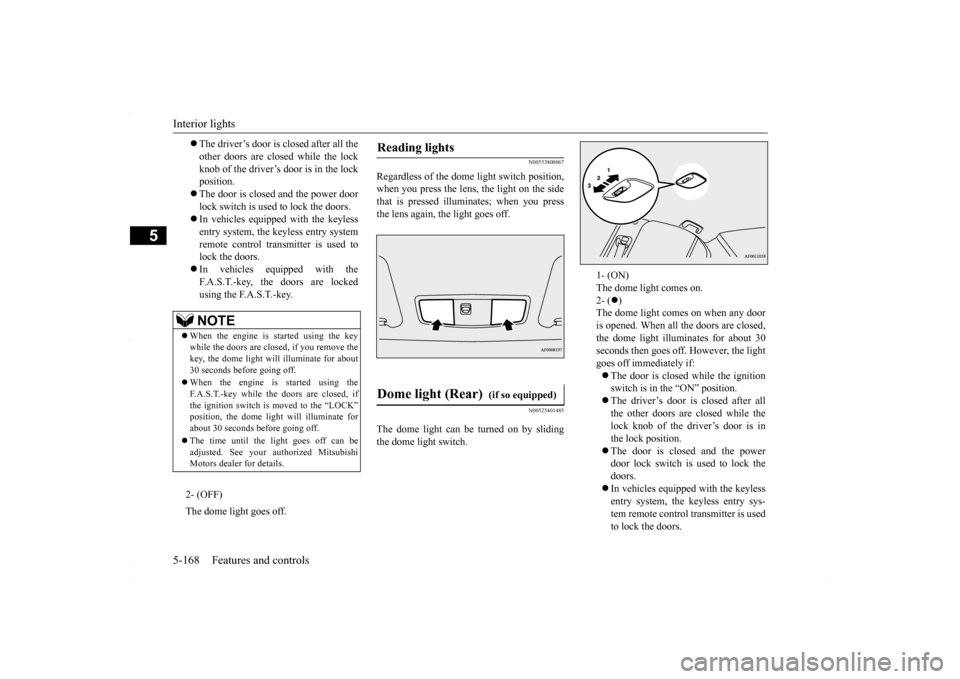
The dome light can be turned on by sliding the dome light switch.
The driver’s door is closed after all the other doors are closed while the lockknob of the driver’s door is in the lock position. The door is closed and the power door lock switch is used
to lock the doors.
In vehicles equipped with the keyless entry system, the keyless entry systemremote control transmitter is used to lock the doors. In vehicles equipped with the F.A.S.T.-key, the doors are lockedusing the F.A.S.T.-key.NOTE
When the engine is started using the key while the doors are closed, if you remove the key, the dome light will illuminate for about 30 seconds before going off. When the engine is started using the F.A.S.T.-key while the doors are closed, ifthe ignition switch is moved to the “LOCK” position, the dome light will illuminate for about 30 seconds before going off. The time until the light goes off can be adjusted. See your au
thorized Mitsubishi
Motors dealer for details.2- (OFF) The dome light goes off.
Reading lights
Dome light (Rear)
(if so equipped)
1- (ON) The dome light comes on. 2- (
)
The dome light comes on when any dooris opened. When all the doors are closed, the dome light illuminates for about 30 seconds then goes off. However, the lightgoes off immediately if: The door is closed while the ignition switch is in the “ON” position. The driver’s door is closed after all the other doors are closed while the lock knob of the driver’s door is in the lock position. The door is closed and the power door lock switch is used to lock the doors. In vehicles equipped with the keyless entry system, the keyless entry sys- tem remote control transmitter is usedto lock the doors.
BK0230300US.book
168 ページ 2015年7月30日 木曜日 午後8時38分
Page 231 of 392
Storage spaces
Features and controls 5-169
5
N00526301465
If any of the interior lights are left on with the ignition switch in the “LOCK” position, the lights go off automatically after about 30 minutes.
The lights come on again if the ignition switch is turned to the “ON” or “ACC” posi- tion, any door or the tru
nk lid is opened and
closed, or the keyless entry system orF.A.S.T.-key is operated.
N00526401570
N00551501302
To open the glove compartment, pull the lever (A).
In vehicles equipped with the F.A.S.T.-key, the doors are lockedusing the F.A.S.T.-key.NOTE
When the engine is started using the key while the doors are closed, if you remove the key, the dome light will illuminate for about30 seconds before going off. When the engine is started using the F.A.S.T.-key while the doors are closed, if the ignition switch is moved to the “LOCK” position, the dome light will illuminate forabout 30 seconds before going off. The time until the light goes off can be adjusted. See your authorized Mitsubishi Motors dealer for details.3- (OFF) The dome light goes off.
Interior light auto-cutout func- tion (dome light and other lights)
NOTE
The interior light auto-cutout function can be deactivated. The time until the lights auto- matically go off can be adjusted. See yourauthorized Mitsubishi Motors dealer for details.
Storage spaces
CAUTION Never leave lighters, carbonated drink cans, or spectacles in the cabin when parking the vehicle in hot sunshine. The cabin will become extremely hot, so lighters and otherflammable items may catch fire and unopened drink cans (including beer cans) may rupture. The heat may also deform or crack plastic spectacle parts. Keep the lids of stor
age spaces closed while
driving the vehicle. A lid or the contents of a storage space could otherwise cause injuriesduring a sudden stop.
NOTE
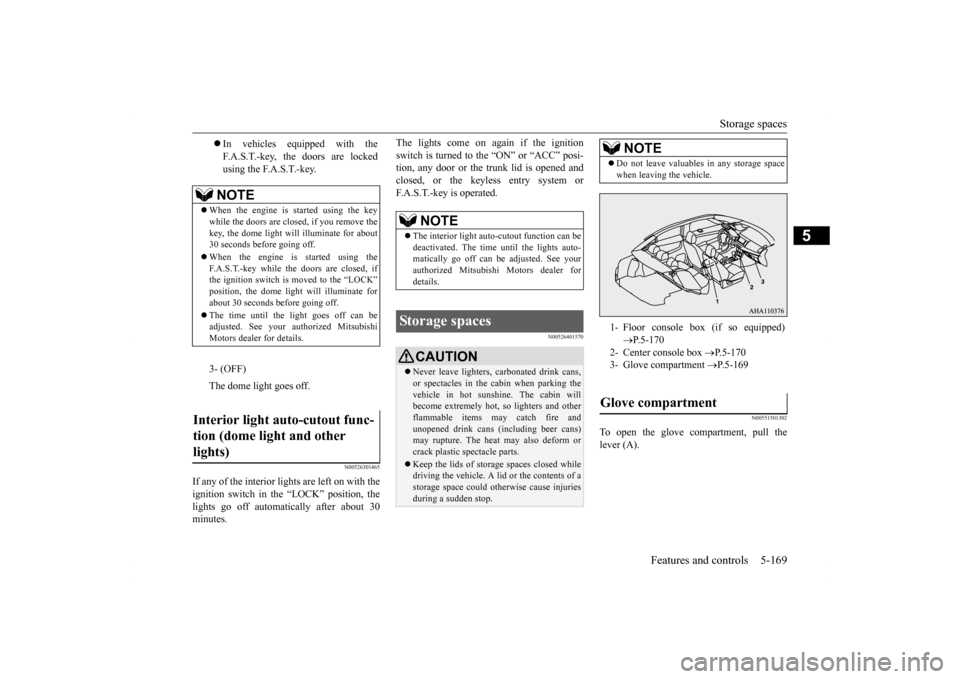
Do not leave valuables in any storage space when leaving the vehicle.1- Floor console box (if so equipped)
P.5-170
2- Center console box
P.5-170
3- Glove compartment
P.5-169
Glove compartment
BK0230300US.book
169 ページ 2015年7月30日 木曜日 午後8時38分
Page 239 of 392
Vehicle preparation before driving
Driving safety 6-3
6
N00629001741
For a safer and more enjoyable trip, always observe the following: Before starting the vehicle, make certain that you and all passengers are seated and wearing their seat belts properly (with children in the rear seat, in appropriaterestraints), and that all the doors are locked.
Move the driver’s seat as far backward as possible, while still keeping good visibil- ity, and good control of the steering wheel, brakes, accelerator, and controls.Check the instrument panel indicators and multi-information display for any possible problem. Move the front passenger seat as far back as possible. Make sure that infants and small children are properly restrained in accordance withall laws and regulations.
Check these by selecting the defroster mode, and set the blower switch on high. You should be able to feel the air blowing against the windshield. (Refer to “Defrosting or defogging the wind- shield and door windows” on page 7-7, 7-12, 7-17.) Check all the tires for heavy tread wear or uneven wear patterns. Look for stones, nails,glass, or other objects stuck in the tread. Look for any tread cuts or sidewall cracks. Check the wheel nuts for tightness, and the tires(including spare tire) for proper pressures.
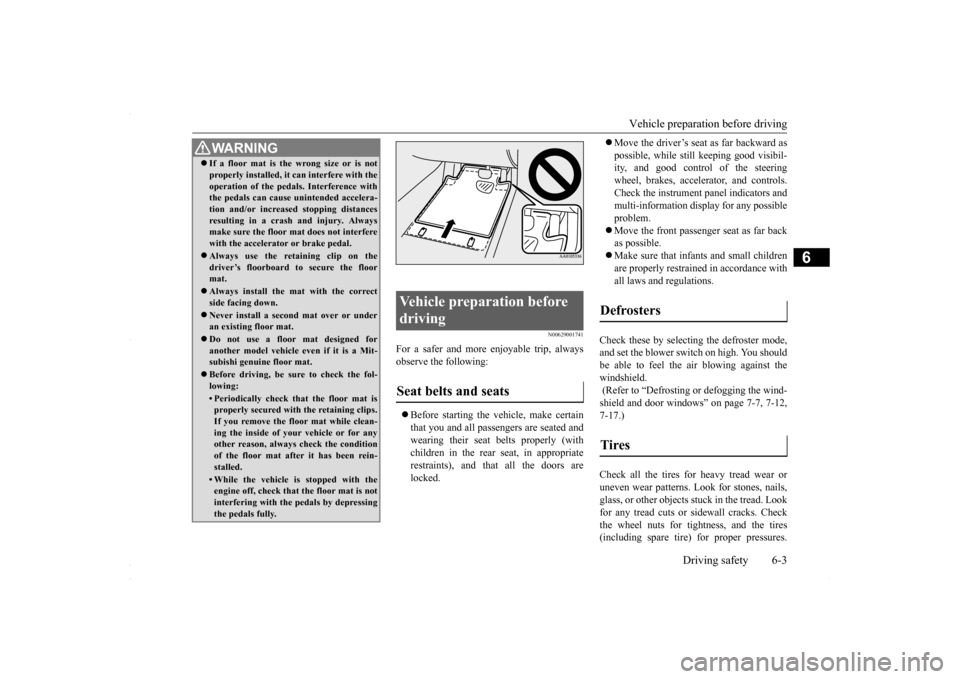
WA R N I N G If a floor mat is the wrong size or is not properly installed, it can interfere with the operation of the pedals. Interference with the pedals can cause unintended accelera- tion and/or increased stopping distancesresulting in a crash and injury. Always make sure the floor mat does not interfere with the accelerator or brake pedal. Always use the retaining clip on the driver’s floorboard to secure the floormat. Always install the mat with the correct side facing down. Never install a second mat over or under an existing floor mat. Do not use a floor mat designed for another model vehicle ev
en if it is a Mit-
subishi genuine floor mat. Before driving, be sure to check the fol- lowing:• Periodically check that the floor mat isproperly secured with the retaining clips. If you remove the floor mat while clean-ing the inside of your vehicle or for any other reason, always check the condition of the floor mat after it has been rein-stalled.• While the vehicle is stopped with the engine off, check that the floor mat is not interfering with the pedals by depressingthe pedals fully.
Vehicle preparation before driving Seat belts and seats
Defrosters Tires
BK0230300US.bo
ok 3 ページ 2015年7月30日 木曜日 午後8時38分
Page 242 of 392
Loading information 6-6 Driving safety
6
Your front bumper can be damaged if you scrape it over curbs or parking stop blocks.Be careful when traveling up or down steep slopes where your bumper can scrape the road. When leaving the vehicle unattended, always carry the key and lock all doors.Always try to park your vehicle in a well lit area.
N00629900349
It is very important to know how much weight your vehicle can carry. This weight iscalled the vehicle capacity weight and includes the weight of all occupants, cargo and non-factory-installed options. The tireand loading information placard located on the driver’s door sill of your vehicle will show how much weight it may properly carry. It is important to familiarize yourself with the following terms before loading your vehicle: Vehicle maximum load on the tire: load on an individual tire that is determined by distributing to each axle its share of the maximum loaded vehicle weight anddividing by two. Vehicle normal load on the tire: load on an individual tire that is determined by dis-tributing to each axle its share of the curb weight, accessory weight, and normal occupant weight and dividing by two.
Maximum loaded vehicle weight: the sum of - (a) Curb weight; (b) Accessory weight;(c) Vehicle capacity weight; and (d) Production options weight. Curb weight: the weight of a motor vehi- cle with standard equipment including the maximum capacity of fuel, oil, and cool- ant. Accessory weight: the combined weight (in excess of those standard items which may be replaced) of automatic transmis- sion, power steering, power brakes, powerwindows, power seats, radio, and heater, to the extent that these items are available as factory- installed equipment (whetherinstalled or not). Vehicle capacity weight: the rated cargo and luggage load plus 150 lbs (68 kg)
*
times the vehicle’s designated seating capacity. Production options weight: the combined weight of those installed regular produc- tion options weighing over 5 lbs (2.3 kg) in excess of those standard items whichthey replace, not previously considered in curb weight or accessory weight, includ- ing heavy duty brakes, ride levelers, roofrack, heavy duty battery, and special trim.
WA R N I N G Leaving the engine running risks injury or death from accidentally moving the gear- shift lever (manual transaxle or the selec- tor lever (CVT) or from the accumulation of toxic exhaust fumes in the passengercompartment.
Where you park
WA R N I N G Do not park your vehicle in areas where combustible materials such as dry grass or leaves can come in contact with a hotexhaust, since a fire could occur.
When leaving the vehicle
Loading information
WA R N I N G Never overload your vehicle. Overloading can damage your vehicle, adversely affectvehicle performance, including handling and braking, cause tire failure, and result in an accident.
BK0230300US.bo
ok 6 ページ 2015年7月30日 木曜日 午後8時38分
Page 246 of 392
Cargo loads 6-10 Driving safety
6
N00629700464
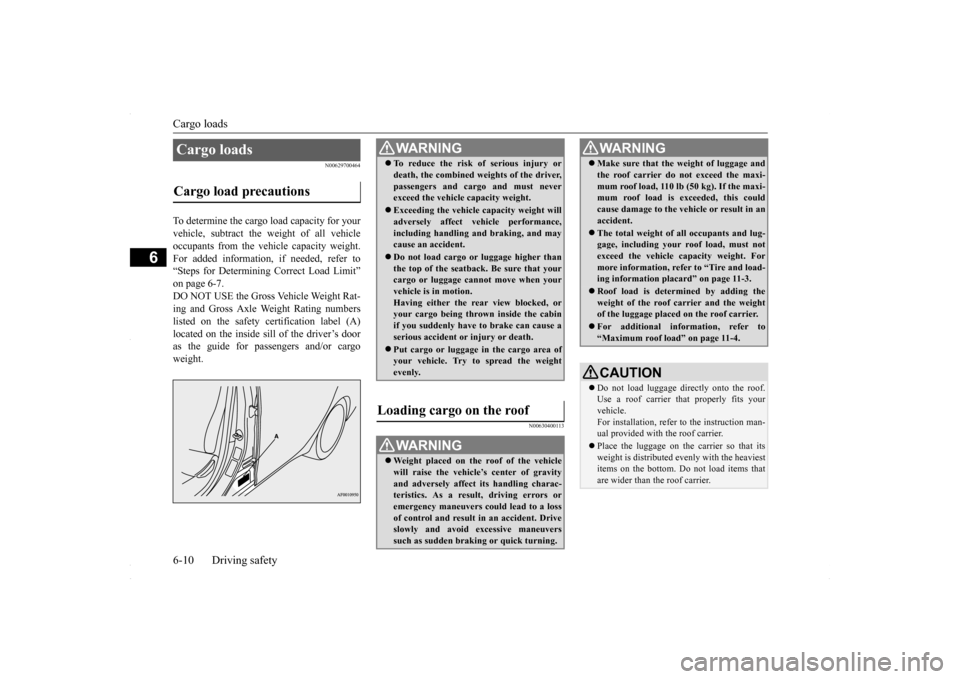
To determine the cargo load capacity for your vehicle, subtract the weight of all vehicleoccupants from the vehicle capacity weight. For added information, if needed, refer to “Steps for Determining Correct Load Limit”on page 6-7.DO NOT USE the Gross Vehicle Weight Rat- ing and Gross Axle Weight Rating numbers listed on the safety certification label (A)located on the inside sill of the driver’s door as the guide for passengers and/or cargo weight.
N00630400113
Cargo loads Cargo load precautions
WA R N I N G To reduce the risk of serious injury or death, the combined weights of the driver, passengers and cargo and must never exceed the vehicle capacity weight. Exceeding the vehicle capacity weight will adversely affect vehicle performance, including handling and braking, and maycause an accident. Do not load cargo or luggage higher than the top of the seatback. Be sure that your cargo or luggage cannot move when your vehicle is in motion.Having either the rear view blocked, or your cargo being thrown inside the cabin if you suddenly have to brake can cause aserious accident or injury or death. Put cargo or luggage in the cargo area of your vehicle. Try to spread the weight evenly.
Loading cargo on the roof
WA R N I N G Weight placed on the roof of the vehicle will raise the vehicle’s center of gravity and adversely affect its handling charac-teristics. As a result, driving errors or emergency maneuvers could lead to a loss of control and result in an accident. Driveslowly and avoid excessive maneuvers such as sudden braking or quick turning.
Make sure that the weight of luggage and the roof carrier do not exceed the maxi- mum roof load, 110 lb (50 kg). If the maxi- mum roof load is exceeded, this could cause damage to the ve
hicle or result in an
accident. The total weight of all occupants and lug- gage, including your roof load, must not exceed the vehicle capacity weight. For more information, refer to “Tire and load-ing information placard” on page 11-3. Roof load is determined by adding the weight of the roof carrier and the weight of the luggage placed on the roof carrier. For additional information, refer to “Maximum roof load” on page 11-4.CAUTION Do not load luggage directly onto the roof. Use a roof carrier th
at properly fits your
vehicle. For installation, refer to the instruction man- ual provided with the roof carrier. Place the luggage on the carrier so that its weight is distributed evenly with the heaviest items on the bottom. Do not load items that are wider than the roof carrier.WA R N I N G
BK0230300US.bo
ok 10 ページ 2015年7月30日 木曜日 午後8時38分
Page 251 of 392
7
Comfort controlsVents .........................................
.......................................................7-2
Heater without air conditioning function (if so equipped) ...............7-4 Automatic air conditioning
with Fahrenheit scale
(if so equipped) .
.................................................
..........................7-7
Automatic air conditioning with Cels
ius scale (if so equipped) .....7-12
Important air conditioning op
erating tips ......................................7-18
Air purifier ......................
...............................................................7-18
AM/FM radio/CD player (if so equipped) .....................................7-19 Handling of Discs .
.................................................
........................7-22
Audio Files (MP3/WMA/
AAC) ....................................................7-24
Important Points on Safety fo
r the Customer ................................7-28
Operation Keys ...............
...............................................................7-28
Listen to Radio ......
.................................................
........................7-32
Listen to Satellite Radio (if so equipped) .......................................7-33 Listen to CDs ..................
...............................................................7-35
Listen to MP3s ......
.................................................
........................7-36
Listen to an iPod ...
.................................................
........................7-37
Listen to Audio Files on
a USB Device .........................................7-39
To play iPod/USB memory device tracks via voice operation (vehicles with Bluetooth 2.0
interface) ......................................7-42
Listen to Bluetooth Audio (i
f so equipped) ....................................7-45
Display Indicator ..
.................................................
........................7-47
Audio Quality and Volume Balance Adjustment ...........................7-48System Settings .....
.................................................
........................7-49
Troubleshooting ..............
...............................................................7-53
Antenna .....................................
.....................................................7-55
Clock (if so equipped)
............................................
........................7-56
General information about
your radio ...........................................7-57
BK0230300US.bo
ok 1 ページ 2015年7月30日 木曜日 午後8時38分
Page 254 of 392
Heater without air conditioni
ng function (if so equipped)
7-4 Comfort controls
7
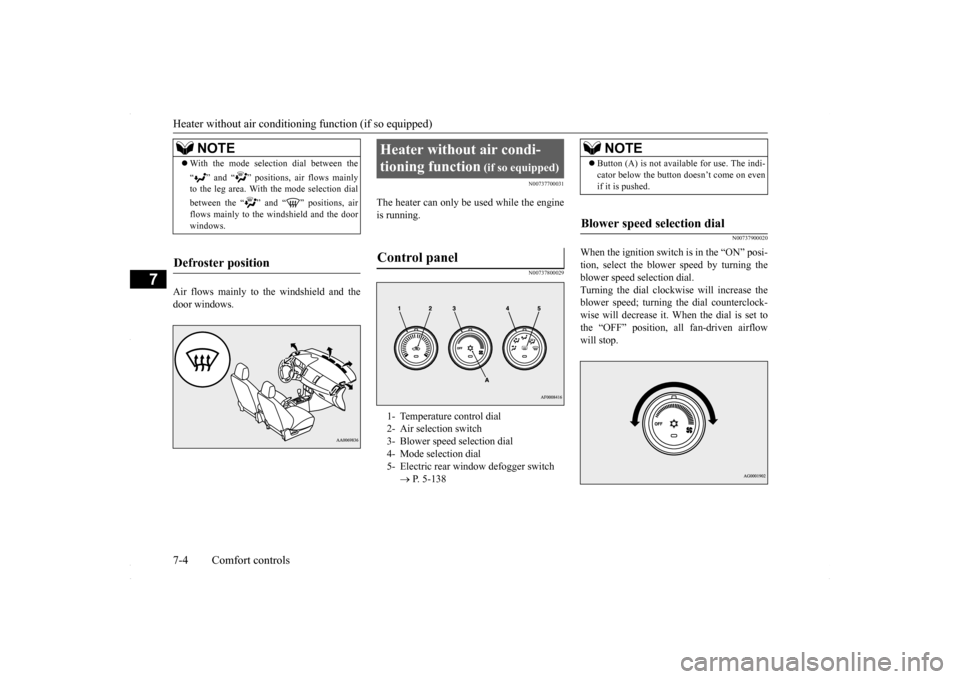
Air flows mainly to the windshield and the door windows.
N00737700031
The heater can only be used while the engineis running.
N00737800029
N00737900020
When the ignition switch is in the “ON” posi- tion, select the blower speed by turning theblower speed selection dial. Turning the dial clockwise will increase the blower speed; turning the dial counterclock-wise will decrease it. When the dial is set to the “OFF” position, all fan-driven airflow will stop.
NOTE
With the mode selection dial between the “ ” and “ ” positions, air flows mainly to the leg area. With the mode selection dial between the “ ” and “ ” positions, air flows mainly to the windshield and the door windows.
Defroster position
Heater without air condi- tioning function
(if so equipped)
Control panel
1- Temperature control dial 2- Air selection switch 3- Blower speed selection dial 4- Mode selection dial5- Electric rear window defogger switch
P. 5-138
NOTE
Button (A) is not available for use. The indi- cator below the button doesn’t come on even if it is pushed.
Blower speed selection dial
BK0230300US.bo
ok 4 ページ 2015年7月30日 木曜日 午後8時38分