Transaxle MITSUBISHI LANCER 2016 8.G Owner's Manual
[x] Cancel search | Manufacturer: MITSUBISHI, Model Year: 2016, Model line: LANCER, Model: MITSUBISHI LANCER 2016 8.GPages: 392, PDF Size: 13.12 MB
Page 152 of 392
Instrument cluster 5-90 Features and controls
5
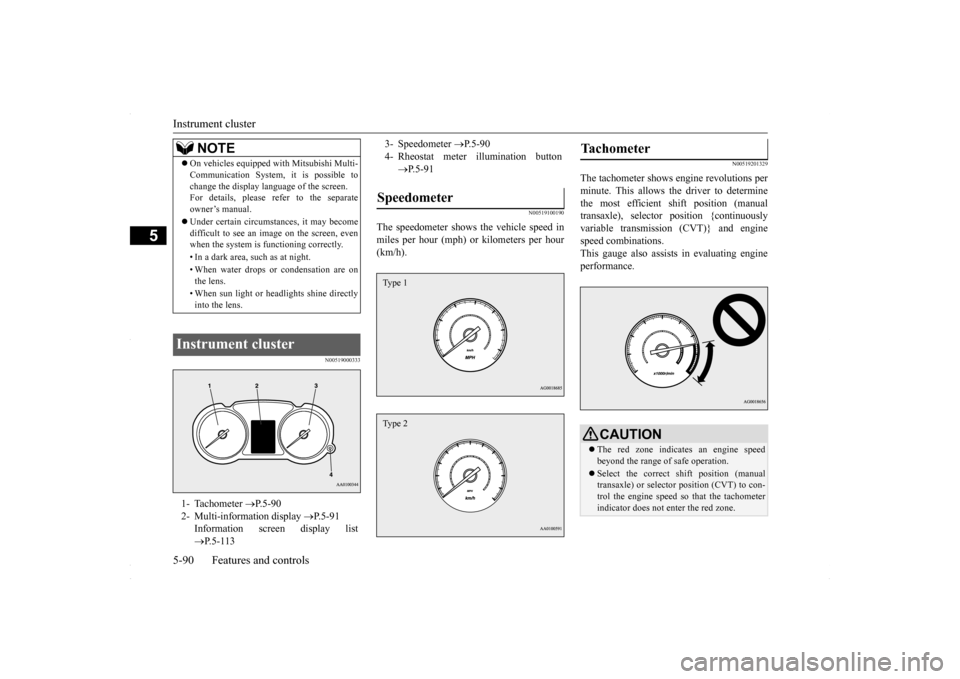
N00519000333
N00519100190
The speedometer shows the vehicle speed in miles per hour (mph) or kilometers per hour (km/h).
N00519201329
The tachometer shows engine revolutions perminute. This allows the driver to determinethe most efficient shift position (manual transaxle), selector position {continuously variable transmission (CVT)} and enginespeed combinations. This gauge also assists in evaluating engine performance.
NOTE
On vehicles equipped with Mitsubishi Multi- Communication System, it is possible to change the display language of the screen. For details, please refer to the separate owner’s manual. Under certain circumstances, it may become difficult to see an image on the screen, evenwhen the system is functioning correctly. • In a dark area, such as at night. • When water drops or condensation are on the lens. • When sun light or headlights shine directly into the lens.
Instrument cluster 1- Tachometer
P.5-90
2- Multi-information display
P.5-91
Information screen display list P.5-113
3- Speedometer
P.5-90
4- Rheostat meter illumination button
P.5-91
Speedometer Type 1Type 2
Tachometer
CAUTIONThe red zone indicates an engine speed beyond the range of safe operation. Select the correct shift position (manual transaxle) or selector position (CVT) to con- trol the engine speed so that the tachometerindicator does not enter the red zone.
BK0230300US.bo
ok 90 ページ 2015年7月30日 木曜日 午後8時38分
Page 154 of 392
Multi-information display 5-92 Features and controls
5
W i t h i g n i t i o n s w i t c h i n “ O N ” p os i t i o n { C o n t i n u o us l y
v a r i a b l e t r a n s m i s s i o n ( C V T ) }
With ignition switch in “OFF” position
With ignition switch in “ON” position (Manual transaxle)
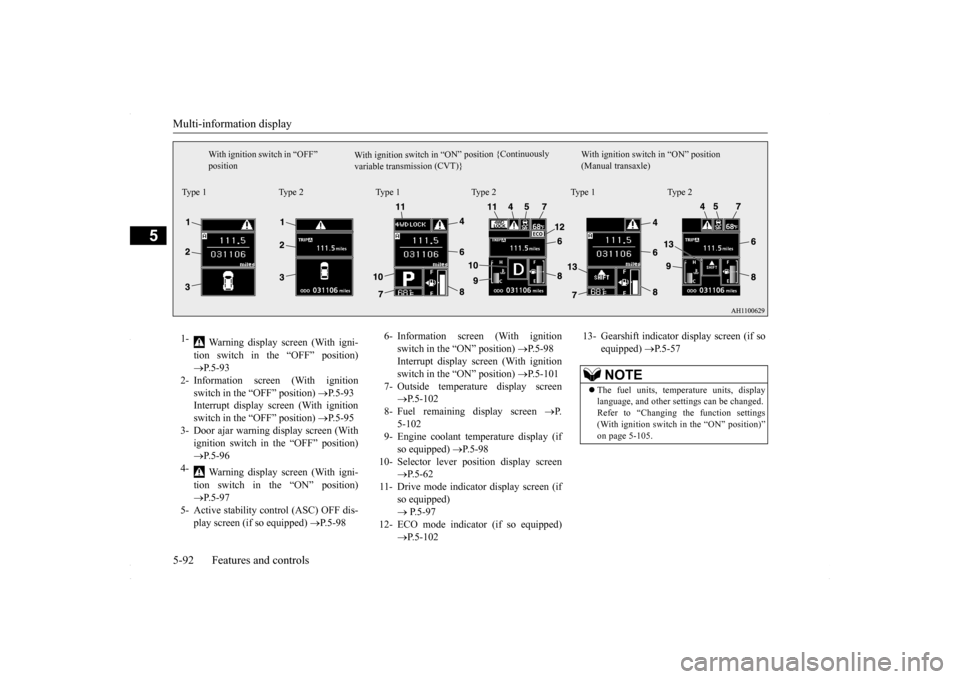
Type 1 Type 2 Type 1 Type 2 Type 1 Type 21-
Warning display screen (With igni- tion switch in the “OFF” position) P.5-93
2- Information screen (With ignition
switch in the “OFF” position)
P.5-93
Interrupt display screen (With ignition switch in the “OFF” position)
P.5-95
3- Door ajar warning display screen (With
ignition switch in the “OFF” position) P.5-96
4-
Warning display screen (With igni- tion switch in the “ON” position) P.5-97
5- Active stability control (ASC) OFF dis-
play screen (if so equipped)
P.5-98
6- Information screen (With ignition
switch in the “ON” position)
P.5-98
Interrupt display screen (With ignition switch in the “ON” position)
P.5-101
7- Outside temperature display screen
P.5-102
8- Fuel remaining display screen
P.
5-102
9- Engine coolant temperature display (if
so equipped)
P.5-98
10- Selector lever position display screen
P.5-62
11- Drive mode indicator display screen (if
so equipped) P.5-97
12- ECO mode indicator (if so equipped)
P.5-102
13- Gearshift indicator display screen (if so
equipped)
P.5-57
NOTE
The fuel units, temperature units, display language, and other settings can be changed. Refer to “Changing the function settings (With ignition switch in the “ON” position)” on page 5-105.
BK0230300US.bo
ok 92 ページ 2015年7月30日 木曜日 午後8時38分
Page 167 of 392
Multi-information display
Features and controls 5-105
5
sound 4 times to inform you that a door is ajar. The buzzer will not sound if only the trunk lid is open. Type 1 Type 2
N00556801241
1. Park your vehicle in a safe place.
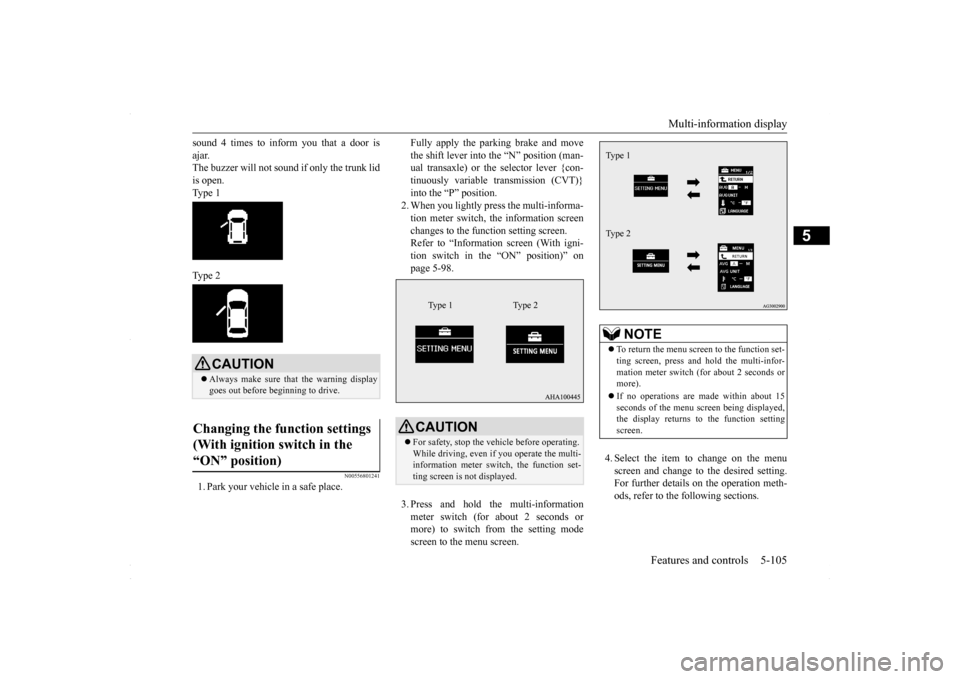
Fully apply the parking brake and move the shift lever into the “N” position (man- ual transaxle) or the selector lever {con- tinuously variable transmission (CVT)}into the “P” position. 2. When you lightly press the multi-informa- tion meter switch, the information screenchanges to the function setting screen. Refer to “Information screen (With igni- tion switch in the “ON” position)” onpage 5-98. 3. Press and hold the multi-information meter switch (for about 2 seconds or more) to switch from the setting mode screen to the menu screen.
4. Select the item to change on the menu screen and change to the desired setting. For further details on the operation meth- ods, refer to the following sections.
CAUTION Always make sure that the warning display goes out before beginning to drive.
Changing the function settings (With ignition switch in the “ON” position)
CAUTION For safety, stop the vehicle before operating. While driving, even if you operate the multi-information meter switch, the function set- ting screen is not displayed.
Type 1 Type 2
NOTE
To return the menu screen to the function set- ting screen, press and hold the multi-infor- mation meter switch (for about 2 seconds or more). If no operations are made within about 15 seconds of the menu screen being displayed,the display returns to the function setting screen.Type 1 Type 2
BK0230300US.book
105 ページ 2015年7月30日 木曜日 午後8時38分
Page 207 of 392
Bluetooth® 2.0 interface (if so equipped)
Features and controls 5-145
5
3. Say “Passcode.” 4. The voice guide will say “Passcode is enabled. Would you like to disable it?” Answer “Yes.”Answer “No” to cancel the disabling of the passcode and return to the main menu. 5. When the disabling of the passcode iscompleted, the voice guide will say “Pass- code is disabled” and the system will return to the main menu.
N00564700011
The Bluetooth
® 2.0 interface can use the
speaker enrollment function to create a voice model for one person per language. This makes it easier for the Bluetooth
® 2.0
interface to recognise voice commands said by you. You can turn a voice model registered with the speaker enrollment function on and off whenever you want.
N00564801152
It takes about 2 to 3 minutes to complete thespeaker enrollment process.To ensure the best results, run through the process while in the driver’s seat, in an envi- ronment that is as quiet as possible (whenthere is no rain or st
rong winds and the vehi-
cle windows are closed). Please turn off your phone while in speaker enrollment to prevent interruption of the process. Use the following procedure for speakerenrollment. 1. Stop your vehicle in a safe area, put the shift lever (manual transaxle) in the “N” (Neutral) position, or the selector lever{continuously variable transmission (CVT)} in the “P”(PARK) position, and then pull the parking brake lever. 2. Press the SPEECH button (except for vehicles with Mits
ubishi Multi-Commu-
nication System) or PICK-UP button (forvehicles with Mits
ubishi Multi-Commu-
nication System). 3. Say “Voice training.”
4. The voice guide will say “This operation must be performed in a quiet environment while the vehicle is stopped. See the owner’s manual for the list of requiredtraining phrases. Press and release the SPEECH button when you are ready to begin. Press the HANG-UP button to can-cel at any time.” Press the SPEECH button to start the speaker enrollment process. 5. The voice guide will prompt for phrase 1. Repeat the corresponding phrase listed in table “Enrollment commands” on page 5-162.The system will register your voice and then move on to the registration of the next command. Continue the process untilall phrases have been registered.
Speaker enrollment function
Speaker enrollment
NOTE
Speaker enrollment is not possible unless the vehicle is parked. Make sure you park the vehicle in a safe area before attempting speaker enrollment.
NOTE
If you do not start the speaker enrollment process within 3 minutes after pressing the SPEECH button, the speaker enrollment function will time out. The voice guide will say “Speaker enroll- ment has timed out.” The system will then beep and the voice recognition mode will bedeactivated.
BK0230300US.book
145 ページ 2015年7月30日 木曜日 午後8時38分
Page 209 of 392
Bluetooth® 2.0 interface (if so equipped)
Features and controls 5-147
5
1. Stop your vehicle in a safe area, put the shift lever (manual transaxle) in the “N” (Neutral) position, or the selector lever {continuously variable transmission(CVT)} in the “P” (PARK) position, and then pull the parking brake lever. 2. Press the SPEECH button (except for vehicles with Mitsubishi Multi-Commu- nication System) or PICK-UP button (for vehicles with Mitsubishi Multi-Commu-nication System). 3. Say “Setup.” 4. Say “Pairing Options.”5. The voice guide will say “Select one ofthe following: pair, edit, delete, or list.” Say “Pair.”
digit pairing code.” Say a 4-digit number. When the confirmation function is on, thesystem will confirm whether the number said is acceptable. Answer “Yes.” Answer “No” to return to pairing codeselection.
7. The voice guide will say “Start pairing procedure on the device. See the device manual for instructions.” Enter in the Bluetooth
® device the 4-digit number you
have registered in Step 6.
Pairing procedure- Type 1
(if so
equipped)NOTE
You cannot pair any Bluetooth
® device with
the Bluetooth
® 2.0 interface unless the vehi-
cle is parked. Before pairing a Bluetooth
®
device with the Bluetooth
® 2.0 interface,
confirm that the vehicle is parked in a safelocation.
NOTE
If 7 devices have already been paired, the voice guide will say “Maximum devices paired” and then the system will end the pairing process. To register a new device, delete one device and then repeat the pairingprocess. (Refer to “Deleting a device” on page 5-150.)NOTE
Some Bluetooth
® devices require a specific
pairing code. Please refer to the device man-ual for pairing code requirements.
The pairing code entered here is only used for the Bluetooth
® connection certification.
It is any 4-digit number the user would like to select. Remember the pairing code as it needs to be keyed into the Bluetooth
® device later in the
pairing process. Depending on the connection settings of the Bluetooth
® device, this code may have to be
entered each time you connect the Blue- tooth
® device to the Bluetooth
® 2.0 inter-
face. For the default connection settings, refer to the instructions for the device.NOTE
Depending on the Bluetooth
® device, it may
take a few minutes to pair it with the Blue- tooth
® 2.0 interface.
If the Bluetooth
® 2.0 interface cannot recog-
nize the Bluetooth
® device, the voice guide
will say “Pairing has timed out” and the pair-ing process will be cancelled. Confirm that the device you are pairing sup- ports Bluetooth
®, and try pairing it again.
NOTE
BK0230300US.book
147 ページ 2015年7月30日 木曜日 午後8時38分
Page 210 of 392
Bluetooth® 2.0 interface (if so equipped) 5-148 Features and controls
5
8. The voice guide will say “Please say the name of the device after the beep.” You can assign a desired name for the Blue- tooth
® device and register it as a device
tag. Say the name you want to register after the beep. 9. The voice guide will say “Pairing com- plete,” and the pairing process will end.
1. Stop your vehicle in a safe area, put the shift lever (manual transaxle) in the “N” (Neutral) position, or the selector lever{continuously variable transmission (CVT)} in the “P” (PARK) position and pull the parking brake lever. 2. Press the SPEECH button (except for vehicles with Mitsubishi Multi-Commu- nication System) or PICK-UP button (forvehicles with Mitsubishi Multi-Commu- nication System). 3. Say “Pair Device.”
4. The voice guide will say “Start pairing procedure on the device. See the device manual for instructions.” and then willsay “The pairing code is
If you enter the wrong number, the voice guide will say “Pairing failed” and the pair- ing process will be cancelled. Confirm the number is right, and try pairing it again.NOTE
When the confirmation function is on, after repeating the device tag you have said, the voice guide will ask “Is this correct?” Answer “Yes.”To change the device tag, answer “No” and then say the device tag again.NOTE
Pairing procedure- Type 2
(if so
equipped)NOTE
You cannot pair any Bluetooth
® device with
the Bluetooth
® 2.0 interface unless the vehi-
cle is parked. Before pairing a Bluetooth
®
device with the Bluetooth
® 2.0 interface,
confirm that the vehicle is parked in a safe location.
NOTE
The following procedure ( to ) can also be used instead of saying “Pair Device.” Replace this step 3 with the following proce- dure if you prefer. Say “Setup.” Say “Pairing Options.” The voice guide will say “Select one of the following: pair, edit, delete, list or set code.”Say “Pair.” voice guide will say “Maximum devices paired” and then the system will end the pairing process. To register a new device, delete one device and then repeat the pairing process.(Refer to “Selecting a device: Deleting a device” on page 5-150.)NOTE
Some Bluetooth
® devices require a specific
pairing code. Please refer to the device man- ual for pairing code requirements and read the next section “If your device requires aspecific pairing code” on page 5-149 to set the pairing code.
BK0230300US.book
148 ページ 2015年7月30日 木曜日 午後8時38分
Page 240 of 392
Safe driving techniques 6-4 Driving safety
6
Replace your tires before they are heavily worn out. As your vehicle is equipped with a tire pres- sure monitoring system, there is a risk ofdamage to the tire inflation pressure sensors when the tire is replaced on the rim. Tire replacement should, therefore, be performedonly by an authorized Mitsubishi Motors dealer. Have someone watch while you turn all the exterior lights on and off. Also check the turn signal indicators and high-beam indicators on the instrument panel. Check the ground under the vehicle after parking overnight, for fuel, water, oil, orother leaks. Make sure all the fluid levels are correct. Also, if you can smell fuel, you need to find out why immediately and have itfixed.
N00629200111
Even this vehicle’s safety equipment, andyour safest driving, cannot guarantee that you
can avoid an accident or injury. However, if you give extra attention to the following areas, you can better protect yourself and your passengers: Drive defensively. Be aware of traffic, road and weather conditions. Leave plenty of stopping distance between your vehicle and the vehicle ahead. Before changing lanes, check your mir- rors and use your turn signal light. While driving, watch the behavior of other drivers, bicyclists, and pedestrians. Always obey applicable laws and regula- tions. Be a polite and alert driver. Always leave room for unexpected events, such assudden braking. If you plan to drive in another country, obey their vehicle registration laws andmake sure you will be able to get the right fuel.
N00629401497
Check the battery, including terminals and cables. During extremely cold weather, the battery will not be as strong. Also, thebattery power level may drop because more power is used for cold starting and driving.
Before driving the vehicle, check to see if the engine runs at the proper speed and if the headlights are as bright as normally. Charge or replace the battery if necessary.During extreme cold weather, it is possi- ble that a very low battery could freeze. Warm the engine sufficiently. After start- ing the engine, allow a short warm-up time to distribute oil to all cylinders. Thendrive your vehicle slowly. Stay at low speeds at first so that the transaxle, transfer case and rear axle oilhave time to spread to all the lubrication points. Manual transaxle can be harder to shift in cold weather conditions. This is normal and shifting will get easier as the transaxle warms up. Check the engine antifreeze. If there is not enough coolant because of a leak or from engine overheating, add Mit-subishi Motors Genuine Super Long Life Coolant Premium or equivalent.
Lights Fluid leaks Safe driving techniques
Driving during cold weather
WA R N I N G The battery gives off explosive hydrogen gas. Any spark or flame can cause the bat- tery to explode, which could cause seriousinjury or death. Always wear protective clothes and a face mask when working with your battery, orlet a skilled mechanic do it.
BK0230300US.bo
ok 4 ページ 2015年7月30日 木曜日 午後8時38分
Page 241 of 392
Braking
Driving safety 6-5
6
Please read this section in conjunction with the “Engine coolant” on page 9-7.
N00629500446
All the parts of the brake system are criticalto safety. Have the vehicle serviced by anauthorized Mitsubishi Motors dealer or a repair facility of your choice at regular inter- vals according to the “WARRANTY ANDMAINTENANCE MANUAL”. Check the brake system while driving at a low speed immediately after starting, espe- cially when the brakes are wet, to confirm they work normally.A film of water can be formed on the brake discs or brake drums and prevent normal braking after driving in heavy rain or throughlarge puddles, or after the vehicle is washed. If this occurs, dry the brakes out by driving slowly while lightly depressing the brakepedal.
On snowy roads, ice can form on the braking system, making the brakes less effective.While driving in such conditions, pay close attention to preceding and following vehicles and to the condition of
the road surface. From
time to time, lightly depress the brake pedal and check how effective the brakes are. It is important to take advantage of the engine braking by shifting to a lower gear while driving on steep downhill roads in order to prevent the brakes from overheating.
N00629601356
When parking on a hill, set the parking brake,and turn the front wheels toward the curb on adownhill, or away from the curb on an uphill. If necessary, apply chocks to wheels.
Place the gearshift lever into the “R” (Reverse) position when parking on a down- hill slope, into the 1s
t position when parking
on an uphill slope. Be sure that the parking brake is firmly set when parked and that the selector lever is in the “P” (PARK) position.When parking on a hill, it is important to set the parking brake before moving the selector lever to the “P” (PARK) position. This pre-vents loading the parking brake against the transaxle gear. When this happens, it is diffi- cult to move the selector lever out of the “P”(PARK) position. Never leave the engine running while you take a short sleep/rest. Also, never leave the engine running in a closed or poorly venti-lated place.
WA R N I N G Never open the radiator cap when the radiator is hot. You could be seriouslyburned.
Braking When brakes are wet
When driving in cold weather When driving downhill Parking Parking on a hill
For vehicles with manual trans- axle For vehicles with continuously variable transmission (CVT) Parking with the engine run- ning
BK0230300US.bo
ok 5 ページ 2015年7月30日 木曜日 午後8時38分
Page 242 of 392
Loading information 6-6 Driving safety
6
Your front bumper can be damaged if you scrape it over curbs or parking stop blocks.Be careful when traveling up or down steep slopes where your bumper can scrape the road. When leaving the vehicle unattended, always carry the key and lock all doors.Always try to park your vehicle in a well lit area.
N00629900349
It is very important to know how much weight your vehicle can carry. This weight iscalled the vehicle capacity weight and includes the weight of all occupants, cargo and non-factory-installed options. The tireand loading information placard located on the driver’s door sill of your vehicle will show how much weight it may properly carry. It is important to familiarize yourself with the following terms before loading your vehicle: Vehicle maximum load on the tire: load on an individual tire that is determined by distributing to each axle its share of the maximum loaded vehicle weight anddividing by two. Vehicle normal load on the tire: load on an individual tire that is determined by dis-tributing to each axle its share of the curb weight, accessory weight, and normal occupant weight and dividing by two.
Maximum loaded vehicle weight: the sum of - (a) Curb weight; (b) Accessory weight;(c) Vehicle capacity weight; and (d) Production options weight. Curb weight: the weight of a motor vehi- cle with standard equipment including the maximum capacity of fuel, oil, and cool- ant. Accessory weight: the combined weight (in excess of those standard items which may be replaced) of automatic transmis- sion, power steering, power brakes, powerwindows, power seats, radio, and heater, to the extent that these items are available as factory- installed equipment (whetherinstalled or not). Vehicle capacity weight: the rated cargo and luggage load plus 150 lbs (68 kg)
*
times the vehicle’s designated seating capacity. Production options weight: the combined weight of those installed regular produc- tion options weighing over 5 lbs (2.3 kg) in excess of those standard items whichthey replace, not previously considered in curb weight or accessory weight, includ- ing heavy duty brakes, ride levelers, roofrack, heavy duty battery, and special trim.
WA R N I N G Leaving the engine running risks injury or death from accidentally moving the gear- shift lever (manual transaxle or the selec- tor lever (CVT) or from the accumulation of toxic exhaust fumes in the passengercompartment.
Where you park
WA R N I N G Do not park your vehicle in areas where combustible materials such as dry grass or leaves can come in contact with a hotexhaust, since a fire could occur.
When leaving the vehicle
Loading information
WA R N I N G Never overload your vehicle. Overloading can damage your vehicle, adversely affectvehicle performance, including handling and braking, cause tire failure, and result in an accident.
BK0230300US.bo
ok 6 ページ 2015年7月30日 木曜日 午後8時38分
Page 312 of 392
If the vehicle breaks down 8-2 For emergencies
8
N00836300161
If your vehicle breaks down on the road, move to the shoulder and turn on the hazardwarning flashers. If there is no shoulder, or the shoulder is not safe, drive in the right lane slowly, with the hazard lights flashing, untilyou come to a safe stopping place. Keep the flashers flashing. If the engine stops, there will be no power assist to the steering and brakes, making these difficult to use. The brake booster will not work, so the brakes will not grip well. The brake pedalwill be harder to press than usual. Since there is no power steering assist, the steering wheel will be hard to turn.
Get help from your passengers, bystanders, etc. to push the vehicl
e and move it to a safe
zone.
N00836401808
If the engine cannot be started because the battery is weak or dead, you can start it withthe battery from another vehicle using jumper cables. 1. Take off any metal jewelry such as watch bands or bracelets that might make an accidental electrical contact. 2. Position the vehicles close enough together so that the jumper cables can reach, but be sure the vehicles aren’ttouching each other.
3. You could be injured if the vehicles move. Set the parking brake firmly on each vehi-cle. Put an automatic transaxle, CVT in “P” (PARK) or a manual transaxle in “N” (Neutral). Turn the ignition key to the“LOCK” position. 4. Make sure your battery electrolyte is at the proper level. (Refer to “Checking bat- tery electrolyte level” on page 9-12.)
If the vehicle breaks down If the engine stops/fails When the engine fails at the intersection
Jump-starting the engine
WA R N I N G When using jumper cables to start a vehi- cle, follow the procedures and be very cau- tious. CAUTION Do not try to start your vehicle by pushing or towing. Vehicles with continuously variable transmission (CVT) cannot be started this way. Pushing or towing a vehicle that has amanual transaxle may overheat and damage the catalytic converter. Also, there is more risk of an accident when a vehicle is beingpushed or towed.
CAUTION Check the other vehicle. It must have a 12- volt battery. If the other system isn’t 12-volt, both systems can be damaged.WA R N I N G Turn the ignition key to the “LOCK” posi- tion on both vehicles. Make sure that thecables or your clothes cannot be caught by the fan or drive belt. Personal injury could result. NOTE
Turn off all lights, heater, and other electrical loads. This will avoid sparks and help save both batteries.
BK0230300US.bo
ok 2 ページ 2015年7月30日 木曜日 午後8時38分