ad blue MITSUBISHI LANCER 2016 8.G Owner's Guide
[x] Cancel search | Manufacturer: MITSUBISHI, Model Year: 2016, Model line: LANCER, Model: MITSUBISHI LANCER 2016 8.GPages: 392, PDF Size: 13.12 MB
Page 226 of 392
USB input terminal 5-164 Features and controls
5
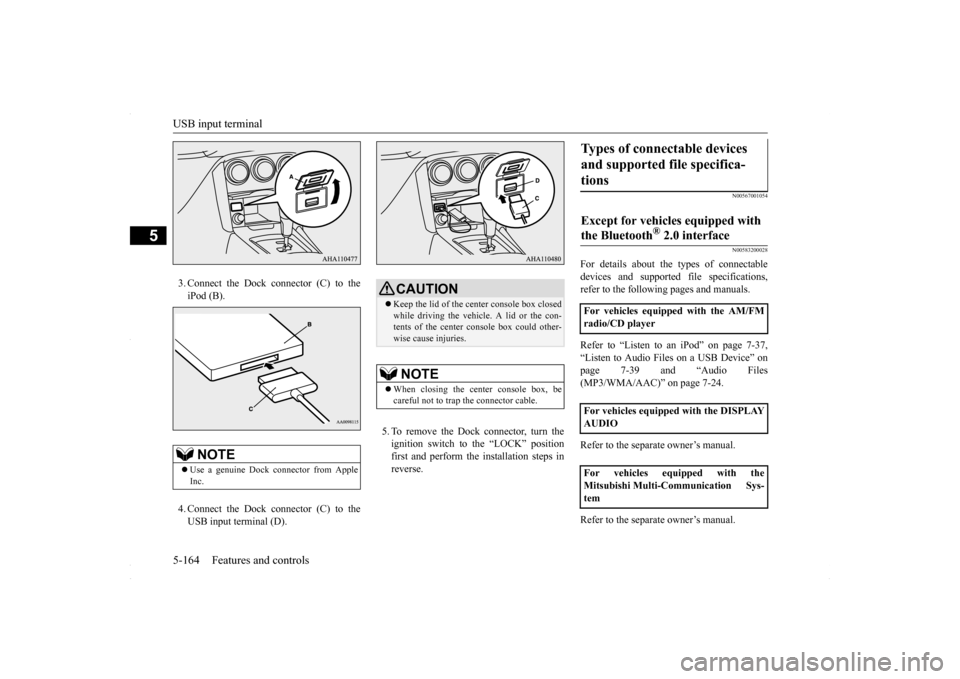
3. Connect the Dock connector (C) to the iPod (B). 4. Connect the Dock connector (C) to the USB input terminal (D).
5. To remove the Dock connector, turn the ignition switch to the “LOCK” position first and perform the installation steps inreverse.
N00567001054 N00583200028
For details about the types of connectable devices and supported file specifications,refer to the following pages and manuals. Refer to “Listen to an iPod” on page 7-37, “Listen to Audio Files on a USB Device” on page 7-39 and “Audio Files (MP3/WMA/AAC)” on page 7-24. Refer to the separate owner’s manual. Refer to the separate owner’s manual.
NOTE
Use a genuine Dock connector from Apple Inc.
CAUTION Keep the lid of the center console box closed while driving the vehicle. A lid or the con- tents of the center console box could other-wise cause injuries.NOTE
When closing the center console box, be careful not to trap the connector cable.
Types of connectable devices and supported file specifica- tions Except for vehicles equipped with the Bluetooth
® 2.0 interface
For vehicles equipped with the AM/FM radio/CD player For vehicles equipped with the DISPLAY AUDIO For vehicles equipped with the Mitsubishi Multi-Communication Sys-tem
BK0230300US.book
164 ページ 2015年7月30日 木曜日 午後8時38分
Page 227 of 392
USB input terminal
Features and controls 5-165
5
N00583300029
For details about the types of connectable devices and supported file specifications, refer to the following section.
N00583400020
Devices of the following types can be con-nected. For these connectable device types, “iPod*,” “iPod classic*,” “iPod nano*,” “iPod touch*” and “iPhone*,” refer to the following web- site:[For vehicles sold in U.S.A.] You can access the Mitsubishi Motors North America website.[For vehicles sold in Canada and Mexico] You can access the Mitsubishi Motors web- site. Please read and agree to the “Warningabout Links to the Web Sites of Other Com-
panies”. The websites mentioned above may connect you to websites other than the Mitsubishi Motors website. http://www.mitsubishi-motors.com/en/prod-ucts/index.html
N00583500021
You can play music files of the following specifications that are saved in a USB mem- ory device or other device supporting massstorage class. When you connect your iPod, playable file specifications depend on the connected iPod.
For vehicles equipped with the Bluetooth
® 2.0 interface
Device types Model name
Condition
USB memory device
Storage capacity of 256 Mbytes or more
Models other than USB memory devices and iPods
Digital audio player supporting mass storage class
* : “iPod,” “iPod classic,” “iPod nano,” “iPod touch,” and “iPhone” are regis- tered trademarks of Apple Inc. in the United States and other countries.NOTE
Depending on the type of the USB memory device or other device connected, the con- nected device may not function properly or the available functions may be limited. It is recommended to use an iPod with firm- ware updated to the latest version. You can charge your iPod by connecting it to the USB input terminal when the ignitionswitch is in the “ACC” or “ON” position. Do not keep your USB memory device or iPod in your vehicle. It is recommended that you back up the files in case of data damage. Do not connect to the USB input terminal any device (hard disk, card reader, memory reader, etc.) other than the connectabledevices specified in the previous section. The device and/or data may be damaged. If any of these devices was connected by mis-take, remove it after turning the ignition switch to the “LOCK” position.
File specifications Item
Condition
File format
MP3, WMA, AAC, WAV
Maximum number of levels(including the root)
Level 8
Number of folders 700 Number of files 65,535
BK0230300US.book
165 ページ 2015年7月30日 木曜日 午後8時38分
Page 251 of 392
7
Comfort controlsVents .........................................
.......................................................7-2
Heater without air conditioning function (if so equipped) ...............7-4 Automatic air conditioning
with Fahrenheit scale
(if so equipped) .
.................................................
..........................7-7
Automatic air conditioning with Cels
ius scale (if so equipped) .....7-12
Important air conditioning op
erating tips ......................................7-18
Air purifier ......................
...............................................................7-18
AM/FM radio/CD player (if so equipped) .....................................7-19 Handling of Discs .
.................................................
........................7-22
Audio Files (MP3/WMA/
AAC) ....................................................7-24
Important Points on Safety fo
r the Customer ................................7-28
Operation Keys ...............
...............................................................7-28
Listen to Radio ......
.................................................
........................7-32
Listen to Satellite Radio (if so equipped) .......................................7-33 Listen to CDs ..................
...............................................................7-35
Listen to MP3s ......
.................................................
........................7-36
Listen to an iPod ...
.................................................
........................7-37
Listen to Audio Files on
a USB Device .........................................7-39
To play iPod/USB memory device tracks via voice operation (vehicles with Bluetooth 2.0
interface) ......................................7-42
Listen to Bluetooth Audio (i
f so equipped) ....................................7-45
Display Indicator ..
.................................................
........................7-47
Audio Quality and Volume Balance Adjustment ...........................7-48System Settings .....
.................................................
........................7-49
Troubleshooting ..............
...............................................................7-53
Antenna .....................................
.....................................................7-55
Clock (if so equipped)
............................................
........................7-56
General information about
your radio ...........................................7-57
BK0230300US.bo
ok 1 ページ 2015年7月30日 木曜日 午後8時38分
Page 270 of 392
AM/FM radio/CD player (if so equipped) 7-20 Comfort controls
7
“Made for iPod”, “Made for iPhone” mean that an electronic accessory has been designed to connect specifically to iPod or iPhone, respectively, and has beencertified by the developer to meet Apple performance standards. iPhone, iPod, iPod classic, iPod nano, andiPod touch are trademarks of Apple Inc., registered in the U.S. and other countries. Apple is not responsible for the operationof this device or its compliance withsafety and regulatory standards.NOTE
iPod and iTunes licensing allows individual users to privately reproduce and play back non- copyrighted material as well as material that may be legally copied and reproduced.Infringement of copyright is prohibited.
For vehicles with a Bluetooth
® 2.0 interface,
the types of devices that can be connectedmay vary. [For vehicles sold in U.S.A.] For details, access the Mitsubishi MotorsNorth America website. [For vehicles sold in Canada and Mexico] For details, access the Mitsubishi Motorswebsite. Please read and agree to the “Warn- ing about Links to the Web Sites of Other Companies”. The websites mentioned abovemay connect you to websites other than the Mitsubishi Motors website. http://www.mitsubishi-motors.com/en/prod-ucts/index.htmlNOTE
BK0230300US.bo
ok 20 ページ 2015年7月30日 木曜日 午後8時38分
Page 281 of 392
Operation Keys
Comfort controls 7-31
7
N00716800084
13-
5 key Play/Pause Bluetooth Audio
*2, and use
as preset key 5 for radio.
14-
6 key Return during audio track search, and stop Bluetooth Audio
*2.
For radio, use as preset key 6.
15-
key/ key
For audio, select audio track/file; forradio, perform automatic station selec- tion. Select channels in the satellite radio*
1.
16- MENU key
Switch to Menu mode.
17-
/SEL key
Adjust audio quality and select items.For radio, manually select stations. Select channels in the satellite radio*
1.
*1: Requires a satellite tuner connection.*2: Requires a separately-purchased Blue- tooth-capable audio device in equip- ment by type (vehicles with a Bluetooth
® 2.0 interface).
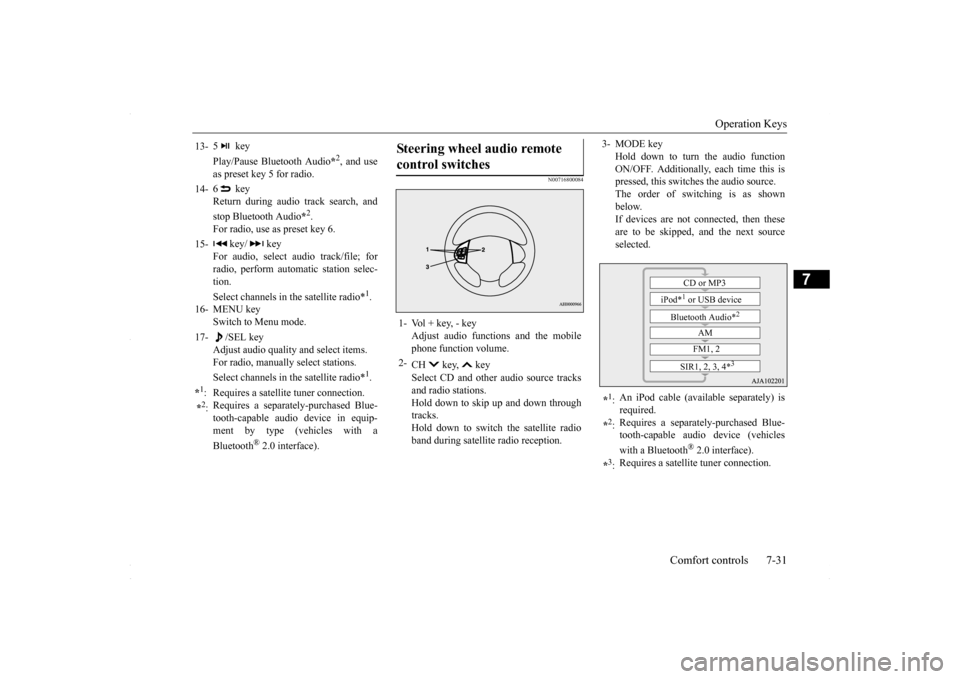
Steering wheel audio remote control switches 1- Vol + key, - key
Adjust audio functions and the mobilephone function volume.
2-
CH key, key Select CD and other audio source tracks and radio stations.Hold down to skip up and down through tracks. Hold down to switch the satellite radioband during satellite radio reception.
3- MODE key
Hold down to turn the audio functionON/OFF. Additionally, each time this is pressed, this switches the audio source. The order of switching is as shownbelow. If devices are not connected, then these are to be skipped, and the next sourceselected.
*1: An iPod cable (available separately) is required.
*2: Requires a separately-purchased Blue- tooth-capable audio device (vehicles with a Bluetooth
® 2.0 interface).
*3: Requires a satellite tuner connection.
CD or MP3
iPod*
1 or USB device
Bluetooth Audio*
2
AM FM1, 2
SIR1, 2, 3, 4*
3
BK0230300US.bo
ok 31 ページ 2015年7月30日 木曜日 午後8時38分
Page 288 of 392
Listen to an iPod 7-38 Comfort controls
7
Press the MEDIA key to set the iPod as the source. The selected source is indicated on the dis- play.
Press the key or key to select the track. This enables selection of the next or previous track. Hold down the 3 key or the 4 key. Fast forward/rewind is possible. Repeat playback and shuffle playback are possible. Press the 1RPT key. Repeat playback of th
e track currently being
played.
For vehicles with a Bluetooth
® 2.0 interface,
the types of devices that can be connectedmay vary. [For vehicles sold in U.S.A.] For details, access the Mitsubishi MotorsNorth America website. [For vehicles sold in Canada and Mexico] For details, access the Mitsubishi Motorswebsite. Please read and agree to the “Warn- ing about Links to the Web Sites of Other Companies”. The websites mentioned abovemay connect you to websites other than the Mitsubishi Motors website. http://www.mitsubishi-motors.com/en/prod-ucts/index.html Regarding how to connect the iPod/iPhone, refer to “How to connect an iPod” on page 5-163. When connecting the iPod/iPhone, use a commercially-available iPod connectioncable. Set up the device in order that no unsafe actions, such as plugging in the connection cable are taken while driving. When inserting and removing the iPod/iPhone, for safety’s sake first stop the vehicle. Depending on the status of the iPod/iPhone, it may take some time until the device is rec-ognized, or playback starts. Buttons on the product will not operate while iPod/iPhone is connected.NOTE
iPod/iPhone specifications and settings may mean that connection is not possible, or result in differences in operation or display. Depending on audio data in the iPod/iPhone, track information may not be displayed cor- rectly. Depending on the status of the vehicle and device, the iPod/iPhone may not play back after starting the engine. Data containing copyright information may not play back. It is recommended that the iPod/iPhone equalizer settings be set to flat. Operate the iPod/iPhone while connected to this product. If the iPod/iPhone is connected via Bluetooth as a Bluetooth-capable audio device, then donot connect the iPod/iPhone using an iPod cable. Connection using both methods will result in erroneous operation. If an iPod/iPhone does not operate correctly, then remove the iPod/iPhone from the prod-uct, reset, then reconnect.
Play iPod
NOTE
Select the Track (File) Fast Forward or Rewind Switch Playback Mode Repeat Playback (RPT)
NOTE
Pressing again will cancel.
BK0230300US.bo
ok 38 ページ 2015年7月30日 木曜日 午後8時38分
Page 290 of 392
Listen to Audio Files on a USB Device 7-40 Comfort controls
7
Press the MEDIA key to set USB as the source. The selected source is indicated on the dis- play.
Press the key or key to select the track. This enables selection of the next or previous track. Hold down the 3 key or the 4 key. Fast forward/rewind is possible. Repeat playback, random playback, and scan playback are possible. Press the 1RPT key. Repeat playback of th
e track currently being
played.
For details regarding the types of USB devices that can be connected and the types of files that can be played back in vehicles with a Bluetooth
® 2.0 interface, refer to
“Types of connectable devices and supportedfile specifications” on page 5-164. Regarding how to connect USB devices, refer to “How to connect a USB memory device” on page 5-163. When connecting a USB device, use a con- nection cable. Failure to use a connection cable when connecting may place undue loadon, or damage the USB connector. Set up the device in order that no unsafe actions, such as plugging in the connection cable are taken while driving. When inserting and removing the USB device, for safety’s sake first stop the vehi- cle. Do not insert other than audio devices into the USB port. Damage to the device or equipment may result. Depending on the status of the USB device, it may take some time until the device is rec- ognized, or playback starts. Depending on USB devices, buttons on the product will not operate while the USBdevice is connected. USB device specifications and settings may mean that connection is not possible, or result in differences in operation or display.NOTE
Depending on audio data in the USB device, track information may not be displayed cor- rectly. Depending on the status of the vehicle and device, the iPod/iPhone may not play back after starting the engine. Data containing copyright information may not play back. This product can play back MP3, WMA, and AAC format audio files. Depending on the type of USB device, usage may not be possible, or functions that can be used may be restricted. The recommended file system for USB memory is FAT32. The maximum supported capacity for USB memory is 32GB. Operate the USB device containing recorded audio files while connected to this product.
Play Back of Audio Files on a USB Device
NOTE
Select the Track (File) Fast Forward or Rewind Switch Playback Mode Repeat Playback (RPT)
NOTE
Pressing again will cancel.
BK0230300US.bo
ok 40 ページ 2015年7月30日 木曜日 午後8時38分
Page 291 of 392
Listen to Audio Files on a USB Device
Comfort controls 7-41
7
Hold down the 1RPT key. Repeat playback of the tracks within the folder currently being played. Press the 2RDM key. Play tracks in the folder currently being played in a random order.
Hold down the 2RDM key. Play the tracks in all folders in a random order. Press the SCAN key. Play the first 10 seconds of each of the tracks on the whole USB device in order.
Hold down the SCAN key. Play the first 10 seconds of the first track in each folder on the USB device in order. Search folders and files, and select a track. 1. Turn the /SEL key to select the folder. 2. Press the /SEL key. Files within the selected folder are dis- played. 3. Turn the /SEL key to select the file.4. Press the /SEL key.
Selecting a file will cancel this. However, it will not be cancelled in vehicles with a Bluetooth
® 2.0 interface.
Folder Repeat Playback
NOTE
Pressing again will cancel. Selecting a folder will cancel this. Cycling up/down through files will cancel this. Even if the file is selected, folder repeat playback will not be cancelled.
Folder Random Playback (RDM)
NOTE
Pressing again will cancel. Selecting a folder will cancel this.NOTE
Cycling up/down through files will cancel this. Even if the file is selected, folder random playback will not be cancelled.
All Folder Random Playback
NOTE
Pressing again will cancel. Selecting a folder will cancel this. Cycling up/down through files will cancel this. Even if the file is selected, all folder random playback will not be cancelled.
Scan Playback (SCAN)
NOTE
NOTE
Press this button again during playback if you wish to hear that track, and that track will play normally.
Folder Scan Playback
NOTE
Press this button again during playback if you wish to hear that track, and that track will play normally.
Search Tracks
BK0230300US.bo
ok 41 ページ 2015年7月30日 木曜日 午後8時38分
Page 292 of 392
To play iPod/USB memory device tracks via voice
operation (vehicles with
Bluetooth 2.0 interface)
7-42 Comfort controls
7
This plays the selected file (track).
N00772001041
When connected to the USB input terminal, desired tracks on the iPod/USB memorydevice which is connected to the USB input
terminal can be selected and played via voice operation. For information concerning the voice recog- nition function or speaker registration func- tion, refer to “Bluetooth
® 2.0 interface” on
page 5-139. The following explains how to prepare forvoice operation and play the tracks.
N00772101042
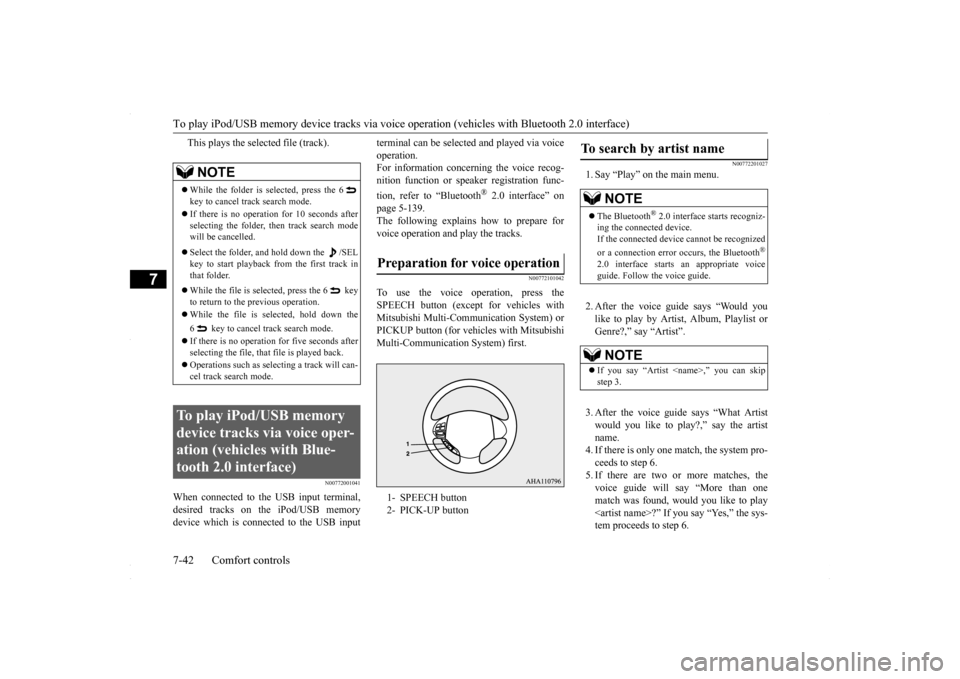
To use the voice operation, press theSPEECH button (except for vehicles withMitsubishi Multi-Communication System) or PICKUP button (for vehicles with Mitsubishi Multi-Communication System) first.
N00772201027
1. Say “Play” on the main menu. 2. After the voice guide says “Would you like to play by Artist, Album, Playlist or Genre?,” say “Artist”. 3. After the voice guide says “What Artist would you like to play?,” say the artist name. 4. If there is only one match, the system pro-ceeds to step 6. 5. If there are two or more matches, the voice guide will say “More than onematch was found, would you like to play
NOTE
While the folder is selected, press the 6 key to cancel track search mode. If there is no operation for 10 seconds after selecting the folder, then track search mode will be cancelled. Select the folder, and hold down the /SEL key to start playback from the first track in that folder. While the file is selected, press the 6 key to return to the previous operation. While the file is selected, hold down the 6 key to cancel track search mode. If there is no operation for five seconds after selecting the file, that file is played back. Operations such as selecting a track will can- cel track search mode.
To play iPod/USB memory device tracks via voice oper-ation (vehicles with Blue-tooth 2.0 interface)
Preparation for voice operation 1- SPEECH button 2- PICK-UP button
To search by artist name
NOTE
The Bluetooth
® 2.0 interface starts recogniz-
ing the connected device. If the connected device cannot be recognized or a connection error occurs, the Bluetooth
®
2.0 interface starts an appropriate voice guide. Follow the voice guide.NOTE
If you say “Artist
BK0230300US.bo
ok 42 ページ 2015年7月30日 木曜日 午後8時38分
Page 293 of 392
To play iPod/USB memory device tracks via voice
operation (vehicles with Bluetooth 2.0 interface)
Comfort controls 7-43
7
If you say “No,” the next matching artist is uttered by the system. 6. After the voice guide says “Playing
N00772301028
1. Say “Play” on the main menu.
2. After the voice guide says “Would you like to play by Artist, Album, Playlist or Genre?,” say “Album”. 3. After the voice guide says “What Album would you like to play?” say the albumtitle. 4. If there is only one match, the system pro- ceeds to step 6.5. If there are two or more matches, the voice guide will say “More than one match was found, would you like to play
6. After the voice guide says “Playing
N00772401029
1. Say “Play” on the main menu.
NOTE
If you say “No” to three or all artist names uttered by the system, the voice guide willsay “Artist not found, please try again” and the system returns to step 2. Search time is dependant on the number of songs on your connected device. Devices containing a large number of songs may takelonger to return search results.NOTE
If the confirmation function is active, the voice guide confirms if the artist name is correct. If the artist name is correct, say “Yes”. If not, say “No”. After the voice guidesays “Artist not found, please try again,” the system returns to step 2.
To search by album title
NOTE
The Bluetooth
® 2.0 interface starts recogniz-
ing the connected device.If the connected device cannot be recognized or a connection error occurs, the Bluetooth
®
2.0 interface starts an appropriate voice guide. Follow the voice guide.NOTE
If you say “Album