change wheel MITSUBISHI LANCER 2016 8.G Owners Manual
[x] Cancel search | Manufacturer: MITSUBISHI, Model Year: 2016, Model line: LANCER, Model: MITSUBISHI LANCER 2016 8.GPages: 392, PDF Size: 13.12 MB
Page 33 of 392
Seat
belts
Seat and restraint systems
4-9
4
This
system
is designed
to provide
both
com-
fort
and
safet
y. It permit
s full
exten
sion
and
automatic
retraction
of
the
belts
during
nor
-
mal
vehicle
operation.
A
sensing
device
inside
the
belt
retractor
is designed
to lock
the
retractor
in
the
event
of
a sudden
change
in
the vehicle
’s motion.
1.Occupants
should
always
sit
back
in their
seats
with
their
backs
against
the
upright
seatback.
To reduce
the
risk
of
serious
injury
or
death
during
deployment
of
the
airbag,
adjust
the
driver
’s seat
as
far
back
as possible
while
maintaining
a pos
ition
that
still
enables
you
to
fully
apply
the
pedals,
easily
control
the
steering
wheel,
and
safely
operate
the
vehicle.
The
front
passenger
seat
should
also
be
moved
as
far
back
as
possible.
Refer
to
“Supple-
mental
Restraint
System
(SRS)
- airbag”
on
page
4-20.
Also
refer
to “To adjust
the
seat forward or backward” on page 4-3.
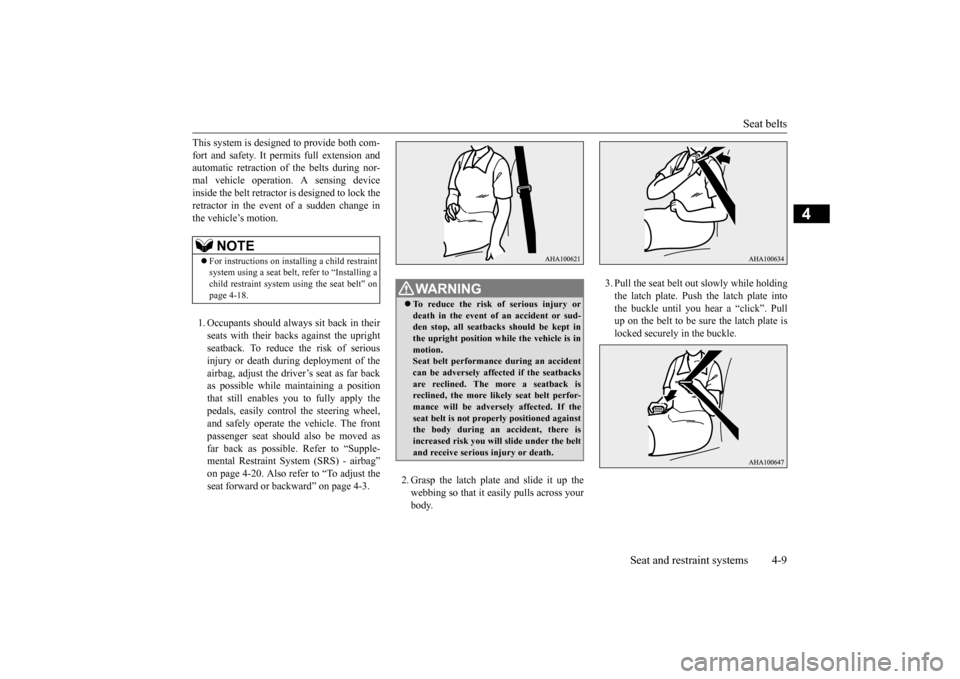
2.Grasp
the
latch
plate
and
slide
it up
the
webbing
so
that
it easily
pulls
across
your
body
.
3.Pull
the
seat
belt
out
slowly
while
holding
the
latch
plate.
Push
the
latch
plate
into
the
buckle
until
you
hear
a “click”.
Pull
up
on
the
belt
to be
sure
the
latch
plate
is
locked securely in the buckle.
NOTE
For
instructions
on
installing
a child restrain
t
system
using
a seat
belt,
refer
to “Installing
a
child
restraint
system
using
the
seat
belt”
on
page
4-18.
W
AR
NING
To reduce
the
risk
of
serious
injury
or
death
in the
event
of an
accident
or
sud-
den stop,
all
seatbacks
sho
uld be kept
in
the
upright
position
while
the
vehicle
is in
motion.Seat
belt performance
during
an accid
ent
can
be
adversely
affected
if the
seatbacks
are reclined.
The
mor
e a seatback
is
reclined,
the
mor
e likely
seat
belt
perfor
-
mance
will
be
adversely
affected.
If the
seat
belt
is not
properly
positioned
against
the
body durin
g an
accid
ent,
the
re is
increas
ed risk
you
will slide under
the
belt
and
receive s
erious
injur
y or
death.
Page 115 of 392
Ignition switch
Features and controls 5-53
5
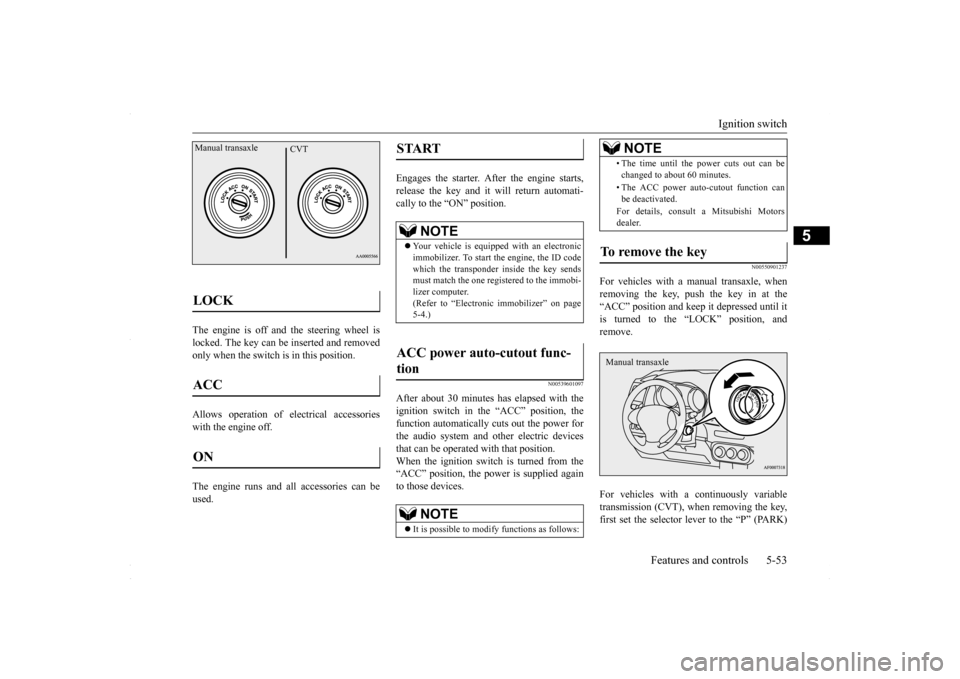
The engine is off and the steering wheel is locked. The key can be inserted and removedonly when the switch is in this position. Allows operation of electrical accessories with the engine off. The engine runs and all accessories can be used.
Engages the starter. After the engine starts, release the key and it will return automati-cally to the “ON” position.
N00539601097
After about 30 minutes has elapsed with theignition switch in the “ACC” position, the function automatically cuts out the power for the audio system and other electric devicesthat can be operated with that position. When the ignition switch is turned from the “ACC” position, the power is supplied againto those devices.
N00550901237
For vehicles with a manual transaxle, whenremoving the key, push the key in at the“ACC” position and keep it depressed until it is turned to the “LOCK” position, and remove. For vehicles with a continuously variable transmission (CVT), when removing the key,first set the selector lever to the “P” (PARK)
LOCK ACC ON Manual transaxle
CVT
START
NOTE
Your vehicle is equipped with an electronic immobilizer. To start the engine, the ID code which the transponder inside the key sendsmust match the one registered to the immobi- lizer computer. (Refer to “Electronic immobilizer” on page5-4.)
ACC power auto-cutout func- tion
NOTE
It is possible to modify functions as follows:
• The time until the power cuts out can be changed to about 60 minutes. • The ACC power auto-cutout function can be deactivated. For details, consult a Mitsubishi Motors dealer.
To remove the key
NOTE
Manual transaxle
BK0230300US.bo
ok 53 ページ 2015年7月30日 木曜日 午後8時38分
Page 126 of 392
Continuously variable transm
ission (CVT) (if so equipped)
5-64 Features and controls
5
This position is for driving up very steep hills and for engine braki
ng at low speeds when
driving down steep hills.
N00514401469
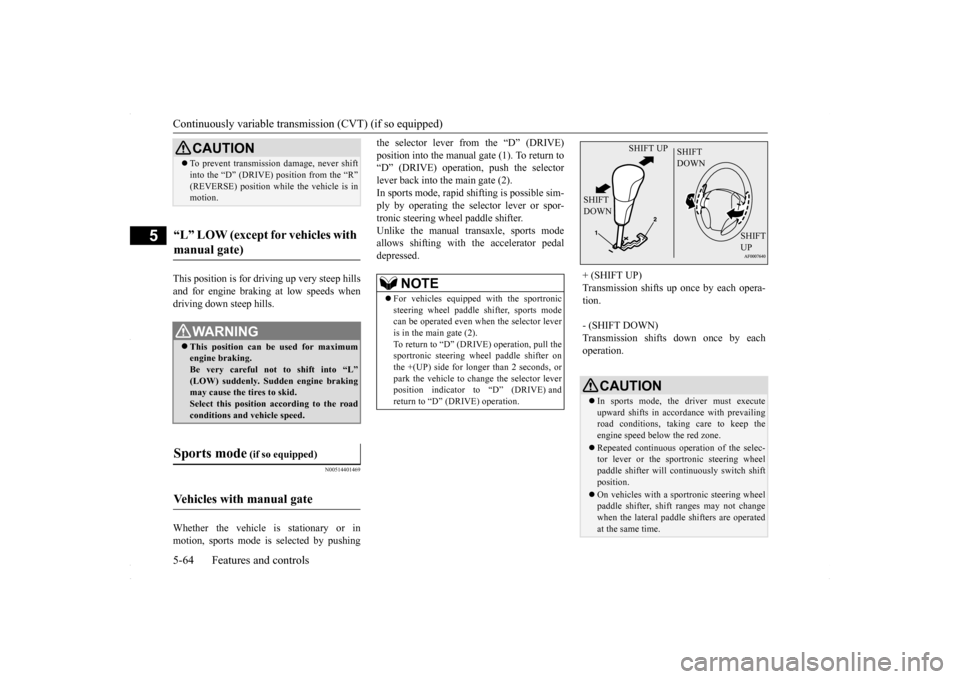
Whether the vehicle is stationary or in motion, sports mode is selected by pushing
the selector lever from the “D” (DRIVE) position into the manual gate (1). To return to “D” (DRIVE) operation, push the selector lever back into the main gate (2).In sports mode, rapid shifting is possible sim- ply by operating the selector lever or spor- tronic steering wheel paddle shifter.Unlike the manual transaxle, sports mode allows shifting with the accelerator pedal depressed.
CAUTION To prevent transmission damage, never shift into the “D” (DRIVE) position from the “R” (REVERSE) position while
the vehicle is in
motion.
“L” LOW (except for vehicles with manual gate)
WA R N I N G This position can be used for maximum engine braking.Be very careful not to shift into “L” (LOW) suddenly. Sudden engine braking may cause the tires to skid.Select this position according to the road conditions and vehicle speed.
Sports mode
(if so equipped)
Vehicles with manual gate
NOTE
For vehicles equipped with the sportronic steering wheel paddle shifter, sports modecan be operated even when the selector lever is in the main gate (2). To return to “D” (DRIVE) operation, pull thesportronic steering wheel paddle shifter on the +(UP) side for longer than 2 seconds, or park the vehicle to change the selector leverposition indicator to “D” (DRIVE) and return to “D” (DRIVE) operation.
+ (SHIFT UP) Transmission shifts up once by each opera- tion. - (SHIFT DOWN) Transmission shifts down once by each operation.
CAUTION In sports mode, the driver must execute upward shifts in accordance with prevailing road conditions, taking care to keep theengine speed below the red zone. Repeated continuous operation of the selec- tor lever or the sportronic steering wheel paddle shifter will continuously switch shift position. On vehicles with a sportronic steering wheel paddle shifter, shift ranges may not changewhen the lateral paddle shifters are operated at the same time.
SHIFT UP
SHIFT DOWN
SHIFT DOWN
SHIFT UP
BK0230300US.bo
ok 64 ページ 2015年7月30日 木曜日 午後8時38分
Page 127 of 392
Continuously variable transmission (CVT) (if so equipped)
Features and controls 5-65
5
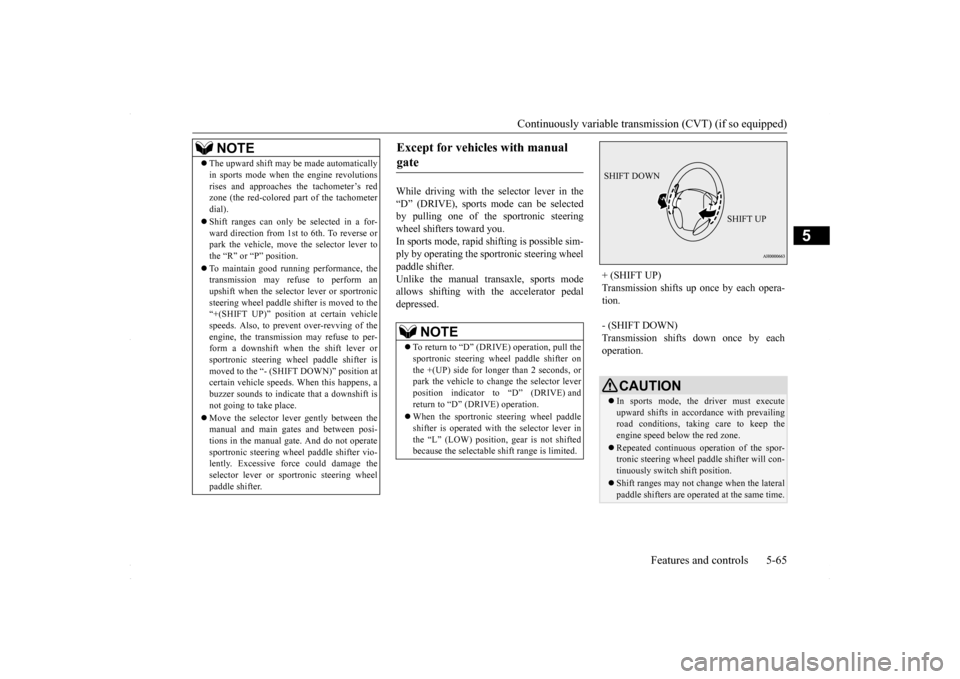
While driving with the selector lever in the “D” (DRIVE), sports mode can be selected by pulling one of the sportronic steeringwheel shifters toward you. In sports mode, rapid
shifting is possible sim-
ply by operating the sportronic steering wheelpaddle shifter.Unlike the manual transaxle, sports mode allows shifting with the accelerator pedal depressed.
NOTE
The upward shift may be made automatically in sports mode when the engine revolutions rises and approaches the tachometer’s red zone (the red-colored part of the tachometer dial). Shift ranges can only be selected in a for- ward direction from 1st to 6th. To reverse orpark the vehicle, move the selector lever to the “R” or “P” position. To maintain good running performance, the transmission may refuse to perform an upshift when the selector lever or sportronicsteering wheel paddle shifter is moved to the “+(SHIFT UP)” positi
on at certain vehicle
speeds. Also, to prevent over-revving of theengine, the transmission may refuse to per- form a downshift when the shift lever or sportronic steering wheel paddle shifter ismoved to the “- (SHIFT DOWN)” position at certain vehicle speeds. When this happens, a buzzer sounds to indicate that a downshift isnot going to take place. Move the selector lever gently between the manual and main gates and between posi- tions in the manual gate. And do not operate sportronic steering wheel paddle shifter vio-lently. Excessive force could damage the selector lever or sportronic steering wheel paddle shifter.
Except for vehicles with manual gate
NOTE
To return to “D” (DRIVE) operation, pull the sportronic steering wheel paddle shifter on the +(UP) side for longer than 2 seconds, orpark the vehicle to change the selector lever position indicator to “D” (DRIVE) and return to “D” (DRIVE) operation. When the sportronic steering wheel paddle shifter is operated with the selector lever inthe “L” (LOW) position, gear is not shifted because the selectable shift range is limited.
+ (SHIFT UP) Transmission shifts up once by each opera- tion. - (SHIFT DOWN) Transmission shifts down once by each operation.
CAUTION In sports mode, the driver must execute upward shifts in accordance with prevailing road conditions, taking care to keep theengine speed below the red zone. Repeated continuous operation of the spor- tronic steering wheel paddle shifter will con- tinuously switch shift position. Shift ranges may not change when the lateral paddle shifters are operated at the same time.
SHIFT DOWN
SHIFT UP
BK0230300US.bo
ok 65 ページ 2015年7月30日 木曜日 午後8時38分
Page 128 of 392
Continuously variable transm
ission (CVT) (if so equipped)
5-66 Features and controls
5
N00538800154
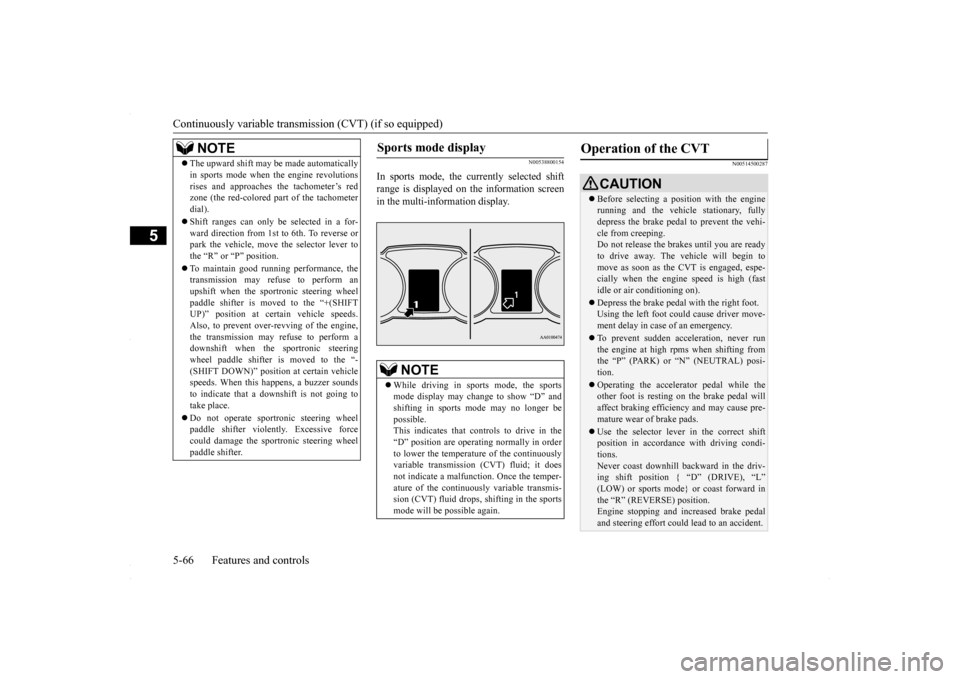
In sports mode, the currently selected shift range is displayed on the information screenin the multi-information display.
N00514500287
NOTE
The upward shift may be made automatically in sports mode when the engine revolutions rises and approaches the tachometer’s red zone (the red-colored part of the tachometer dial). Shift ranges can only be selected in a for- ward direction from 1st to 6th. To reverse orpark the vehicle, move the selector lever to the “R” or “P” position. To maintain good running performance, the transmission may refuse to perform an upshift when the sportronic steering wheelpaddle shifter is moved to the “+(SHIFT UP)” position at certain vehicle speeds. Also, to prevent over-revving of the engine,the transmission may refuse to perform a downshift when the sportronic steering wheel paddle shifter is moved to the “-(SHIFT DOWN)” position at certain vehicle speeds. When this happens, a buzzer sounds to indicate that a downshift is not going totake place. Do not operate sportronic steering wheel paddle shifter violently. Excessive force could damage the sportronic steering wheel paddle shifter.
Sports mode display
NOTE
While driving in sports mode, the sports mode display may change to show “D” and shifting in sports mode may no longer be possible.This indicates that controls to drive in the “D” position are operating normally in order to lower the temperature of the continuouslyvariable transmission (CVT) fluid; it does not indicate a malfunction. Once the temper- ature of the continuously variable transmis-sion (CVT) fluid drops, shifting in the sports mode will be possible again.
Operation of the CVT
CAUTION Before selecting a position with the engine running and the vehicle stationary, fully depress the brake pedal to prevent the vehi- cle from creeping.Do not release the brakes until you are ready to drive away. The vehicle will begin to move as soon as the CVT is engaged, espe-cially when the engine speed is high (fast idle or air conditioning on). Depress the brake pedal with the right foot. Using the left foot could cause driver move- ment delay in case of an emergency. To prevent sudden acceleration, never run the engine at high rpms when shifting fromthe “P” (PARK) or “N” (NEUTRAL) posi- tion. Operating the accelerator pedal while the other foot is resting on the brake pedal will affect braking efficiency and may cause pre-mature wear of brake pads. Use the selector lever in the correct shift position in accordance with driving condi- tions. Never coast downhill backward in the driv- ing shift position { “D” (DRIVE), “L” (LOW) or sports mode} or coast forward inthe “R” (REVERSE) position. Engine stopping and increased brake pedal and steering effort could lead to an accident.
BK0230300US.bo
ok 66 ページ 2015年7月30日 木曜日 午後8時38分
Page 132 of 392
All-wheel driving operation 5-70 Features and controls
5
N00530600169
Full-time 4WD vehicles are propelled by engine power distributed constantly andappropriately to all 4 wheels. Not only does this ensure enhanced handling on dry, paved roads but also permits bettertraction when driving on slippery, wet orsnow-covered roads and when moving out of mud. These vehicles, however, are not designedfor off-road use, and are unsuitable for driving on bumpy ground that may cause excessive strain.
Full-time 4WD vehicles
should be driven only under the same condi- tions as are suitable for ordinary front-wheel drive vehicles. Electronically controlled 4WD system vehi- cles are propelled by engine power distrib- uted constantly and appropriately to all 4 wheels. Not only does this ensure enhanced handling on dry, paved roads but also permits better
traction when driving on slippery, wet or snow-covered roads and when moving out of mud. These vehicles, however, are not designedfor off-road use, and are unsuitable for driving on bumpy ground that may cause excessive strain.
Electronically controlled
4WD system vehicles should be driven only under the same conditions as are suitable for ordinary front-wheel drive vehicles. When turning a sharp corner in “4WD LOCK” position at low speed, a slight differ- ence in steering may be experienced similarto feeling as if the brakes were applied. This is called tight corner braking and results from each of the four tires being at a different dis-tance from the corner. The phenomenon is typical of 4-wheel drive vehicles. If this occurs, either straighten out the steeringwheel, or change to “2WD” or “4WD AUTO” mode. Set the drive mode-selector to “4WD AUTO” conditions, and then gradually depress theaccelerator pedal for a smooth start.
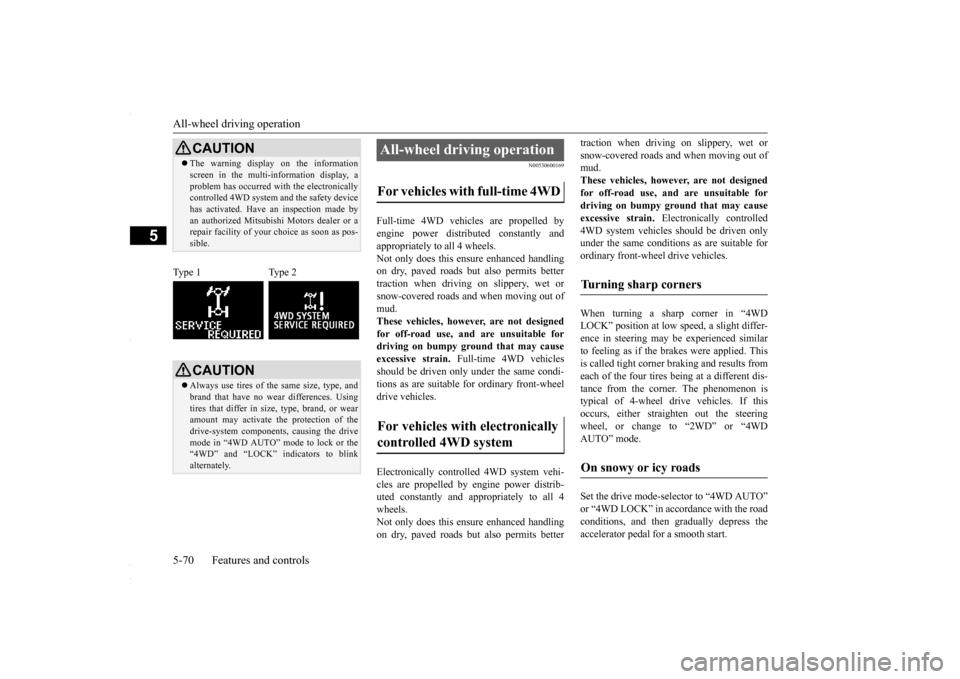
CAUTION The warning display on the information screen in the multi-information display, a problem has occurred with the electronically controlled 4WD system and the safety device has activated. Have an inspection made byan authorized Mitsubishi Motors dealer or a repair facility of your choice as soon as pos- sible.
Type 1 Type 2
CAUTION Always use tires of the same size, type, and brand that have no wear differences. Using tires that differ in size, type, brand, or wear amount may activate the protection of thedrive-system components, causing the drive mode in “4WD AUTO” mode to lock or the “4WD” and “LOCK” indicators to blinkalternately.
All-wheel driving operation For vehicles with full-time 4WD For vehicles with electronically controlled 4WD system
Turning sharp corners On snowy or icy roads
BK0230300US.bo
ok 70 ページ 2015年7月30日 木曜日 午後8時38分
Page 153 of 392
Multi-information display
Features and controls 5-91
5
N00554900137
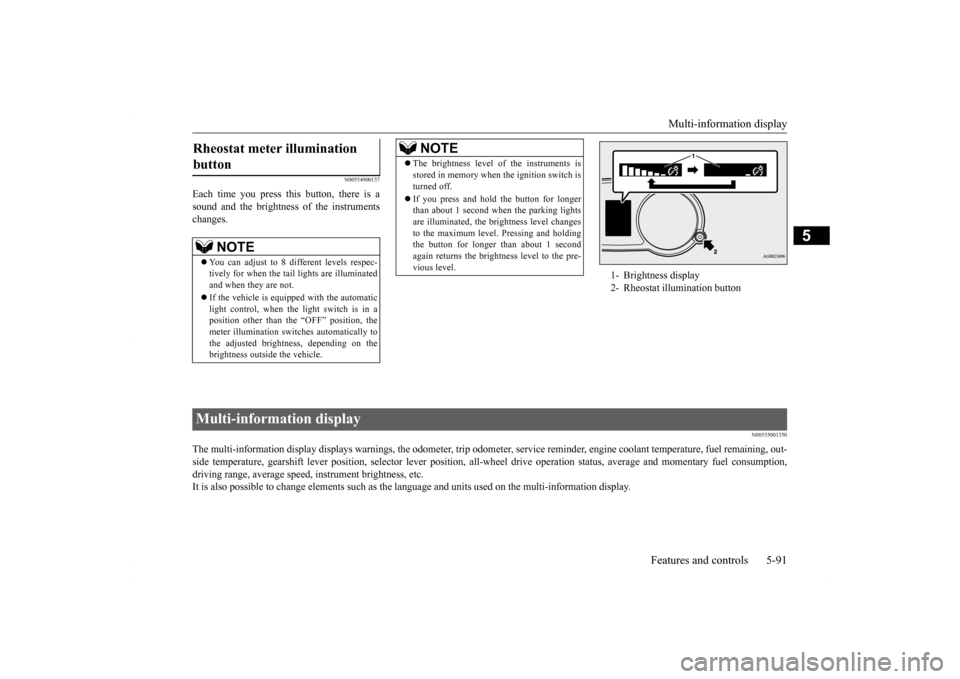
Each time you press this button, there is a sound and the brightness of the instruments changes.
N00555001350
The multi-information display displays warnings, the odometer, tr
ip odometer, service reminder, engine coolant temperature, fue
l remaining, out-
side temperature, gearshift lever position, selector lever pos
ition, all-wheel drive operation status, average and momentary fu
el consumption,
driving range, average speed, instrument brightness, etc. It is also possible to change elements such as the
language and units used on the multi-information display.
Rheostat meter illumination button
NOTE
You can adjust to 8 different levels respec- tively for when the tail lights are illuminated and when they are not. If the vehicle is equipped with the automatic light control, when the light switch is in a position other than the “OFF” position, themeter illumination switches automatically to the adjusted brightness, depending on the brightness outside the vehicle.
The brightness level of the instruments is stored in memory when the ignition switch is turned off. If you press and hold the button for longer than about 1 second when the parking lights are illuminated, the brightness level changes to the maximum level. Pressing and holdingthe button for longer than about 1 second again returns the brightness level to the pre- vious level.NOTE
1- Brightness display 2- Rheostat illumination button
Multi-information display
BK0230300US.bo
ok 91 ページ 2015年7月30日 木曜日 午後8時38分
Page 195 of 392
Turn signal lever
Features and controls 5-133
5
N00522601545
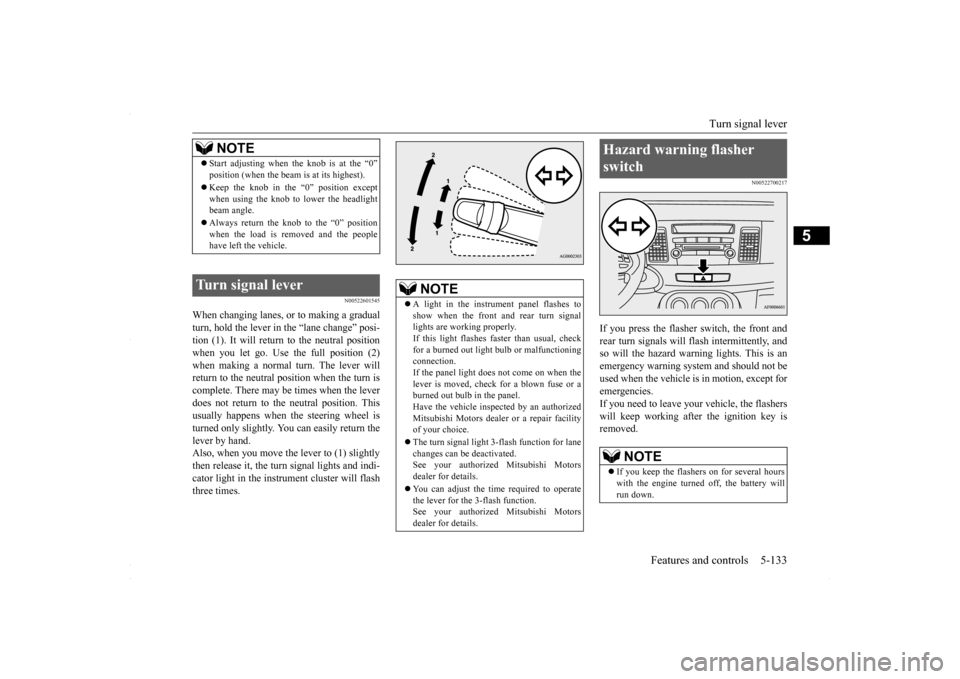
When changing lanes, or to making a gradual turn, hold the lever in
the “lane change” posi-
tion (1). It will return to the neutral positionwhen you let go. Use the full position (2) when making a normal turn. The lever will return to the neutral position when the turn iscomplete. There may be times when the lever does not return to the neutral position. This usually happens when the steering wheel isturned only slightly. You can easily return the lever by hand. Also, when you move the lever to (1) slightlythen release it, the turn signal lights and indi- cator light in the instrument cluster will flash three times.
N00522700217
If you press the flasher switch, the front andrear turn signals will flash intermittently, and so will the hazard warning lights. This is an emergency warning system and should not beused when the vehicle is in motion, except foremergencies. If you need to leave your vehicle, the flashers will keep working afte
r the ignition key is
removed.
NOTE
Start adjusting when the knob is at the “0” position (when the beam is at its highest). Keep the knob in the “0” position except when using the knob to lower the headlightbeam angle. Always return the knob to the “0” position when the load is removed and the people have left the vehicle.
Turn signal lever
NOTE
A light in the instrument panel flashes to show when the front and rear turn signal lights are working properly.If this light flashes faster than usual, check for a burned out light bulb or malfunctioning connection.If the panel light does not come on when the lever is moved, check for a blown fuse or a burned out bulb in the panel.Have the vehicle inspected by an authorized Mitsubishi Motors dealer or a repair facility of your choice. The turn signal light 3-flash function for lane changes can be deactivated.See your authorized Mitsubishi Motors dealer for details. You can adjust the time required to operate the lever for the 3-flash function. See your authorized Mitsubishi Motorsdealer for details.
Hazard warning flasher switch
NOTE
If you keep the flashers on for several hours with the engine turned off, the battery will run down.
BK0230300US.book
133 ページ 2015年7月30日 木曜日 午後8時38分
Page 217 of 392
Bluetooth® 2.0 interface (if so equipped)
Features and controls 5-155
5
“
N00565800019
If an incoming phone call is received whilethe ignition switch is in the “ACC” or “ON”position, the audio system will be automati- cally turned on and switched to the incoming call, even when the audio system was origi-nally off. The voice guide announcement for the incoming call will be output from the frontpassenger’s seat speaker. If the CD player or radio was playing when the incoming call was received, the audio sys-tem will mute the sound from the CD player or radio and output only the incoming call. To receive the call, press the PICK-UP buttonon the steering wheel control switch. When the call is over,
the audio system will
return to its previous state.
N00565900010
At any time during a call, you can mute thevehicle microphone. Pressing the SPEECH button and then saying “Mute” during a call will turn ON the mute function and mute the microphone.Saying “Mute off” in the same way will turn off the mute function and cancel the mute on the microphone.
N00566600014
The Bluetooth
® 2.0 interface can switch
between hands-free mode (hands-free calls) and private mode (calls using cellular phone). If you press the SPEECH button and say“Transfer call” during a hands-free call, you can stop the hands-free mode and talk in pri- vate mode. To return to hands-free mode, press the SPEECH button again and say “Transfer call.”
N00566000018
The Bluetooth
® 2.0 interface has 2 types of
unique phonebooks that are different from thephonebook stored in the cellular phone. They
are the vehicle phonebook and the mobile phonebook. These phonebooks are used to register tele- phone numbers and make calls to desirednumbers via voice recognition function.
N00566101117
This phonebook is us
ed when making calls
with the voice recognition function. Up to 32 names can be registered in the vehi- cle phonebook per language.Also, each entry has 4 locations associated with: home, work, mobile and other. You can register one telephone number for each loca-tion. You can register a desired name as a name for any phonebook entry registered in the vehicle phonebook.Names and telephone numbers can be changed later on. The vehicle phonebook can be used with all paired cellular phones.
Receiving calls
Mute function
Switching between hands-free mode and private mode
Phonebook function
NOTE
Disconnecting the battery cable will not delete information registered in the phone- book.
Vehicle phonebook
BK0230300US.book
155 ページ 2015年7月30日 木曜日 午後8時38分
Page 317 of 392
How to change a tire
For emergencies 8-7
8
6. Get the jack, bar and wheel nut wrench ready.Refer to “Tools and jack” on page 8-5.
N00849600298
The compact spare tire is designed to savespace in the trunk. Its lighter weight makes iteasier to use if a flat tire occurs.
N00849701339
1. Lift up the luggage floor board.For front-wheel drive vehicles, pull theluggage floor board (A) rearward to release the hooks (B), and then lift it up.
NOTE
The chocks shown in the illustration do not come with your vehicle. It is recommended that you purchase chocks or blocks and keep them in the vehicle for use if needed. If chocks or blocks are not available, use stones or any other objects that are large enough to hold the wheel in position.
Spare tire information Compact spare tire
WA R N I N G Tires, including spare tire, degrade over time with age even when they are not being used. It is recommended that tiresover 6 years generally be replaced even if damage is not obvious.
CAUTION While the compact spare tire is stowed, the inflation pressure should be checked at least once a month to assure that it remains at the recommended inflation pressure. See the tire and loading information placard attached tothe driver’s door sill. Refer to “Tire and loading information plac- ard” on page 11-3. Driving with an improperly inflated tire can cause an accident. If you have no choice butto drive with an under-inflated tire, keep your speed down and avoid sudden steering or braking, if possible
. Inflate the tire to the
correct pressure as soon as possible. Refer to “Tire inflation pressures” on page 9-17. The compact spare tire should be used only temporarily. While the compact spare tire is being used, the tire pressure monitoring sys-tem will not function properly. Have the tire replaced or repaired at an authorized Mit- subishi Motors dealer or a repair facility ofyour choice as soon as possible. If your vehicle has aluminum type wheels, you can use the same wheel nuts on the com- pact spare tire wheel. Do not go over 50 mph (80 km/h) when driv- ing with the compact spare tire. Avoid fast starting and braking when driving with the compact spare tire.
Do not drive through automatic car washes and over obstacles that could possibly dam- age the underside of your vehicle. Because the compact spare tire is smaller than the original tire, there is less clearance betweenthe ground and your vehicle. Because the compact spare tire is designed only for your vehicle, do not use it on any other vehicle. Do not put the compact spare tire on a differ- ent wheel, and do not put standard tires, snow tires, wheel covers or trim rings on thecompact spare wheel. Otherwise, you could damage these parts or other parts on your vehicle. Do not use snow chain with your compact spare tire. Using a chain could cause damageto your vehicle and loss of the chains.
To remove the compact spare tire
CAUTION
BK0230300US.bo
ok 7 ページ 2015年7月30日 木曜日 午後8時38分