clock MITSUBISHI LANCER 2017 8.G User Guide
[x] Cancel search | Manufacturer: MITSUBISHI, Model Year: 2017, Model line: LANCER, Model: MITSUBISHI LANCER 2017 8.GPages: 385, PDF Size: 14.34 MB
Page 292 of 385
System Settings
Comfort controls 7-45
7
2. Turn the /SEL key to adjust.
N00718500131
Change system settings such as product time. 1. Press the MENU key.
2. Press the /SEL key to select settings items. Each time the /SEL key is pressed, this switches in the order Satellite radio set- tings*
1, Gracenote DB*
2, PHONE set-
tings, Adjust time, and Cancel. 3. Turn the /SEL key to set.4. Press the /SEL key to determine. This completes settings, and displays the next settings item.
Adjust-ment items
Turn counter- clockwise
Turn clockwise
BASS -6 to 0
(low low-pass volume)
0 to +6 (high low-pass volume)
TRE- BLE
-6 to 0 (Low high-pass volume)
0 to +6 (High high-pass volume)
FADER CENTER to
REAR 11 (emphasize REAR)
FRONT 11 to CENTER (emphasize FRONT)
BAL- ANCE
LEFT 11 to CENTER (emphasize LEFT)
CENTER to RIGHT 11 (emphasize RIGHT)
SCV OFF, LOW
(SCV effect is OFF/low)
MID, HIGH (SCV effect is middle/high)
System Settings
*1: Displayed when a satellite tuner is con- nected.
*2: Displayed when playing back audio files (vehicles with a Bluetooth
® 2.0 interface).
BK0237700US.bo
ok 45 ページ 2016年4月15日 金曜日 午前11時28分
Page 294 of 385
System Settings
Comfort controls 7-47
7
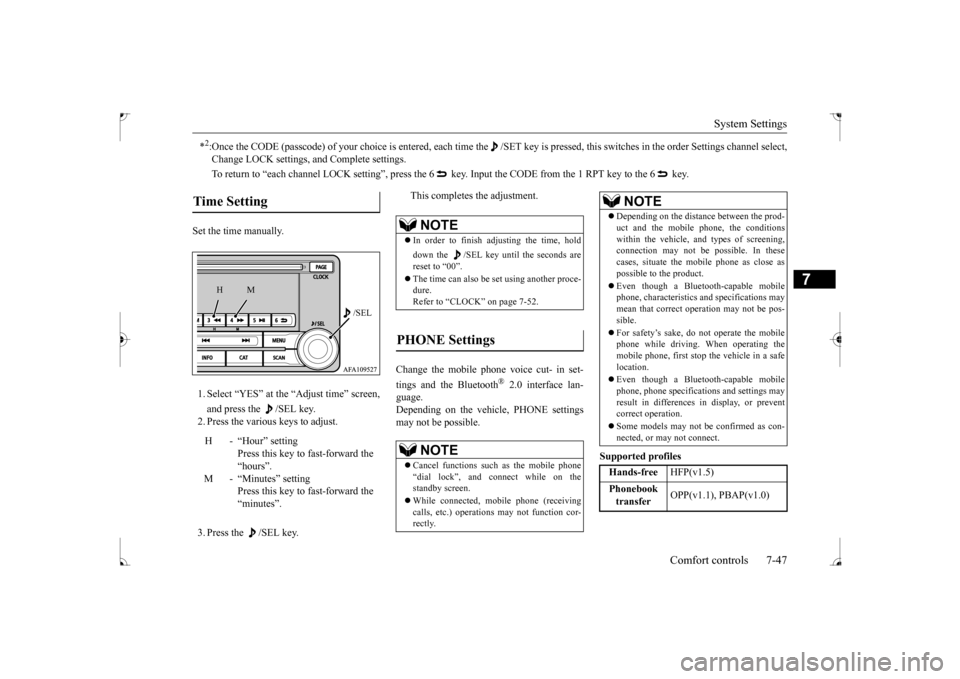
Set the time manually. 1. Select “YES” at the “Adjust time” screen, and press the /SEL key. 2. Press the various keys to adjust. 3. Press the /SEL key.
This completes the adjustment.
Change the mobile phone voice cut- in set- tings and the Bluetooth
® 2.0 interface lan-
guage. Depending on the vehicle, PHONE settingsmay not be possible.
Supported profiles
*2:Once the CODE (passcode) of your choice is entered, each time th
e /SET key is pressed, this switches in the order Settings chan
nel select,
Change LOCK settings, and Complete settings. To return to “each channel LOCK setting”, press the 6
key. Input the CODE from the 1 RPT key to the 6 key.
Time Setting
H - “Hour” setting
Press this key to fast-forward the “hours”.
M - “Minutes” setting
Press this key to fast-forward the “minutes”.
/SEL
M
H
NOTE
In order to finish adjusting the time, hold down the /SEL key until the seconds are reset to “00”. The time can also be set using another proce- dure. Refer to “CLOCK” on page 7-52.
PHONE Settings
NOTE
Cancel functions such as the mobile phone “dial lock”, and connect while on the standby screen. While connected, mobile phone (receiving calls, etc.) operations may not function cor- rectly.
Depending on the distance between the prod- uct and the mobile phone, the conditions within the vehicle, and types of screening,connection may not be possible. In these cases, situate the mobile phone as close as possible to the product. Even though a Bluetooth-capable mobile phone, characteristics and specifications may mean that correct operation may not be pos- sible. For safety’s sake, do not operate the mobile phone while driving. When operating themobile phone, first stop the vehicle in a safe location. Even though a Bluetooth-capable mobile phone, phone specifications and settings may result in differences in display, or preventcorrect operation. Some models may not be confirmed as con- nected, or may not connect.Hands-free
HFP(v1.5)
Phonebook transfer
OPP(v1.1), PBAP(v1.0)
NOTE
BK0237700US.bo
ok 47 ページ 2016年4月15日 金曜日 午前11時28分
Page 298 of 385
Antenna
Comfort controls 7-51
7
N00734200426
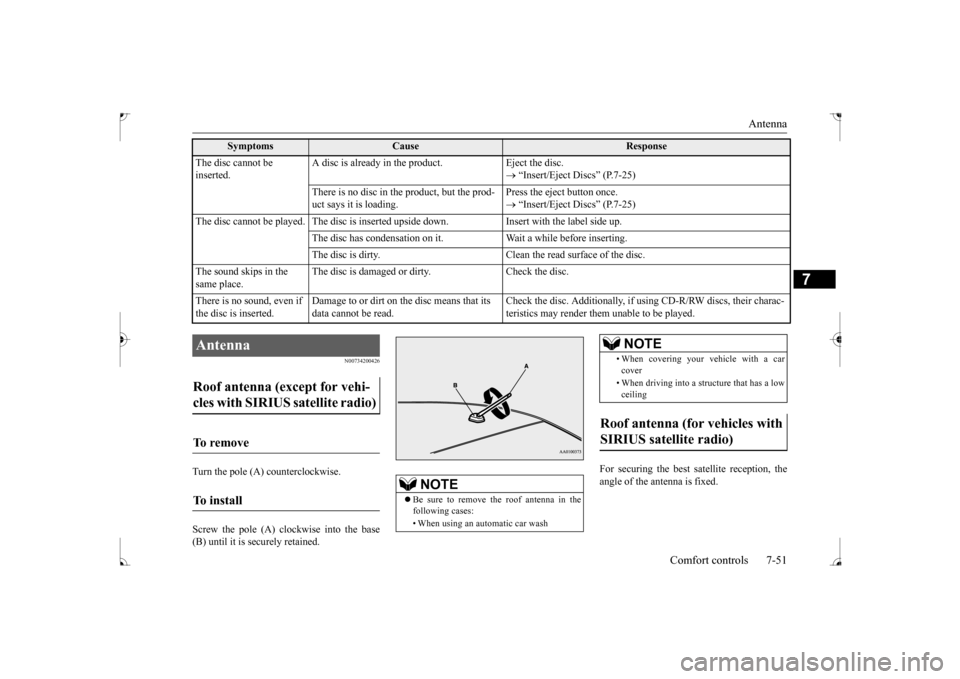
Turn the pole (A) counterclockwise. Screw the pole (A) clockwise into the base (B) until it is securely retained.
For securing the best satellite reception, the angle of the antenna is fixed.
The disc cannot be inserted.
A disc is already in the product. Eject the disc.
“Insert/Eject Discs” (P.7-25)
There is no disc in the product, but the prod- uct says it is loading.
Press the eject button once. “Insert/Eject Discs” (P.7-25)
The disc cannot be played. The disc is inserted upside down. Insert with the label side up.
The disc has condensation on it. Wait a while before inserting.The disc is dirty. Clean the read surface of the disc.
The sound skips in the same place.
The disc is damaged or dirty. Check the disc.
There is no sound, even if the disc is inserted.
Damage to or dirt on the disc means that its data cannot be read.
Check the disc. Additionally, if using CD-R/RW discs, their charac- teristics may render them unable to be played.
Symptoms
Cause
Response
Antenna Roof antenna (except for vehi- cles with SIRIUS satellite radio) To remove To install
NOTE
Be sure to remove the roof antenna in the following cases: • When using an automatic car wash
• When covering your vehicle with a car cover • When driving into a structure that has a low ceiling
Roof antenna (for vehicles with SIRIUS satellite radio)
NOTE
BK0237700US.bo
ok 51 ページ 2016年4月15日 金曜日 午前11時28分
Page 299 of 385
Clock (if so equipped) 7-52 Comfort controls
7
Turn the pole (A) counterclockwise. Screw the pole (A) clockwise into the base (B) until it is securely retained.
N00755001219
The time is displayed when the ignitionswitch is in ON or ACC.
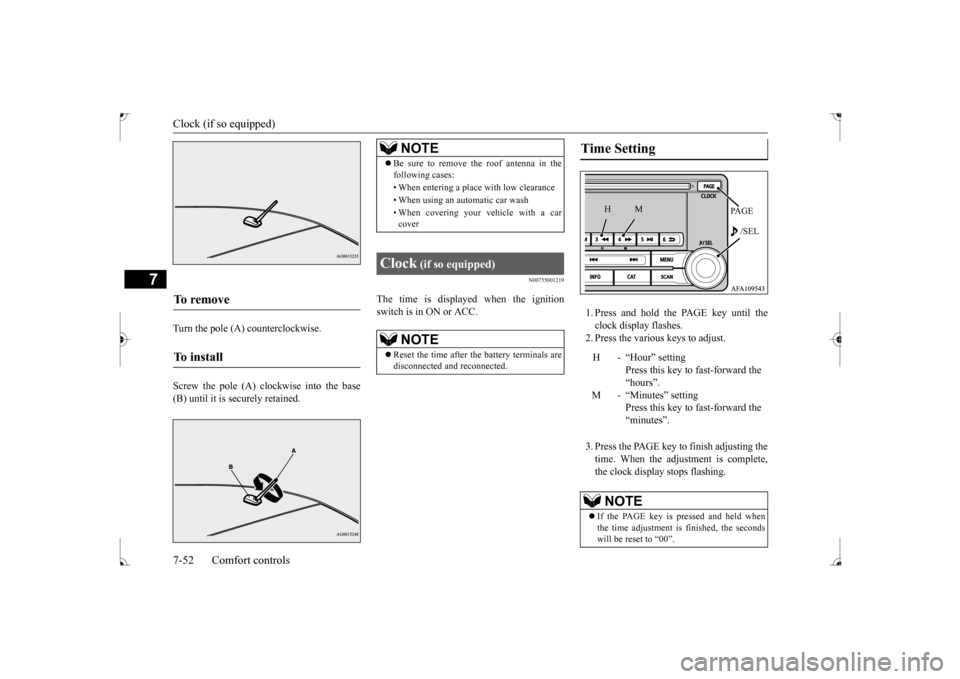
1. Press and hold the PAGE key until the clock display flashes.2. Press the various keys to adjust. 3. Press the PAGE key to finish adjusting the time. When the adjustment is complete, the clock display stops flashing.
To remove To i n s t a l l
NOTE
Be sure to remove the roof antenna in the following cases: • When entering a place with low clearance • When using an automatic car wash • When covering your vehicle with a car cover
Clock
(if so equipped)
NOTE
Reset the time after the battery terminals are disconnected and reconnected.
Time Setting
H - “Hour” setting
Press this key to fast-forward the“hours”.
M - “Minutes” setting
Press this key to fast-forward the “minutes”.
NOTE
If the PAGE key is pressed and held when the time adjustment is finished, the seconds will be reset to “00”.
PA G E /SEL
M
H
BK0237700US.bo
ok 52 ページ 2016年4月15日 金曜日 午前11時28分
Page 308 of 385
Tools and jack
For emergencies 8-5
8
9. Start the engine, and slowly add coolant, up to the bottom of the filler neck. Useplain water if you have to (and replace it with the right coolant as soon as possible).
10. Replace the radiator cap and tighten it
fully. Check the engine coolant tempera- ture display on the multi-information dis- play. You can start driving again when thebar graph for the engine coolant tempera- ture display returns to the normal zone.
11. Have your vehicle checked by your autho-
rized Mitsubishi Motors dealer or a repair facility of your choice.
N00836600265
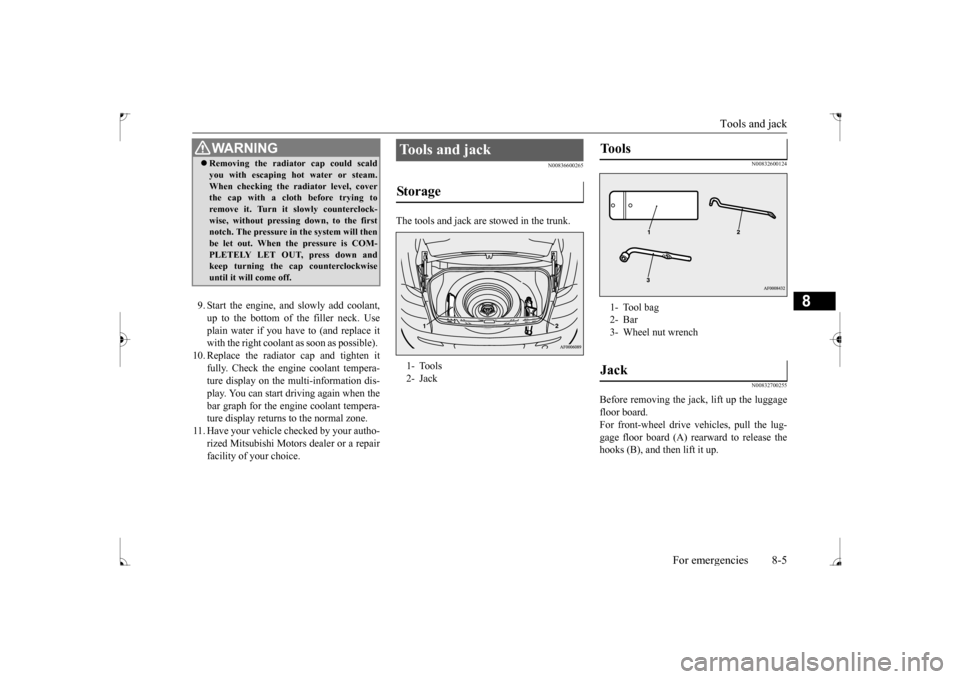
The tools and jack are stowed in the trunk.
N00832600124 N00832700255
Before removing the jack, lift up the luggage floor board. For front-wheel drive vehicles, pull the lug-gage floor board (A) rearward to release the hooks (B), and then lift it up.
WA R N I N G Removing the radiator cap could scald you with escaping hot water or steam. When checking the radiator level, cover the cap with a cloth before trying to remove it. Turn it slowly counterclock-wise, without pressing down, to the first notch. The pressure in the system will then be let out. When the pressure is COM-PLETELY LET OUT, press down and keep turning the cap counterclockwise until it will come off.
Tools and jack Storage 1- Tools 2- Jack
Tools 1- Tool bag2- Bar3- Wheel nut wrenchJack
BK0237700US.bo
ok 5 ページ 2016年4月15日 金曜日 午前11時28分
Page 311 of 385
How to change a tire 8-8 For emergencies
8
2. To remove the spare tire, remove the installation clamp (C) by turning it coun-terclockwise.
N00849801486
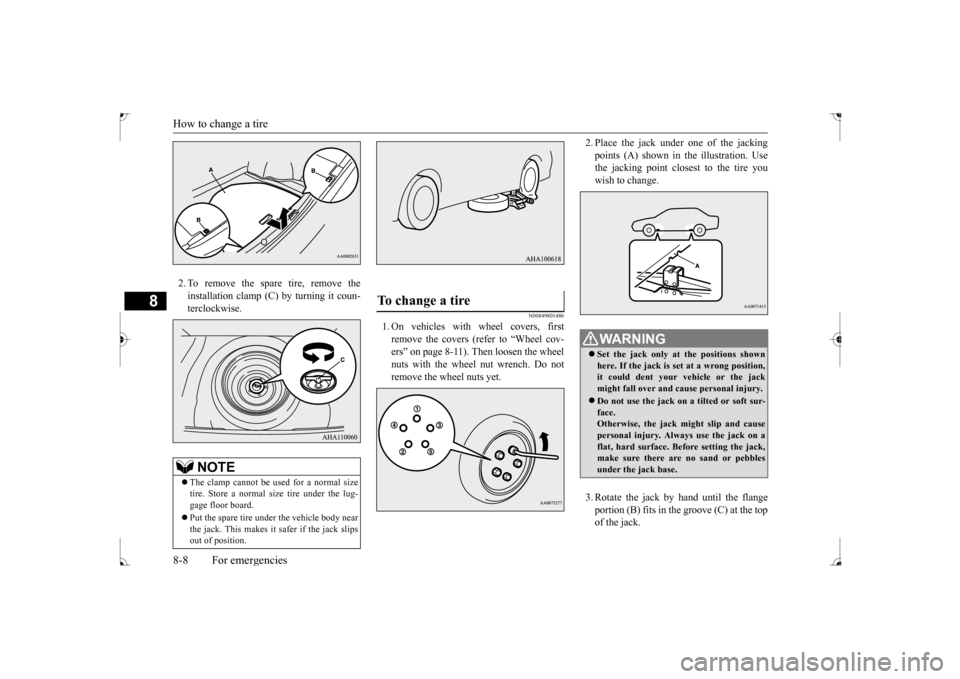
1. On vehicles with wheel covers, firstremove the covers (refer to “Wheel cov-ers” on page 8-11). Then loosen the wheel nuts with the wheel nut wrench. Do not remove the wheel nuts yet.
2. Place the jack under
one of the jacking
points (A) shown in the illustration. Use the jacking point closest to the tire you wish to change. 3. Rotate the jack by hand until the flange portion (B) fits in the groove (C) at the top of the jack.
NOTE
The clamp cannot be used for a normal size tire. Store a normal size tire under the lug-gage floor board. Put the spare tire under the vehicle body near the jack. This makes it safer if the jack slips out of position.
To change a tire
WA R N I N G Set the jack only at the positions shown here. If the jack is set at a wrong position,it could dent your vehicle or the jack might fall over and cause personal injury. Do not use the jack on a tilted or soft sur- face. Otherwise, the jack might slip and causepersonal injury. Always use the jack on a flat, hard surface. Before setting the jack, make sure there are no sand or pebblesunder the jack base.
BK0237700US.bo
ok 8 ページ 2016年4月15日 金曜日 午前11時28分
Page 313 of 385
![MITSUBISHI LANCER 2017 8.G User Guide How to change a tire 8-10 For emergencies
8
7. [Vehicle with steel wheels] • Normal wheels and compact spare wheel Install the wheel nuts (tapered nuts) withtheir tapered ends facing inward, then ti](/img/19/7464/w960_7464-312.png "MITSUBISHI LANCER 2017 8.G User Guide How to change a tire 8-10 For emergencies
8
7. [Vehicle with steel wheels] • Normal wheels and compact spare wheel Install the wheel nuts (tapered nuts) withtheir tapered ends facing inward, then ti")
How to change a tire 8-10 For emergencies
8
7. [Vehicle with steel wheels] • Normal wheels and compact spare wheel Install the wheel nuts (tapered nuts) withtheir tapered ends facing inward, then tighten by hand until the wheel is no lon- ger loose. [Vehicle with aluminum wheels] • Normal wheels
Temporarily tighten the wheel nuts (flange nuts) until their flange section comes in contact with the wheel and it is no longer loose. • Compact spare wheel Install the wheel nuts with their tapered ends facing inward, then tighten by hand until the wheel is no longer loose.
8. Lower the vehicle slowly by rotating the wheel nut wrench counterclockwise until the tire touches the ground. 9. Tighten the nuts in the order shown in the illustration until each nut has been tight-ened to the torque listed here. 65 to 80 ft-lb (88 to 108 N•m)CAUTION Never apply oil to either the wheel bolts or the nuts or they will tighten too much.NOTE
Flange nuts can be temporarily used on the compact spare or steel wheel, but return them to the original wheel and tire as soon aspossible. If all four wheels are changed to steel wheels, use tapered nuts.
BK0237700US.bo
ok 10 ページ 2016年4月15日 金曜日 午前11時28分
Page 351 of 385
Replacement of light bulbs 9-32 Vehicle care and maintenance
9
N00950401728
N00943101895
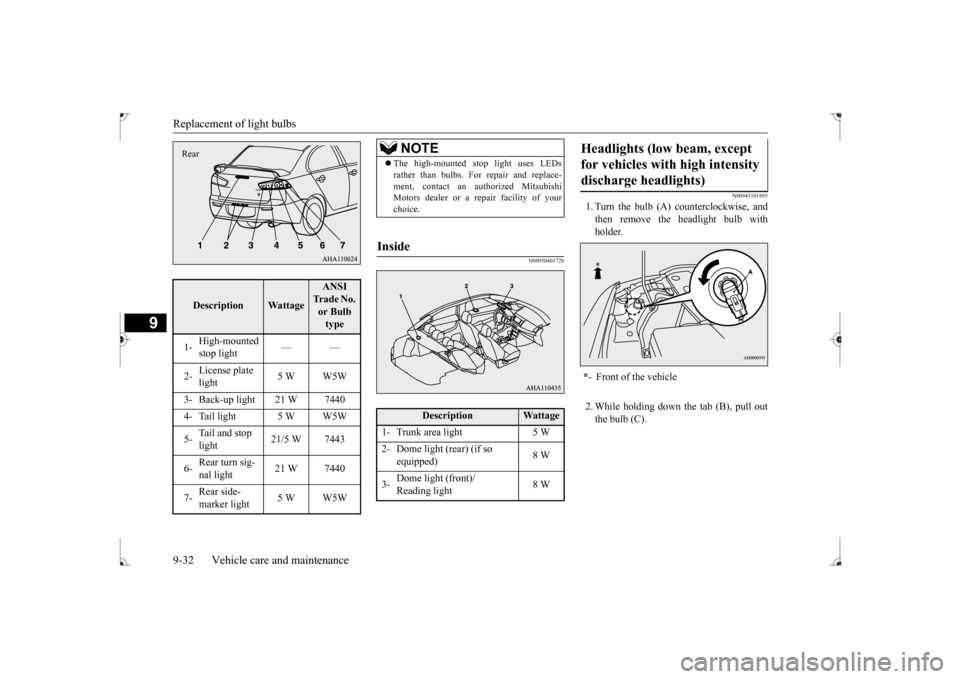
1. Turn the bulb (A) counterclockwise, and then remove the headlight bulb with holder. 2. While holding down the tab (B), pull out the bulb (C).
Description
Wattage
ANSI Trade No. or Bulb type
1-
High-mounted stop light
——
2-
License plate light
5 W W5W
3- Back-up light 21 W 7440 4- Tail light 5 W W5W 5-
Tail and stop light
21/5 W 7443
6-
Rear turn sig- nal light
21 W 7440
7-
Rear side- marker light
5 W W5W
Rear
NOTE
The high-mounted stop light uses LEDs rather than bulbs. For repair and replace- ment, contact an authorized Mitsubishi Motors dealer or a repair facility of your choice.
Inside
Description
Wattage
1- Trunk area light 5 W2- Dome light (rear) (if so
equipped)
8 W
3-
Dome light (front)/ Reading light
8 W
Headlights (low beam, except for vehicles with high intensity discharge headlights) * - Front of the vehicle
BK0237700US.bo
ok 32 ページ 2016年4月15日 金曜日 午前11時28分
Page 352 of 385
Replacement of light bulbs
Vehicle care and maintenance 9-33
9
3. To install the bulb, perform the removal steps in reverse.
N00943100885
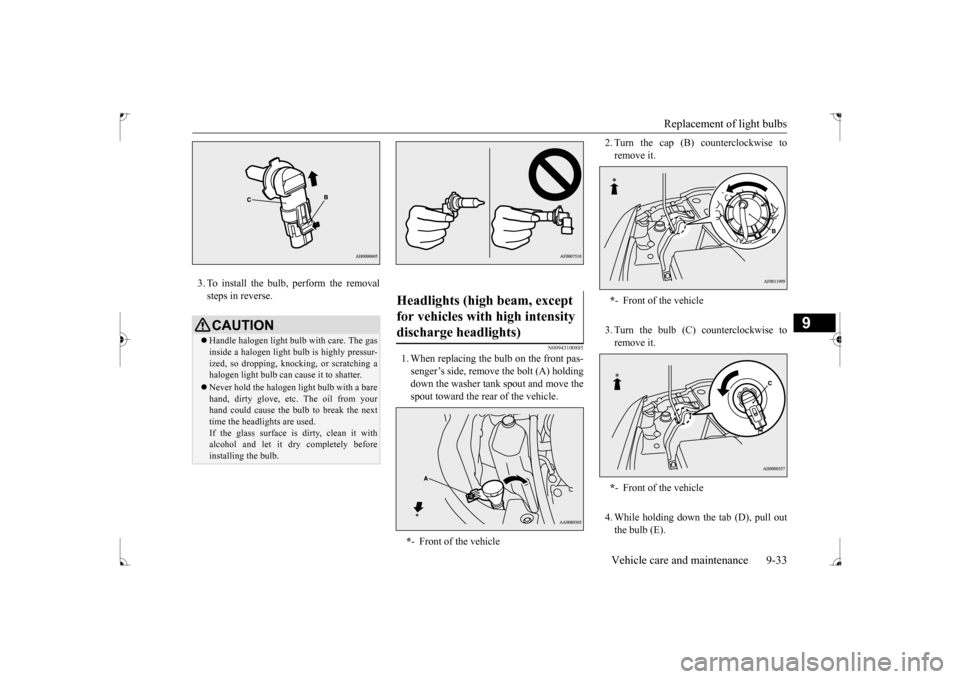
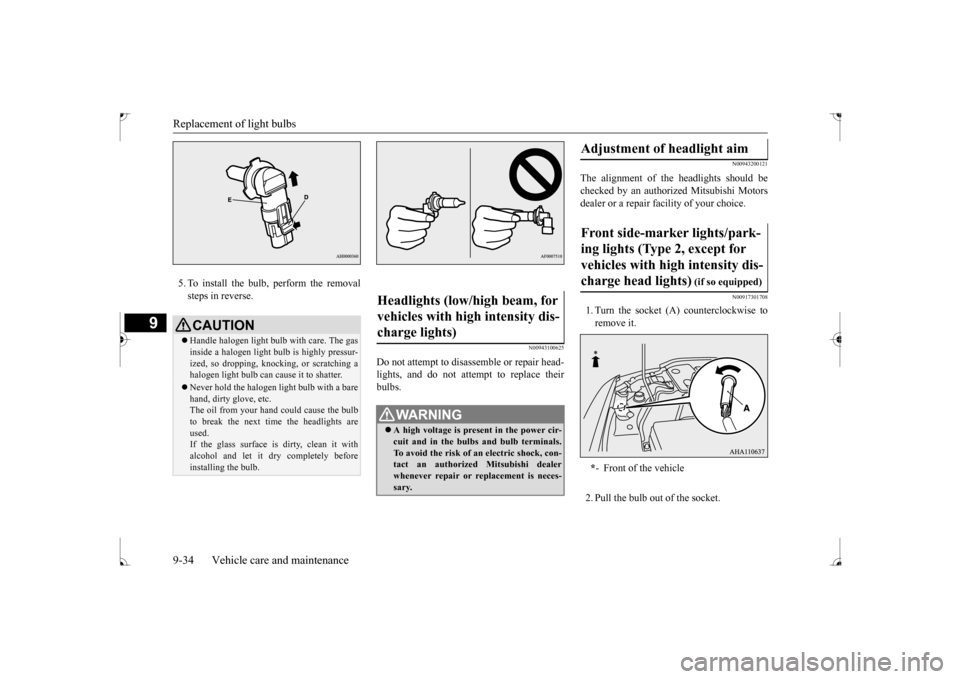
1. When replacing the bulb on the front pas- senger’s side, remove the bolt (A) holdingdown the washer tank spout and move thespout toward the rear of the vehicle.
2. Turn the cap (B) counterclockwise to remove it. 3. Turn the bulb (C) counterclockwise to remove it. 4. While holding down
the tab (D), pull out
the bulb (E).
CAUTION Handle halogen light bulb with care. The gas inside a halogen light bulb is highly pressur- ized, so dropping, knocking, or scratching a halogen light bulb can cause it to shatter. Never hold the halogen light bulb with a bare hand, dirty glove, etc. The oil from yourhand could cause the bulb to break the next time the headlights are used. If the glass surface is dirty, clean it withalcohol and let it dry completely before installing the bulb.
Headlights (high beam, except for vehicles with high intensity discharge headlights) * - Front of the vehicle
*- Front of the vehicle * - Front of the vehicle
BK0237700US.bo
ok 33 ページ 2016年4月15日 金曜日 午前11時28分
Page 353 of 385
Replacement of light bulbs 9-34 Vehicle care and maintenance
9
5. To install the bulb, perform the removal steps in reverse.
N00943100625
Do not attempt to disassemble or repair head- lights, and do not attempt to replace theirbulbs.
N00943200121
The alignment of the headlights should bechecked by an authorized Mitsubishi Motorsdealer or a repair facility of your choice.
N00917301708
1. Turn the socket (A) counterclockwise toremove it. 2. Pull the bulb out of the socket.
CAUTION Handle halogen light bulb with care. The gas inside a halogen light bulb is highly pressur- ized, so dropping, knocking, or scratching a halogen light bulb can cause it to shatter. Never hold the halogen light bulb with a bare hand, dirty glove, etc.The oil from your hand could cause the bulb to break the next time the headlights are used.If the glass surface is dirty, clean it with alcohol and let it dry completely before installing the bulb.
Headlights (low/high beam, for vehicles with high intensity dis- charge lights)
WA R N I N G A high voltage is present in the power cir- cuit and in the bulbs and bulb terminals. To avoid the risk of an electric shock, con-tact an authorized Mitsubishi dealer whenever repair or replacement is neces- sary.
Adjustment of headlight aim Front side-marker lights/park- ing lights (Type 2, except for vehicles with high intensity dis-charge head lights)
(if so equipped)
* - Front of the vehicle
BK0237700US.bo
ok 34 ページ 2016年4月15日 金曜日 午前11時28分