parking brake MITSUBISHI LANCER EVOLUTION 2007 Service Owner's Manual
[x] Cancel search | Manufacturer: MITSUBISHI, Model Year: 2007, Model line: LANCER EVOLUTION, Model: MITSUBISHI LANCER EVOLUTION 2007Pages: 1449, PDF Size: 56.82 MB
Page 1072 of 1449

ABS <4WD> -General Information35B-2
GENERAL INFORMATION
ABS has been adopted as optional equipment in
RS-IIto maintain directional stability and steering
performance during sudden braking or braking on
slippery road surfaces.
The ABS control method is a 4-sensor, 4-channel
method which provides independent control for all
wheels.
Following system for Lancer EVOLUTION-VII has
been modified from Lancer EVOLUTION-VI Tommi
Makinen Edition.DBy adding lateral G sensor, longitudinal G
sensor and steering wheel sensor, optimized
ABS control at the time of cornering.
DBy inputting parking brake switch signal to
ABS-ECU with pulling parking brake lever, ABS
control has been optimized.
DABS-ECU outputs ABS signal to 4WD-ECU.
DG sensor (lateral), steering wheel sensor and
parking brake switch have been added to the
diagnosis and service data.
DABS-ECU connector has been changed.
EBD CONTROL
In ABS, electronic control method is used by which
the rear wheel brake hydraulic pressure during
braking is regulated by rear wheel control solenoid
valves in accordance with the vehicle’s rate of
deceleration and the front and rear wheel slippage
which are calculated from the each wheel speed
sensor’s signal. EBD control is a control system
which provides a high level of control for both vehicle
braking force and vehicle stability. The system has
the following features:
DBecause the system provides the optimum rear
wheel braking force regardless of the vehicleladen condition and the condition of the road
surface, the system reduces the required pedal
depression force, particularly when the vehicle
is heavily laden or driving on road surfaces
with high frictional coefficients.
DBecause the duty placed on the front brakes
has been reduced, the increases in pad
temperature can be controlled to improve the
wear resistance characteristics of the pad,
during front brakes applying.
DControl valves such as the proportioning valve
are no longer required.
SPECIFICATIONS
ItemSpecifications
ABS control method4-sensor, 4-channel
No. of ABS rotor teethFront43
Rear43
ABS speed sensorTypeMagnet coil typep
Gap between sensor and rotor mm0.85
Page 1073 of 1449

ABS <4WD> -General Information/Service Specifications35B-3
CONSTRUCTION DIAGRAM
Stop lamp
switch*Parking brake
switch
Diagnosis
connector*
Wheel speed sensorWheel speed sensor Hydraulic unit
assembly*
(integrated with
the ABS-ECU) ABS warning lamp
Lateral G sensor
Longitudinal G sensor Steering
wheel
sensor*
NOTE
For R.H. drive vehicles, only the position indicated by the * is symmetrical.
SERVICE SPECIFICATIONS
ItemsStandard value
Wheel speed sensor internal resistance kΩ1.24 - 1.64
Wheel speed sensor insulation resistance kΩ100 or more
Lateral G sensor/Longitudinal G
sensoroutputvoltageV
On stationary vehicle2.4 - 2.6
sensor outputvoltageV
With front mark downward3.4 - 3.6
Page 1085 of 1449

ABS <4WD> -Troubleshooting35B-15
INSPECTION CHART FOR TROUBLE SYMPTOMS
Trouble symptomsInspection procedure
No.Reference page
Communication between the MUT-IIand the whole system is not
possible.135B-16
Communication between the MUT-IIand the ABS-ECU is not possible.235B-17
When the ignition key is turned to “ON” (engine stopped), the ABS
warning lamp does not illuminate.335B-18
Even after the engine is started, the ABS warning lamp remains
illuminated.435B-18
In the inspection with MUT-II service data, the parking brake switch is not
turned ON or turn OFF.535B-19
The neutral position learning of the steering wheel sensor is not finished.635B-20
Faulty ABS operation735B-21
Caution
1. If steering movements are made when driving at high speed, or when driving on road surfaces
with low frictional resistance, or when passing over bumps, the ABS may operate even though
sudden braking is not being applied. Because of this, when getting information from the customer,
check if the problem occurred while driving under such conditions as these.
2. During ABS operation, the brake pedal may vibrate or may not be able to be depressed. Such
phenomena are due to intermittent changes in hydraulic pressure inside the brake line to prevent
the wheels from locking and is not an abnormality.
Page 1089 of 1449
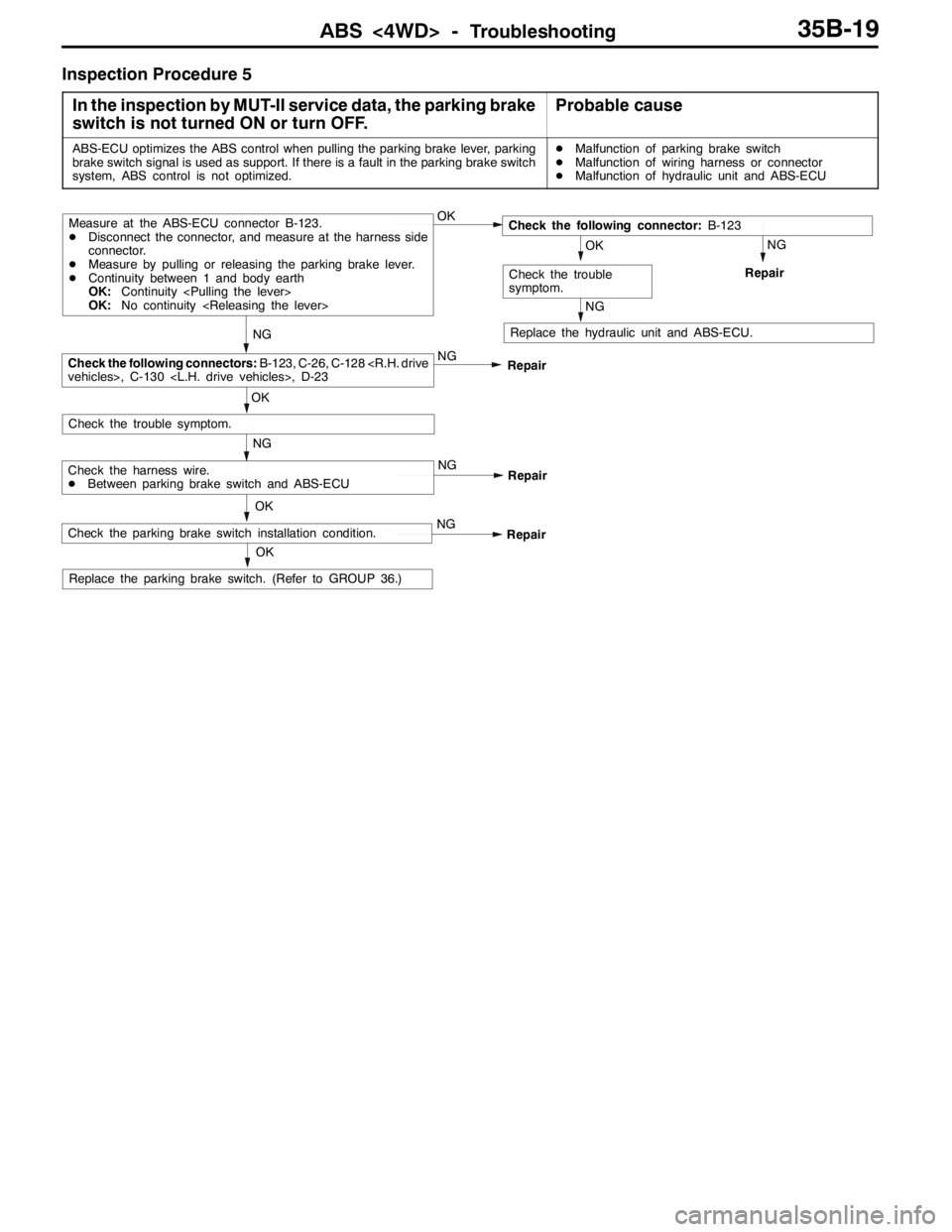
ABS <4WD> -Troubleshooting35B-19
Inspection Procedure 5
In the inspection by MUT-II service data, the parking brake
switch is not turned ON or turn OFF.
Probable cause
ABS-ECU optimizes the ABS control when pulling the parking brake lever, parking
brake switch signal is used as support. If there is a fault in the parking brake switch
system, ABS control is not optimized.DMalfunction of parking brake switch
DMalfunction of wiring harness or connector
DMalfunction of hydraulic unit and ABS-ECU
OK
NG
NG
Check the harness wire.
DBetween parking brake switch and ABS-ECU
Replace the hydraulic unit and ABS-ECU.
OK
NG
OK
Check the trouble symptom.
Repair
NG
RepairCheck the following connectors:B-123, C-26, C-128
Measure at the ABS-ECU connector B-123.
DDisconnect the connector, and measure at the harness side
connector.
DMeasure by pulling or releasing the parking brake lever.
DContinuity between 1 and body earth
OK:Continuity
OK:No continuity
NG
Repair
NG
OK
Check the trouble
symptom.
Check the following connector:B-123
OK
Replace the parking brake switch. (Refer to GROUP 36.)
NG
RepairCheck the parking brake switch installation condition.
Page 1092 of 1449

ABS <4WD> -Troubleshooting35B-22
DATA LIST REFERENCE TABLE
The following items can be read by the MUT-IIfrom the ABS-ECU input data.
1. When the system is normal
Item No.Check itemChecking requirementsNormal value
11Front-right wheel speed sensorPerform a test runVehicle speeds
displayedonthe
12Front-left wheel speed sensor
displayedonthe
speedometer and
MUTIIareidentical13Rear-right wheel speed sensorMUT-IIareidentical.
14Rear-left wheel speed sensor
21Power supply voltageIgnition switch: ON10 - 16 V
29Parking brake switchPull the parking brake lever.ON
Release the parking brake lever.OFF
36Stop lamp switchDepress the brake pedal.ON
Release the brake pedal.OFF
37Steering wheel sensor neutral
position learningAfter driving straightly with vehicle speed more
than 10km/hON
Before driving with ignition switch ONOFF
71Lateral G sensorWhen vehicle stops2.4 - 2.6 V
When vehicle drives1.0 - 4.0 V
74Steering wheel sensor (ST-N)Ignition switch: ONSteering:
Neutral position and
position near by±
360_ON
Steering:
Except for aboveOFF
75Steering wheel sensor (ST-1)Ignition switch: ONSteering:
Turnlaterallyslowly
Display ON and OFF
alternately
76Steering wheel sensor (ST-2)
Turnlaterallyslowlyalternately
86Steering degreeIgnition switch: ON
Steering wheel sensor
tlitili
Steering: Steer by
90_to the right+90_
g
neutral position learning
is finished (service data
N37di lON)
Steering: NeutralOFF(
No. 37 displays ON)Steering: Steer by
90_to the left-90_
2. When the ABS-ECU shut off ABS operation
When the diagnosis system stops the ABS-ECU, the MUT-IIdisplay data will be unreliable.
Page 1094 of 1449

ABS <4WD> -Troubleshooting35B-24
CHECK AT ABS-ECU
Use the following steps to remove the connector cover and
measure the terminal voltage.
1. Move the lock lever of the ABS-ECU connector as shown
in the illustration, and then disconnect the ABS-ECU
connector.
2. Push up and unlock the hooks of the ABS-ECU connector
shown in the illustration, then remove the connector cover.
TERMINAL VOLTAGE CHECK CHART
1. Measure the voltage between each terminal and earth
(terminal No.12).
2. The terminal layout is shown in the illustration.
Terminal No.Check itemChecking requirementsNormal condition
1Parking brake switch
input
Parking brake switch: ON1 V or less
input
Parking brake switch: OFFSystem voltage
2MUT-IIWhen the MUT-IIis connectedSerial communication with MUT-II
When the MUT-IIis not connected1 V or less
3ABS ON output to
4WD ECU
With ABS active (reference)(0.5 V or less)
4WD-ECU
With ABS not activeSystem voltage
4Steering wheel sensor
(ST-N) inputIgnition
switch: ONSteering wheel: Neutral
position and position
near by±360_0.8 - 2.1 V
Steering wheel: Except
for above2.7 - 4.4 V
5Diagnosis changeover
input
When the MUT-IIis connected0V
input
When the MUT-IIis not connectedApprox. 12 V
Lock lever
Page 1096 of 1449

ABS <4WD> -Troubleshooting/On-vehicle Service35B-26
RESISTANCE AND CONTINUITY BETWEEN
HARNESS-SIDE CONNECTOR TERMINALS
1. Turn the ignition key to the “LOCK” (OFF) position.
2. Disconnect the ABS-ECU connector.
3. Check the resistance and continuity between the terminals
indicated in the table below.
4. The terminal layout is shown in the illustration.
ABS-ECU terminal No.SignalNormal condition
6-7Wheel speed sensor (rear left)1.24 - 1.64 kΩ
8-9Wheel speed sensor (rear right)
22 - 31Wheel speed sensor (front left)
29 - 30Wheel speed sensor (front right)
12 - Body earthEarthContinuity
34 - Body earthEarth
ON-VEHICLE SERVICE
WHEEL SPEED SENSOR OUTPUT VOLTAGE
CHECK
1. Lift up the vehicle and release the parking brake.
2. Move the lock lever of the ABS-ECU connector as shown
in the illustration, and then disconnect the ABS-ECU
connector.
3. Push up and unlock the hooks of the ABS-ECU connector
shown in the illustration, then remove the connector cover.
Lock lever
Page 1098 of 1449

ABS <4WD> -On-vehicle Service35B-28
SymptomRemedy Probable causes
Noisy or disturbed waveformOpen circuit in sensorReplace sensor
Open circuit in harnessCorrect harness
Incorrectly mounted wheel speed sensorMount correctly
ABS rotor with missing or damaged teethReplace ABS rotor
Caution
Because the wheel speed sensor cables move together with the front and rear suspension, they
vibrate greatly when driving over poor road surfaces. As a result, the sensor harnesses should also
be shaken when monitoring of output waveforms of the wheel speed sensors in order to simulate
conditions such as driving over poor road surfaces.
HYDRAULIC UNIT CHECK
1. Jack up the vehicle and support the vehicle with rigid racks placed at the specified jack-up points
or place the wheels which are checked on the rollers of the braking force tester.
Caution
(1) The roller of the braking force tester and the tyre should be dry during testing.
(2) When testing the front brakes, apply the parking brake, and when testing the rear brakes,
stop the front wheels by chocking them.
2. Turn the ignition key to the “LOCK” (OFF) position and set the MUT-II.
Caution
Turn the ignition key to the “LOCK” (OFF) position before connecting or disconnecting the
MUT-II.
3. After checking that the shift lever is in neutral, start the engine.
4. Use the MUT-IIto force-drive the actuator.
NOTE
(1) During the actuator test, the ABS warning lamp will illuminate and the anti-skid control will be
cancelled.
(2) When the ABS has been interrupted by the fail-safe function, the MUT-IIactuator testing cannot
be carried out.
5. Turn the wheel by hand and check the change in braking force when the brake pedal is depressed.
When using the braking force tester, depress the brake pedal until the braking force is at the following
values, and check that the braking force decreases when the actuator is force-driven.
Front wheel785 - 981 N
Rear wheel588 - 784 N
Page 1104 of 1449

ABS <4WD> -Wheel Speed Sensor35B-34
INSTALLATION SERVICE POINT
"AAWHEEL SPEED SENSOR
INSTALLATION
Install the wheel speed sensor crossing with the parking brake
cable.
INSPECTION
CHECK OF RESISTANCE BETWEEN WHEEL SPEED
SENSOR TERMINALS
Caution
The pole piece can become magnetized because of the
magnet built into the wheel speed sensor, with the result
that metallic foreign material easily adheres to it.
Moreover, the pole piece may not be able to function to
correctly sense the wheel rotation speed if it is damaged.
1. Measure the resistance between the wheel speed sensor
terminals.
Standard value: 1.24 - 1.64 kΩ
If the internal resistance of the wheel speed sensor is
not within the standard value, replace with a new wheel
speed sensor.
2. Check the wheel speed sensor cable for breakage,
damage or disconnection; replace with a new one if a
problem is found.
NOTE
When checking for cable damage, remove the cable clamp
part from the body and then bend and pull the cable
near the clamp to check whether or not temporary
disconnection occurs. Also check the connection of the
connector and that the terminals are inserted correctly.
ABS ROTOR CHECK
Check whether ABS rotor teeth are broken or deformed, and,
if so, replace the ABS rotor.
WHEEL SPEED SENSOR INSULATION INSPECTION
1. Remove all connections from the wheel speed sensor,
and then measure the resistance between terminal 1 and
the body of the wheel speed sensor, and terminal 2 and
the body of the wheel speed sensor.
Standard value: 100 kΩor more
2. If the speed sensor insulation resistance is outside the
standard value range, replace with a new speed sensor.
Wheeel speed sensor
Parking brake cable
Page 1105 of 1449

ABS <4WD> -G Sensors and Steering Wheel Sensor35B-35
G SENSORS AND STEERING WHEEL
SENSOR
REMOVAL AND INSTALLATION
Refer to GROUP 22 - Sensor, Switch and Relay.
Parking brake lever
Lateral G sensorLongitudinal G sensor
Steering wheel sensor