battery MITSUBISHI LANCER EVOLUTION 2014 10.G Owner's Manual
[x] Cancel search | Manufacturer: MITSUBISHI, Model Year: 2014, Model line: LANCER EVOLUTION, Model: MITSUBISHI LANCER EVOLUTION 2014 10.GPages: 338, PDF Size: 40.99 MB
Page 134 of 338
S-AWC (Super-All Wheel Control)
Features and controls 5-73
5
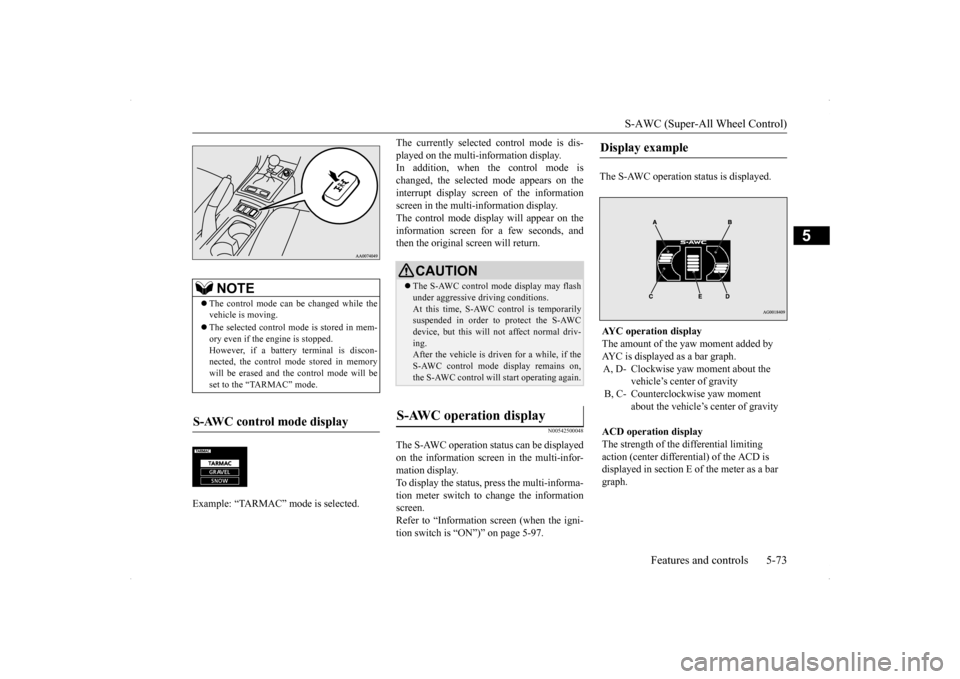
The currently selected control mode is dis- played on the multi-information display. In addition, when the control mode is changed, the selected mode appears on theinterrupt display screen of the information screen in the multi-information display. The control mode display will appear on theinformation screen for a few seconds, and then the original screen will return.
N00542500048
The S-AWC operation status can be displayedon the information screen in the multi-infor- mation display.To display the status, press the multi-informa- tion meter switch to change the information screen.Refer to “Information screen (when the igni- tion switch is “ON”)” on page 5-97.
The S-AWC operation status is displayed.
NOTE
The control mode can be changed while the vehicle is moving. The selected control mode is stored in mem- ory even if the engine is stopped. However, if a battery terminal is discon-nected, the control mode stored in memory will be erased and the control mode will be set to the “TARMAC” mode.
S-AWC control mode display Example: “TARMAC” mode is selected.ç
CAUTION The S-AWC control mode display may flash under aggressive driving conditions. At this time, S-AWC control is temporarily suspended in order to protect the S-AWCdevice, but this will not affect normal driv- ing. After the vehicle is driven for a while, if theS-AWC control mode display remains on, the S-AWC control will start operating again.
S-AWC operation display
Display example AYC operation display The amount of the yaw moment added by AYC is displayed as a bar graph.A, D- Clockwise yaw moment about the
vehicle’s center of gravity
B, C- Counterclockwise yaw moment
about the vehicle’s center of gravity
ACD operation display The strength of the differential limiting action (center differential) of the ACD is displayed in section E of the meter as a bar graph.
BK0200800US.bo
ok 73 ページ 2013年2月14日 木曜日 午後2時28分
Page 139 of 338
Active stability control (ASC) 5-78 Features and controls
5
N00546500091
N00546600092
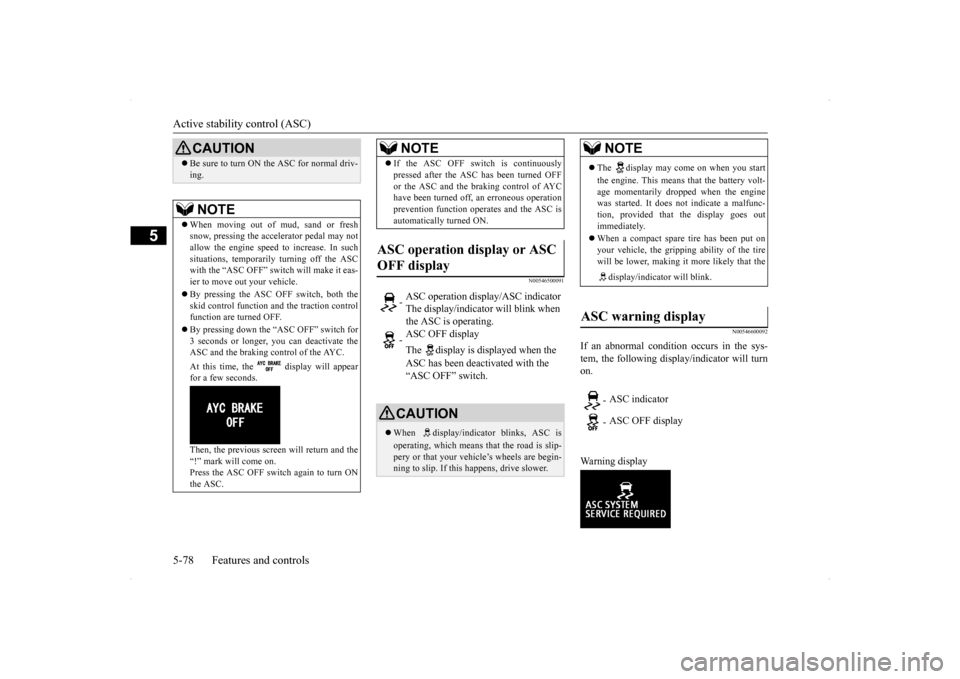
If an abnormal condition occurs in the sys- tem, the following display/indicator will turn on. Warning display
Be sure to turn ON the ASC for normal driv- ing.NOTE
When moving out of mud, sand or fresh snow, pressing the accelerator pedal may not allow the engine speed to increase. In such situations, temporarily turning off the ASCwith the “ASC OFF” switch will make it eas- ier to move out your vehicle. By pressing the ASC OFF switch, both the skid control function and the traction control function are turned OFF. By pressing down the “ASC OFF” switch for 3 seconds or longer, you can deactivate theASC and the braking control of the AYC. At this time, the display will appear for a few seconds. Then, the previous screen will return and the “!” mark will come on. Press the ASC OFF switch again to turn ONthe ASC.CAUTION
If the ASC OFF switch is continuously pressed after the ASC has been turned OFF or the ASC and the braking control of AYC have been turned off, an erroneous operation prevention function operates and the ASC isautomatically turned ON.
ASC operation display or ASC OFF display
- ASC operation display/ASC indicator The display/indicator will blink when the ASC is operating. - ASC OFF display The display is displayed when the ASC has been deactivated with the “ASC OFF” switch.CAUTION When display/indicator blinks, ASC is operating, which means that the road is slip- pery or that your vehicle’s wheels are begin-ning to slip. If this happens, drive slower.NOTE
NOTE
The display may come on when you start the engine. This means that the battery volt- age momentarily droppe
d when the engine
was started. It does not indicate a malfunc-tion, provided that the display goes out immediately. When a compact spare tire has been put on your vehicle, the grip
ping ability of the tire
will be lower, making it more likely that the display/indicator will blink.
ASC warning display
- ASC indicator - ASC OFF display
BK0200800US.bo
ok 78 ページ 2013年2月14日 木曜日 午後2時28分
Page 143 of 338
Cruise control 5-82 Features and controls
5
N00518400327
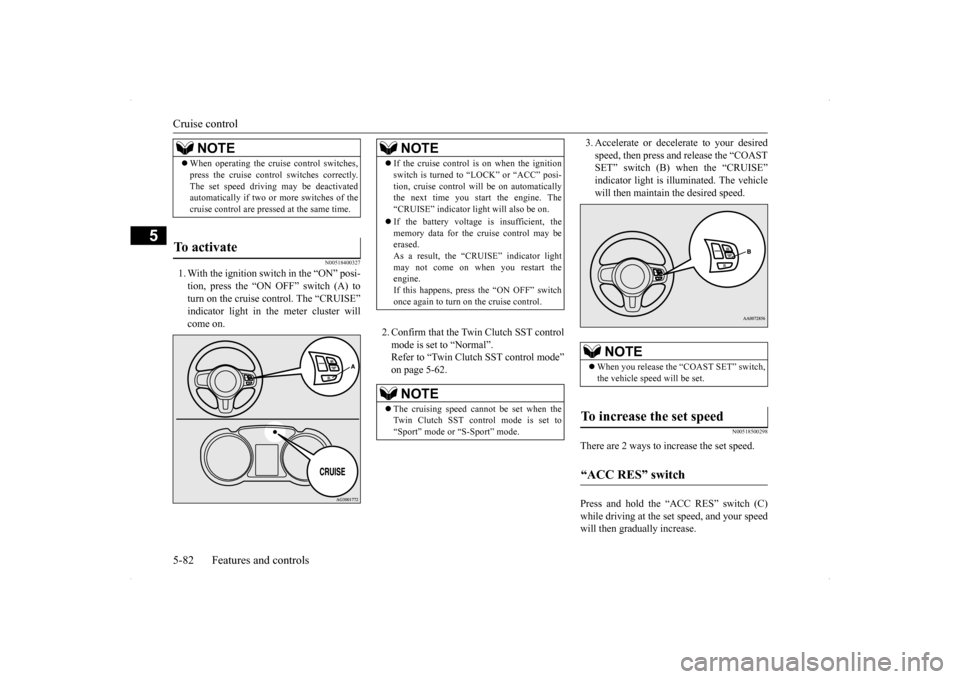
1. With the ignition switch in the “ON” posi- tion, press the “ON OFF” switch (A) to turn on the cruise control. The “CRUISE” indicator light in the meter cluster willcome on.
2. Confirm that the Twin Clutch SST control mode is set to “Normal”. Refer to “Twin Clutch SST control mode”on page 5-62.
3. Accelerate or decelerate to your desired speed, then press and release the “COAST SET” switch (B) when the “CRUISE” indicator light is illuminated. The vehiclewill then maintain the desired speed.
N00518500298
There are 2 ways to increase the set speed. Press and hold the “ACC RES” switch (C) while driving at the set speed, and your speedwill then gradually increase.
NOTE
When operating the cruise control switches, press the cruise control switches correctly. The set speed driving may be deactivated automatically if two or more switches of the cruise control are pressed at the same time.
To activate
NOTE
If the cruise control is on when the ignition switch is turned to “LOCK” or “ACC” posi- tion, cruise control will be on automatically the next time you start the engine. The “CRUISE” indicator light will also be on. If the battery voltage is insufficient, the memory data for the cruise control may beerased. As a result, the “CRUISE” indicator light may not come on when you restart theengine. If this happens, press the “ON OFF” switch once again to turn on the cruise control.NOTE
The cruising speed cannot be set when the Twin Clutch SST control mode is set to “Sport” mode or “S-Sport” mode.
NOTE
When you release the “COAST SET” switch, the vehicle speed will be set.
To increase the set speed “ACC RES” switch
BK0200800US.bo
ok 82 ページ 2013年2月14日 木曜日 午後2時28分
Page 149 of 338
Tire pressure monitoring system 5-88 Features and controls
5
2. If the tire pressure monitoring system warning light remains illuminated after you have been driving for about 20 min- utes after you adjust the tire inflation pres-sure, one or more of the tires may have apuncture. Inspect the tire and if it has a puncture, have it repaired by an autho- rized Mitsubishi Motors dealer as soon aspossible.
The tire pressure monitoring system may not work normally in the following circum- stances: A wireless facility or device using the same frequency is near the vehicle. Snow or ice is stuck inside the fenders and/or on the wheels. The tire inflation pressure sensor’s battery is dead. Wheels other than Mitsubishi genuine wheels are being used. Wheels that are not fi
tted with tire infla-
tion pressure sensors are being used. Wheels whose ID codes are not memo- rized by the vehicle are used. Compact spare tire is fitted on a road wheel.
A window tint that affects the radio wave signals is installed.
N00532900179
If new wheels with new tire inflation pressuresensors are installed, their ID codes must beprogrammed into the tire pressure monitoring system. Have tire and wheel replacement per- formed by an authorized Mitsubishi Motorsdealer to avoid the risk of damaging the tire inflation pressure sensors. If the wheel replacement is not done by an authorizedMitsubishi Motors dealer, it is not covered by your warranty.
Once adjustments have been made, the warn- ing light will go off after a few minutes of driving.WA R N I N G If the warning light/display illuminates while you are driving, avoid hard braking, sharp steering maneuvers and high speeds. Driving with an under-inflated tireadversely affects vehicle performance and can result in an accident.CAUTION If a tire has a puncture, replace that tire with the spare tire. Driving on a punctured tire could lead to an accident. The warning light/display may not illuminate immediately in the event of a tire blowout orrapid leak.NOTE
NOTE
To avoid the risk of damage to the tire infla- tion pressure sensors, have any punctured tire repaired by an authorized Mitsubishi Motors dealer. If the tire repair is not done by an authorized Mitsubishi Motors dealer, it isnot covered by your warranty. Do not use an aerosol puncture-repair prod- uct on any tire. Such a spray could damage the tire inflation pressure sensors. Have any puncture repaired by an authorized Mitsubi-shi Motors dealer.
NOTE
Tire inflation pressures vary with the ambi- ent temperature. If the
vehicle is subjected to
large variations in ambient temperature, thetire inflation pressures may be under-inflated (causing the warning light/display to come on) when the ambient temperature is rela-tively low. If the warning light/display comes on, adjust the tire inflation pressure.
Whenever the tires and wheels are replaced with new ones
BK0200800US.bo
ok 88 ページ 2013年2月14日 木曜日 午後2時28分
Page 155 of 338
Multi-information display 5-94 Features and controls
5
N00555500013
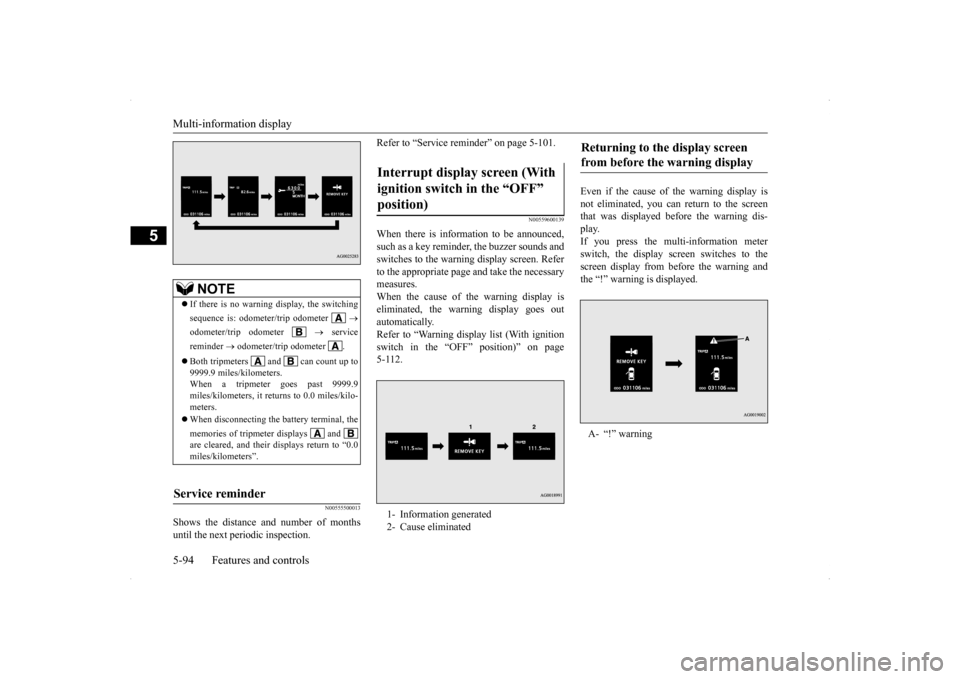
Shows the distance and number of months until the next periodic inspection.
Refer to “Service reminder” on page 5-101.
N00559600139
When there is information to be announced, such as a key reminder, the buzzer sounds and switches to the warning display screen. Referto the appropriate page and take the necessarymeasures. When the cause of the warning display is eliminated, the warning display goes outautomatically. Refer to “Warning display list (With ignition switch in the “OFF” position)” on page5-112.
Even if the cause of the warning display is not eliminated, you can return to the screen that was displayed before the warning dis-play. If you press the multi-information meter switch, the display screen switches to thescreen display from before the warning andthe “!” warning is displayed.
NOTE
If there is no warning display, the switching sequence is: odometer/trip odometer
odometer/trip odometer
service
reminder
odometer/trip odometer .
Both tripmeters and can count up to 9999.9 miles/kilometers.When a tripmeter goes past 9999.9 miles/kilometers, it returns to 0.0 miles/kilo- meters. When disconnecting the battery terminal, the memories of tripmeter displays and are cleared, and their displays return to “0.0miles/kilometers”.
Service reminder
Interrupt display screen (With ignition switch in the “OFF” position) 1- Information generated 2- Cause eliminated
Returning to the display screen from before the warning display A- “!” warning
BK0200800US.bo
ok 94 ページ 2013年2月14日 木曜日 午後2時28分
Page 159 of 338

Multi-information display 5-98 Features and controls
5
This displays the average speed from the last reset to the present.There are 2 types of mode settings as follows. For details on how to change the average speed display setting, refer to “Changing thefunction settings (With
ignition switch in the
“ON” position)” on page 5-103.
When the average speed is being dis- played, if you hold down the multi-infor- mation meter switch, these calculations will be reset to zero. When the ignition switch is turned to the “ON” position from the “ACC” or “LOCK” position, the mode settingchanges automatically from manual to auto. Switching to auto occurs automatically. Ifswitching to manual mode is done, how-ever, the data from the last reset is dis- played. When the average speed is being dis- played, if you hold down the multi-infor-mation meter switch, these calculations will be reset to zero. When the ignition switch has been set to the “ACC” or “LOCK” position for about 4 hours or more, the average speed dis- play will automatically reset.
This displays the average fuel consumption from the last reset to the present. There are 2 types of mode settings as follows.For details on how to change the average fuel consumption display setting, refer to “Chang- ing the function settings (With ignition switchin the “ON” position)” on page 5-103. The “ ” mark in the momentary fuel gauge shows the average fuel consumption. When the average fuel consumption is being displayed, if you hold down themulti-information meter switch, these cal- culations will be reset to zero.
When you refuel, the driving range display is updated. However, if you only add a small amount of fuel, the correct value will not be displayed. Fill to a full tank whenever possible. When your vehicle is stopped on an extremely steep hill, the driving range valuemay, change. This is due to the movement of fuel in the tank and does not indicate any breakdown. The display setting can be changed to the preferred units (miles or km).Refer to “Changing the function settings (With ignition switch in the “ON” position)” on page 5-103.
Average speed display
NOTE
Manual reset mode Auto reset mode
NOTE
The average speed display and the average fuel consumption display can be reset sepa-rately in both auto reset mode and manual reset mode.
“---” is displayed when the average speed cannot be measured. The initial (default) setting is “Auto reset mode”. The display setting can be changed to the preferred units (mph or km/h).Refer to “Changing the function settings (With ignition switch in the “ON” position)” on page 5-103. The average speed display memories for auto reset mode and manual reset mode are erasedif the battery is disconnected.
Average fuel consumption display Manual reset mode
NOTE
BK0200800US.bo
ok 98 ページ 2013年2月14日 木曜日 午後2時28分
Page 160 of 338
Multi-information display
Features and controls 5-99
5
When the ignition switch is turned to the “ON” position from the “ACC” or “LOCK” position, the mode setting changes automatically from manual toauto. Switching to auto occurs automatically. If switching to manual mode is done, how-ever, the data from the last reset is dis- played. When the average fuel consumption is being displayed, if you hold down the multi-information meter switch, these cal-culations will be reset to zero. When the ignition switch has been set to the “ACC” or “LOCK” position for about4 hours or more, the average fuel con- sumption display will automatically reset.
While driving, the momentary fuel consump- tion is shown with a bar graph. When the momentary fuel consumption sur- passes the average fuel consumption, themomentary fuel consumption is displayed with a green bar graph. Be conscious of maintaining the momentaryfuel consumption above the average fuel con- sumption, it can help you drive with the better fuel consumption.
The S-AWC operation status is displayed. For further details, refer to “S-AWC opera- tion display” on page 5-73. The “Display language”, “Temperature unit”, “Fuel consumption unit”, and “Average fuel
Auto reset mode
NOTE
The average speed display and the average fuel consumption display can be reset sepa-rately in both auto reset mode and manual reset mode. “---” is displayed when the average fuel con- sumption cannot be measured. The initial (default) setting is “Auto reset mode”.
Average fuel consumption may vary depend on the driving conditions (road conditions, how you drive, etc.) The actual fuel con- sumption may differ from the fuel consump- tion displayed, so treat the fuel consumptiondisplayed as just a rough guideline. The average fuel consumption display mem- ories for auto reset mode and manual reset mode are erased if the battery is discon- nected. The display setting can be changed to the preferred units {mpg (US), mpg (UK),L/100km or km/L}. Refer to “Changing the function settings (With ignition switch in the “ON” position)”on page 5-103.
Momentary fuel consumption dis- play
NOTE
NOTE
When the momentary fuel consumption can- not be measured, a ba
r graph is not shown.
The display setting can be changed to the preferred units {mpg (US), mpg (UK),L/100km or km/L}. Refer to “Changing the function settings (With ignition switch in the “ON” position)”on page 5-103. It is possible to cancel the green bar graph. Refer to “Changing the function settings (With ignition switch in the “ON” position)” on page 5-103.
S-AWC operation display
WA R N I N G Always concentrate on your driving first. Keep your eyes and mind on the road. Dis-tractions while driving can lead to an acci- dent.
Function setting screen
BK0200800US.bo
ok 99 ページ 2013年2月14日 木曜日 午後2時28分
Page 166 of 338
Multi-information display
Features and controls 5-105
5
N00557000214
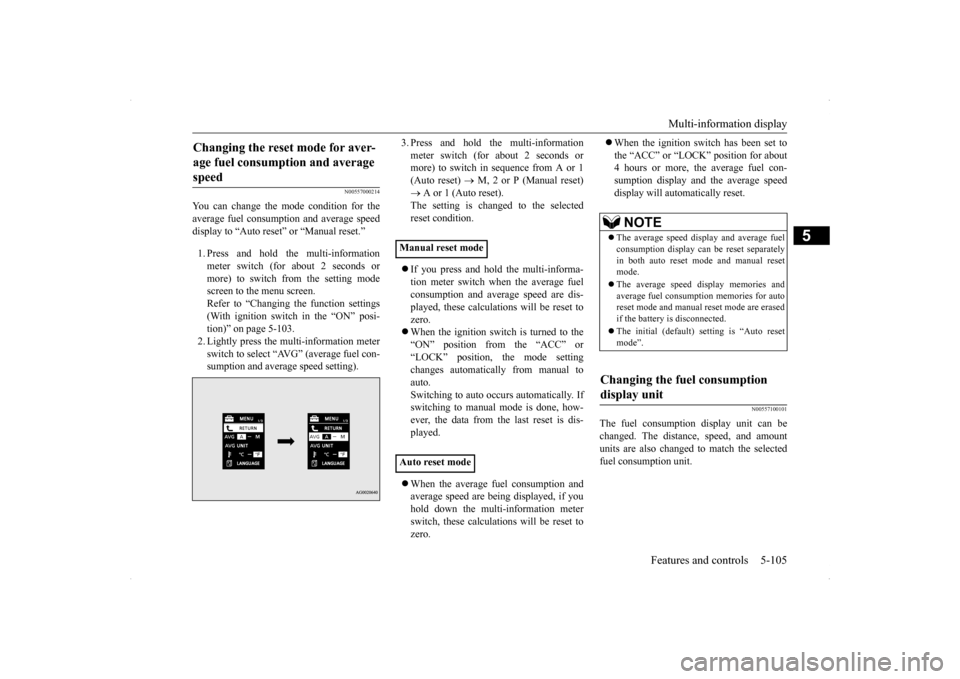
You can change the mode condition for the average fuel consumption and average speed display to “Auto reset” or “Manual reset.” 1. Press and hold the multi-information meter switch (for about 2 seconds ormore) to switch from the setting modescreen to the menu screen. Refer to “Changing the function settings (With ignition switch in the “ON” posi-tion)” on page 5-103. 2. Lightly press the multi-information meter switch to select “AVG” (average fuel con-sumption and average speed setting).
3. Press and hold the multi-information meter switch (for about 2 seconds or more) to switch in sequence from A or 1 (Auto reset)
M, 2 or P (Manual reset)
A or 1 (Auto reset). The setting is changed to the selected reset condition. If you press and hold the multi-informa- tion meter switch when the average fuelconsumption and average speed are dis- played, these calculations will be reset to zero. When the ignition switch is turned to the “ON” position from the “ACC” or “LOCK” position, the mode settingchanges automatically from manual to auto. Switching to auto occurs automatically. Ifswitching to manual mode is done, how- ever, the data from the last reset is dis- played. When the average fuel consumption and average speed are being displayed, if you hold down the multi-information meter switch, these calculations will be reset tozero.
When the ignition switch has been set to the “ACC” or “LOCK” position for about 4 hours or more, the average fuel con- sumption display and the average speeddisplay will automatically reset.
N00557100101
The fuel consumption display unit can bechanged. The distance, speed, and amountunits are also changed to match the selected fuel consumption unit.
Changing the reset mode for aver- age fuel consumption and average speed
Manual reset mode Auto reset mode
NOTE
The average speed display and average fuel consumption display can be reset separately in both auto reset mode and manual resetmode. The average speed display memories and average fuel consumption memories for auto reset mode and manual reset mode are erased if the battery is disconnected. The initial (default) setting is “Auto reset mode”.
Changing the fuel consumption display unit
BK0200800US.book
105 ページ 2013年2月14日 木曜日 午後2時28分
Page 167 of 338
Multi-information display 5-106 Features and controls
5
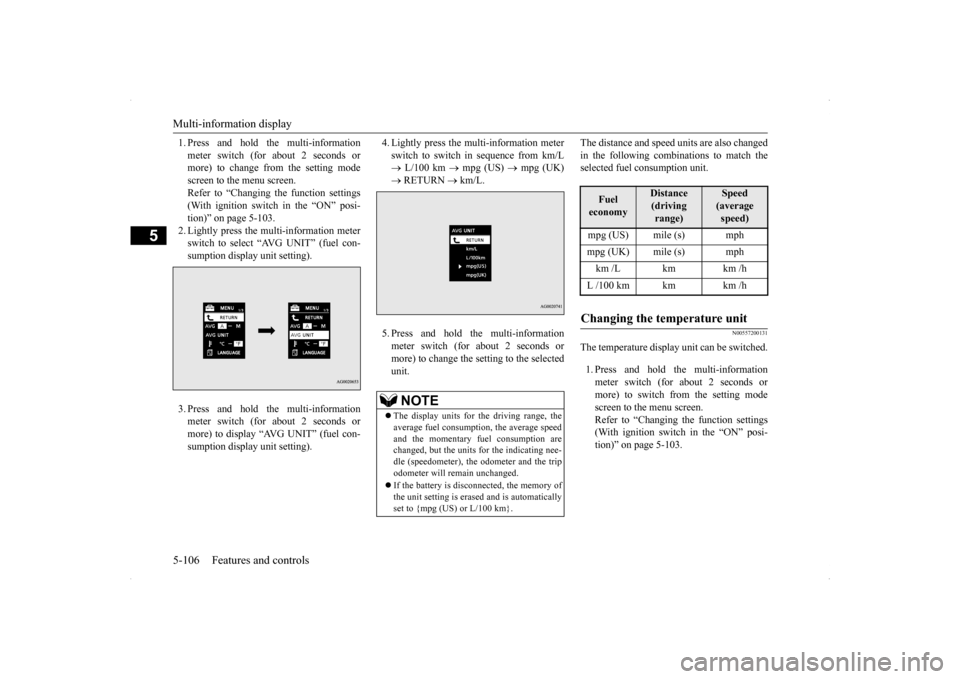
1. Press and hold the multi-information meter switch (for about 2 seconds or more) to change from the setting mode screen to the menu screen.Refer to “Changing the function settings (With ignition switch in the “ON” posi- tion)” on page 5-103.2. Lightly press the multi-information meter switch to select “AVG UNIT” (fuel con- sumption display unit setting). 3. Press and hold the multi-information meter switch (for about 2 seconds or more) to display “AVG UNIT” (fuel con-sumption display unit setting).
4. Lightly press the multi-information meter switch to switch in sequence from km/L L/100 km
mpg (US)
mpg (UK)
RETURN
km/L.
5. Press and hold the multi-information meter switch (for about 2 seconds ormore) to change the setting to the selectedunit.
The distance and speed units are also changed in the following combinations to match the selected fuel consumption unit.
N00557200131
The temperature display unit can be switched. 1. Press and hold the multi-information meter switch (for about 2 seconds ormore) to switch from the setting modescreen to the menu screen. Refer to “Changing the function settings (With ignition switch in the “ON” posi-tion)” on page 5-103.
NOTE
The display units for the driving range, the average fuel consumption, the average speed and the momentary fuel consumption are changed, but the units for the indicating nee-dle (speedometer), the odometer and the trip odometer will remain unchanged. If the battery is disconnected, the memory of the unit setting is erased and is automatically set to {mpg (US) or L/100 km}.
Fuel economy
Distance(driving range)
Speed (average speed)
mpg (US) mile (s) mphmpg (UK) mile (s) mphkm /L km km /hL /100 km km km /hChanging the temperature unit
BK0200800US.book
106 ページ 2013年2月14日 木曜日 午後2時28分
Page 168 of 338
Multi-information display
Features and controls 5-107
5
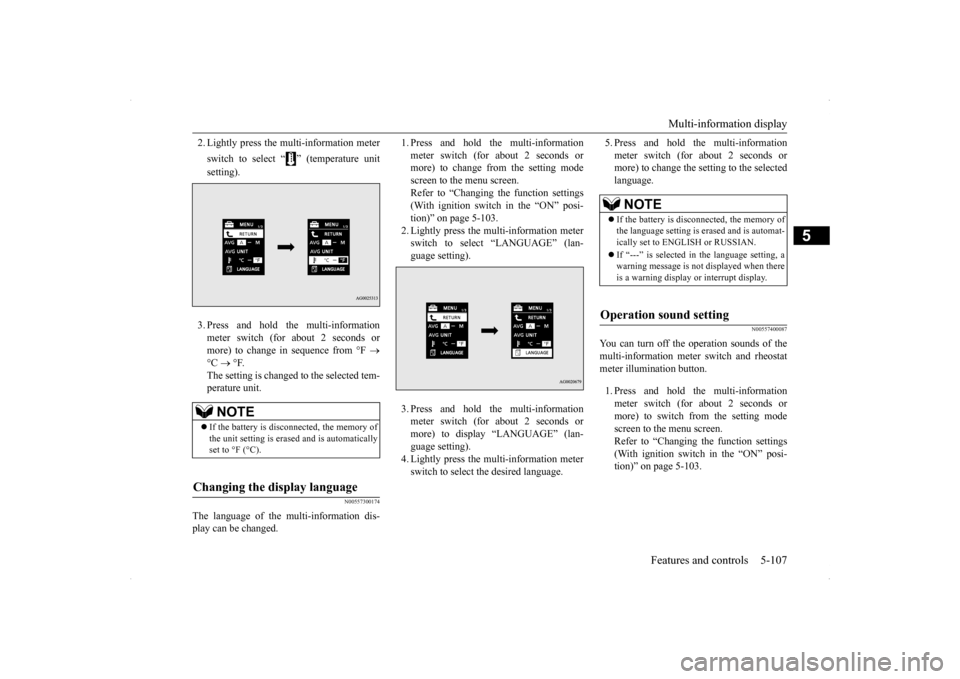
2. Lightly press the multi-information meter switch to select “ ” (temperature unit setting). 3. Press and hold the multi-information meter switch (for about 2 seconds or more) to change in sequence from °F
°C
°F.
The setting is changed to the selected tem- perature unit.
N00557300174
The language of the multi-information dis- play can be changed.
1. Press and hold the multi-information meter switch (for about 2 seconds or more) to change from the setting mode screen to the menu screen.Refer to “Changing the function settings (With ignition switch in the “ON” posi- tion)” on page 5-103.2. Lightly press the multi-information meter switch to select “LANGUAGE” (lan- guage setting). 3. Press and hold the multi-information meter switch (for about 2 seconds or more) to display “LANGUAGE” (lan-guage setting). 4. Lightly press the multi-information meter switch to select the desired language.
5. Press and hold the multi-information meter switch (for about 2 seconds or more) to change the setting to the selected language.
N00557400087
You can turn off the operation sounds of themulti-information meter switch and rheostat meter illumination button. 1. Press and hold the multi-information meter switch (for about 2 seconds ormore) to switch from the setting mode screen to the menu screen. Refer to “Changing the function settings(With ignition switch in the “ON” posi- tion)” on page 5-103.
NOTE
If the battery is disconnected, the memory of the unit setting is erased and is automatically set to °F (°C).
Changing the display language
NOTE
If the battery is disconnected, the memory of the language setting is erased and is automat- ically set to ENGLISH or RUSSIAN. If “---” is selected in the language setting, a warning message is not displayed when there is a warning display or interrupt display.
Operation sound setting
BK0200800US.book
107 ページ 2013年2月14日 木曜日 午後2時28分