service MITSUBISHI LANCER EVOLUTION 2015 10.G User Guide
[x] Cancel search | Manufacturer: MITSUBISHI, Model Year: 2015, Model line: LANCER EVOLUTION, Model: MITSUBISHI LANCER EVOLUTION 2015 10.GPages: 338, PDF Size: 43.12 MB
Page 135 of 338
Anti-lock braking system 5-74 Features and controls
5
N00517900295
The anti-lock braking system helps prevent the wheels from locking up when braking.This helps maintain vehicle drivability and steering wheel handling. Always keep a safe distance from the vehicle in front of you. Even if your vehi-cle is equipped with the anti-lock braking system, leave a greater braking distance when:• Driving on gravel or snow-covered roads. • Driving on uneven road surfaces. Operation of anti-lock braking system is not restricted to situations where brakes are applied suddenly. This system mayalso prevent the wheels from locking when you drive over manholes, steel roadwork plates, road markings, or anyuneven road surface. When the anti-lock braking system is in use, you may feel the brake pedal pulsa-tion and the vibrations of the vehicle body and steering wheel. It may also feel as if the pedal resists being pressed.
In this situation, simply hold the brake pedal down firmly. Do not pump the brake, which will result in reduced braking performance. An operation noise is emitted from the engine compartment or feel a shock from the brake pedal when start driving imme-diately after starting the engine. These are normal sound or operation that the anti- lock braking system makes when per-forming a self-check. It does not indicatea malfunction. The anti-lock braking system can be used after the vehicle has reached a speed overapproximately 6 mph (10 km/h). It stops working when the vehicle slows below approximately 3 mph (5 km/h).
CAUTION The system may be malfunctioning. Park your vehicle in a safe place and stop the engine. Restart the engine and check whether the warning display and “SERVICE REQUIRED” go out. If the warning display and “SERVICE REQUIRED” go out, there is no abnormal condition. If the warning display and “SERVICE REQUIRED” do not go out or appear frequently, it is not necessary to stop the vehicle immediately, but we recommendthat you have your vehicle inspected.NOTE
If the ambient temperature drops and the vis- cosity of the AWC control fluid increases,the warning may be displayed. At this time, S-AWC control is temporarily suspended, but this will not affect normaldriving. After the vehicle is driven for a while, if the engine is restarted after the AWC controlfluid warms up or the ambient temperature increases, the S-AWC control will start oper- ating again if the warning display goes out.
Anti-lock braking system Driving hints
CAUTION The anti-lock braking system cannot prevent accidents. It is your responsibility to take safety precautions and to drive carefully. To prevent failure of the anti-lock braking system, be sure all 4 wheels and tires are thesame size and the same type. Do not install any aftermarket limited-slip differential (LSD) on your vehicle. The anti- lock braking system may stop functioningproperly.
BK0210800US.bo
ok 74 ページ 2014年4月8日 火曜日 午前11時28分
Page 140 of 338
Service brake
Features and controls 5-79
5
N00517500291
Overuse of the brake can cause poor brake response and premature wear of the brakepads. When driving down a long or steep hill, use engine braking by downshifting.
N00517600380
Your vehicle is equipped with power brakes for more braking force with minimal brake pedal effort.Your brakes are designe
d to operate at full
capacity, even if the power assist is lost. If the power assist is lost, the effort needed topress the brake pedal is greater. If you lose the power assist for some reason, the brakes will still work. If the power brake unit or either of the two brake hydraulic systems stops working prop-
erly, the rest of the br
ake system will still
work, but the vehicle will not slow down as quickly. You will know this has happened if you findyou need to depress the brake pedal down further, or harder when slowing down or stop- ping, or if the brake
warning light and the
warning display in the multi-information dis- play come on.
N00532500117
The disc brakes have an alarm that makes ametallic squeal when the brake pads have worn down enough to need service. If youhear this sound continuously, have the brake pads inspected at an authorized Mitsubishi Motors dealer or a repair facility of yourchoice.
NOTE
Even if there is a difference in the amount of traction the wheels can get, if both of them are spinning, the limited-slip differential will not be effective.CAUTION Never start the engine while one of the front or rear wheels is jacked up and the other in contact with the ground; doing so may cause the vehicle to jump forward. Continuously attempting to extract the vehi- cle from snow, mud, etc. while using highengine rpm may damage the limited-slip dif- ferential. Using a compact spare wheel will adversely affect the limited-slip differential; replace the compact spare wheel with a standard sizewheel as soon as possible.
Service brake Brake pedal
WA R N I N G Do not leave any objects near the brake pedal or let a floor mat slide under it; doing so could prevent the full pedal stroke that would be necessary in an emergency. Make sure that the pedal canbe operated freely at all times. Make sure the floor mat is securely held in place.CAUTION It is important not to drive the vehicle with your foot resting on the brake pedal when braking is not required. This practice can result in very high brake temperatures, pre-mature pad wear, and possible damage to the brakes.
Power brakes
WA R N I N G Never coast downhill with the engine OFF. Keep the engine running whenever your vehicle is in motion. If you turn off the engine while driving, the power brakebooster will stop working and your brakes will not work as well. If the power assist is
lost or if either brake
hydraulic system stops working properly, take your vehicle to an authorized Mit-subishi Motors dealer or a repair facility of your choice immediately.
Brake pad wear alarm
BK0210800US.bo
ok 79 ページ 2014年4月8日 火曜日 午前11時28分
Page 151 of 338
Multi-information display 5-90 Features and controls
5
N00555000207
The multi-information display displays warn
ings, the odometer, trip odometer, service re
minder, engine coolant temperature, fue
l remaining, out-
side temperature, Twin Clutch SST contro
l mode, S-AWC (Super-All Wheel Control) control mode, gearshift lever position, average
and momen-
tary fuel consumption, driving range, average speed, S-AWC (Super-
All Wheel Control) operation display, instrument brightness,
etc.
It is also possible to change elements such as th
e language and units used on the multi-information display.
NOTE
You can adjust to 8 different levels respec- tively for when the front side-marker and parking lights are illuminated and when they are not. If the vehicle is equipped with the automatic light control, when the light switch is in a position other than the “OFF” position, themeter illumination switches automatically to the adjusted brightness, depending on the brightness outside the vehicle. The brightness level of the instruments is stored when the ignition switch is turned off.
If you press and hold the button for longer than about 1 second when the front side- marker and parking lights are illuminated, the brightness level changes to the maximum level. Pressing and holding the button forlonger than about 1 second again returns the brightness level to the previous level.NOTE
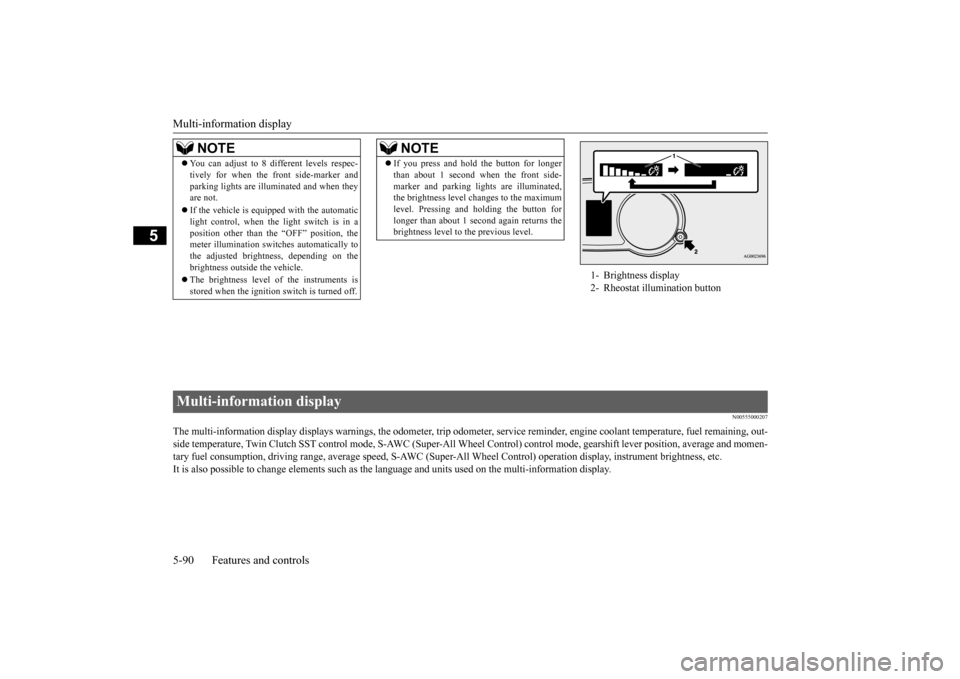
1- Brightness display 2- Rheostat illumination button
Multi-information display BK0210800US.bo
ok 90 ページ 2014年4月8日 火曜日 午前11時28分
Page 153 of 338
Multi-information display 5-92 Features and controls
5
N00555100165
The multi-information meter switch is a but- ton marked “INFO” on the left side of the dash. Each time the multi-information meter switchis operated, a sound is emitted and the multi- information display changes between infor- mation such as warnings, service reminder,average and momentary fuel consumption, driving range, average speed, and S-AWC operation display.It is also possible to change elements such as the language and units used on the multi-
information display by operating the multi- information meter switch.
N00555200078
If you press the multi-information meter switch and return from the warning display screen to the previous screen, the “!” warningis displayed. Refer to “Returning to the display screen from before the warning display” on page5-94. This mark is also displayed if there is another warning other than the one displayed. Whenthe cause of the warning display is elimi- nated, the “!” warning goes out automatically.
N00555300141
Each time you lightly press the multi-infor- mation meter switch, the display screen switches in the following order.
The display screen is different depending on whether the ignition switch in the “OFF” or “ON” position. Refer to “Information screen (With ignition switch in the “OFF” position)” on page 5-92.Refer to “Warning displa
y list (With ignition
switch in the “OFF” position)” on page 5-111.Refer to “Information screen (With ignition switch turned from “OFF” to “ON”)” on page 5-95.Refer to “Information screen (With ignition switch in the “ON” position)” on page 5-96. Refer to “Warning displa
y list (With ignition
switch in the “ON” position)” on page 5-114.
Multi-information meter switch
NOTE
“!” Warning display screen (With ignition switch in the “OFF” position)
NOTE
When the “!” warning is displayed, the warn- ing display screen can be redisplayed on the information screen. Refer to “Information screen (With ignition switch in the “OFF” position)” on page 5-92.Refer to “Information screen (With ignition switch in the “ON” position)” on page 5-96.
Information screen (With igni- tion switch in the “OFF” posi-tion)
BK0210800US.bo
ok 92 ページ 2014年4月8日 火曜日 午前11時28分
Page 154 of 338
Multi-information display
Features and controls 5-93
5
N00555400139
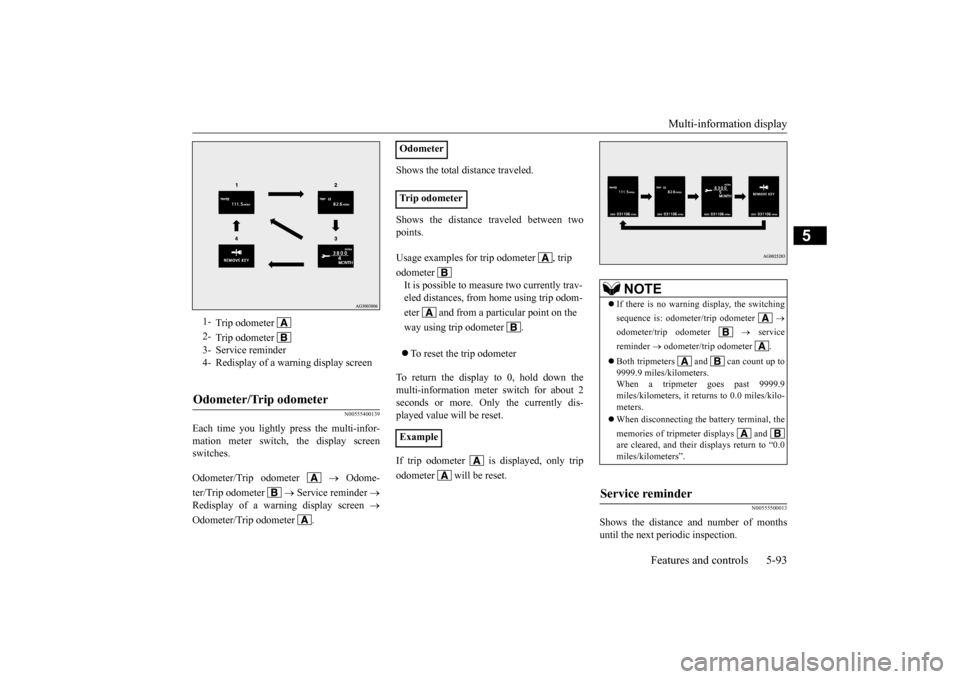
Each time you lightly press the multi-infor- mation meter switch, the display screen switches. Odometer/Trip odometer
Odome-
ter/Trip odometer
Service reminder
Redisplay of a warning display screen
Odometer/Trip odometer .
Shows the total distance traveled. Shows the distance traveled between two points. To reset the trip odometer
To return the display to 0, hold down the multi-information meter switch for about 2 seconds or more. Only the currently dis-played value will be reset. If trip odometer is displayed, only trip odometer will be reset.
N00555500013
Shows the distance and number of months until the next periodic inspection.
1-
Trip odometer
2-
Trip odometer
3- Service reminder 4- Redisplay of a warning display screenOdometer/Trip odometer
Odometer Trip odometer Usage examples for trip odometer , trip odometer It is possible to measure two currently trav- eled distances, from home using trip odom- eter and from a particular point on the way using trip odometer . Example
NOTE
If there is no warning display, the switching sequence is: odometer/trip odometer
odometer/trip odometer
service
reminder
odometer/trip odometer .
Both tripmeters and can count up to 9999.9 miles/kilometers.When a tripmeter goes past 9999.9 miles/kilometers, it returns to 0.0 miles/kilo- meters. When disconnecting the battery terminal, the memories of tripmeter displays and are cleared, and their displays return to “0.0miles/kilometers”.
Service reminder
BK0210800US.bo
ok 93 ページ 2014年4月8日 火曜日 午前11時28分
Page 155 of 338
Multi-information display 5-94 Features and controls
5
Refer to “Service reminder” on page 5-101.
N00559600139
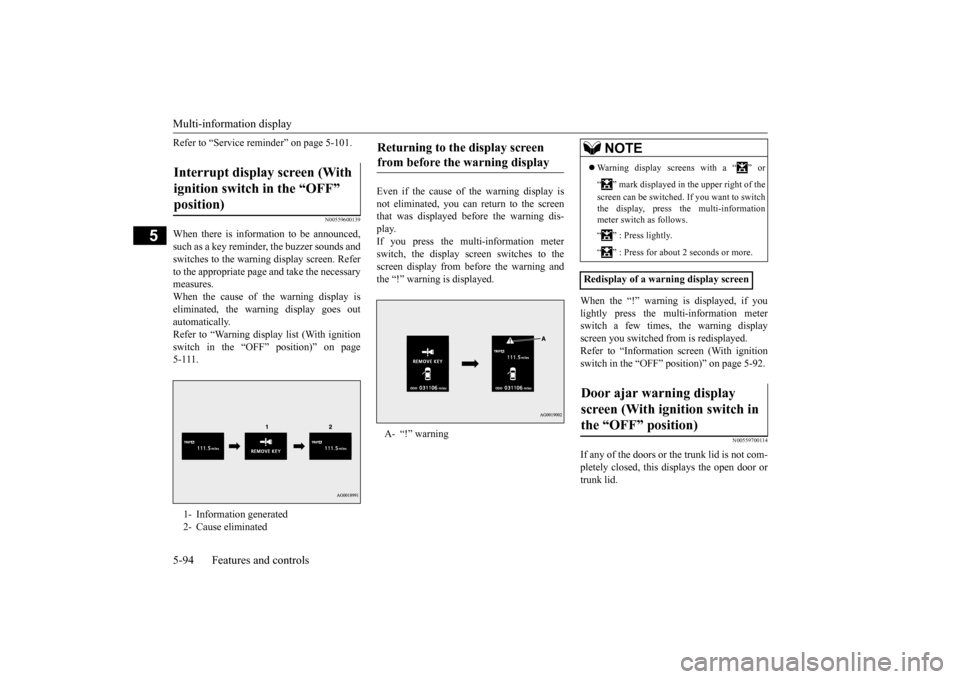
When there is information to be announced, such as a key reminder, the buzzer sounds and switches to the warning display screen. Referto the appropriate page and take the necessarymeasures. When the cause of the warning display is eliminated, the warning display goes outautomatically. Refer to “Warning display list (With ignition switch in the “OFF” position)” on page5-111.
Even if the cause of the warning display is not eliminated, you can return to the screen that was displayed before the warning dis-play. If you press the multi-information meter switch, the display screen switches to thescreen display from before the warning andthe “!” warning is displayed.
When the “!” warning is displayed, if you lightly press the multi-information meter switch a few times, the warning display screen you switched from is redisplayed.Refer to “Information screen (With ignition switch in the “OFF” position)” on page 5-92.
N00559700114
If any of the doors or the trunk lid is not com- pletely closed, this displays the open door or trunk lid.
Interrupt display screen (With ignition switch in the “OFF” position) 1- Information generated 2- Cause eliminated
Returning to the display screen from before the warning display A- “!” warning
NOTE
Warning display screens with a “ ” or “ ” mark displayed in the upper right of the screen can be switched. If you want to switch the display, press the multi-information meter switch as follows. “ ” : Press lightly. “ ” : Press for about 2 seconds or more.
Redisplay of a warning display screenDoor ajar warning display screen (With ignition switch in the “OFF” position)
BK0210800US.bo
ok 94 ページ 2014年4月8日 火曜日 午前11時28分
Page 156 of 338
Multi-information display
Features and controls 5-95
5
N00555800162
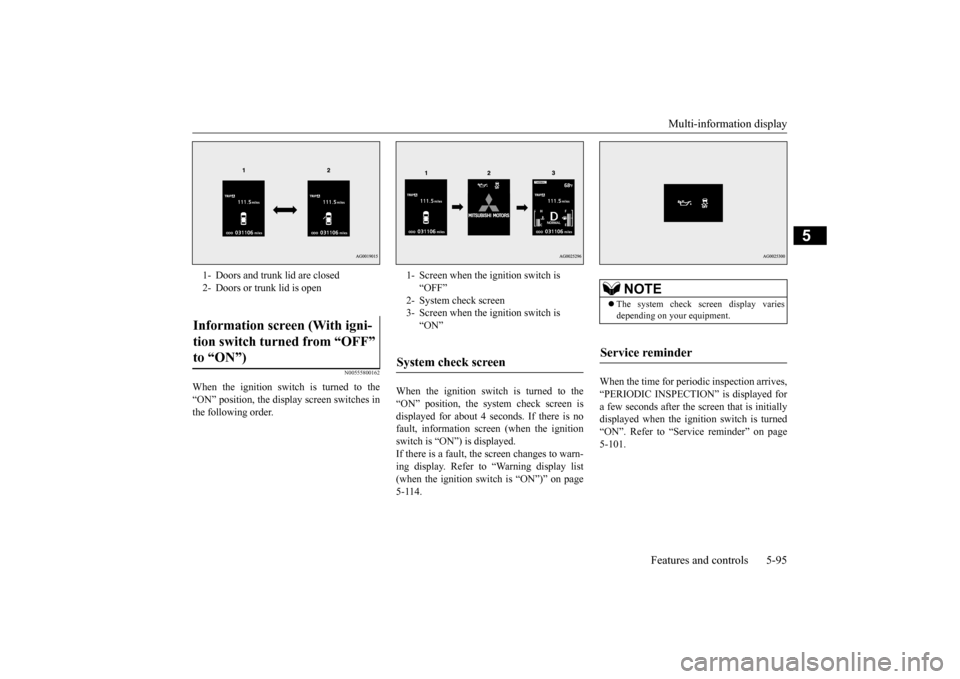
When the ignition switch is turned to the “ON” position, the display screen switches inthe following order.
When the ignition switch is turned to the “ON” position, the system check screen is displayed for about 4 seconds. If there is no fault, information screen (when the ignitionswitch is “ON”) is displayed. If there is a fault, the screen changes to warn- ing display. Refer to “Warning display list(when the ignition switch is “ON”)” on page 5-114.
When the time for periodic inspection arrives, “PERIODIC INSPECTION” is displayed for a few seconds after the screen that is initiallydisplayed when the ignition switch is turned “ON”. Refer to “Service reminder” on page 5-101.
1- Doors and trunk lid are closed 2- Doors or trunk lid is openInformation screen (With igni- tion switch turned from “OFF” to “ON”)
1- Screen when the ignition switch is
“OFF”
2- System check screen 3- Screen when the ignition switch is
“ON”
System check screen
NOTE
The system check screen display varies depending on your equipment.
Service reminder
BK0210800US.bo
ok 95 ページ 2014年4月8日 火曜日 午前11時28分
Page 157 of 338
Multi-information display 5-96 Features and controls
5
N00561900012
The S-AWC operation status is displayed. Refer to “S-AWC control mode” on page 5-72.
N00556000015
This is displayed when you press the multi- information meter switch and switch thewarning display screen. This mark is also displayed if there is another warning other than the one displayed.
When the cause of the warning display is eliminated, the “!” warning goes out automat- ically.
N00556100104
This is displayed when the Active stabilitycontrol (ASC) is turned “OFF” with the “ASC OFF” switch.Also, if an abnormal condition is occurred in the ASC while driving, the “ASC OFF” dis- play illuminates.Refer to “ASC OFF switch” on page 5-77.
N00556200206
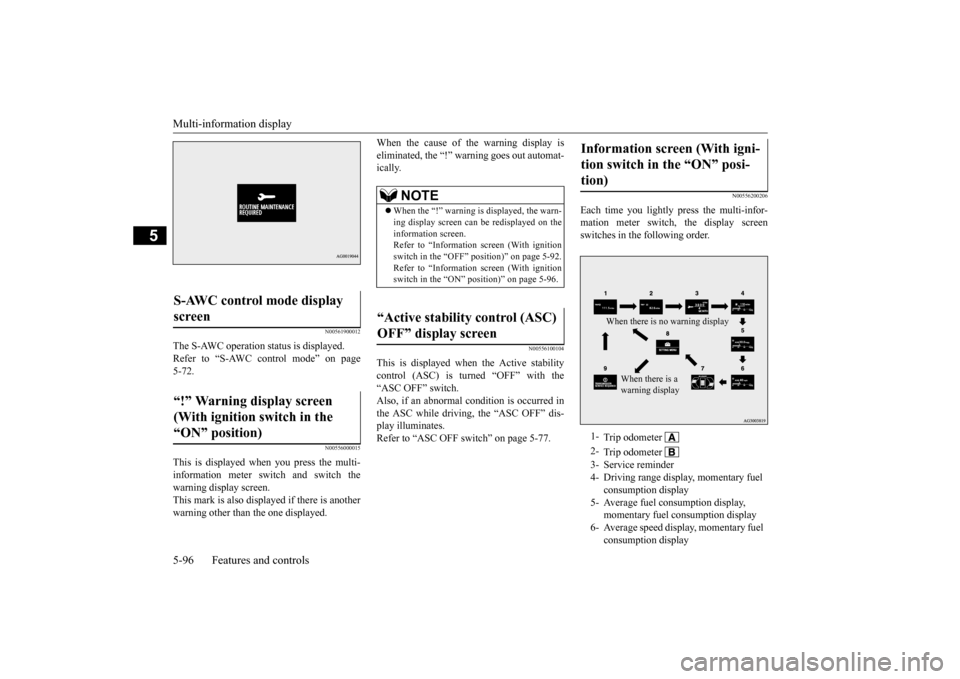
Each time you lightly press the multi-infor- mation meter switch, the display screen switches in the following order.
S-AWC control mode display screen “!” Warning display screen (With ignition switch in the “ON” position)
NOTE
When the “!” warning is displayed, the warn- ing display screen can be redisplayed on the information screen. Refer to “Information screen (With ignitionswitch in the “OFF” position)” on page 5-92. Refer to “Information screen (With ignition switch in the “ON” position)” on page 5-96.
“Active stability control (ASC) OFF” display screen
Information screen (With igni- tion switch in the “ON” posi- tion) 1-
Trip odometer
2-
Trip odometer
3- Service reminder 4- Driving range display, momentary fuel
consumption display
5- Average fuel consumption display,
momentary fuel consumption display
6- Average speed display, momentary fuel
consumption displayWhen there is no warning display
When there is a warning display
BK0210800US.bo
ok 96 ページ 2014年4月8日 火曜日 午前11時28分
Page 158 of 338
Multi-information display
Features and controls 5-97
5
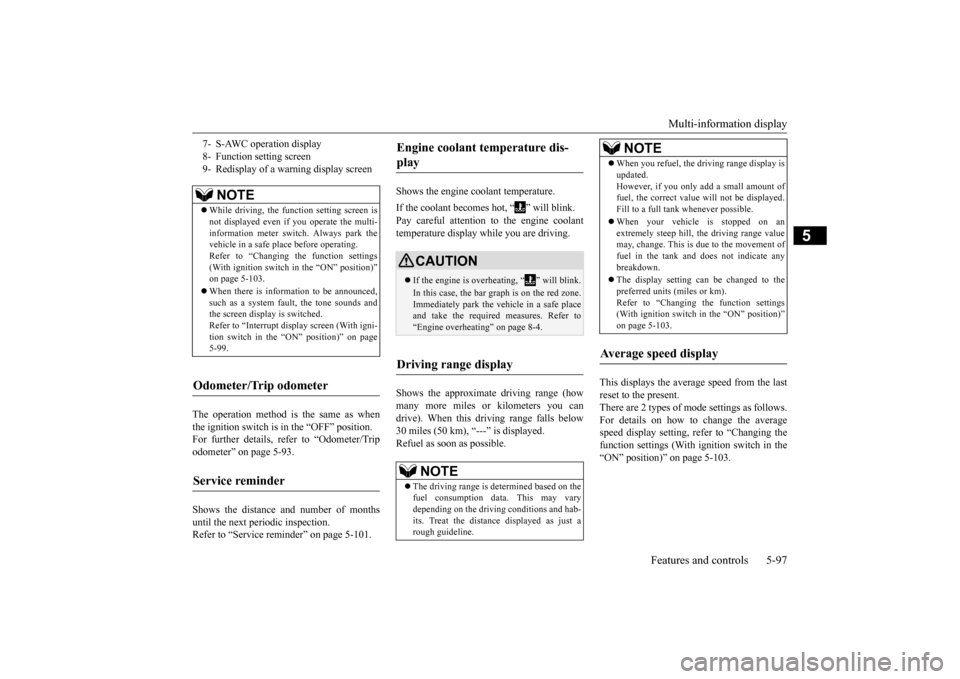
The operation method is the same as when the ignition switch is in the “OFF” position. For further details, refer to “Odometer/Tripodometer” on page 5-93. Shows the distance and number of months until the next periodic inspection. Refer to “Service reminder” on page 5-101.
Shows the engine coolant temperature. If the coolant becomes hot, “ ” will blink. Pay careful attention to the engine coolant temperature display while you are driving. Shows the approximate driving range (how many more miles or kilometers you can drive). When this driving range falls below 30 miles (50 km), “---” is displayed.Refuel as soon as possible.
This displays the average speed from the last reset to the present.There are 2 types of mode settings as follows. For details on how to change the average speed display setting, refer to “Changing thefunction settings (With ignition switch in the “ON” position)” on page 5-103.
7- S-AWC operation display 8- Function setting screen9- Redisplay of a warning display screen
NOTE
While driving, the function setting screen is not displayed even if you operate the multi- information meter switch. Always park thevehicle in a safe place before operating. Refer to “Changing the function settings (With ignition switch in the “ON” position)”on page 5-103. When there is information to be announced, such as a system fault, the tone sounds and the screen display is switched. Refer to “Interrupt display screen (With igni-tion switch in the “ON” position)” on page 5-99.
Odometer/Trip odometer Service reminder
Engine coolant temperature dis- play
CAUTION If the engine is overheating, “ ” will blink. In this case, the bar graph is on the red zone. Immediately park the vehicle in a safe place and take the required measures. Refer to “Engine overheating” on page 8-4.
Driving range display
NOTE
The driving range is determined based on the fuel consumption data. This may vary depending on the driving conditions and hab-its. Treat the distance displayed as just a rough guideline.
When you refuel, the driving range display is updated. However, if you only add a small amount of fuel, the correct value will not be displayed. Fill to a full tank whenever possible. When your vehicle is stopped on an extremely steep hill, the driving range valuemay, change. This is due to the movement of fuel in the tank and does not indicate any breakdown. The display setting can be changed to the preferred units (miles or km).Refer to “Changing the function settings (With ignition switch in the “ON” position)” on page 5-103.
Average speed display
NOTE
BK0210800US.bo
ok 97 ページ 2014年4月8日 火曜日 午前11時28分
Page 162 of 338
Multi-information display
Features and controls 5-101
5
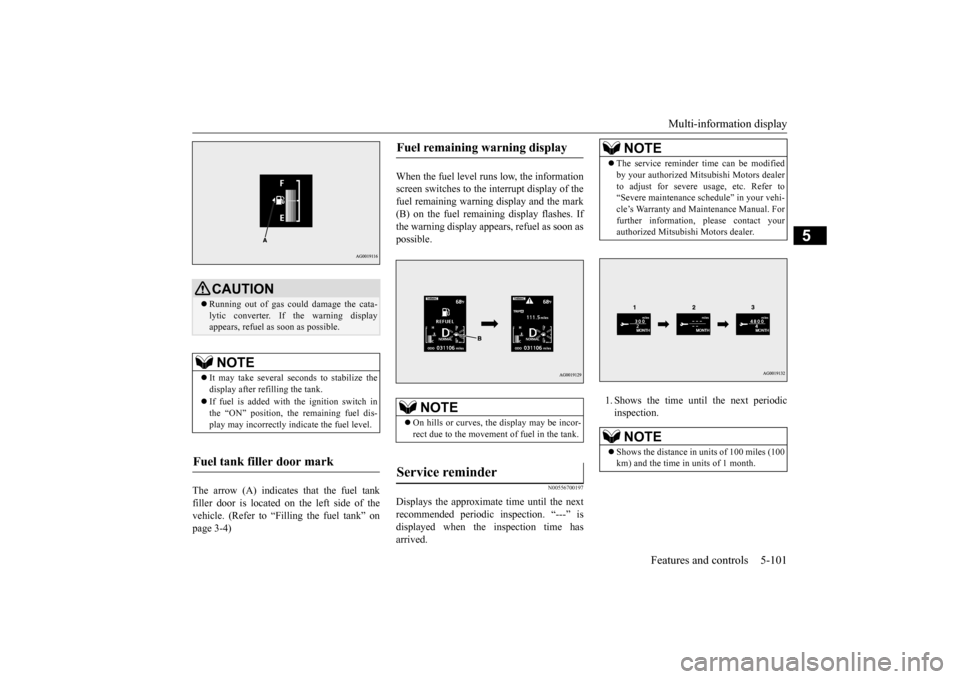
The arrow (A) indicates that the fuel tank filler door is located on the left side of the vehicle. (Refer to “Filling the fuel tank” on page 3-4)
When the fuel level runs low, the information screen switches to the interrupt display of thefuel remaining warning display and the mark (B) on the fuel remaining display flashes. If the warning display appears, refuel as soon aspossible.
N00556700197
Displays the approximate time until the nextrecommended periodic inspection. “---” isdisplayed when the inspection time has arrived.
1. Shows the time until the next periodic inspection.
CAUTION Running out of gas could damage the cata- lytic converter. If the warning display appears, refuel as soon as possible.NOTE
It may take several seconds to stabilize the display after refilling the tank. If fuel is added with the ignition switch in the “ON” position, the remaining fuel dis- play may incorrectly indicate the fuel level.
Fuel tank filler door mark
Fuel remaining warning display
NOTE
On hills or curves, the display may be incor- rect due to the movement of fuel in the tank.
Service reminder
NOTE
The service reminder time can be modified by your authorized Mitsubishi Motors dealer to adjust for severe usage, etc. Refer to “Severe maintenance schedule” in your vehi- cle’s Warranty and Maintenance Manual. Forfurther information, please contact your authorized Mitsubishi Motors dealer.NOTE
Shows the distance in units of 100 miles (100 km) and the time in units of 1 month.
BK0210800US.book
101 ページ 2014年4月8日 火曜日 午前11時28分