ignition MITSUBISHI LANCER SPORTBACK 2014 8.G Owners Manual
[x] Cancel search | Manufacturer: MITSUBISHI, Model Year: 2014, Model line: LANCER SPORTBACK, Model: MITSUBISHI LANCER SPORTBACK 2014 8.GPages: 422, PDF Size: 55.11 MB
Page 253 of 422
Interior lights 5-186 Features and controls
5
N00526200063
N00526301478
If any of the interior lights are left on with the ignition switch in the “LOCK” position, the lights go off automatically after about 30minutes. The lights come on again if the ignition switch is turned to the “ON” or “ACC” posi-tion, any door or the rear hatch is opened andclosed, or the keyless entry system or F.A.S.T.-key is operated.
The door and the rear hatch are closed and the power door lock switch is used to lock the doors. The keyless entry system remote control transmitter is used to lock the doors and the rear hatch. In vehicles equipped with the F.A.S.T.-key, the doors and the rear hatch are locked using the F. A . S . T. - k e y.
NOTE
When the engine is started using the key while the doors and the rear hatch are closed,if you remove the key, the dome light will illuminate for approximately 30 seconds before going off. When the engine is started using the F.A.S.T.-key while the doors and the rearhatch are closed, if the ignition switch is moved to the “LOCK” position, the dome light will illuminate for approximately 30seconds before going off. The time until the light goes off can be adjusted. See your au
thorized Mitsubishi
Motors dealer for details.3- (OFF) The dome light goes off.
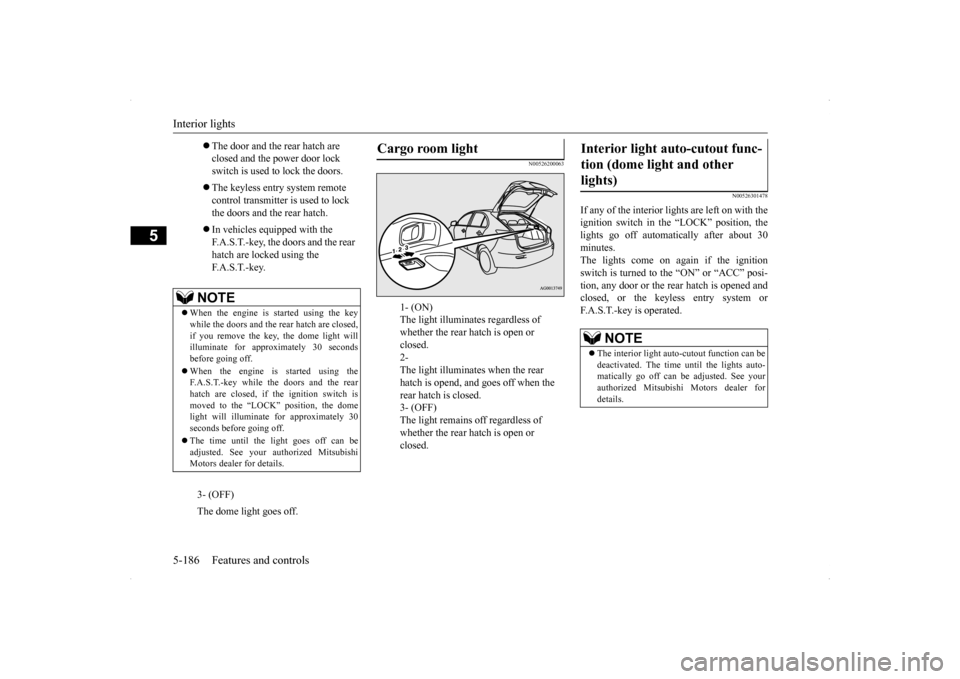
Cargo room light
1- (ON) The light illuminates regardless of whether the rear hatch is open or closed. 2- The light illuminates when the rear hatch is opend, and goes off when the rear hatch is closed. 3- (OFF) The light remains off regardless of whether the rear hatch is open or closed.
Interior light auto-cutout func- tion (dome light and other lights)
NOTE
The interior light auto-cutout function can be deactivated. The time until the lights auto-matically go off can be adjusted. See your authorized Mitsubishi Motors dealer for details.
BK0200700US.book
186 ページ 2013年2月15日 金曜日 午後12時17分
Page 275 of 422
Manual air conditioning with
MAX A/C mode (if so equipped)
7-4 Comfort controls
7
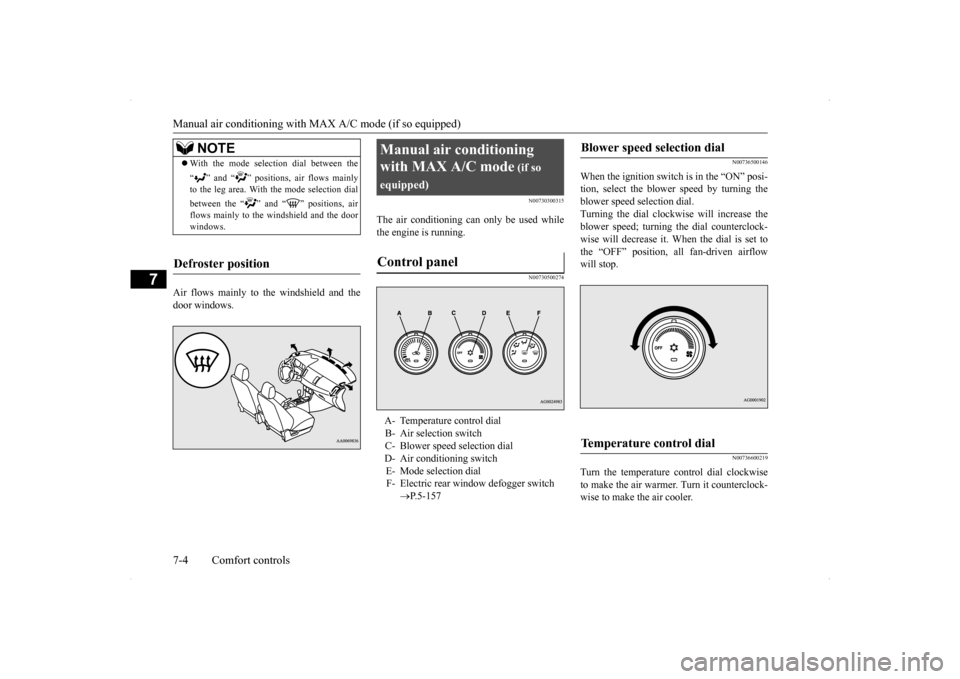
Air flows mainly to the windshield and the door windows.
N00730300315
The air conditioning can only be used whilethe engine is running.
N00730500274
N00736500146
When the ignition switch is in the “ON” posi- tion, select the blower speed by turning theblower speed selection dial. Turning the dial clockwise will increase the blower speed; turning the dial counterclock-wise will decrease it. When the dial is set to the “OFF” position, all fan-driven airflow will stop.
N00736600219
Turn the temperature control dial clockwise to make the air warmer. Turn it counterclock- wise to make the air cooler.
NOTE
With the mode selection dial between the “ ” and “ ” positions, air flows mainly to the leg area. With the mode selection dial between the “ ” and “ ” positions, air flows mainly to the windshield and the doorwindows.
Defroster position
Manual air conditioning with MAX A/C mode
(if so
equipped)Control panel
A- Temperature control dial B- Air selection switch C- Blower speed selection dialD- Air conditioning switch E- Mode selection dial F- Electric rear window defogger switch
P.5-157
Blower speed selection dial
Temperature control dial
BK0200700US.bo
ok 4 ページ 2013年2月15日 金曜日 午後12時17分
Page 281 of 422
Manual air conditioning without
MAX A/C mode (if so equipped)
7-10 Comfort controls
7
N00730500287 N00736500133
When the ignition switch is in the “ON” posi- tion, select the blower speed by turning the blower speed selection dial.Turning the dial clockwise will increase the blower speed; turning the dial counterclock- wise will decrease it. When the dial is set tothe “OFF” position, all fan-driven airflow will stop.
N00736600176
Turn the temperature control dial clockwise to make the air warmer. Turn it counterclock-wise to make the air cooler.
N00736700177
To change the amount of air flowing from thevents, turn the mode selection dial. Refer to “Changing the mode selection” on page 7-2.
N00736800279
Normally, use the outside air position to keepthe windshield and side windows clear and to
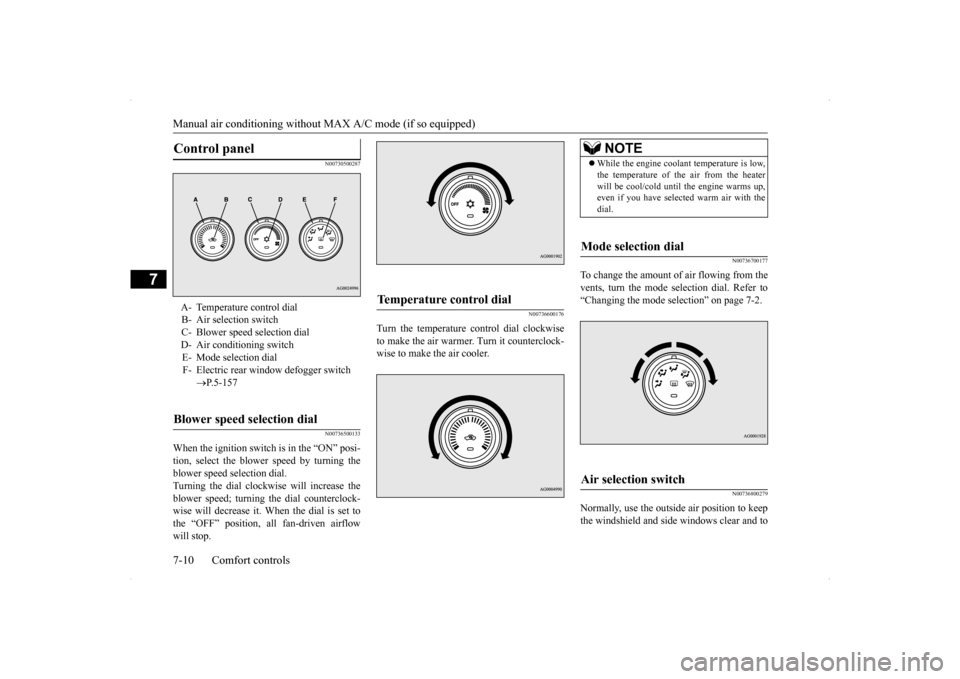
Control panel
A- Temperature control dialB- Air selection switch C- Blower speed selection dialD- Air conditioning switch E- Mode selection dial F- Electric rear window defogger switch
P.5-157
Blower speed selection dial
Temperature control dial
NOTE
While the engine coolant temperature is low, the temperature of the air from the heater will be cool/cold until the engine warms up, even if you have selected warm air with the dial.
Mode selection dial
Air selection switch
BK0200700US.bo
ok 10 ページ 2013年2月15日 金曜日 午後12時17分
Page 286 of 422
Automatic air conditioning with
Fahrenheit scale (if so equipped)
Comfort controls 7-15
7
N00711801578
N00736900094
When the ignition switch is in the “ON” posi- tion, select the blower speed by turning the blower speed selection dial. Turning the dial clockwise will increase theblower speed; turning the dial counterclock- wise will decrease it. When the dial is set to the “OFF” position, all fan-driven airflowwill stop.
N00737000265
Use this dial to adjust the temperature in thepassenger compartment. Turn the temperaturecontrol dial clockwise to make the air warmer. Turn it counterclockwise to make the air cooler.
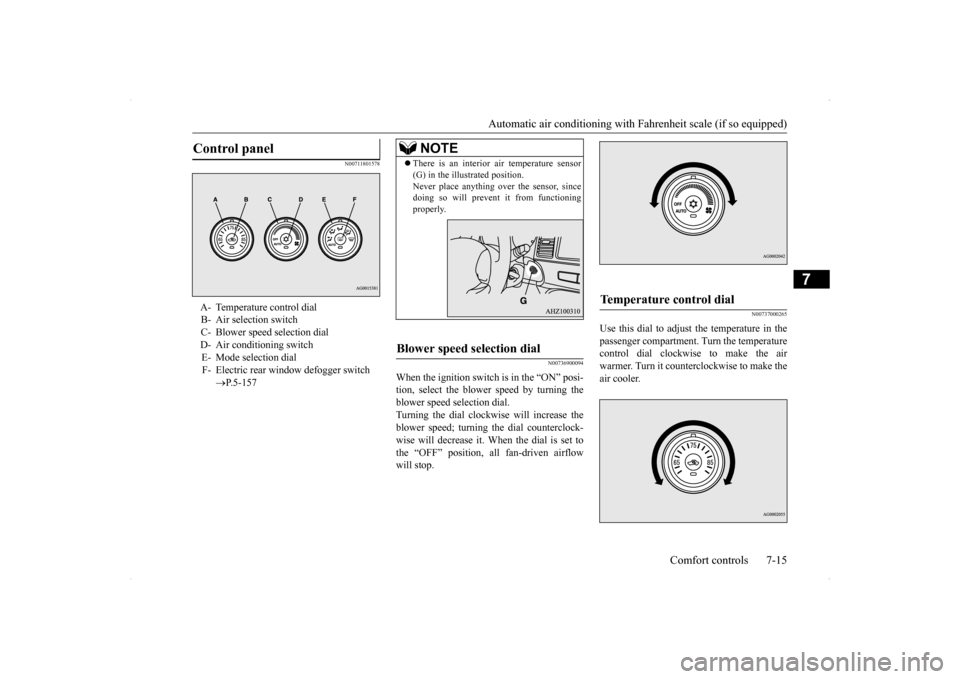
Control panel
A- Temperature control dial B- Air selection switch C- Blower speed selection dialD- Air conditioning switch E- Mode selection dial F- Electric rear window defogger switch
P.5-157
NOTE
There is an interior
air temperature sensor
(G) in the illustrated position. Never place anything over the sensor, since doing so will prevent it from functioning properly.
Blower speed selection dial
Temperature control dial
BK0200700US.bo
ok 15 ページ 2013年2月15日 金曜日 午後12時17分
Page 291 of 422
Automatic air conditioning with
Celsius scale (if so equipped)
7-20 Comfort controls
7
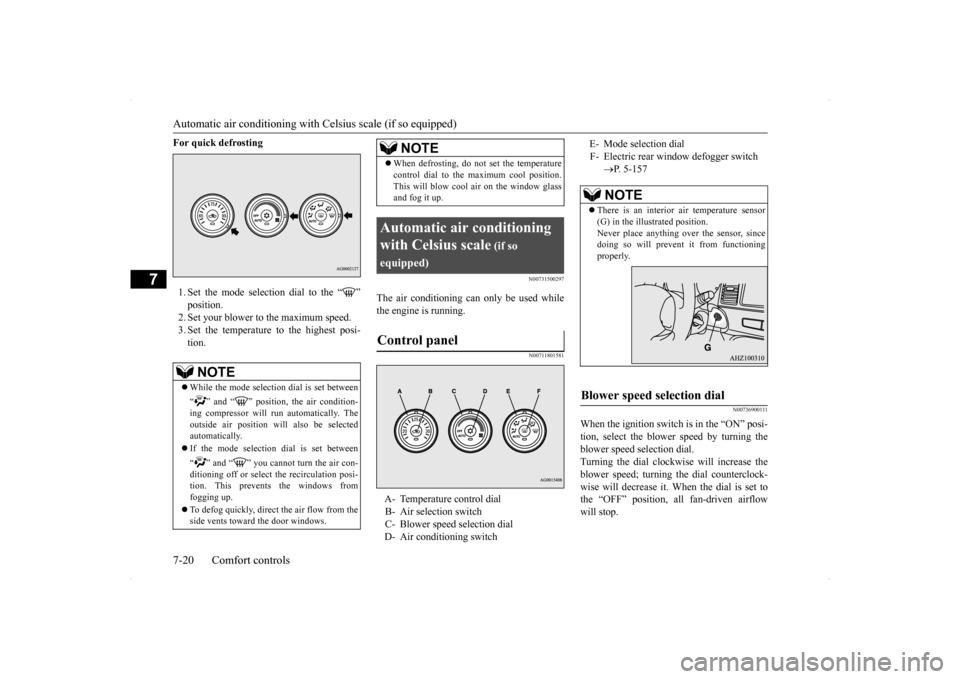
For quick defrosting 1. Set the mode selection dial to the “ ” position. 2. Set your blower to the maximum speed. 3. Set the temperature to the highest posi-tion.
N00731500297
The air conditioning can only be used while the engine is running.
N00711801581
N00736900111
When the ignition switch is in the “ON” posi- tion, select the blower speed by turning the blower speed selection dial.Turning the dial clockwise will increase the blower speed; turning the dial counterclock- wise will decrease it. When the dial is set tothe “OFF” position, all fan-driven airflow will stop.
NOTE
While the mode selection dial is set between “ ” and “ ” position, the air condition- ing compressor will run automatically. The outside air position will also be selectedautomatically. If the mode selection dial is set between “ ” and “ ” you cannot turn the air con- ditioning off or select the recirculation posi- tion. This prevents the windows from fogging up. To defog quickly, direct
the air flow from the
side vents toward the door windows.
When defrosting, do not set the temperature control dial to the maximum cool position. This will blow cool air on the window glass and fog it up.
Automatic air conditioning with Celsius scale
(if so
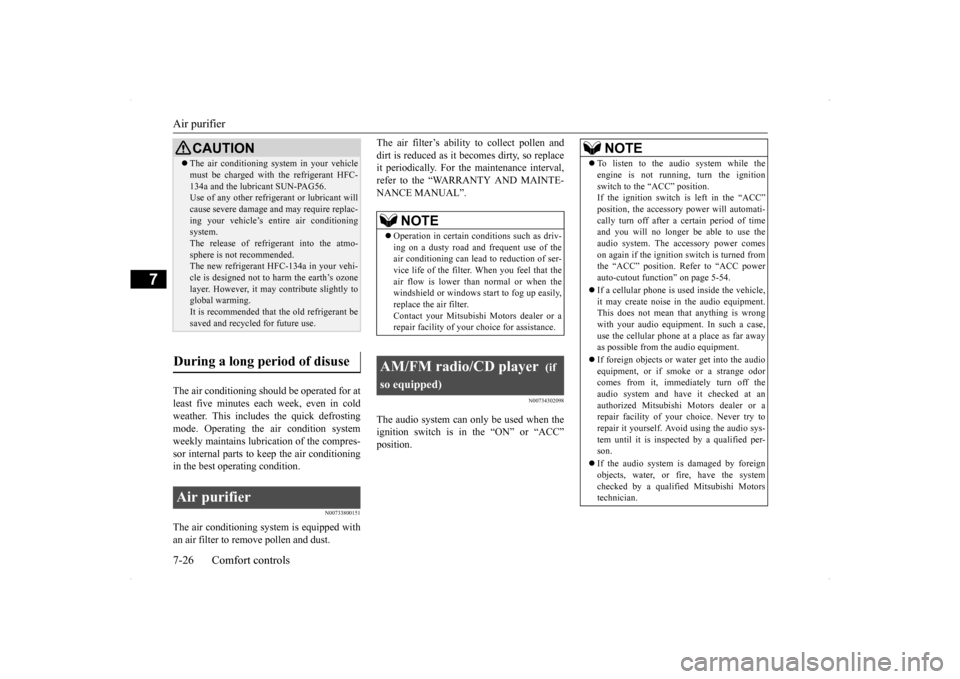
equipped)Control panel
A- Temperature control dial B- Air selection switch C- Blower speed selection dial D- Air conditioning switch
NOTE
E- Mode selection dialF- Electric rear window defogger switch
P. 5-157NOTE
There is an interior air temperature sensor (G) in the illustrated position. Never place anything over the sensor, sincedoing so will prevent it from functioning properly.
Blower speed selection dial
BK0200700US.bo
ok 20 ページ 2013年2月15日 金曜日 午後12時17分
Page 297 of 422
Air purifier 7-26 Comfort controls
7
The air conditioning should be operated for at least five minutes each week, even in coldweather. This includes
the quick defrosting
mode. Operating the air condition system weekly maintains lubrication of the compres-sor internal parts to keep the air conditioning in the best operating condition.
N00733800151
The air conditioning system is equipped withan air filter to remove pollen and dust.
The air filter’s ability to collect pollen and dirt is reduced as it becomes dirty, so replace it periodically. For the maintenance interval, refer to the “WARRANTY AND MAINTE-NANCE MANUAL”.
N00734302098
The audio system can only be used when the ignition switch is in the “ON” or “ACC” position.
CAUTION The air conditioning system in your vehicle must be charged with the refrigerant HFC- 134a and the lubricant SUN-PAG56. Use of any other refrigerant or lubricant will cause severe damage and may require replac-ing your vehicle’s entire air conditioning system. The release of refrigerant into the atmo-sphere is not recommended. The new refrigerant HFC-134a in your vehi- cle is designed not to harm the earth’s ozonelayer. However, it may contribute slightly to global warming. It is recommended that the old refrigerant besaved and recycled for future use.
During a long period of disuse Air purifier
NOTE
Operation in certain conditions such as driv- ing on a dusty road and frequent use of the air conditioning can lead to reduction of ser-vice life of the filter.
When you feel that the
air flow is lower than
normal or when the
windshield or windows start to fog up easily,replace the air filter. Contact your Mitsubishi Motors dealer or a repair facility of your choice for assistance.
AM/FM radio/CD player
(if
so equipped)
NOTE
To listen to the audio system while the engine is not running, turn the ignition switch to the “ACC” position. If the ignition switch is left in the “ACC” position, the accessory power will automati-cally turn off after a
certain period of time
and you will no longer be able to use the audio system. The accessory power comeson again if the ignition switch is turned from the “ACC” position. Refer to “ACC power auto-cutout function” on page 5-54. If a cellular phone is used inside the vehicle, it may create noise in the audio equipment.This does not mean that anything is wrong with your audio equipment. In such a case, use the cellular phone at a place as far awayas possible from the audio equipment. If foreign objects or water get into the audio equipment, or if sm
oke or a strange odor
comes from it, immediately turn off the audio system and have it checked at anauthorized Mitsubishi Motors dealer or a repair facility of your choice. Never try to repair it yourself. Avoid using the audio sys-tem until it is inspected by a qualified per- son. If the audio system is damaged by foreign objects, water, or fire, have the system checked by a qualified Mitsubishi Motors technician.
BK0200700US.bo
ok 26 ページ 2013年2月15日 金曜日 午後12時17分
Page 317 of 422

Listen to Audio Files on a USB Device 7-46 Comfort controls
7
Hold down the 2RDM key. Play back the album in a random order (tracks in any order on the album). Search categories or track names, and select a track. 1. Turn the /SEL key to select the cate- gory. 2. Press the /SEL key. Categories or tracks within the selected category are displayed. 3. Turn the /SEL key to select the cate- gory or track.
4. Press the /SEL key. Repeat steps 1 to 4, and search for tracks. Select the track, and press the /SEL key to play.
N00717400032
By connecting commercially-available USB devices such as USB memory to this product,
you can play back audio files on these through the product.
NOTE
Pressing again will cancel.
Album Shuffle Playback
NOTE
Pressing again will cancel.
Search Tracks
NOTE
While the category (1st level) is selected, press the 6 key to cancel track search mode. If there is no operation for 10 seconds after selecting the category, then track searchmode will be cancelled. Select the category, and hold down the
/SEL key to start playback from the first
track in that category. While the track is selected, press the 6 key to return to the previous operation. While the track is selected, hold down the 6 key to cancel track search mode. If there is no operation for five seconds after selecting the track, that file is played back. iPod operations such as selecting a track will cancel track search mode.
Listen to Audio Files on a USB Device
CAUTION Do not leave the USB device unattended in the vehicle. Never hold these devices in your hand to operate while driving, as this is dangerous. Do not use hard discs, card readers, or mem- ory readers, as damage may occur to these or to the data contained therein. If these areerroneously connected, then turn the ignition switch to the “LOCK” position, then remove. Because of the risk of data loss, it is recom- mended that files be backed up. No guarantee is made as regards damage to the USB device, nor regarding loss or dam- age to data contained therein. Depending on how the devices are handled, audio files being damaged or lost, thereforeit is recommended that data be backed up.NOTE
Regarding details such as types of USB devices that can be connected, and USB input ports, refer to “Device types” on page 5-182. Regarding details of types of files that can be played back in equipment by type (vehicles with a Bluetooth
® 2.0 interface), refer to
“File specifications” on page 5-182.
BK0200700US.bo
ok 46 ページ 2013年2月15日 金曜日 午後12時17分
Page 335 of 422
If the vehicle breaks down 8-2 For emergencies
8
N00836300204
If your vehicle breaks down on the road, move to the shoulder and turn on the hazardwarning flashers. If there is no shoulder, or the shoulder is not safe, drive in the right lane slowly, with the hazard lights flashing, untilyou come to a safe stopping place. Keep the flashers flashing. If the engine stops, there will be no power assist to the steering and brakes, making these difficult to use. The brake booster will not work, so the brakes will not grip well. The brake pedalwill be harder to press than usual. Since there is no power steering assist, the steering wheel will be hard to turn.
Get help from your passengers, bystanders, etc. to push the vehicl
e and move it to a safe
zone.
N00836400654
If the engine cannot be started because the battery is weak or dead, you can start it withthe battery from another vehicle using jumper cables. 1. Take off any metal jewelry such as watch bands or bracelets that might make an accidental electrical contact.
2. Position the vehicles close enough together so that the jumper cables can reach, but be sure the vehicles aren’t touching each other. 3. You could be injured if the vehicles move. Set the parking brake firmly on each vehi- cle. Put an automatic transaxle, CVT or Twin Clutch SST in “P” (PARK) or amanual transaxle in “N” (Neutral). Turn the ignition switch to the “LOCK” posi- tion.
If the vehicle breaks down If the engine stops/fails When the engine fails at the intersection
Jump-starting the engine
WA R N I N G When using jumper cables to start a vehi- cle, follow the procedures and be very cau- tious. CAUTION Do not try to start your vehicle by pushing or towing. Vehicles equipped with continuously variable transmission (CVT) or Twin Clutch SST cannot be started this way. Pushing ortowing a vehicle that has a manual transaxle may overheat and damage the catalytic con- verter. Also, there is more risk of an accidentwhen a vehicle is being pushed or towed.
CAUTION Check the other vehicle. It must have a 12- volt battery. If the other system isn’t 12-volt, both systems can be damaged.WA R N I N G Turn the ignition switch to the “LOCK” position on both vehicles. Make sure thatthe cables or your clothes cannot be caught by the fan or drive belt. Personal injury could result. NOTE
Turn off all lights, heater, and other electrical loads. This will avoid sparks and help saveboth batteries.
BK0200700US.bo
ok 2 ページ 2013年2月15日 金曜日 午後12時17分
Page 339 of 422
How to change a tire 8-6 For emergencies
8
N00832600124 N00832700242
Before removing the jack, lift up the board.
Turn the shaft end (1) so that the jack con- tracts, then remove it from the storage bracket(A). Turn the shaft end (2) by hand to expand the jack until it is held firmly in position.
N00836900718
Before changing a tire, first stop your vehicle in a safe, flat location. 1. Park the vehicle on level and stable ground.2. Set the parking brake firmly.
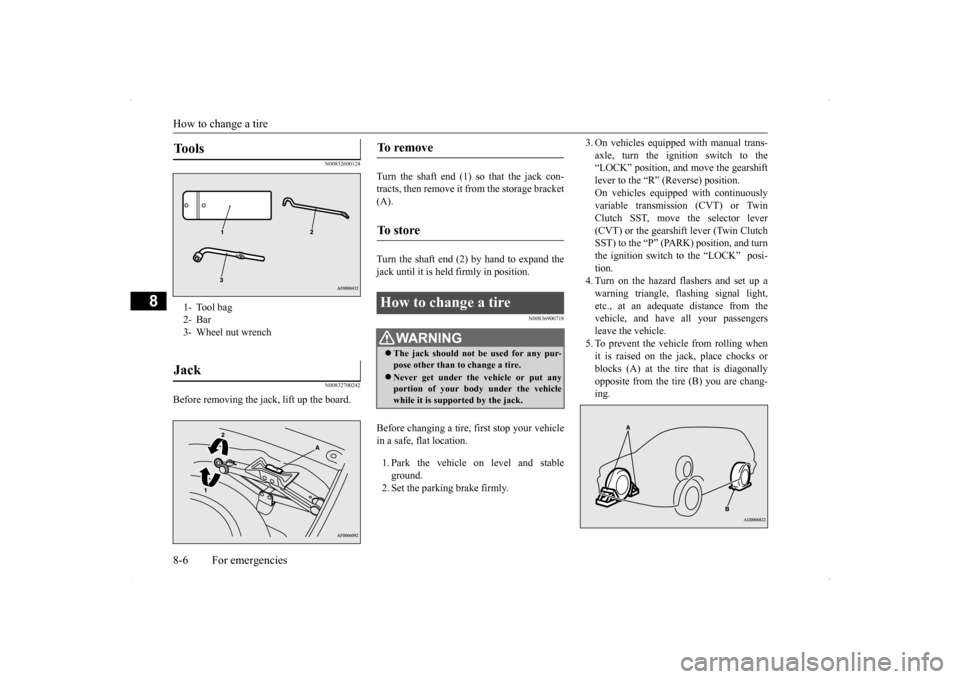
3. On vehicles equipped with manual trans- axle, turn the ignition switch to the “LOCK” position, and move the gearshift lever to the “R” (Reverse) position.On vehicles equipped with continuously variable transmission (CVT) or Twin Clutch SST, move the selector lever(CVT) or the gearshift lever (Twin Clutch SST) to the “P” (PARK) position, and turn the ignition switch to the “LOCK” posi-tion.4. Turn on the hazard flashers and set up a warning triangle, flashing signal light, etc., at an adequate distance from thevehicle, and have all your passengers leave the vehicle. 5. To prevent the vehicle from rolling whenit is raised on the jack, place chocks or blocks (A) at the tire that is diagonally opposite from the tire (B) you are chang-ing.
Tools 1- Tool bag2- Bar3- Wheel nut wrenchJack
To remove To s t o r e How to change a tire
WA R N I N G The jack should not be used for any pur- pose other than to change a tire. Never get under the vehicle or put any portion of your body under the vehiclewhile it is supported by the jack.
BK0200700US.bo
ok 6 ページ 2013年2月15日 金曜日 午後12時17分
Page 347 of 422
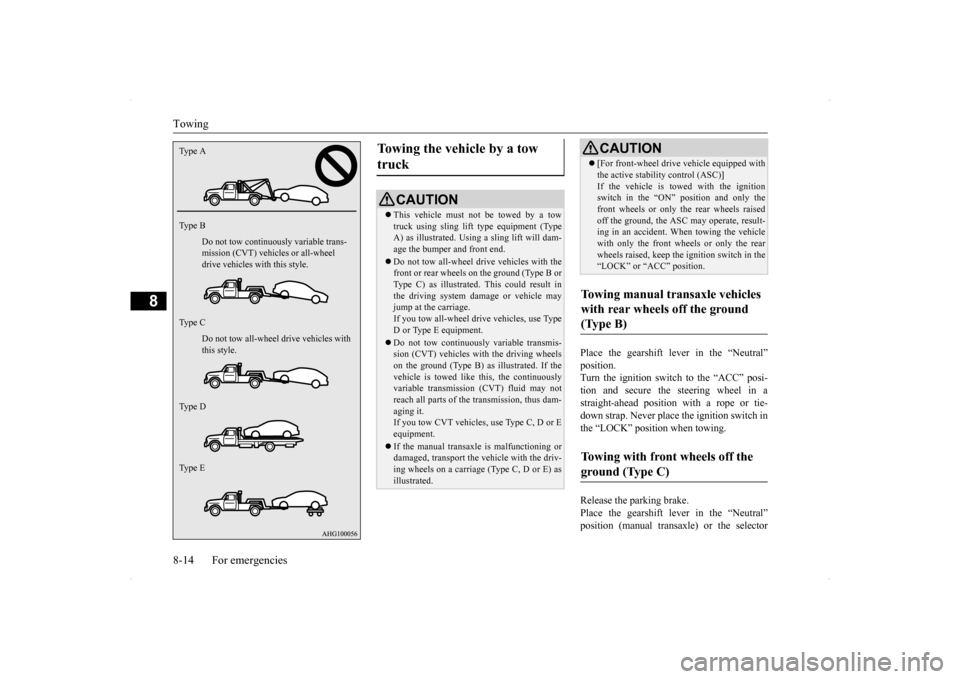
Towing 8-14 For emergencies
8
Place the gearshift lever in the “Neutral” position. Turn the ignition switch to the “ACC” posi-tion and secure the steering wheel in a straight-ahead position with a rope or tie- down strap. Never place the ignition switch inthe “LOCK” position when towing. Release the parking brake. Place the gearshift lever in the “Neutral”position (manual transaxle) or the selector
Type A Type B
Do not tow continuously variable trans- mission (CVT) vehicles or all-wheel drive vehicles with this style. Do not tow all-wheel drive vehicles with this style.
Type C Type D Type E
Towing the vehicle by a tow truck
CAUTION This vehicle must not be towed by a tow truck using sling lift type equipment (TypeA) as illustrated. Using a sling lift will dam- age the bumper and front end. Do not tow all-wheel drive vehicles with the front or rear wheels on the ground (Type B or Type C) as illustrated. This could result inthe driving system damage or vehicle may jump at the carriage. If you tow all-wheel drive vehicles, use TypeD or Type E equipment. Do not tow continuously variable transmis- sion (CVT) vehicles with the driving wheels on the ground (Type B) as illustrated. If the vehicle is towed like this, the continuouslyvariable transmission (CVT) fluid may not reach all parts of the transmission, thus dam- aging it.If you tow CVT vehicles, use Type C, D or E equipment. If the manual transaxle is malfunctioning or damaged, transport the vehicle with the driv- ing wheels on a carriage (Type C, D or E) as illustrated.
[For front-wheel drive vehicle equipped with the active stability control (ASC)] If the vehicle is towed with the ignition switch in the “ON” position and only the front wheels or only the rear wheels raisedoff the ground, the ASC may operate, result- ing in an accident. When towing the vehicle with only the front wheels or only the rearwheels raised, keep the ignition switch in the “LOCK” or “ACC” position.
Towing manual transaxle vehicles with rear wheels off the ground (Type B) Towing with front wheels off the ground (Type C)
CAUTION
BK0200700US.bo
ok 14 ページ 2013年2月15日 金曜日 午後12時17分