ignition MITSUBISHI LANCER SPORTBACK 2014 8.G Owners Manual
[x] Cancel search | Manufacturer: MITSUBISHI, Model Year: 2014, Model line: LANCER SPORTBACK, Model: MITSUBISHI LANCER SPORTBACK 2014 8.GPages: 422, PDF Size: 55.11 MB
Page 222 of 422
Wiper and washer switch
Features and controls 5-155
5
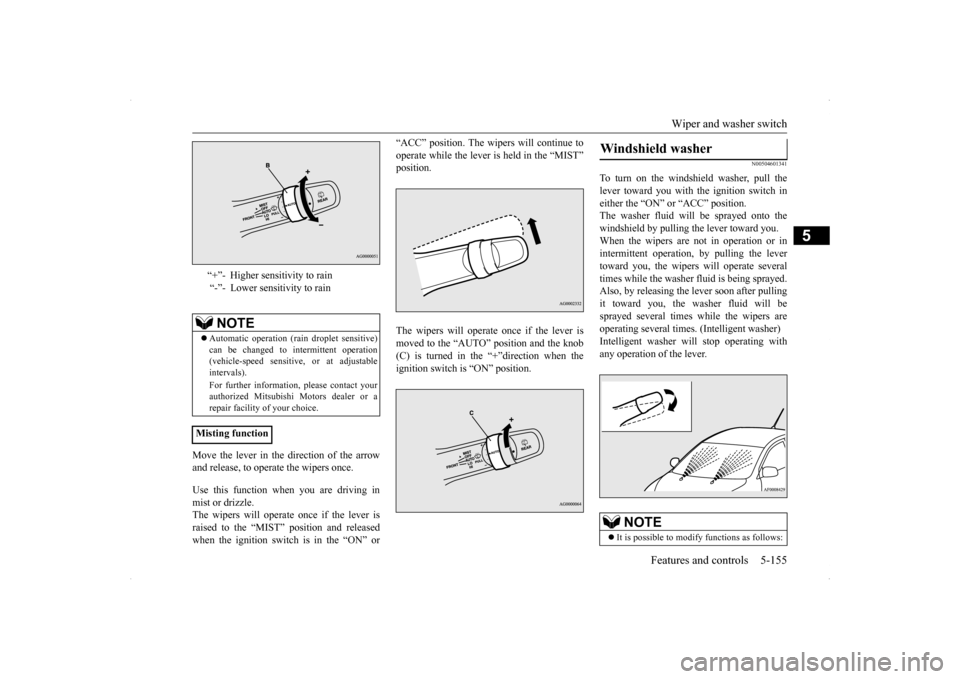
Move the lever in the direction of the arrow and release, to operate the wipers once. Use this function when you are driving in mist or drizzle.The wipers will operate once if the lever is raised to the “MIST” position and released when the ignition switch is in the “ON” or
“ACC” position. The wipers will continue to operate while the lever is held in the “MIST” position. The wipers will operate once if the lever is moved to the “AUTO” position and the knob (C) is turned in the “+”direction when the ignition switch is “ON” position.
N00504601341
To turn on the windshield washer, pull thelever toward you with the ignition switch ineither the “ON” or “ACC” position. The washer fluid will be sprayed onto the windshield by pulling the lever toward you.When the wipers are not in operation or in intermittent operation, by pulling the lever toward you, the wipers will operate severaltimes while the washer fluid is being sprayed.Also, by releasing the lever soon after pulling it toward you, the washer fluid will be sprayed several times while the wipers areoperating several times. (Intelligent washer) Intelligent washer will stop operating with any operation of the lever.
“+”- Higher sensitivity to rain “-”- Lower sensitivity to rainNOTE
Automatic operation (rain droplet sensitive) can be changed to intermittent operation (vehicle-speed sensitive, or at adjustableintervals). For further information, please contact your authorized Mitsubishi Motors dealer or a repair facility of your choice.
Misting function
Windshield washer
NOTE
It is possible to modify functions as follows:
BK0200700US.book
155 ページ 2013年2月15日 金曜日 午後12時17分
Page 223 of 422
Wiper and washer switch 5-156 Features and controls
5
N00523201434
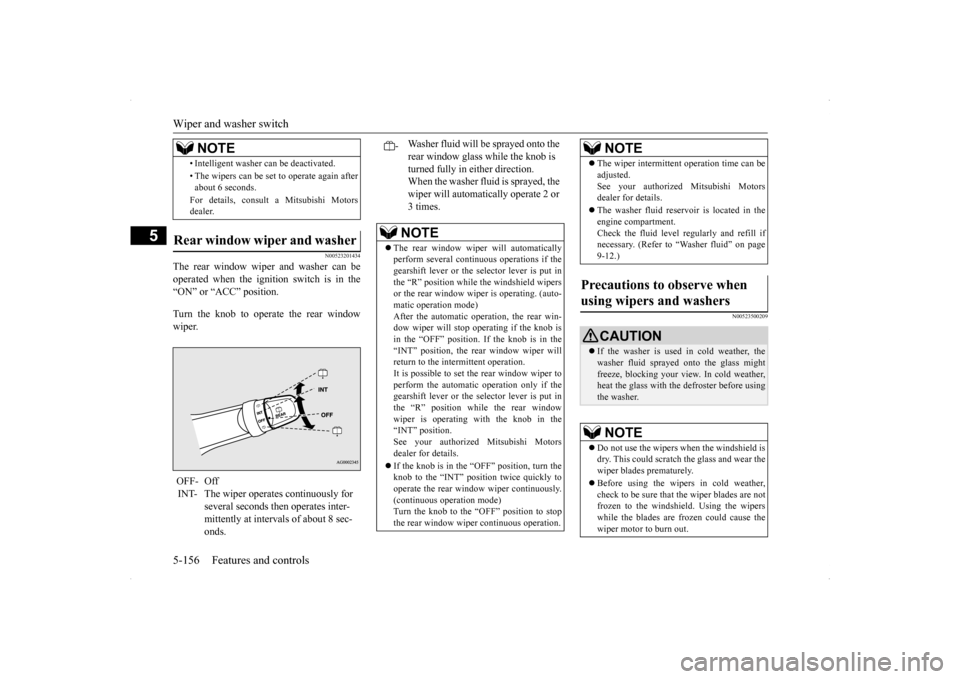
The rear window wiper and washer can be operated when the ignition switch is in the “ON” or “ACC” position. Turn the knob to operate the rear window wiper.
N00523500209
• Intelligent washer can be deactivated. • The wipers can be set to operate again after about 6 seconds. For details, consult a Mitsubishi Motors dealer.
Rear window wiper and washer OFF- Off INT- The wiper operates continuously for
several seconds then operates inter- mittently at intervals of about 8 sec- onds.NOTE
-
Washer fluid will be sprayed onto the rear window glass while the knob is turned fully in either direction. When the washer fluid is sprayed, the wiper will automatically operate 2 or 3 times.NOTE
The rear window wiper will automatically perform several continuous operations if the gearshift lever or the selector lever is put inthe “R” position while the windshield wipers or the rear window wiper is operating. (auto- matic operation mode)After the automatic operation, the rear win- dow wiper will stop operating if the knob is in the “OFF” position. If the knob is in the“INT” position, the rear window wiper will return to the intermittent operation. It is possible to set the rear window wiper toperform the automatic operation only if the gearshift lever or the selector lever is put in the “R” position while the rear windowwiper is operating with the knob in the “INT” position. See your authorized Mitsubishi Motorsdealer for details. If the knob is in the “OFF” position, turn the knob to the “INT” position twice quickly to operate the rear window wiper continuously.(continuous operation mode) Turn the knob to the “OFF” position to stop the rear window wiper continuous operation.
The wiper intermittent operation time can be adjusted. See your authorized Mitsubishi Motors dealer for details. The washer fluid reservoir is located in the engine compartment. Check the fluid level regularly and refill ifnecessary. (Refer to “Washer fluid” on page 9-12.)
Precautions to observe when using wipers and washers
CAUTION If the washer is used in cold weather, the washer fluid sprayed onto the glass might freeze, blocking your view. In cold weather, heat the glass with the defroster before usingthe washer.NOTE
Do not use the wipers when the windshield is dry. This could scratch the glass and wear the wiper blades prematurely. Before using the wipers in cold weather, check to be sure that the wiper blades are not frozen to the windshield. Using the wiperswhile the blades are frozen could cause the wiper motor to burn out.NOTE
BK0200700US.book
156 ページ 2013年2月15日 金曜日 午後12時17分
Page 225 of 422
Link System (if so equipped) 5-158 Features and controls
5
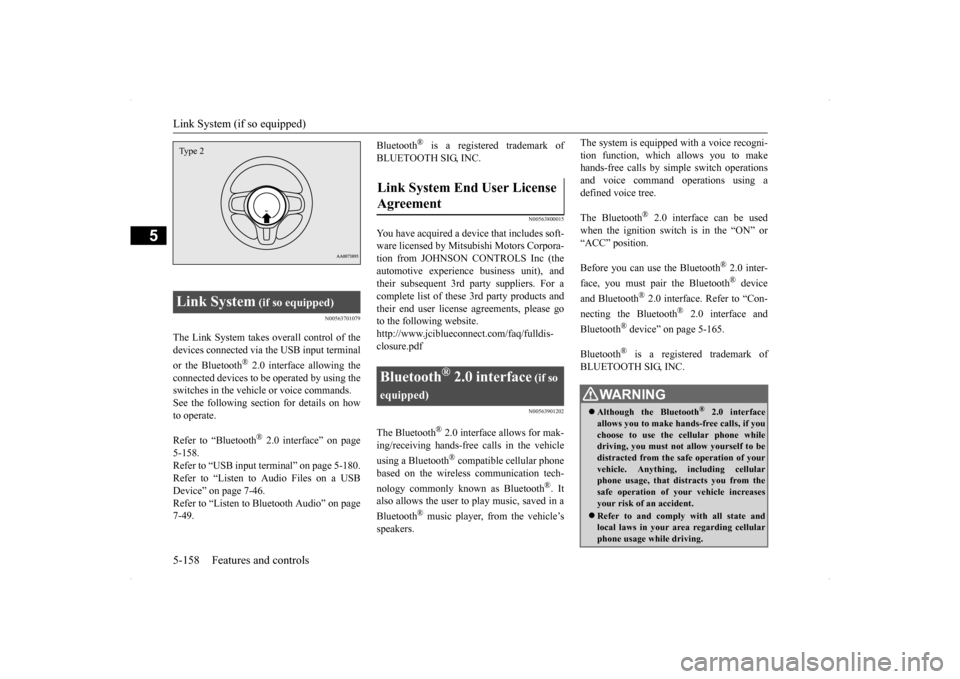
N00563701079
The Link System takes overall control of the devices connected via the USB input terminal or the Bluetooth
® 2.0 interface allowing the
connected devices to be operated by using theswitches in the vehicle or voice commands.See the following section for details on how to operate. Refer to “Bluetooth
® 2.0 interface” on page
5-158.Refer to “USB input terminal” on page 5-180. Refer to “Listen to Audio Files on a USB Device” on page 7-46.Refer to “Listen to Bluetooth Audio” on page 7-49.
Bluetooth
® is a registered trademark of
BLUETOOTH SIG, INC.
N00563800015
You have acquired a device that includes soft- ware licensed by Mitsubishi Motors Corpora- tion from JOHNSON CONTROLS Inc (theautomotive experience business unit), andtheir subsequent 3rd party suppliers. For a complete list of these 3rd party products and their end user license agreements, please goto the following website. http://www.jciblueconn
ect.com/faq/fulldis-
closure.pdf
N00563901202
The Bluetooth
® 2.0 interface allows for mak-
ing/receiving hands-free calls in the vehicle using a Bluetooth
® compatible cellular phone
based on the wireless communication tech- nology commonly known as Bluetooth
®. It
also allows the user to
play music, saved in a
Bluetooth
® music player, from the vehicle’s
speakers.
The system is equipped with a voice recogni- tion function, which allows you to make hands-free calls by simple switch operations and voice command operations using adefined voice tree. The Bluetooth
® 2.0 interface can be used
when the ignition switch is in the “ON” or “ACC” position. Before you can use the Bluetooth
® 2.0 inter-
face, you must pair the Bluetooth
® device
and Bluetooth
® 2.0 interface. Refer to “Con-
necting the Bluetooth
® 2.0 interface and
Bluetooth
® device” on page 5-165.
Bluetooth
® is a registered trademark of
BLUETOOTH SIG, INC.
Link System
(if so equipped)
Type 2
Link System End User License Agreement
Bluetooth
® 2.0 interface
(if so
equipped)
WA R N I N G Although the Bluetooth
® 2.0 interface
allows you to make hands-free calls, if you choose to use the cellular phone whiledriving, you must not allow yourself to be distracted from the safe operation of your vehicle. Anything, including cellularphone usage, that distracts you from the safe operation of your vehicle increases your risk of an accident. Refer to and comply with all state and local laws in your area regarding cellularphone usage while driving.
BK0200700US.book
158 ページ 2013年2月15日 金曜日 午後12時17分
Page 226 of 422
Bluetooth® 2.0 interface (if so equipped)
Features and controls 5-159
5
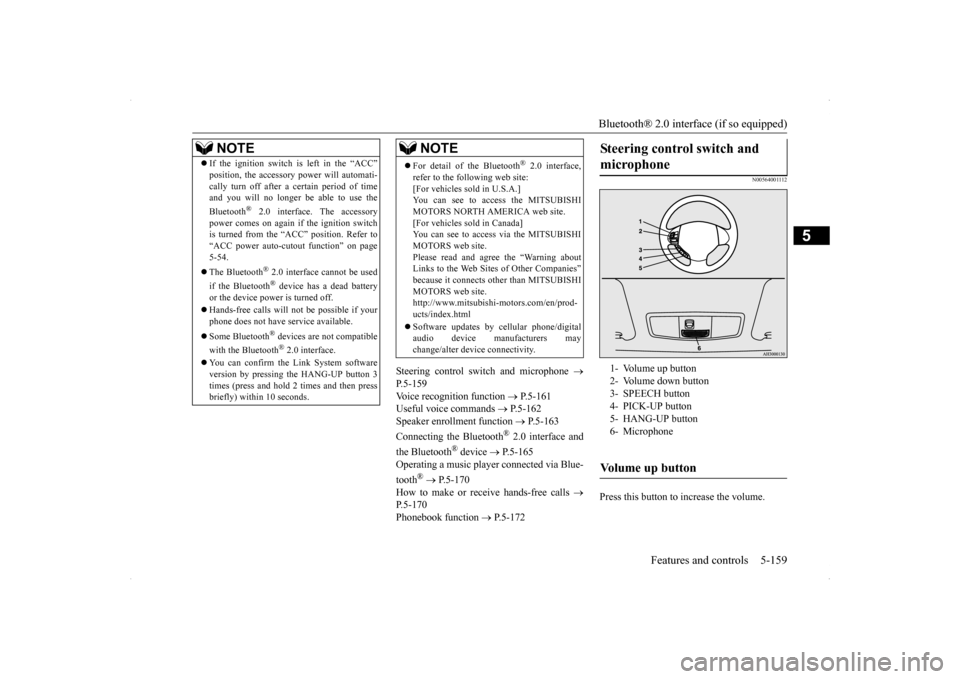
Steering control switch and microphone
P.5-159Voice recognition function
P.5-161
Useful voice commands
P.5-162
Speaker enrollment function
P.5-163
Connecting the Bluetooth
® 2.0 interface and
the Bluetooth
® device
P.5-165
Operating a music player connected via Blue- tooth
® P.5-170
How to make or receive hands-free calls
P.5-170 Phonebook function
P.5-172
N00564001112
Press this button to increase the volume.
NOTE
If the ignition switch is left in the “ACC” position, the accessory power will automati- cally turn off after a
certain period of time
and you will no longer be able to use the Bluetooth
® 2.0 interface. The accessory
power comes on again if the ignition switch is turned from the “ACC” position. Refer to “ACC power auto-cutout function” on page5-54. The Bluetooth
® 2.0 interface cannot be used
if the Bluetooth
® device has a dead battery
or the device power is turned off. Hands-free calls will not be possible if your phone does not have service available. Some Bluetooth
® devices are not compatible
with the Bluetooth
® 2.0 interface.
You can confirm the Link System software version by pressing the HANG-UP button 3 times (press and hold 2 times and then press briefly) within 10 seconds.
For detail of the Bluetooth
® 2.0 interface,
refer to the following web site:[For vehicles sold in U.S.A.] You can see to access the MITSUBISHI MOTORS NORTH AMERICA web site.[For vehicles sold in Canada] You can see to access via the MITSUBISHI MOTORS web site.Please read and agree the “Warning about Links to the Web Sites of Other Companies” because it connects other than MITSUBISHIMOTORS web site. http://www.mitsubishi-motors.com/en/prod- ucts/index.html Software updates by cellular phone/digital audio device manufacturers maychange/alter device connectivity.NOTE
Steering control switch and microphone
1- Volume up button 2- Volume down button3- SPEECH button 4- PICK-UP button 5- HANG-UP button6- MicrophoneVolume up button
BK0200700US.book
159 ページ 2013年2月15日 金曜日 午後12時17分
Page 230 of 422

Bluetooth® 2.0 interface (if so equipped)
Features and controls 5-163
5
If a passcode has been set and the security function is enabled, the voice guide will say“Hands-free system is locked. State the pass- code to continue” when the SPEECH button (except for vehicles with Mitsubishi Multi-Communication System) or PICK-UP button (for vehicles with Mi
tsubishi Multi-Commu-
nication System) is pressed to enter voice rec-ognition mode. Say the 4-digit passcode number to enter the passcode. If the entered passcode is wrong, the voice guide will say “<4-digit passcode>, Incorrectpasscode. Please try again.” Enter the correct passcode.
Use the following procedure to turn off the security function by disabling the passcode. 1. Press the SPEECH button (except for vehicles with Mits
ubishi Multi-Commu-
nication System) or PICK-UP button (forvehicles with Mits
ubishi Multi-Commu-
nication System). 2. Say “Setup.”3. Say “Passcode.” 4. The voice guide will say “Passcode is enabled. Would you like to disable it?”Answer “Yes.” Answer “No” to cancel the disabling of the passcode and return to the main menu.
5. When the disabling of the passcode is completed, the voice guide will say “Pass- code is disabled” and the system will return to the main menu.
N00564700011
The Bluetooth
® 2.0 interface can use the
speaker enrollment function to create a voicemodel for one person per language. This makes it easier for the Bluetooth
® 2.0
interface to recognise voice commands said by you. You can turn a voice model registered with the speaker enrollment function on and off whenever you want.
N00564801093
It takes about 2 to 3 minutes to complete thespeaker enrollment process.To ensure the best results, run through the process while in the driver’s seat, in an envi- ronment that is as quiet as possible (whenthere is no rain or strong winds and the vehi- cle windows are closed). Please turn off your phone while in speaker enrollment to preventinterruption of the process. Use the following procedure for speaker enrollment.
NOTE
Passcode will be required to access the sys- tem after the next ignition cycle. It is required for a little time after engine stop that the entered passcode is actuallyrecorded in the system. If the ignition switch is made to “ACC” or “ON” or the engine is started immediatelyafter engine stop, there is a case when the entered passcode is not recorded in the sys- tem. At this time, please try to enter the pass-code again.
Entering the passcode
NOTE
You can reenter the passcode as many times as you want. If you have forgotten your passcode, say “Cancel” to quit the voice input mode andthen check with an authorized Mitsubishi Motors dealer.
Disabling the passcode
NOTE
System must be unlocked to disable the pass- code.
Speaker enrollment function
Speaker enrollment
BK0200700US.book
163 ページ 2013年2月15日 金曜日 午後12時17分
Page 239 of 422

Bluetooth® 2.0 interface (if so equipped) 5-172 Features and controls
5
6. The voice guide will say “Calling
You can redial the last number called, based on the history of dialed calls in the paired cel- lular phone. Use the following procedure to redial. 1. Press the SPEECH button (except for vehicles with Mitsubishi Multi-Commu- nication System) or PICK-UP button (for vehicles with Mitsubishi Multi-Commu-nication System). 2. Say “Redial.”
N00565700018
During a call, press the SPEECH button toenter voice recognition mode, then say
“
N00565800019
If an incoming phone call is received whilethe ignition switch is in the “ACC” or “ON”position, the audio system will be automati- cally turned on and switched to the incoming call, even when the audio system was origi-nally off. The voice guide announcement for the incoming call will be output from the frontpassenger’s seat speaker. If the CD player or radio was playing when the incoming call was received, the audio sys-tem will mute the sound from the CD player or radio and output only the incoming call. To receive the call, press the PICK-UP buttonon the steering wheel control switch. When the call is over,
the audio system will
return to its previous state.
N00565900010
At any time during a call, you can mute thevehicle microphone. Pressing the SPEECH button and then saying “Mute” during a call will turn ON the mute function and mute the microphone.Saying “Mute off” in the same way will turn off the mute function and cancel the mute on the microphone.
N00566600014
The Bluetooth
® 2.0 interface can switch
between hands-free mode (hands-free calls) and private mode (calls using cellular phone). If you press the SPEECH button and say“Transfer call” during a hands-free call, you can stop the hands-free mode and talk in pri- vate mode. To return to hands-free mode, press the SPEECH button again and say “Transfer call.”
N00566000018
The Bluetooth
® 2.0 interface has 2 types of
unique phonebooks that are different from thephonebook stored in the cellular phone. They
NOTE
When the confirmation function is on, the system will check if the name and location of the receiver are correct. If the name is cor-rect, answer “Yes.” To change the name or location to call, answer “No.” The system will return to Step3.
RedialingSend function
Receiving calls
Mute function
Switching between hands-free mode and private mode
Phonebook function
BK0200700US.book
172 ページ 2013年2月15日 金曜日 午後12時17分
Page 247 of 422
USB input terminal (if so equipped) 5-180 Features and controls
5
The term “IC:” before the radio certification number only signifies that Industry Canada technical specifications were met. The antenna used for this transmitter must notbe co-located or operating in conjunction with any other antenna or transmitter. End- users and installers must be provided withinstallation instructio
ns and transmitter oper-
ating conditions for satisfying RF exposure compliance.
N00566401093 N00566701054
You can connect your USB memory device or iPod
* to play music files stored in the USB
memory device or iPod.
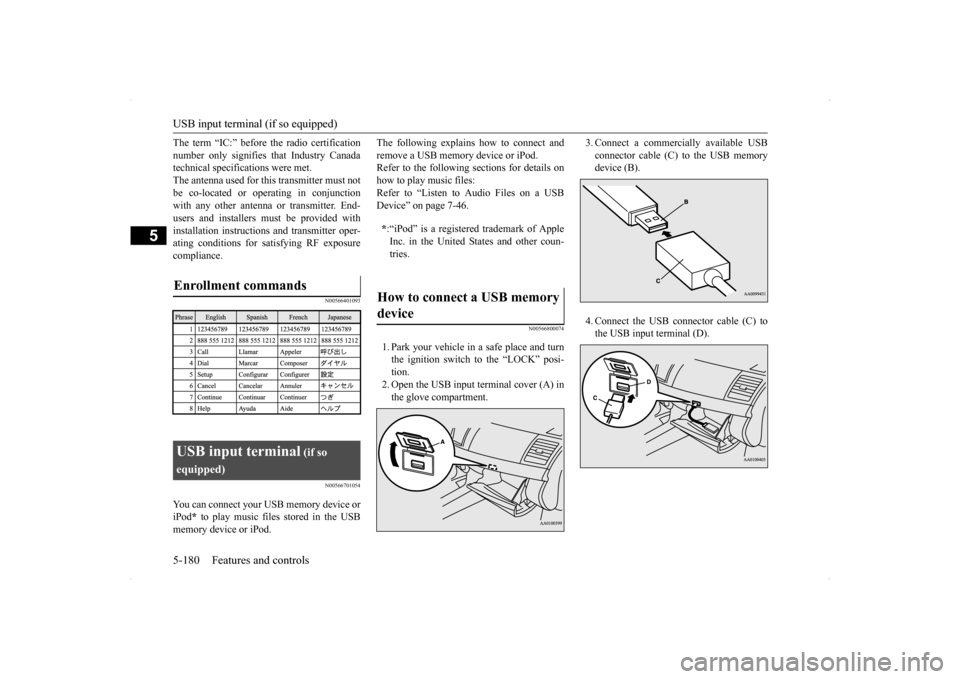
The following explains how to connect and remove a USB memory device or iPod. Refer to the following sections for details on how to play music files:Refer to “Listen to Audio Files on a USB Device” on page 7-46.
N00566800074
1. Park your vehicle in a safe place and turn the ignition switch to the “LOCK” posi- tion. 2. Open the USB input terminal cover (A) inthe glove compartment.
3. Connect a commercially available USB connector cable (C) to the USB memory device (B). 4. Connect the USB connector cable (C) to the USB input terminal (D).
Enrollment commands
USB input terminal
(if so
equipped)
* :“iPod” is a registered trademark of Apple Inc. in the United States and other coun- tries.
How to connect a USB memory device
BK0200700US.book
180 ページ 2013年2月15日 金曜日 午後12時17分
Page 248 of 422
USB input terminal (if so equipped)
Features and controls 5-181
5
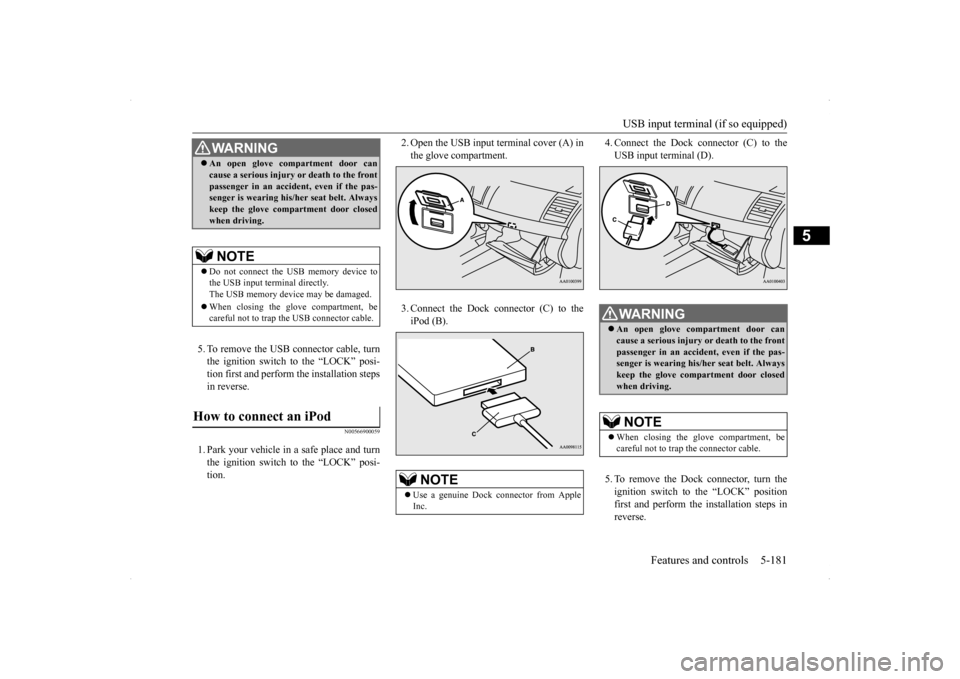
5. To remove the USB connector cable, turn the ignition switch to the “LOCK” posi- tion first and perform the installation steps in reverse.
N00566900059
1. Park your vehicle in a safe place and turnthe ignition switch to the “LOCK” posi- tion.
2. Open the USB input terminal cover (A) in the glove compartment. 3. Connect the Dock connector (C) to the iPod (B).
4. Connect the Dock connector (C) to the USB input terminal (D). 5. To remove the Dock connector, turn the ignition switch to the “LOCK” positionfirst and perform the installation steps in reverse.
WA R N I N G An open glove compartment door can cause a serious injury or death to the front passenger in an accident, even if the pas- senger is wearing his/her seat belt. Always keep the glove compartment door closedwhen driving.NOTE
Do not connect the USB memory device to the USB input terminal directly.The USB memory device may be damaged. When closing the glove compartment, be careful not to trap the USB connector cable.
How to connect an iPod
NOTE
Use a genuine Dock connector from Apple Inc.
WA R N I N G An open glove compartment door can cause a serious injury or death to the front passenger in an accident, even if the pas-senger is wearing his/her seat belt. Always keep the glove compartment door closed when driving.NOTE
When closing the glove compartment, be careful not to trap the connector cable.
BK0200700US.book
181 ページ 2013年2月15日 金曜日 午後12時17分
Page 249 of 422
Sun visors 5-182 Features and controls
5
N00567000015 N00567100087
Devices of the following types can be con- nected. * : “iPod touch,” “iPod classic,” “iPod” and “iPod nano” are registered trademarks of
Apple Inc. in the United States and other countries.
N00567200017
You can play music files of the following specifications that are saved in a USB mem- ory device or other device supporting massstorage class.
N00524600294
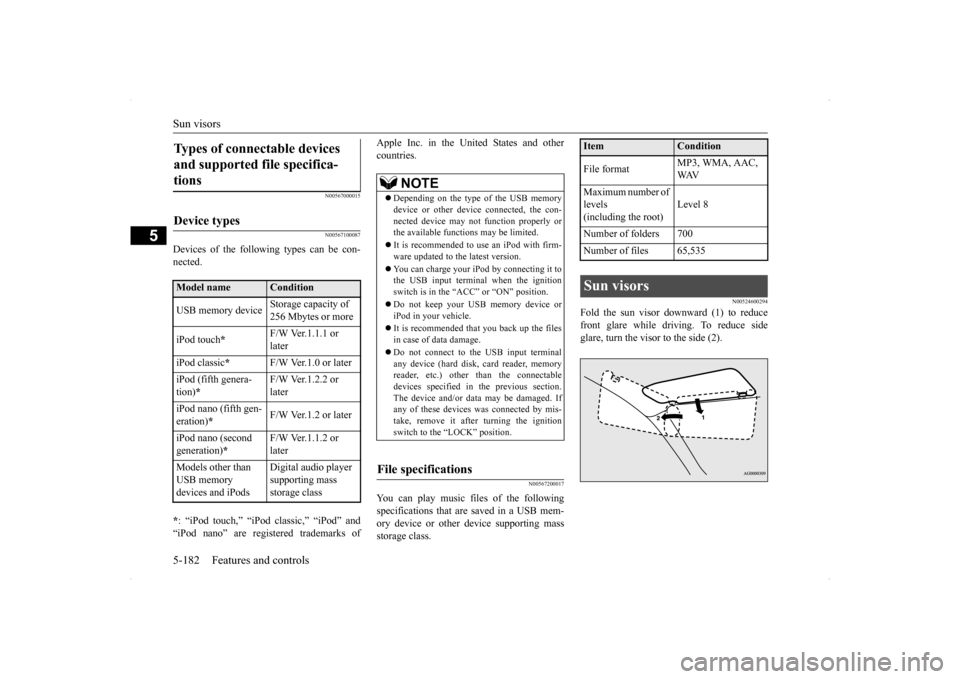
Fold the sun visor downward (1) to reduce front glare while driving. To reduce side glare, turn the visor to the side (2).
Types of connectable devices and supported file specifica- tions
Device types
Model name
Condition
USB memory device
Storage capacity of 256 Mbytes or more
iPod touch
*
F/W Ver.1.1.1 or later
iPod classic
*
F/W Ver.1.0 or later
iPod (fifth genera- tion)
*
F/W Ver.1.2.2 or later
iPod nano (fifth gen- eration)
*
F/W Ver.1.2 or later
iPod nano (second generation)
*
F/W Ver.1.1.2 or later
Models other than USB memory devices and iPods
Digital audio player supporting mass storage class
NOTE
Depending on the type of the USB memory device or other device connected, the con- nected device may not function properly orthe available functions may be limited. It is recommended to use an iPod with firm- ware updated to the latest version. You can charge your iPod by connecting it to the USB input terminal when the ignition switch is in the “ACC” or “ON” position. Do not keep your USB memory device or iPod in your vehicle. It is recommended that you back up the files in case of data damage. Do not connect to the USB input terminal any device (hard disk, card reader, memory reader, etc.) other than the connectabledevices specified in the previous section. The device and/or data may be damaged. If any of these devices
was connected by mis-
take, remove it after turning the ignition switch to the “LOCK” position.
File specifications
Item
Condition
File format
MP3, WMA, AAC, WAV
Maximum number of levels(including the root)
Level 8
Number of folders 700 Number of files 65,535Sun visors
BK0200700US.book
182 ページ 2013年2月15日 金曜日 午後12時17分
Page 252 of 422
Interior lights
Features and controls 5-185
5
N00553800070
Regardless of the dome light switch position, when you press the lens, the light on the side that is pressed illuminates; when you pressthe lens again, the light goes off.
N00525401502
The dome light can be turned on by sliding the dome light switch.
The doors and the rear hatch are closed while the ignition switch is in the “ON” position. The driver’s door is closed after all the other doors and the rear hatch are closed while the lock knob of the driver’s door is in the lock position. The doors and the rear hatch are closed and the power door lock switch is used to lock the doors. The keyless entry system remote con- trol transmitter is used to lock the doors and the rear hatch. In vehicles equipped with the F.A.S.T.-key, the doors and the rear hatch are locked using the F.A.S.T.- key.NOTE
When the engine is started using the key while the doors and rear hatch are closed, ifyou remove the key, the dome light will illu- minate for approximately 30 seconds before going off. When the engine is started using the F.A.S.T.-key while the doors and rear hatch are closed, if the ignition switch is moved to the “LOCK” position, the dome light willilluminate for approximately 30 seconds before going off. The time until the light goes off can be adjusted. See your authorized Mitsubishi Motors dealer for details.
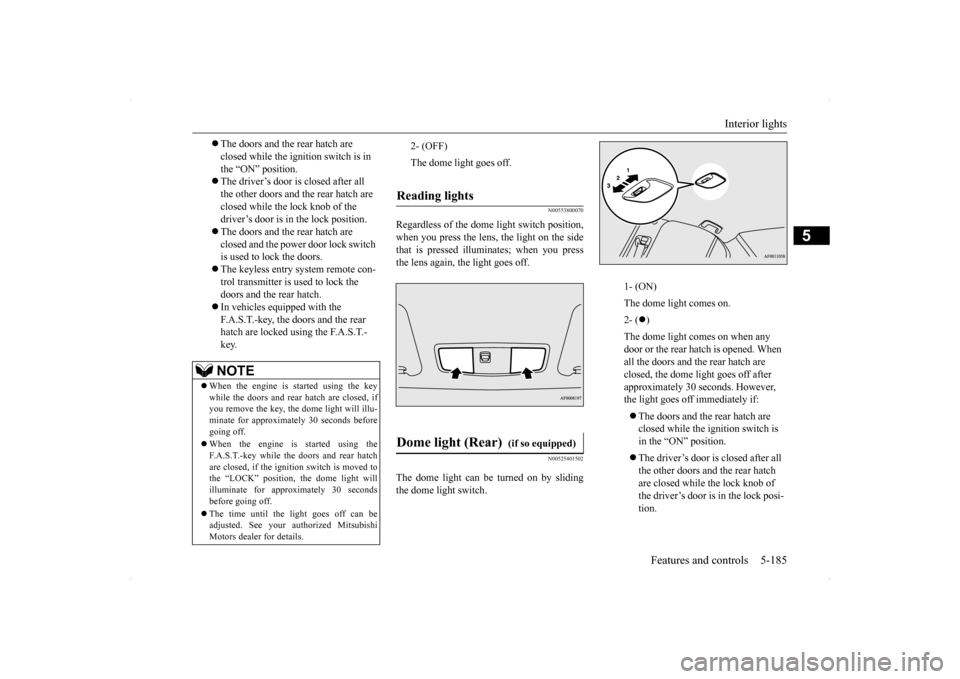
2- (OFF) The dome light goes off.
Reading lights Dome light (Rear)
(if so equipped)
1- (ON) The dome light comes on.2- (
)
The dome light comes on when any door or the rear hatch is opened. When all the doors and the rear hatch are closed, the dome light goes off after approximately 30 seconds. However, the light goes off immediately if: The doors and the rear hatch are closed while the ignition switch is in the “ON” position. The driver’s door is closed after all the other doors and the rear hatch are closed while the lock knob of the driver’s door is in the lock posi- tion.
BK0200700US.book
185 ページ 2013年2月15日 金曜日 午後12時17分