lock MITSUBISHI LANCER SPORTBACK 2014 8.G Workshop Manual
[x] Cancel search | Manufacturer: MITSUBISHI, Model Year: 2014, Model line: LANCER SPORTBACK, Model: MITSUBISHI LANCER SPORTBACK 2014 8.GPages: 422, PDF Size: 55.11 MB
Page 98 of 422
Free-hand Advanced Security Transmit
ter (F.A.S.T.-key) (if so equipped)
Features and controls 5-31
5
N00544200049
Press the LOCK button (1) to lock all the doors and the rear hatch.The turn signal lights will also blink once.
N00544301122
Press the UNLOCK button (2) to unlock thedriver’s door only. Within about 2 seconds,press the UNLOCK button one more time to unlock all the doors and the rear hatch. The dome light will turn on for 30 seconds.The turn signal lights will also blink twice. The front side-marker and parking lights will also turn on for about 30 seconds. Refer to“Welcome light” on page 5-149.
N00544501081
Setting of the horn, turn signal lights andbuzzer of the keyless entry system answer- back function can be changed as required. This is done with the key removed from theignition switch.
Horn deactivation/reactivation The horn answerback function can be set tothe following three conditions. Each time the horn answerback function is set, a chime will sound to tell you the condi-tion of the answerback function. 1. Turn the ignition switch to the “LOCK” position. If you started the engine with thekey, remove the key from the ignition switch. 2. Open the driver’s door and turn the com-bination headlights and dimmer switch to the “OFF” position. 3. Press the LOCK button (1) for 4 to 10 sec-onds and press the UNLOCK button (2) during this time.
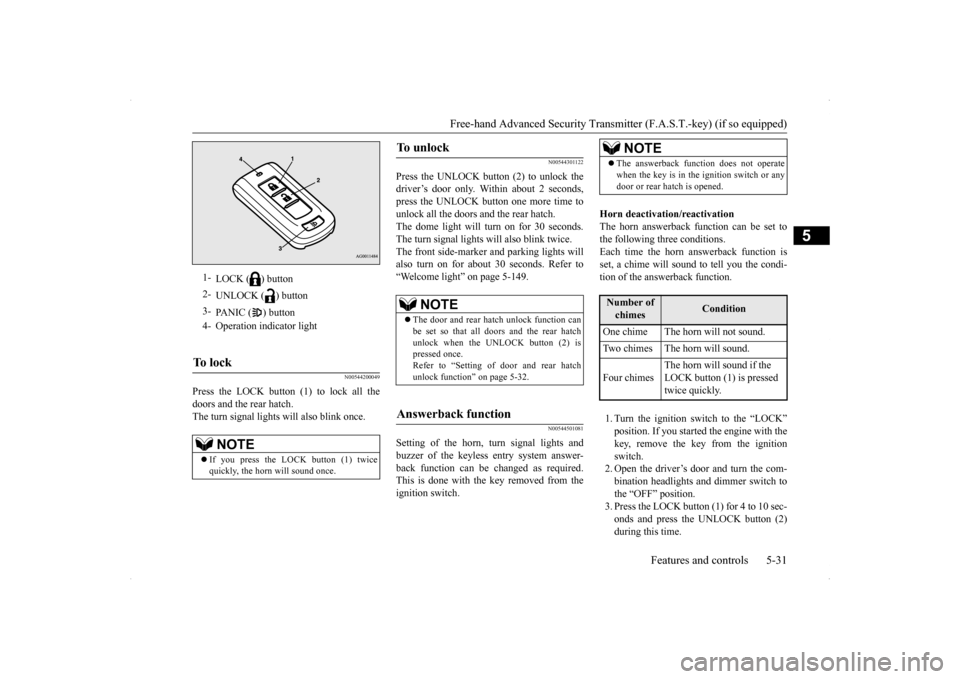
1-
LOCK ( ) button
2-
UNLOCK ( ) button
3-
PANIC ( ) button
4- Operation indicator lightTo l o c k
NOTE
If you press the LOCK button (1) twice quickly, the horn will sound once.
To u n l o c k
NOTE
The door and rear hatch unlock function can be set so that all doors and the rear hatch unlock when the UNLOCK button (2) ispressed once. Refer to “Setting of door and rear hatch unlock function” on page 5-32.
Answerback function
NOTE
The answerback function does not operate when the key is in the ignition switch or any door or rear hatch is opened.Number of chimes
Condition
One chime The horn will not sound. Two chimes The horn will sound. Four chimes
The horn will sound if the LOCK button (1) is pressed twice quickly.
BK0200700US.bo
ok 31 ページ 2013年2月15日 金曜日 午後12時17分
Page 99 of 422
Free-hand Advanced Security Transmitter (F.A.S.T.-key) (if so equipped) 5-32 Features and controls
5
4. Release in sequence the UNLOCK and LOCK buttons within 10 seconds of pressing the UNLOCK button in step 3.
Changing the setting of the turn signal lights answerback functionThe turn signal lights answerback function can be set to the following seven conditions. Each time the turn signal lights answerbackfunction is set, a chime will sound to tell you the condition of the answerback function. 1. Turn the ignition switch to the “LOCK” position. If you started the engine with the key, remove the key from the ignition switch.2. Open the driver’s door and turn the com- bination headlights and dimmer switch to the “OFF” position.
3. Press the UNLOCK button (2) for 4 to 10 seconds and press the LOCK button (1) during this time. 4. Release in sequence the UNLOCK andLOCK buttons within 10 seconds of pressing the LOCK button in step 3.
The buzzer answerback function can be turned ON or OFF as required.
N00544601125
The door and rear hatch unlock function canbe set to the following two conditions. Each time the door and rear hatch unlock function is set, a chime will sound to tell youthe condition of the door and rear hatch unlock function.
1. Turn the ignition switch to the “LOCK” position. If you started the engine with the key, remove the key from the ignition switch.2. Open the driver’s door and turn the com- bination headlights and dimmer switch to the “OFF” position.3. Press the LOCK button (1) for 4 to 10 sec- onds and press the UNLOCK button (2) during this time.4. Release in sequence the LOCK andUNLOCK buttons within 10 seconds of pressing the LOCK button in step 3.
N00544700028
If you are near your vehicle and feel threat-ened, you can activate the alarm to call atten- tion as follows: 1. Press the PANIC button (3) for more than 1 second. 2. The headlights will blink on and off and the horn will sound intermittently forabout 3 minutes. 3. To turn off the alarm, press any button on the remote control transmitter.
Number of chimes
Condition
To l o c k
To u n l o c k
One chime One flash Two flashesTwo chimes One flash No flashThree chimes No flash Two flashesFour chimes Two flashes One flashFive chimes No flash One flashSix chimes Two flashes No flashSeven chimes No flash No flash
Buzzer deactivation/reactivationSetting of door and rear hatch unlock function
Number of chimes
Condition
One chime
All doors and rear hatch unlock
Two chimes Driver’s door unlock only
Using the panic alarm
BK0200700US.bo
ok 32 ページ 2013年2月15日 金曜日 午後12時17分
Page 100 of 422
Free-hand Advanced Security Transmit
ter (F.A.S.T.-key) (if so equipped)
Features and controls 5-33
5
N00561300045
Only a F.A.S.T.-key, which has been pro- grammed into the vehicle’s electronics, canlock and unlock all the doors and the rear hatch, and start the engine. If you lose the F.A.S.T.-key, you can order aF.A.S.T.-key from your authorized Mitsubishi Motors dealer by referring to the key number. To prevent vehicle theft, the ID codes for allthe F.A.S.T.-keys except the one for the lostF.A.S.T.-key must be programmed again. Take your vehicle and all the remaining F.A.S.T.-keys to your authorized MitsubishiMotors dealer to have your ID codes pro- grammed again.
N00561400046
To add a F.A.S.T.-key, you must already havetwo registered F.A.S.T.-keys. Registering the ID code can be done by yourauthorized Mitsubishi Motors dealer. Or it can be done by yourself (except for vehicles sold in Canada). For you to register the IDcode yourself, follow the “Customer F.A.S.T.-key programming” procedure below. If you choose to have your authorized Mit-subishi Motors dealer
register the ID code,
take your vehicle and all remaining F.A.S.T.-
keys to your authorized Mitsubishi Motors dealer.
N00561501132
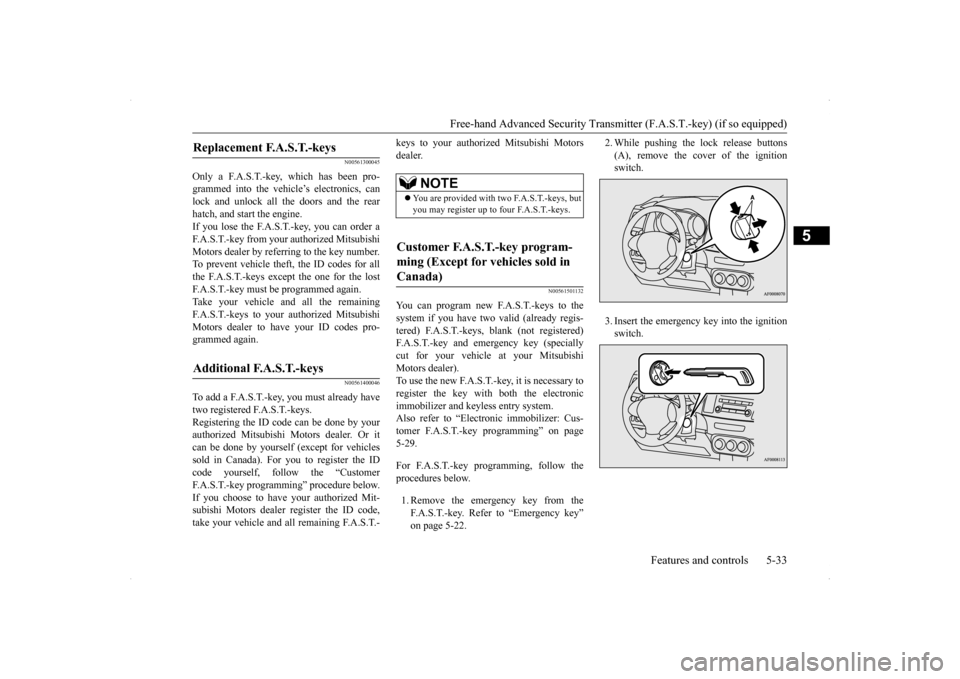
You can program new F.A.S.T.-keys to thesystem if you have two valid (already regis-tered) F.A.S.T.-keys, blank (not registered) F.A.S.T.-key and emergency key (specially cut for your vehicle at your MitsubishiMotors dealer). To use the new F.A.S.T.-key, it is necessary to register the key with both the electronicimmobilizer and keyless entry system. Also refer to “Electronic immobilizer: Cus- tomer F.A.S.T.-key programming” on page5-29. For F.A.S.T.-key programming, follow the procedures below. 1. Remove the emergency key from the F.A.S.T.-key. Refer to “Emergency key”on page 5-22.
2. While pushing the lock release buttons (A), remove the cover of the ignition switch. 3. Insert the emergency key into the ignition switch.
Replacement F.A.S.T.-keys
Additional F.A.S.T.-keys
NOTE
You are provided with two F.A.S.T.-keys, but you may register up to four F.A.S.T.-keys.
Customer F.A.S.T.-key program- ming (Except for vehicles sold in Canada)
BK0200700US.bo
ok 33 ページ 2013年2月15日 金曜日 午後12時17分
Page 101 of 422
Free-hand Advanced Security Transmitter (F.A.S.T.-key) (if so equipped) 5-34 Features and controls
5
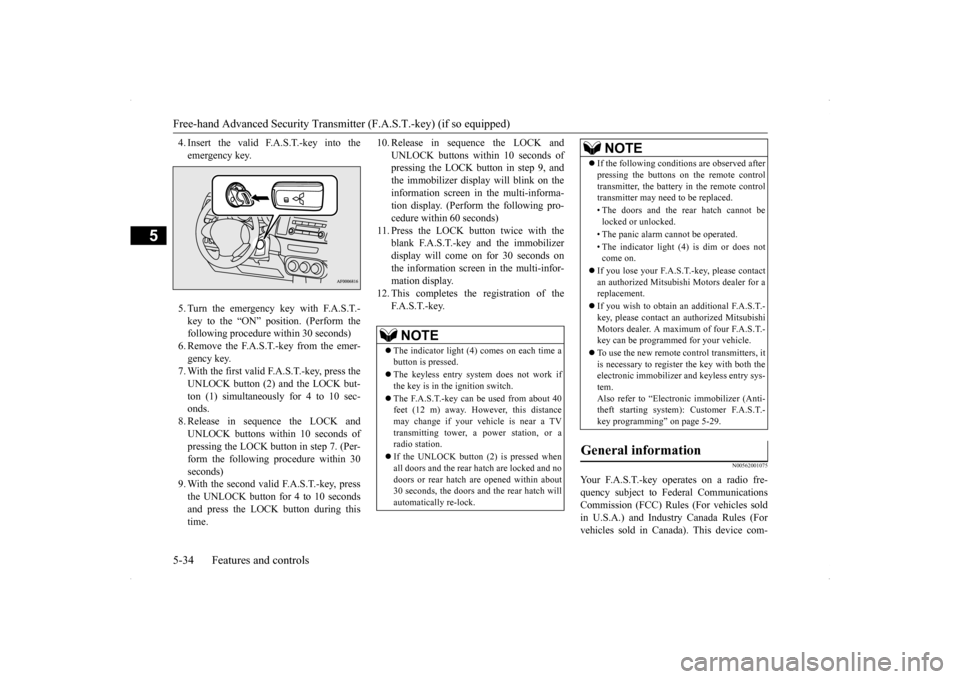
4. Insert the valid F.A.S.T.-key into the emergency key. 5. Turn the emergency key with F.A.S.T.- key to the “ON” position. (Perform the following procedure within 30 seconds)6. Remove the F.A.S.T.-key from the emer- gency key. 7. With the first valid F.A.S.T.-key, press theUNLOCK button (2) and the LOCK but-ton (1) simultaneously for 4 to 10 sec- onds. 8. Release in sequence the LOCK andUNLOCK buttons within 10 seconds of pressing the LOCK button in step 7. (Per- form the following procedure within 30seconds) 9. With the second valid F.A.S.T.-key, press the UNLOCK button for 4 to 10 secondsand press the LOCK button during this time.
10. Release in sequence the LOCK and
UNLOCK buttons within 10 seconds of pressing the LOCK button in step 9, and the immobilizer display will blink on theinformation screen in the multi-informa- tion display. (Perform the following pro- cedure within 60 seconds)
11. Press the LOCK button twice with the
blank F.A.S.T.-key and the immobilizer display will come on for 30 seconds onthe information screen in the multi-infor-mation display.
12. This completes the registration of the
F. A . S . T. - k e y.
N00562001075
Your F.A.S.T.-key operates on a radio fre-quency subject to Federal CommunicationsCommission (FCC) Rules (For vehicles sold in U.S.A.) and Industry Canada Rules (For vehicles sold in Canada). This device com-
NOTE
The indicator light (4) comes on each time a button is pressed. The keyless entry system does not work if the key is in the ignition switch. The F.A.S.T.-key can be used from about 40 feet (12 m) away. However, this distance may change if your vehicle is near a TVtransmitting tower, a power station, or a radio station. If the UNLOCK button (2) is pressed when all doors and the rear hatch are locked and nodoors or rear hatch are opened within about 30 seconds, the doors and the rear hatch will automatically re-lock.
If the following conditions are observed after pressing the buttons on the remote control transmitter, the battery in the remote control transmitter may need to be replaced. • The doors and the rear hatch cannot be locked or unlocked. • The panic alarm cannot be operated. • The indicator light (4) is dim or does not come on.
If you lose your F.A.S.T.-key, please contact an authorized Mitsubishi Motors dealer for a replacement. If you wish to obtain an
additional F.A.S.T.-
key, please contact an authorized Mitsubishi Motors dealer. A maximum of four F.A.S.T.-key can be programmed for your vehicle. To use the new remote control transmitters, it is necessary to register the key with both the electronic immobilizer and keyless entry sys- tem.Also refer to “Electr
onic immobilizer (Anti-
theft starting system): Customer F.A.S.T.- key programming” on page 5-29.
General information
NOTE
BK0200700US.bo
ok 34 ページ 2013年2月15日 金曜日 午後12時17分
Page 103 of 422
Door locks 5-36 Features and controls
5
N00509200521
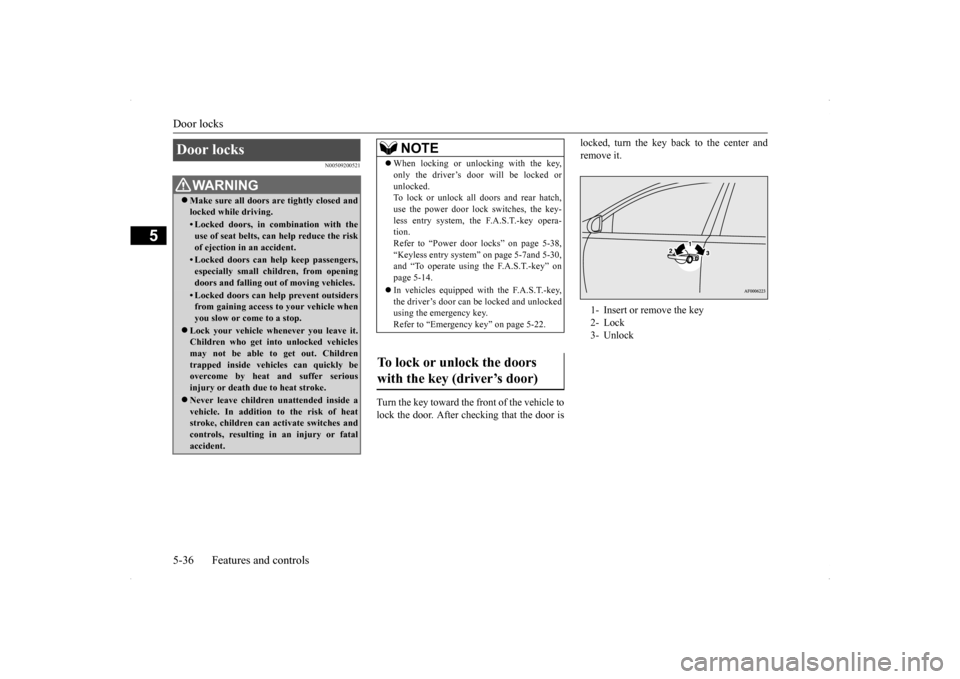
Turn the key toward the front of the vehicle to lock the door. After checking that the door is
locked, turn the key back to the center and remove it.
Door locks
WA R N I N G Make sure all doors are tightly closed and locked while driving.• Locked doors, in combination with theuse of seat belts, can help reduce the risk of ejection in an accident.• Locked doors can help keep passengers,especially small chil
dren, from opening
doors and falling out of moving vehicles.• Locked doors can help prevent outsidersfrom gaining access to your vehicle whenyou slow or come to a stop.
Lock your vehicle whenever you leave it. Children who get into unlocked vehicles may not be able to get out. Children trapped inside vehicles can quickly beovercome by heat and suffer serious injury or death due to heat stroke. Never leave children unattended inside a vehicle. In addition to the risk of heat stroke, children can activate switches andcontrols, resulting in an injury or fatal accident.
NOTE
When locking or unlocking with the key, only the driver’s door will be locked or unlocked. To lock or unlock all doors and rear hatch, use the power door lock switches, the key-less entry system, the F.A.S.T.-key opera- tion. Refer to “Power door locks” on page 5-38,“Keyless entry system” on page 5-7and 5-30, and “To operate using the F.A.S.T.-key” on page 5-14. In vehicles equipped with the F.A.S.T.-key, the driver’s door can be locked and unlockedusing the emergency key. Refer to “Emergency key” on page 5-22.
To lock or unlock the doors with the key (driver’s door)
1- Insert or remove the key 2- Lock 3- Unlock
BK0200700US.bo
ok 36 ページ 2013年2月15日 金曜日 午後12時17分
Page 104 of 422
Door locks
Features and controls 5-37
5
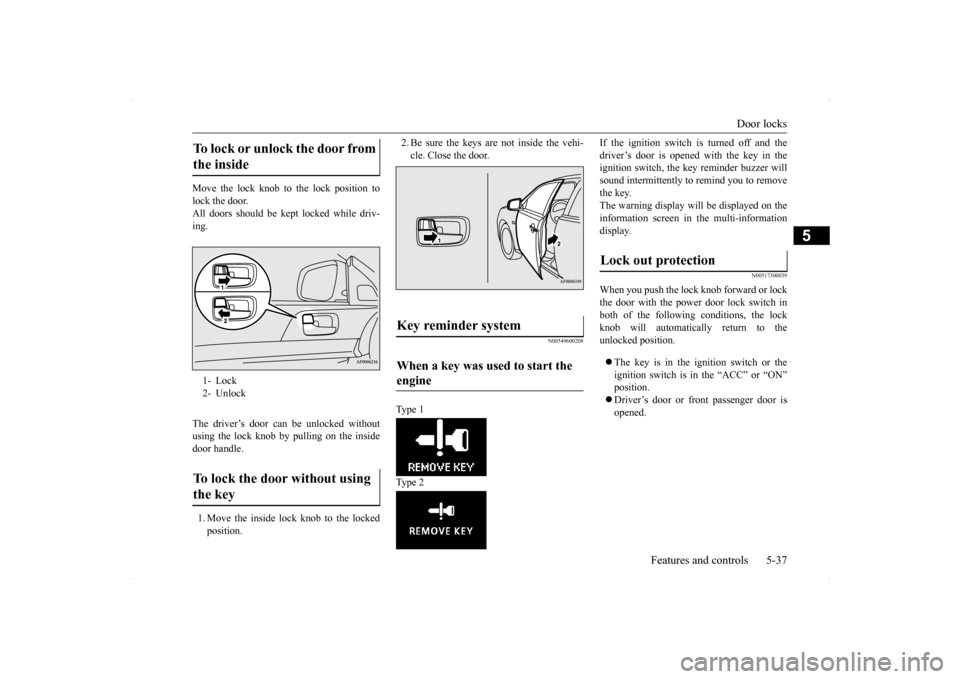
Move the lock knob to the lock position to lock the door.All doors should be kept locked while driv- ing. The driver’s door can be unlocked without using the lock knob by pulling on the inside door handle. 1. Move the inside lock knob to the locked position.
2. Be sure the keys are not inside the vehi- cle. Close the door.
N00549600208
Type 1 Type 2
If the ignition switch is turned off and the driver’s door is opened with the key in the ignition switch, the key reminder buzzer will sound intermittently to remind you to removethe key. The warning display will be displayed on the information screen in the multi-informationdisplay.
N00517300039
When you push the lock knob forward or lockthe door with the power door lock switch inboth of the following conditions, the lock knob will automatically return to the unlocked position. The key is in the ignition switch or the ignition switch is in the “ACC” or “ON” position. Driver’s door or front passenger door is opened.
To lock or unlock the door from the inside 1- Lock 2- Unlock To lock the door without using the key
Key reminder system When a key was used to start the engine
Lock out protection
BK0200700US.bo
ok 37 ページ 2013年2月15日 金曜日 午後12時17分
Page 105 of 422
Power door locks 5-38 Features and controls
5
N00503800134
Ty p e 1 Ty p e 2 If the driver’s door is opened while the igni- tion switch is in a position other than “LOCK” (PUSH OFF), the ignition switch return reminder buzzer will sound intermit-tently to remind you to return the ignition switch to the “LOCK” (PUSH OFF) position. The warning display will be displayed on theinformation screen in the multi-information display.
N00509300593
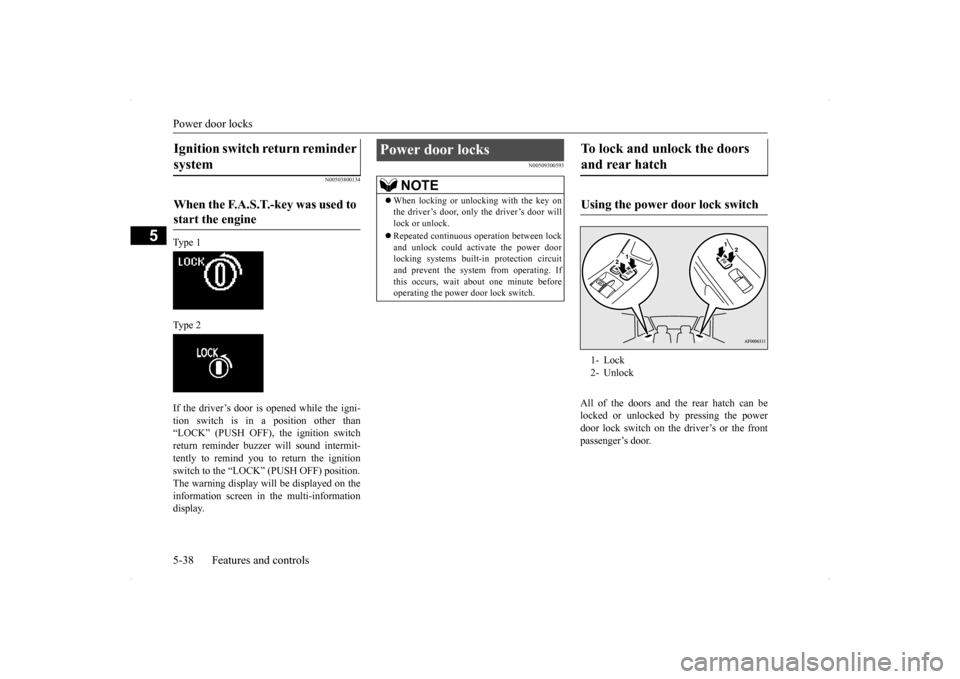
All of the doors and the rear hatch can belocked or unlocked by pressing the power door lock switch on the driver’s or the frontpassenger’s door.
Ignition switch return reminder system When the F.A.S.T.-key was used to start the engine
Power door locks
NOTE
When locking or unlocking with the key on the driver’s door, only the driver’s door will lock or unlock. Repeated continuous operation between lock and unlock could activate the power door locking systems built-in protection circuitand prevent the system from operating. If this occurs, wait about one minute before operating the power door lock switch.
To lock and unlock the doors and rear hatch Using the power door lock switch 1- Lock 2- Unlock
BK0200700US.bo
ok 38 ページ 2013年2月15日 金曜日 午後12時17分
Page 106 of 422
“Child safety locks” for rear door
Features and controls 5-39
5
N00563401148
All doors and the rear hatch will unlock when the ignition switch is turned to the “LOCK” position. All doors and the rear hatch will unlock when the selector lever (CVT) or the gearshift lever(Twin Clutch SST) is moved to the “P”
(PARK) position with the ignition switch in the “ON” position.
N00509400204
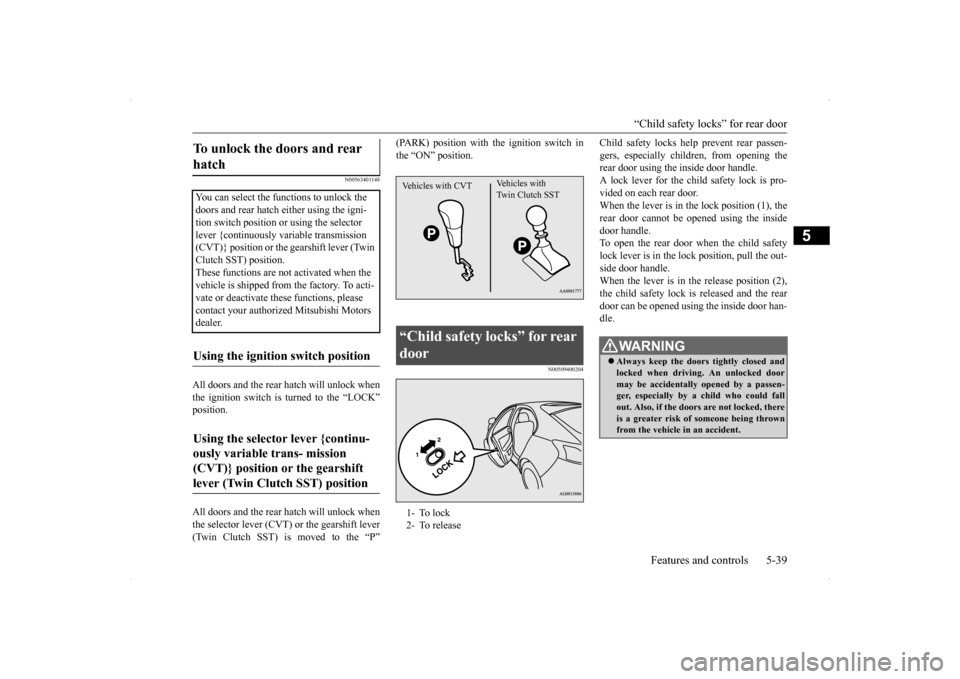
Child safety locks help prevent rear passen-gers, especially children, from opening the rear door using the inside door handle. A lock lever for the chil
d safety lock is pro-
vided on each rear door. When the lever is in the lock position (1), the rear door cannot be opened using the insidedoor handle. To open the rear door when the child safety lock lever is in the lock position, pull the out-side door handle.When the lever is in th
e release position (2),
the child safety lock is released and the rear door can be opened using the inside door han-dle.
To unlock the doors and rear hatch You can select the functions to unlock the doors and rear hatch either using the igni- tion switch position or using the selector lever {continuously variable transmission (CVT)} position or the gearshift lever (Twin Clutch SST) position.These functions are not activated when the vehicle is shipped from the factory. To acti- vate or deactivate these functions, please contact your authorized Mitsubishi Motors dealer.Using the ignition switch position Using the selector lever {continu- ously variable trans- mission (CVT)} position or the gearshift lever (Twin Clutch SST) position
“Child safety locks” for rear door 1- To lock 2- To releaseVehicles with CVT
Vehicles with Twin Clutch SST
WA R N I N G Always keep the doors tightly closed and locked when driving. An unlocked door may be accidentally opened by a passen- ger, especially by a child who could fallout. Also, if the doors are not locked, there is a greater risk of someone being thrown from the vehicle in an accident.
BK0200700US.bo
ok 39 ページ 2013年2月15日 金曜日 午後12時17分
Page 107 of 422
Rear hatch 5-40 Features and controls
5
N00510000066
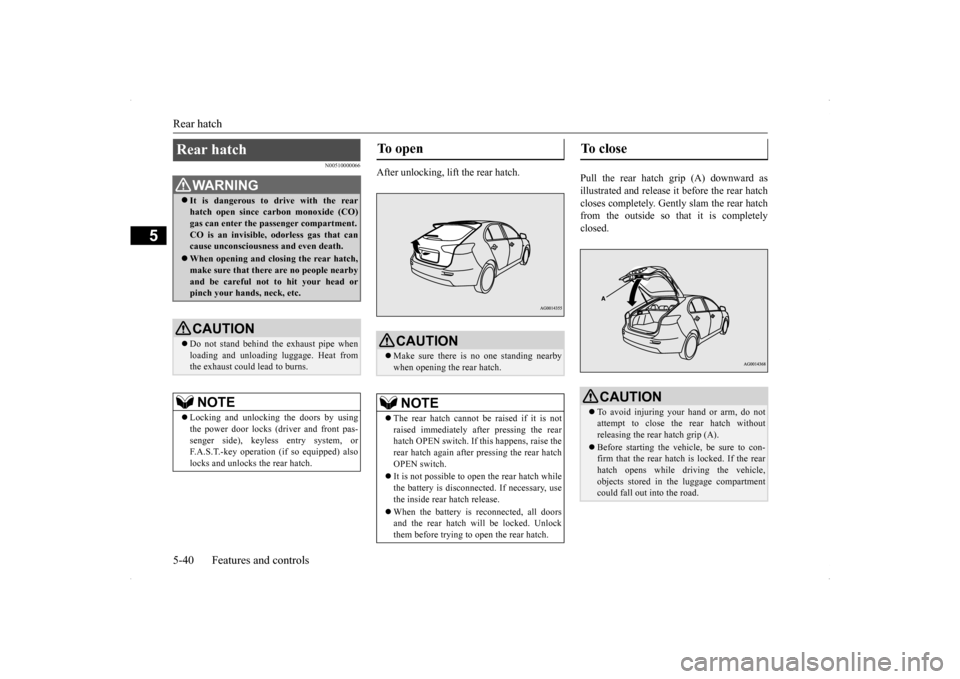
After unlocking, lift the rear hatch.
Pull the rear hatch grip (A) downward as illustrated and release it before the rear hatchcloses completely. Gently slam the rear hatch from the outside so that it is completely closed.
Rear hatch
WA R N I N G It is dangerous to drive with the rear hatch open since carbon monoxide (CO) gas can enter the passenger compartment. CO is an invisible, odorless gas that cancause unconsciousness and even death. When opening and closing the rear hatch, make sure that there are no people nearby and be careful not to hit your head or pinch your hands, neck, etc.CAUTION Do not stand behind the exhaust pipe when loading and unloading luggage. Heat from the exhaust could lead to burns.NOTE
Locking and unlocking the doors by using the power door locks (driver and front pas- senger side), keyless entry system, or F.A.S.T.-key operation (if so equipped) also locks and unlocks the rear hatch.
To open
CAUTION Make sure there is no one standing nearby when opening the rear hatch.NOTE
The rear hatch cannot be raised if it is not raised immediately after pressing the rearhatch OPEN switch. If this happens, raise the rear hatch again after pressing the rear hatch OPEN switch. It is not possible to open the rear hatch while the battery is disconnected. If necessary, usethe inside rear hatch release. When the battery is reconnected, all doors and the rear hatch will be locked. Unlock them before trying to open the rear hatch.
To close
CAUTION To avoid injuring your hand or arm, do not attempt to close the rear hatch without releasing the rear hatch grip (A). Before starting the vehicle, be sure to con- firm that the rear hatch is locked. If the rearhatch opens while driving the vehicle, objects stored in the luggage compartment could fall out into the road.
BK0200700US.bo
ok 40 ページ 2013年2月15日 金曜日 午後12時17分
Page 109 of 422
Theft-alarm system 5-42 Features and controls
5
N00510301196
Park the vehicle and stop the engine. Arm the system as described below. 1. Turn the ignition switch to the “LOCK” position. Also, if a key was used to start the engine, remove the key from the ignition switch.2. Make sure that the engine hood is closed.
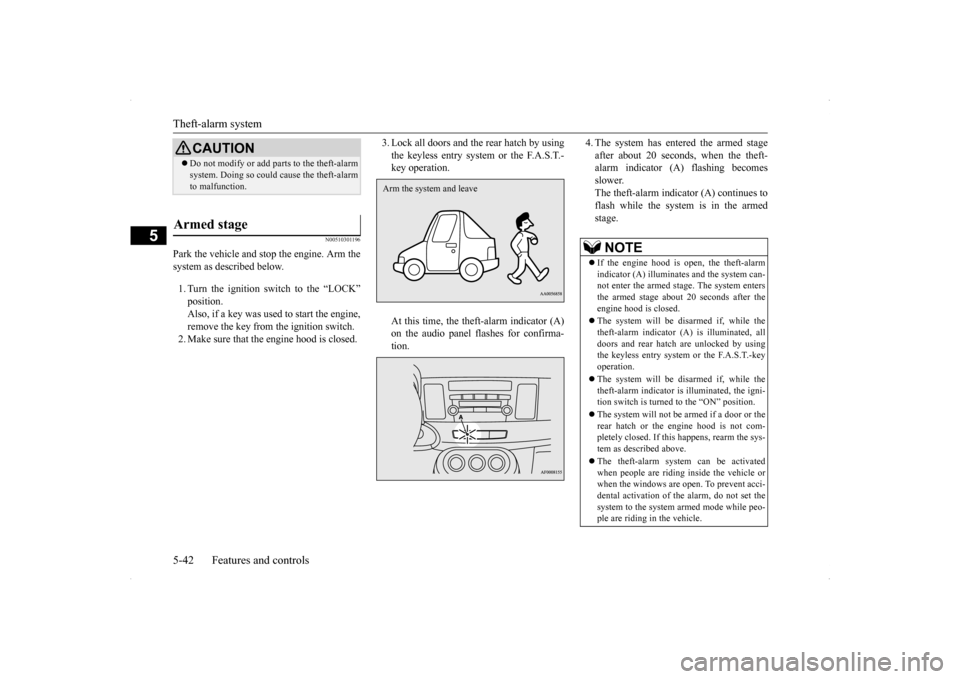
3. Lock all doors and the rear hatch by using the keyless entry system or the F.A.S.T.- key operation. At this time, the theft-alarm indicator (A) on the audio panel flashes for confirma- tion.
4. The system has entered the armed stage after about 20 seconds, when the theft- alarm indicator (A) flashing becomes slower.The theft-alarm indicator (A) continues to flash while the system is in the armed stage.
CAUTION Do not modify or add parts to the theft-alarm system. Doing so could cause the theft-alarm to malfunction.
Armed stage
Arm the system and leave
NOTE
If the engine hood is open, the theft-alarm indicator (A) illuminates and the system can-not enter the armed stage. The system enters the armed stage about 20 seconds after the engine hood is closed. The system will be disarmed if, while the theft-alarm indicator (A) is illuminated, alldoors and rear hatch are unlocked by using the keyless entry system or the F.A.S.T.-key operation. The system will be disarmed if, while the theft-alarm indicator is illuminated, the igni-tion switch is turned to the “ON” position. The system will not be
armed if a door or the
rear hatch or the engine hood is not com- pletely closed. If this happens, rearm the sys- tem as described above. The theft-alarm system can be activated when people are riding inside the vehicle or when the windows are open. To prevent acci- dental activation of the alarm, do not set thesystem to the system armed mode while peo- ple are riding in the vehicle.
BK0200700US.bo
ok 42 ページ 2013年2月15日 金曜日 午後12時17分