warning MITSUBISHI LANCER SPORTBACK 2014 8.G Repair Manual
[x] Cancel search | Manufacturer: MITSUBISHI, Model Year: 2014, Model line: LANCER SPORTBACK, Model: MITSUBISHI LANCER SPORTBACK 2014 8.GPages: 422, PDF Size: 55.11 MB
Page 188 of 422
Multi-information display
Features and controls 5-121
5
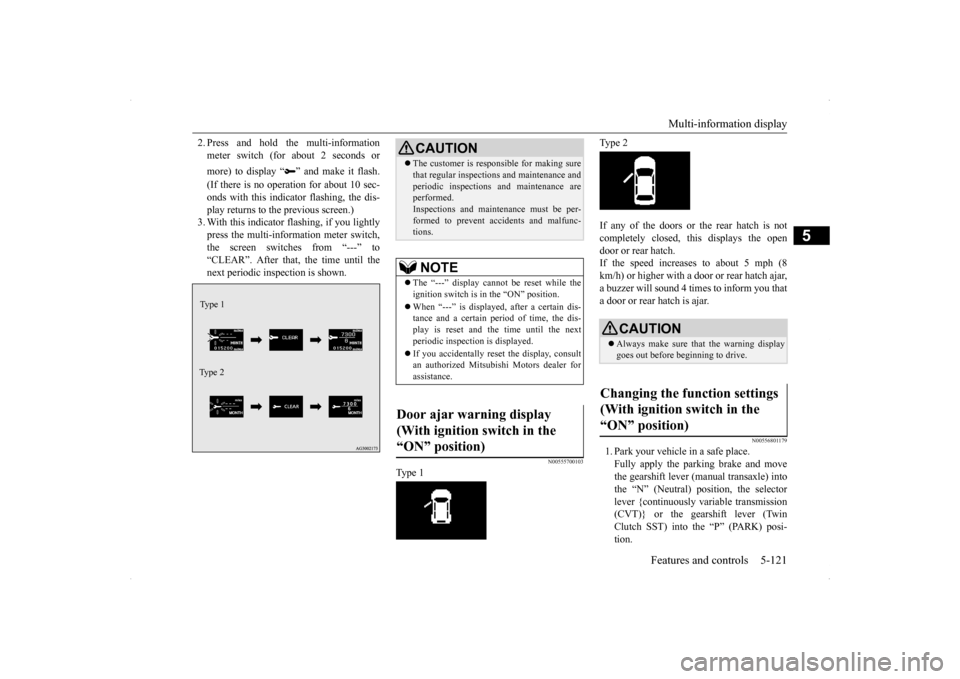
2. Press and hold the multi-information meter switch (for about 2 seconds or more) to display “ ” and make it flash. (If there is no operation for about 10 sec- onds with this indicator flashing, the dis-play returns to the previous screen.) 3. With this indicator flashing, if you lightly press the multi-information meter switch,the screen switches from “---” to “CLEAR”. After that, the time until the next periodic inspection is shown.
N00555700103
Type 1
Type 2 If any of the doors or the rear hatch is not completely closed, this displays the open door or rear hatch.If the speed increases to about 5 mph (8 km/h) or higher with a door or rear hatch ajar, a buzzer will sound 4 times to inform you thata door or rear hatch is ajar.
N00556801179
1. Park your vehicle in a safe place. Fully apply the parking brake and move the gearshift lever (manual transaxle) intothe “N” (Neutral) position, the selectorlever {continuously variable transmission (CVT)} or the gearshift lever (Twin Clutch SST) into the “P” (PARK) posi-tion.
Type 1 Type 2
CAUTION The customer is responsible for making sure that regular inspections and maintenance and periodic inspections and maintenance are performed. Inspections and maintenance must be per-formed to prevent accidents and malfunc- tions.NOTE
The “---” display cannot be reset while the ignition switch is in the “ON” position. When “---” is displayed, after a certain dis- tance and a certain period of time, the dis- play is reset and the time until the next periodic inspection is displayed. If you accidentally reset the display, consult an authorized Mitsubishi Motors dealer forassistance.
Door ajar warning display (With ignition switch in the “ON” position)
CAUTION Always make sure that the warning display goes out before beginning to drive.
Changing the function settings (With ignition switch in the “ON” position)
BK0200700US.book
121 ページ 2013年2月15日 金曜日 午後12時17分
Page 192 of 422
Multi-information display
Features and controls 5-125
5
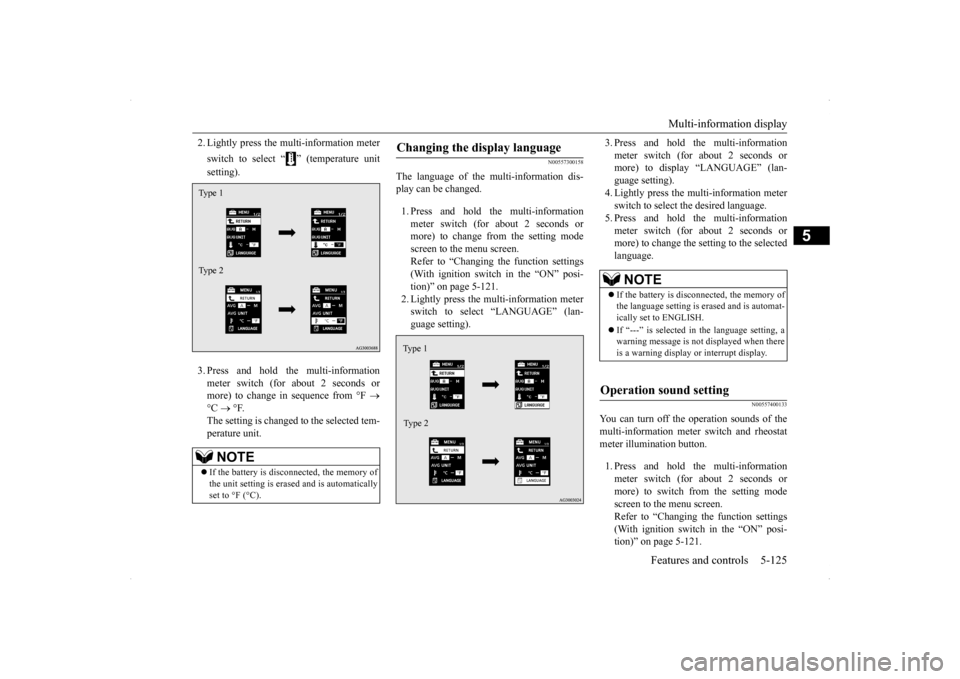
2. Lightly press the multi-information meter switch to select “ ” (temperature unit setting). 3. Press and hold the multi-information meter switch (for about 2 seconds or more) to change in sequence from °F
°C
°F.
The setting is changed to the selected tem- perature unit.
N00557300158
The language of the multi-information dis- play can be changed. 1. Press and hold the multi-information meter switch (for about 2 seconds or more) to change from the setting mode screen to the menu screen.Refer to “Changing the function settings (With ignition switch in the “ON” posi- tion)” on page 5-121.2. Lightly press the multi-information meterswitch to select “LANGUAGE” (lan- guage setting).
3. Press and hold the multi-information meter switch (for about 2 seconds or more) to display “LANGUAGE” (lan- guage setting).4. Lightly press the multi-information meter switch to select the desired language. 5. Press and hold the multi-informationmeter switch (for about 2 seconds or more) to change the setting to the selected language.
N00557400133
You can turn off the operation sounds of themulti-information meter switch and rheostat meter illumination button. 1. Press and hold the multi-information meter switch (for about 2 seconds ormore) to switch from the setting mode screen to the menu screen. Refer to “Changing the function settings(With ignition switch in the “ON” posi- tion)” on page 5-121.
NOTE
If the battery is disconnected, the memory of the unit setting is erased and is automatically set to °F (°C).Type 1 Type 2
Changing the display language Type 1 Type 2
NOTE
If the battery is disconnected, the memory of the language setting is erased and is automat- ically set to ENGLISH. If “---” is selected in the language setting, a warning message is not displayed when there is a warning display or interrupt display.
Operation sound setting
BK0200700US.book
125 ページ 2013年2月15日 金曜日 午後12時17分
Page 193 of 422
Multi-information display 5-126 Features and controls
5
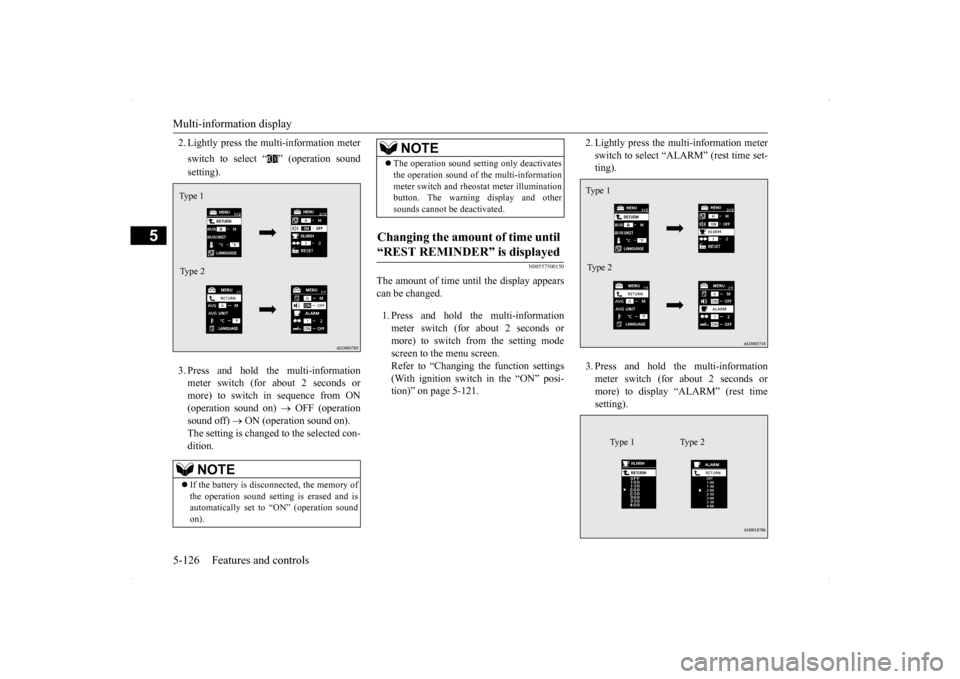
2. Lightly press the multi-information meter switch to select “ ” (operation sound setting). 3. Press and hold the multi-information meter switch (for about 2 seconds or more) to switch in sequence from ON(operation sound on)
OFF (operation
sound off)
ON (operation sound on).
The setting is changed to the selected con- dition.
N00557500150
The amount of time until the display appears can be changed. 1. Press and hold the multi-information meter switch (for about 2 seconds ormore) to switch from the setting mode screen to the menu screen. Refer to “Changing the function settings(With ignition switch in the “ON” posi- tion)” on page 5-121.
2. Lightly press the multi-information meter switch to select “ALARM” (rest time set- ting). 3. Press and hold the multi-information meter switch (for about 2 seconds or more) to display “ALARM” (rest timesetting).
NOTE
If the battery is disconnected, the memory of the operation sound setting is erased and isautomatically set to “ON” (operation sound on).Type 1 Type 2
The operation sound setting only deactivates the operation sound of the multi-information meter switch and rheostat meter illumination button. The warning display and other sounds cannot be deactivated.
Changing the amount of time until “REST REMINDER” is displayed
NOTE
Ty p e 1 Type 2
Type 1 Type 2
BK0200700US.book
126 ページ 2013年2月15日 金曜日 午後12時17分
Page 196 of 422
Indicator light, warning light, an
d information screen display list Features and controls 5-129
5
N00557700035 N00557801277
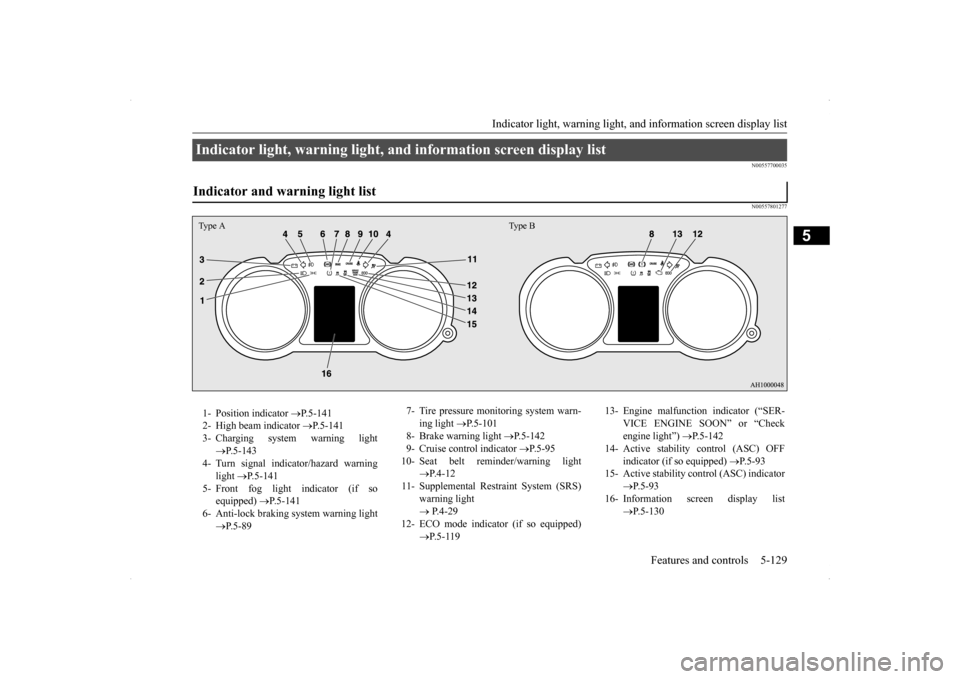
Indicator light, warning light, and information screen display list Indicator and warning light list Type A Type B1- Position indicator
P.5-141
2- High beam indicator
P.5-141
3- Charging system warning light
P.5-143
4- Turn signal indicator/hazard warning
light
P.5-141
5- Front fog light indicator (if so
equipped)
P.5-141
6- Anti-lock braking system warning light
P.5-89
7- Tire pressure monitoring system warn-
ing light
P.5-101
8- Brake warning light
P.5-142
9- Cruise control indicator
P.5-95
10- Seat belt reminder/warning light
P. 4 - 1 2
11- Supplemental Restraint System (SRS)
warning light P.4-29
12- ECO mode indicator (if so equipped)
P. 5 - 1 1 9
13- Engine malfunction indicator (“SER-
VICE ENGINE SOON” or “Checkengine light”)
P.5-142
14- Active stability control (ASC) OFF
indicator (if so equipped)
P.5-93
15- Active stability control (ASC) indicator
P. 5 - 9 3
16- Information screen display list
P.5-130
BK0200700US.book
129 ページ 2013年2月15日 金曜日 午後12時17分
Page 197 of 422

Indicator light, warning light, an
d information screen display list
5-130 Features and controls
5
N00557900040
When there is information to be announced, such as light reminders, the tone sounds andthe screen switches to the displays shown below. Refer to the appropriate page and take the necessary measures.When the cause of the warning display is eliminated, the warning display goes out automatically.Refer to “Warning display list (With ignitionswitch in the “OFF” position)” on page 5-131. Refer to “Warning display list (With ignitionswitch in the “ON” position)” on page 5-134. Refer to “Other interrupt displays (With igni- tion switch in the “ON” position)” on page5-140.Information screen display list
NOTE
In the following cases, a warning may be dis- played on the information screen and the buzzer may sound for a few seconds, at times. This is caused by the system picking up interference such as strong electromagneticwaves or noise, and is not a functional prob- lem. • An extremely strong electromagnetic wave is received from a source such as an illegal radio set, a spark from a wire, or a radar sta-tion.
• Abnormal voltage or a static electricity dis- charge is generated by the operation of installed electronics (including after-market parts). If the warning display has occurred a number of times, take your vehicle to an authorized Mitsubishi Motors dealer or a repair facilityof your choice and have the system checked.NOTE
BK0200700US.book
130 ページ 2013年2月15日 金曜日 午後12時17分
Page 198 of 422
Indicator light, warning light, an
d information screen display list Features and controls 5-131
5
N00558001247
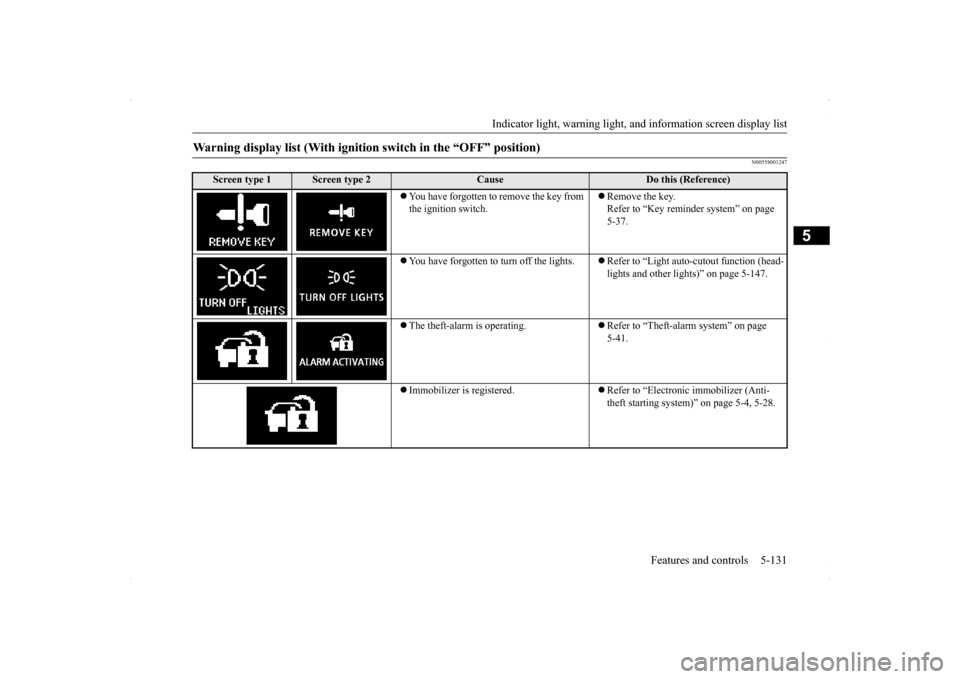
Warning display list (With ignition switch in the “OFF” position)
Screen type 1
Screen type 2
Cause
Do this (Reference)
You have forgotten to remove the key from the ignition switch.
Remove the key. Refer to “Key reminder system” on page 5-37.
You have forgotten to turn off the lights.
Refer to “Light auto-cutout function (head- lights and other lights)” on page 5-147.
The theft-alarm is operating.
Refer to “Theft-alarm system” on page 5-41.
Immobilizer is registered.
Refer to “Electronic immobilizer (Anti- theft starting system)” on page 5-4, 5-28.
BK0200700US.book
131 ページ 2013年2月15日 金曜日 午後12時17分
Page 199 of 422
Indicator light, warning light, an
d information screen display list
5-132 Features and controls
5
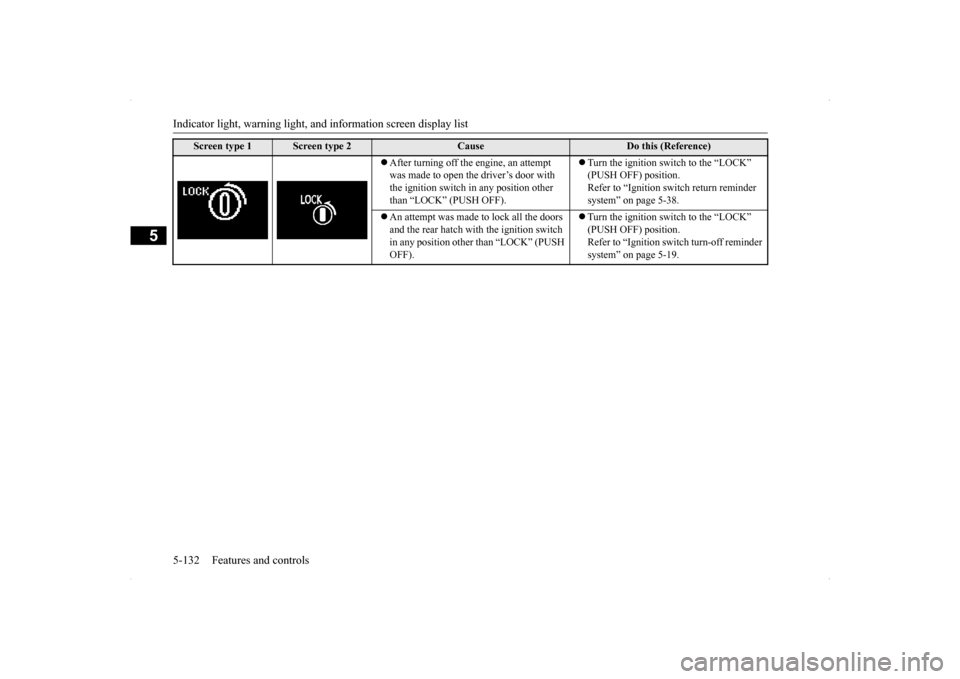
After turning off the engine, an attempt was made to open the driver’s door with the ignition switch in any position other than “LOCK” (PUSH OFF).
Turn the ignition switch to the “LOCK” (PUSH OFF) position. Refer to “Ignition switch return reminder system” on page 5-38.
An attempt was made to lock all the doors and the rear hatch with the ignition switch in any position other than “LOCK” (PUSH OFF).
Turn the ignition switch to the “LOCK” (PUSH OFF) position. Refer to “Ignition switch turn-off reminder system” on page 5-19.
Screen type 1
Screen type 2
Cause
Do this (Reference)
BK0200700US.book
132 ページ 2013年2月15日 金曜日 午後12時17分
Page 200 of 422
Indicator light, warning light, an
d information screen display list Features and controls 5-133
5
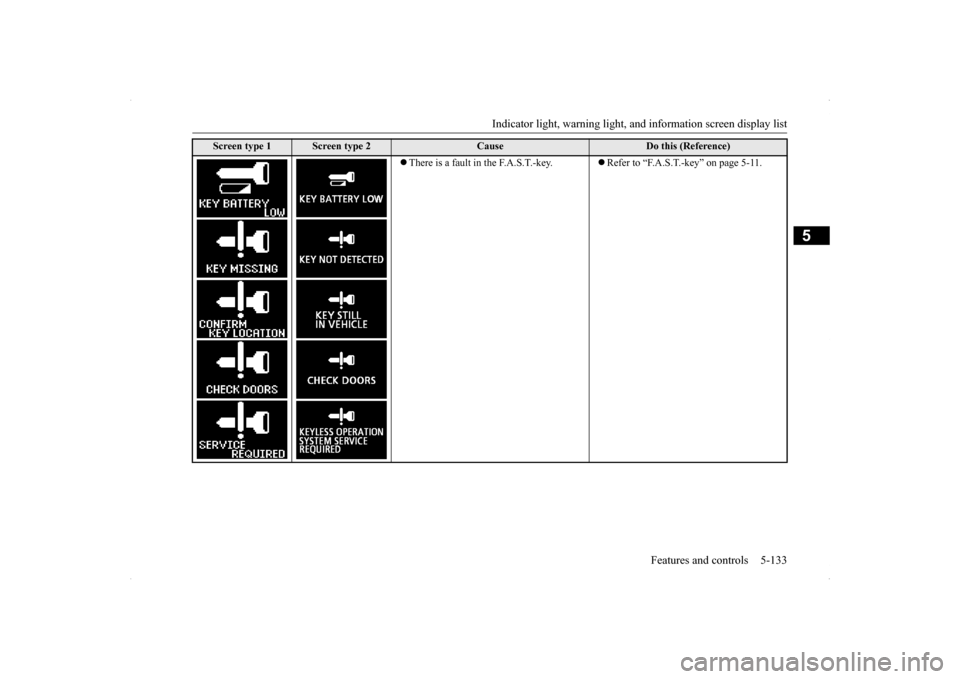
There is a fault in the F.A.S.T.-key.
Refer to “F.A.S.T.-key” on page 5-11.
Screen type 1
Screen type 2
Cause
Do this (Reference)
BK0200700US.book
133 ページ 2013年2月15日 金曜日 午後12時17分
Page 201 of 422
Indicator light, warning light, an
d information screen display list
5-134 Features and controls
5
N00558101307
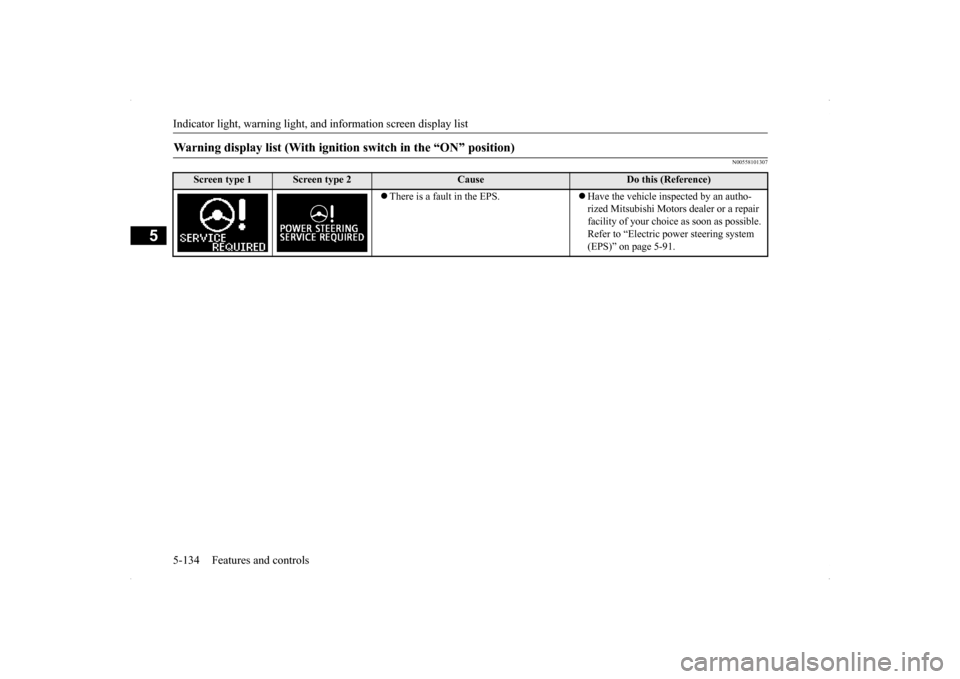
Warning display list (With ignition switch in the “ON” position)
Screen type 1
Screen type 2
Cause
Do this (Reference)
There is a fault in the EPS.
Have the vehicle inspected by an autho- rized Mitsubishi Motors dealer or a repair facility of your choice as soon as possible. Refer to “Electric power steering system (EPS)” on page 5-91.
BK0200700US.book
134 ページ 2013年2月15日 金曜日 午後12時17分
Page 202 of 422
Indicator light, warning light, an
d information screen display list Features and controls 5-135
5
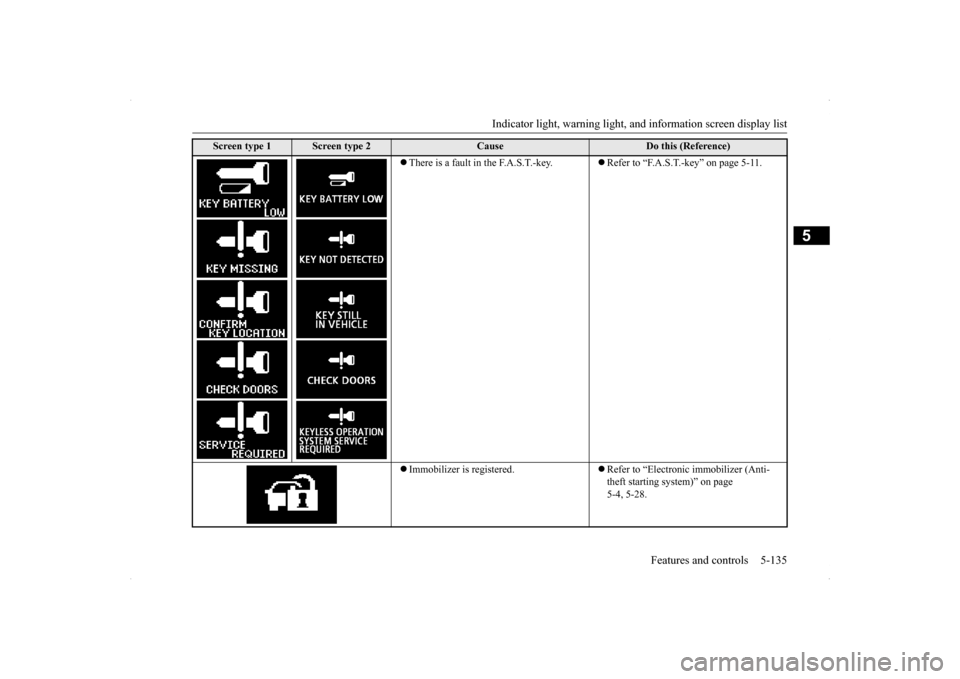
There is a fault in the F.A.S.T.-key.
Refer to “F.A.S.T.-key” on page 5-11.
Immobilizer is registered.
Refer to “Electronic immobilizer (Anti- theft starting system)” on page 5-4, 5-28.
Screen type 1
Screen type 2
Cause
Do this (Reference)
BK0200700US.book
135 ページ 2013年2月15日 金曜日 午後12時17分