change time MITSUBISHI MIRAGE 2014 6.G MMCS Manual
[x] Cancel search | Manufacturer: MITSUBISHI, Model Year: 2014, Model line: MIRAGE, Model: MITSUBISHI MIRAGE 2014 6.GPages: 135, PDF Size: 26.9 MB
Page 92 of 135
92
Outline of Button and
Touchkey Operation
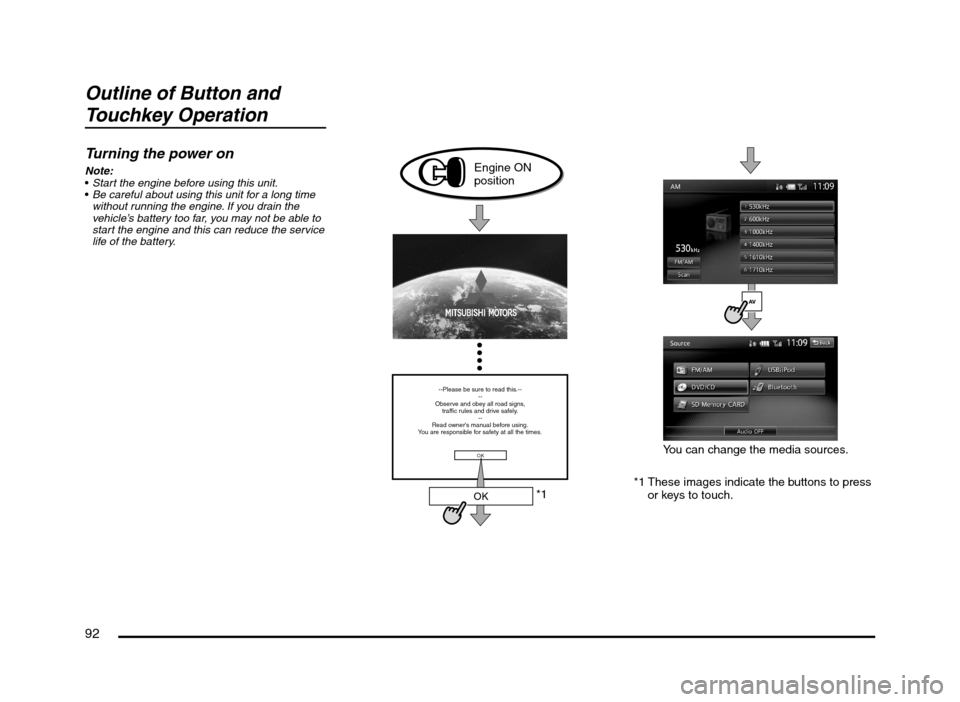
Turning the power on
Note:
Start the engine before using this unit.
Be careful about using this unit for a long time
without running the engine. If you drain the
vehicle’s battery too far, you may not be able to
start the engine and this can reduce the service
life of the battery.
*1
--Please be sure to read this.--
--
Observe and obey all road signs,
traffic rules and drive safely.
--
Read owner's manual before using.
You are responsible for safety at all the times.
OK
OK
Engine ON
position
*1 These images indicate the buttons to press
or keys to touch.You can change the media sources.
205-0010-00_QY-7375M-A_EN.indb 92205-0010-00_QY-7375M-A_EN.indb 923/12/2013 9:57:26 AM3/12/2013 9:57:26 AM
Page 98 of 135
98
11. BASIC
OPERATIONS
Note:
Be sure to read this chapter while referring to
“Controls” (page 91).
Turning the Power On/Off
Note:
Start the engine before using this unit.
Be careful about using this unit for a long time
without running the engine. If you drain the
vehicle’s battery too far, you may not be able to
start the engine and this can reduce the service
life of the battery.
qTurning the power on
1. Start the engine. The power is
automatically turned on and the startup
screen is displayed.
Note:
The power is turned on even when the ignition
switch is set to the ACC ON position.
2. The startup screen automatically changes
to the caution screen. Touch the [OK] key.
The system resumes from its status when
the power was turned off.
The navigation system does not operate until
the [OK] key is touched.
Some audio features are available even if
the [OK] key is not touched.
qTurning the power off
1. Turn the ignition switch to the OFF position.
Opening the Operation
Panel and Adjusting the
Angle
The operation panel can be opened/closed to
insert/eject a disc or memory card. The angle
of the operation panel can be adjusted to suit
the mounting angle of the unit or light coming
into the vehicle.
WARNING
To prevent the battery from going
dead, operate this unit with the engine
running if possible.
When the operation panel is operating,
be careful not to get your hand or
finger caught between the panel and
main unit or the instrument panel of
the vehicle.
Do not move the operation panel by
hand.
qOpening/closing the
operation panel
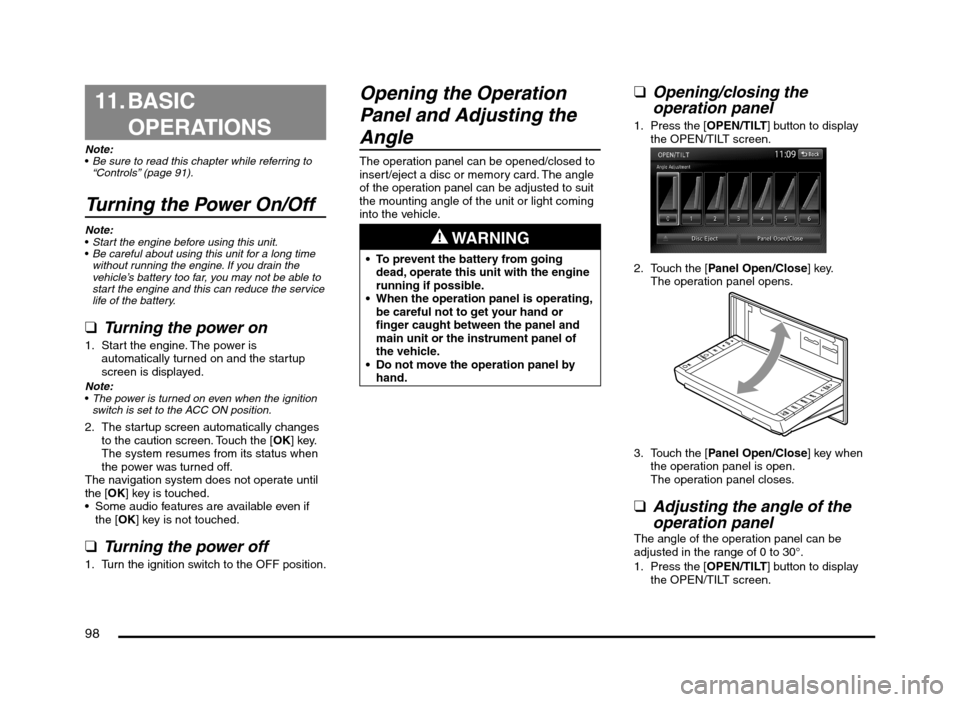
1. Press the [OPEN/TILT] button to display
the OPEN/TILT screen.
2. Touch the [Panel Open/Close] key.
The operation panel opens.
3. Touch the [Panel Open/Close] key when
the operation panel is open.
The operation panel closes.
qAdjusting the angle of the
operation panel
The angle of the operation panel can be
adjusted in the range of 0 to 30°.
1. Press the [OPEN/TILT] button to display
the OPEN/TILT screen.
205-0010-00_QY-7375M-A_EN.indb 98205-0010-00_QY-7375M-A_EN.indb 983/12/2013 9:57:27 AM3/12/2013 9:57:27 AM
Page 103 of 135
103
It may take a long time to recognise the
connected device.
Note:
If USB memory mode is already selected, the
system switches to the relevant source media
mode, and playback starts.
Never insert unrelated objects into the USB
connector.
Always insert the USB memory fully into the
connector. Incomplete connections may cause
the device not to be recognised.
Disconnecting a USB memory
CAUTION
For your safety, the driver should not
connect or disconnect a USB memory.
Do not turn off your vehicle or disconnect
a USB memory while accessing a file from
the USB memory. Before disconnecting
the USB memory, change to a source
mode other than USB memory mode,
press the [POWER] button, or press the
[AV] button and touch the [Audio OFF] key.
1. Confirm that data is not being transferred
to or from the USB memory.
For how to confirm this, refer to the
operation manual of your USB memory.
2. Remove the USB memory from the USB
connector.
Note:
When turning on the ACC power with no USB
memory connected, “No USB memory.” may
be displayed on the screen if USB memory
mode is selected.
qConnecting/Disconnecting
an iPod
An iPod can be used for playing audio data
with this system.
É “iPod Operations” (page 117)
To connect your iPod to this unit, use a USB
cable (if so equipped).
For details, consult your Mitsubishi Motors
dealer.
Connecting an iPod
CAUTION
For your safety, the driver should not
connect or disconnect an iPod.
Do not turn off your vehicle or disconnect
an iPod while accessing a file from the iPod.
1. Turn on the power of your iPod.
2. Confirm the orientation of the connectors,
and connect the iPod to the USB cable.
It may take a long time to recognise the
iPod.
Note:
If iPod mode is already selected, the system
switches to the relevant source media mode,
and playback starts.
Never insert unrelated objects into the iPod
USB connector.
Always insert the cable connector fully into the
iPod. Incomplete connections may cause the
iPod not to be recognised.
Disconnecting an iPod
CAUTION
For your safety, the driver should not
connect or disconnect an iPod.
Do not turn off your vehicle or
disconnect an iPod while accessing a
file from the iPod. Before disconnecting
the iPod, change to a source mode other
than iPod mode, press the [POWER]
button, or press the [AV] button and
touch the [Audio OFF] key.
1. Confirm that data is not being transferred
to or from the iPod.
For how to confirm this, refer to the
operation manual of your iPod.
2. Remove the iPod from the iPod USB
connector.
Note:
When turning on the ACC power with no
iPod connected, “No USB memory.” may
be displayed on the screen if iPod mode is
selected.
Steering Wheel Audio
Remote Control Operations
You can use the Steering Wheel Audio
Remote Control (if so equipped) to perform
various audio operations.
These operations can be used only when your
vehicle is equipped with a Steering Wheel
Audio Remote Control.
Note:
While driving, be sure that audio control
operations do not interfere with your driving.
205-0010-00_QY-7375M-A_EN.indb 103205-0010-00_QY-7375M-A_EN.indb 1033/12/2013 9:57:27 AM3/12/2013 9:57:27 AM
Page 105 of 135
105
C: This position is approximately 1 m from the
rear of the vehicle.
D: This position is approximately 50 cm from
the rear of the vehicle.
E: This position is approximately aligned with
the position directly below the vehicle’s rear
bumper.
F: These positions are approximately 20 cm
from the sides of the vehicle.
qAdjusting the video of the
Rear View Camera
Note:
Adjustments can only be made when the gear
lever is set to the reverse position.
1. Touch the screen while video from the
Rear View Camera is being displayed.
2. Touch the [Display Adj.] key.
Display settings are the same as those for
a DVD/CD.
3. Touch the key for the item you want to
adjust.
To adjust the brightness, touch the
[Brightness] key.
To adjust the lightness, touch the [Tint]
key.
To adjust the color, touch the [Color] key.
To adjust the black level, touch the
[Black Level] key.
4. To increase the setting, touch the [+] key.
To decrease the setting, touch the [–] key.
12. SOURCE
OPERATIONS
Radio Operations
This unit supports FM and AM radio reception.
This unit also has a built-in “Radio Broadcast
Data System” (RBDS) decoder system that
supports broadcast stations transmitting
Radio Broadcast Data System data.
Radio Broadcast Data System functions are
only available for the FM band.
Note:
When you store a station without broadcasting
Radio Broadcast Data System data to the
preset memory, store the station after receiving
it for more than 10 seconds. If you store such a
station within 10 seconds, it will be stored as an
Radio Broadcast Data System station, and the
Radio Broadcast Data System tracking function
will activate when you tune in.
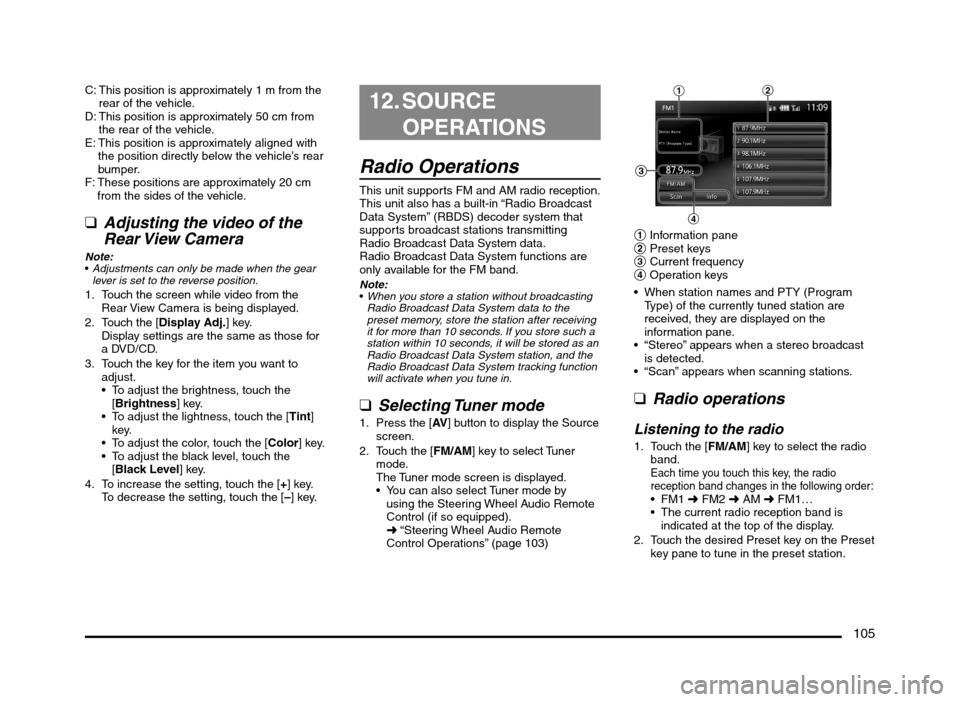
q
Selecting Tuner mode
1. Press the [AV] button to display the Source
screen.
2. Touch the [FM/AM] key to select Tuner
mode.
The Tuner mode screen is displayed.
You can also select Tuner mode by
using the Steering Wheel Audio Remote
Control (if so equipped).
É “Steering Wheel Audio Remote
Control Operations” (page 103)
12
4
3
1 Information pane
2 Preset keys
3 Current frequency
4 Operation keys
When station names and PTY (Program
Type) of the currently tuned station are
received, they are displayed on the
information pane.
“Stereo” appears when a stereo broadcast
is detected.
“Scan” appears when scanning stations.
q
Radio operations
Listening to the radio
1. Touch the [FM/AM] key to select the radio
band.
Each time you touch this key, the radio
reception band changes in the following order:
É FM2 É AM É FM1…
The current radio reception band is
indicated at the top of the display.
2. Touch the desired Preset key on the Preset
key pane to tune in the preset station.
205-0010-00_QY-7375M-A_EN.indb 105205-0010-00_QY-7375M-A_EN.indb 1053/12/2013 9:57:27 AM3/12/2013 9:57:27 AM
Page 106 of 135
106
Manual tuningThere are 3 manual tuning methods: step
tuning, seek tuning, and fast tuning.
When you are in step tuning mode, the
frequency changes one step at a time. In seek
tuning and fast tuning modes, you can quickly
tune the desired frequency.
1. Select the desired band by touching the
[FM/AM] key.
2. Tune into a station.
Step tuning:
Press the [
] or [] (TUNE/TRACK) button
to manually tune in a station.
Seek tuning:
Press and hold the [
] or [] (TUNE/
TRACK) button for at least 0.5 seconds
and then release it to tune in a station.
Fast tuning:
Press and hold the [
] or [] (TUNE/
TRACK) button for more than about 1.5
seconds to step up or down continuously.
When the button is released, a station will
be tuned by seek tuning.
Recalling a preset stationThere are total of 18 preset positions (6
for FM1, 6 for FM2, and 6 for AM) to store
individual radio stations in memory.
1. Touch the [FM/AM] key to select the
desired band.
2. Touch the desired Preset key on the Preset
key pane to recall the preset station.
Manual memory
1. Touch the [FM/AM] key to select the
desired band.
2. Select the desired station with the manual
tuning or preset tuning.3. Touch and hold one of the Preset keys for
more than about 1.5 seconds to store the
current station into the preset memory.
Displaying radio text
Note:
This function is only available when using Radio
Broadcast Data System functions.
When the station receiving broadcasts text
data, you can display the data on the screen.
1. Touch the [Info] key on the Tuner mode
screen.
The received radio text is displayed on the
screen.
qUsing the Scan functionThe tuner can continuously scan for stations.
1. Touch the [Scan] key.
The tuner changes from low to high
frequencies and stops at each broadcasting
station for about 5 seconds.
If you do not touch the [Scan] key within
about 5 seconds, scan tuning moves to the
next station.
2. Touch the [Scan] key again during this 5
second period to stop scanning. The tuner
remains tuned to that station.
Note:You can also stop scanning by touching a preset
key, pressing the [] or [] (TUNE/TRACK)
button, or pressing the [TRACK/CH UP] or
[TRACK/CH DOWN] button on the Steering
Wheel Audio Remote Control (if so equipped).
DVD Video Operations
qSelecting DVD Video mode
1. Insert a DVD video disc into the unit.
The system will automatically read the disc
data, change to DVD mode (DVD Video
mode), and start playback after a short
time.
É “Inserting/Ejecting a Disc” (page 101)
WARNING
Some videos may be recorded at a
higher volume level than desired.
Increase the volume gradually from the
minimal setting when starting playback.
For your safety, the driver should
not watch the video or operate the
controls while driving. Please note that
watching the video and operating the
controls while driving are prohibited
by law in some countries.
When a DVD video disc is already inserted:
1. Press the [AV] button to display the Source
screen.
2. Touch the [DVD/CD] key to select DVD
Video mode.
The system changes to DVD mode (DVD
Video mode), and starts playback from the
previous position.
When you touch the screen, the DVD
Video mode screen is displayed.
205-0010-00_QY-7375M-A_EN.indb 106205-0010-00_QY-7375M-A_EN.indb 1063/12/2013 9:57:27 AM3/12/2013 9:57:27 AM
Page 111 of 135
![MITSUBISHI MIRAGE 2014 6.G MMCS Manual 111
Deleting the password for the
parental level
1. From the DVD Setup screen, touch the
[Default] key to display the Default screen.
2. Touch the [Password] key to display the
Enter Password scr](/img/19/7509/w960_7509-110.png "MITSUBISHI MIRAGE 2014 6.G MMCS Manual 111
Deleting the password for the
parental level
1. From the DVD Setup screen, touch the
[Default] key to display the Default screen.
2. Touch the [Password] key to display the
Enter Password scr")
111
Deleting the password for the
parental level
1. From the DVD Setup screen, touch the
[Default] key to display the Default screen.
2. Touch the [Password] key to display the
Enter Password screen.
Enter the current 4-digit password using
the number keys, and touch the [OK] key.
3. Touch the [Clear Password] key, and
touch the [Ye s] key.
The password is deleted.
Setting the country codeSet the country code for the parental level.
The factory setting is [8583] (United States).
1. From the DVD Setup screen, touch the
[Default] key to display the Default screen.
2. Touch the [Country Code] key to display
the Country Code screen.
3. Enter the country code for the parental
level country. See the following table.
Country Input code
Bermuda 6677
Canada 6765
United States 8583
Setting up the parental levelYou can change the parental lock level (audio/
video restriction level).
This function allows you to restrict the viewing
of DVDs. When setting the parental level and
a DVD which can be restricted is played, the
message “Please change the parental level
to play this disc.” is displayed.
The factory setting is [OFF].
1. From the DVD Setup screen, touch the
[Default] key to display the Default screen.
2. Touch the [Parental Level] key to display
the Default screen.
3. Enter the 4-digit password using the
number keys, and touch the [OK] key.
4. Touch the key for the level at which you
want to set the Parental Level setting.
[OFF] disables the Parental Level setting.
[Level 8] is the most restrictive. [Level 1] is
the least restrictive.
Displaying/hiding the playback
status
1. From the DVD Setup screen, touch the
[Default] key to display the Default screen.
2. Touch the [Always Show Status] key to
set Always show status to on.
The status bar is displayed at the top of the
screen during playback.
Audio CD Operations
This system is a CD TEXT compatible
model, and supports the display of DISC
TITLE, TRACK TITLE, and TRACK ARTIST
information from CD TEXT.
Note:
This unit supports CD TEXT in English,
German, French, Spanish, Dutch, Italian,
Portuguese, Danish, and Swedish. Some
characters may not be reproduced properly on
the display.
qSelecting Audio CD mode
1. Insert an audio CD into the unit.
The system will automatically read the disc
data, change to Audio CD mode, and start
playback after a short time.
É “Inserting/Ejecting a Disc” (page 101)
WARNING
Some CDs may be recorded at a higher
volume level than desired. Increase
the volume gradually from the minimal
setting when starting playback.
When an audio CD is already inserted:
1. Press the [AV] button to display the Source
screen.
2. Touch the [DVD/CD] key to select Audio
CD mode.
The system changes to Audio CD mode,
and starts playback from the previous
position.
You can also select Audio CD mode
(CD mode) by using the Steering Wheel
Audio Remote Control (if so equipped).
É “Steering Wheel Audio Remote Control
Operations” (page 103)
4 3
21
1 Information pane
2 Track keys and track list
3 Playback mode
4 Operation keys
205-0010-00_QY-7375M-A_EN.indb 111205-0010-00_QY-7375M-A_EN.indb 1113/12/2013 9:57:28 AM3/12/2013 9:57:28 AM
Page 112 of 135
112
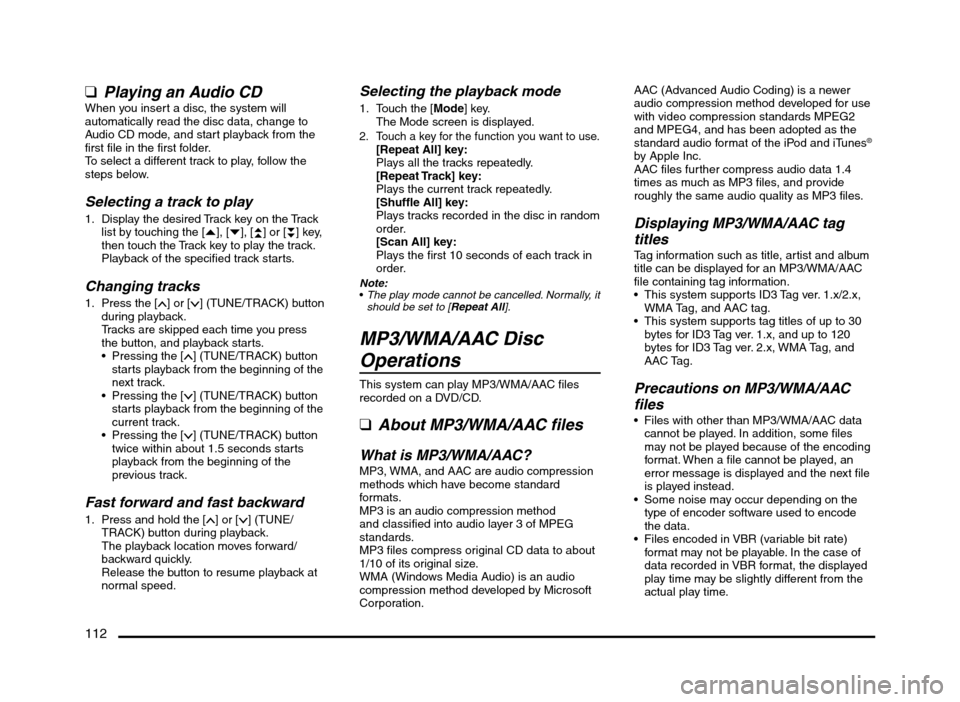
qPlaying an Audio CDWhen you insert a disc, the system will
automatically read the disc data, change to
Audio CD mode, and start playback from the
first file in the first folder.
To select a different track to play, follow the
steps below.
Selecting a track to play
1. Display the desired Track key on the Track
list by touching the [{], [}], [{
{] or [}
}] key,
then touch the Track key to play the track.
Playback of the specified track starts.
Changing tracks
1. Press the [] or [] (TUNE/TRACK) button
during playback.
Tracks are skipped each time you press
the button, and playback starts.
Pressing the [
] (TUNE/TRACK) button
starts playback from the beginning of the
next track.
Pressing the [
] (TUNE/TRACK) button
starts playback from the beginning of the
current track.
Pressing the [
] (TUNE/TRACK) button
twice within about 1.5 seconds starts
playback from the beginning of the
previous track.
Fast forward and fast backward
1. Press and hold the [] or [] (TUNE/
TRACK) button during playback.
The playback location moves forward/
backward quickly.
Release the button to resume playback at
normal speed.
Selecting the playback mode
1. Touch the [Mode] key.
The Mode screen is displayed.
2. Touch a key for the function you want to use.[Repeat All] key:
Plays all the tracks repeatedly.
[Repeat Track] key:
Plays the current track repeatedly.
[Shuffle All] key:
Plays tracks recorded in the disc in random
order.
[Scan All] key:
Plays the first 10 seconds of each track in
order.
Note:
The play mode cannot be cancelled. Normally, it
should be set to [Repeat All].
MP3/WMA/AAC Disc
Operations
This system can play MP3/WMA/AAC files
recorded on a DVD/CD.
q
About MP3/WMA/AAC files
What is MP3/WMA/AAC?MP3, WMA, and AAC are audio compression
methods which have become standard
formats.
MP3 is an audio compression method
and classified into audio layer 3 of MPEG
standards.
MP3 files compress original CD data to about
1/10 of its original size.
WMA (Windows Media Audio) is an audio
compression method developed by Microsoft
Corporation.AAC (Advanced Audio Coding) is a newer
audio compression method developed for use
with video compression standards MPEG2
and MPEG4, and has been adopted as the
standard audio format of the iPod and iTunes
®
by Apple Inc.
AAC files further compress audio data 1.4
times as much as MP3 files, and provide
roughly the same audio quality as MP3 files.
Displaying MP3/WMA/AAC tag
titles
Tag information such as title, artist and album
title can be displayed for an MP3/WMA/AAC
file containing tag information.
This system supports ID3 Tag ver. 1.x/2.x,
WMA Tag, and AAC tag.
This system supports tag titles of up to 30
bytes for ID3 Tag ver. 1.x, and up to 120
bytes for ID3 Tag ver. 2.x, WMA Tag, and
AAC Tag.
Precautions on MP3/WMA/AAC
files
Files with other than MP3/WMA/AAC data
cannot be played. In addition, some files
may not be played because of the encoding
format. When a file cannot be played, an
error message is displayed and the next file
is played instead.
Some noise may occur depending on the
type of encoder software used to encode
the data.
Files encoded in VBR (variable bit rate)
format may not be playable. In the case of
data recorded in VBR format, the displayed
play time may be slightly different from the
actual play time.
205-0010-00_QY-7375M-A_EN.indb 112205-0010-00_QY-7375M-A_EN.indb 1123/12/2013 9:57:28 AM3/12/2013 9:57:28 AM
Page 114 of 135
114
*1 VBR playback is supported.
*2 WMA9 Pro, WMA9 Voice, and WMA9
Lossless are not playable.
*3 Only for monaural data.
*4 Monaural and stereo data.
*5 HE-AAC is only playable as AAC.
Precautions when preparing a disc
File system
Specify the following formats as the file
system.
Otherwise, normal playback may not be
possible.
CD: ISO9660 Level 1/Level 2, Joliet, Romeo
DVD: UDF (Ver. 1.02/1.5/2.0), UDF Bridge,
ISO9660 Level 1/Level 2, Joliet, Romeo
Folder structure
The folder hierarchy must be within 8
hierarchical levels (excluding root).
Otherwise, playback is not possible. When
many folders are present, there may be a
time lag before playback begins.
You can store MP3, WMA, and AAC files
together in a folder.
Number of files or folders
The maximum allowable number of folders
is 255 (including the root directory).
The maximum allowable number of folders
and files in a disc is 512.
The maximum allowable number of files in a
folder is 255.
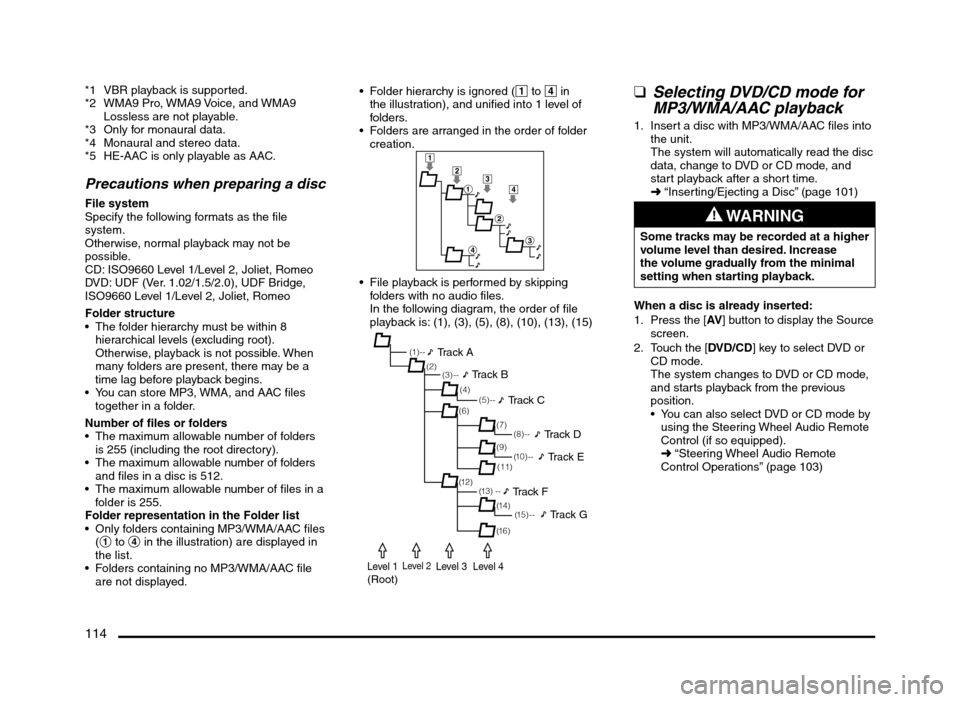
Folder representation in the Folder list
Only folders containing MP3/WMA/AAC files
(1 to 4 in the illustration) are displayed in
the list.
Folders containing no MP3/WMA/AAC file
are not displayed. Folder hierarchy is ignored (1 to 4 in
the illustration), and unified into 1 level of
folders.
Folders are arranged in the order of folder
creation.
1
2
1
2
3
4
3
4
File playback is performed by skipping
folders with no audio files.
In the following diagram, the order of file
playback is: (1), (3), (5), (8), (10), (13), (15)
(1 ) - -
(3) --
(6)
(12)(7) (2)
(4)
(13) --(5) --
(11)
(14) (9)
(1 5 ) - -
(16)
(8) --
(1 0 ) - -
Track A
Track B
Track C
Track D
Track E
Track F
Track G
Level 1(Root)Level 2Level 3Level 4
qSelecting DVD/CD mode for
MP3/WMA/AAC playback
1. Insert a disc with MP3/WMA/AAC files into
the unit.
The system will automatically read the disc
data, change to DVD or CD mode, and
start playback after a short time.
É “Inserting/Ejecting a Disc” (page 101)
WARNING
Some tracks may be recorded at a higher
volume level than desired. Increase
the volume gradually from the minimal
setting when starting playback.
When a disc is already inserted:
1. Press the [AV] button to display the Source
screen.
2. Touch the [DVD/CD] key to select DVD or
CD mode.
The system changes to DVD or CD mode,
and starts playback from the previous
position.
You can also select DVD or CD mode by
using the Steering Wheel Audio Remote
Control (if so equipped).
É “Steering Wheel Audio Remote
Control Operations” (page 103)
205-0010-00_QY-7375M-A_EN.indb 114205-0010-00_QY-7375M-A_EN.indb 1143/12/2013 9:57:28 AM3/12/2013 9:57:28 AM
Page 115 of 135
115
1
3
4
5
2
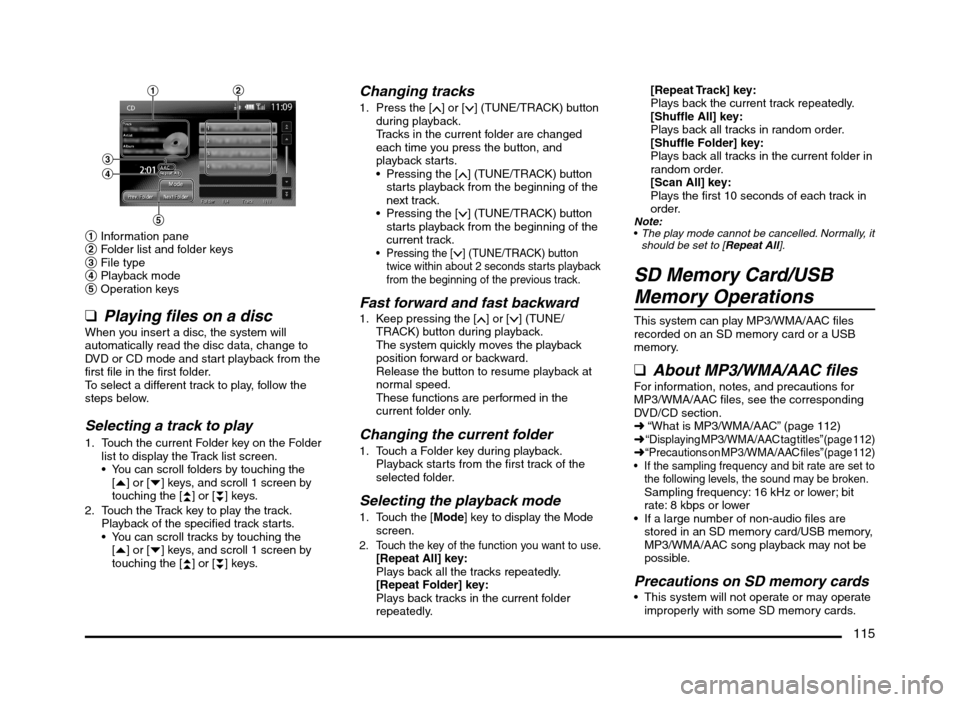
1 Information pane
2 Folder list and folder keys
3 File type
4 Playback mode
5 Operation keys
q
Playing files on a discWhen you insert a disc, the system will
automatically read the disc data, change to
DVD or CD mode and start playback from the
first file in the first folder.
To select a different track to play, follow the
steps below.
Selecting a track to play
1. Touch the current Folder key on the Folder
list to display the Track list screen.
You can scroll folders by touching the
[{] or [}] keys, and scroll 1 screen by
touching the [
{
{] or [}
}] keys.
2. Touch the Track key to play the track.
Playback of the specified track starts.
You can scroll tracks by touching the
[{] or [}] keys, and scroll 1 screen by
touching the [
{
{] or [}
}] keys.
Changing tracks
1. Press the [] or [] (TUNE/TRACK) button
during playback.
Tracks in the current folder are changed
each time you press the button, and
playback starts.
Pressing the [
] (TUNE/TRACK) button
starts playback from the beginning of the
next track.
Pressing the [
] (TUNE/TRACK) button
starts playback from the beginning of the
current track.
Pressing the [] (TUNE/TRACK) button
twice within about 2 seconds starts playback
from the beginning of the previous track.
Fast forward and fast backward1. Keep pressing the [] or [] (TUNE/
TRACK) button during playback.
The system quickly moves the playback
position forward or backward.
Release the button to resume playback at
normal speed.
These functions are performed in the
current folder only.
Changing the current folder
1. Touch a Folder key during playback.
Playback starts from the first track of the
selected folder.
Selecting the playback mode
1. Touch the [Mode] key to display the Mode
screen.
2. Touch the key of the function you want to use.[Repeat All] key:
Plays back all the tracks repeatedly.
[Repeat Folder] key:
Plays back tracks in the current folder
repeatedly.
[Repeat Track] key:
Plays back the current track repeatedly.
[Shuffle All] key:
Plays back all tracks in random order.
[Shuffle Folder] key:
Plays back all tracks in the current folder in
random order.
[Scan All] key:
Plays the first 10 seconds of each track in
order.
Note:
The play mode cannot be cancelled. Normally, it
should be set to [Repeat All].
SD Memory Card/USB
Memory Operations
This system can play MP3/WMA/AAC files
recorded on an SD memory card or a USB
memory.
qAbout MP3/WMA/AAC filesFor information, notes, and precautions for
MP3/WMA/AAC files, see the corresponding
DVD/CD section.
É “What is MP3/WMA/AAC” (page 112)
É
“Displaying MP3/WMA/AAC tag titles” (page 112)É “Precautions on MP3/WMA/AAC files” (page 112) If the sampling frequency and bit rate are set to
the following levels, the sound may be broken.
Sampling frequency: 16 kHz or lower; bit
rate: 8 kbps or lower
If a large number of non-audio files are
stored in an SD memory card/USB memory,
MP3/WMA/AAC song playback may not be
possible.
Precautions on SD memory cards This system will not operate or may operate
improperly with some SD memory cards.
205-0010-00_QY-7375M-A_EN.indb 115205-0010-00_QY-7375M-A_EN.indb 1153/12/2013 9:57:28 AM3/12/2013 9:57:28 AM
Page 118 of 135
118
qNotes on using an Apple
iPod
CAUTION
Do not operate an iPod while driving.
Do not leave an iPod inside your vehicle.
Exposure to sunlight may cause the
inside of your vehicle to become
excessively hot, and result in the
malfunction of the iPod.
Do not sit on the iPod or place items
on top of it while it is connected. A
malfunction may occur.
On certain iPod models, a logo screen sent
from this unit is displayed on the screen of
the iPod after the iPod has been connected
to this unit.
Tag information such as track title, artist
name, and album title can be displayed for a
file containing tag information.
When you connect an iPod which has a
large number of tracks, it may take a long
time to establish a connection with the iPod
or to control the iPod features.
If the iPod stops operating, selecting a track
from the category list may make the iPod
operable again.
If you set the track repeat function on an
iPod, it may not operate correctly with this
unit.
If you set the shuffle function on an iPod, it
may not operate correctly with this unit. If
this happens, disable the shuffle function to
use the iPod.
Depending on the iPod model, titles and lists
of tracks from the iPod may not be displayed
if there are many playable tracks stored on
the iPod.
If an error message is displayed, disconnect
the iPod from this unit, and then reconnect it.
If the iPod becomes inoperable, reset the
iPod. For details on resetting the iPod, refer
to its operating instructions, etc.
If the iPod still cannot be operated after it
has been reset and connected to this unit,
reset the iPod, check if the iPod can be
operated, and then connect it to this unit.
Make sure to disconnect the iPod after
turning off your vehicle’s engine. If you leave
it connected, the iPod’s power may not turn
off, and the iPod battery may be depleted.
When connecting an iPod touch or iPhone
to this unit via Bluetooth and you perform
audio playback or a hands-free call, audio
cannot be output via iPod mode. Switch the
audio output setting from your iPod touch
or iPhone from Bluetooth (“Car-Navi”) to
the dock connector, or disconnect and
reconnect the iPod touch or iPhone. For
details, refer to the operating instructions of
the connecting device.
If you connect an audio device via
Bluetooth, audio cannot be output from an
iPod touch or iPhone via USB cable. Select
the Bluetooth device from Bluetooth Audio
in the Paired Device List screen, touch the
[Deselect] key, and then reconnect the iPod
touch or iPhone.
É “Paired Device List operations” (page 129)
If you connect an iPod that is currently
playing a track to this unit, playback of that
track will continue via this unit.
An iPod connected to this unit cannot be
controlled via the iPod itself.
Place the iPod in a safe location.
Precautions on battery
consumption
If the iPod is connected to this unit when the
iPod’s internal battery has run down, iPod
mode may not operate correctly. Charge the
iPod before connecting it.
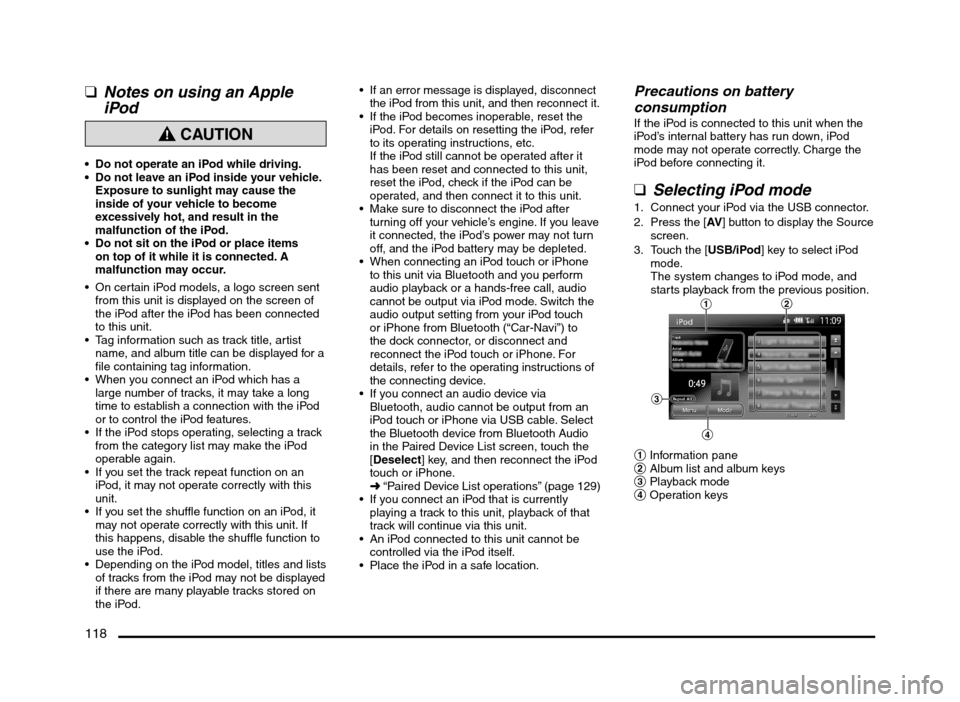
qSelecting iPod mode
1. Connect your iPod via the USB connector.
2. Press the [AV] button to display the Source
screen.
3. Touch the [USB/iPod] key to select iPod
mode.
The system changes to iPod mode, and
starts playback from the previous position.
12
3
4
1 Information pane
2 Album list and album keys
3 Playback mode
4 Operation keys
205-0010-00_QY-7375M-A_EN.indb 118205-0010-00_QY-7375M-A_EN.indb 1183/12/2013 9:57:29 AM3/12/2013 9:57:29 AM