CD player MITSUBISHI MIRAGE 2015 6.G User Guide
[x] Cancel search | Manufacturer: MITSUBISHI, Model Year: 2015, Model line: MIRAGE, Model: MITSUBISHI MIRAGE 2015 6.GPages: 300, PDF Size: 43.44 MB
Page 200 of 300
AM/FM electronically tuned radio with CD player (if so equipped)
Comfort controls 7-19
7
N00712100685
Press the /MENU button to select BASS TREBLE
FA D E R
BALANCE
Sound control mode off. Press the sound control button either or
to select the de
sired bass level.
Press the sound control button either or
to select the desired treble level.
Press the sound control button either or
to balance the volume of sound from the
front and the rear speakers.
Press the sound control button either or
to balance the volume of sound from the
left and the right speakers.
N00734900915 N00735000926
1. Press the PWR switch or the RADIO but- ton to turn on the radio.Press and hold the PWR switch for 2 sec- onds or longer to turn off the radio. 2. Press the RADIO but
ton to select the
desired band (AM/FM1/FM2).
To adjust the tone
BASS (Bass tone control)
TREBLE (Treble tone control)
FADER (Front/Rear balance con- trol) (if equipped with rear speak-ers)
BALANCE (Left/Right balance control)
NOTE
The sound control mode
will be canceled
when the another mode
is selected or no
adjustment is performed for more than 10 seconds. In a two-speakers vehi
cle, keep the FADER
setting in the middle position. Since no rearspeakers are connect
ed, adjusting the
FADER setting toward the “REAR” side will result in a loss of sound output.
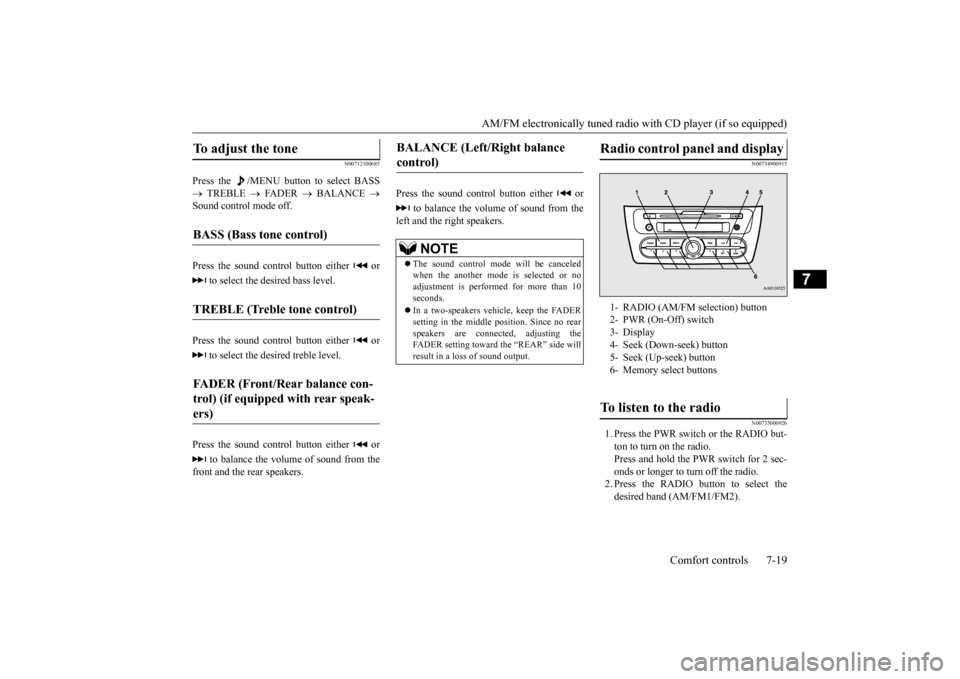
Radio control panel and display
1- RADIO (AM/FM selection) button 2- PWR (On-Off) switch3- Display 4- Seek (Down-seek) button 5- Seek (Up-seek) button6- Memory select buttonsTo listen to the radio
BK0212400US.book 19 ページ 2014年4月1日 火曜日 午後2時21分
Page 201 of 300
AM/FM electronically tuned radio with CD player (if so equipped) 7-20 Comfort controls
7
3. Press the seek button to tune to a station, or press one of the memory select buttonsto tune in to a station memorized for that button. Refer to “Automatic tuning”, “Manualtuning” or “To enter frequencies into the memory”.
The frequency changes every time the seek button is pressed. Pres
s the button to select
the desired station. After keeping the seek button depressed until it beeps, release the button, and the selected station reception will start. As many as 6 AM and
12 FM stations can be
entered into the memory. To store a frequency in the memory, follow these steps:
1. Press the seek button to tune to the fre- quency you wish to keep in the memory.2. Press one of the me
mory select buttons
until it beeps. The sound will be momentarily inter-rupted while the frequency is being entered into the memory. The number of the button matching the entry in the mem-ory as well as the fre
quency is displayed.
3. The preset memory setting is retrieved by pressing the button a
nd then releasing it
within 1 second.
N00735300756
N00735501087
1. Insert the disc wi
th the label facing up.
When a disc is inserted, the CD indicator will come on and the CD player will begin playing even if the radio is being used.The CD player will also start playback when the CD button is pressed with a disc in the player or with a disc set in the Disc-loading slot, even if the radio is being used.
To tune the radio
Manual tuning Automatic tuningTo enter frequencies into the mem- ory
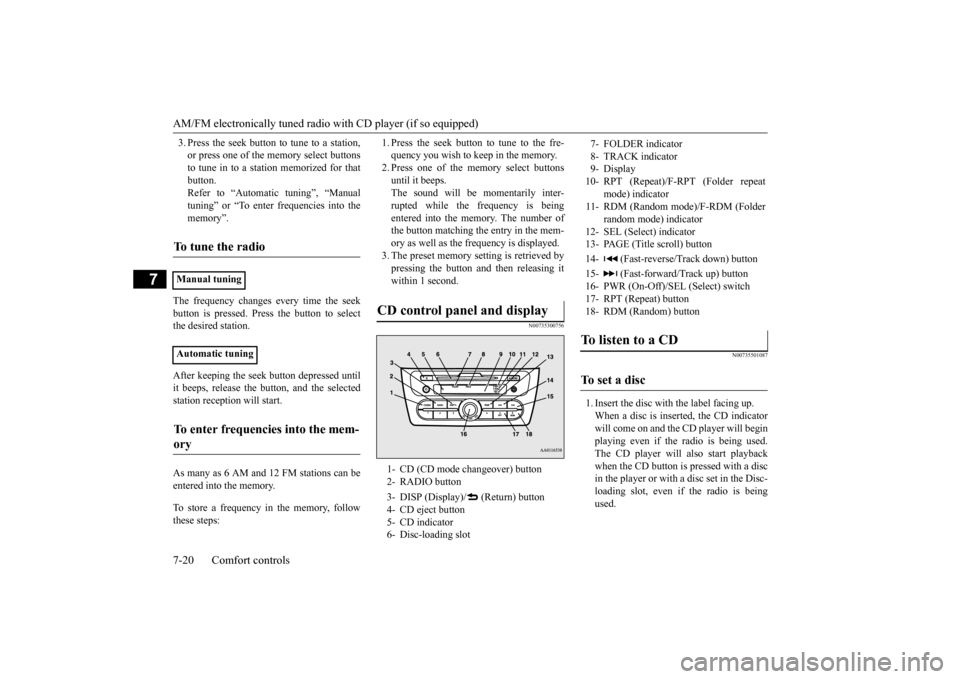
CD control panel and display
1- CD (CD mode changeover) button 2- RADIO button 3- DISP (Display)/ (Return) button 4- CD eject button 5- CD indicator 6- Disc-loading slot
7- FOLDER indicator 8- TRACK indicator 9- Display10- RPT (Repeat)/F-RPT (Folder repeat
mode) indicator
11- RDM (Random mode)/F-RDM (Folder
random mode) indicator
12- SEL (Select) indicator 13- PAGE (Title scroll) button 14- (Fast-reverse/
Track down) button
15- (Fast-forward/Track up) button 16- PWR (On-Off)/SEL
(Select) switch
17- RPT (Repeat) button18- RDM (Random) buttonTo listen to a CD
To s e t a d i s c
BK0212400US.book 20 ページ 2014年4月1日 火曜日 午後2時21分
Page 202 of 300

AM/FM electronically tuned radio with CD player (if so equipped)
Comfort controls 7-21
7
2. To stop the CD, turn off the power by pressing the PWR switch for 2 seconds orlonger, or change over to the radio mode by pressing the RADIO button, or eject the disc by pressi
ng the eject button.
When the CD eject button is pressed, the disc automatically stops and is ejected. Press the CD button if a disc is already in the CD player. The CD player will enter CD
mode and start playba
ck. The track number
and the playing time will appear on the dis-play. The tracks in the disc will be played continuously. This CD player allows you to play MP3 (MPEG Audio Layer-3) files recorded on CD-ROMs, CD-Rs (recordable CDs), and CD-RWs (rewritable CDs) in ISO9660 Level 1/Level 2, Joliet, a
nd Romeo formats. Each
disc can hold up to 255 files in up to 100 fold- ers, up to a maximum of 16 levels. The ID3 tag information can be displayed during MP3playback. For information concerning ID3 tags, refer to “CD text
and MP3 title display”
on page 7-23. 1. Insert a disc containing MP3 files into the slot. 2. Press the CD button if a disc is already in the CD player.The display shows “READING”, then playback will begin.
NOTE
For information on adjusting the volume and tone, refer to “To adju
st the volume” on page
7-18 and “To adjust the tone” on page 7-19. 3 inches (8 cm) compact disc cannot be played on this CD player. For information concerning the handling of compact discs, refer to “Handling of com- pact discs” on page 7-40.
To eject a disc
NOTE
If you do not remove the disc before 15 sec- onds have elapsed, the CD player will auto-matically reload the disc and stop.
To listen to a music CD
To listen to an MP3 CD
NOTE
While listening to a disc on which CD-DA (CD-Digital Audio) a
nd MP3 files have both
been recorded, you can switch between read-ing of the CD-DA, reading of the MP3 files, and the external audi
o input mode by press-
ing the CD button for 2 seconds or longer(until you hear a beep). For information on the external audio input, refer to “To use the external audio inputfunction” on page 7-26. With a disc that contains both CD-DA and MP3 files, the CD-DA files are automati- cally played first. The playback sound quality differs depend- ing on the encoding software and the bit rate. For details, refer to the user manual of yourencoding software. Depending on file/folde
r configurations on a
disc, it may take some
time before playback
starts. MP3 encode software and writing software are not supplied with this unit. You may encounter trouble in playing an MP3 or displaying the information of MP3 files recorded with certain writing softwareor CD recorders (CD-R/RW drivers). If you record too many folders or files other than MP3 onto a disc, it
may take some time
before playback starts. This unit does not record MP3 files. For information on CD-Rs/RWs, refer to “Notes on CD-Rs/RWs” on page 7-41.
BK0212400US.book 21 ページ 2014年4月1日 火曜日 午後2時21分
Page 203 of 300
AM/FM electronically tuned radio with CD player (if so equipped) 7-22 Comfort controls
7
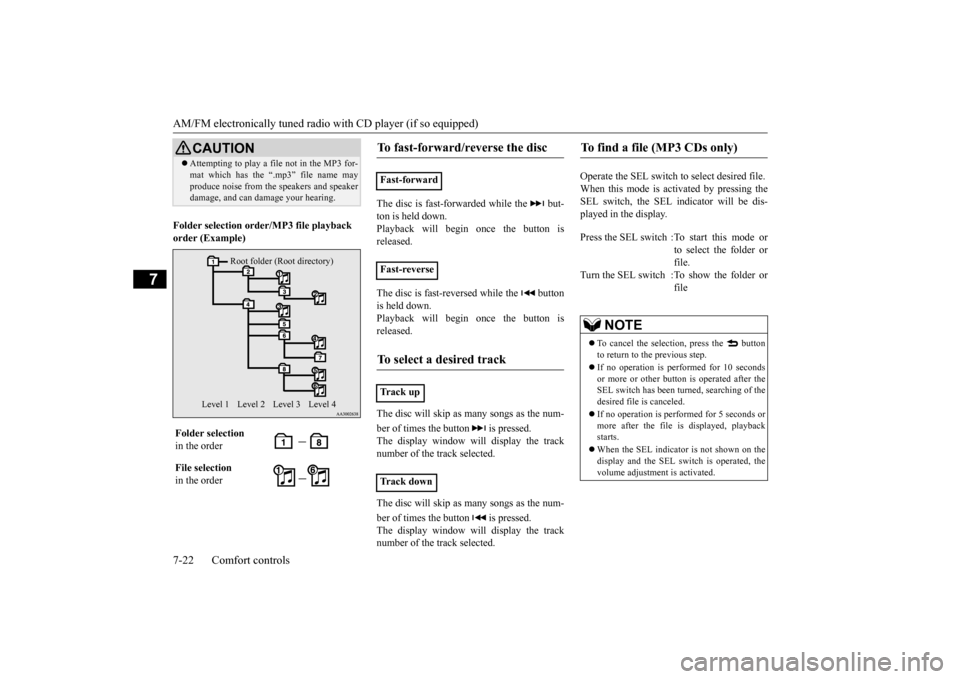
Folder selection orde
r/MP3 file playback
order (Example)
The disc is fast-forwarded while the but- ton is held down.Playback will begi
n once the button is
released. The disc is fast-reversed while the button is held down.Playback will begi
n once the button is
released. The disc will skip as
many songs as the num-
ber of times the but
ton is pressed.
The display window will display the track number of the track selected. The disc will skip as
many songs as the num-
ber of times the but
ton is pressed.
The display window will display the tracknumber of the track selected.
Operate the SEL switch to
select desired file.
When this mode is activated by pressing the SEL switch, the SEL i
ndicator will be dis-
played in the display.
CAUTION Attempting to play a file not in the MP3 for- mat which has the “.mp3” file name mayproduce noise from the speakers and speakerdamage, and can da
mage your hearing.
Folder selection in the order File selection in the order
Root folder (Root directory)
Level 1 Level 3 Level 4
Level 2
To fast-forward/reverse the disc
Fast-forward Fast-reverseTo select a desired track
Tr a c k u pTr a c k d o w n
To find a file (MP3 CDs only)
Press the SEL switch :To start this mode or
to select the folder or file.
Turn the SEL switch :To show the folder or
file
NOTE
To cancel the selecti
on, press the button
to return to the previous step. If no operation is perf
ormed for 10 seconds
or more or other butt
on is operated after the
SEL switch has been turned, searching of the desired file is canceled. If no operation is performed for 5 seconds or more after the file is
displayed, playback
starts. When the SEL indicato
r is not shown on the
display and the SEL switch is operated, thevolume adjustment is activated.
BK0212400US.book 22 ページ 2014年4月1日 火曜日 午後2時21分
Page 204 of 300

AM/FM electronically tuned radio with CD player (if so equipped)
Comfort controls 7-23
7
Press the RPT button to
repeat the same track.
If the RPT button is pressed, the RPT indica- tor will come on. To exit this mode, press the button again. While a song is playing,
press the RPT button
for 2 seconds or longer (until you hear abeep). The F-RPT indicator will come on and the disc will repeat all the songs in the folder that contains the s
ong currently playing.
To exit this mode, press the button again.
If the RDM button is pressed, the RDM indi- cator will come on and the tracks that are played will be selected at random. To exit this mode, press the button again. If the RDM button is pressed, the F-RDM indicator will come on and the tracks that areplayed will be select
ed at random from the
folder that is currently selected. To exit this mode, press the button again. Press the RDM button for 2 seconds or longer (until you hear a beep). The RDM indicator will come on and the tracks that are playedwill be selected at
random from all folders on
the disc currently selected. To exit this mode, press the button again.
N00752100179
This CD player can display CD text and MP3titles, including ID3 tag information. The CD player can display disc and track titles for discs with c
onverted disc and track
title information. Press the DISP buttonrepeatedly to make selections in the following sequence: disc name
track name
normal
display mode.
To r e p e a t t r a c k s
To repeat a track To repeat songs in the same folder (MP3 CDs only)
NOTE
With a disc that contains both CD-DA and MP3 files, the repeat
mode causes only files
of the same format (CD-DA only or MP3 files only) to be repeated.
To change the order of tracks for playback
Random playback for a disc (music CDs only) Random playback for a folder (MP3 CDs only) Random playback for all folders on a disc (MP3 CDs only)
NOTE
With a disc that contains both CD-DA and MP3 files, the random
mode causes only
files of the same format (CD-DA only orMP3 files only) to be played in a random sequence.
CD text and MP3 title display
CD text
NOTE
The display can show up to 11 characters. If a disc name or track name has more than 11 characters, press the PAGE button to view the next 11 characters. When there is no title information to be dis- played, the display
shows “NO TITLE”.
Characters that the CD
player cannot display
are shown as “•”.
BK0212400US.book 23 ページ 2014年4月1日 火曜日 午後2時21分
Page 205 of 300
AM/FM electronically tuned radio with CD player (if so equipped) 7-24 Comfort controls
7
The CD player can display folder and file titles for discs with c
onverted folder and file
information. Press th
e DISP button repeat-
edly to make selections in the following sequence: folder name
file name
nor-
mal display mode. The CD player can display ID3 tag informa- tion for files that have been recorded withID3 tag information. 1. Press the DISP button for 2 seconds or longer to switch to
the ID3 tag informa-
tion.2. Press the DISP button repeatedly to make selections in the following sequence: album TAG
track TAG
artist TAG
normal display mode.
N00702600010
Press the button to switch the clock mode. To exit the clock mode, press the button.
N00702700011
1. Press and hold the button and the clock display flashes. 2. Press the or button to adjust the “hours” digit.
MP3 titles ID3 tag information
NOTE
To return from ID3 tag information to the folder name, press the
DISP button again for
2 seconds or longer. When there is no title information to be dis- played, the display shows “NO TITLE”.
The display can show up to 11 characters. If a folder name, track name
, or item of ID3 tag
information has more than 11 characters,press the PAGE button to view the next 11 characters. Characters that the CD
player cannot display
are shown as “•”.
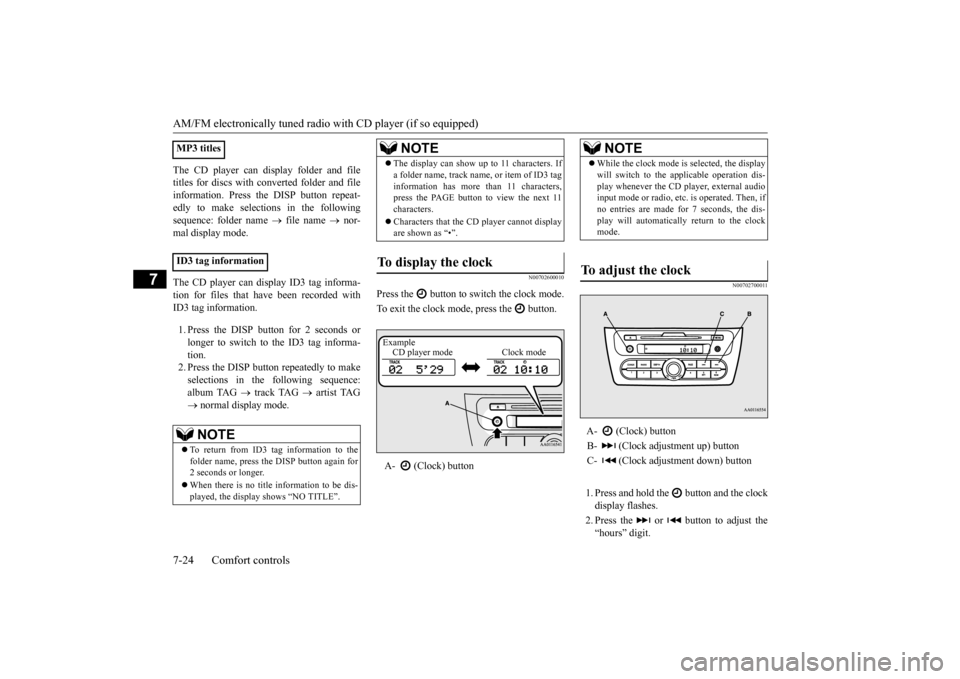
To display the clock
A- (Clock) button
NOTE
Example CD player mode Clock mode
NOTE
While the clock mode is selected, the display will switch to the applicable operation dis-play whenever the CD player, external audioinput mode or radio, etc. is operated. Then, if no entries are made for 7 seconds, the dis- play will automatically return to the clockmode.
To adjust the clock
A- (Clock) button B- (Clock adjustment up) buttonC- (Clock adjustment down) button
BK0212400US.book 24 ページ 2014年4月1日 火曜日 午後2時21分
Page 206 of 300
AM/FM electronically tuned radio with CD player (if so equipped)
Comfort controls 7-25
7
If you keep pressing the button, fast-for- ward begins.3. When the “hours” digit is adjusted, press the button to flash the “minutes” digit.Press the or button to adjust the “minutes” digit. If you keep pressing the button, fast-for-ward begins. 4. When the time is set, press the button to stop the clock display from flashing.
N00702800012
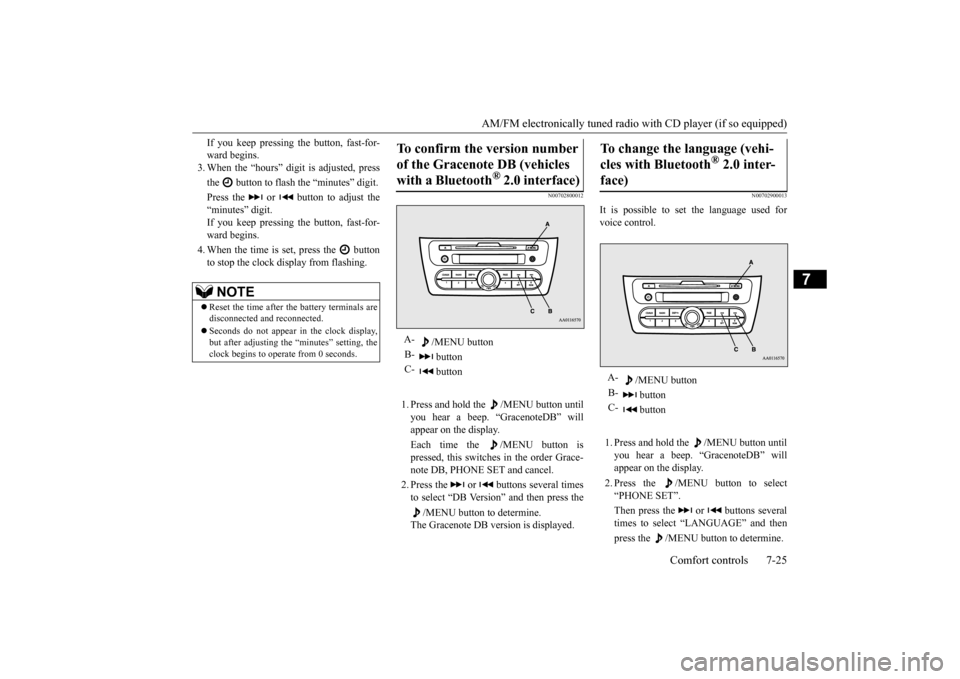
1. Press and hold the /MENU button untilyou hear a beep. “GracenoteDB” will appear on the display. Each time the /MENU button is pressed, this switches in the order Grace- note DB, PHONE SET and cancel. 2. Press the or buttons several times to select “DB Version” and then press the
/MENU button to determine.
The Gracenote DB ve
rsion is displayed.
N00702900013
It is possible to set the language used for voice control. 1. Press and hold the /MENU button until you hear a beep. “GracenoteDB” will appear on the display. 2. Press the /MENU button to select “PHONE SET”. Then press the or buttons several times to select “LANGUAGE” and then press the /MENU button to determine.
NOTE
Reset the time after the battery terminals are disconnected an
d reconnected.
Seconds do not appear
in the clock display,
but after adjusting the “minutes” setting, the clock begins to operate from 0 seconds.
To confirm the version number of the Gracenote DB (vehicles with a Bluetooth
® 2.0 interface)
A-
/MENU button
B-
button
C-
button
To change the language (vehi- cles with Bluetooth
® 2.0 inter-
face)
A-
/MENU button
B-
button
C-
button
BK0212400US.book 25 ページ 2014年4月1日 火曜日 午後2時21分
Page 207 of 300
AM/FM electronically tuned radio with CD player (if so equipped) 7-26 Comfort controls
7
3. Press the or buttons to select “LangChg YES” and then press the
/MENU button to determine.
4. Press the or buttons to select lan- guage and then press the /MENU but- ton to determine. 5. Press the or buttons to select “LangSet YES” and then press the
/MENU button to determine.
N00703000011
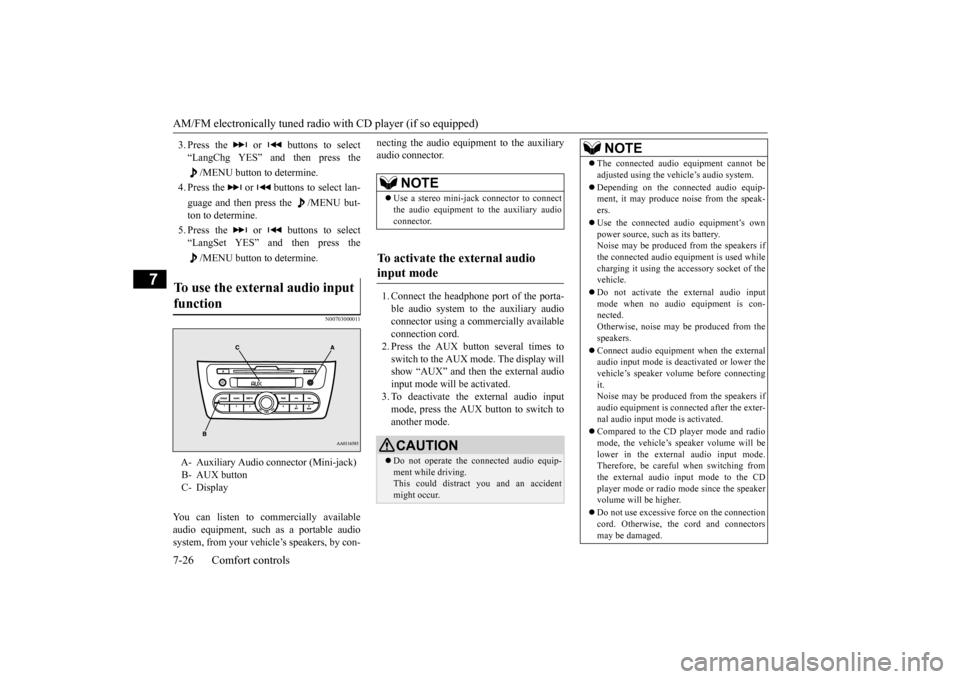
You can listen to commercially available audio equipment, such
as a portable audio
system, from your vehicl
e’s speakers, by con-
necting the audio equi
pment to the auxiliary
audio connector. 1. Connect the headphone port of the porta- ble audio system to the auxiliary audio connector using a comm
ercially available
connection cord.2. Press the AUX button several times to switch to the AUX mode. The display will show “AUX” and then the external audioinput mode will be activated. 3. To deactivate the external audio input mode, press the AUX button to switch toanother mode.
To use the external audio input function
A- Auxiliary Audio connector (Mini-jack) B- AUX button C- Display
NOTE
Use a stereo mini-jac
k connector to connect
the audio equipment to the auxiliary audio connector.
To activate the external audio input mode
CAUTION Do not operate the c
onnected audio equip-
ment while driving. This could distract
you and an accident
might occur.
NOTE
The connected audio
equipment cannot be
adjusted using the vehicle’s audio system. Depending on the conne
cted audio equip-
ment, it may produce noise from the speak- ers. Use the connected audio equipment’s own power source, such as its battery.Noise may be produced from the speakers if the connected audio equipment is used while charging it using the ac
cessory socket of the
vehicle. Do not activate the external audio input mode when no audio equipment is con- nected. Otherwise, noise may be produced from thespeakers. Connect audio equipment when the external audio input mode is deactivated or lower the vehicle’s speaker volume before connecting it.Noise may be produced from the speakers if audio equipment is conne
cted after the exter-
nal audio input mode is activated. Compared to the CD player mode and radio mode, the vehicle’s speaker volume will belower in the external audio input mode. Therefore, be careful when switching from the external audio input mode to the CDplayer mode or radio mode since the speaker volume will be higher. Do not use excessive force on the connection cord. Otherwise, the
cord and connectors
may be damaged.
BK0212400US.book 26 ページ 2014年4月1日 火曜日 午後2時21分
Page 216 of 300
To play tracks from a Bluetooth® device (vehicles with Bluetooth® 2.0 interface)
Comfort controls 7-35
7
N00765200073
Desired tracks can be
selected and played
from your USB memory device by “Artist”, “Album”, “Playlist”
and “Genre” using voice
commands.For information concerning the voice recog- nition function or spea
ker registration func-
tion, refer to “Bluetooth
® 2.0 interface” on
page 5-81. The playback sequence of tracks is the same as when an iPod is connected. Refer to the “To play iPod tracks via voice operation” onpage 7-29. To use the voice operation, press the SPEECH button (A) first.
N00765300104
You can wirelessly c
onnect a digital audio
player or cellular phone supporting Blue- tooth
® to listen to the tracks on the connected
device. Refer to “Bluetooth
® 2.0 interface” for the
connecting method, etc. on page 5-81. The following explains
the basic playback
method.
N00765400062
If no title is stored, “NO TITLE” is shown in the display. Characters that cannot
be displayed are sub-
stituted by “•”.
To play USB memory device tracks via voice operation (vehi- cles with Bluetooth
® 2.0 inter-
face)
Preparation for voice operation
NOTE
To play tracks from a Blue- tooth
® device (vehicles with
Bluetooth
® 2.0 interface)
NOTE
Depending on the connected device, opera- tion of the connected de
vice is limited to its
available functions. Depending on the connected device, the device may not ope
rate correctly.
A file protected by c
opyright might not be
able to playback. It is recommended to adjust the equaliser of the connected device to 0 db or neutral. The voice operation is not
available to access
music files on the c
onnected Bluetooth
®
device.
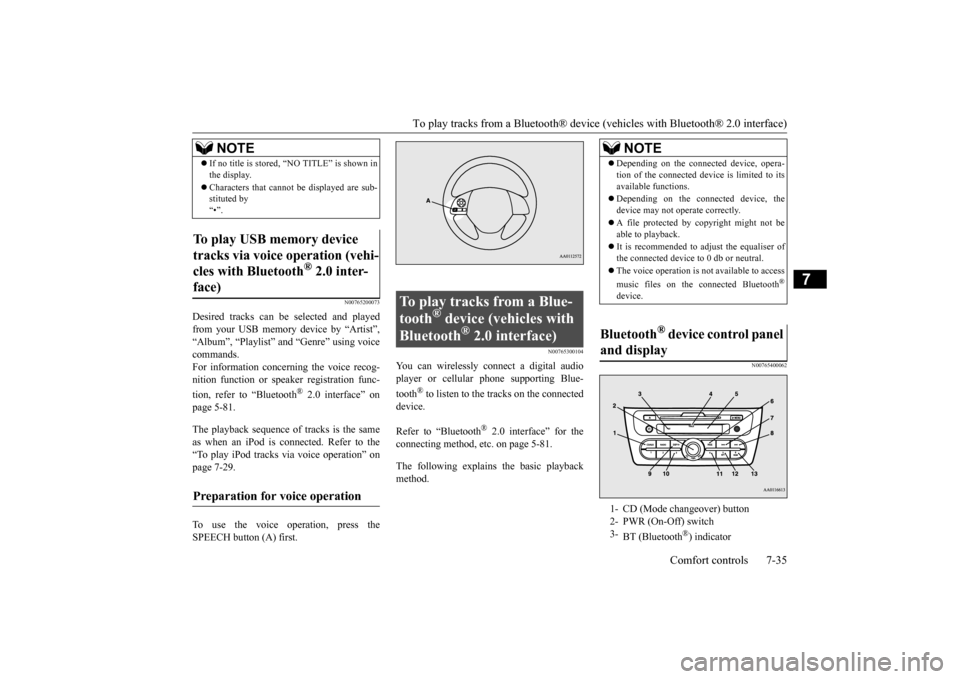
Bluetooth
® device control panel
and display 1- CD (Mode changeover) button 2- PWR (On-Off) switch 3-
BT (Bluetooth
®) indicator
BK0212400US.book 35 ページ 2014年4月1日 火曜日 午後2時21分
Page 221 of 300
Handling of compact discs 7-40 Comfort controls
7
N00734100340
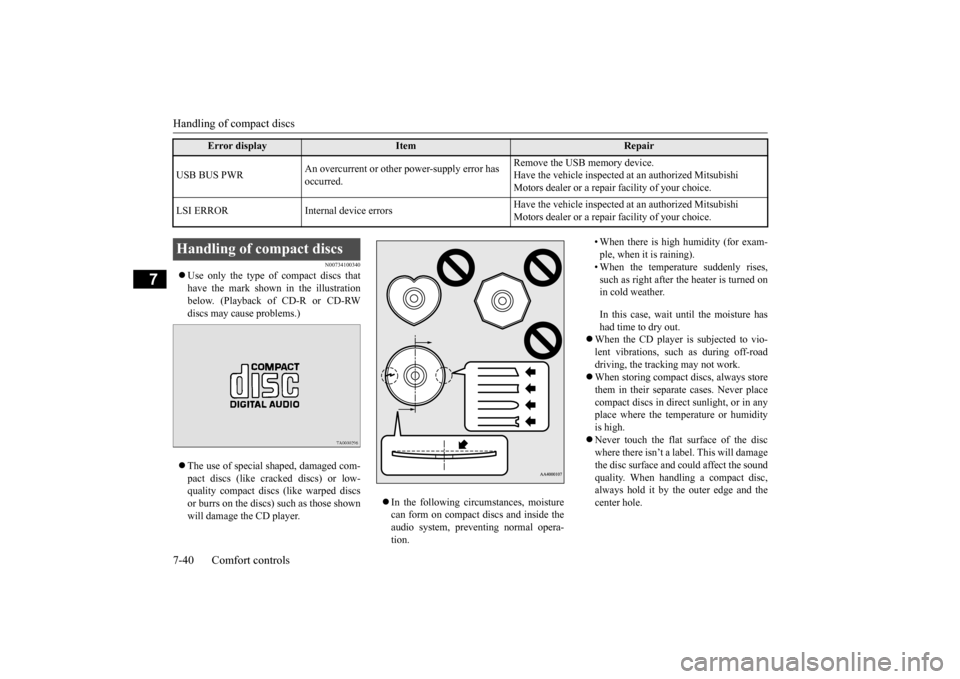
Use only the type of compact discs that have the mark shown in the illustrationbelow. (Playback of CD-R or CD-RW discs may cause problems.) The use of special shaped, damaged com- pact discs (like crac
ked discs) or low-
quality compact discs (like warped discsor burrs on the discs) such as those shown will damage the CD player.
In the following circumstances, moisture can form on compact discs and inside the audio system, preventing normal opera- tion.
• When there is high humidity (for exam- ple, when it is raining). • When the temperature suddenly rises, such as right after the heater is turned onin cold weather. In this case, wait until the moisture has had time to dry out.
When the CD player is subjected to vio- lent vibrations, such as during off-road driving, the tracking may not work. When storing compact discs, always store them in their separate
cases. Never place
compact discs in direct sunlight, or in any place where the temperature or humidityis high. Never touch the flat
surface of the disc
where there isn’t a label. This will damagethe disc surface and
could affect the sound
quality. When handli
ng a compact disc,
always hold it by the outer edge and thecenter hole.
USB BUS PWR
An overcurrent or other power-supply error has occurred.
Remove the USB memory device. Have the vehicle inspected at an authorized Mitsubishi Motors dealer or a repair
facility of your choice.
LSI ERROR Internal
device errors
Have the vehicle inspected at an authorized Mitsubishi Motors dealer or a repair
facility of your choice.
Error display
Item
Repair
Handling of compact discs BK0212400US.book 40 ページ 2014年4月1日 火曜日 午後2時21分