Transmission MITSUBISHI MIRAGE 2015 6.G User Guide
[x] Cancel search | Manufacturer: MITSUBISHI, Model Year: 2015, Model line: MIRAGE, Model: MITSUBISHI MIRAGE 2015 6.GPages: 300, PDF Size: 43.44 MB
Page 101 of 300
Continuously variable transmission (CVT) (if so equipped) 5-40 Features and controls
5
According to the conditions, the transmission will automatically shift to a lower gear ratio to achieve stronger engine braking. This mayhelp reduce your need to use the service brake.
N00560300051
As an additional safe
ty precaution, models
equipped with a conti
nuously variable trans-
mission have a shift-lo
ck device that holds
the selector lever in the “P” (PARK) position. To move the selector lever from the “P”(PARK) position to a
nother position, follow
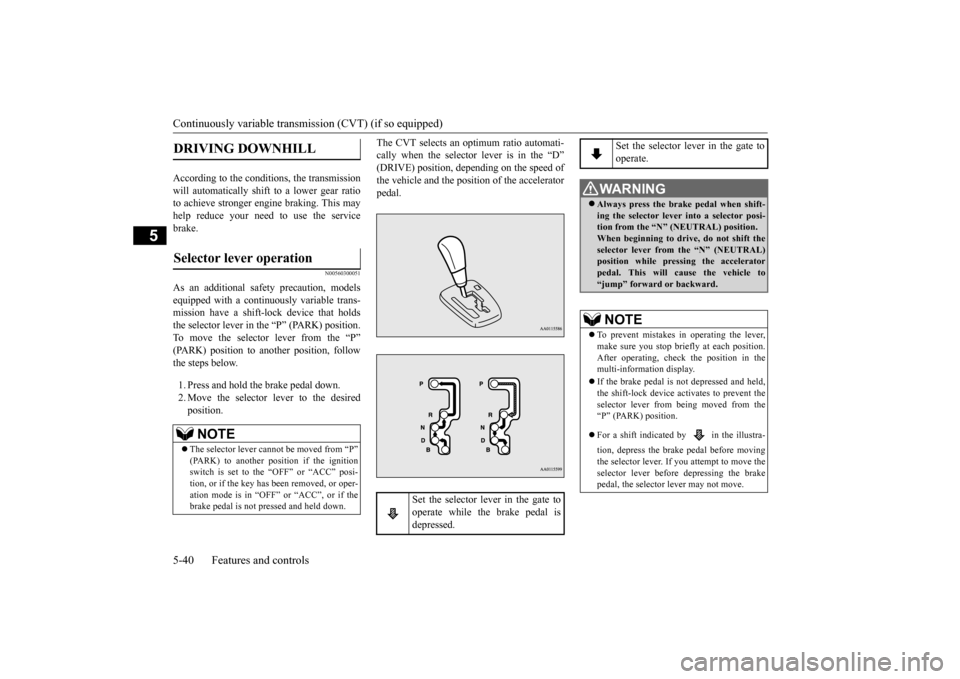
the steps below. 1. Press and hold the brake pedal down. 2. Move the selector
lever to the desired
position.
The CVT selects an optimum ratio automati- cally when the selector lever is in the “D”(DRIVE) position, depe
nding on the speed of
the vehicle and the position of the accelerator pedal.
DRIVING DOWNHILL
Selector lever operation
NOTE
The selector lever cannot
be moved from “P”
(PARK) to another pos
ition if the ignition
switch is set to the “OFF” or “ACC” posi-tion, or if the key has been removed, or oper- ation mode is in “OFF”
or “ACC”, or if the
brake pedal is not pressed and held down.
Set the selector lever in the gate to operate while the brake pedal is depressed.
Set the selector lever in the gate to operate.
WA R N I N G Always press the brake pedal when shift- ing the selector lever into a selector posi- tion from the “N”
(NEUTRAL) position.
When beginning to drive, do not shift theselector lever from
the “N” (NEUTRAL)
position while pressing the accelerator pedal. This will cause the vehicle to“jump” forward or backward.NOTE
To prevent mistakes in operating the lever, make sure you stop brie
fly at each position.
After operating, check the position in the multi-information display. If the brake pedal is not
depressed and held,
the shift-lock device activates to prevent theselector lever from being moved from the “P” (PARK) position. For a shift indicated by in the illustra- tion, depress the brake pedal before moving the selector lever. If you attempt to move theselector lever before
depressing the brake
pedal, the selector
lever may not move.
BK0212400US.book 40 ページ 2014年4月1日 火曜日 午後2時21分
Page 102 of 300
Continuously variable transmission (CVT) (if so equipped)
Features and controls 5-41
5
N00563300049
When the selector lever cannot be shifted from the “P” (PARK) position to anotherposition while the brake
pedal is pressed and
held down with the ignition switch or the operation mode in ON, the battery may be flator the shift-lock mechanism may be malfunc- tioning. Immediately have your
vehicle checked by an
authorized Mitsubishi Motors dealer or a repair facility
of your choice.
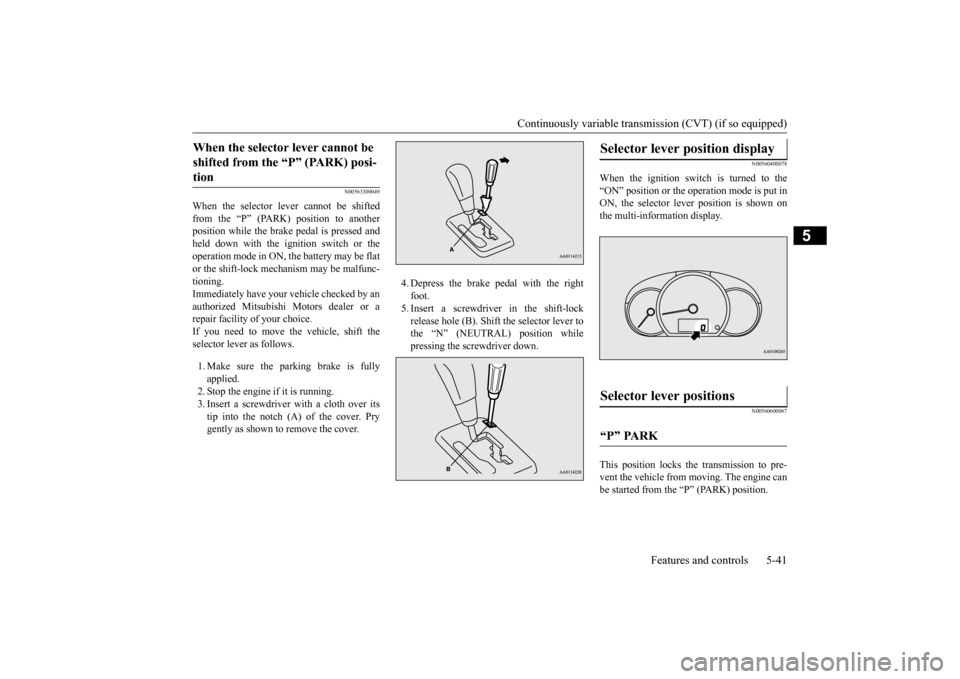
If you need to move the vehicle, shift the selector lever as follows. 1. Make sure the parking brake is fully applied.2. Stop the engine if it is running. 3. Insert a screwdrive
r with a cloth over its
tip into the notch (A) of the cover. Prygently as shown to remove the cover.
4. Depress the brake pedal with the right foot.5. Insert a screwdriver in the shift-lock release hole (B). Shift the selector lever to the “N” (NEUTRAL) position whilepressing the screwdriver down.
N00560400078
When the ignition switch is turned to the “ON” position or the operation mode is put in ON, the selector lever position is shown onthe multi-information display.
N00560600067
This position locks the transmission to pre-vent the vehicle from m
oving. The engine can
be started from the “P” (PARK) position.
When the selector lever cannot be shifted from the “P” (PARK) posi-tion
Selector lever position display
Selector lever positions
“P” PARK
BK0212400US.book 41 ページ 2014年4月1日 火曜日 午後2時21分
Page 103 of 300
Continuously variable transmission (CVT) (if so equipped) 5-42 Features and controls
5
Move the lever to this
position only after the
vehicle has come to a complete stop. At this position, the transmission is disen- gaged. It is the same
as the neutral position on
a manual transaxle and should be used whenthe vehicle is not m
oving for an extended
length of time during driving, such as in a traffic jam.
This position is used fo
r most city and high-
way driving. The transmission will automati-cally and continuously ch
ange its gear ratio
depending on road and driving conditions. This position is for use when light engine braking at high-speed is needed, or driving up very steep hills and for
engine braking at low
speeds when descendi
ng steep gradients.
N00549500018 N00574601023
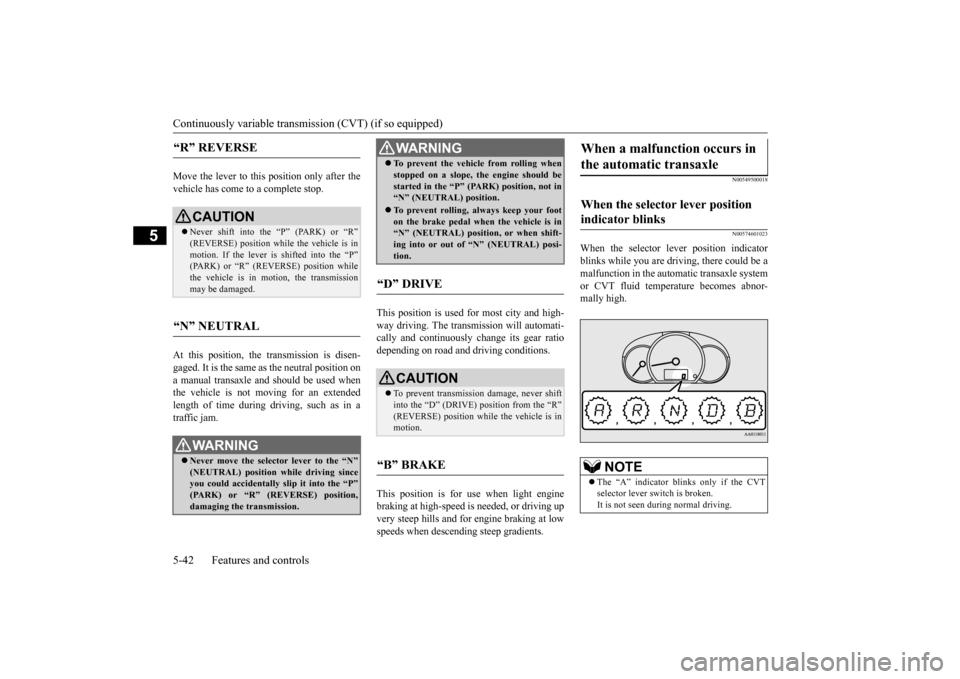
When the selector lever position indicator blinks while you are driving, there could be a malfunction in the automatic transaxle system or CVT fluid temperature becomes abnor- mally high.
“R” REVERSE
CAUTION Never shift into the “P” (PARK) or “R” (REVERSE) position while the vehicle is in motion. If the lever is shifted into the “P”(PARK) or “R” (REVERSE) position while the vehicle is in motion, the transmission may be damaged.
“N” NEUTRAL
WA R N I N G Never move the selector lever to the “N” (NEUTRAL) position while driving since you could accidentally
slip it into the “P”
(PARK) or “R” (REVERSE) position,damaging the transmission.
To prevent the vehicle from rolling when stopped on a slope,
the engine should be
started in the “P” (PARK) position, not in“N” (NEUTRAL) position. To prevent rolling,
always keep your foot
on the brake pedal when the vehicle is in “N” (NEUTRAL) positi
on, or when shift-
ing into or out of “N” (NEUTRAL) posi-tion.
“D” DRIVE
CAUTION To prevent transmission damage, never shift into the “D” (DRIVE) position from the “R”(REVERSE) position while the vehicle is in motion.
“B” BRAKE
WA R N I N G
When a malfunction occurs in the automatic transaxle
When the selector lever position indicator blinks
NOTE
The “A” indicator blinks only if the CVT selector lever switch is broken.It is not seen during normal driving.
BK0212400US.book 42 ページ 2014年4月1日 火曜日 午後2時21分
Page 104 of 300
Continuously variable transmission (CVT) (if so equipped)
Features and controls 5-43
5
N00560801066
To gain extra acceleration in “D” (DRIVE) position (when passing another vehicle) pushthe accelerator to the floor. The CVT will automatically downshift. For short waiting periods, such as at traffic lights, the vehicle can be
left in selector lever
position and held stati
onary with the service
brake. For longer waiting periods with the engine running, place th
e selector lever in the “N”
(NEUTRAL) position and apply the parking brake, while holding th
e vehicle stationary
with the service brake.
CAUTION If a malfunction occurs in the CVT while driving, the indicator will blink.In this case, immediat
ely park your vehicle
in a safe place and follow these procedures: [If the indicator blinks
rapidly (once per sec-
ond), the CVT fluid is overheating.]Park your vehicle in
a safe place but do not
turn off the engine. M
ove the selector lever
to the “P” (PARK) position and open thebonnet. Keep the engine, idling. After a while, move the selector lever into any position other than
“P” (PARK) position
and confirm that the in
dicator stops blinking.
It is safe to continue driving if the indicator no longer blinks.If the indicator conti
nues blinking or blinks
intermittently, have your
vehicle inspected at
an authorized Mitsubi
shi Motors dealer or
repair facility of your choice. [If the indicator blinks slowly (once per 2 seconds), the CVT sa
fety device may be
operating due to a malfunction.] Have the vehicle inspec
ted at an authorized
Mitsubishi Motors dealer
or repair facility of
your choice as soon as possible.
Operation of the CVT
CAUTION Before selecting a pos
ition with the engine
running and the vehicl
e stationary, firmly
depress the brake pedal to prevent the vehi- cle from creeping. The vehicle will begin to
move as soon as the
CVT is engaged, especi
ally when the engine
speed or idle speed is
high, or with the air
conditioning (cooling or
heating) operating.
Do not release the brake pedal until you are ready to drive away. Depress the brake pedal with the right foot at all times. Using the left foot c
ould cause driver move-
ment delay in case of an emergency. To prevent sudden acceleration, never run the engine at high rpms when shifting from the “P” (PARK) or “N” (NEUTRAL). Operating the accelerator pedal while the other foot is resting
on the brake pedal will
affect braking efficien
cy and may cause pre-
mature wear of brake pads. Use the selector lever in the correct shift position in accordance
with driving condi-
tions. Never coast downhill backward in the driv-ing shift position “D” (DRIVE) or coast for- ward in the “R” (REVERSE) position. Engine stopping and in
creased brake pedal
and steering effort coul
d lead to an accident.
Do not rev the engine
with the brake pedal
pressed when the vehicle is stationary.This can damage the CVT.Also, when you depress
the accelerator pedal
while holding down the brake pedal with the selector lever in th
e “D” (DRIVE) position,
the engine revolutions
may not rise as high
as when performing the same operation with the selector lever in the “N” (NEUTRAL)position.
Passing acceleration
Waiting
CAUTION
BK0212400US.book 43 ページ 2014年4月1日 火曜日 午後2時21分
Page 105 of 300
Service brake 5-44 Features and controls
5
Prior to moving off after having stopped the vehicle, make sure that
the selector lever is in
“D” (DRIVE) position. To park the vehicle, first bring it to a com- plete stop, fully engage the parking brake,and then move the selector lever to the “P” (PARK) position. If the CVT does not shift while driving, or your vehicle does not pick up enough speed when starting on an uphill slope, it may be that there is something unusual happening inthe transmission, causi
ng a safety device to
activate. Have your ve
hicle checked at an
authorized Mitsubishi Motors dealer or a repair facility of your c
hoice as soon as possi-
ble.
N00517500318
Overuse of the brake can cause weakening, resulting in poor brake response and prema- ture wear of the brake pads.When driving down a long or steep hill, use engine braking by movi
ng the selector lever
to “B” (BRAKE) position.
N00517600436
Your vehicle is equipped with power brakes for more braking force with less brake pedal effort.Your brakes are designed to operate at full capacity, even if the power assist is not being used.If the power assist is not being used, the effort needed to press the brake pedal is greater. If you should lose the power assist for somereason, the brakes will still work. If the power brake unit or either of the two brake hydraulic systems stops working prop-erly, the rest of the brake system will still work, but the vehicle will not slow down as quickly.You will know this has happened if you find you need to press the brake down farther, or harder when slowing down or stopping, or ifthe brake warning light and the warning dis- play in the multi-information display come on. Have the brake system repaired at an
CAUTION To avoid transmission
overheating, never try
to keep your vehicle
stationary on a hill by
using the accelerator
pedal. Always apply
the parking brake and/or service brake. Do not rev the engine unnecessarily while the vehicle is stationary. Unexpected acceler- ation may occur if the selector lever is in aposition other than “P” (PARK) or “N” (NEUTRAL).
Parking
When the CVT makes no speed change
Service brake Brake pedal
WA R N I N G Do not leave any objects near the brake pedal or let a floor mat slide under it; doing so could prevent the full pedalstroke that would be necessary in an emergency. Make sure that the pedal can be operated freely at all times. Make surethe floor mat is securely held in place.
CAUTION It is important not to drive the vehicle with your foot resting on the brake pedal whenbraking is not required.
This practice can
result in very high brake temperatures, pre- mature lining wear, a
nd possible damage to
the brakes.
Power brakes
BK0212400US.book 44 ページ 2014年4月1日 火曜日 午後2時21分
Page 112 of 300
Active stability control (ASC) Features and controls 5-51
5
N00546500118
N00546600119
If an abnormal condition occurs in the sys- tem, the following indicator will turn on.
N00546300031
When moving out of mud, sand or fresh snow, pressing the acce
lerator pedal may not
allow the engine speed to increase. In suchsituations, temporaril
y turning off ASC with
the “ASC OFF” switch will make it easier to move out your vehicle. If you continue to press the “ASC OFF” switch after the ASC is turned off, the “mis-taken operation protec
tion function” will
activate and the ASC will turn back on.
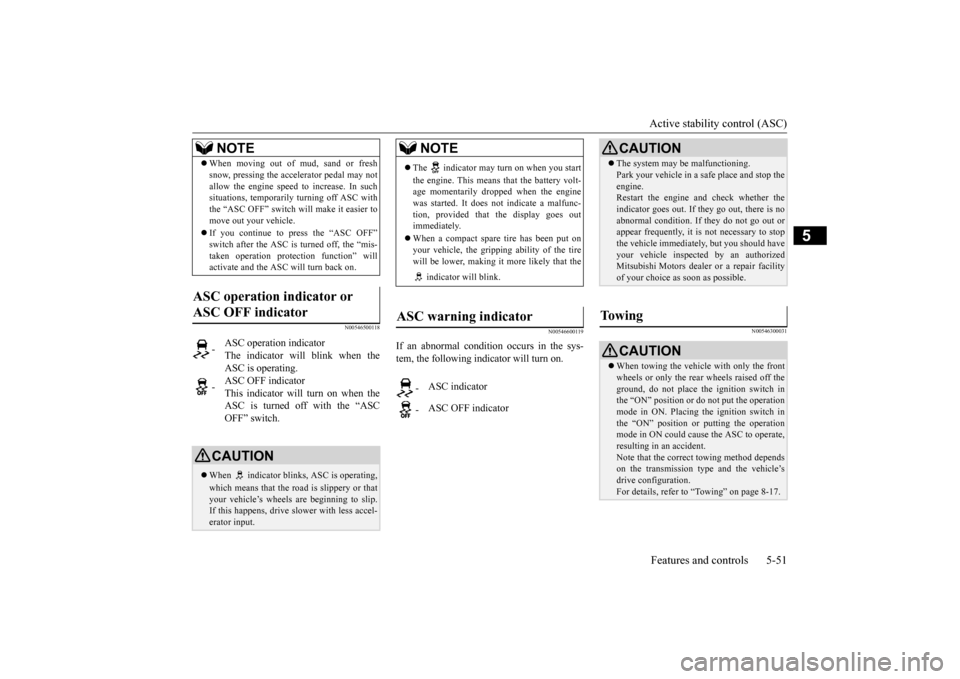
ASC operation indicator or ASC OFF indicator
-
ASC operation indicator The indicator will blink when the ASC is operating.
-
ASC OFF indicator This indicator will turn on when the ASC is turned off with the “ASCOFF” switch.
CAUTION When indicator bli
nks, ASC is operating,
which means that the road is slippery or that your vehicle’s wheels ar
e beginning to slip.
If this happens, drive
slower with less accel-
erator input.NOTE
NOTE
The indicator may turn on when you start the engine. This means that the battery volt- age momentarily dropped when the enginewas started. It does not
indicate a malfunc-
tion, provided that
the display goes out
immediately. When a compact spare tire has been put on your vehicle, the grippi
ng ability of the tire
will be lower, making it
more likely that the
indicator will blink.
ASC warning indicator
-
ASC indicator
-
ASC OFF indicator
CAUTION The system may be malfunctioning. Park your vehicle in a
safe place and stop the
engine.Restart the engine and check whether the indicator goes out. If th
ey go out, there is no
abnormal condition. If
they do not go out or
appear frequently, it is
not necessary to stop
the vehicle imme
diately, but you should have
your vehicle inspected by an authorizedMitsubishi Motors dealer
or a repair facility
of your choice as soon as possible.
To w i n g
CAUTION When towing the vehicle with only the front wheels or only the rear wheels raised off theground, do not place th
e ignition switch in
the “ON” position or
do not put the operation
mode in ON. Placing
the ignition switch in
the “ON” position or
putting the operation
mode in ON could caus
e the ASC to operate,
resulting in an accident.Note that the correct
towing method depends
on the transmission type
and the vehicle’s
drive configuration. For details, refer to “Towing” on page 8-17.
BK0212400US.book 51 ページ 2014年4月1日 火曜日 午後2時21分
Page 133 of 300
Warning lights 5-72 Features and controls
5
N00520300147 N00520400526
This light comes on when the ignition switch is turned to the “ON” position (engine off) or the operation mode is put in ON.When the engine is started, the light should go off a few seconds later. The warning light also illuminates after start- ing the engine under the following condi- tions. When the parking brake is still applied. When the brake fluid level is low. When the brake system circuit is not working properly.
When the vehicle is moving at more than 5 mph (8 km/h) and the parking brake applied, a buzzer will sound to in
form the driver that
the parking brake is not properly release. Before driving, be sure that the parking brake is fully released and the brake warning light is off.
N00520500804
This indicator is a pa
rt of the onboard diag-
nostic (OBD) system which monitors the emissions, engine control system or continu- ously variable transmission (CVT) controlsystem. If a problem is detected in one of these systems, this indicator illuminates or flashes. When the ignition switch is turned to the “ON” position or the operation mode is put in ON, this indicator normally comes onand goes off after the engine has started. This indicator will come on if the fuel tank filler cap is not properly tightened. If this indicator comes on and stays on after refuel-ing, stop the engine and check that the cap is properly tightened. (Turn the cap clockwise until you hear clicking sounds.)If this indicator does not go off after several seconds or lights up while driving, have the system checked as s
oon as possible at an
authorized Mitsubishi Motors dealer or a repair facility of your choice.
Warning lights Brake warning light and buzzer
CAUTION If the brake warning light and the Anti-lock braking system warning
light are illuminated
at the same time, the braking force distribu-tion function will not
operate, the vehicle
may be destabilized
during sudden braking
under the following conditions.• When the brake warn
ing light does not go
out even when the parking brake isreleased.• When the brake warning light stays onwhile driving.If the above occurs, avoid sudden brakingand high-speed driving. Park the vehicle in a safe place, and c
ontact an authorized
Mitsubishi Motors dealer or a repair facilityof your choice as soon as possible. The vehicle should be bro
ught to a halt in the
following manner when
brake performance
is deteriorated.• Confirm that the vehicle slows down whenyou press down on the brake pedal harder than usual. In some cases, the brake pedalmay go all the way to the floor.• Should the brakes fail, use engine brakingto reduce your speed and slowly apply the parking brake. Depress the brake pedal to illuminate thestop lights and to aler
t the vehicles behind
you.
Engine malfunction indicator (“SERVICE ENGINE SOON” or “Check engine light”)
BK0212400US.book 72 ページ 2014年4月1日 火曜日 午後2時21分
Page 147 of 300

Bluetooth® 2.0 interface (if so equipped) 5-86 Features and controls
5
If a passcode has been set and the security function is enabled, the voice guide will say“Hands-free system is lo
cked. State the pass-
code to continue” when the SPEECH button is pressed to enter voice recognition mode.Say the 4-digit passcode number to enter the passcode. If the entered passcode
is wrong, the voice
guide will say “<4-digi
t passcode>, Incorrect
passcode. Please try again.” Enter the correct passcode.
Use the following procedure to turn off the security function by di
sabling the passcode.
1. Press the SPEECH button. 2. Say “Setup.” 3. Say “Passcode.”4. The voice guide w
ill say “Passcode is
enabled. Would you like to disable it?” Answer “Yes.”Answer “No” to cancel the disabling of the passcode and return to the main menu. 5. When the disabling of the passcode iscompleted, the voice
guide will say “Pass-
code is disabled” and the system will return to the main menu.
N00564700011
The Bluetooth
® 2.0 interface can use the
speaker enrollment function to create a voicemodel for one person per language. This makes it easier for the Bluetooth
® 2.0
interface to recognise
voice commands said
by you.
You can turn a voice model registered with the speaker enrollment function on and offwhenever you want.
N00564800038
It takes about 2 to 3 minutes to complete thespeaker enrollment process. To ensure the best results, run through the process while in the driver’s seat, in an envi- ronment that is as qu
iet as possible (when
there is no rain or strong winds and the vehi-cle windows are closed). Please turn off your phone while in speaker enrollment to prevent interruption of the process.Use the following procedure for speaker enrollment. 1. Stop your vehicle in a safe area, put the gearshift lever in the “N” (Neutral) posi-tion (manual transaxle), or the selector lever in the “P” (PARK) position (contin- uously variable transmission (CVT)), andpull the parking brake lever. 2. Press the SPEECH button.
It is required for a little time after engine stop that the entered passcode is actuallyrecorded in the system.If the ignition switch
or the operation mode
is made to ACC or ON or the engine is started immediately afte
r engine stop, there
is a case when the entered passcode is not recorded in the system. At this time, please try to enter the passcode again.
Entering the passcode
NOTE
You can reenter the passcode as many times as you want. If you have forgotten your passcode, say “Cancel” to quit the voice input mode and then check with an authorized Mitsubishi Motors dealer.NOTE
Disabling the passcode
NOTE
System must be unlocke
d to disable the pass-
code.
Speaker enrollment function
Speaker enrollment
NOTE
Speaker enrollment is not possible unless the vehicle is parked. Make sure you park the vehicle in a safe area before attemptingspeaker enrollment.
BK0212400US.book 86 ページ 2014年4月1日 火曜日 午後2時21分
Page 149 of 300

Bluetooth® 2.0 interface (if so equipped) 5-88 Features and controls
5
Up to 7 Bluetooth
® devices can be paired
with the Bluetooth
® 2.0 interface.
If multiple paired Bluetooth
® devices are
available in the vehicle,
the cellular phone or
music player most recently connected is auto- matically connected to the Bluetooth
® 2.0
interface. You can also change a Bluetooth
® device to
be connected. To pair a Bluetooth
® device with the Blue-
tooth
® 2.0 interface, foll
ow the steps below.
1. Stop your vehicle in a safe area, put the gearshift lever in the “N” (Neutral) posi-tion (manual transaxle), or the selector lever in the “P” (PARK) position (contin- uously variable transmission (CVT)), andpull the parking brake lever. 2. Press the SPEECH button. 3. Say “Setup.” 4. Say “Pairing Options.”5. The voice guide will
say “Select one of
the following: pair, ed
it, delete, or list.”
Say “Pair.”
6. The voice guide will say “Please say a 4- digit pairing code.”
Say a 4-digit number.
When the confirmation function is on, the system will confirm whether the number said is acceptable. Answer “Yes.”Answer “No” to return to pairing code selection. 7. The voice guide will say “Start pairing procedure on the device. See the devicemanual for instructions.” Enter in the Bluetooth
® device the 4-digit number you
have registered in Step 6.
NOTE
Pairing is required only when the device is used for the first time. Once the device has been paired with the Bluetooth
® 2.0 inter-
face, all you need is to
bring the device into
the vehicle next time
and the device will
connect to the Bluetooth
® 2.0 interface auto-
matically (if supported
by the device). The
device must have Bluetooth
® turned ON to
connect.
To p a i r
NOTE
You cannot pair any Bluetooth
® device with
the Bluetooth
® 2.0 interface unless the vehi-
cle is parked. Before pairing a Bluetooth
®
device with the Bluetooth
® 2.0 interface,
confirm that the vehicle is parked in a safe location.NOTE
If 7 devices have alre
ady been paired, the
voice guide will sa
y “Maximum devices
paired” and then the system will end the pairing process. To re
gister a ne
w device,
delete one device and th
en repeat the pairing
process. (Refer to “Selecting a device: Deleting a device” on page 5-89.)
NOTE
Some Bluetooth
® devices requi
re a specific
pairing code. Please re
fer to the device man-
ual for pairing code requirements. The pairing code ente
red here is only used
for the Bluetooth
® connection ce
rtification.
It is any 4-digit numbe
r the user would like
to select.Remember the pairing c
ode as it needs to be
keyed into the Bluetooth
® device later in the
pairing process. Depending on the connecti
on settings of the
Bluetooth
® device, this code may have to be
entered each time you connect the Blue- tooth
® device to the Bluetooth
® 2.0 inter-
face. For the default
connection settings,
refer to the instructions for the device.
BK0212400US.book 88 ページ 2014年4月1日 火曜日 午後2時21分
Page 176 of 300
Braking
Driving safety 6-5
6
Please read this section in conjunction with the “Engine coolant” on page 9-7.
N00629500521
All parts of the brake system are critical to safety. Have the vehicle serviced by an autho- rized Mitsubishi Motors dealer or a repairfacility of your choice at regular intervals according to the “WARRANTY AND MAINTENANCE MANUAL”. Check the brake system while driving at a low speed immediately
after starting, espe-
cially when the brakes are wet, to confirm they work normally. A film of water can be formed on the brakediscs or brake drums, and prevent normal braking after driving in heavy rain or through large puddles, or after the vehicle is washed.If this occurs, dry the brakes out by driving slowly while lightly depressing the brake pedal.
On snowy roads, ice can form on the braking system, making the brak
es less effective.
While driving in such conditions, pay closeattention to surrounding
vehicles and to the
condition of the road surface. From time to time, lightly depress the brake pedal andcheck how effective the brakes are. It is important to take
advantage of the engine
braking by downshifting while driving on steep downhill roads in order to prevent thebrakes from overheating.
N00629600333
When parking on a hill, set the parking brake,and turn the front wheels toward the curb on a downhill, or away from
the curb on an uphill.
If necessary, apply chocks to the wheels.
Place the gearshift lever into the “R” (Reverse) position when parking on a down- hill slope, into the 1st position when parking on an uphill slope. Be sure that the parking brake is firmly set when parked and that the selector lever is in the “P” (PARK) position.When parking on a hill, it is important to set the parking brake before
moving the selector
lever to the “P” (PARK) position. This pre-vents loading the parking brake against the transaxle. When this happens, it is difficult to move the selector lever out of the “P”(PARK) position. Never leave the engine running while you take a short nap or rest. Also, never leave the engine running in a closed or poorly venti-lated place.
WA R N I N G Never open the radiator cap when the radiator is hot. You could be seriously burned.
Braking When brakes are wet
When driving in cold weather When driving downhill Parking Parking on a hill
For vehicles equipped with man- ual transaxle For vehicles equipped with contin- uously variable transmission (CVT) Parking with the engine run- ning
BK0212400US.book 5 ページ 2014年4月1日 火曜日 午後2時21分