audio MITSUBISHI MIRAGE 2015 6.G User Guide
[x] Cancel search | Manufacturer: MITSUBISHI, Model Year: 2015, Model line: MIRAGE, Model: MITSUBISHI MIRAGE 2015 6.GPages: 300, PDF Size: 43.44 MB
Page 199 of 300
Air purifier (if so equipped) 7-18 Comfort controls
7
N00733800180
The air conditioning system is equipped with an air filter to re
move pollen
and dust.
The air filter’s ability to collect pollen and dirt is reduced as it be
comes dirty, so replace
it periodically. For the maintenance interval,refer to the “WARRANTY AND MAINTE- NANCE MANUAL”.
N00734302131
The audio system can onl
y be used when the
ignition switch or the operation mode is inON or ACC.
N00711900729 N00712000411
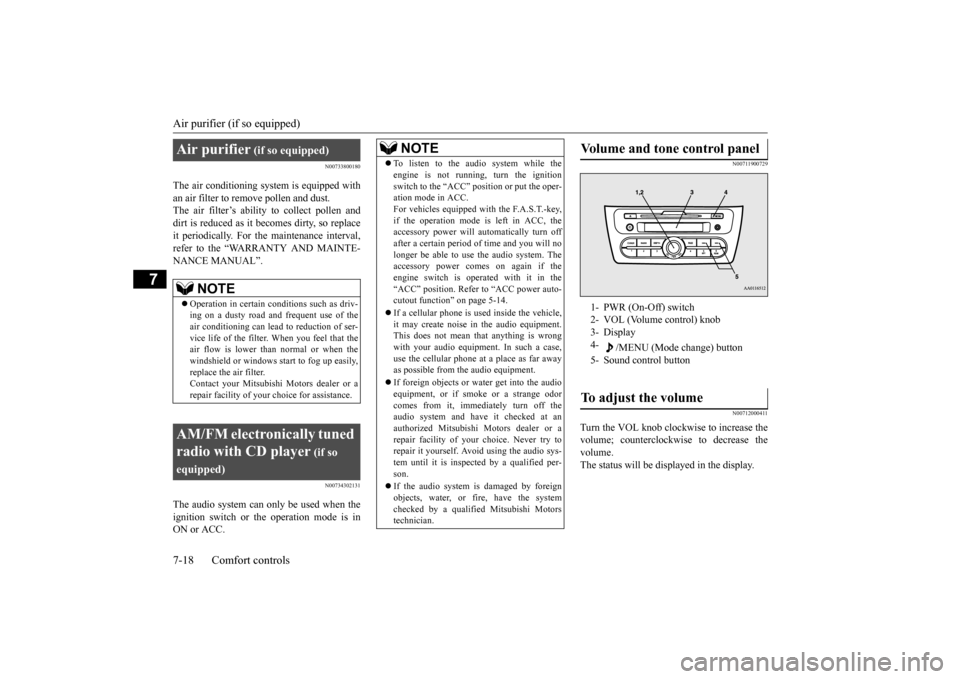
Turn the VOL knob clockwise to increase the volume; counterclockwis
e to decrease the
volume. The status will be displayed in the display.
Air purifier
(if so equipped)
NOTE
Operation in certain conditions such as driv- ing on a dusty road and frequent use of the air conditioning
can lead to re
duction of ser-
vice life of the filter. When you feel that the air flow is lower than normal or when the windshield or windows st
art to fog up easily,
replace the air filter. Contact your Mitsubishi
Motors dealer or a
repair facility of your
choice for assistance.
AM/FM electronically tuned radio with CD player
(if so
equipped)
NOTE
To listen to the audio system while the engine is not running, turn the ignitionswitch to the “ACC” position or put the oper-ation mode in ACC. For vehicles equipped with the F.A.S.T.-key, if the operation mode is left in ACC, theaccessory power will automatically turn off after a certain period
of time and you will no
longer be able to use the audio system. Theaccessory power comes on again if the engine switch is operated with it in the “ACC” position. Refer
to “ACC power auto-
cutout function” on page 5-14. If a cellular phone is
used inside the vehicle,
it may create noise in the audio equipment. This does not mean that anything is wrong with your audio equipment. In such a case,use the cellular phone at
a place as far away
as possible from the audio equipment. If foreign objects or wa
ter get into the audio
equipment, or if smoke or a strange odor comes from it, immediately turn off theaudio system and have
it checked at an
authorized Mitsubishi Motors dealer or a repair facility of your
choice. Never try to
repair it yourself. Avoid using the audio sys- tem until it is inspected by a qualified per- son. If the audio system is damaged by foreign objects, water, or fire, have the systemchecked by a qualified
Mitsubishi Motors
technician.
Volume and tone control panel
1- PWR (On-Off) switch 2- VOL (Volume control) knob3- Display 4-
/MENU (Mode change) button
5- Sound control buttonTo adjust the volume
BK0212400US.book 18 ページ 2014年4月1日 火曜日 午後2時21分
Page 202 of 300

AM/FM electronically tuned radio with CD player (if so equipped)
Comfort controls 7-21
7
2. To stop the CD, turn off the power by pressing the PWR switch for 2 seconds orlonger, or change over to the radio mode by pressing the RADIO button, or eject the disc by pressi
ng the eject button.
When the CD eject button is pressed, the disc automatically stops and is ejected. Press the CD button if a disc is already in the CD player. The CD player will enter CD
mode and start playba
ck. The track number
and the playing time will appear on the dis-play. The tracks in the disc will be played continuously. This CD player allows you to play MP3 (MPEG Audio Layer-3) files recorded on CD-ROMs, CD-Rs (recordable CDs), and CD-RWs (rewritable CDs) in ISO9660 Level 1/Level 2, Joliet, a
nd Romeo formats. Each
disc can hold up to 255 files in up to 100 fold- ers, up to a maximum of 16 levels. The ID3 tag information can be displayed during MP3playback. For information concerning ID3 tags, refer to “CD text
and MP3 title display”
on page 7-23. 1. Insert a disc containing MP3 files into the slot. 2. Press the CD button if a disc is already in the CD player.The display shows “READING”, then playback will begin.
NOTE
For information on adjusting the volume and tone, refer to “To adju
st the volume” on page
7-18 and “To adjust the tone” on page 7-19. 3 inches (8 cm) compact disc cannot be played on this CD player. For information concerning the handling of compact discs, refer to “Handling of com- pact discs” on page 7-40.
To eject a disc
NOTE
If you do not remove the disc before 15 sec- onds have elapsed, the CD player will auto-matically reload the disc and stop.
To listen to a music CD
To listen to an MP3 CD
NOTE
While listening to a disc on which CD-DA (CD-Digital Audio) a
nd MP3 files have both
been recorded, you can switch between read-ing of the CD-DA, reading of the MP3 files, and the external audi
o input mode by press-
ing the CD button for 2 seconds or longer(until you hear a beep). For information on the external audio input, refer to “To use the external audio inputfunction” on page 7-26. With a disc that contains both CD-DA and MP3 files, the CD-DA files are automati- cally played first. The playback sound quality differs depend- ing on the encoding software and the bit rate. For details, refer to the user manual of yourencoding software. Depending on file/folde
r configurations on a
disc, it may take some
time before playback
starts. MP3 encode software and writing software are not supplied with this unit. You may encounter trouble in playing an MP3 or displaying the information of MP3 files recorded with certain writing softwareor CD recorders (CD-R/RW drivers). If you record too many folders or files other than MP3 onto a disc, it
may take some time
before playback starts. This unit does not record MP3 files. For information on CD-Rs/RWs, refer to “Notes on CD-Rs/RWs” on page 7-41.
BK0212400US.book 21 ページ 2014年4月1日 火曜日 午後2時21分
Page 205 of 300
AM/FM electronically tuned radio with CD player (if so equipped) 7-24 Comfort controls
7
The CD player can display folder and file titles for discs with c
onverted folder and file
information. Press th
e DISP button repeat-
edly to make selections in the following sequence: folder name
file name
nor-
mal display mode. The CD player can display ID3 tag informa- tion for files that have been recorded withID3 tag information. 1. Press the DISP button for 2 seconds or longer to switch to
the ID3 tag informa-
tion.2. Press the DISP button repeatedly to make selections in the following sequence: album TAG
track TAG
artist TAG
normal display mode.
N00702600010
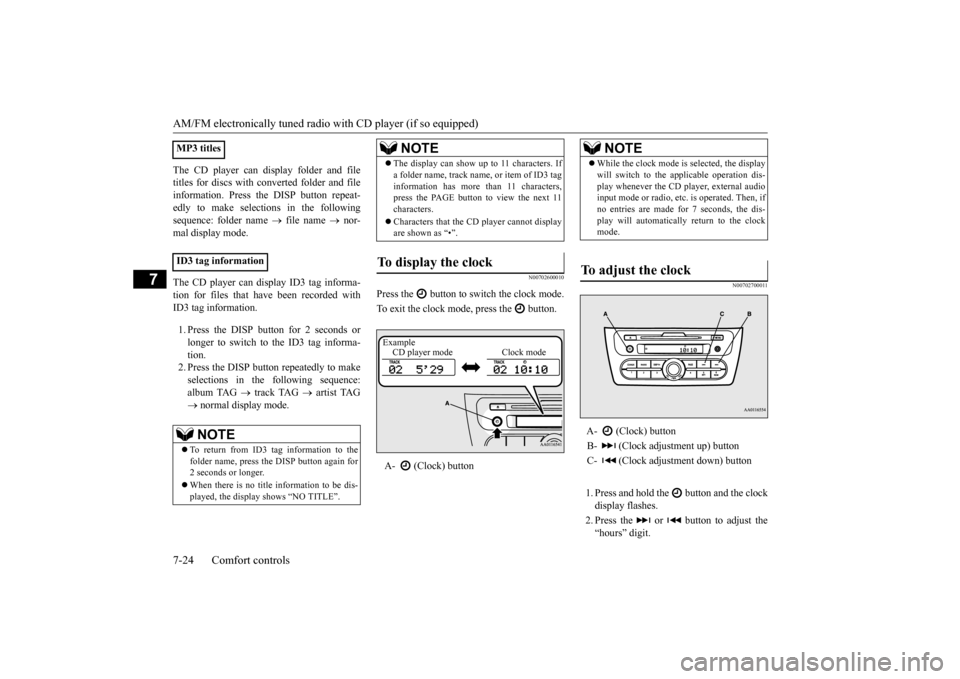
Press the button to switch the clock mode. To exit the clock mode, press the button.
N00702700011
1. Press and hold the button and the clock display flashes. 2. Press the or button to adjust the “hours” digit.
MP3 titles ID3 tag information
NOTE
To return from ID3 tag information to the folder name, press the
DISP button again for
2 seconds or longer. When there is no title information to be dis- played, the display shows “NO TITLE”.
The display can show up to 11 characters. If a folder name, track name
, or item of ID3 tag
information has more than 11 characters,press the PAGE button to view the next 11 characters. Characters that the CD
player cannot display
are shown as “•”.
To display the clock
A- (Clock) button
NOTE
Example CD player mode Clock mode
NOTE
While the clock mode is selected, the display will switch to the applicable operation dis-play whenever the CD player, external audioinput mode or radio, etc. is operated. Then, if no entries are made for 7 seconds, the dis- play will automatically return to the clockmode.
To adjust the clock
A- (Clock) button B- (Clock adjustment up) buttonC- (Clock adjustment down) button
BK0212400US.book 24 ページ 2014年4月1日 火曜日 午後2時21分
Page 207 of 300
AM/FM electronically tuned radio with CD player (if so equipped) 7-26 Comfort controls
7
3. Press the or buttons to select “LangChg YES” and then press the
/MENU button to determine.
4. Press the or buttons to select lan- guage and then press the /MENU but- ton to determine. 5. Press the or buttons to select “LangSet YES” and then press the
/MENU button to determine.
N00703000011
You can listen to commercially available audio equipment, such
as a portable audio
system, from your vehicl
e’s speakers, by con-
necting the audio equi
pment to the auxiliary
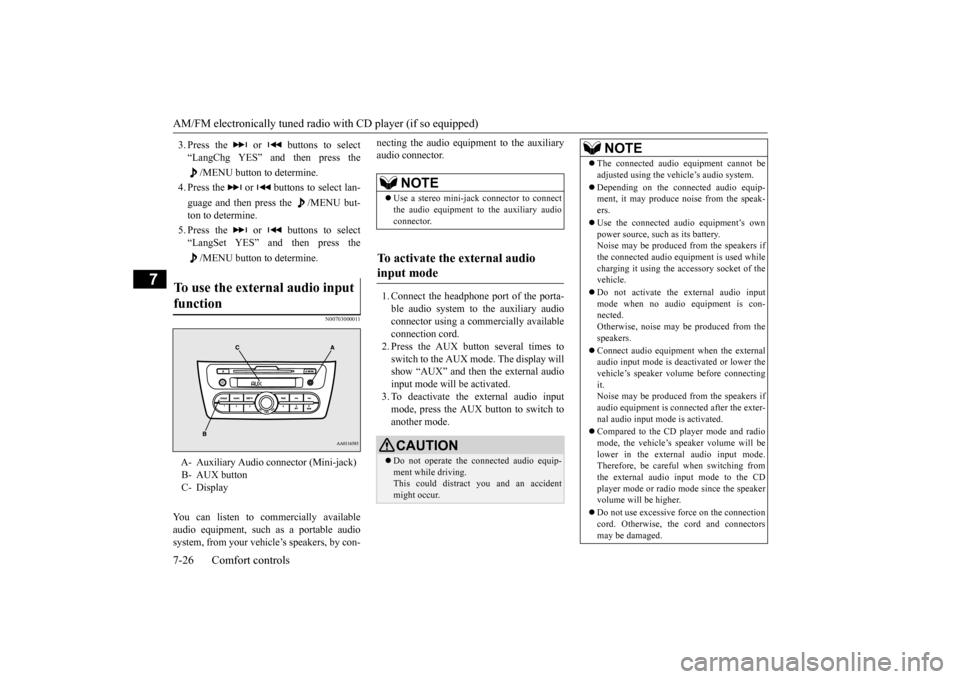
audio connector. 1. Connect the headphone port of the porta- ble audio system to the auxiliary audio connector using a comm
ercially available
connection cord.2. Press the AUX button several times to switch to the AUX mode. The display will show “AUX” and then the external audioinput mode will be activated. 3. To deactivate the external audio input mode, press the AUX button to switch toanother mode.
To use the external audio input function
A- Auxiliary Audio connector (Mini-jack) B- AUX button C- Display
NOTE
Use a stereo mini-jac
k connector to connect
the audio equipment to the auxiliary audio connector.
To activate the external audio input mode
CAUTION Do not operate the c
onnected audio equip-
ment while driving. This could distract
you and an accident
might occur.
NOTE
The connected audio
equipment cannot be
adjusted using the vehicle’s audio system. Depending on the conne
cted audio equip-
ment, it may produce noise from the speak- ers. Use the connected audio equipment’s own power source, such as its battery.Noise may be produced from the speakers if the connected audio equipment is used while charging it using the ac
cessory socket of the
vehicle. Do not activate the external audio input mode when no audio equipment is con- nected. Otherwise, noise may be produced from thespeakers. Connect audio equipment when the external audio input mode is deactivated or lower the vehicle’s speaker volume before connecting it.Noise may be produced from the speakers if audio equipment is conne
cted after the exter-
nal audio input mode is activated. Compared to the CD player mode and radio mode, the vehicle’s speaker volume will belower in the external audio input mode. Therefore, be careful when switching from the external audio input mode to the CDplayer mode or radio mode since the speaker volume will be higher. Do not use excessive force on the connection cord. Otherwise, the
cord and connectors
may be damaged.
BK0212400US.book 26 ページ 2014年4月1日 火曜日 午後2時21分
Page 208 of 300
To play tracks from USB device (if so equipped)
Comfort controls 7-27
7
N00762200056
You can connect your iPod or USB memory device to the USB input terminal and playmusic files stored in the iPod or USB mem- ory device. See the following section for the types ofconnectable devices
and supported files.
Refer to “Types of connectable devices and supported file specifications” on page 5-103.See the following sections for the connecting methods, “How to conne
ct an iPod” on page
5-102 and “How to connect a USB memorydevice” on page 5-101. If your vehicle is equipped with a Bluetooth
®
2.0 interface, you can play music files in your iPod or USB memory de
vice via voice opera-
tion. Refer to “To play iPod
tracks via voice opera-
tion” on page 7-29 and “To play USB mem-
ory device tracks via voice operation” on page 7-35.
N00762300060
N00762400087
1. Press the PWR switch to turn on the audio system. The system turns on in the lastmode used. 2. Connect your iPod to the USB input ter- minal.Refer to “How to connect an iPod” on page 5-102. 3. Press the CD button several times toswitch to the iPod mode. The input mode changes as follows every time the CD but- ton is pressed: CD mode
iPod mode
Bluetooth
® mode (if so equipped)
AUX mode
CD mode.
The iPod indicator are illuminated andthen the iPod mode will be activated. 4. Once the device is selected, playback starts and indicato
r appears on the dis-
play.
If the connection cord
alone is left connected
to the auxiliary audi
o connector, noise may
be produced from the speakers. For information on how to connect and oper- ate the commercially av
ailable audio equip-
ment, refer to the ow
ner’s manual for the
commercially availabl
e audio equipment.
To play tracks from USB device
(if so equipped)
NOTE
NOTE
A file protected by c
opyright might not be
able to playback. It is recommended to adjust the equalizer of the connected device to 0 db or neutral.
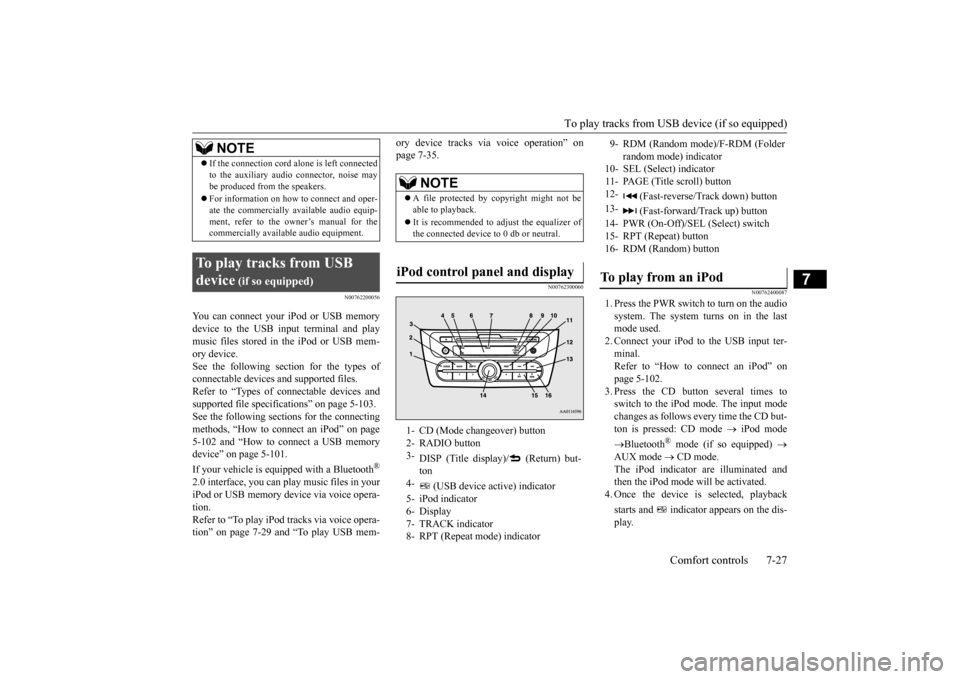
iPod control panel and display
1- CD (Mode changeover) button 2- RADIO button 3-
DISP (Title display)/ (Return) but- ton
4-
(USB device active) indicator
5- iPod indicator 6- Display 7- TRACK indicator8- RPT (Repeat mode) indicator
9- RDM (Random mode)/F-RDM (Folder
random mode) indicator
10- SEL (Select)
indicator
11- PAGE (Title scroll) button 12-
(Fast-reverse/Track down) button
13-
(Fast-forward/Track up) button
14- PWR (On-Off)/SEL (Select) switch 15- RPT (Repeat) button 16- RDM (Random) buttonTo play from an iPod
BK0212400US.book 27 ページ 2014年4月1日 火曜日 午後2時21分
Page 209 of 300

To play tracks from USB device (if so equipped) 7-28 Comfort controls
7
5. To stop the playback, press the RADIO button or CD button to switch to a differ-ent mode.
N00762500033
To fast-forward/reverse the current track, press the button or button. To fast-forward the current track, press the
button. While the button is kept pressed,
the track will be fast-forwarded.
To fast-reverse the current track, press the button. While the button is kept pressed, the track will be fast-reversed.
N00762600034
Press the button repeatedly until the desired track number appears on the display. Press the button repeatedly until the desired track number appears on the display.
N00762700077
You can select desired tracks from the “Playl- ists”, “Artists”,
“Albums”, “Songs” or
“Genre” (vehicles with Bluetooth
® 2.0 inter-
face) menus on your iPod. Operate the SEL switch to select desired tracks. The selected menu or category or track is shown in the display.When this mode is activated by pressing the SEL switch, the SEL i
ndicator will be dis-
played in the display.
NOTE
Depending on the condition of your iPod, it may take a longer time
before the playback
starts.NOTE
Buttons on the iPod are disabled while the iPod is connected to the audio system. To adjust the volume and tone, refer to “To adjust the volume” on page 7-18 and “To adjust the tone” on page 7-19.
To fast-forward/reverse the track
Fast-forward
Fast-reverseTo select a desired track
Tr a c k u p Tr a c k d o w n
NOTE
Pressing the button once during the song will cause the audio system to restart play- back from the beginning of the song.
To find a track from the iPod menu
Press the SEL switch :To start this mode or
to select the menu or category or track.
Turn the SEL switch :To show the menu or
category or track.
NOTE
To cancel the selecti
on, press the button
to return to the previous step. If no operation is perf
ormed for 10 seconds
or more or other butt
on is operated after the
SEL switch has been pressed, searching of the desired tracks is canceled. If no operation is performed for 5 seconds or more after the track is
displayed, playback
starts. When the SEL indicato
r is not shown on the
display and the SEL switch is operated, the volume adjustment is activated.
BK0212400US.book 28 ページ 2014年4月1日 火曜日 午後2時21分
Page 213 of 300
To play tracks from USB device (if so equipped) 7-32 Comfort controls
7
3. After the voice guide says “What Genre would you like to play?,” say the musictype. 4. If there is only one ma
tch, the system pro-
ceeds to step 6.5. If there are two or more matches, the voice guide will say “More than one match was found, would you like to play
de says “Playing
7. The system exits
the voice recognition
mode and starts playback.
N00763900063
N00764000087
1. Press the PWR switch to turn on the audio system. The system turns on in the last mode used. 2. Connect your USB memory device to the USB input terminal.Refer to “How to connect a USB memory device” on page 5-101. 3. Press the CD button several times toswitch to the USB mode. The input mode changes as follows every time the CD but- ton is pressed: CD mode
USB mode
Bluetooth
® mode (if so equipped)
AUX mode
CD mode.
The USB indicator are illuminated andthen the USB mode will be activated. 4. Once the device is
selected, playback
starts and indicator appears on the dis- play.
NOTE
If you say “No” to three
or all genres uttered
by the system, the voice guide will say “Genre not found, please try again” and the system returns to step 2.NOTE
If the confirmation function is active, the voice guide confirms if the genre is correct.If the genre is correct, say “Yes”. If not, say “No”. After the voice
guide says “Genre not
found, please try again,” the system returnsto step 2. Refer to
“Confirmation function
setting” on page 5-85.
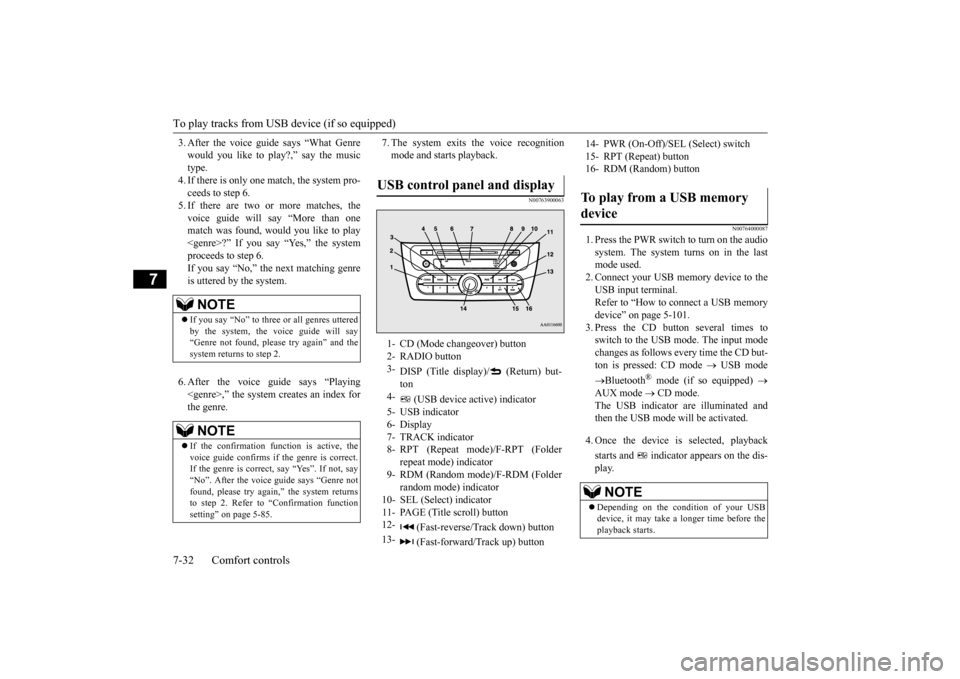
USB control panel and display
1- CD (Mode changeover) button 2- RADIO button 3-
DISP (Title display)/ (Return) but- ton
4-
(USB device ac
tive) indicator
5- USB indicator 6- Display 7- TRACK indicator8- RPT (Repeat mode)/F-RPT (Folder
repeat mode) indicator
9- RDM (Random mode)/F-RDM (Folder
random mode) indicator
10- SEL (Select)
indicator
11- PAGE (Title scroll) button12-
(Fast-reverse/Track down) button
13-
(Fast-forward/Track up) button
14- PWR (On-Off)/SEL
(Select) switch
15- RPT (Repeat) button 16- RDM (Random) buttonTo play from a USB memory device
NOTE
Depending on the condition of your USB device, it may take a
longer time before the
playback starts.
BK0212400US.book 32 ページ 2014年4月1日 火曜日 午後2時21分
Page 214 of 300
To play tracks from USB device (if so equipped)
Comfort controls 7-33
7
5. To stop the playback, press the RADIO button or CD button to switch to a differ-ent mode.
N00764100105
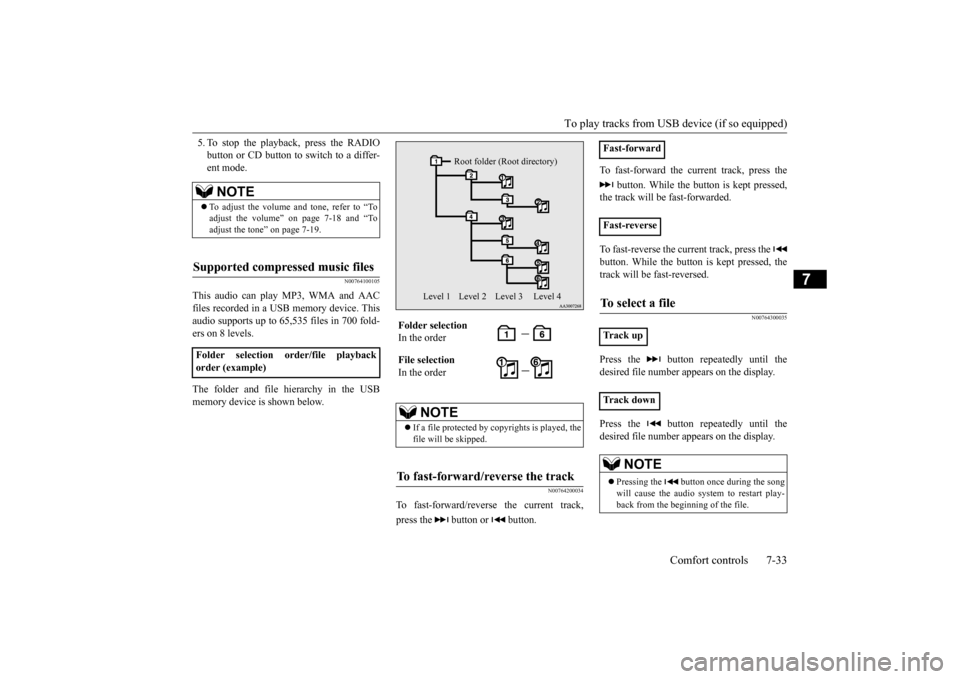
This audio can play MP3, WMA and AACfiles recorded in a USB memory device. Thisaudio supports up to 65,535 files in 700 fold- ers on 8 levels. The folder and file hierarchy in the USB memory device is shown below.
N00764200034
To fast-forward/reverse the current track, press the button or button.
To fast-forward the current track, press the
button. While the button is kept pressed,
the track will be fast-forwarded. To fast-reverse the current track, press the button. While the button is kept pressed, the track will be fast-reversed.
N00764300035
Press the button repeatedly until the desired file number a
ppears on the display.
Press the button repeatedly until the desired file number a
ppears on the display.
NOTE
To adjust the volume and tone, refer to “To adjust the volume” on page 7-18 and “To adjust the tone” on page 7-19.
Supported compressed music files
Folder selection order/file playback order (example)
Folder selection In the order File selection In the order
NOTE
If a file protected by copyrights is played, the file will be skipped.
To fast-forward/reverse the track
Root folder (Root directory)
Level 1 Level 2 Level 3 Level 4
Fast-forward Fast-reverseTo select a file
Tr a c k u p Tr a c k d o w n
NOTE
Pressing the button once during the song will cause the audio system to restart play- back from the beginning of the file.
BK0212400US.book 33 ページ 2014年4月1日 火曜日 午後2時21分
Page 215 of 300

To play tracks from USB device (if so equipped) 7-34 Comfort controls
7
N00703100012
Operate the SEL switch to
select desired file.
When this mode is activated by pressing the SEL switch, the SEL i
ndicator will be dis-
played in the display.
N00764500024
Press the RPT button to show “RPT” in the display. To cancel this
mode, press the button
again.
N00764600038
Press and hold the RPT button until you hear a beep to show “F-RPT” in the display. All tracks in the current folder are played repeatedly. To exit this mode, press the button again.
N00764700039
Press the RDM button to show “F-RDM” inthe display.The audio randomly selects tracks from the current folder and plays the selected tracks. To exit this mode, press the button again.
N00764800030
Press and hold the RDM button until you hear a beep to show “RDM” in the display. The audio randomly selects tracks from allfolders and plays the selected tracks.
To exit this mode, press the button again.
N00765100043
You can displays titles with tag information. The display changes as follows every time the DISP button is pressed during playback:Folder name
File name
Normal display.
1. Press and hold the DISP button until you hear a beep.2. The display changes
as follows every time
the DISP button is pressed briefly: Album TA G
Track TAG
Artist TAG
Genre TAG (vehicles with Bluetooth
® 2.0
interface)
Normal display.
To find a file
Press the SEL switch :To start this mode or
to select the folder or file.
Turn the SEL switch :To show the folder or
file.
NOTE
To cancel the selection, press the button to return to the previous step. If no operation is perfo
rmed for 10 seconds
or more or other butt
on is operated after the
SEL switch has been turned, searching of the desired file is canceled. If no operation is performed for 5 seconds or more after the file is
displayed, playback
starts. When the SEL indicato
r is not shown on the
display and the SEL switch is operated, thevolume adjustment is activated.
To play the same file repeatedly
To play the files in the same folder repeatedly
To play a folder in random order
To play all folders in random order
To switch the display
Folder title Tag information
NOTE
Press and hold the DISP button again until you hear a beep, and the tag information dis-play returns to the folder title display. Up to 11 characters are shown in the display at once. If the title is cut off in the middle, press the PAGE button. The next characters are displayed every time this button ispressed.
BK0212400US.book 34 ページ 2014年4月1日 火曜日 午後2時21分
Page 216 of 300
To play tracks from a Bluetooth® device (vehicles with Bluetooth® 2.0 interface)
Comfort controls 7-35
7
N00765200073
Desired tracks can be
selected and played
from your USB memory device by “Artist”, “Album”, “Playlist”
and “Genre” using voice
commands.For information concerning the voice recog- nition function or spea
ker registration func-
tion, refer to “Bluetooth
® 2.0 interface” on
page 5-81. The playback sequence of tracks is the same as when an iPod is connected. Refer to the “To play iPod tracks via voice operation” onpage 7-29. To use the voice operation, press the SPEECH button (A) first.
N00765300104
You can wirelessly c
onnect a digital audio
player or cellular phone supporting Blue- tooth
® to listen to the tracks on the connected
device. Refer to “Bluetooth
® 2.0 interface” for the
connecting method, etc. on page 5-81. The following explains
the basic playback
method.
N00765400062
If no title is stored, “NO TITLE” is shown in the display. Characters that cannot
be displayed are sub-
stituted by “•”.
To play USB memory device tracks via voice operation (vehi- cles with Bluetooth
® 2.0 inter-
face)
Preparation for voice operation
NOTE
To play tracks from a Blue- tooth
® device (vehicles with
Bluetooth
® 2.0 interface)
NOTE
Depending on the connected device, opera- tion of the connected de
vice is limited to its
available functions. Depending on the connected device, the device may not ope
rate correctly.
A file protected by c
opyright might not be
able to playback. It is recommended to adjust the equaliser of the connected device to 0 db or neutral. The voice operation is not
available to access
music files on the c
onnected Bluetooth
®
device.
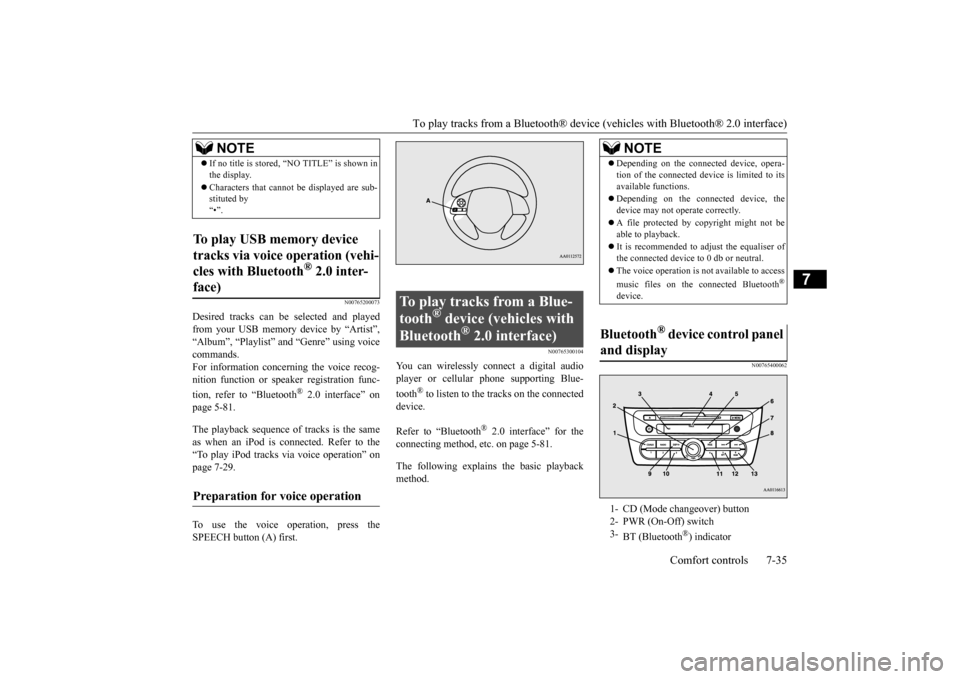
Bluetooth
® device control panel
and display 1- CD (Mode changeover) button 2- PWR (On-Off) switch 3-
BT (Bluetooth
®) indicator
BK0212400US.book 35 ページ 2014年4月1日 火曜日 午後2時21分