Battery MITSUBISHI MIRAGE 2015 6.G Owner's Manual
[x] Cancel search | Manufacturer: MITSUBISHI, Model Year: 2015, Model line: MIRAGE, Model: MITSUBISHI MIRAGE 2015 6.GPages: 300, PDF Size: 43.44 MB
Page 131 of 300
Indicator and warning light package 5-70 Features and controls
5
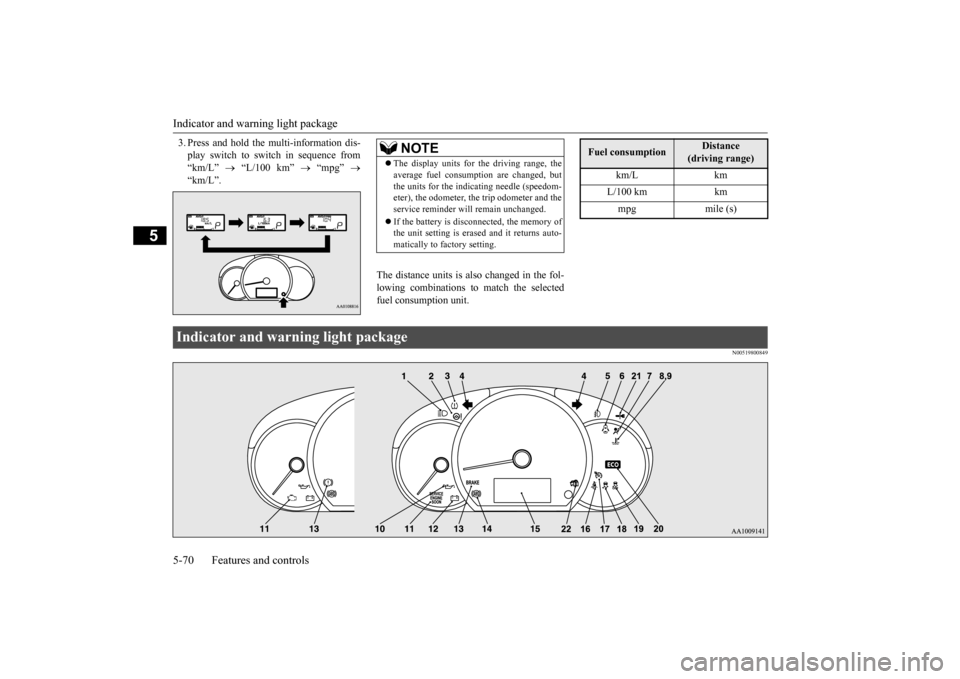
3. Press and hold the multi-information dis- play switch to swit
ch in sequence from
“km/L”
“L/100 km”
“mpg”
“km/L”.
The distance units is also changed in the fol- lowing combinations to match the selectedfuel consumption unit.
N00519800849
NOTE
The display units for the driving range, the average fuel consumption are changed, butthe units for the indica
ting needle (speedom-
eter), the odometer, the trip odometer and the service reminder will
remain unchanged.
If the battery is disconnected, the memory of the unit setting is erased and it returns auto- matically to factory setting.
Fuel consumption
Distance
(driving range)
km/L km L/100 km km mpg mile (s)
Indicator and warning light package BK0212400US.book 70 ページ 2014年4月1日 火曜日 午後2時21分
Page 136 of 300
![MITSUBISHI MIRAGE 2015 6.G Owners Manual Combination headlights and dimmer switch
Features and controls 5-75
5
[When the engine is not
running, or when the
engine is running but the parking brake is not released] The engine starts when t](/img/19/7511/w960_7511-135.png "MITSUBISHI MIRAGE 2015 6.G Owners Manual Combination headlights and dimmer switch
Features and controls 5-75
5
[When the engine is not
running, or when the
engine is running but the parking brake is not released] The engine starts when t")
Combination headlights and dimmer switch
Features and controls 5-75
5
[When the engine is not
running, or when the
engine is running but the parking brake is not released] The engine starts when the lights are off.
N00532600570
If the following operation is performed with the combination headlights and dim- mer switch in the “ ” or “ ” position, the lights automatically turn off. [Except for vehicles
equipped with the
F. A . S . T. - k e y ]The ignition switch is turned to the “OFF” or “ACC” position or the key is removed from the ignition switch and the driver’sdoor is opened. [For vehicles equipped with the F.A.S.T.- key] The operation mode is changed to OFF orACC and the driver’s door is opened.
If the following operation is performed with the combination headlights and dim- mer switch in the “ ” or “ ” position, the lights automatically turn off after about 3 minutes. [Except for vehicles equipped with the F. A . S . T. - k e y ]The ignition switch is turned to the “OFF” or “ACC” position or
the key is removed
from the ignition switch and the driver’s door is not opened. [For vehicles equipped with the F.A.S.T.- key]The operation mode is changed to OFF or ACC and the driver’s door is not opened.
If the combination
headlights and dimmer
switch is turned to the “ ” or “ ” posi- tion again after the engine is turned off, theabout 3-minute auto-cutout function
NOTE
Once the daytime running light come on, they do not go out until the ignition switch isturned to the “OFF” or “ACC” position orthe operation mode is changed to OFF or ACC.
OFF All lights off
Parking, tail, front
and rear side-
marker lights, lic
ense plate and
instrument panel lights on Headlights and other lights onNOTE
Do not leave the head
lights and ot
her lights
on for a long period of time when the engine is not running. The battery will run down.
When it rains, or wh
en the vehicle has been
washed, the inside of the lens sometimesbecomes foggy. This is the same as whenwindow glass mists up on a humid day, and does not indicate a pr
oblem. When the light
is switched on, the heat will dry out the fog.However, if water collects inside the light, have it checked by an authorized Mitsubishi Motors dealer or a repair facility of yourchoice.
Light auto-cutout function (headlights and other lights)
NOTE
NOTE
The light auto-cutout f
unction can be deacti-
vated.See your authorized Mitsubishi Motors dealer for details.
When you want to keep the lights on:
BK0212400US.book 75 ページ 2014年4月1日 火曜日 午後2時21分
Page 138 of 300
Hazard warning flasher switch Features and controls 5-77
5
See your authorized Mitsubishi Motors dealer for details.
N00522700318
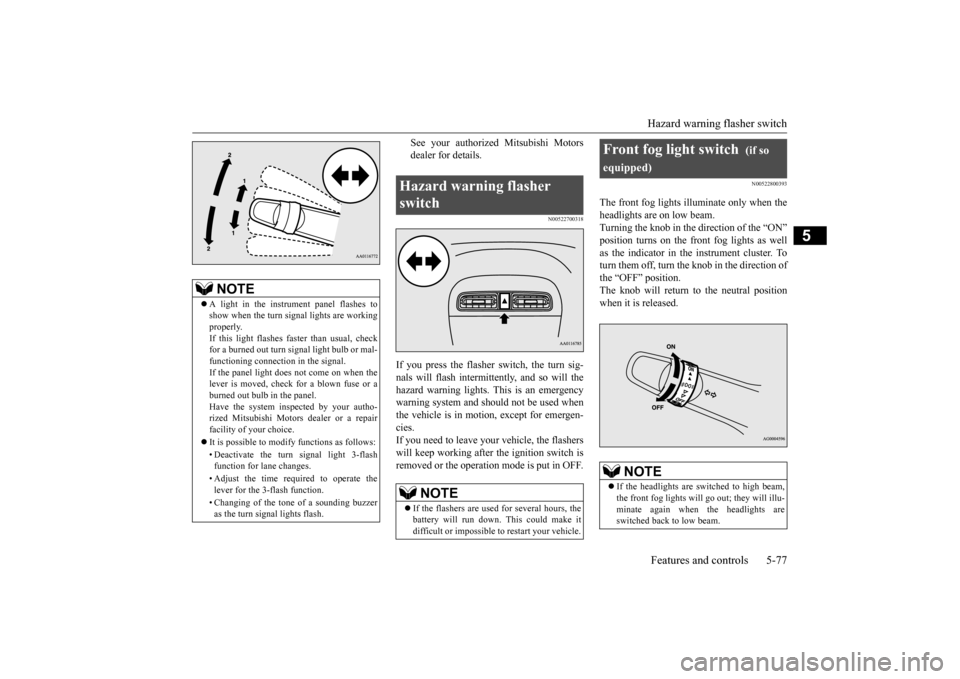
If you press the flasher switch, the turn sig- nals will flash intermittently, and so will the hazard warning lights.
This is an emergency
warning system and should not be used when the vehicle is in motion, except for emergen- cies.If you need to leave your vehicle, the flashers will keep working afte
r the ignition switch is
removed or the operation mode is put in OFF.
N00522800393
The front fog lights illuminate only when theheadlights are on low beam.Turning the knob in the direction of the “ON” position turns on the front fog lights as well as the indicator in the instrument cluster. Toturn them off, turn the knob in the direction of the “OFF” position. The knob will return to the neutral position when it is released.
NOTE
A light in the instrument panel flashes to show when the turn signal lights are workingproperly. If this light flashes fa
ster than usual, check
for a burned out turn signal light bulb or mal-functioning connect
ion in the signal.
If the panel light does not come on when the lever is moved, check for a blown fuse or aburned out bulb in the panel. Have the system inspected by your autho- rized Mitsubishi Motors dealer or a repairfacility of your choice. It is possible to modify functions as follows: • Deactivate the turn signal light 3-flash function for lane changes. • Adjust the time required to operate the lever for the 3-flash function. • Changing of the tone of a sounding buzzer as the turn signal lights flash.
Hazard warning flasher switch
NOTE
If the flashers are used for several hours, the battery will run down.
This could make it
difficult or impossible
to restart your vehicle.
Front fog light switch
(if so
equipped)
NOTE
If the headlights are sw
itched to high beam,
the front fog lights will go out; they will illu- minate again when the headlights are switched back to low beam.
BK0212400US.book 77 ページ 2014年4月1日 火曜日 午後2時21分
Page 141 of 300
Electric rear window defogger switch 5-80 Features and controls
5
N00523700403
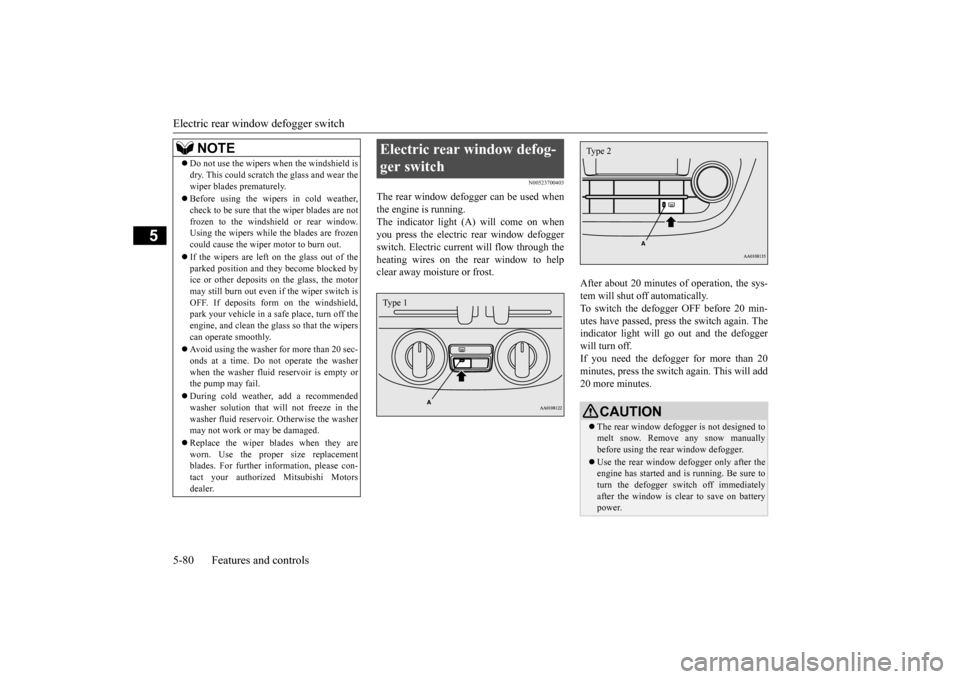
The rear window defogger can be used when the engine is running. The indicator light (A) will come on whenyou press the electric rear window defogger switch. Electric current will flow through the heating wires on the rear window to helpclear away moisture or frost.
After about 20 minutes of operation, the sys- tem will shut off automatically.To switch the defogger OFF before 20 min- utes have passed, press the switch again. The indicator light will go
out and the defogger
will turn off. If you need the defogger for more than 20 minutes, press th
e switch again. This will add
20 more minutes.
NOTE
Do not use the wipers when the windshield is dry. This could scratch the glass and wear thewiper blades prematurely. Before using the wipers in cold weather, check to be sure that the wiper blades are notfrozen to the windshield or rear window. Using the wipers while the blades are frozen could cause the wiper motor to burn out. If the wipers are left on the glass out of the parked position and th
ey become blocked by
ice or other deposits on the glass, the motor may still burn out even
if the wiper switch is
OFF. If deposits form on the windshield,park your vehicle in a safe place, turn off the engine, and clean the glass so that the wipers can operate smoothly. Avoid using the washer for more than 20 sec- onds at a time. Do not
operate the washer
when the washer fluid reservoir is empty or the pump may fail. During cold weather, add a recommended washer solution that will not freeze in the washer fluid reservoir. Otherwise the washermay not work or may be damaged. Replace the wiper blades when they are worn. Use the proper size replacement blades. For further info
rmation, please con-
tact your authorized
Mitsubishi Motors
dealer.
Electric rear window defog- ger switch Type 1
CAUTION The rear window defogge
r is not designed to
melt snow. Remove any snow manually before using the rear window defogger. Use the rear window defogger only after the engine has started and
is running. Be sure to
turn the defogger switch off immediatelyafter the window is clea
r to save on battery
power.Type 2
BK0212400US.book 80 ページ 2014年4月1日 火曜日 午後2時21分
Page 143 of 300
Bluetooth® 2.0 interface (if so equipped) 5-82 Features and controls
5
command operations us
ing a defined voice
tree. The Bluetooth
® 2.0 interface can be used
when the ignition switch or the operation mode is in ON or ACC. Before you can use the Bluetooth
® 2.0 inter-
face, you must pa
ir the Bluetooth
® device
and Bluetooth
® 2.0 interface. Refer to “Con-
necting the Bluetooth
® 2.0 interface and
Bluetooth
® device” on page 5-87.
Bluetooth
® is a registered trademark of
BLUETOOTH SIG, INC.
Steering control sw
itch and microphone
P.5-83Voice recognition function
P.5-84
Useful voice commands
P.5-85
Speaker enrollment function
P. 5 - 8 6
Connecting the Bluetooth
® 2.0 interface and
the Bluetooth
® device
P.5-87
Operating a music player connected via Blue- tooth
® P.5-91
How to make or r
eceive hands-free calls
P.5-91Phonebook function
P.5-94
WA R N I N GAlthough the Bluetooth
® 2.0 interface
allows you to make ha
nds-free calls, if you
choose to use the cellular phone while driving, you must not allow yourself to bedistracted from the sa
fe operation of your
vehicle. Anything, including cellular phone usage, that distracts you from thesafe operation of your vehicle increases your risk of
an accident.
Refer to and comply with all state and local laws in your area regarding cellular phone usage wh
ile driving.
NOTE
For vehicles equipped with the F.A.S.T.-key, if the operation mode is left in ACC, theaccessory power will automatically turn offafter a certain period
of time and you will no
longer be able to use the Bluetooth
® 2.0
interface. The accessory power comes on again if the engine
switch is operated.
Refer to “ACC power
auto-cutout function”
on page 5-14. The Bluetooth
® 2.0 interface
cannot be used
if the Bluetooth
® device has a dead battery
or the device power is turned off. Hands-free calls will
not be possible if your
phone does not have
service available.
If you place the Bluetooth
® device in the
cargo area, you may not be able to use the Bluetooth
® 2.0 interface.
Some Bluetooth
® devices are not compatible
with the Bluetooth
® 2.0 interface.
You can confirm the Link System software version by pressing the HANG-UP button 3 times (press and hold 2 times and then pressbriefly) within 10 seconds.
For detail of the Bluetooth
® 2.0 interface,
refer to the following website: [For vehicles sold in U.S.A.] You can access the Mits
ubishi Motors North
America website. [For vehicles so
ld in Canada]
You can access the Mitsubishi Motors web-site. Please read and agree to the “Warning about Links to the Web Sites of Other Companies”,the websites mentione
d above may connect
you to websites other than the Mitsubishi Motors website.http://www.mitsubishi
-motors.com/en/prod-
ucts/index.html Software updates by cellular phone/digital audio device manufacturers may change/alter devi
ce connectivity.
NOTE
BK0212400US.book 82 ページ 2014年4月1日 火曜日 午後2時21分
Page 167 of 300
12 V power outlets 5-106 Features and controls
5
N00525000615
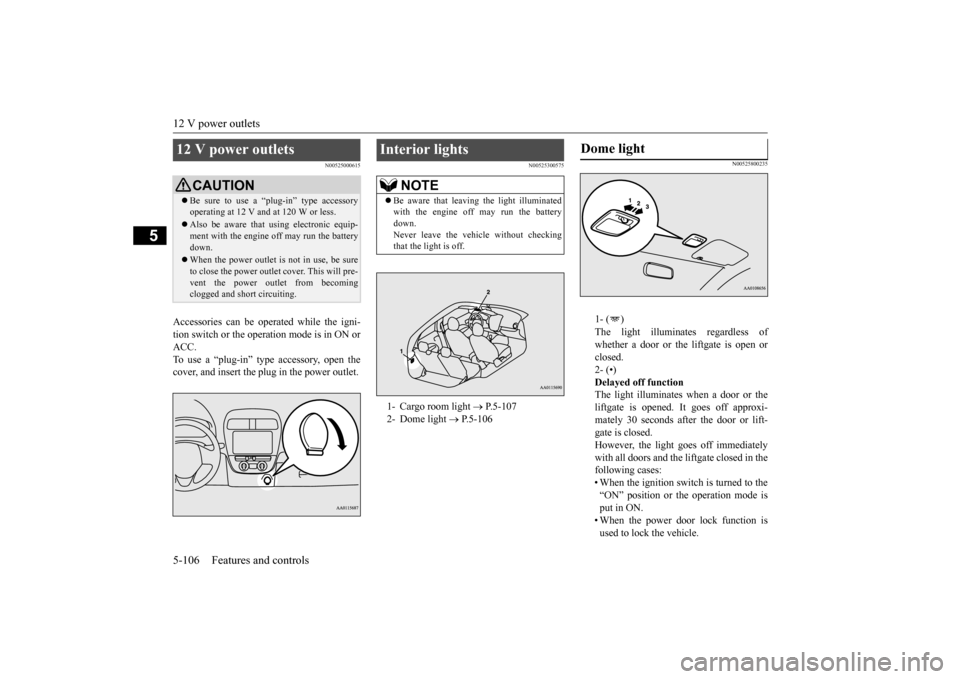
Accessories can be ope
rated while the igni-
tion switch or the opera
tion mode is in ON or
ACC. To use a “plug-in” type
accessory, open the
cover, and insert the
plug in the power outlet.
N00525300575
N00525800235
1- ( ) The light illuminates regardless of whether a door or the liftgate is open or closed.2- (•) Delayed off function The light illuminates when a door or theliftgate is opened. It goes off approxi- mately 30 seconds after the door or lift- gate is closed.However, the light goes off immediately with all doors and the liftgate closed in the following cases:• When the ignition switch is turned to the “ON” position or the operation mode is put in ON.• When the power door lock function is used to lock the vehicle.
12 V power outlets
CAUTION Be sure to use a “plug-in” type accessory operating at 12 V and at 120 W or less. Also be aware that
using electronic equip-
ment with the engine
off may run the battery
down. When the power outlet is not in use, be sure to close the power outlet
cover. This will pre-
vent the power out
let from becoming
clogged and short circuiting.
Interior lights
NOTE
Be aware that leaving the light illuminated with the engine off may run the batterydown. Never leave the vehi
cle without checking
that the light is off.1- Cargo room light
P.5-107
2- Dome light
P.5-106
Dome light
BK0212400US.book 106 ページ 2014年4月1日 火曜日 午後2時21分
Page 175 of 300
Safe driving techniques 6-4 Driving safety
6
Replace your tires before they are heavily worn out.On vehicles equipped with a tire pressure monitoring system, there
is a risk of damage
to the tire inflation pressure sensors when thetire is replaced on the
rim. Tire replacement
should, only be perform
ed by an authorized
Mitsubishi Motors dealer. Have someone watch while you turn all the exterior lights on and off. Also check the turn signal indicators and hi
gh-beam indicators on
the instrument panel. Check the ground under the vehicle after parking overnight, for
fuel, water, oil, or
other leaks. Make sure
all the fluid levels are
correct. Also, if you
can smell fuel, you need
to find out why imme
diately and have it
fixed.
N00629200137
Even this vehicle’s sa
fety equipment, and
your safest driving, ca
nnot guarantee that you
can avoid an accident or injury. However, if
you give extra attention to the following areas, you can better protect yourself andyour passengers: Drive defensively. Be aware of traffic, road and weather c
onditions. Leave plenty
of stopping distance
between your vehicle
and the vehicle ahead. Before changing lanes, check your mir- rors, your blind spots, and use your turn-signal light. While driving, watch the behavior of other drivers, bicycl
ists, and pedestrians.
Always obey applicab
le laws and regula-
tions. Be a polite and alert driver. Alwaysleave room for unexpected events, such as sudden braking. If you plan to drive in another country, obey their vehicle re
gistration laws and
make sure you will be able to get the right fuel.
N00629400474
Check the battery. At the same time, check the terminals and wiring. Duringextremely cold weather, the battery will not be as strong. Also, the battery power level may drop beca
use more power is
used for cold starting and driving.
Before driving the vehicle, check to see if the engine runs at the proper speed and ifthe headlights are as bright as normally. Charge or replace the battery if necessary. During extreme cold weather, it is possi-ble that a very low battery could freeze. Warm the engine sufficiently. After start- ing the engine, allow a short warm-up time to distribute oil to all cylinders. Then drive your vehicle slowly. Stay at low speeds at first so that the man- ual transaxle oil or the automatic transaxle fluid has time to spread to all the lubrica-tion points. Manual transaxle can be harder to shift in cold weather conditions. This is normaland shifting will get easier as the transaxle warms up. Check the engine antifreeze. If there is not enough coolant because of a leak or from engine overheating, add Mitsubishi Motors Genuine Super LongLife Coolant Premium or equivalent.
Lights Fluid leaks Safe driving techniques
Driving during cold weather
WA R N I N G The battery gives off explosive hydrogen gas. Any spark or flame can cause the bat- tery to explode, which could cause serious injury or death.Always wear protecti
ve clothes and a face
mask when working wi
th your battery, or
let a skilled mechanic do it.
BK0212400US.book 4 ページ 2014年4月1日 火曜日 午後2時21分
Page 178 of 300
Loading information Driving safety 6-7
6
Production options weight: the combined weight of those inst
alled regular produc-
tion options weighing over 5 lbs (2.3 kg) in excess of those standard items which they replace, not previously considered incurb weight or acce
ssory weight, includ-
ing heavy duty brakes, ride levelers, roof rack, heavy duty battery
, and special trim.
Normal occupant weight: 150 lbs (68 kg)
*
times the number of specified occupants. (In your vehicle the number is 3) Occupant distribution:
Occupant distribu-
tion within the passenger compartment (Inyour vehicle the distribution is 2 in front, 1 in second row seat)
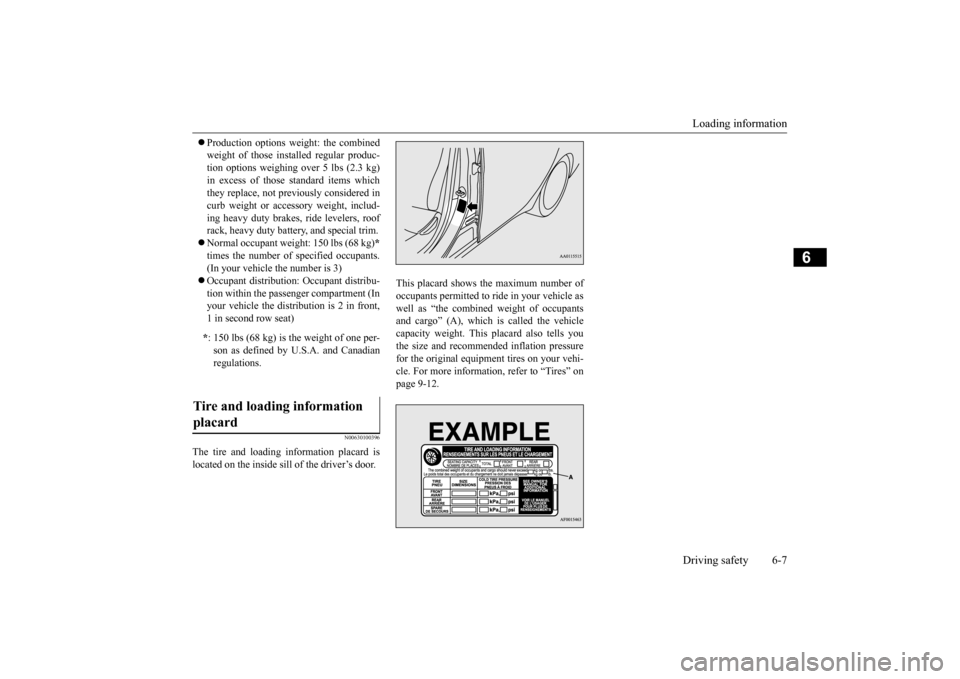
N00630100396
The tire and loading information placard is located on the inside sill of the driver’s door.
This placard shows the maximum number of occupants permitted to ri
de in your vehicle as
well as “the combined weight of occupantsand cargo” (A), which is called the vehicle capacity weight. This
placard also tells you
the size and recomme
nded inflation pressure
for the original equipment tires on your vehi- cle. For more information, refer to “Tires” on page 9-12.
* : 150 lbs (68 kg) is the weight of one per- son as defined by U.
S.A. and Canadian
regulations.
Tire and loading information placard
BK0212400US.book 7 ページ 2014年4月1日 火曜日 午後2時21分
Page 206 of 300
AM/FM electronically tuned radio with CD player (if so equipped)
Comfort controls 7-25
7
If you keep pressing the button, fast-for- ward begins.3. When the “hours” digit is adjusted, press the button to flash the “minutes” digit.Press the or button to adjust the “minutes” digit. If you keep pressing the button, fast-for-ward begins. 4. When the time is set, press the button to stop the clock display from flashing.
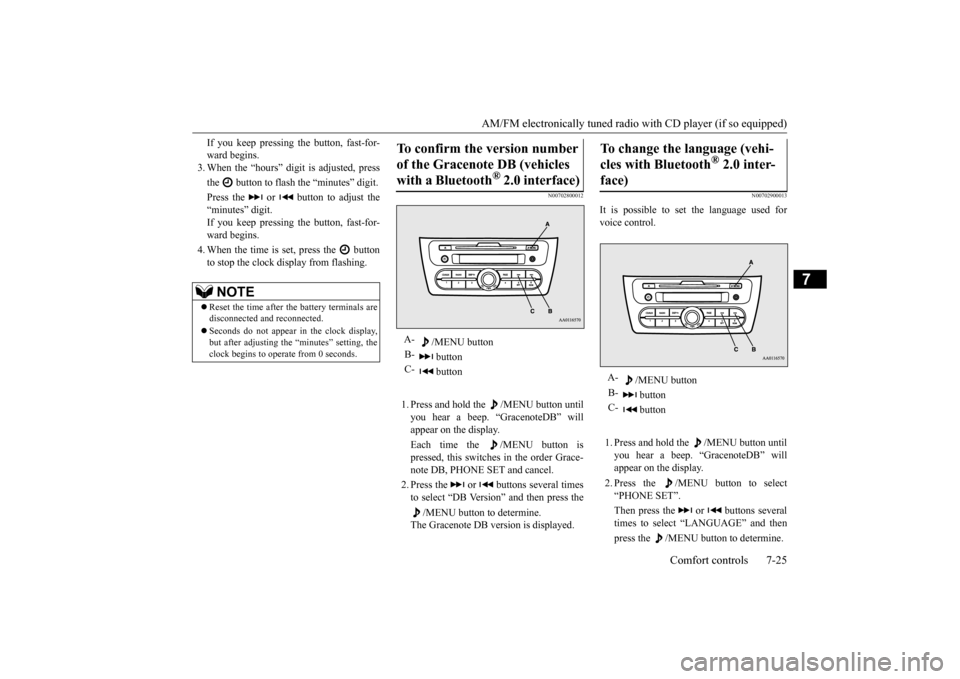
N00702800012
1. Press and hold the /MENU button untilyou hear a beep. “GracenoteDB” will appear on the display. Each time the /MENU button is pressed, this switches in the order Grace- note DB, PHONE SET and cancel. 2. Press the or buttons several times to select “DB Version” and then press the
/MENU button to determine.
The Gracenote DB ve
rsion is displayed.
N00702900013
It is possible to set the language used for voice control. 1. Press and hold the /MENU button until you hear a beep. “GracenoteDB” will appear on the display. 2. Press the /MENU button to select “PHONE SET”. Then press the or buttons several times to select “LANGUAGE” and then press the /MENU button to determine.
NOTE
Reset the time after the battery terminals are disconnected an
d reconnected.
Seconds do not appear
in the clock display,
but after adjusting the “minutes” setting, the clock begins to operate from 0 seconds.
To confirm the version number of the Gracenote DB (vehicles with a Bluetooth
® 2.0 interface)
A-
/MENU button
B-
button
C-
button
To change the language (vehi- cles with Bluetooth
® 2.0 inter-
face)
A-
/MENU button
B-
button
C-
button
BK0212400US.book 25 ページ 2014年4月1日 火曜日 午後2時21分
Page 207 of 300
AM/FM electronically tuned radio with CD player (if so equipped) 7-26 Comfort controls
7
3. Press the or buttons to select “LangChg YES” and then press the
/MENU button to determine.
4. Press the or buttons to select lan- guage and then press the /MENU but- ton to determine. 5. Press the or buttons to select “LangSet YES” and then press the
/MENU button to determine.
N00703000011
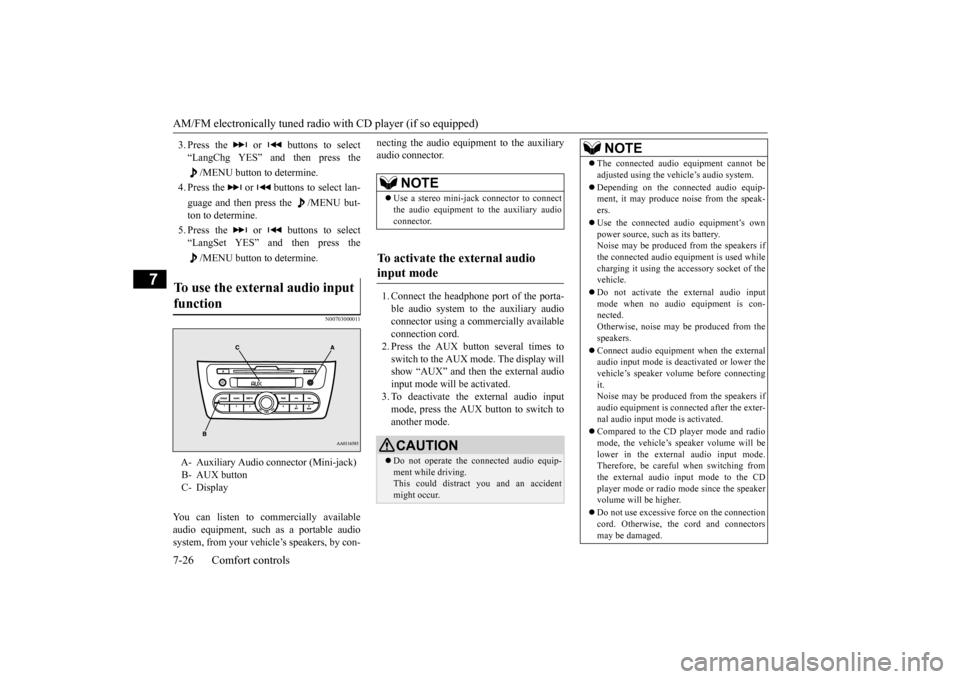
You can listen to commercially available audio equipment, such
as a portable audio
system, from your vehicl
e’s speakers, by con-
necting the audio equi
pment to the auxiliary
audio connector. 1. Connect the headphone port of the porta- ble audio system to the auxiliary audio connector using a comm
ercially available
connection cord.2. Press the AUX button several times to switch to the AUX mode. The display will show “AUX” and then the external audioinput mode will be activated. 3. To deactivate the external audio input mode, press the AUX button to switch toanother mode.
To use the external audio input function
A- Auxiliary Audio connector (Mini-jack) B- AUX button C- Display
NOTE
Use a stereo mini-jac
k connector to connect
the audio equipment to the auxiliary audio connector.
To activate the external audio input mode
CAUTION Do not operate the c
onnected audio equip-
ment while driving. This could distract
you and an accident
might occur.
NOTE
The connected audio
equipment cannot be
adjusted using the vehicle’s audio system. Depending on the conne
cted audio equip-
ment, it may produce noise from the speak- ers. Use the connected audio equipment’s own power source, such as its battery.Noise may be produced from the speakers if the connected audio equipment is used while charging it using the ac
cessory socket of the
vehicle. Do not activate the external audio input mode when no audio equipment is con- nected. Otherwise, noise may be produced from thespeakers. Connect audio equipment when the external audio input mode is deactivated or lower the vehicle’s speaker volume before connecting it.Noise may be produced from the speakers if audio equipment is conne
cted after the exter-
nal audio input mode is activated. Compared to the CD player mode and radio mode, the vehicle’s speaker volume will belower in the external audio input mode. Therefore, be careful when switching from the external audio input mode to the CDplayer mode or radio mode since the speaker volume will be higher. Do not use excessive force on the connection cord. Otherwise, the
cord and connectors
may be damaged.
BK0212400US.book 26 ページ 2014年4月1日 火曜日 午後2時21分