Battery MITSUBISHI MIRAGE 2015 6.G User Guide
[x] Cancel search | Manufacturer: MITSUBISHI, Model Year: 2015, Model line: MIRAGE, Model: MITSUBISHI MIRAGE 2015 6.GPages: 300, PDF Size: 43.44 MB
Page 85 of 300
Door locks 5-24 Features and controls
5
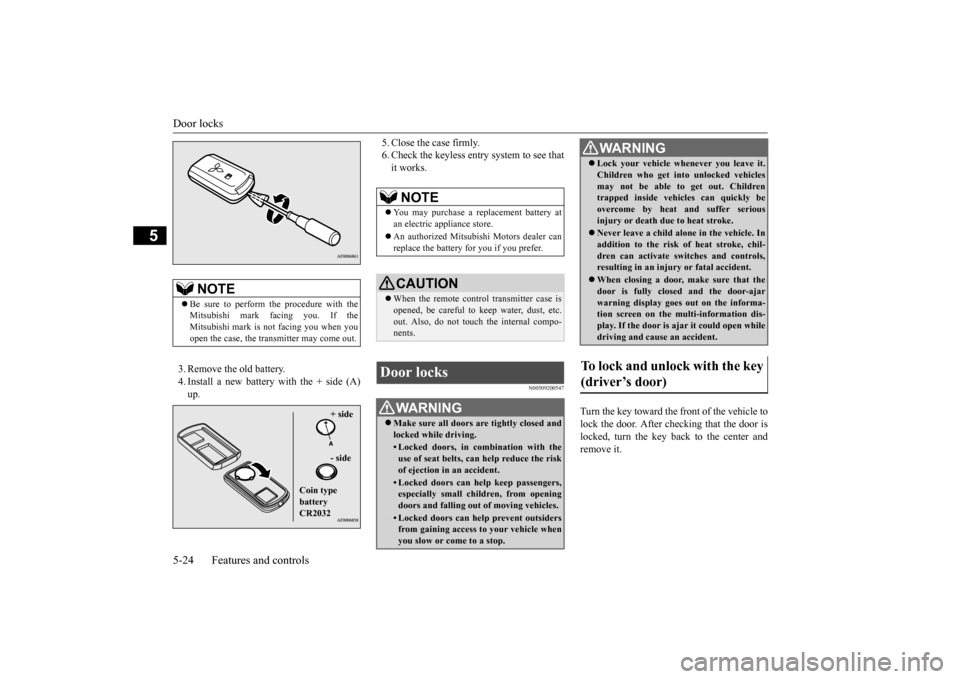
3. Remove the old battery. 4. Install a new battery with the + side (A) up.
5. Close the case firmly. 6. Check the keyless entry system to see thatit works.
N00509200547
Turn the key toward the front of the vehicle to lock the door. After checking that the door is locked, turn the key back to the center andremove it.
NOTE
Be sure to perform the procedure with the Mitsubishi mark fa
cing you. If the
Mitsubishi mark is not facing you when you open the case, the transmitter may come out.
+ side - side
Coin type battery CR2032
NOTE
You may purchase a re
placement battery at
an electric appliance store. An authorized Mitsubish
i Motors dealer can
replace the battery for you if you prefer.CAUTION When the remote control transmitter case is opened, be careful to keep water, dust, etc. out. Also, do not touch the internal compo- nents.
Door locks
WA R N I N G Make sure all doors are tightly closed and locked while driving.• Locked doors, in co
mbination with the
use of seat belts, can help reduce the riskof ejection in
an accident.
• Locked doors can help keep passengers, especially small children, from opening doors and falling out
of moving vehicles.
• Locked doors can help
prevent outsiders
from gaining access to your vehicle when you slow or come to a stop.
Lock your vehicle whenever you leave it. Children who get into unlocked vehiclesmay not be able to get out. Childrentrapped inside vehicles can quickly be overcome by heat and suffer serious injury or death due to heat stroke. Never leave a child alon
e in the vehicle. In
addition to the risk
of heat stroke, chil-
dren can activate switches and controls, resulting in an injury
or fatal accident.
When closing a door,
make sure that the
door is fully closed and the door-ajar warning display goes out on the informa-tion screen on the multi-information dis- play. If the door is aj
ar it could open while
driving and caus
e an accident.
To lock and unlock with the key (driver’s door)
WA R N I N G
BK0212400US.book 24 ページ 2014年4月1日 火曜日 午後2時21分
Page 90 of 300
Power window control
Features and controls 5-29
5
N00510800370
N00548700130
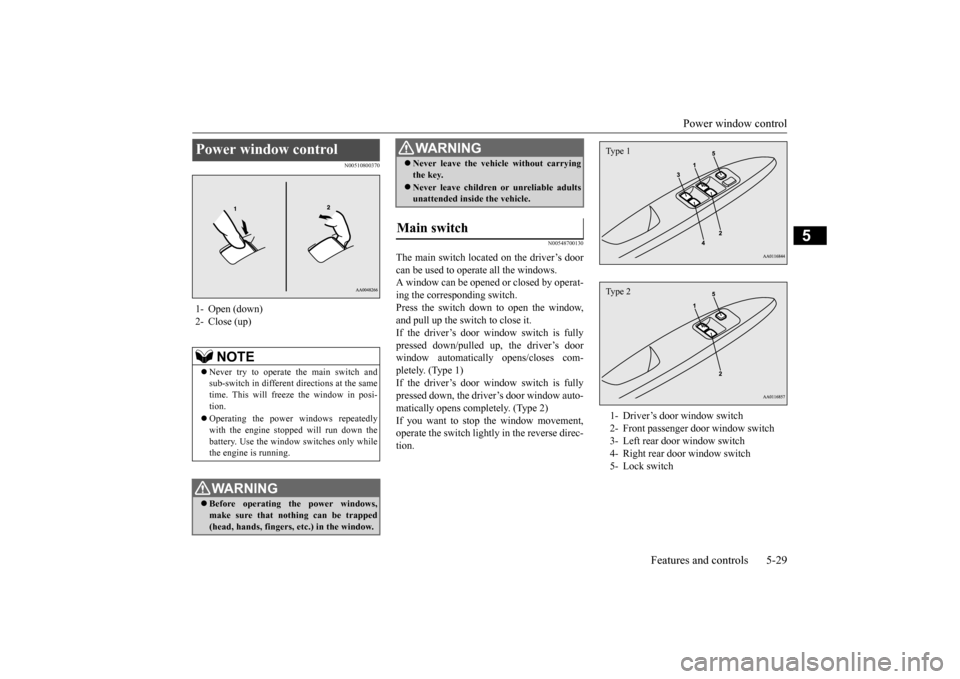
The main switch located on the driver’s door can be used to operate all the windows. A window can be opened or closed by operat-ing the corresponding switch. Press the switch down to open the window, and pull up the switch to close it.If the driver’s door window switch is fully pressed down/pulled up, the driver’s door window automatically opens/closes com-pletely. (Type 1) If the driver’s door window switch is fully pressed down, the driver’s door window auto-matically opens completely. (Type 2) If you want to stop the window movement, operate the switch lightly in the reverse direc-tion.
Power window control 1- Open (down)2- Close (up)
NOTE
Never try to operate the main switch and sub-switch in different directions at the same time. This will freeze the window in posi- tion. Operating the power
windows repeatedly
with the engine stopped will run down thebattery. Use the window
switches only while
the engine is running.WA R N I N G Before operating the power windows, make sure that nothing can be trapped (head, hands, fingers, etc.) in the window.
Never leave the vehi
cle without carrying
the key. Never leave children
or unreliable adults
unattended inside the vehicle.
Main switch
WA R N I N G
1- Driver’s door window switch 2- Front passenger door window switch3- Left rear door window switch 4- Right rear door window switch 5- Lock switchType 1Type 2
BK0212400US.book 29 ページ 2014年4月1日 火曜日 午後2時21分
Page 91 of 300
Power window control 5-30 Features and controls
5
N00548800098
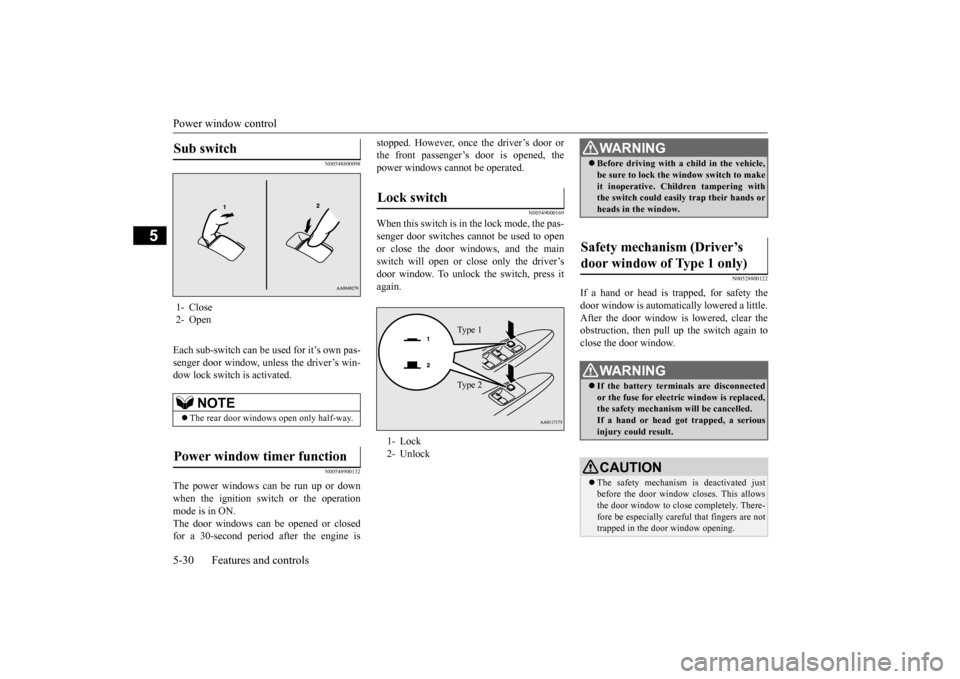
Each sub-switch can be
used for it’s own pas-
senger door window, unless the driver’s win-dow lock switch is activated.
N00548900132
The power windows can be run up or downwhen the ignition switch or the operationmode is in ON. The door windows can be opened or closed for a 30-second period after the engine is
stopped. However, once the driver’s door or the front passenger’s
door is opened, the
power windows cannot be operated.
N00549000169
When this switch is in the lock mode, the pas-senger door switches cannot be used to open or close the door windows, and the main switch will open or
close only the driver’s
door window. To unlock the switch, press it again.
N00528800122
If a hand or head is trapped, for safety thedoor window is automati
cally lowered a little.
After the door window is lowered, clear the obstruction, then pull up the switch again toclose the door window.
Sub switch 1- Close2- Open
NOTE
The rear door windows open only half-way.
Power window timer function
Lock switch 1- Lock 2- Unlock
Ty p e 1 Ty p e 2
WA R N I N G Before driving with a child in the vehicle, be sure to lock the window switch to makeit inoperative. Children tampering withthe switch could easily trap their hands or heads in the window.
Safety mechanism (Driver’s door window of Type 1 only)
WA R N I N G If the battery terminals are disconnected or the fuse for electric window is replaced, the safety mechanism will be cancelled. If a hand or head got
trapped, a serious
injury could result.CAUTION The safety mechanism is deactivated just before the door window closes. This allows the door window to close completely. There- fore be especially careful that fingers are nottrapped in the door window opening.
BK0212400US.book 30 ページ 2014年4月1日 火曜日 午後2時21分
Page 92 of 300
Parking brake
Features and controls 5-31
5
N00551400043
Wind buffeting can be de
scribed as the per-
ception of pressure on the ears or a boomingor rumbling sound. Your
vehicle may exhibit
wind buffeting when driving with one or both rear door windows down or partially opened.This is a normal occurrence that can be mini- mized. If the buffeting
occurs with the rear
door windows open, open the front door win- dows as well as the rear door windows to minimize the condition.
N00511400399
To park the vehicle, first bring it to a com-plete stop, fully engage the parking brake,and then move the gearshift lever to 1st (on a uphill) or “R” (Reverse) (on a downhill) posi- tion for vehicles equipped with a manualtransaxle, set the selector lever to “P” (PARK) position for vehi
cles equipped with a
continuously variable transmission (CVT).
The safety mechanism is deactivated while the switch is pulled up.
Therefore be espe-
cially careful that fi
ngers are not trapped in
the door window opening. Do not deliberately tr
ap your hands or head
in order to activate the safety mechanism. Your hand or head coul
d be trapped and per-
sonal injury could result.NOTE
The safety mechanism can be activated if the driving conditions or
other circumstances
cause the door window to be subjected to a physical shock similar to that caused by trapped hand or head. If the battery termin
als are disc
onnected or
the fuse for electric
window is replaced, the
safety mechanism will be cancelled and the door window will not
automatically
open/close completely.If the window is open,
repeatedly raise the
driver’s door window switch until the win- dow has been fully cl
osed. Following this,
release the switch, raise the switch onceagain and hold it in this
condition for at least
1 second, then release it. You should now be able to operate the driver’s door window inthe normal fashion.CAUTION
What to do if you hear wind buffeting when driving Parking brake
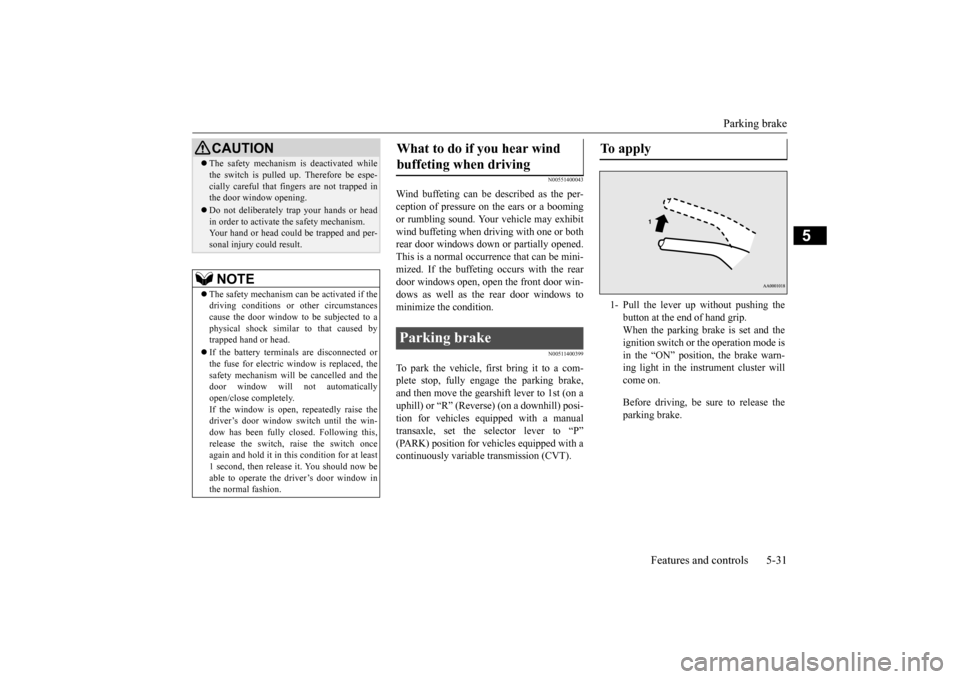
To apply 1- Pull the lever up without pushing the
button at the end of hand grip. When the parking brake is set and theignition switch or the operation mode is in the “ON” position, the brake warn- ing light in the instrument cluster willcome on. Before driving, be sure to release the parking brake.
BK0212400US.book 31 ページ 2014年4月1日 火曜日 午後2時21分
Page 97 of 300
![MITSUBISHI MIRAGE 2015 6.G User Guide Starting the engine 5-36 Features and controls
5
N00512601816
[For vehicles equipped with the Free-hand Advanced Security Transmitter (F.A.S.T.- key)]
For information on
operation for vehicles
equ](/img/19/7511/w960_7511-96.png "MITSUBISHI MIRAGE 2015 6.G User Guide Starting the engine 5-36 Features and controls
5
N00512601816
[For vehicles equipped with the Free-hand Advanced Security Transmitter (F.A.S.T.- key)]
For information on
operation for vehicles
equ")
Starting the engine 5-36 Features and controls
5
N00512601816
[For vehicles equipped with the Free-hand Advanced Security Transmitter (F.A.S.T.- key)]
For information on
operation for vehicles
equipped with the Free-hand Advanced Secu-rity Transmitter (F.A
.S.T.-key), refer to
“Free-hand Advanced
Security Transmitter
(F.A.S.T.-key): Starting and stopping theengine” on page 5-16. [Except for vehicles equipped with the Free-hand Advanced Se
curity Transmit-
ter (F.A.S.T.-key)] Do not operate the starter motor continu- ously for longer than 15 seconds as thiscould run the battery
down or damage the
starter motor. If the engine does not start, turn the ignition switch back to the “OFF”position, wait a few se
conds, and then try
again. Trying repeatedly with the engine or starter motor still turning will damagethe starter mechanism. If the engine will not
start because the bat-
tery is weak or discharged, refer to“Jump-starting the engine” (on page 8-2) for instructions. A longer warm up period will only con- sume extra fuel. The engine is warmed up enough for driving when the low coolant temperature indi
cator goes out.
Refer to “Low coolant temperature indi- cator” on page 5-71.
This model is equipped with an electronically controlled fuel injection system. This is a sys-tem that automatically controls fuel injection. There is usually no need to depress the accel- erator pedal when starting the engine.The starter should not be run for more than 15 seconds at a time. To prevent battery drain, wait a few secondsbetween attempts to restart the engine. 1. Make sure all occupants are properly seated with seat belts fastened.
CAUTION If the engine is stopped while driving, the brake servomechanism w
ill cease to function
and braking efficiency will deteriorate. Also, the power steering syst
em will not function
and it will require gr
eater manual effort to
operate the steering. Do not leave the key in
the “ON” position for
a long time when the engine is not running, doing so will cause th
e battery to be dis-
charged. Do not turn the key to the “START” position when the engine is running, doing so coulddamage the starter motor.
Starting the engine
Tips for starting
WA R N I N G Never run the engine in
a closed or poorly
ventilated area any longer than is neededto move your vehicle
out of the area. Car-
bon monoxide gas, wh
ich is odorless and
extremely poisonous, could build up and cause serious injury or death.CAUTION Do not push-start the vehicle.Do not run the engine at high rpms or drive at high speeds until
the engine has had a
chance to warm up. Release the ignition sw
itch as soon as the
engine starts. Otherwis
e, the starter motor
will be damaged.
Starting the engine
BK0212400US.book 36 ページ 2014年4月1日 火曜日 午後2時21分
Page 102 of 300
Continuously variable transmission (CVT) (if so equipped)
Features and controls 5-41
5
N00563300049
When the selector lever cannot be shifted from the “P” (PARK) position to anotherposition while the brake
pedal is pressed and
held down with the ignition switch or the operation mode in ON, the battery may be flator the shift-lock mechanism may be malfunc- tioning. Immediately have your
vehicle checked by an
authorized Mitsubishi Motors dealer or a repair facility
of your choice.
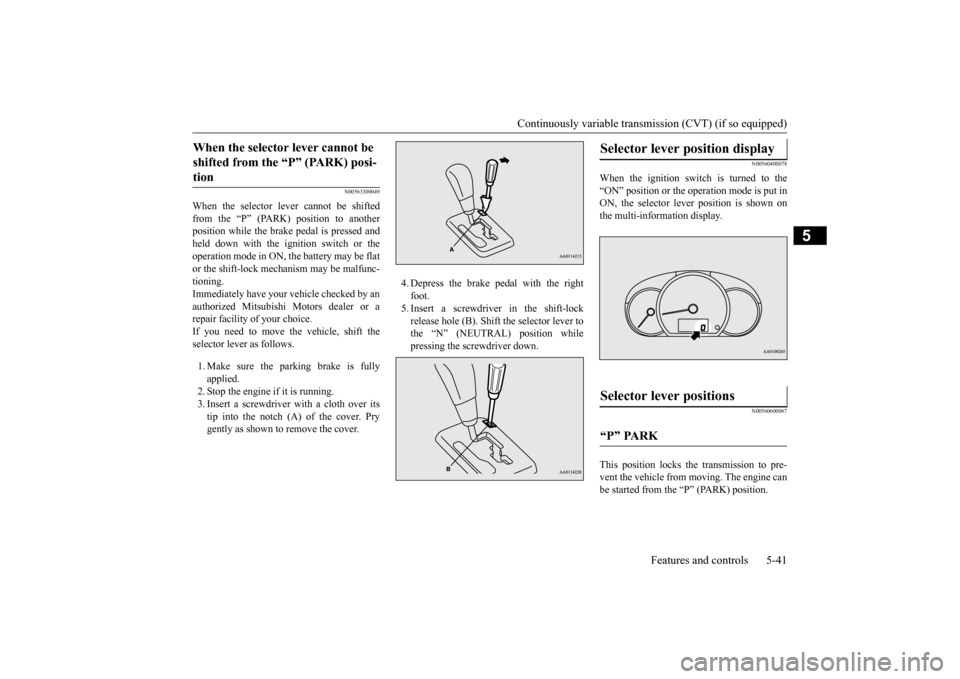
If you need to move the vehicle, shift the selector lever as follows. 1. Make sure the parking brake is fully applied.2. Stop the engine if it is running. 3. Insert a screwdrive
r with a cloth over its
tip into the notch (A) of the cover. Prygently as shown to remove the cover.
4. Depress the brake pedal with the right foot.5. Insert a screwdriver in the shift-lock release hole (B). Shift the selector lever to the “N” (NEUTRAL) position whilepressing the screwdriver down.
N00560400078
When the ignition switch is turned to the “ON” position or the operation mode is put in ON, the selector lever position is shown onthe multi-information display.
N00560600067
This position locks the transmission to pre-vent the vehicle from m
oving. The engine can
be started from the “P” (PARK) position.
When the selector lever cannot be shifted from the “P” (PARK) posi-tion
Selector lever position display
Selector lever positions
“P” PARK
BK0212400US.book 41 ページ 2014年4月1日 火曜日 午後2時21分
Page 112 of 300
Active stability control (ASC) Features and controls 5-51
5
N00546500118
N00546600119
If an abnormal condition occurs in the sys- tem, the following indicator will turn on.
N00546300031
When moving out of mud, sand or fresh snow, pressing the acce
lerator pedal may not
allow the engine speed to increase. In suchsituations, temporaril
y turning off ASC with
the “ASC OFF” switch will make it easier to move out your vehicle. If you continue to press the “ASC OFF” switch after the ASC is turned off, the “mis-taken operation protec
tion function” will
activate and the ASC will turn back on.
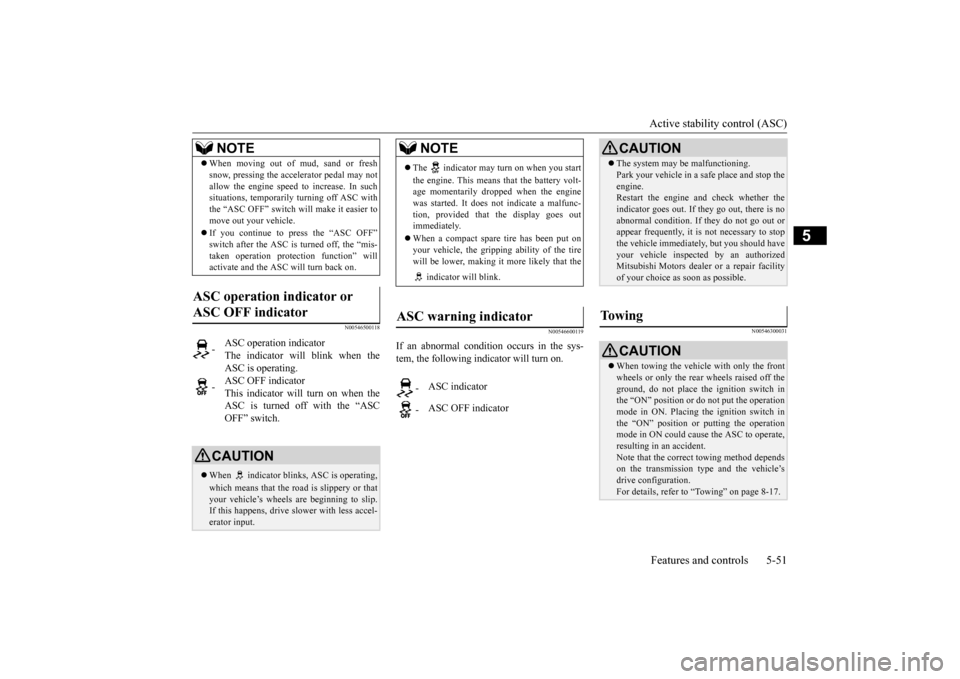
ASC operation indicator or ASC OFF indicator
-
ASC operation indicator The indicator will blink when the ASC is operating.
-
ASC OFF indicator This indicator will turn on when the ASC is turned off with the “ASCOFF” switch.
CAUTION When indicator bli
nks, ASC is operating,
which means that the road is slippery or that your vehicle’s wheels ar
e beginning to slip.
If this happens, drive
slower with less accel-
erator input.NOTE
NOTE
The indicator may turn on when you start the engine. This means that the battery volt- age momentarily dropped when the enginewas started. It does not
indicate a malfunc-
tion, provided that
the display goes out
immediately. When a compact spare tire has been put on your vehicle, the grippi
ng ability of the tire
will be lower, making it
more likely that the
indicator will blink.
ASC warning indicator
-
ASC indicator
-
ASC OFF indicator
CAUTION The system may be malfunctioning. Park your vehicle in a
safe place and stop the
engine.Restart the engine and check whether the indicator goes out. If th
ey go out, there is no
abnormal condition. If
they do not go out or
appear frequently, it is
not necessary to stop
the vehicle imme
diately, but you should have
your vehicle inspected by an authorizedMitsubishi Motors dealer
or a repair facility
of your choice as soon as possible.
To w i n g
CAUTION When towing the vehicle with only the front wheels or only the rear wheels raised off theground, do not place th
e ignition switch in
the “ON” position or
do not put the operation
mode in ON. Placing
the ignition switch in
the “ON” position or
putting the operation
mode in ON could caus
e the ASC to operate,
resulting in an accident.Note that the correct
towing method depends
on the transmission type
and the vehicle’s
drive configuration. For details, refer to “Towing” on page 8-17.
BK0212400US.book 51 ページ 2014年4月1日 火曜日 午後2時21分
Page 120 of 300
Tire pressure monitoring system (if so equipped)
Features and controls 5-59
5
The tire pressure monitoring system may not work normally in the following circum- stances: A wireless facility or device using the same frequency is near the vehicle. Snow or ice is stuck inside the fenders and/or on the wheels. The tire inflation pres
sure sensor’s battery
is dead. Wheels other than Mitsubishi Genuine wheels are being used. Wheels that are not fitted with tire infla- tion pressure sensors are being used. Wheels whose ID codes are not memo- rized by the vehicle are used. Compact spare tire (if so equipped) is fit- ted on a road wheel. A window tint that affects the radio wave signals is installed.
N00532900153
If new wheels with new tire inflation pressuresensors are installed, their ID codes must be programmed into the tire pressure monitoring system. Have tire and
wheel replacement per-
formed by an authorized Mitsubishi Motors dealer to avoid the ri
sk of damaging the tire
inflation pressure sensors. If the wheelreplacement is not done by an authorized Mitsubishi Motors dealer
, it is not covered by
your warranty.
N00533000236
Your tire pressure monitoring system oper- ates on a radio frequenc
y subject to Federal
Communications Commission (FCC) Rules(For vehicles sold in
U.S.A.) and Industry
Canada Rules (For vehicles sold in Canada). This device complies with part 15 of FCCRules and Industry Ca
nada licence-exempt
RSS standard(s). Operation is subject to the following two con- ditions. This device may not
cause harmful inter-
ference This device must ac
cept any interference
received, including interference that may cause undesired operation.
Do not use an aerosol puncture-repair spray on any tire.Such a spray could damage the tire inflationpressure sensors. Have any puncture repaired by an authorized Mitsubishi Motors dealer. Using the tire repair kit may damage the tire inflation pressure sensor. The vehicle mustpromptly be inspected and repaired by an authorized Mitsubishi Motors dealer after using the tire repair kit.NOTE
NOTE
Tire inflation pressures vary with the ambi- ent temperature. If the vehicle is subjected tolarge variations in ambient temperature, thetire inflation pressures may be under-inflated (causing the warning light come on) when the ambient temperature is relatively low. Ifthe warning light comes on, adjust the tire inflation pressure.
Whenever the tires and wheels are replaced with new ones
CAUTION The use of non-genuine wheels will prevent the proper fit of the tire inflation pressure sensors, resulting air
leakage or damage of
the sensors.
General information
WA R N I N G Changes or modifica
tions not expressly
approved by the manufacturer for compli- ance could void the
user’s authority to
operate the equipment.
BK0212400US.book 59 ページ 2014年4月1日 火曜日 午後2時21分
Page 126 of 300
Multi-information display
Features and controls 5-65
5
To return the display to 0, hold down the multi-information display switch for about 1 second or more. Only the currently displayed value will be reset. Example If trip odometer is displayed, only tripodometer will be reset.
N00575100015
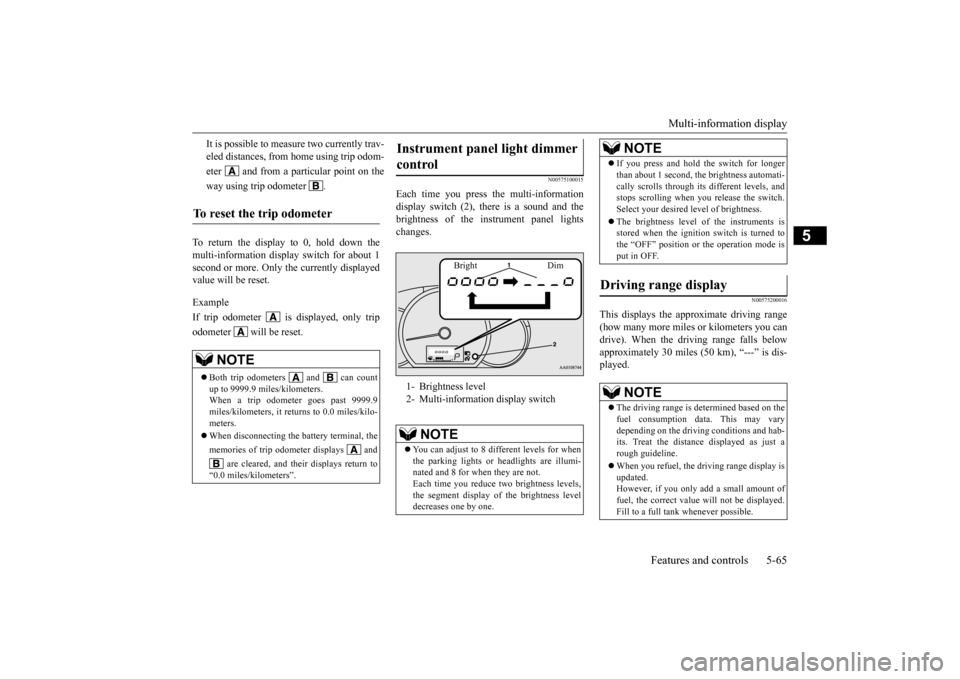
Each time you press
the multi-information
display switch (2), there is a sound and thebrightness of the in
strument panel lights
changes.
N00575200016
This displays the approximate driving range (how many more miles or
kilometers you can
drive). When the driving range falls below approximately 30 miles (
50 km), “---” is dis-
played.
It is possible to measure two currently trav- eled distances, from home using trip odom- eter and from a particular point on theway using trip odometer .
To reset the trip odometer
NOTE
Both trip odometers and can count up to 9999.9 miles/kilometers. When a trip odometer goes past 9999.9 miles/kilometers, it returns to 0.0 miles/kilo-meters. When disconnecting the battery terminal, the memories of trip odom
eter displays and
are cleared, and thei
r displays return to
“0.0 miles/kilometers”.
Instrument panel light dimmer control 1- Brightness level 2- Multi-informati
on display switch
NOTE
You can adjust to 8 different levels for when the parking lights or
headlights are illumi-
nated and 8 for when they are not. Each time you reduce tw
o brightness levels,
the segment display of the brightness leveldecreases one by one.
Bright Dim
If you press and hold the switch for longer than about 1 second, th
e brightness automati-
cally scrolls through its different levels, andstops scrolling when
you release the switch.
Select your desired
level of brightness.
The brightness level of the instruments is stored when the ignition switch is turned to the “OFF” position or the operation mode isput in OFF.
Driving range display
NOTE
The driving range is determined based on the fuel consumption data. This may vary depending on the drivi
ng conditions and hab-
its. Treat the distance displayed as just arough guideline. When you refuel, the driving range display is updated. However, if you only add a small amount of fuel, the correct value
will not be displayed.
Fill to a full tank whenever possible.NOTE
BK0212400US.book 65 ページ 2014年4月1日 火曜日 午後2時21分
Page 127 of 300
Multi-information display 5-66 Features and controls
5
N00575300017
This displays the average fuel consumption from the last reset to the present. The reset mode conditions for the average fuel consumption disp
lay can be switched
between “Auto reset”
and “Manual reset”.
For information on how to change the aver- age fuel consumption display setting, refer to“Changing the function settings” on page 5-68.
N00575400018
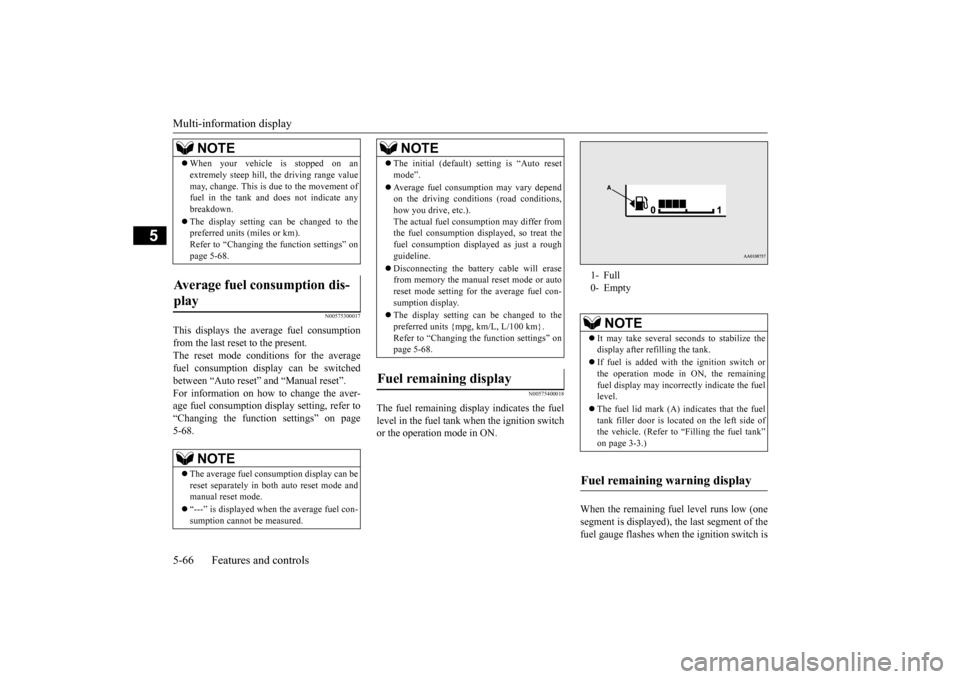
The fuel remain
ing display indicates the fuel
level in the fuel tank when the ignition switch or the operation mode in ON.
When the remaining fuel level runs low (one segment is displayed), th
e last segment of the
fuel gauge flashes when
the ignition switch is
When your vehicle is stopped on an extremely steep hill, th
e driving range value
may, change. This is due to the movement offuel in the tank and does not indicate any breakdown. The display setting can be changed to the preferred units (miles or km). Refer to “Changing th
e function settings” on
page 5-68.
Average fuel consumption dis- play
NOTE
The average fuel cons
umption display can be
reset separately in both auto reset mode and manual reset mode. “---” is displayed when the average fuel con- sumption cannot be measured.NOTE
The initial (default) setting is “Auto reset mode”. Average fuel consumption may vary depend on the driving conditi
ons (road conditions,
how you drive, etc.).The actual fuel consum
ption may differ from
the fuel consumption di
splayed, so treat the
fuel consumption displayed as just a roughguideline. Disconnecting th
e battery cable will erase
from memory the manual reset mode or auto reset mode setting for the average fuel con- sumption display. The display setting can be changed to the preferred units {mpg, km/L, L/100 km}.Refer to “Changing the
function settings” on
page 5-68.
Fuel remaining display
NOTE
1- Full 0- Empty
NOTE
It may take several se
conds to stabilize the
display after refilling the tank. If fuel is added with
the ignition switch or
the operation mode in ON, the remainingfuel display may incorr
ectly indicate the fuel
level. The fuel lid mark (A) indicates that the fuel tank filler door is loca
ted on the left side of
the vehicle. (Refer to “Filling the fuel tank”on page 3-3.)
Fuel remaining warning display
BK0212400US.book 66 ページ 2014年4月1日 火曜日 午後2時21分