ad blue MITSUBISHI MIRAGE 2015 6.G Owner's Manual
[x] Cancel search | Manufacturer: MITSUBISHI, Model Year: 2015, Model line: MIRAGE, Model: MITSUBISHI MIRAGE 2015 6.GPages: 300, PDF Size: 43.44 MB
Page 159 of 300
![MITSUBISHI MIRAGE 2015 6.G Owners Manual Bluetooth® 2.0 interface (if so equipped) 5-98 Features and controls
5
[Listening to the list
of registered names]
1. Press the SPEECH button. 2. Say “Phonebook.”3. The voice guide will say â€](/img/19/7511/w960_7511-158.png "MITSUBISHI MIRAGE 2015 6.G Owners Manual Bluetooth® 2.0 interface (if so equipped) 5-98 Features and controls
5
[Listening to the list
of registered names]
1. Press the SPEECH button. 2. Say “Phonebook.”3. The voice guide will say â€")
Bluetooth® 2.0 interface (if so equipped) 5-98 Features and controls
5
[Listening to the list
of registered names]
1. Press the SPEECH button. 2. Say “Phonebook.”3. The voice guide will say “Select one of the following: new entry, edit number, edit name, list names, delete, erase all, orimport contact.” Sa
y “List names.”
4. Bluetooth
® 2.0 interface will read out the
entries in the phonebook in order.5. When the voice guide is done reading the list, it will say “End of
list, would you like
to start from the beginning?” When you want to check the list again from the beginning, answer “Yes.”When you are done, answer “No” to return to the previous or main menu.
[Deleting a te
lephone number]
1. Press the SPEECH button. 2. Say “Phonebook.”3. The voice guide will
say “Select one of
the following: new entry, edit number, edit name, list names, delete, erase all, orimport contact.” Say “Delete.” 4. The voice guide will
say “Please say the
name of the entry you would like todelete, or say list names.” Say the name of the phonebook entry in which the tele- phone number you want to delete is regis- tered. 5. If only one telephone
number is registered
in the selected phonebook entry, the voiceguide will say “Deleting
ed phonebook entry, the
voice guide will say “Would you like to delete [home], [work], [mobile], [other],or all?”
Select the location to delete, and the voice guide will say “Del
eting
if you really want to
delete the selected
telephone number(s) to
go ahead with the deletion, answer “Yes.” Answer “No,” the system will cancel deleting the telephone number(s) and thenreturn to Step 4. 7. When the telephone number deletion is complete, the voice guide will say“
deleted” and then
the system will return to the main menu. If all locations are deleted, the system willsay “
removed from the
phonebook. If numbers still remain underthe entry, the name will retain the other associated numbers.
You can delete all registered information from the vehicle phonebook. 1. Press the SPEECH button. 2. Say “Phonebook.”
NOTE
You can call, edit or delete a name that is being read out. Press the SPEECH butt
on and say “Call” to
call the name, “Edit name” to edit it, or“Delete” to delete it. The system will beep and then execute your command. If you press the SPEECH button and say “Continue” or “Previous” while the list isbeing read, the system will advance or rewind the list. Say “C
ontinue” to proceed to
the next entry or “Previous” to return to theprevious entry.
NOTE
Say “List names,” and
the names registered
in the phonebook are read out in order. Refer to “Vehicle phonebook: Listening to the list of registered names” on page 5-98.
NOTE
To delete the telepho
ne numbers from all
locations, say “All.”
Erasing the phonebook
BK0212400US.book 98 ページ 2014年4月1日 火曜日 午後2時21分
Page 160 of 300

Bluetooth® 2.0 interface (if so equipped)
Features and controls 5-99
5
3. The voice guide will
say “Select one of
the following: new entry, edit number,edit name, list names, delete, erase all, or import contact.” Say “Erase all.” 4. For confirmation purposes, the voiceguide will ask “Are you sure you want to erase everything from your hands-free system phonebook?” Answer “Yes.”Answer “No” to cancel the deletion of all registered information in the phonebook and return to the main menu. 5. The voice guide will say “You are about to delete everything from your hands-freesystem phonebook. Do
you want to con-
tinue?” Answer “Yes” to continue. Answer “No” to cancel the deletion of allregistered information in the phonebook and return to the main menu. 6. The voice guide wi
ll say “Please wait,
erasing the hands-free system phone- book” and then the syst
em will de
lete all
data in the phonebook.When the deletion is complete, the voice guide will say “Ha
nds-free system phone-
book erased” and then the system willreturn to the main menu.
N00566200049
All entries in the phonebook stored in the cel-lular phone can be transferred in a batch and registered in the mobile phonebook.
Up to 7 mobile phonebooks, each containing up to 1,000 names, can be registered. The Bluetooth
® 2.0 interface automatically
converts from text to
voice the na
mes regis-
tered in the transferred phonebook entries, and creates names. Follow the steps below to transfer to the mobile phonebook the phonebook stored inthe cellular phone.
1. Press the SPEECH button. 2. Say “Phonebook.” 3. The voice guide will
say “Select one of
the following: new entry, edit number,edit name, list names, delete, erase all, or import contact.
” Say “Import contact.”
4. The voice guide will say “Would you liketo import a single entry or all contacts?” Say “All contacts.”
Mobile phonebook
NOTE
Only the mobile phonebook transferred from the connected cellul
ar phone can be used
with that cellular phone. You cannot change the names and telephone numbers in the phonebook entries registered in the mobile phonebook. You cannot selectand delete spec
ific phonebook entries, either.
To change or delete any of the above, change the applicable information in the sourcephonebook of the cellular phone and then transfer the phonebook again.
To import a devices phonebook
NOTE
Transfer should be completed while the vehi- cle is parked. Before transferring, make surethat the vehicle is park
ed in a safe location.
The already stored phonebook in the mobile phonebook is overwritten by the storedphonebook in the cellular phone. All or part of data
may not be transferred,
even when the cellular phone supports Blue- tooth
®, depending on the compatibility of
the device. Only a home, a work, and a mobile number can be imported. The maximum supported telephone number length is 19 digits. A
ny telephone number of
20 digits or more will be
truncated to the first
19 digits. If telephone numbers
contain characters
other than 0 to 9,
*, # or +, these characters
are deleted before the transfer. For the connection set
tings on the cellular
phone side, refer to the instructions for thecellular phone.NOTE
BK0212400US.book 99 ページ 2014年4月1日 火曜日 午後2時21分
Page 161 of 300
Bluetooth® 2.0 interface (if so equipped) 5-100 Features and controls
5
5. The voice guide will say “Importing the contact list from the mobile phonebook.This may take several minutes to com- plete. Would you li
ke to continue?”
Answer “Yes,” transferring to the mobilephonebook the phonebook stored in the cellular phone will start. Answer “No,” the system will return tothe main menu.
6. When the transfer is complete, the voice guide will say “Import complete” andthen the system will return to the main menu.
N00566301092
MODEL: MMC FCC ID: CB2MDGMY10IC: 279B-MDGMY10 Your Bluetooth
® 2.0 interface operates on a
radio frequency subject to Federal Communi- cations Commission (FCC)
Rules (For vehi-
cles sold in U.S.A.
) and Industry Canada
Rules (For vehicles so
ld in Canada). This
device complies with Part 15 of the FCCRules and RSS-210 of the Industry Canada Rules. Operation is subject to the following two conditions: This device may not
cause harmful inter-
ference. This device must ac
cept any interference
received, including interference that maycause undesired operation.
The term “IC:” before
the radio certification
number only signifies th
at Industry Canada
technical specifications were met. The antenna used for this transmitter must not be co-located or operating in conjunctionwith any other antenna
or transmitter. End-
users and installers must be provided with installation instructions
and transmitter oper-
ating conditions for sa
tisfying RF exposure
compliance. FCC Notice: This equipment has been tested and found to comply with the limits for a Class B digital device, pursuant to part 15 ofthe FCC Rules. These limits are designed to provide reasonable prot
ection against harmful
interference in a residential installation.This equipment generate
s, use and can radiate
radio frequency energy a
nd, if not installed
and used in accordance with the instructions,may cause harmful interf
erence to radio com-
munications. However, there is no guarantee that interfer-ence will not occur in a particular installation. If this equipment does
cause harmful interfer-
ence to radio or tele
vision reception, which
can be determined by turning the equipment off and on, the user is encouraged to try to correct the interference by one or more of thefollowing measures: Reorient or relocate the receiving antenna. Increase the separation between the equipment and receiver.
NOTE
The transfer may take some time to complete depending on the number of contacts. If the Bluetooth
® 2.0 interface could not be
connected to the Bluetooth
® compatible cel-
lular phone, the voice gui
de will sa
y “Unable
to transfer contact list from phone” and thenthe system will return to the main menu. If you press the HANG-UP button or press and hold the SPEECH button during the data transfer, the transfer will be cancelled and the system will return to the main menu. If an error occurs during the data transfer, all transfer will be canc
elled and the voice guide
will say “Unable to complete the phonebook import” and then the system will return to the main menu. If there are no contacts in the phonebook, the voice guide will say
“There are no contacts
on the connected phone.”
General information
CAUTION Changes or modifica
tions made to this
equipment not expressly approved by the manufacturer may void the FCC authoriza- tion to operate this equipment.
BK0212400US.book 100 ページ 2014年4月1日 火曜日 午後2時21分
Page 165 of 300
USB input terminal (if so equipped) 5-104 Features and controls
5
On vehicles equipped with the Bluetooth
®
2.0 interface, for thes
e connectable device
types, “iPod
*,” “iPod classic
*,” “iPod
nano
*,” “iPod touch
*” and “iPhone
*,” refer
to the following website: [For vehicles sold in U.S.A.]You can access the Mitsubishi Motors North America website. [For vehicles sold in Canada]You can access the Mi
tsubishi Motors web-
site. Please read and agree to the “Warning about Links to the Web Sites of Other Com-panies”. The websites
mentioned above may
connect you to websites
other than the Mit-
subishi Motors website.
http://www.mitsubishi-motors.com/en/prod- ucts/index.html * : “iPod,” “iPod classic,” “iPod nano,” “iPod touch” and “iPhone” are registered trade- marks of Apple Inc. in the United States and other countries.
iPod clas- sic
*
80GB/180 GB
F/W Ver.1.1.2 or later
120GB
F/W Ver.2.0.1 or later
160GB (late 2009)
F/W Ver.2.0.4 or later
iPod nano
*
first gener- ation
F/W Ver.1.3.1 or later
second generation
F/W Ver.1.1.3 or later
third gen- eration
F/W Ver.1.1.3 or later
fourth generation
F/W Ver.1.0.4 or later
fifth gen- eration
F/W Ver.1.0.2 or later
sixth gen- eration
F/W Ver.1.0 or later
iPod touch
*
first gener- ation
F/W Ver.3.1.3 or later
second generation
F/W Ver.4.2.1 or later
third gen- eration
F/W Ver.4.3.1 or later
fourth generation
F/W Ver.4.3.1 or later
Model name
Condition
iPhone
*
iPhone
F/W Ver.3.1.3 or later
iPhone 3G
F/W Ver.4.2.1 or later
iPhone 3GS
F/W Ver.4.3.1 or later
iPhone 4
F/W Ver.4.3.1 or later
iPhone 4S
F/W Ver.5.0.1 or later
Models other than USB memory devices and iPods
Digital audio player supporting mass storage class
Model name
Condition
NOTE
Depending on the type of the USB memory device or other devi
ce connected, the con-
nected device may not
function properly or
the available functi
ons may be limited.
It is recommended to use an iPod with firm- ware updated to th
e latest version.
You can charge your
iPod by connecting it to
the USB input terminal
when the ignition
switch or the operati
on mode is in ON or
ACC. Do not keep your US
B memory device or
iPod in your vehicle. It is recommended that you back up the files in case of
data damage.
Do not connect to the USB input terminal any device (hard disk, card reader, memory reader, etc.) other than the connectabledevices specified in the previous section. The device and/or data
may be damaged. If
any of these devices
was connected by mis-
take, remove it afte
r turning the ignition
switch to the “OFF” position or putting the operation mode in OFF.
BK0212400US.book 104 ページ 2014年4月1日 火曜日 午後2時21分
Page 182 of 300
7
Comfort controlsVents ................................................................................................7-2 Heater without air conditioning functi
on (if so equipped) ...............7-4
Manual air conditioning (if so equipped) .........................................7-7Automatic air conditioning (if so equipped)................................... 7-11 Important air conditioning operating tips ..
...........
...........
.........
.....7-17
Air purifier (if so equipped)............................................................7-18AM/FM electronically tune
d radio with CD player
(if so equipped) ..........................................................................7-18 To play tracks from USB device (if so equipped) ..........................7-27 To play tracks from a Bluetooth
® device
(vehicles with Bluetooth
® 2.0 interface) ...................................7-35
Steering wheel audio remote control
switches (if so equipped) .....7-37
Error codes .....................................................................................7-38 Handling of compact discs .............................................................7-40 Antenna ..........................................................................................7-41General information about your radio .....
...........
...........
...........
.....7-42
BK0212400US.book 1 ページ 2014年4月1日 火曜日 午後2時21分
Page 206 of 300
AM/FM electronically tuned radio with CD player (if so equipped)
Comfort controls 7-25
7
If you keep pressing the button, fast-for- ward begins.3. When the “hours” digit is adjusted, press the button to flash the “minutes” digit.Press the or button to adjust the “minutes” digit. If you keep pressing the button, fast-for-ward begins. 4. When the time is set, press the button to stop the clock display from flashing.
N00702800012
1. Press and hold the /MENU button untilyou hear a beep. “GracenoteDB” will appear on the display. Each time the /MENU button is pressed, this switches in the order Grace- note DB, PHONE SET and cancel. 2. Press the or buttons several times to select “DB Version” and then press the
/MENU button to determine.
The Gracenote DB ve
rsion is displayed.
N00702900013
It is possible to set the language used for voice control. 1. Press and hold the /MENU button until you hear a beep. “GracenoteDB” will appear on the display. 2. Press the /MENU button to select “PHONE SET”. Then press the or buttons several times to select “LANGUAGE” and then press the /MENU button to determine.
NOTE
Reset the time after the battery terminals are disconnected an
d reconnected.
Seconds do not appear
in the clock display,
but after adjusting the “minutes” setting, the clock begins to operate from 0 seconds.
To confirm the version number of the Gracenote DB (vehicles with a Bluetooth
® 2.0 interface)
A-
/MENU button
B-
button
C-
button
To change the language (vehi- cles with Bluetooth
® 2.0 inter-
face)
A-
/MENU button
B-
button
C-
button
BK0212400US.book 25 ページ 2014年4月1日 火曜日 午後2時21分
Page 208 of 300
To play tracks from USB device (if so equipped)
Comfort controls 7-27
7
N00762200056
You can connect your iPod or USB memory device to the USB input terminal and playmusic files stored in the iPod or USB mem- ory device. See the following section for the types ofconnectable devices
and supported files.
Refer to “Types of connectable devices and supported file specifications” on page 5-103.See the following sections for the connecting methods, “How to conne
ct an iPod” on page
5-102 and “How to connect a USB memorydevice” on page 5-101. If your vehicle is equipped with a Bluetooth
®
2.0 interface, you can play music files in your iPod or USB memory de
vice via voice opera-
tion. Refer to “To play iPod
tracks via voice opera-
tion” on page 7-29 and “To play USB mem-
ory device tracks via voice operation” on page 7-35.
N00762300060
N00762400087
1. Press the PWR switch to turn on the audio system. The system turns on in the lastmode used. 2. Connect your iPod to the USB input ter- minal.Refer to “How to connect an iPod” on page 5-102. 3. Press the CD button several times toswitch to the iPod mode. The input mode changes as follows every time the CD but- ton is pressed: CD mode
iPod mode
Bluetooth
® mode (if so equipped)
AUX mode
CD mode.
The iPod indicator are illuminated andthen the iPod mode will be activated. 4. Once the device is selected, playback starts and indicato
r appears on the dis-
play.
If the connection cord
alone is left connected
to the auxiliary audi
o connector, noise may
be produced from the speakers. For information on how to connect and oper- ate the commercially av
ailable audio equip-
ment, refer to the ow
ner’s manual for the
commercially availabl
e audio equipment.
To play tracks from USB device
(if so equipped)
NOTE
NOTE
A file protected by c
opyright might not be
able to playback. It is recommended to adjust the equalizer of the connected device to 0 db or neutral.
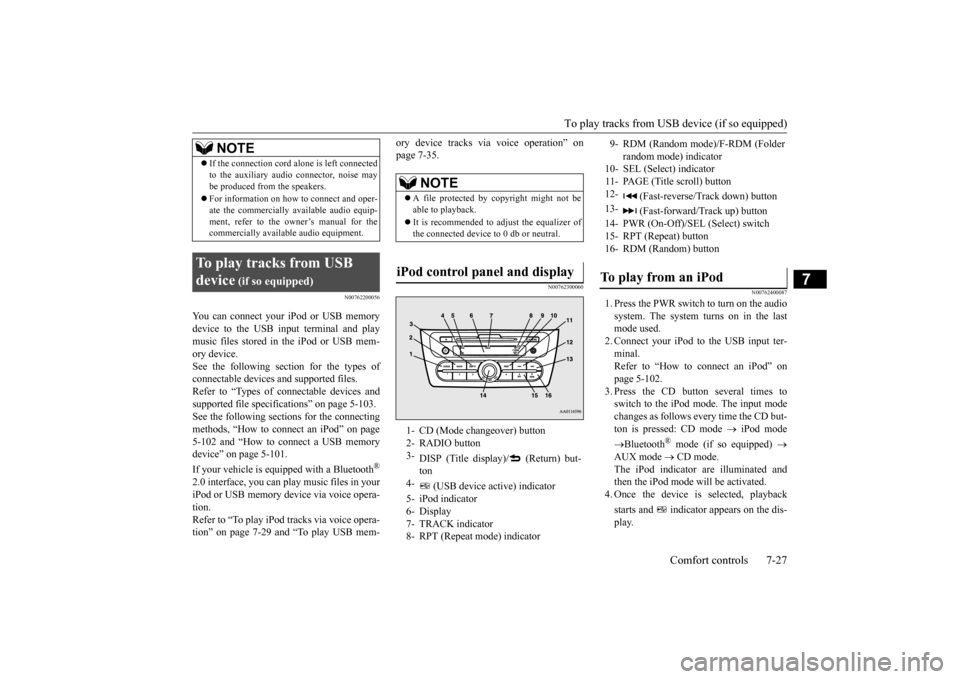
iPod control panel and display
1- CD (Mode changeover) button 2- RADIO button 3-
DISP (Title display)/ (Return) but- ton
4-
(USB device active) indicator
5- iPod indicator 6- Display 7- TRACK indicator8- RPT (Repeat mode) indicator
9- RDM (Random mode)/F-RDM (Folder
random mode) indicator
10- SEL (Select)
indicator
11- PAGE (Title scroll) button 12-
(Fast-reverse/Track down) button
13-
(Fast-forward/Track up) button
14- PWR (On-Off)/SEL (Select) switch 15- RPT (Repeat) button 16- RDM (Random) buttonTo play from an iPod
BK0212400US.book 27 ページ 2014年4月1日 火曜日 午後2時21分
Page 209 of 300

To play tracks from USB device (if so equipped) 7-28 Comfort controls
7
5. To stop the playback, press the RADIO button or CD button to switch to a differ-ent mode.
N00762500033
To fast-forward/reverse the current track, press the button or button. To fast-forward the current track, press the
button. While the button is kept pressed,
the track will be fast-forwarded.
To fast-reverse the current track, press the button. While the button is kept pressed, the track will be fast-reversed.
N00762600034
Press the button repeatedly until the desired track number appears on the display. Press the button repeatedly until the desired track number appears on the display.
N00762700077
You can select desired tracks from the “Playl- ists”, “Artists”,
“Albums”, “Songs” or
“Genre” (vehicles with Bluetooth
® 2.0 inter-
face) menus on your iPod. Operate the SEL switch to select desired tracks. The selected menu or category or track is shown in the display.When this mode is activated by pressing the SEL switch, the SEL i
ndicator will be dis-
played in the display.
NOTE
Depending on the condition of your iPod, it may take a longer time
before the playback
starts.NOTE
Buttons on the iPod are disabled while the iPod is connected to the audio system. To adjust the volume and tone, refer to “To adjust the volume” on page 7-18 and “To adjust the tone” on page 7-19.
To fast-forward/reverse the track
Fast-forward
Fast-reverseTo select a desired track
Tr a c k u p Tr a c k d o w n
NOTE
Pressing the button once during the song will cause the audio system to restart play- back from the beginning of the song.
To find a track from the iPod menu
Press the SEL switch :To start this mode or
to select the menu or category or track.
Turn the SEL switch :To show the menu or
category or track.
NOTE
To cancel the selecti
on, press the button
to return to the previous step. If no operation is perf
ormed for 10 seconds
or more or other butt
on is operated after the
SEL switch has been pressed, searching of the desired tracks is canceled. If no operation is performed for 5 seconds or more after the track is
displayed, playback
starts. When the SEL indicato
r is not shown on the
display and the SEL switch is operated, the volume adjustment is activated.
BK0212400US.book 28 ページ 2014年4月1日 火曜日 午後2時21分
Page 210 of 300
To play tracks from USB device (if so equipped)
Comfort controls 7-29
7
N00762800023
Press the RPT button during playback to show “RPT” in the display. To exit this mode, press the button again.
N00762900024
Press the RDM button to show “RDM” in thedisplay. The iPod randomly select
s tracks from the
current category and plays the selected tracks.To exit this mode, press the button again.
N00763000035
Press and hold the RDM button until you heara beep to show “F-RDM” in the display.The iPod randomly sele
cts tracks in the
album from the current category and play the selected tracks.To exit this mode, press the button again.
N00763100049
You can display the track titles, artist names,genre and album titles recorded in the iPod. The display changes as follows every time the DISP button is pressed during playback:
Album title
Track name
Artist name
Genre (vehicles with Bluetooth
® 2.0 inter-
face)
Normal display.
N00763200040
Desired tracks can be
selected and played
from your iPod by “Artis
t”, “Album”,
“Playl-
ist” and “Genre” us
ing voice commands.
For information concerning the voice recog- nition function or spea
ker registration func-
tion, refer to “Bluetooth
® 2.0 interface” on
page 5-81. The following explains how to prepare forvoice operation and play the tracks.
N00763300067
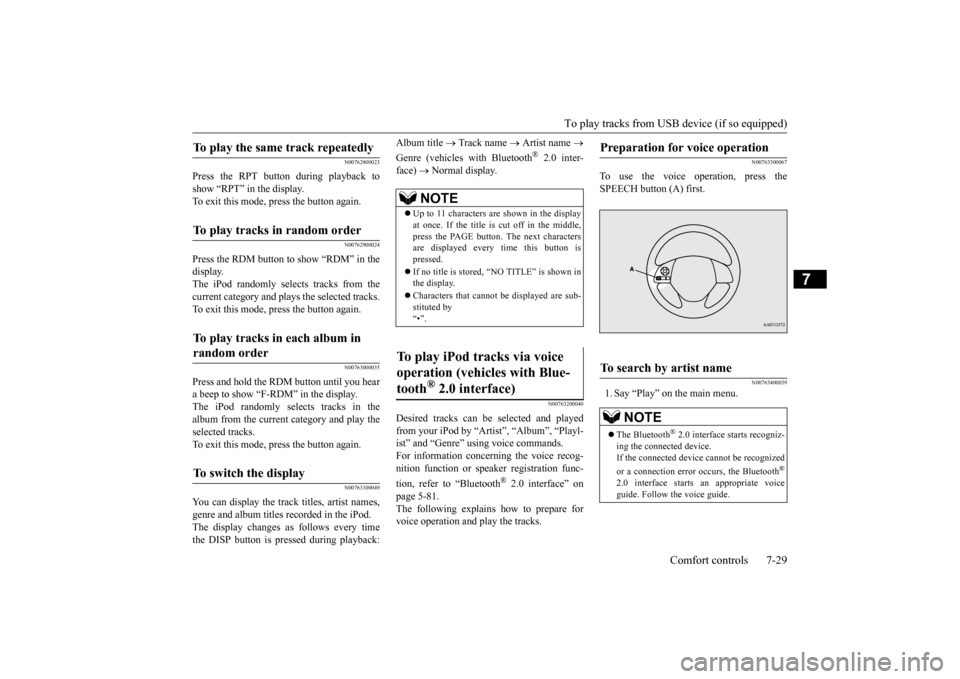
To use the voice operation, press the SPEECH button (A) first.
N00763400039
1. Say “Play” on the main menu.
To play the same track repeatedly
To play tracks in random order
To play tracks in each album in random order
To switch the display
NOTE
Up to 11 characters are shown in the display at once. If the title is cut off in the middle,press the PAGE button. The next characters are displayed every time this button is pressed. If no title is stored, “NO TITLE” is shown in the display. Characters that cannot
be displayed are sub-
stituted by “•”.
To play iPod tracks via voice operation (vehicles with Blue- tooth
® 2.0 interface)
Preparation for voice operation
To search by artist name
NOTE
The Bluetooth
® 2.0 interface
starts recogniz-
ing the connected device. If the connected device
cannot be recognized
or a connection error
occurs, the Bluetooth
®
2.0 interface starts an appropriate voice guide. Follow th
e voice guide.
BK0212400US.book 29 ページ 2014年4月1日 火曜日 午後2時21分
Page 211 of 300

To play tracks from USB device (if so equipped) 7-30 Comfort controls
7
2. After the voice guide says “Would you like to play by Artist, Album, Playlist orGenre?,” say “Artist”. 3. After the voice guide
says “What Artist
would you like to play?,” say the artist name.4. If there is only one ma
tch, the system pro-
ceeds to step 6. 5. If there are two or more matches, thevoice guide will say “More than one match was found, would you like to play
say “Yes,” the sys-
tem proceeds to step 6. If you say “No,” the next matching artist is uttered by the system.
6. After the voice guide
says “Playing
the voice recognition
mode and starts playback.
N00763500030
1. Say “Play” on the main menu. 2. After the voice guide says “Would you like to play by Artist, Album, Playlist orGenre?,” say “Album”.
3. After the voice gui
de says “What Album
would you like to play?” say the album title. 4. If there is only one ma
tch, the system pro-
ceeds to step 6. 5. If there are two or more matches, the voice guide will say “More than onematch was found, would you like to play
u say “Yes,” the sys-
tem proceeds to step 6.If you say “No,” the name of the next matching album is uttered by the system. 6. After the voice gui
de says “Playing
NOTE
If you say “Artist
If you say “No” to three or all artist names uttered by the system, the voice guide willsay “Artist not found, please try again” andthe system returns to step 2. Search time depends
on the number of songs
on your connected devi
ce. Devices contain-
ing a large number of songs may take longer to return search results.
NOTE
If the confirmation function is active, the voice guide confirms if
the artist name is
correct. If the artist name is correct, say “Yes”. If not, say “No”. After the voice guidesays “Artist not found, please try again,” the system returns to step 2.
To search by album title
NOTE
The Bluetooth
® 2.0 interface
starts recogniz-
ing the connected device. If the connected device
cannot be recognized
or a connection error
occurs, the Bluetooth
®
2.0 interface starts an appropriate voice guide. Follow the voice guide.
NOTE
If you say “Album