steering MITSUBISHI MIRAGE 2015 6.G Owner's Manual
[x] Cancel search | Manufacturer: MITSUBISHI, Model Year: 2015, Model line: MIRAGE, Model: MITSUBISHI MIRAGE 2015 6.GPages: 300, PDF Size: 43.44 MB
Page 142 of 300
Horn switch
Features and controls 5-81
5
N00523800185
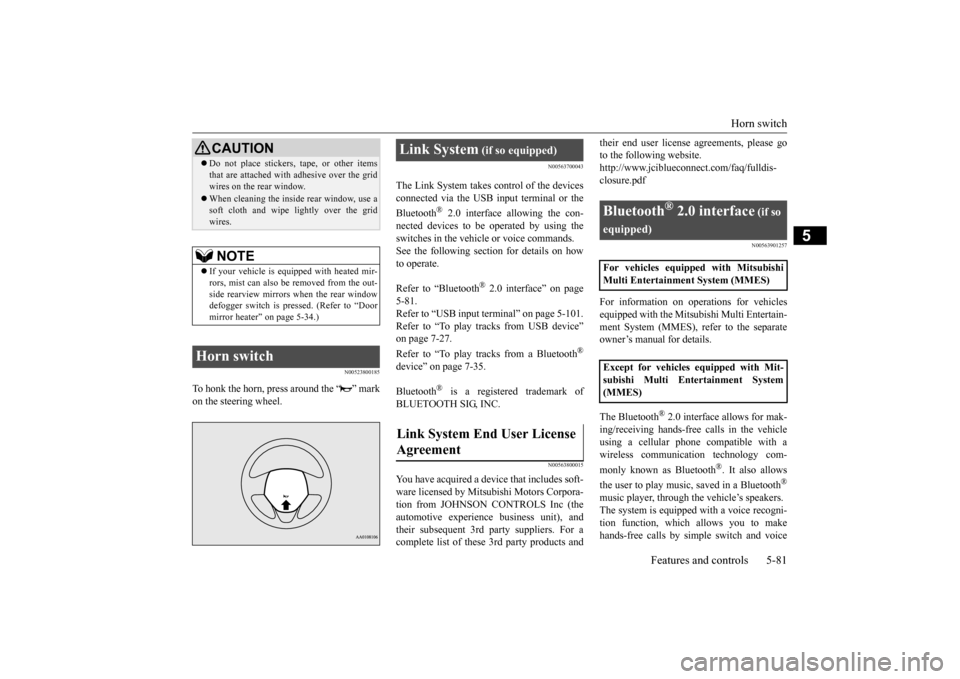
To honk the horn, press around the “ ” mark on the steering wheel.
N00563700043
The Link System takes co
ntrol of the devices
connected via the USB input terminal or the Bluetooth
® 2.0 interface allowing the con-
nected devices to be operated by using the switches in the vehicl
e or voice commands.
See the following sect
ion for details on how
to operate. Refer to “Bluetooth
® 2.0 interface” on page
5-81. Refer to “USB input terminal” on page 5-101. Refer to “To play tracks from USB device”on page 7-27. Refer to “To play tracks from a Bluetooth
®
device” on page 7-35. Bluetooth
® is a registered trademark of
BLUETOOTH SIG, INC.
N00563800015
You have acquired a device
that includes soft-
ware licensed by Mits
ubishi Motors Corpora-
tion from JOHNSON CONTROLS Inc (theautomotive experience business unit), and their subsequent 3rd party suppliers. For a complete list of these
3rd party products and
their end user license
agreements, please go
to the following website.http://www.jciblueconne
ct.com/faq/fulldis-
closure.pdf
N00563901257
For information on operations for vehicles equipped with the Mits
ubishi Multi Entertain-
ment System (MMES),
refer to the separate
owner’s manual for details. The Bluetooth
® 2.0 interface allows for mak-
ing/receiving ha
nds-free calls in the vehicle
using a cellular phone compatible with a wireless communicat
ion technology com-
monly known as Bluetooth
®. It also allows
the user to play music, saved in a Bluetooth
®
music player, through the vehicle’s speakers. The system is equipped with a voice recogni-tion function, which allows you to make hands-free calls by simple switch and voice
Do not place stickers,
tape, or other items
that are attached with adhesive over the gridwires on the rear window. When cleaning the inside
rear window, use a
soft cloth and wipe lightly over the gridwires.NOTE
If your vehicle is equi
pped with heated mir-
rors, mist can also be removed from the out- side rearview mirrors when the rear window defogger switch is pressed. (Refer to “Doormirror heater” on page 5-34.)
Horn switch
CAUTION
Link System
(if so equipped)
Link System End User License Agreement
Bluetooth
® 2.0 interface
(if so
equipped)For vehicles equipped with Mitsubishi Multi Entertainment System (MMES) Except for vehicles equipped with Mit- subishi Multi Entertainment System (MMES)
BK0212400US.book 81 ページ 2014年4月1日 火曜日 午後2時21分
Page 143 of 300
Bluetooth® 2.0 interface (if so equipped) 5-82 Features and controls
5
command operations us
ing a defined voice
tree. The Bluetooth
® 2.0 interface can be used
when the ignition switch or the operation mode is in ON or ACC. Before you can use the Bluetooth
® 2.0 inter-
face, you must pa
ir the Bluetooth
® device
and Bluetooth
® 2.0 interface. Refer to “Con-
necting the Bluetooth
® 2.0 interface and
Bluetooth
® device” on page 5-87.
Bluetooth
® is a registered trademark of
BLUETOOTH SIG, INC.
Steering control sw
itch and microphone
P.5-83Voice recognition function
P.5-84
Useful voice commands
P.5-85
Speaker enrollment function
P. 5 - 8 6
Connecting the Bluetooth
® 2.0 interface and
the Bluetooth
® device
P.5-87
Operating a music player connected via Blue- tooth
® P.5-91
How to make or r
eceive hands-free calls
P.5-91Phonebook function
P.5-94
WA R N I N GAlthough the Bluetooth
® 2.0 interface
allows you to make ha
nds-free calls, if you
choose to use the cellular phone while driving, you must not allow yourself to bedistracted from the sa
fe operation of your
vehicle. Anything, including cellular phone usage, that distracts you from thesafe operation of your vehicle increases your risk of
an accident.
Refer to and comply with all state and local laws in your area regarding cellular phone usage wh
ile driving.
NOTE
For vehicles equipped with the F.A.S.T.-key, if the operation mode is left in ACC, theaccessory power will automatically turn offafter a certain period
of time and you will no
longer be able to use the Bluetooth
® 2.0
interface. The accessory power comes on again if the engine
switch is operated.
Refer to “ACC power
auto-cutout function”
on page 5-14. The Bluetooth
® 2.0 interface
cannot be used
if the Bluetooth
® device has a dead battery
or the device power is turned off. Hands-free calls will
not be possible if your
phone does not have
service available.
If you place the Bluetooth
® device in the
cargo area, you may not be able to use the Bluetooth
® 2.0 interface.
Some Bluetooth
® devices are not compatible
with the Bluetooth
® 2.0 interface.
You can confirm the Link System software version by pressing the HANG-UP button 3 times (press and hold 2 times and then pressbriefly) within 10 seconds.
For detail of the Bluetooth
® 2.0 interface,
refer to the following website: [For vehicles sold in U.S.A.] You can access the Mits
ubishi Motors North
America website. [For vehicles so
ld in Canada]
You can access the Mitsubishi Motors web-site. Please read and agree to the “Warning about Links to the Web Sites of Other Companies”,the websites mentione
d above may connect
you to websites other than the Mitsubishi Motors website.http://www.mitsubishi
-motors.com/en/prod-
ucts/index.html Software updates by cellular phone/digital audio device manufacturers may change/alter devi
ce connectivity.
NOTE
BK0212400US.book 82 ページ 2014年4月1日 火曜日 午後2時21分
Page 144 of 300
Bluetooth® 2.0 interface (if so equipped)
Features and controls 5-83
5
N00564000072
Press this button to increase the volume.
Press this button to decrease the volume. Press this button to ch
ange to voice recog-
nition mode.While the system is in voice recognition mode, “Listening” w
ill appear on the
audio display. If you press the button briefly while in voice recogniti
on mode, it will interrupt
prompting and allow voice command input. Pressing the button lo
nger will deactivate
the voice recognition mode. Pressing this button briefly during a call will enable voice
recognition and allow
voice command input. Press this button when an incoming call is received to answer the telephone. When another call is received during a call, press this button to put the first caller on hold and talk to the new caller.
• In such circumstance
s, you can press the
button briefly to switch between callers.You will switch to the first caller and the other caller will
be put on hold.
• To establish a three-way call in such situ-ations, press the SPEECH button to enter voice recognition mode and then say “Join calls.”
Press this button when an incoming call is received to refuse the call. Press this button during a call to end the current call. When another call is on hold, you willswitch to that call. If this button is pressed in the voice recog- nition mode, the voice recognition modewill be de
activated.
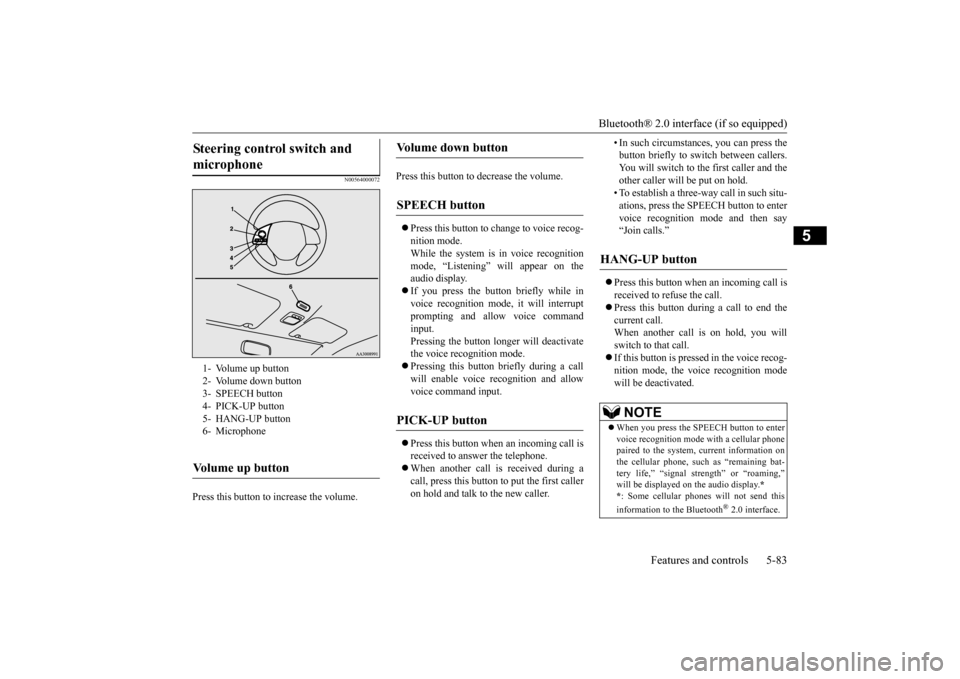
Steering control switch and microphone
1- Volume up button 2- Volume down button 3- SPEECH button4- PICK-UP button 5- HANG-UP button 6- MicrophoneVolume up button
Volume down button
SPEECH button
PICK-UP button
HANG-UP button
NOTE
When you press the SPEECH button to enter voice recognition mode
with a cellular phone
paired to the system, current information on the cellular phone, such as “remaining bat-tery life,” “signal st
rength” or “roaming,”
will be displayed on the audio display.
*
* : Some cellular phones
will not send this
information to the Bluetooth
® 2.0 interface.
BK0212400US.book 83 ページ 2014年4月1日 火曜日 午後2時21分
Page 154 of 300

Bluetooth® 2.0 interface (if so equipped)
Features and controls 5-93
5
5. If only 1 telephone number is registered under the name you just said, the voiceguide will proceed to Step 6. If 2 or more telephone
numbers are regis-
tered that match the name you just said,the voice guide will say “Would you like to call
6. The voice guide will say “Calling
the system will dial
the telephone number.
You can redial the last
number called, based
on the history of dialed calls in the paired cel- lular phone. Use the following procedure to redial. 1. Press the SPEECH button. 2. Say “Redial.”
N00565700018
During a call, press the SPEECH button toenter voice recognition mode, then say “
SPEECH button and speak “1 2 3 4 pound send” and the 1234# will be sent via your cel-lular phone.
N00565800035
If an incoming phone call is received whilethe ignition switch or
the operation mode is in
ON or ACC, the audio sy
stem will be auto-
matically turned on and switched to the incoming call, even when the audio system was originally off.The voice guide announcement for the incoming call will be output from the front passenger’s seat speaker.If the CD player or radio was playing when the incoming call was received, the audio sys- tem will mute the sound from the CD playeror radio and output only the incoming call. To receive the call, press the PICK-UP button on the steering wheel control switch.When the call is over, the audio system will return to its previous state.
N00565900010
At any time during a
call, you can mute the
vehicle microphone. Pressing the SPEECH button and then saying“Mute” during a call will turn ON the mute function and mute the microphone.
NOTE
If the name you sele
cted has matching data
in the vehicle phonebook but no telephone number is registered unde
r the selected loca-
tion, the voice guide will say“{home/work/mobile/other} not found for
nd you can register an
additional telephone number under the selected location. If the name you sele
cted has matching data
in the mobile phonebook but no telephone number is registered unde
r the selected loca-
tion, the voice guide will say “{home/work/mobile/other} not found for
NOTE
When the confirmation function is on, the system will check if
the name and location of
the receiver are correct. If the name is cor- rect, answer “Yes.”To change the name or location to call, answer “No.” The system will return to Step 3.
RedialingSend function
Receiving calls
Mute function
BK0212400US.book 93 ページ 2014年4月1日 火曜日 午後2時21分
Page 174 of 300
Vehicle preparatio
n before driving
Driving safety 6-3
6
N00629000702
For a safer and more enjoyable trip, always check for the following: Before starting the vehicle, make certain that you and all passengers are seated andwearing their seat
belts properly (with
children in the rear seat, in appropriate restraints), and that
all the doors and the
liftgate are locked.
Move the driver’s seat as far backward as possible, while keeping good visibility,and good control of the steering wheel, brakes, accelerator, and controls. Check the instrument panel indicators and multi-information display for any possible prob- lem. Similarly, the front
passenger seat should
also be moved as fa
r back as possible.
Make sure that infants and small children are properly restrained in accordance with all laws and regulations.
Check these by selectin
g the defroster mode,
and set the blower switch on high. You should be able to feel the air blowing against thewindshield. Refer to “Defrosti
ng or defogging (wind-
shield, door windows)” on page 7-10, 7-16. Check all the tires for heavy tread wear or uneven wear patterns. Look for stones, nails,glass, or other objects
stuck in the tread. Look
for any tread cuts or
sidewall cracks. Check
the wheel nuts for tightness, and the tires(including spare tire) for proper pressure.
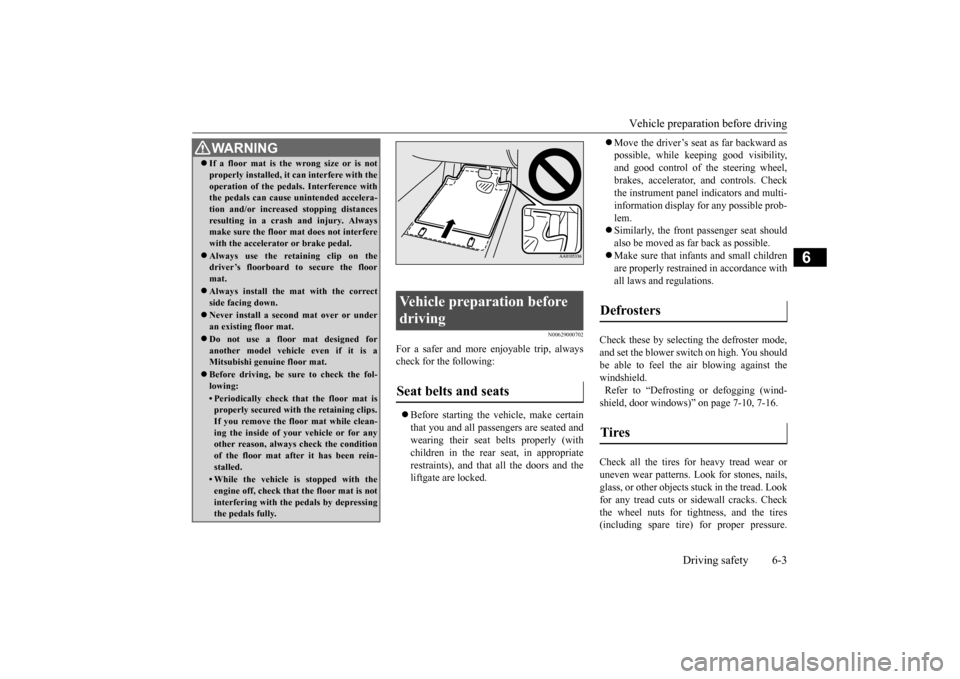
WA R N I N G If a floor mat is the
wrong size or is not
properly installed, it can interfere with theoperation of the pedals. Interference withthe pedals can cause unintended accelera- tion and/or increase
d stopping distances
resulting in a cras
h and injury. Always
make sure the floor mat does not interfere with the accelerator or brake pedal. Always use the retaining clip on the driver’s floorboard to secure the floor mat. Always install the mat with the correct side facing down. Never install a second mat over or under an existing floor mat. Do not use a floor mat designed for another model vehicle even if it is aMitsubishi genu
ine floor mat.
Before driving, be sure to check the fol- lowing:• Periodically check that the floor mat isproperly secured with the retaining clips. If you remove the fl
oor mat while clean-
ing the inside of you
r vehicle or for any
other reason, always
check the condition
of the floor mat afte
r it has been rein-
stalled.• While the vehicle is stopped with theengine off, check that
the floor mat is not
interfering with the pedals by depressing the pedals fully.
Vehicle preparation before driving Seat belts and seats
Defrosters Tires
BK0212400US.book 3 ページ 2014年4月1日 火曜日 午後2時21分
Page 177 of 300
Loading information 6-6 Driving safety
6
Your front bumper can be damaged if you scrape it over curbs or parking stop blocks. Be careful when traveling up or down steepslopes where your bumper can scrape the road. More effort could be required to turn the steering wheel. Refer to “Electric power steering system(EPS)” on page 5-48.
Always carry the key and lock all doors and the liftgate when leaving the vehicle unat- tended.Always try to park your vehicle in a well lit area.
N00629900424
It is very importa
nt to know how much
weight your vehicle can carry. This weight iscalled the vehicle capacity weight and includes the weight of
all occupants, cargo,
non-factory-installed options, if any, beingtowed. The tire and load
ing information plac-
ard located on the driver’s door sill of your vehicle will show how
much weight it may
properly carry. It is important to fami
liarize yourself with the
following terms before loading your vehicle:
Vehicle maximum load on the tire: load on an individual tire th
at is determined by
distributing to each ax
le its share of the
maximum loaded vehicle weight and dividing by two. Vehicle normal load on the tire: load on an individual tire that is
determined by dis-
tributing to each axle its share of the curbweight, accessory
weight, and normal
occupant weight and dividing by two. Maximum loaded vehicle weight: the sum of - (a) Curb weight;(b) Accessory weight; (c) Vehicle capacity weight; and (d) Production options weight. Curb weight: the weight of a motor vehi- cle with standard equipment including the maximum capacity of
fuel, oil, and cool-
ant. Accessory weight: the combined weight (in excess of those standard items whichmay be replaced) of automatic transmis- sion, power steering
, power brakes, power
windows, power seats,
radio, and heater,
to the extent that these items are available as factory- installe
d equipment (whether
installed or not). Vehicle capacity weight: the rated cargo and luggage load plus 150 lbs (68 kg)
*
times the vehicle’s designated seatingcapacity.
WA R N I N G Leaving the engine ru
nning risks injury or
death from accidentally moving the gear-shift lever (manual transaxle) or the selec-tor lever (CVT) or from the accumulation of toxic exhaust fumes in the passenger compartment.
Where you park
WA R N I N G Do not park your vehicle in areas where combustible materials such as dry grass orleaves can come in
contact with a hot
exhaust, since a fire could occur.
Do not keep the steering wheel fully turned for a long time
When leaving the vehicle Loading information
WA R N I N G Never overload your ve
hicle. Overloading
can damage your vehicl
e, adversely affect
vehicle performance, including handling and braking, cause tire failure, and resultin an accident.
BK0212400US.book 6 ページ 2014年4月1日 火曜日 午後2時21分
Page 182 of 300
7
Comfort controlsVents ................................................................................................7-2 Heater without air conditioning functi
on (if so equipped) ...............7-4
Manual air conditioning (if so equipped) .........................................7-7Automatic air conditioning (if so equipped)................................... 7-11 Important air conditioning operating tips ..
...........
...........
.........
.....7-17
Air purifier (if so equipped)............................................................7-18AM/FM electronically tune
d radio with CD player
(if so equipped) ..........................................................................7-18 To play tracks from USB device (if so equipped) ..........................7-27 To play tracks from a Bluetooth
® device
(vehicles with Bluetooth
® 2.0 interface) ...................................7-35
Steering wheel audio remote control
switches (if so equipped) .....7-37
Error codes .....................................................................................7-38 Handling of compact discs .............................................................7-40 Antenna ..........................................................................................7-41General information about your radio .....
...........
...........
...........
.....7-42
BK0212400US.book 1 ページ 2014年4月1日 火曜日 午後2時21分
Page 218 of 300
Steering wheel audio remote control switches (if so equipped)
Comfort controls 7-37
7
N00765900038
Press the RPT button several times to switch to show “RPT” in the display. The mode changes as follows every time the RPT button is pressed:No display (not repeat)
RPT (repeat same
track)
F-RPT (repeat all tracks)
No dis-
play To exit this mode, press the button again.
N00703300014
Press the RPT button several times to switch to show “F-RPT” in the display. The mode changes as follows every time the RPT button is pressed:No display (not repeat)
RPT (repeat same
track)
F-RPT (repeat all tracks)
No dis-
play All tracks in the Bluetooth
® device are played
repeatedly. To exit this mode, press the button again.
N00766000023
Press the RDM button to show “RDM” in thedisplay. The system randomly selects and plays tracks from all tracks in the Bluetooth
® device.
To exit this mode, press the button again.
N00766200041
The system can display tag information. 1. Press the DISP button. 2. The display changes
as follows every time
the DISP button is pressed: Album title
Title name
Artist name
Genre
Normal display
N00714800484
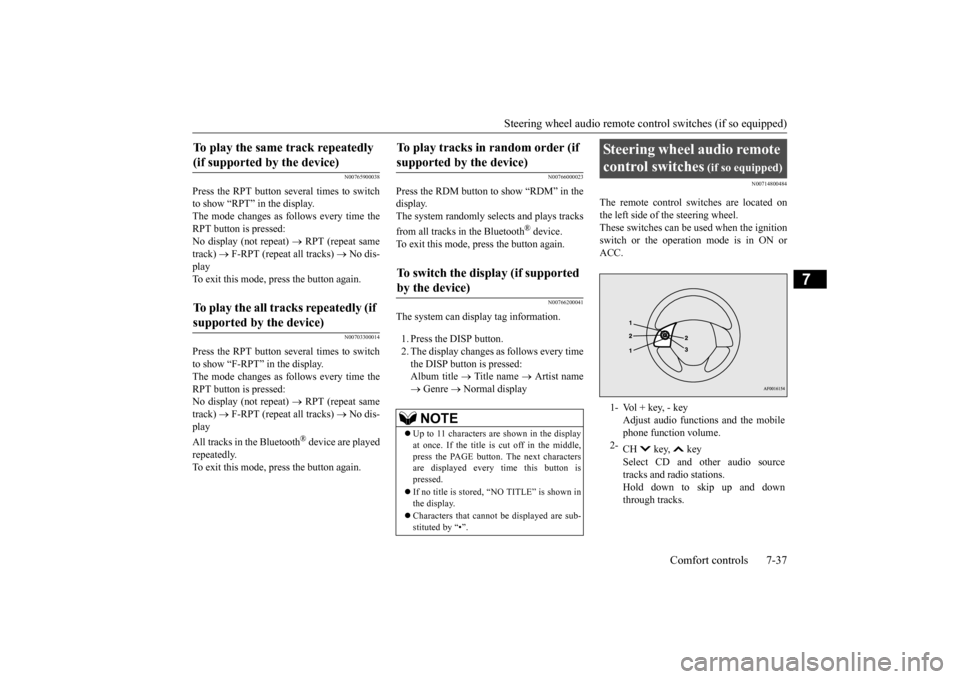
The remote control switches are located on the left side of
the steering wheel.
These switches can be us
ed when the ignition
switch or the operation mode is in ON or ACC.
To play the same track repeatedly (if supported by the device) To play the all tracks repeatedly (if supported by the device)
To play tracks in
random order (if
supported by the device) To switch the display (if supported by the device)
NOTE
Up to 11 characters are shown in the display at once. If the title is cut off in the middle, press the PAGE button. The next characters are displayed every time this button ispressed. If no title is stored, “NO TITLE” is shown in the display. Characters that cannot
be displayed are sub-
stituted by “•”.
Steering wheel audio remote control switches
(if so equipped)
1- Vol + key, - key
Adjust audio functions and the mobile phone function volume.
2-
CH key, key Select CD and ot
her audio source
tracks and radio stations. Hold down to skip up and downthrough tracks.
BK0212400US.book 37 ページ 2014年4月1日 火曜日 午後2時21分
Page 227 of 300
If the vehicle breaks down 8-2 For emergencies
8
N00836300233
If your vehicle breaks down on the road, move to the shoulder and turn on the hazard warning flashers. If there is no shoulder, orthe shoulder is not safe, drive in the right lane slowly with the haza
rd lights flashing until
you come to a safe stopping place. Keep theflashers flashing. If the engine stops, there will be no power assist to the steering and brakes, making these difficult to use. The brake booster will not work, so the brakes will not grip well. The brake pedal will be harder to press than usual. Since there is no power steering assist, the steering wheel will be hard to turn.
Get help from your passengers, bystanders, etc. to push the vehicle
and move it to a safe
area.
N00836400768
If the engine cannot be started because the battery is weak or de
ad, you can start it with
the battery from anothe
r vehicle using jumper
cables. 1. Take off any metal jewelry such as watch bands or bracelets th
at might create an
accidental electrical contact. 2. Position the vehi
cles close enough
together so that the jumper cables canreach, but be sure the vehicles aren’t touching each other.
3. You could be injured if the vehicles move. Set the parking brake firmly on each vehi- cle. Put an automatic transaxle or CVT in “P” (PARK) or a manual transaxle in “N”(Neutral). 4. Turn the ignition switch to the “OFF” position or put the operation mode inOFF. 5. Make sure your battery electrolyte is at the proper level. (Refer to “Battery” on page 9-10.)
If the vehicle breaks down If the engine stops/fails When the engine fails at the intersection
Jump-starting the engine
WA R N I N G To reduce the risk of igniting flammable gas that may be emitted from the battery,carefully read this section before jump- starting the vehicle. Do not try to start you
r vehicle by pushing
or towing. This can cause an accident resulting in serious
injury or death and
can damage the vehicle.NOTE
Do not use jumper cables if they have dam- age or corrosion.
CAUTION Check the other vehicle.
It must have a 12-
volt battery. If the other system isn’t 12-volt,both systems can be damaged.NOTE
Turn off all lights, heat
er, and othe
r electrical
loads. This will avoid sparks and help save both batteries.WA R N I N G If the electrolyte fluid is not visible, or looks frozen, DO NOT ATTEMPT JUMPSTARTING!! The battery might spli
t open or explode if
the temperature is below the freezingpoint or if it is not filled to the proper level.
BK0212400US.book 2 ページ 2014年4月1日 火曜日 午後2時21分
Page 234 of 300
Tire repair kit (if so equipped)
For emergencies 8-9
8
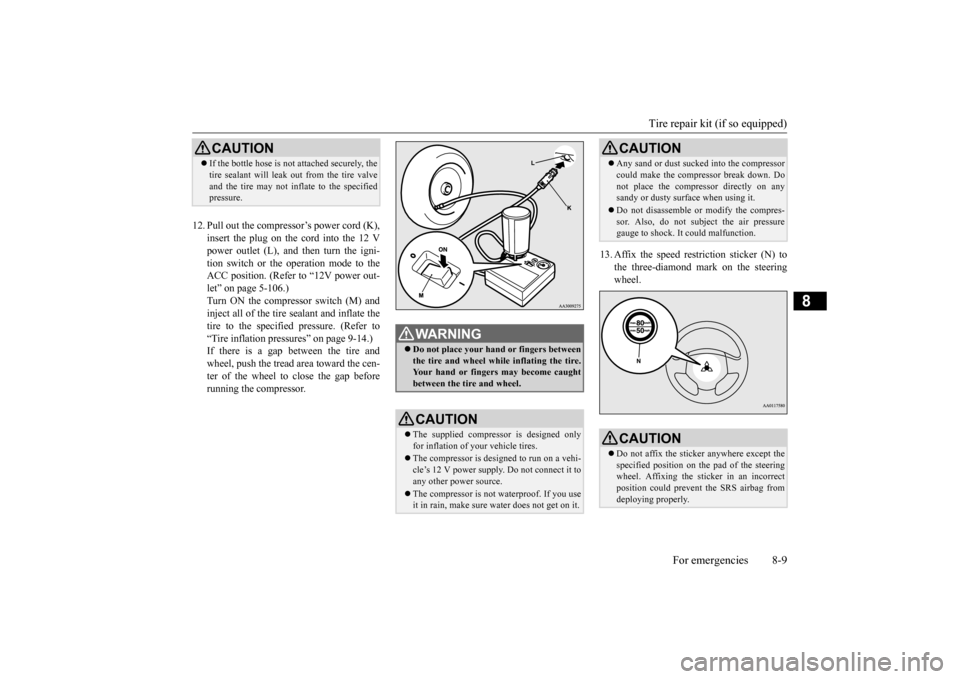
12. Pull out the compressor’s power cord (K),
insert the plug on the cord into the 12 Vpower outlet (L), and then turn the igni- tion switch or the operation mode to the ACC position. (Refer to “12V power out-let” on page 5-106.) Turn ON the compressor switch (M) and inject all of the tire sealant and inflate thetire to the specified pressure. (Refer to “Tire inflation pressures” on page 9-14.) If there is a gap between the tire andwheel, push the tread area toward the cen- ter of the wheel to close the gap before running the compressor.
13. Affix the speed rest
riction sticker (N) to
the three-diamond mark on the steeringwheel.
CAUTION If the bottle hose is not attached securely, the tire sealant will leak out from the tire valveand the tire may not inflate to the specifiedpressure.
WA R N I N G Do not place your hand or fingers between the tire and wheel while inflating the tire. Your hand or fingers may become caughtbetween the tire and wheel.CAUTION The supplied compressor is designed only for inflation of your vehicle tires. The compressor is designed to run on a vehi- cle’s 12 V power supply. Do not connect it to any other power source. The compressor is not waterproof. If you use it in rain, make sure water does not get on it.
Any sand or dust sucked into the compressor could make the compressor break down. Donot place the compressor directly on anysandy or dusty surface when using it. Do not disassemble or modify the compres- sor. Also, do not subject the air pressure gauge to shock. It
could malfunction.
CAUTIONDo not affix the sticke
r anywhere except the
specified position on th
e pad of the steering
wheel. Affixing the sticker in an incorrect position could prevent the SRS airbag from deploying properly.CAUTION
BK0212400US.book 9 ページ 2014年4月1日 火曜日 午後2時21分