ignition MITSUBISHI MIRAGE 2015 6.G Workshop Manual
[x] Cancel search | Manufacturer: MITSUBISHI, Model Year: 2015, Model line: MIRAGE, Model: MITSUBISHI MIRAGE 2015 6.GPages: 300, PDF Size: 43.44 MB
Page 146 of 300

Bluetooth® 2.0 interface (if so equipped)
Features and controls 5-85
5
N00564200016 N00564300017
The Bluetooth
® 2.0 interface is equipped
with a help function. If you say “Help” when the system is waitingfor a voice command input, the system will tell you a list of the commands that can be used under the circumstances.
N00564400018
There are 2 cancel functions.If you are at the main menu, say “Cancel” to exit from the Bluetooth
® 2.0 interface.
If you are anywhere else within the system,say “Cancel” to return to the main menu.
N00564500019
The Bluetooth
® 2.0 interface is equipped
with a confirmation function. With the confirmation function activated, you are given more opportunities than normal toconfirm a command when making various settings to the Bluetooth
® 2.0 interface. This
allows you to decrease the possibility that a setting is accidentally changed. The confirmation function can be turned on or off by following the steps below. 1. Press the SPEECH button. 2. Say “Setup.”3. Say “Confirmation prompts.” 4. The voice guide will say “Confirmation prompts are
N00564600023
It is possible to use a passcode as a securityfunction by setting a passcode of your choice for the Bluetooth
® 2.0 interface.
When the security function is turned on, it isnecessary to make a vo
ice input of a 4-digit
passcode in order to use all functions of the Bluetooth
® 2.0 interface, except for recep-
tion. Use the following procedure to turn on the security function by setting a passcode.
1. Press the SPEECH button. 2. Say “Setup.”3. Say “Passcode.” 4. The voice guide will
say “Passcode is dis-
abled. Would you like to enable it?”Answer “Yes.” Answer “No” to cancel the setting of the passcode and return
to the main menu.
5. The voice guide will
say “Please say a 4-
digit passcode
. Remember this passcode.
It will be required to
use this system.”
Say a 4-digit number which you want to set as a passcode.6. For confirmation purposes, the voice guide will say “Pa
sscode <4-digit pass-
code>. Is this correct?” Answer “Yes.”Answer “No” to return to the passcode input in Step 5. 7. When the registration of the passcode iscompleted, the voice
guide will say “Pass-
code is enabled” and the system will return to the main menu.
Useful voice commands
Help function
Canceling
Confirmation function setting
Security function
Setting the passcode
NOTE
Passcode will be requi
red to access the sys-
tem after the next ignition cycle.
BK0212400US.book 85 ページ 2014年4月1日 火曜日 午後2時21分
Page 147 of 300

Bluetooth® 2.0 interface (if so equipped) 5-86 Features and controls
5
If a passcode has been set and the security function is enabled, the voice guide will say“Hands-free system is lo
cked. State the pass-
code to continue” when the SPEECH button is pressed to enter voice recognition mode.Say the 4-digit passcode number to enter the passcode. If the entered passcode
is wrong, the voice
guide will say “<4-digi
t passcode>, Incorrect
passcode. Please try again.” Enter the correct passcode.
Use the following procedure to turn off the security function by di
sabling the passcode.
1. Press the SPEECH button. 2. Say “Setup.” 3. Say “Passcode.”4. The voice guide w
ill say “Passcode is
enabled. Would you like to disable it?” Answer “Yes.”Answer “No” to cancel the disabling of the passcode and return to the main menu. 5. When the disabling of the passcode iscompleted, the voice
guide will say “Pass-
code is disabled” and the system will return to the main menu.
N00564700011
The Bluetooth
® 2.0 interface can use the
speaker enrollment function to create a voicemodel for one person per language. This makes it easier for the Bluetooth
® 2.0
interface to recognise
voice commands said
by you.
You can turn a voice model registered with the speaker enrollment function on and offwhenever you want.
N00564800038
It takes about 2 to 3 minutes to complete thespeaker enrollment process. To ensure the best results, run through the process while in the driver’s seat, in an envi- ronment that is as qu
iet as possible (when
there is no rain or strong winds and the vehi-cle windows are closed). Please turn off your phone while in speaker enrollment to prevent interruption of the process.Use the following procedure for speaker enrollment. 1. Stop your vehicle in a safe area, put the gearshift lever in the “N” (Neutral) posi-tion (manual transaxle), or the selector lever in the “P” (PARK) position (contin- uously variable transmission (CVT)), andpull the parking brake lever. 2. Press the SPEECH button.
It is required for a little time after engine stop that the entered passcode is actuallyrecorded in the system.If the ignition switch
or the operation mode
is made to ACC or ON or the engine is started immediately afte
r engine stop, there
is a case when the entered passcode is not recorded in the system. At this time, please try to enter the passcode again.
Entering the passcode
NOTE
You can reenter the passcode as many times as you want. If you have forgotten your passcode, say “Cancel” to quit the voice input mode and then check with an authorized Mitsubishi Motors dealer.NOTE
Disabling the passcode
NOTE
System must be unlocke
d to disable the pass-
code.
Speaker enrollment function
Speaker enrollment
NOTE
Speaker enrollment is not possible unless the vehicle is parked. Make sure you park the vehicle in a safe area before attemptingspeaker enrollment.
BK0212400US.book 86 ページ 2014年4月1日 火曜日 午後2時21分
Page 154 of 300

Bluetooth® 2.0 interface (if so equipped)
Features and controls 5-93
5
5. If only 1 telephone number is registered under the name you just said, the voiceguide will proceed to Step 6. If 2 or more telephone
numbers are regis-
tered that match the name you just said,the voice guide will say “Would you like to call
6. The voice guide will say “Calling
the system will dial
the telephone number.
You can redial the last
number called, based
on the history of dialed calls in the paired cel- lular phone. Use the following procedure to redial. 1. Press the SPEECH button. 2. Say “Redial.”
N00565700018
During a call, press the SPEECH button toenter voice recognition mode, then say “
SPEECH button and speak “1 2 3 4 pound send” and the 1234# will be sent via your cel-lular phone.
N00565800035
If an incoming phone call is received whilethe ignition switch or
the operation mode is in
ON or ACC, the audio sy
stem will be auto-
matically turned on and switched to the incoming call, even when the audio system was originally off.The voice guide announcement for the incoming call will be output from the front passenger’s seat speaker.If the CD player or radio was playing when the incoming call was received, the audio sys- tem will mute the sound from the CD playeror radio and output only the incoming call. To receive the call, press the PICK-UP button on the steering wheel control switch.When the call is over, the audio system will return to its previous state.
N00565900010
At any time during a
call, you can mute the
vehicle microphone. Pressing the SPEECH button and then saying“Mute” during a call will turn ON the mute function and mute the microphone.
NOTE
If the name you sele
cted has matching data
in the vehicle phonebook but no telephone number is registered unde
r the selected loca-
tion, the voice guide will say“{home/work/mobile/other} not found for
nd you can register an
additional telephone number under the selected location. If the name you sele
cted has matching data
in the mobile phonebook but no telephone number is registered unde
r the selected loca-
tion, the voice guide will say “{home/work/mobile/other} not found for
NOTE
When the confirmation function is on, the system will check if
the name and location of
the receiver are correct. If the name is cor- rect, answer “Yes.”To change the name or location to call, answer “No.” The system will return to Step 3.
RedialingSend function
Receiving calls
Mute function
BK0212400US.book 93 ページ 2014年4月1日 火曜日 午後2時21分
Page 162 of 300
USB input terminal (if so equipped)
Features and controls 5-101
5
Connect the equipment into an outlet on a circuit different from that to which thereceiver is connected. Consult the dealer or an experienced radio/TV technician for help.
ICES Notice: This Class B digital apparatus complies with Canadian ICES-003.
N00566401080 N00566701083
You can connect your USB memory device or iPod
* to play music files stored in the USB
memory device or iPod.The following explains
how to connect and
remove a USB memory device or iPod.
* : “iPod” is a registered trademark of Apple Inc. in the United Stat
es and other countries.
N00566800104
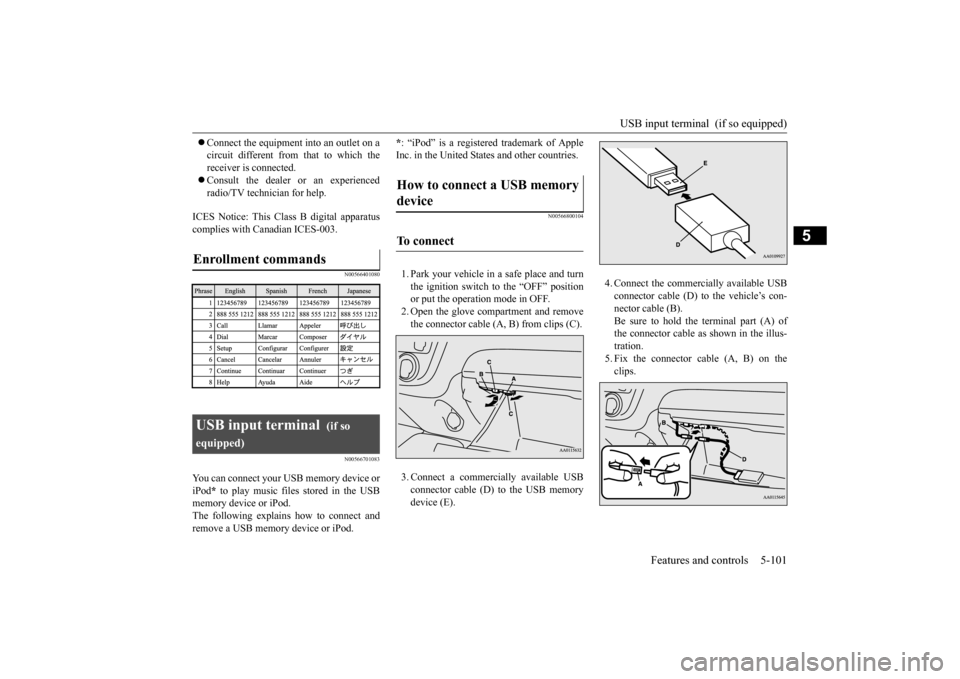
1. Park your vehicle in a safe place and turn the ignition switch to the “OFF” position or put the operati
on mode in OFF.
2. Open the glove compartment and remove the connector cable (A, B) from clips (C). 3. Connect a commercially available USB connector cable (D) to the USB memory device (E).
Enrollment commands
USB input terminal
(if so
equipped)
How to connect a USB memory device
To connect
4. Connect the commercially available USB connector cable (D) to the vehicle’s con-nector cable (B). Be sure to hold the terminal part (A) of the connector cable as shown in the illus-tration. 5. Fix the connector cable (A, B) on the clips.
BK0212400US.book 101 ページ 2014年4月1日 火曜日 午後2時21分
Page 163 of 300
USB input terminal (if so equipped) 5-102 Features and controls
5
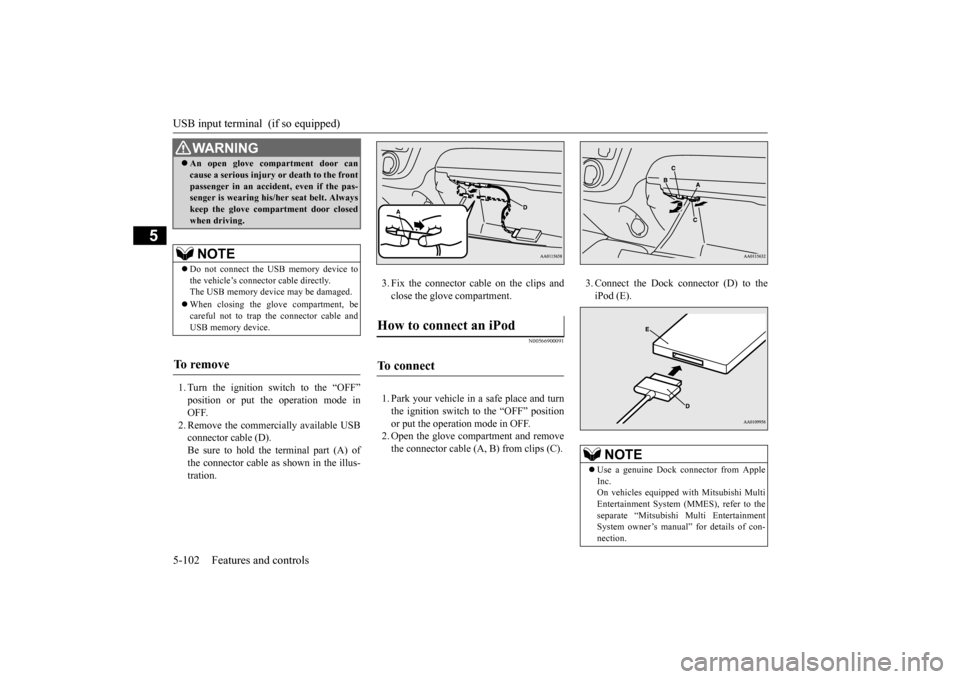
1. Turn the ignition switch to the “OFF” position or put the operation mode in OFF. 2. Remove the commercially available USBconnector cable (D). Be sure to hold the terminal part (A) of the connector cable as
shown in the illus-
tration.
3. Fix the connector cable on the clips and close the glove compartment.
N00566900091
1. Park your vehicle in
a safe place and turn
the ignition switch to the “OFF” position or put the operation mode in OFF. 2. Open the glove compartment and removethe connector cable (A, B) from clips (C).
3. Connect the Dock connector (D) to the iPod (E).
WA R N I N G An open glove comp
artment door can
cause a serious injury or death to the frontpassenger in an accident, even if the pas-senger is wearing his/
her seat be
lt. Always
keep the glove comp
artment door closed
when driving.NOTE
Do not connect the US
B memory device to
the vehicle’s connector cable directly. The USB memory devi
ce may be damaged.
When closing the glove compartment, be careful not to trap the connector cable andUSB memory device.
To r e m o v e
How to connect an iPod
To connect
NOTE
Use a genuine Dock connector from Apple Inc. On vehicles equipped
with Mitsubishi Multi
Entertainment System (MMES), refer to theseparate “Mitsubishi Multi Entertainment System owner’s manual”
for details of con-
nection.
BK0212400US.book 102 ページ 2014年4月1日 火曜日 午後2時21分
Page 164 of 300
USB input terminal (if so equipped)
Features and controls 5-103
5
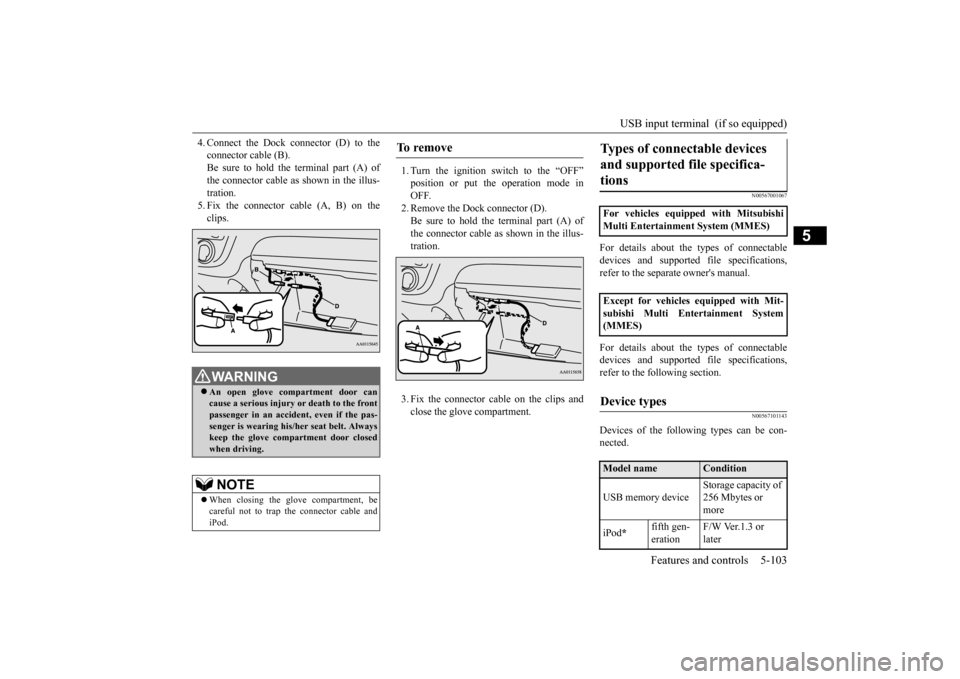
4. Connect the Dock connector (D) to the connector cable (B).Be sure to hold the terminal part (A) of the connector cable as shown in the illus- tration.5. Fix the connector cable (A, B) on the clips.
1. Turn the ignition switch to the “OFF” position or put th
e operation mode in
OFF. 2. Remove the Dock connector (D).Be sure to hold the terminal part (A) of the connector cable as
shown in the illus-
tration. 3. Fix the connector cable on the clips and close the glove compartment.
N00567001067
For details about the
types of connectable
devices and supported fi
le specifications,
refer to the separa
te owner's manual.
For details about the
types of connectable
devices and supported fi
le specifications,
refer to the fo
llowing section.
N00567101143
Devices of the following types can be con- nected.
WA R N I N G An open glove compartment door can cause a serious injury or death to the front passenger in an accident, even if the pas-senger is wearing his/her seat belt. Always keep the glove comp
artment door closed
when driving. NOTE
When closing the glove compartment, be careful not to trap th
e connector cable and
iPod.
To r e m o v e
Types of connectable devices and supported file specifica-tions
For vehicles equipped with Mitsubishi Multi Entertainment System (MMES) Except for vehicles equipped with Mit- subishi Multi Entertainment System (MMES)Device types
Model name
Condition
USB memory device
Storage capacity of 256 Mbytes or more
iPod
*
fifth gen- eration
F/W Ver.1.3 or later
BK0212400US.book 103 ページ 2014年4月1日 火曜日 午後2時21分
Page 165 of 300
USB input terminal (if so equipped) 5-104 Features and controls
5
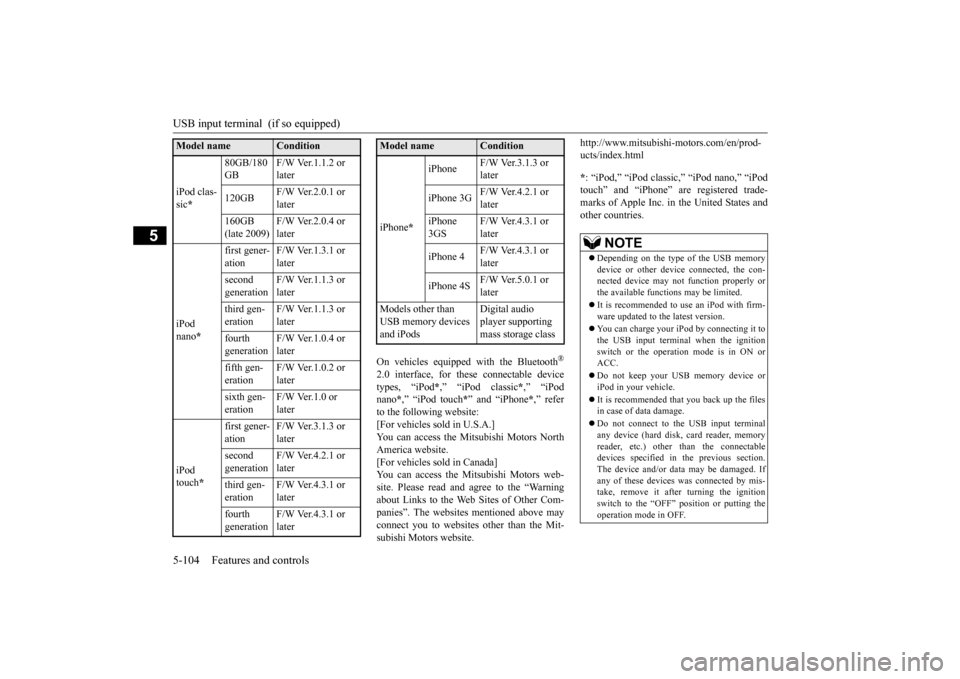
On vehicles equipped with the Bluetooth
®
2.0 interface, for thes
e connectable device
types, “iPod
*,” “iPod classic
*,” “iPod
nano
*,” “iPod touch
*” and “iPhone
*,” refer
to the following website: [For vehicles sold in U.S.A.]You can access the Mitsubishi Motors North America website. [For vehicles sold in Canada]You can access the Mi
tsubishi Motors web-
site. Please read and agree to the “Warning about Links to the Web Sites of Other Com-panies”. The websites
mentioned above may
connect you to websites
other than the Mit-
subishi Motors website.
http://www.mitsubishi-motors.com/en/prod- ucts/index.html * : “iPod,” “iPod classic,” “iPod nano,” “iPod touch” and “iPhone” are registered trade- marks of Apple Inc. in the United States and other countries.
iPod clas- sic
*
80GB/180 GB
F/W Ver.1.1.2 or later
120GB
F/W Ver.2.0.1 or later
160GB (late 2009)
F/W Ver.2.0.4 or later
iPod nano
*
first gener- ation
F/W Ver.1.3.1 or later
second generation
F/W Ver.1.1.3 or later
third gen- eration
F/W Ver.1.1.3 or later
fourth generation
F/W Ver.1.0.4 or later
fifth gen- eration
F/W Ver.1.0.2 or later
sixth gen- eration
F/W Ver.1.0 or later
iPod touch
*
first gener- ation
F/W Ver.3.1.3 or later
second generation
F/W Ver.4.2.1 or later
third gen- eration
F/W Ver.4.3.1 or later
fourth generation
F/W Ver.4.3.1 or later
Model name
Condition
iPhone
*
iPhone
F/W Ver.3.1.3 or later
iPhone 3G
F/W Ver.4.2.1 or later
iPhone 3GS
F/W Ver.4.3.1 or later
iPhone 4
F/W Ver.4.3.1 or later
iPhone 4S
F/W Ver.5.0.1 or later
Models other than USB memory devices and iPods
Digital audio player supporting mass storage class
Model name
Condition
NOTE
Depending on the type of the USB memory device or other devi
ce connected, the con-
nected device may not
function properly or
the available functi
ons may be limited.
It is recommended to use an iPod with firm- ware updated to th
e latest version.
You can charge your
iPod by connecting it to
the USB input terminal
when the ignition
switch or the operati
on mode is in ON or
ACC. Do not keep your US
B memory device or
iPod in your vehicle. It is recommended that you back up the files in case of
data damage.
Do not connect to the USB input terminal any device (hard disk, card reader, memory reader, etc.) other than the connectabledevices specified in the previous section. The device and/or data
may be damaged. If
any of these devices
was connected by mis-
take, remove it afte
r turning the ignition
switch to the “OFF” position or putting the operation mode in OFF.
BK0212400US.book 104 ページ 2014年4月1日 火曜日 午後2時21分
Page 167 of 300
12 V power outlets 5-106 Features and controls
5
N00525000615
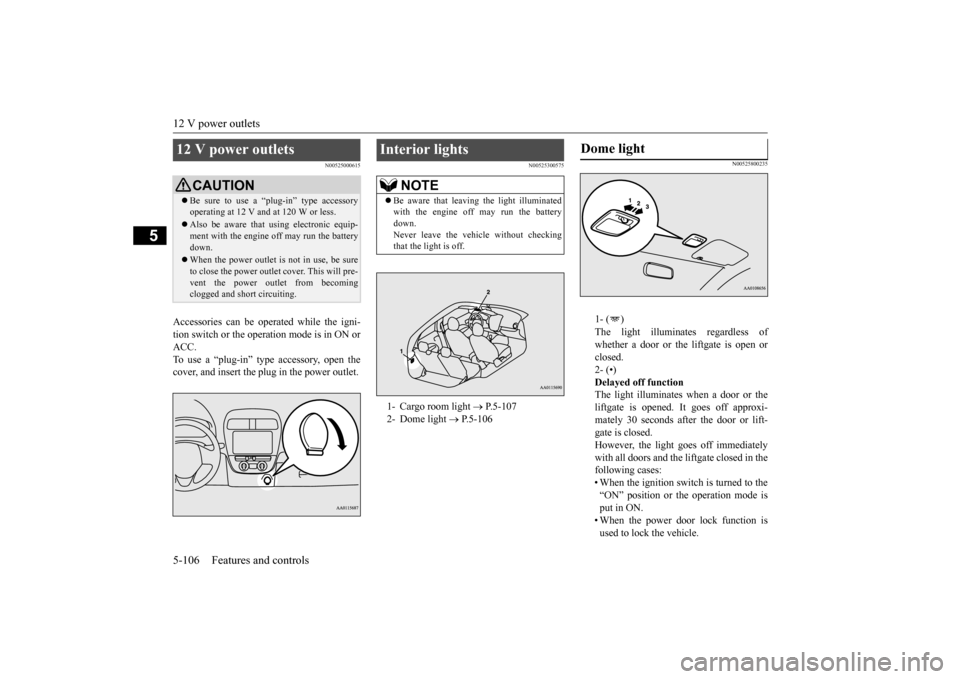
Accessories can be ope
rated while the igni-
tion switch or the opera
tion mode is in ON or
ACC. To use a “plug-in” type
accessory, open the
cover, and insert the
plug in the power outlet.
N00525300575
N00525800235
1- ( ) The light illuminates regardless of whether a door or the liftgate is open or closed.2- (•) Delayed off function The light illuminates when a door or theliftgate is opened. It goes off approxi- mately 30 seconds after the door or lift- gate is closed.However, the light goes off immediately with all doors and the liftgate closed in the following cases:• When the ignition switch is turned to the “ON” position or the operation mode is put in ON.• When the power door lock function is used to lock the vehicle.
12 V power outlets
CAUTION Be sure to use a “plug-in” type accessory operating at 12 V and at 120 W or less. Also be aware that
using electronic equip-
ment with the engine
off may run the battery
down. When the power outlet is not in use, be sure to close the power outlet
cover. This will pre-
vent the power out
let from becoming
clogged and short circuiting.
Interior lights
NOTE
Be aware that leaving the light illuminated with the engine off may run the batterydown. Never leave the vehi
cle without checking
that the light is off.1- Cargo room light
P.5-107
2- Dome light
P.5-106
Dome light
BK0212400US.book 106 ページ 2014年4月1日 火曜日 午後2時21分
Page 168 of 300
Storage spaces
Features and controls 5-107
5
• When the remote control transmitter of the keyless entry system or the F.A.S.T.-key is used to lock the vehicle. • When the door lock/unlock switch or liftgate switch is pressed to lock thevehicle while carrying the F.A.S.T.-key. Auto cut-out function If the light is left switched on with theignition switch is in the “OFF” or “ACC” position or the operation mode is in OFF or ACC, and a door or the liftgate is opened, it goes off automatically after approximately 30 minutes.The light will illuminate again after it automatically goes off in the following cases:• When the ignition switch is turned to the “ON” position or the operation mode is put in ON.• When the keyless entry system or the F.A.S.T.-key is operated. • When all doors and the liftgate areclosed.
3- ( ) The light goes off regardless of whether a door or the liftgate is open or closed.
N00526100176
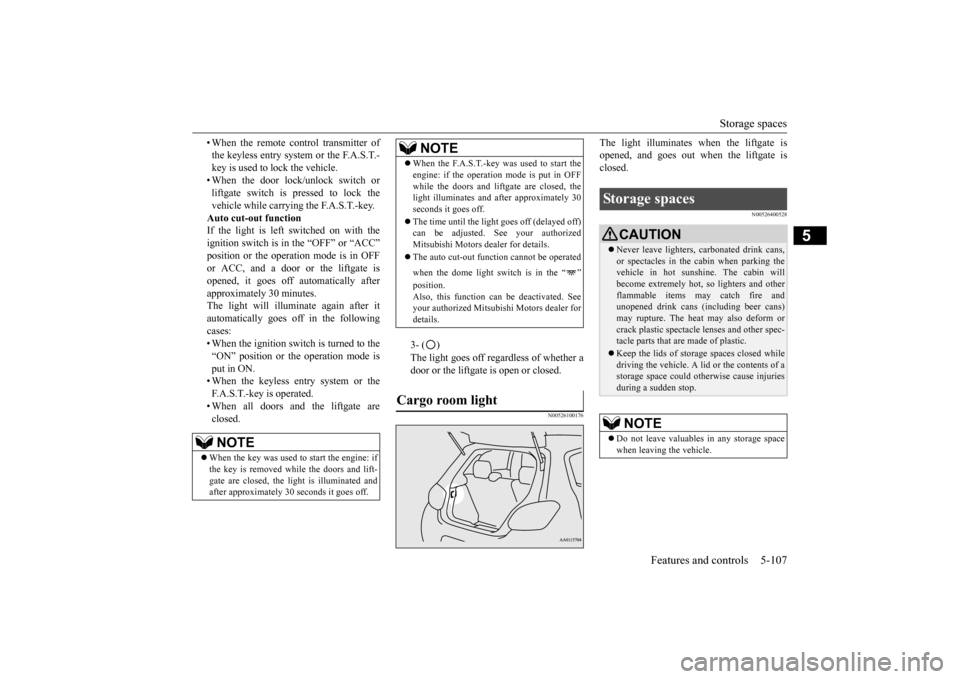
The light illuminates when the liftgate is opened, and goes out when the liftgate isclosed.
N00526400528
NOTE
When the key was used to start the engine: if the key is removed while the doors and lift- gate are closed, the li
ght is illuminated and
after approximately 30
seconds it goes off.
When the F.A.S.T.-key was used to start the engine: if the operation
mode is put in OFF
while the doors and lift
gate are closed, the
light illuminates and
after approximately 30
seconds it goes off. The time until the light
goes off (delayed off)
can be adjusted. See your authorized Mitsubishi Motors dealer for details. The auto cut-out func
tion cannot be
operated
when the dome light switch is in the “ ” position. Also, this function can
be deactivated. See
your authorized Mitsubish
i Motors dealer for
details.
Cargo room light
NOTE
Storage spaces
CAUTION Never leave lighters,
carbonated drink cans,
or spectacles in the cabin when parking the vehicle in hot suns
hine. The cabin will
become extremely hot,
so lighters and other
flammable items may catch fire and unopened drink cans (i
ncluding beer cans)
may rupture. The heat may also deform orcrack plastic spectacle
lenses and other spec-
tacle parts that are made of plastic. Keep the lids of storage spaces closed while driving the vehicle. A li
d or the contents of a
storage space could otherwise cause injuriesduring a sudden stop.NOTE
Do not leave valuables
in any storage space
when leaving the vehicle.
BK0212400US.book 107 ページ 2014年4月1日 火曜日 午後2時21分
Page 185 of 300
Heater without air conditioning function (if so equipped) 7-4 Comfort controls
7
Air flows mainly to the windshield and the door windows.
N00737700031
The heater can only be used while the engineis running.
N00737800032
N00737900033
When the ignition switch is in the “ON” posi- tion, select the blower speed by turning the blower speed selection dial.Turning the dial clockwise will increase the blower speed; turning
the dial counterclock-
wise will decrease it. When the dial is set tothe “OFF” position, all fan-driven airflow will stop.
N00738000057
The temperature control lever is used to select the desired air temperature.
NOTE
With the mode selec
tion dial between the
“ ” and “ ” positions, air flows mainly to the leg area. With the mode selection dial between the “ ”and “ ” positions, air flows mainly to the windshield and the door windows.
Defroster position
Heater without air condi- tioning function
(if so equipped)
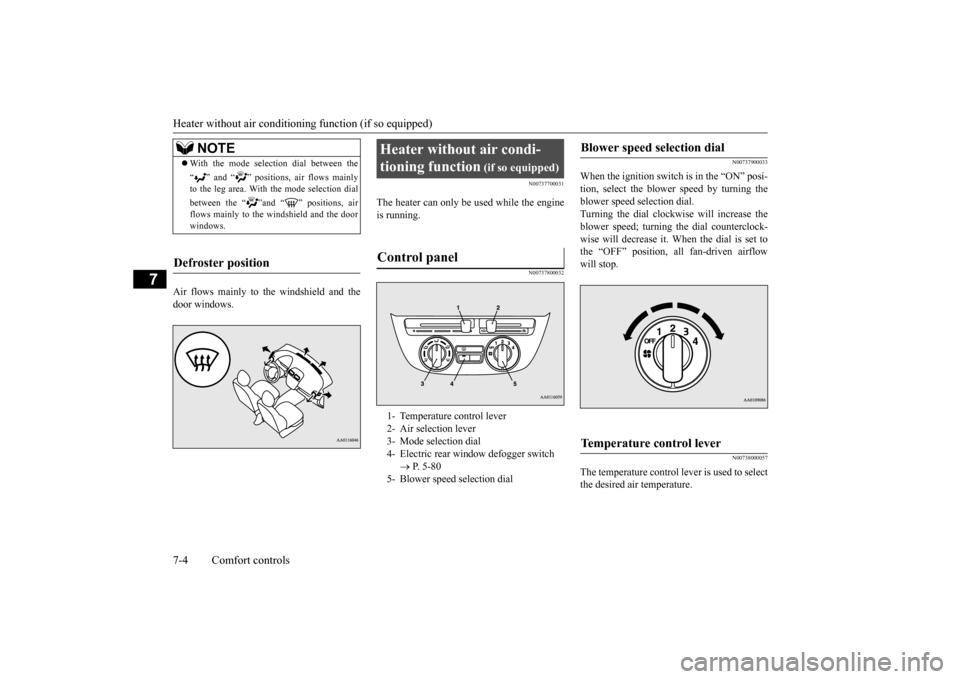
Control panel
1- Temperature control lever 2- Air selection lever 3- Mode selection dial4- Electric rear win
dow defogger switch
P. 5-80
5- Blower speed selection dial
Blower speed selection dial
Temperature control lever
BK0212400US.book 4 ページ 2014年4月1日 火曜日 午後2時21分