ignition MITSUBISHI MIRAGE 2015 6.G User Guide
[x] Cancel search | Manufacturer: MITSUBISHI, Model Year: 2015, Model line: MIRAGE, Model: MITSUBISHI MIRAGE 2015 6.GPages: 300, PDF Size: 43.44 MB
Page 62 of 300
5
Features and controlsBreak-in recommendations ..............................................................5-2 Keys .................................................................................................5-2 Electronic immobilizer (Anti-theft starting system) ........................5-3Keyless entry system (if so equipped) ..............................................5-6 Free-hand Advanced Security
Transmitter (F.A.S.T.-key)
(if so equipped) ............................................................................5-9Door locks ......................................................................................5-24 Power door locks ......
...........
...........
...........
...........
...........
.........
.....5-26
Child safety locks for rear door ..........
...........
.........
.........
.........
.....5-27
Liftgate ...........................................................................................5-27 Manual window control (if so equipped)........................................5-28 Power window control ...................................................................5-29Parking brake .................................................................................5-31 Steering wheel height adjustment ..................................................5-32 Inside rearview mirror ...................................................................5-32Outside rearview mirrors ...............................................................5-33 Ignition switch ...............................................................................5-35 Starting the engine .........................................................................5-36Manual transaxle (if so equipped) ..................................................5-38 Continuously variable transmission
(CVT) (if so equipped)..........5-39
Service brake .................................................................................5-44Hill start assist (if so equipped) ......................................................5-45 Brake assist system ........................................................................5-46 Anti-lock braking system ...............................................................5-46Electric power steering system (EPS) ............................................5-48 Active stability control (ASC) .......................................................5-49 Cruise control (if so equipped) .......................................................5-52Tire pressure monitoring system (if so equipped) ..........................5-56
Rear-view camera (if so equipped)................................................. 5-60 Instrument cluster .......................................................................... 5-62 Multi-information display ............................................................. 5-62Indicator and warning light package ............................................. 5-70 Indicators ....................................................................................... 5-71 Warning lights ................................................................................ 5-72Combination headlights and dimmer switch ................................. 5-74 Turn signal lever ............................................................................ 5-76 Hazard warning flasher switch ...................................................... 5-77Front fog light switch (if so equipped) .......................................... 5-77 Wiper and washer switch ............................................................... 5-78 Electric rear window defogger switch ....
...........
...........
...........
...... 5-80
Horn switch ................................................................................... 5-81 Link System (if so equipped) ......................................................... 5-81 Bluetooth
® 2.0 interface (if so equipped)....................................... 5-81
USB input terminal (if so
equipped) ....
...........
.........
........
........... 5-101
Sun visors .................................................................................... 5-105 12 V power outlets ....................................................................... 5-106Interior lights ............................................................................... 5-106 Storage spaces .............................................................................. 5-107 Cup holders .................................................................................. 5-108Bottle holders ............................................................................... 5-108 Rear shelf panel (if so equipped) .................................................. 5-109 Convenience hook ............
...........
...........
...........
...........
...........
.... 5-109
Assist grips .................................................................................. 5-110
BK0212400US.book 1 ページ 2014年4月1日 火曜日 午後2時21分
Page 66 of 300

Electronic immobilizer (Ant
i-theft starting system)
Features and controls 5-5
5
To add a key, you must already have 2 regis- tered keys. You need to register the ID code to the vehicle.Registering the ID code can be done by your- self (except for vehicles
sold in Canada), or
by your authorized Mits
ubishi Motors dealer.
For you to register the ID code yourself, fol- low the “Customer key programming” proce- dure below. If you choose to have your authorized Mitsubishi Motors dealer register the IDcode, take your vehicle and all remaining keys to your authorized Mitsubishi Motors dealer.
N00562200139
You can program new keys to the system if you have two valid (already registered) keys and blank immobilizer ke
y (specially cut for
your vehicle at your Mitsubishi Motors dealer) by doing the following: 1. Insert the first valid key into the ignition switch and turn the key to the “ON” posi- tion for 5 seconds. 2. Turn the key to the “OFF” position andremove the first key. 3. Within 30 seconds of removing the first key, insert the second valid key into theignition and turn it
to the “ON” position.
About 10 seconds late
r, the immobilizer
indicator will start to blink. 4. When the immobilizer indicator starts blinking, turn the second valid key to the“OFF” position and remove it. Within 30 seconds after doing so, insert a blank immobilizer key into the ignition switchand turn it to the “ON” position. Perform this operation no more than 30 seconds after the immobilizer indicator startsblinking. When registration of the ID code is complete, the immobilizer indica- tor will come on for 3 seconds then go off.If an error occurs, the immobilizer indica- tor will go off during the procedure.
5. If you wish to register another key, per- form the process again from step 1.
Additional keys
NOTE
You are provided with 2 keys, but you may register up to 8 keys.
Customer key programming (Except for vehicles sold in Canada)
NOTE
When the key registration is completed, the immobilizer indicator will come on within30 seconds of turning
the ignition switch to
the “ON” position with the blank immobi- lizer key (specially cut for your vehicle at your Mitsubishi Motors dealer). NOTE
It is not possible to register a key if: • the immobilizer indicator goes off during the procedure • the immobilizer indi
cator does not come on
within 30 seconds after step 4.
The procedure will be
terminated automati-
cally if: • a period of 30 seconds
or longer elapses
from the moment when the first key isturned to the “OFF” position to the moment when the second key is turned to the “ON” position • a period of 30 seconds
or longer elapses
from the moment when the second key isturned to the “OFF” position to the momentwhen the blank immobilizer key is turned to the “ON” position • more than 20 seconds elapses after the immobilizer indicato
r starts blinking
BK0212400US.book 5 ページ 2014年4月1日 火曜日 午後2時21分
Page 67 of 300
Keyless entry system (if so equipped) 5-6 Features and controls
5
N00562300097
Your electronic imm
obilizer operates on a
radio frequency subject
to Federal Communi-
cations Commission (FCC) Rules (For vehi-cles sold in U.S.A.) and Industry Canada Rules (For vehicles so
ld in Canada). This
device complies with part 15 of FCC Rulesand Industry Canada licence-exempt RSS standard(s). Operation is subject to the following two con- ditions. This device may not
cause harmful inter-
ference. This device must ac
cept any interference
received, including interference that may cause undesired operation of this device.
N00509000923
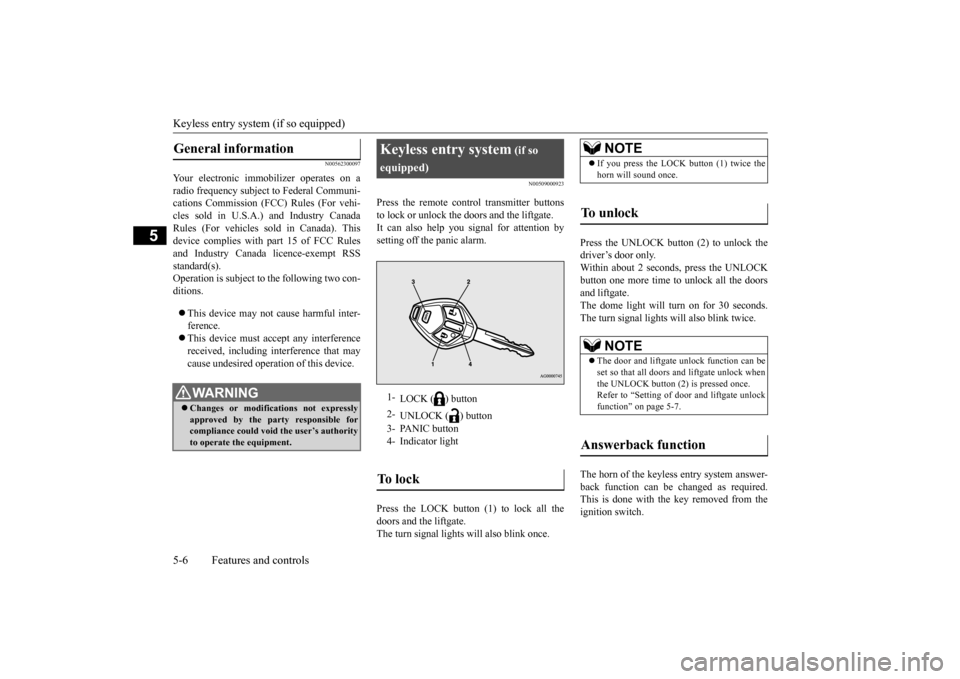
Press the remote control transmitter buttonsto lock or unlock the doors and the liftgate.It can also help you
signal for attention by
setting off the panic alarm. Press the LOCK button (1) to lock all the doors and the liftgate. The turn signal lights
will also blink once.
Press the UNLOCK button (2) to unlock the driver’s door only.Within about 2 seconds, press the UNLOCK button one more time to unlock all the doors and liftgate.The dome light will turn on for 30 seconds. The turn signal lights will also blink twice. The horn of the keyless entry system answer- back function can be changed as required.This is done with the key removed from the ignition switch.
General information
WA R N I N G Changes or modifications not expressly approved by the part
y responsible for
compliance could void
the user’s authority
to operate the equipment.
Keyless entry system
(if so
equipped)1-
LOCK ( ) button
2-
UNLOCK ( ) button
3- PANIC button 4- Indicator lightTo l o c k
NOTE
If you press the LOCK button (1) twice the horn will sound once.
To u n l o c k
NOTE
The door and liftgate
unlock function can be
set so that all doors and liftgate unlock whenthe UNLOCK button (2) is pressed once. Refer to “Setting of door
and liftgate unlock
function” on page 5-7.
Answerback function
BK0212400US.book 6 ページ 2014年4月1日 火曜日 午後2時21分
Page 68 of 300
Keyless entry system (if so equipped)
Features and controls 5-7
5
The answerback function can be set in the following three ways.Each time the answerback function is set, a chime will sound to tell you the condition of the answerback function. 1. Remove the key from the ignition switch. 2. Open the driver’s door and turn the com- bination headlights and dimmer switch to the “OFF” position.3. Press the LOCK button (1) for 4 to 10 sec- onds and press the UNLOCK button (2) during this time.4. Release in sequence the UNLOCK and LOCK buttons within 10 seconds of pressing the UNLOCK button in step 3.
The turn signal lights answerback function can be changed. If you want to change the answerback func- tion, please contact an
authorized Mitsubishi
Motors dealer.
N00543600118
The door and liftgate
unlock function can be
set to the following two conditions.Each time the door and
liftgate unlock func-
tion is set, a chime wi
ll sound to tell you the
condition of the door and liftgate unlockfunction. 1. Put the operation mode in OFF. 2. Open the driver’s door and turn the com- bination headlights a
nd dimmer switch to
the “OFF” position.
3. Press the LOCK button (1) for 4 to 10 sec- onds and press the UNLOCK button (2)during this time. 4. Release in sequence the LOCK and UNLOCK buttons within 10 seconds ofpressing the LOCK button in step 3.
N00543700034
If you are near your vehicle and feel threat- ened, you may acti-vate the alarm to call attention as follows: 1. Press the PANIC button (3) for more than 1 second. 2. The headlights will blink on and off and the horn will sound intermittently forabout 3 minutes. 3. To turn off the alarm, press any button on the remote control transmitter.
N00543800051
Only remote control transmitters pro-grammed with the vehicle’s electronics can lock or unlock all doors and the liftgate. If you lose the remote control transmitter, you can order a remote control transmitter from
NOTE
The answerback functi
on will not operate if
any of the doors are open.
Horn deactivation/reactivation
One chime: The horn will not sound. Two chimes: The horn will sound.Four chimes: The horn will sound if the
LOCK button is pressed twice within 1 second.
Turn signal lights deactiva- tion/reactivation
Setting of door and liftgate unlock function
Number of chimes
Condition
One chime
All doors and the liftgate unlock
Two chimes Driver’s door unlock only
Using the panic alarm
Replacement remote control transmitters
BK0212400US.book 7 ページ 2014年4月1日 火曜日 午後2時21分
Page 83 of 300
Free-hand Advanced
Security Transmitter (F.A.S
.T.-key) (if so equipped)
5-22 Features and controls
5
Press the UNLOCK button (2) to unlock the driver’s door only. Within about 2 seconds, press the UNLOCKbutton one more time to unlock all the doors and liftgate. The dome light will turn on for 30 seconds.The turn signal lights will also blink twice. The horn of the keyless entry system answer- back function can be changed as required. This is done with the key removed from the ignition switch.
The answerback function can be set in the following three ways. 1. Put the operation mode in OFF. 2. Open the driver’s door and turn the com- bination headlights and dimmer switch tothe “OFF” position. 3. Press the LOCK button (1) for 4 to 10 sec- onds and press the UNLOCK button (2)during this time. 4. Release in sequence the UNLOCK and LOCK buttons within 10 seconds ofpressing the UNLOCK button in step 3.
The turn signal lights answerback function can be changes.If you want to change the answerback func- tion, please contact an
authorized Mitsubishi
Motors dealer.
The buzzer answerback function can be turned ON or OFF as required.
N00544600098
The door and liftgate
unlock function can be
set to the following two conditions. Each time the door and
liftgate unlock func-
tion is set, a chime wi
ll sound to tell you the
condition of the door and liftgate unlockfunction. 1. Put the operation mode in OFF. 2. Open the driver’s door and turn the com- bination headlights a
nd dimmer switch to
the “OFF” position.3. Press the LOCK button (1) for 4 to 10 sec- onds and press the UNLOCK button (2) during this time.
NOTE
If you press the LOCK button (1) twice, the horn will sound once.
To unlock
NOTE
The door and liftgate
unlock function can be
set so that all doors a
nd liftgate unlock when
the UNLOCK button (2) is pressed once. Refer to “Setting of door
and liftgate unlock
function” on page 5-22.
Answerback function
Horn deactivation/reactivation One chime: The horn will not sound. Two chimes: The horn will sound.Four chimes: The horn will sound if the
LOCK button is pressed twice within 1 second.
Turn signal light deactivation/reactiva- tion
Buzzer deactivation/reactivationSetting of door and liftgate unlock function
Number of chimes
Condition
One chime
All doors and the liftgate unlock
Two chimes Driver’s door unlock only
BK0212400US.book 22 ページ 2014年4月1日 火曜日 午後2時21分
Page 86 of 300
Door locks
Features and controls 5-25
5
Move the lock knob to the lock position to lock the door.All doors should be kept
locked while driv-
ing. The driver’s door can be unlocked without using the lock knob by pulling on the inside door handle. 1. Move the inside lock knob to the locked position.
2. Be sure the keys are not inside the vehi- cle. Close the door.
N00549600253
If the ignition switch is turned off and the driver’s door is opened with the key in the ignition switch, the ke
y reminder buzzer will
sound intermittently to remind you to remove the key.
N00517300042
If the key is in the ignition switch or the oper-ation mode is in any mode other than OFF when you push the lock knob forward withthe driver’s door or passenger’s door open,
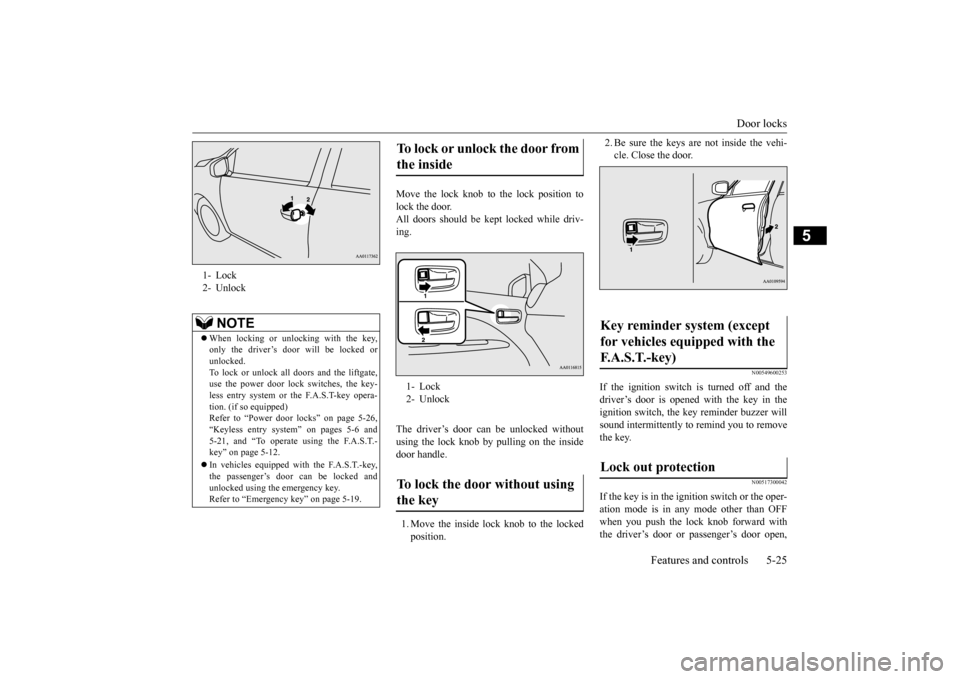
1- Lock 2- Unlock
NOTE
When locking or unlocking with the key, only the driver’s door will be locked orunlocked. To lock or unlock all doors and the liftgate, use the power door lock switches, the key-less entry system or the F.A.S.T-key opera- tion. (if so equipped) Refer to “Power door locks” on page 5-26,“Keyless entry system” on pages 5-6 and 5-21, and “To operate using the F.A.S.T.- key” on page 5-12. In vehicles equipped wi
th the F.A.S.T.-key,
the passenger’s door can be locked andunlocked using the emergency key. Refer to “Emergency key” on page 5-19.
To lock or unlock the door from the inside 1- Lock 2- UnlockTo lock the door without using the key
Key reminder system (except for vehicles equipped with the F. A . S . T. - k e y ) Lock out protection
BK0212400US.book 25 ページ 2014年4月1日 火曜日 午後2時21分
Page 87 of 300
Power door locks 5-26 Features and controls
5
the lock knob will automatically return to the unlocked position.
N00503800150
If the driver’s door is opened while the engine is stopped and the operation mode is in any position other than OF
F, the operation mode
ON buzzer will sound
intermittently to
remind you to put the operation mode in OFF.
N00509300610
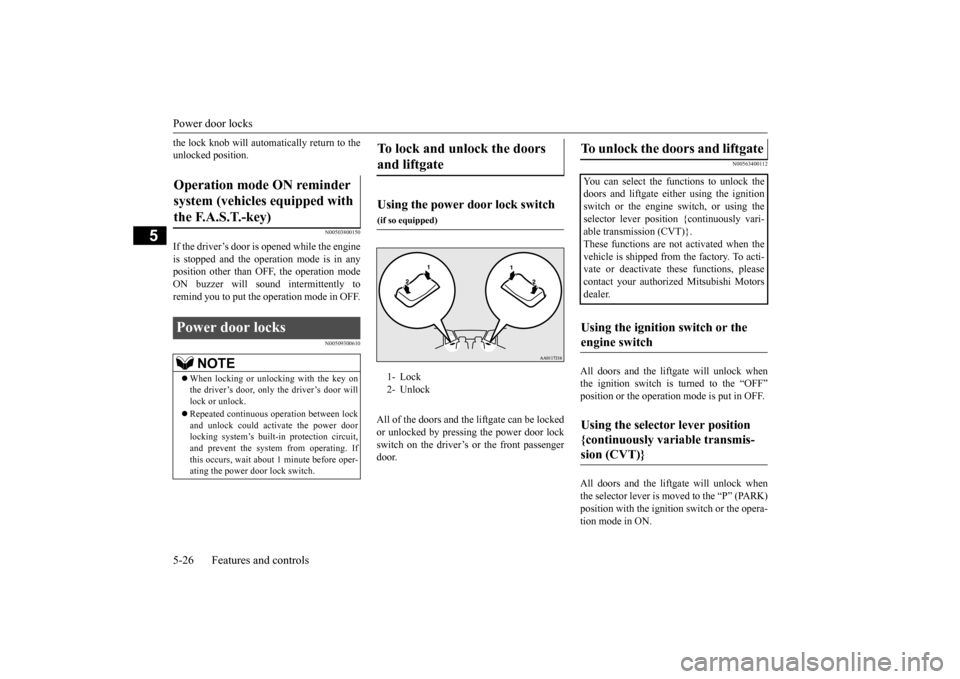
All of the doors and the
liftgate can be locked
or unlocked by pressing the power door lock switch on the driver’s or the front passengerdoor.
N00563400112
All doors and the liftgate will unlock whenthe ignition switch is turned to the “OFF” position or the operation
mode is put in OFF.
All doors and the liftgate will unlock when the selector lever is moved to the “P” (PARK)position with the ignition
switch or the opera-
tion mode in ON.
Operation mode ON reminder system (vehicles equipped with the F.A.S.T.-key) Power door locks
NOTE
When locking or unlocking with the key on the driver’s door, only the driver’s door willlock or unlock. Repeated continuous
operation between lock
and unlock could acti
vate the power door
locking system’s built-i
n protection circuit,
and prevent the system from operating. Ifthis occurs, wait about
1 minute before oper-
ating the power door lock switch.
To lock and unlock the doors and liftgate Using the power door lock switch
(if so equipped)1- Lock 2- Unlock
To unlock the doors and liftgate You can select the functions to unlock the doors and liftgate eith
er using the ignition
switch or the engine switch, or using the selector lever positi
on {continuously vari-
able transmission (CVT)}.These functions are not
activated when the
vehicle is shipped from the factory. To acti- vate or deactivate
these functions, please
contact your authorized Mitsubishi Motors dealer.Using the ignition switch or the engine switch Using the selector lever position {continuously variable transmis-sion (CVT)}
BK0212400US.book 26 ページ 2014年4月1日 火曜日 午後2時21分
Page 91 of 300
Power window control 5-30 Features and controls
5
N00548800098
Each sub-switch can be
used for it’s own pas-
senger door window, unless the driver’s win-dow lock switch is activated.
N00548900132
The power windows can be run up or downwhen the ignition switch or the operationmode is in ON. The door windows can be opened or closed for a 30-second period after the engine is
stopped. However, once the driver’s door or the front passenger’s
door is opened, the
power windows cannot be operated.
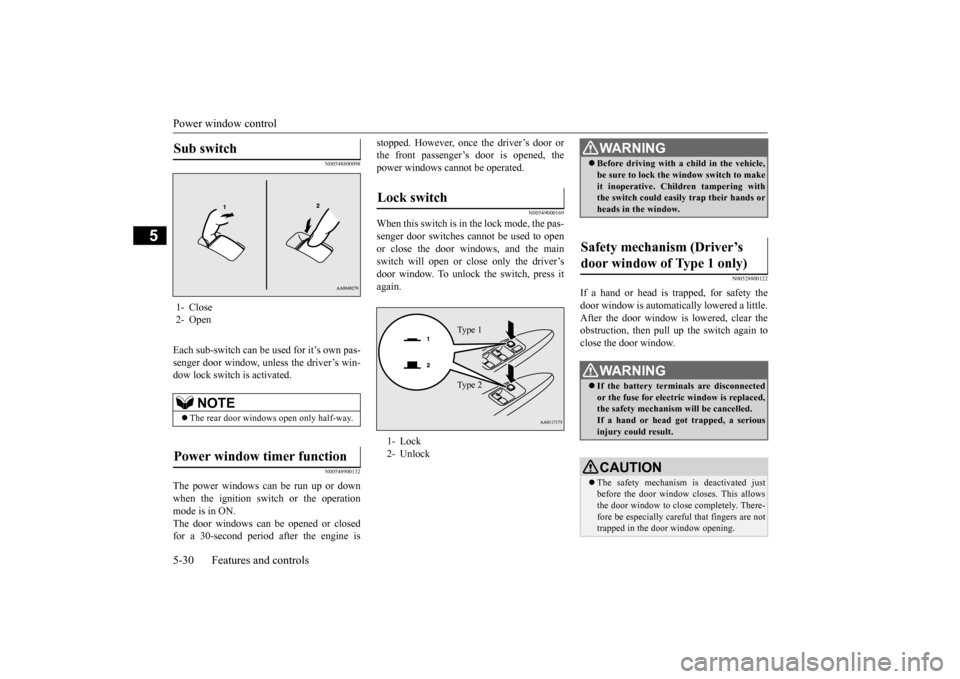
N00549000169
When this switch is in the lock mode, the pas-senger door switches cannot be used to open or close the door windows, and the main switch will open or
close only the driver’s
door window. To unlock the switch, press it again.
N00528800122
If a hand or head is trapped, for safety thedoor window is automati
cally lowered a little.
After the door window is lowered, clear the obstruction, then pull up the switch again toclose the door window.
Sub switch 1- Close2- Open
NOTE
The rear door windows open only half-way.
Power window timer function
Lock switch 1- Lock 2- Unlock
Ty p e 1 Ty p e 2
WA R N I N G Before driving with a child in the vehicle, be sure to lock the window switch to makeit inoperative. Children tampering withthe switch could easily trap their hands or heads in the window.
Safety mechanism (Driver’s door window of Type 1 only)
WA R N I N G If the battery terminals are disconnected or the fuse for electric window is replaced, the safety mechanism will be cancelled. If a hand or head got
trapped, a serious
injury could result.CAUTION The safety mechanism is deactivated just before the door window closes. This allows the door window to close completely. There- fore be especially careful that fingers are nottrapped in the door window opening.
BK0212400US.book 30 ページ 2014年4月1日 火曜日 午後2時21分
Page 92 of 300
Parking brake
Features and controls 5-31
5
N00551400043
Wind buffeting can be de
scribed as the per-
ception of pressure on the ears or a boomingor rumbling sound. Your
vehicle may exhibit
wind buffeting when driving with one or both rear door windows down or partially opened.This is a normal occurrence that can be mini- mized. If the buffeting
occurs with the rear
door windows open, open the front door win- dows as well as the rear door windows to minimize the condition.
N00511400399
To park the vehicle, first bring it to a com-plete stop, fully engage the parking brake,and then move the gearshift lever to 1st (on a uphill) or “R” (Reverse) (on a downhill) posi- tion for vehicles equipped with a manualtransaxle, set the selector lever to “P” (PARK) position for vehi
cles equipped with a
continuously variable transmission (CVT).
The safety mechanism is deactivated while the switch is pulled up.
Therefore be espe-
cially careful that fi
ngers are not trapped in
the door window opening. Do not deliberately tr
ap your hands or head
in order to activate the safety mechanism. Your hand or head coul
d be trapped and per-
sonal injury could result.NOTE
The safety mechanism can be activated if the driving conditions or
other circumstances
cause the door window to be subjected to a physical shock similar to that caused by trapped hand or head. If the battery termin
als are disc
onnected or
the fuse for electric
window is replaced, the
safety mechanism will be cancelled and the door window will not
automatically
open/close completely.If the window is open,
repeatedly raise the
driver’s door window switch until the win- dow has been fully cl
osed. Following this,
release the switch, raise the switch onceagain and hold it in this
condition for at least
1 second, then release it. You should now be able to operate the driver’s door window inthe normal fashion.CAUTION
What to do if you hear wind buffeting when driving Parking brake
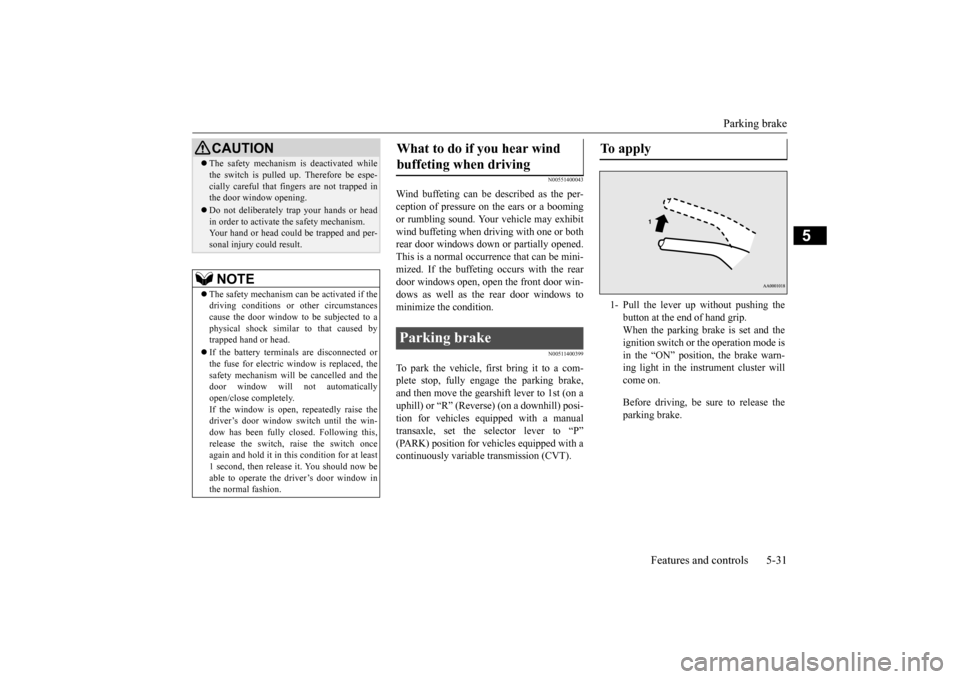
To apply 1- Pull the lever up without pushing the
button at the end of hand grip. When the parking brake is set and theignition switch or the operation mode is in the “ON” position, the brake warn- ing light in the instrument cluster willcome on. Before driving, be sure to release the parking brake.
BK0212400US.book 31 ページ 2014年4月1日 火曜日 午後2時21分
Page 95 of 300
Outside rearview mirrors 5-34 Features and controls
5
N00549100144
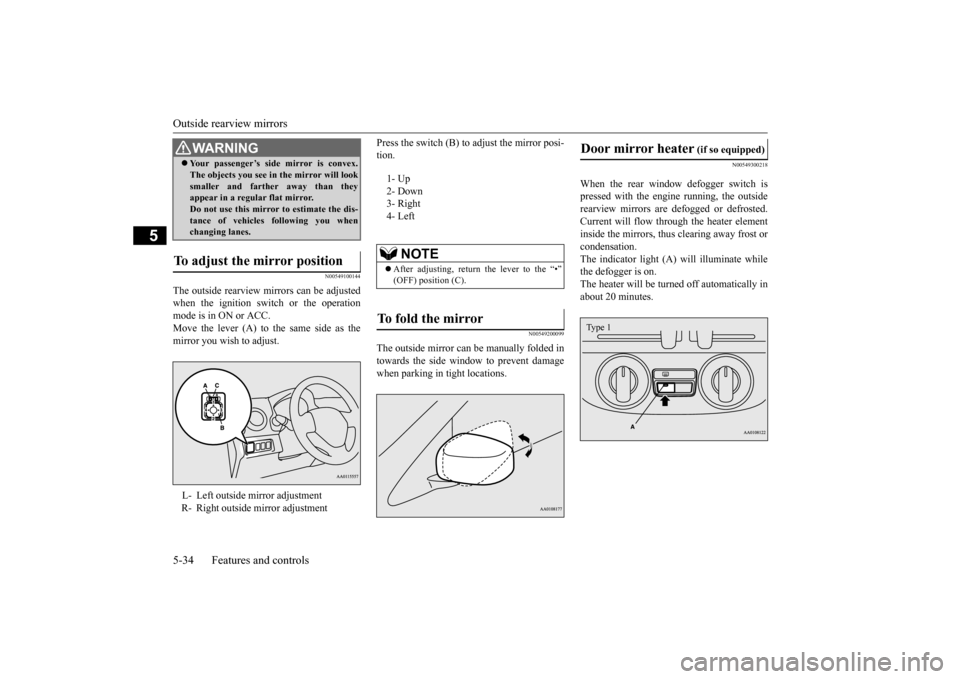
The outside rearview mirrors can be adjusted when the ignition switch or the operationmode is in ON or ACC. Move the lever (A) to the same side as the mirror you wish to adjust.
Press the switch (B) to adjust the mirror posi- tion.
N00549200099
The outside mirror can be manually folded in towards the side window to prevent damage when parking in tight locations.
N00549300218
When the rear window defogger switch ispressed with the engine running, the outsiderearview mirrors are defogged or defrosted. Current will flow throug
h the heater element
inside the mirrors, thus clearing away frost orcondensation. The indicator light (A) will illuminate while the defogger is on. The heater will be turned off automatically in about 20 minutes.
Your passenger’s side mirror is convex. The objects you see in
the mirror will look
smaller and farthe
r away than they
appear in a regular flat mirror. Do not use this mirror to estimate the dis- tance of vehicles following you whenchanging lanes.
To adjust the mirror position L- Left outside mirror adjustment R- Right outside mirror adjustmentWA R N I N G
1- Up 2- Down3- Right 4- Left
NOTE
After adjusting, return the lever to the “•” (OFF) position (C).
To fold the mirror
Door mirror heater
(if so equipped)
Type 1
BK0212400US.book 34 ページ 2014年4月1日 火曜日 午後2時21分