lock MITSUBISHI MIRAGE 2015 6.G Repair Manual
[x] Cancel search | Manufacturer: MITSUBISHI, Model Year: 2015, Model line: MIRAGE, Model: MITSUBISHI MIRAGE 2015 6.GPages: 300, PDF Size: 43.44 MB
Page 167 of 300
12 V power outlets 5-106 Features and controls
5
N00525000615
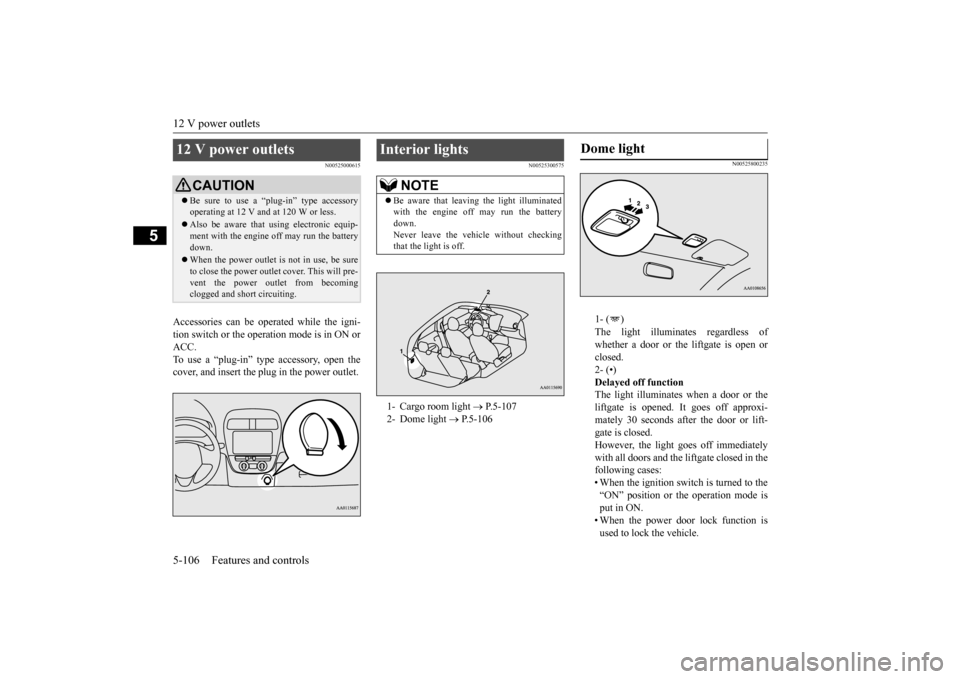
Accessories can be ope
rated while the igni-
tion switch or the opera
tion mode is in ON or
ACC. To use a “plug-in” type
accessory, open the
cover, and insert the
plug in the power outlet.
N00525300575
N00525800235
1- ( ) The light illuminates regardless of whether a door or the liftgate is open or closed.2- (•) Delayed off function The light illuminates when a door or theliftgate is opened. It goes off approxi- mately 30 seconds after the door or lift- gate is closed.However, the light goes off immediately with all doors and the liftgate closed in the following cases:• When the ignition switch is turned to the “ON” position or the operation mode is put in ON.• When the power door lock function is used to lock the vehicle.
12 V power outlets
CAUTION Be sure to use a “plug-in” type accessory operating at 12 V and at 120 W or less. Also be aware that
using electronic equip-
ment with the engine
off may run the battery
down. When the power outlet is not in use, be sure to close the power outlet
cover. This will pre-
vent the power out
let from becoming
clogged and short circuiting.
Interior lights
NOTE
Be aware that leaving the light illuminated with the engine off may run the batterydown. Never leave the vehi
cle without checking
that the light is off.1- Cargo room light
P.5-107
2- Dome light
P.5-106
Dome light
BK0212400US.book 106 ページ 2014年4月1日 火曜日 午後2時21分
Page 168 of 300
Storage spaces
Features and controls 5-107
5
• When the remote control transmitter of the keyless entry system or the F.A.S.T.-key is used to lock the vehicle. • When the door lock/unlock switch or liftgate switch is pressed to lock thevehicle while carrying the F.A.S.T.-key. Auto cut-out function If the light is left switched on with theignition switch is in the “OFF” or “ACC” position or the operation mode is in OFF or ACC, and a door or the liftgate is opened, it goes off automatically after approximately 30 minutes.The light will illuminate again after it automatically goes off in the following cases:• When the ignition switch is turned to the “ON” position or the operation mode is put in ON.• When the keyless entry system or the F.A.S.T.-key is operated. • When all doors and the liftgate areclosed.
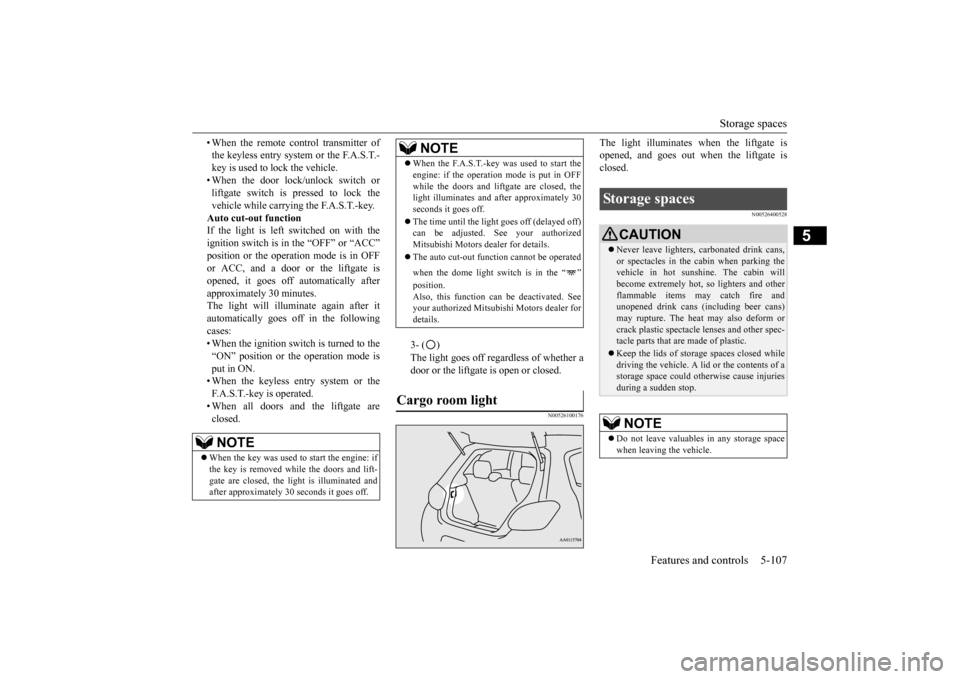
3- ( ) The light goes off regardless of whether a door or the liftgate is open or closed.
N00526100176
The light illuminates when the liftgate is opened, and goes out when the liftgate isclosed.
N00526400528
NOTE
When the key was used to start the engine: if the key is removed while the doors and lift- gate are closed, the li
ght is illuminated and
after approximately 30
seconds it goes off.
When the F.A.S.T.-key was used to start the engine: if the operation
mode is put in OFF
while the doors and lift
gate are closed, the
light illuminates and
after approximately 30
seconds it goes off. The time until the light
goes off (delayed off)
can be adjusted. See your authorized Mitsubishi Motors dealer for details. The auto cut-out func
tion cannot be
operated
when the dome light switch is in the “ ” position. Also, this function can
be deactivated. See
your authorized Mitsubish
i Motors dealer for
details.
Cargo room light
NOTE
Storage spaces
CAUTION Never leave lighters,
carbonated drink cans,
or spectacles in the cabin when parking the vehicle in hot suns
hine. The cabin will
become extremely hot,
so lighters and other
flammable items may catch fire and unopened drink cans (i
ncluding beer cans)
may rupture. The heat may also deform orcrack plastic spectacle
lenses and other spec-
tacle parts that are made of plastic. Keep the lids of storage spaces closed while driving the vehicle. A li
d or the contents of a
storage space could otherwise cause injuriesduring a sudden stop.NOTE
Do not leave valuables
in any storage space
when leaving the vehicle.
BK0212400US.book 107 ページ 2014年4月1日 火曜日 午後2時21分
Page 170 of 300
Rear shelf panel (if so equipped)
Features and controls 5-109
5
There are bottle holders located on the front doors.
N00528200096
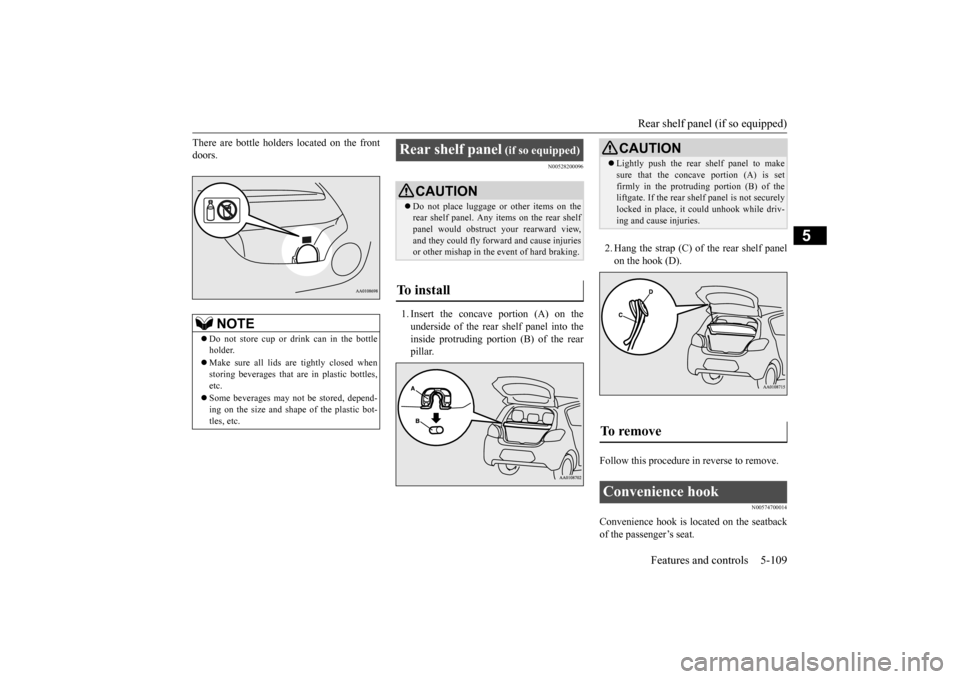
1. Insert the concave portion (A) on the underside of the rear shelf panel into the inside protruding portion (B) of the rearpillar.
2. Hang the strap (C) of the rear shelf panel on the hook (D).
Follow this procedure
in reverse to remove.
N00574700014
Convenience hook is lo
cated on the seatback
of the passenger’s seat.
NOTE
Do not store cup or drink can in the bottle holder. Make sure all lids are tightly closed when storing beverages that
are in plastic bottles,
etc. Some beverages may not
be stored, depend-
ing on the size and shape of the plastic bot-tles, etc.
Rear shelf panel
(if so equipped)
CAUTION Do not place luggage or other items on the rear shelf panel. Any it
ems on the rear shelf
panel would obstruct
your rearward view,
and they could fly forward and cause injuries or other mishap in the event of hard braking.
To install
CAUTION Lightly push the rear shelf panel to make sure that the concave portion (A) is setfirmly in the protruding portion (B) of theliftgate. If the rear shelf panel is not securely locked in place, it could unhook while driv- ing and cause injuries.
To remove
Convenience hook
BK0212400US.book 109 ページ 2014年4月1日 火曜日 午後2時21分
Page 174 of 300
Vehicle preparatio
n before driving
Driving safety 6-3
6
N00629000702
For a safer and more enjoyable trip, always check for the following: Before starting the vehicle, make certain that you and all passengers are seated andwearing their seat
belts properly (with
children in the rear seat, in appropriate restraints), and that
all the doors and the
liftgate are locked.
Move the driver’s seat as far backward as possible, while keeping good visibility,and good control of the steering wheel, brakes, accelerator, and controls. Check the instrument panel indicators and multi-information display for any possible prob- lem. Similarly, the front
passenger seat should
also be moved as fa
r back as possible.
Make sure that infants and small children are properly restrained in accordance with all laws and regulations.
Check these by selectin
g the defroster mode,
and set the blower switch on high. You should be able to feel the air blowing against thewindshield. Refer to “Defrosti
ng or defogging (wind-
shield, door windows)” on page 7-10, 7-16. Check all the tires for heavy tread wear or uneven wear patterns. Look for stones, nails,glass, or other objects
stuck in the tread. Look
for any tread cuts or
sidewall cracks. Check
the wheel nuts for tightness, and the tires(including spare tire) for proper pressure.
WA R N I N G If a floor mat is the
wrong size or is not
properly installed, it can interfere with theoperation of the pedals. Interference withthe pedals can cause unintended accelera- tion and/or increase
d stopping distances
resulting in a cras
h and injury. Always
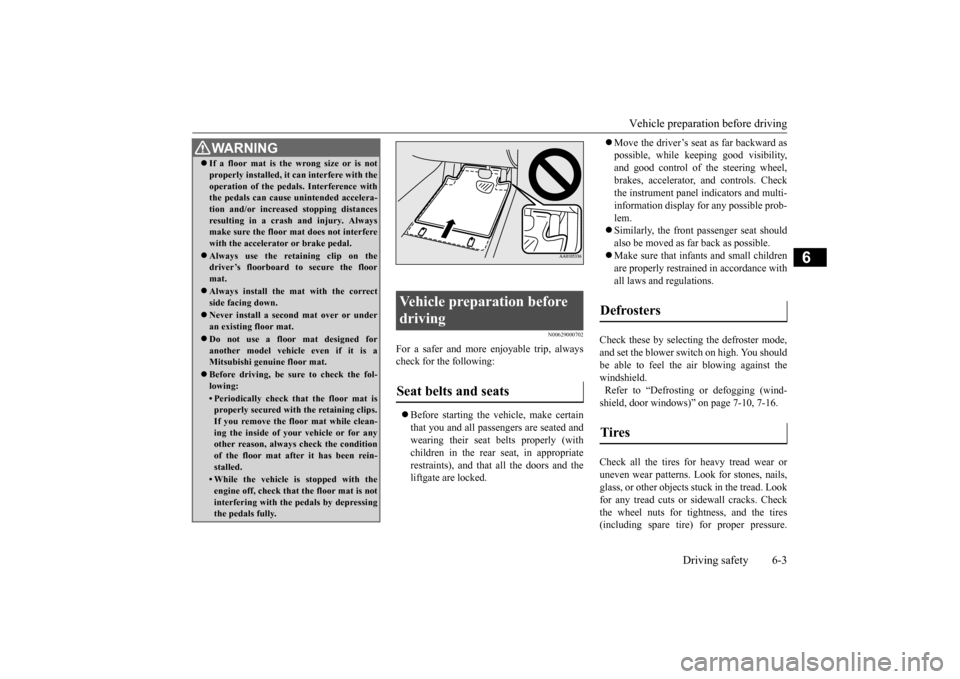
make sure the floor mat does not interfere with the accelerator or brake pedal. Always use the retaining clip on the driver’s floorboard to secure the floor mat. Always install the mat with the correct side facing down. Never install a second mat over or under an existing floor mat. Do not use a floor mat designed for another model vehicle even if it is aMitsubishi genu
ine floor mat.
Before driving, be sure to check the fol- lowing:• Periodically check that the floor mat isproperly secured with the retaining clips. If you remove the fl
oor mat while clean-
ing the inside of you
r vehicle or for any
other reason, always
check the condition
of the floor mat afte
r it has been rein-
stalled.• While the vehicle is stopped with theengine off, check that
the floor mat is not
interfering with the pedals by depressing the pedals fully.
Vehicle preparation before driving Seat belts and seats
Defrosters Tires
BK0212400US.book 3 ページ 2014年4月1日 火曜日 午後2時21分
Page 177 of 300
Loading information 6-6 Driving safety
6
Your front bumper can be damaged if you scrape it over curbs or parking stop blocks. Be careful when traveling up or down steepslopes where your bumper can scrape the road. More effort could be required to turn the steering wheel. Refer to “Electric power steering system(EPS)” on page 5-48.
Always carry the key and lock all doors and the liftgate when leaving the vehicle unat- tended.Always try to park your vehicle in a well lit area.
N00629900424
It is very importa
nt to know how much
weight your vehicle can carry. This weight iscalled the vehicle capacity weight and includes the weight of
all occupants, cargo,
non-factory-installed options, if any, beingtowed. The tire and load
ing information plac-
ard located on the driver’s door sill of your vehicle will show how
much weight it may
properly carry. It is important to fami
liarize yourself with the
following terms before loading your vehicle:
Vehicle maximum load on the tire: load on an individual tire th
at is determined by
distributing to each ax
le its share of the
maximum loaded vehicle weight and dividing by two. Vehicle normal load on the tire: load on an individual tire that is
determined by dis-
tributing to each axle its share of the curbweight, accessory
weight, and normal
occupant weight and dividing by two. Maximum loaded vehicle weight: the sum of - (a) Curb weight;(b) Accessory weight; (c) Vehicle capacity weight; and (d) Production options weight. Curb weight: the weight of a motor vehi- cle with standard equipment including the maximum capacity of
fuel, oil, and cool-
ant. Accessory weight: the combined weight (in excess of those standard items whichmay be replaced) of automatic transmis- sion, power steering
, power brakes, power
windows, power seats,
radio, and heater,
to the extent that these items are available as factory- installe
d equipment (whether
installed or not). Vehicle capacity weight: the rated cargo and luggage load plus 150 lbs (68 kg)
*
times the vehicle’s designated seatingcapacity.
WA R N I N G Leaving the engine ru
nning risks injury or
death from accidentally moving the gear-shift lever (manual transaxle) or the selec-tor lever (CVT) or from the accumulation of toxic exhaust fumes in the passenger compartment.
Where you park
WA R N I N G Do not park your vehicle in areas where combustible materials such as dry grass orleaves can come in
contact with a hot
exhaust, since a fire could occur.
Do not keep the steering wheel fully turned for a long time
When leaving the vehicle Loading information
WA R N I N G Never overload your ve
hicle. Overloading
can damage your vehicl
e, adversely affect
vehicle performance, including handling and braking, cause tire failure, and resultin an accident.
BK0212400US.book 6 ページ 2014年4月1日 火曜日 午後2時21分
Page 181 of 300
Cargo loads 6-10 Driving safety
6
N00629700435 N00630300082
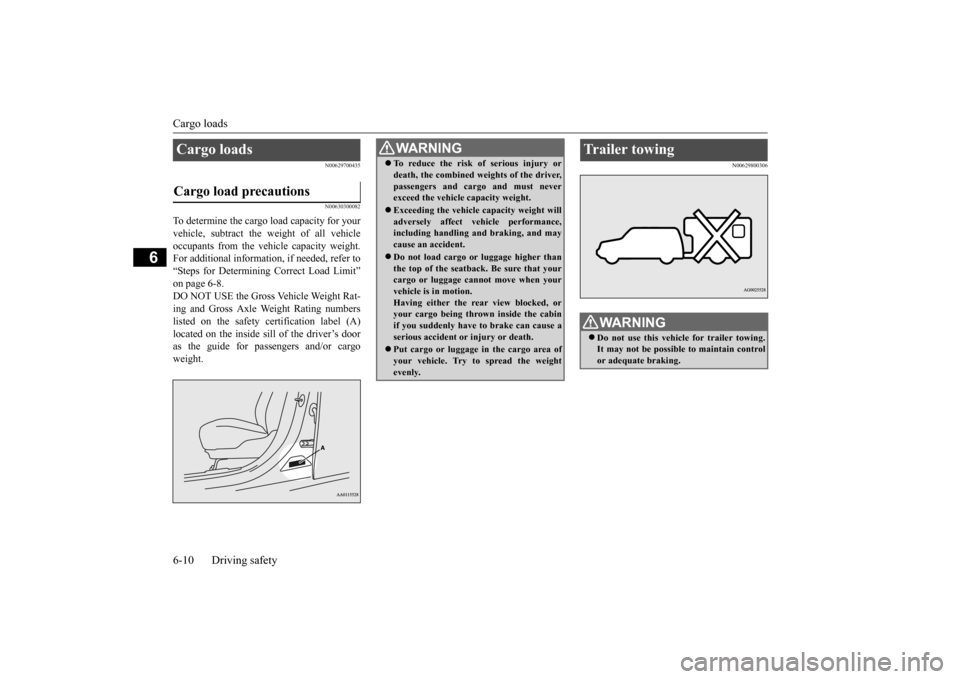
To determine the cargo load capacity for your vehicle, subtract the
weight of all vehicle
occupants from the vehi
cle capacity weight.
For additional information, if needed, refer to “Steps for Determining Correct Load Limit” on page 6-8. DO NOT USE the Gross Vehicle Weight Rat- ing and Gross Axle Weight Rating numberslisted on the safety certification label (A) located on the inside sill of the driver’s door as the guide for pass
engers and/or cargo
weight.
N00629800306
Cargo loads Cargo load precautions
WA R N I N G To reduce the risk of serious injury or death, the combined weights of the driver,passengers and cargo and must neverexceed the vehicle capacity weight. Exceeding the vehicle capacity weight will adversely affect ve
hicle performance,
including handling and braking, and may cause an accident. Do not load cargo or luggage higher than the top of the seatback. Be sure that yourcargo or luggage cann
ot move when your
vehicle is in motion. Having either the re
ar view blocked, or
your cargo being thrown
inside the cabin
if you suddenly have to brake can cause a serious accident or
injury or death.
Put cargo or luggage in the cargo area of your vehicle. Try to spread the weightevenly.
Trailer towing
WA R N I N G Do not use this vehicle for trailer towing. It may not be possible to maintain control or adequate braking.
BK0212400US.book 10 ページ 2014年4月1日 火曜日 午後2時21分
Page 185 of 300
Heater without air conditioning function (if so equipped) 7-4 Comfort controls
7
Air flows mainly to the windshield and the door windows.
N00737700031
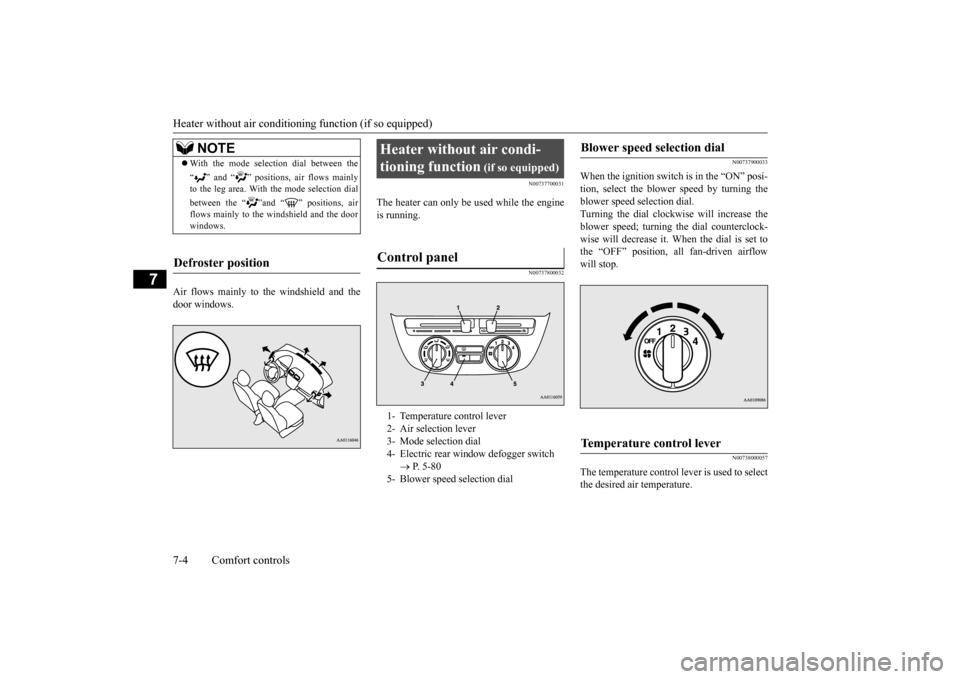
The heater can only be used while the engineis running.
N00737800032
N00737900033
When the ignition switch is in the “ON” posi- tion, select the blower speed by turning the blower speed selection dial.Turning the dial clockwise will increase the blower speed; turning
the dial counterclock-
wise will decrease it. When the dial is set tothe “OFF” position, all fan-driven airflow will stop.
N00738000057
The temperature control lever is used to select the desired air temperature.
NOTE
With the mode selec
tion dial between the
“ ” and “ ” positions, air flows mainly to the leg area. With the mode selection dial between the “ ”and “ ” positions, air flows mainly to the windshield and the door windows.
Defroster position
Heater without air condi- tioning function
(if so equipped)
Control panel
1- Temperature control lever 2- Air selection lever 3- Mode selection dial4- Electric rear win
dow defogger switch
P. 5-80
5- Blower speed selection dial
Blower speed selection dial
Temperature control lever
BK0212400US.book 4 ページ 2014年4月1日 火曜日 午後2時21分
Page 188 of 300
Manual air conditioning (if so equipped)
Comfort controls 7-7
7
N00730300344
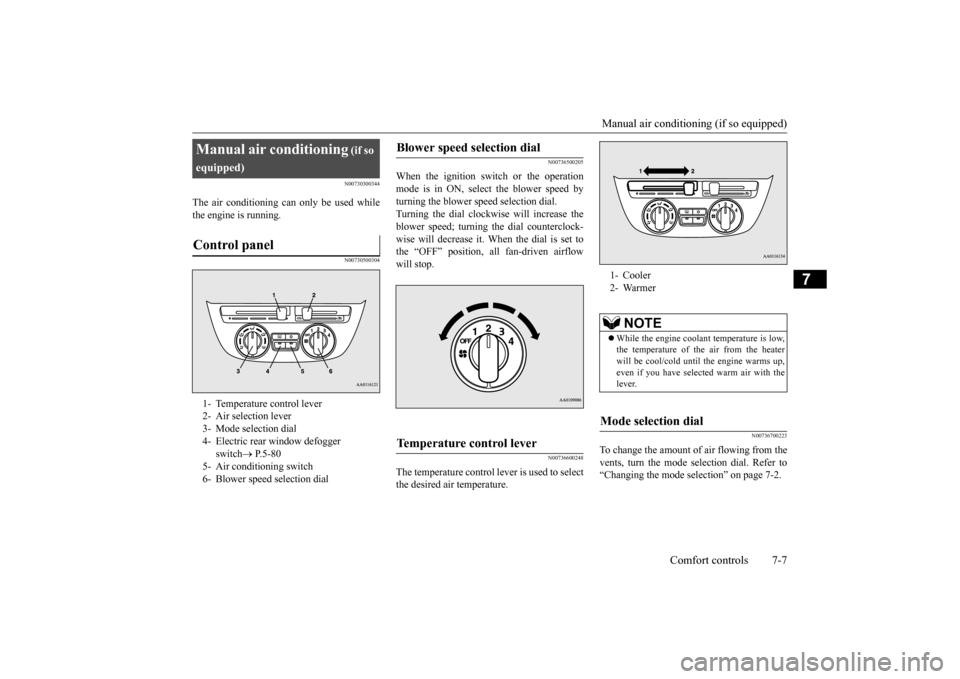
The air conditioning ca
n only be used while
the engine is running.
N00730500304
N00736500205
When the ignition switch or the operation mode is in ON, select
the blower speed by
turning the blower sp
eed selection dial.
Turning the dial clockw
ise will increase the
blower speed; turning
the dial counterclock-
wise will decrease it. When the dial is set tothe “OFF” position, all fan-driven airflow will stop.
N00736600248
The temperature control lever is used to select the desired air temperature.
N00736700223
To change the amount of air flowing from thevents, turn the mode
selection dial. Refer to
“Changing the mode se
lection” on page 7-2.
Manual air conditioning
(if so
equipped)Control panel
1- Temperature control lever 2- Air selection lever 3- Mode selection dial 4- Electric rear
window defogger
switch
P. 5 - 8 0
5- Air conditioning switch 6- Blower speed selection dial
Blower speed selection dial
Temperature control lever
1- Cooler2- Warmer
NOTE
While the engine coolant temperature is low, the temperature of the air from the heaterwill be cool/cold unti
l the engine warms up,
even if you have selected warm air with the lever.
Mode selection dial
BK0212400US.book 7 ページ 2014年4月1日 火曜日 午後2時21分
Page 199 of 300
Air purifier (if so equipped) 7-18 Comfort controls
7
N00733800180
The air conditioning system is equipped with an air filter to re
move pollen
and dust.
The air filter’s ability to collect pollen and dirt is reduced as it be
comes dirty, so replace
it periodically. For the maintenance interval,refer to the “WARRANTY AND MAINTE- NANCE MANUAL”.
N00734302131
The audio system can onl
y be used when the
ignition switch or the operation mode is inON or ACC.
N00711900729 N00712000411
Turn the VOL knob clockwise to increase the volume; counterclockwis
e to decrease the
volume. The status will be displayed in the display.
Air purifier
(if so equipped)
NOTE
Operation in certain conditions such as driv- ing on a dusty road and frequent use of the air conditioning
can lead to re
duction of ser-
vice life of the filter. When you feel that the air flow is lower than normal or when the windshield or windows st
art to fog up easily,
replace the air filter. Contact your Mitsubishi
Motors dealer or a
repair facility of your
choice for assistance.
AM/FM electronically tuned radio with CD player
(if so
equipped)
NOTE
To listen to the audio system while the engine is not running, turn the ignitionswitch to the “ACC” position or put the oper-ation mode in ACC. For vehicles equipped with the F.A.S.T.-key, if the operation mode is left in ACC, theaccessory power will automatically turn off after a certain period
of time and you will no
longer be able to use the audio system. Theaccessory power comes on again if the engine switch is operated with it in the “ACC” position. Refer
to “ACC power auto-
cutout function” on page 5-14. If a cellular phone is
used inside the vehicle,
it may create noise in the audio equipment. This does not mean that anything is wrong with your audio equipment. In such a case,use the cellular phone at
a place as far away
as possible from the audio equipment. If foreign objects or wa
ter get into the audio
equipment, or if smoke or a strange odor comes from it, immediately turn off theaudio system and have
it checked at an
authorized Mitsubishi Motors dealer or a repair facility of your
choice. Never try to
repair it yourself. Avoid using the audio sys- tem until it is inspected by a qualified per- son. If the audio system is damaged by foreign objects, water, or fire, have the systemchecked by a qualified
Mitsubishi Motors
technician.
Volume and tone control panel
1- PWR (On-Off) switch 2- VOL (Volume control) knob3- Display 4-
/MENU (Mode change) button
5- Sound control buttonTo adjust the volume
BK0212400US.book 18 ページ 2014年4月1日 火曜日 午後2時21分
Page 205 of 300
AM/FM electronically tuned radio with CD player (if so equipped) 7-24 Comfort controls
7
The CD player can display folder and file titles for discs with c
onverted folder and file
information. Press th
e DISP button repeat-
edly to make selections in the following sequence: folder name
file name
nor-
mal display mode. The CD player can display ID3 tag informa- tion for files that have been recorded withID3 tag information. 1. Press the DISP button for 2 seconds or longer to switch to
the ID3 tag informa-
tion.2. Press the DISP button repeatedly to make selections in the following sequence: album TAG
track TAG
artist TAG
normal display mode.
N00702600010
Press the button to switch the clock mode. To exit the clock mode, press the button.
N00702700011
1. Press and hold the button and the clock display flashes. 2. Press the or button to adjust the “hours” digit.
MP3 titles ID3 tag information
NOTE
To return from ID3 tag information to the folder name, press the
DISP button again for
2 seconds or longer. When there is no title information to be dis- played, the display shows “NO TITLE”.
The display can show up to 11 characters. If a folder name, track name
, or item of ID3 tag
information has more than 11 characters,press the PAGE button to view the next 11 characters. Characters that the CD
player cannot display
are shown as “•”.
To display the clock
A- (Clock) button
NOTE
Example CD player mode Clock mode
NOTE
While the clock mode is selected, the display will switch to the applicable operation dis-play whenever the CD player, external audioinput mode or radio, etc. is operated. Then, if no entries are made for 7 seconds, the dis- play will automatically return to the clockmode.
To adjust the clock
A- (Clock) button B- (Clock adjustment up) buttonC- (Clock adjustment down) button
BK0212400US.book 24 ページ 2014年4月1日 火曜日 午後2時21分