clock MITSUBISHI MIRAGE 2017 6.G User Guide
[x] Cancel search | Manufacturer: MITSUBISHI, Model Year: 2017, Model line: MIRAGE, Model: MITSUBISHI MIRAGE 2017 6.GPages: 307, PDF Size: 9.02 MB
Page 202 of 307
Manual air conditioning (if so equipped)
Comfort controls 7-9
7
N00731001488
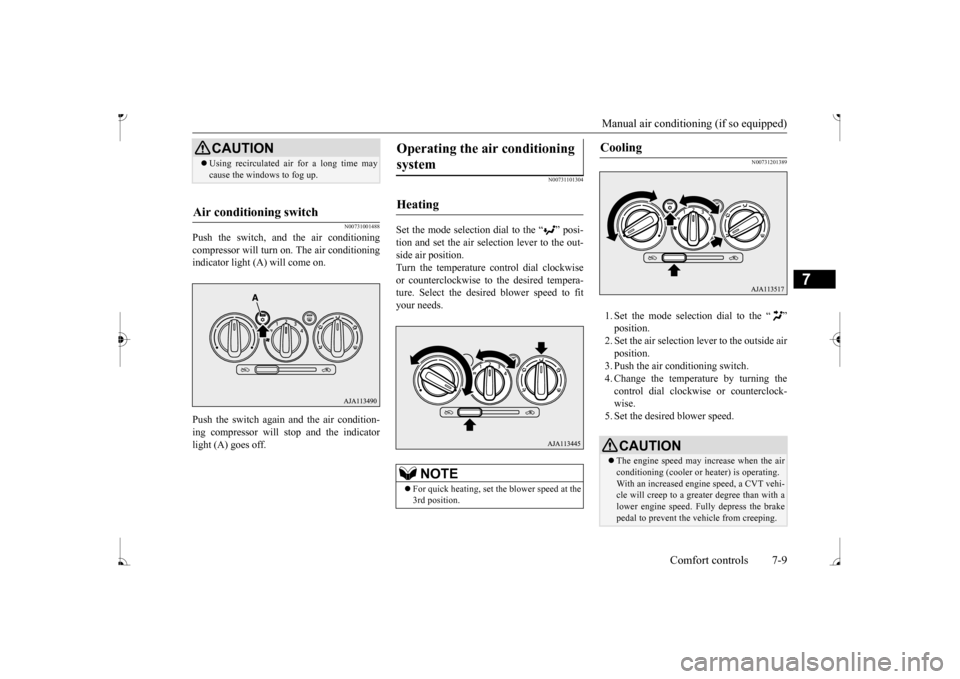
Push the switch, and the air conditioning compressor will turn on. The air conditioningindicator light (A) will come on. Push the switch again and the air condition- ing compressor will stop and the indicator light (A) goes off.
N00731101304
Set the mode selection dial to the “ ” posi- tion and set the air sele
ction lever to the out-
side air position. Turn the temperature control dial clockwise or counterclockwise to
the desired tempera-
ture. Select the desire
d blower speed to fit
your needs.
N00731201389
1. Set the mode selection dial to the “ ” 2. Set the air selection le
ver to the outside air
position.3. Push the air conditioning switch. 4. Change the temperature by turning the control dial clockwise or counterclock-wise. 5. Set the desired blower speed.
CAUTION Using recirculated ai
r for a long time may
cause the windows to fog up.
Air conditioning switch
Operating the ai
r conditioning
system
Heating
NOTE
For quick heating, set th
e blower speed at the
3rd position.
Cooling
CAUTION The engine speed may increase when the air conditioning (cooler or
heater) is operating.
With an increased engi
ne speed, a CVT vehi-
cle will creep to a greater degree than with a lower engine speed. Fully depress the brakepedal to prevent the vehicle from creeping.
BK0236100US.book 9 ページ 2016年2月1日 月曜日 午前10時15分
Page 213 of 307
AM/FM electronically tuned radio with CD player (if so equipped) 7-20 Comfort controls
7
N00711901742 N00712001434
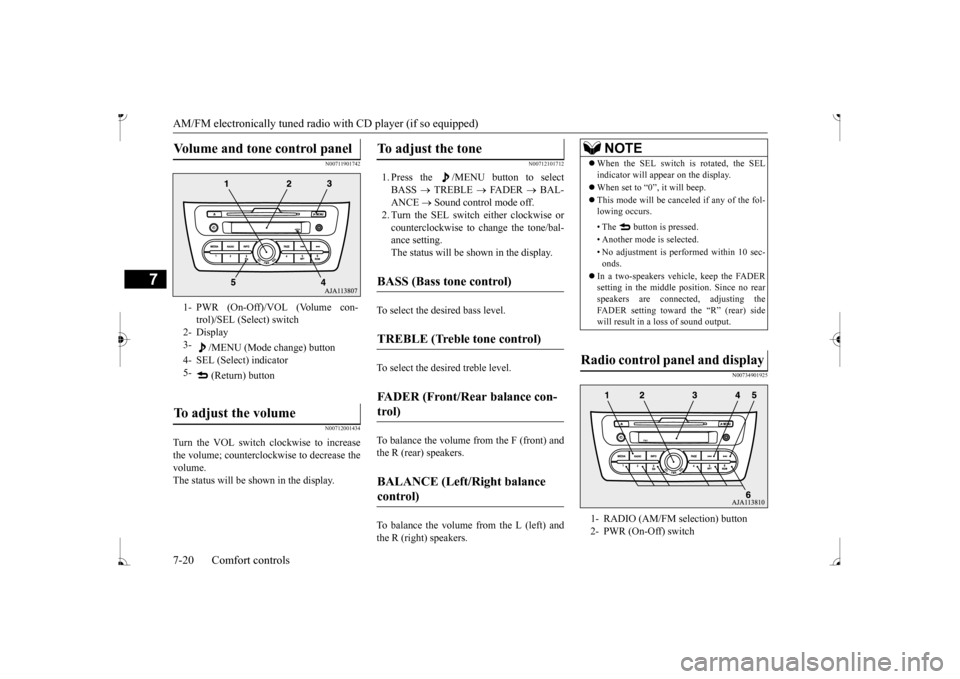
Turn the VOL switch clockwise to increase the volume; counterclockw
ise to decrease the
volume.The status will be shown in the display.
N00712101712
1. Press the /MENU button to select BASS
TREBLE
FADER
BAL-
ANCE
Sound control mode off.
2. Turn the SEL switch either clockwise or counterclockwise to change the tone/bal- ance setting.The status will be shown in the display.
To select the desired bass level.To select the desired treble level. To balance the volume from the F (front) and the R (rear) speakers. To balance the volume from the L (left) and the R (right) speakers.
N00734901925
Volume and tone control panel
1- PWR (On-Off)/VOL (Volume con-
trol)/SEL (Select) switch
2- Display 3-
/MENU (Mode change) button
4- SEL (Select) indicator 5-
(Return) button
To adjust the volume
To adjust the tone
BASS (Bass tone control)
TREBLE (Treble tone control)
FADER (Front/Rear balance con- trol)
BALANCE (Left/Right balance control)
NOTE
When the SEL switch is rotated, the SEL indicator will appear on the display. When set to “0”, it will beep. This mode will be canc
eled if any of the fol-
lowing occurs. • The button is pressed. • Another mode is selected.• No adjustment is performed within 10 sec- onds.
In a two-speakers vehi
cle, keep the FADER
setting in the middle position. Since no rear speakers are connect
ed, adjusting the
FADER setting toward the “R” (rear) side will result in a loss of sound output.
Radio control panel and display
1- RADIO (AM/FM selection) button 2- PWR (On-Off) switch
BK0236100US.book 20 ページ 2016年2月1日 月曜日 午前10時15分
Page 218 of 307
AM/FM electronically tuned radio with CD player (if so equipped)
Comfort controls 7-25
7
The CD player can display disc and track titles. Press the INFO
button repeatedly to
make selections in
the following sequence:
disc name
track name
normal display
mode. The CD player can display folder and file titles. Press the INFO
button repeatedly to
make selections in
the following sequence:
folder name
file name
normal display
mode. The CD player can display ID3 tag informa- tion for files that have been recorded withID3 tag information.
1. Press the INFO button for 2 seconds or longer to switch to
the ID3 tag informa-
tion. 2. Press the INFO button repeatedly to make selections in the following sequence:album TAG
track TAG
artist TAG
normal display mode.
N00702600010
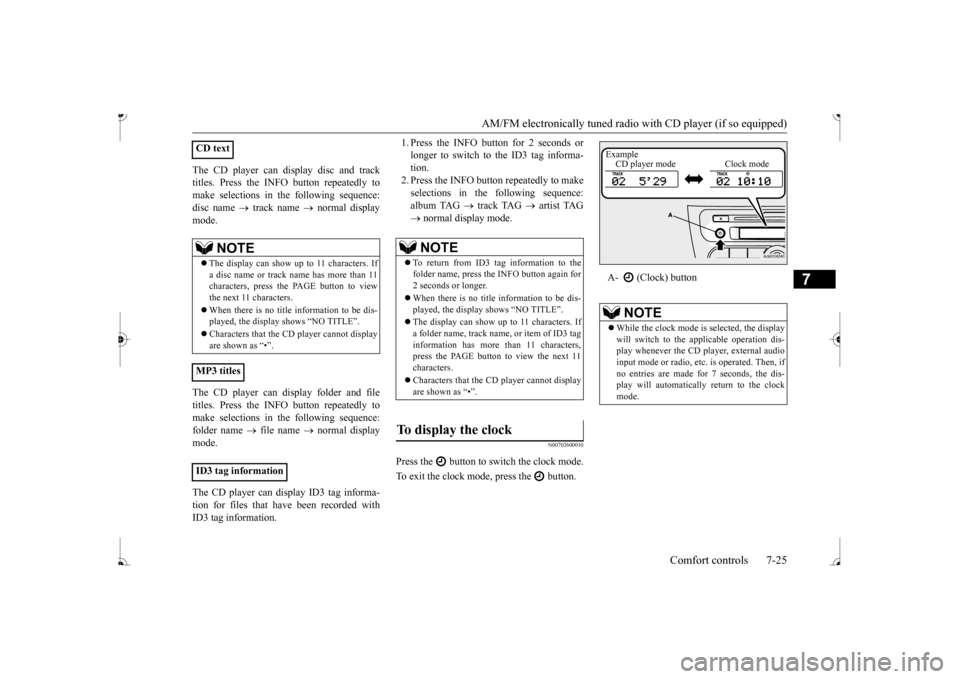
Press the button to switch the clock mode. To exit the clock mode, press the button.
CD text
NOTE
The display can show up to 11 characters. If a disc name or track name has more than 11 characters, press the PAGE button to view the next 11 characters. When there is no title information to be dis- played, the display
shows “NO TITLE”.
player cannot display
are shown as “•”.
MP3 titles ID3 tag information
NOTE
To return from ID3 tag information to the folder name, press the INFO button again for 2 seconds or longer. When there is no title information to be dis- played, the display shows “NO TITLE”. The display can show up to 11 characters. If a folder name, track name
, or item of ID3 tag
information has more than 11 characters, press the PAGE button to view the next 11 characters. Characters that the CD
player cannot display
are shown as “•”.
To display the clock
A- (Clock) button
NOTE
While the clock mode is
selected, the display
will switch to the a
pplicable operation dis-
play whenever the CD player, external audioinput mode or radio, et
c. is operated. Then, if
no entries are made for 7 seconds, the dis- play will automatically return to the clockmode.Example CD player mode Clock mode
BK0236100US.book 25 ページ 2016年2月1日 月曜日 午前10時15分
Page 219 of 307
AM/FM electronically tuned radio with CD player (if so equipped) 7-26 Comfort controls
7
N00702701047
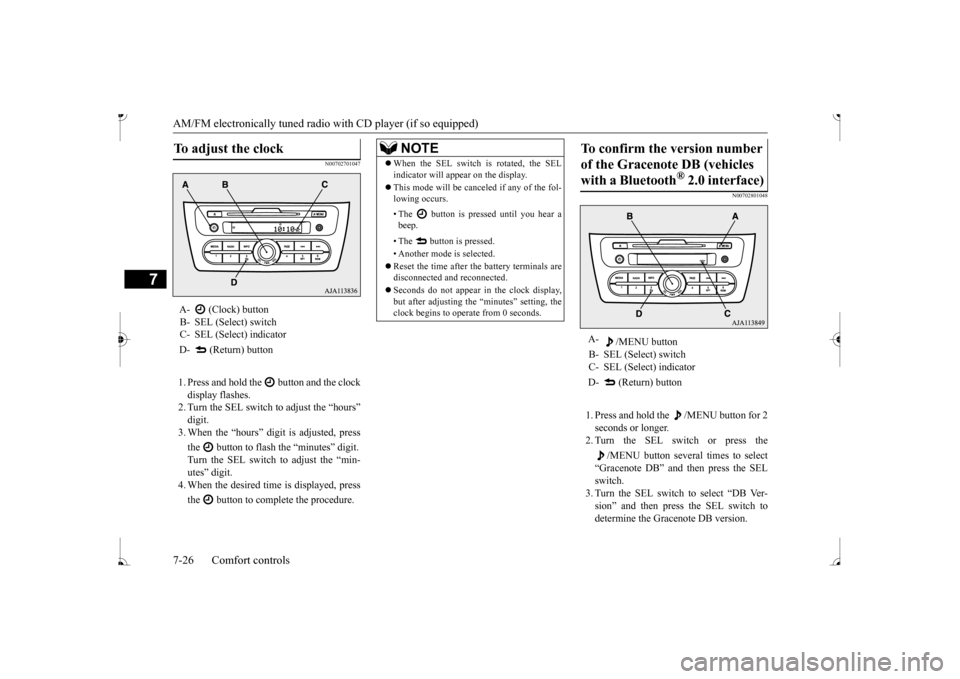
1. Press and hold the button and the clock display flashes. 2. Turn the SEL switch to adjust the “hours”digit. 3. When the “hours” digit is adjusted, press the button to flash
the “minutes” digit.
Turn the SEL switch to adjust the “min- utes” digit. 4. When the desired time is displayed, press the button to complete the procedure.
N00702801048
1. Press and hold the /MENU button for 2 seconds or longer. 2. Turn the SEL switch or press the
/MENU button several times to select
“Gracenote DB” and then press the SEL switch. 3. Turn the SEL switch to select “DB Ver-sion” and then press the SEL switch to determine the Gracenote DB version.
To adjust the clock
A- (Clock) buttonB- SEL (Select) switch C- SEL (Select) indicator D- (Return) button
NOTE
When the SEL switch is rotated, the SEL indicator will appear on the display. This mode will be canceled if any of the fol- lowing occurs. • The button is pressed until you hear a beep. • The button is pressed. • Another mode is selected. Reset the time after the battery terminals are disconnected an
d reconnected.
Seconds do not appear
in the clock display,
but after adjusting the
“minutes” setting, the
clock begins to operate from 0 seconds.
To confirm the version number of the Gracenote DB (vehicles with a Bluetooth
® 2.0 interface)
A-
/MENU button
B- SEL (Select) switch C- SEL (Select) indicator D- (Return) button
BK0236100US.book 26 ページ 2016年2月1日 月曜日 午前10時15分
Page 237 of 307
Antenna 7-44 Comfort controls
7
N00734201511
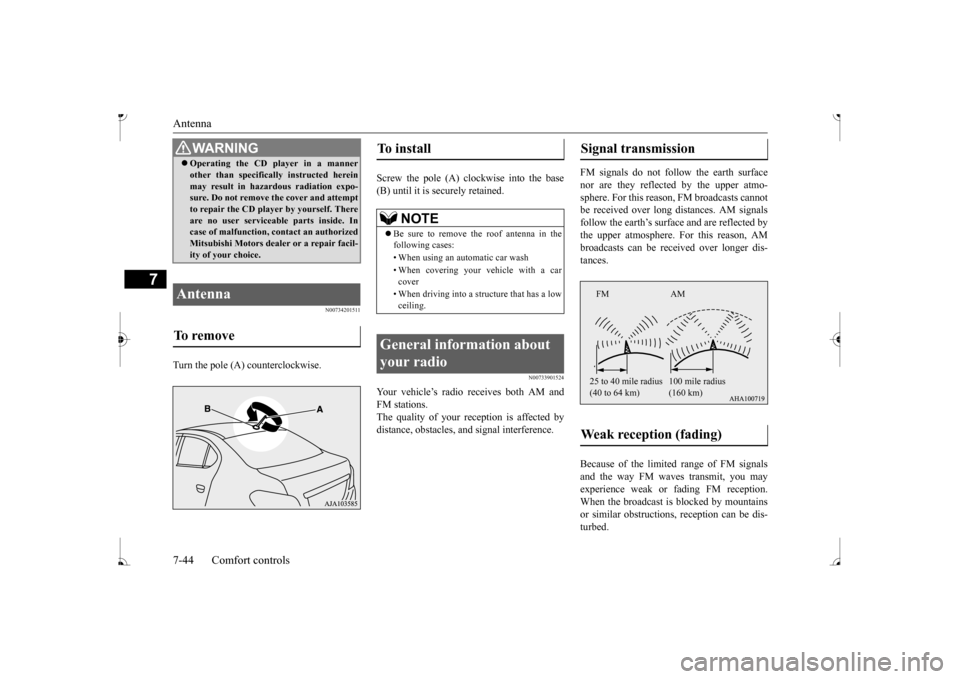
Turn the pole (A) counterclockwise.
Screw the pole (A) clockwise into the base (B) until it is securely retained.
N00733901524
Your vehicle’s radio receives both AM and FM stations. The quality of your reception is affected by distance, obstacles, a
nd signal interference.
FM signals do not foll
ow the earth surface
nor are they reflected by the upper atmo- sphere. For this reason,
FM broadcasts cannot
be received over long di
stances. AM signals
follow the earth’s surfa
ce and are reflected by
the upper atmosphere. For this reason, AM broadcasts can be rece
ived over longer dis-
tances. Because of the limite
d range of FM signals
and the way FM waves transmit, you may experience weak or fading FM reception.When the broadcast is blocked by mountains or similar obstructions,
reception ca
n be dis-
turbed.
WA R N I N G Operating the CD player in a manner other than specifically instructed hereinmay result in hazardous radiation expo-sure. Do not remove the cover and attempt to repair the CD playe
r by yourself. There
are no user serviceable parts inside. Incase of malfunction,
contact an authorized
Mitsubishi Motors dealer or a repair facil- ity of your choice.
Antenna To remove
To install
NOTE
Be sure to remove the roof antenna in the following cases: • When using an automatic car wash • When covering your ve
hicle with a car
cover • When driving into a structure that has a low ceiling.
General information about your radio
Signal transmission Weak reception (fading)
FM AM 25 to 40 mile radius (40 to 64 km)
(160 km)
BK0236100US.book 44 ページ 2016年2月1日 月曜日 午前10時15分
Page 243 of 307
Engine overheating 8-4 For emergencies
8
If you drive your vehicle with a low battery charge after the engine has been started byusing jumper cables, the engine may misfire. This can cause the an
ti-lock braking system
warning light to blink on and off. This is onlydue to the low battery voltage. It is not a problem with the brak
e system. If this hap-
pens, fully charge the battery and ensure thecharging system is operating properly.
N00836501391
If the high coolant temperature warning lightilluminates while the engine is running, the engine may be overheating. If this happens: 1. Stop the vehicle in a safe place. Turn on the hazard warning flashers.2. With the engine st
ill running, carefully
raise the engine hood to vent the engine compartment.
3. Check that the cooling fan is running. If the fan is not turning, stop the engineimmediately and contact an authorized Mitsubishi Motors dealer or a repair facil- ity of your choice for assistance. 4. If you see steam or spray coming from under the hood, turn off the engine. 5. If you do not see stea
m or spray coming
from under the hood, leave the engine onuntil the high coolant temperature warn- ing light goes off. After the high coolant temperature warning light has gone off,you can start driving again. If the high coolant temperature warning light stays on, turn off the engine.
6. When you do not see any more steam or spray, open the hood. Look for obviousleaks, such as a split radiator hose. Be careful as components will be hot. Any leak source must be repaired.7. If there is no obvious leak source, check the coolant level in the engine coolant reserve tank. If there is none, or if it is toolow, slowly add coolant. 8. If the engine coolant reserve tank needs coolant, you will probably also need to add coolant to the radiator. Do not loosen or remove the radiator cap until the enginehas cooled down. 9. Start the engine, and slowly add coolant, up to the bottom of the filler neck. Use plain water if you have to (and replace itwith the right coolant as soon as possible).
Always wear protective clothing and gog- gles when working near the battery. Keep the battery out of the reach of chil- dren.
As your vehicle has anti-lock brakes Engine overheating
WA R N I N G
WA R N I N G To avoid personal injury
, keep hands, hair,
jewelry and clothes aw
ay from the cooling
fan. The cooling fan ca
n start at any time.
WA R N I N GBefore raising the engine hood, check to see if there is steam or spray coming fromunder the hood. Steam or spray comingfrom an overheated en
gine could seriously
scald you. Do not open the hood until there is nosteam or spray.
WA R N I N G Removing the radiat
or cap could scald
you with escaping hot water or steam. When checking the radiator level, coverthe cap with a cloth before trying to remove it. Turn it slowly counterclock- wise, without pressing down, to the firstnotch. The pressure in the system will then be let out. When the pressure is COM- PLETELY LET OUT, press down andkeep turning the cap counterclockwise until it comes off.
BK0236100US.book 4 ページ 2016年2月1日 月曜日 午前10時15分
Page 246 of 307
How to change a tire
For emergencies 8-7
8
6. Get the jack, bar and wheel nut wrench ready. (Refer to “Jack and t
ools” on page 8-5.)
N00849600344
The compact spare tire is stowed beneath the floor board of the cargo area. It is designed to save space in the cargo area. Its lighter weightmakes it easier to use if a flat tire occurs.
N00849701371
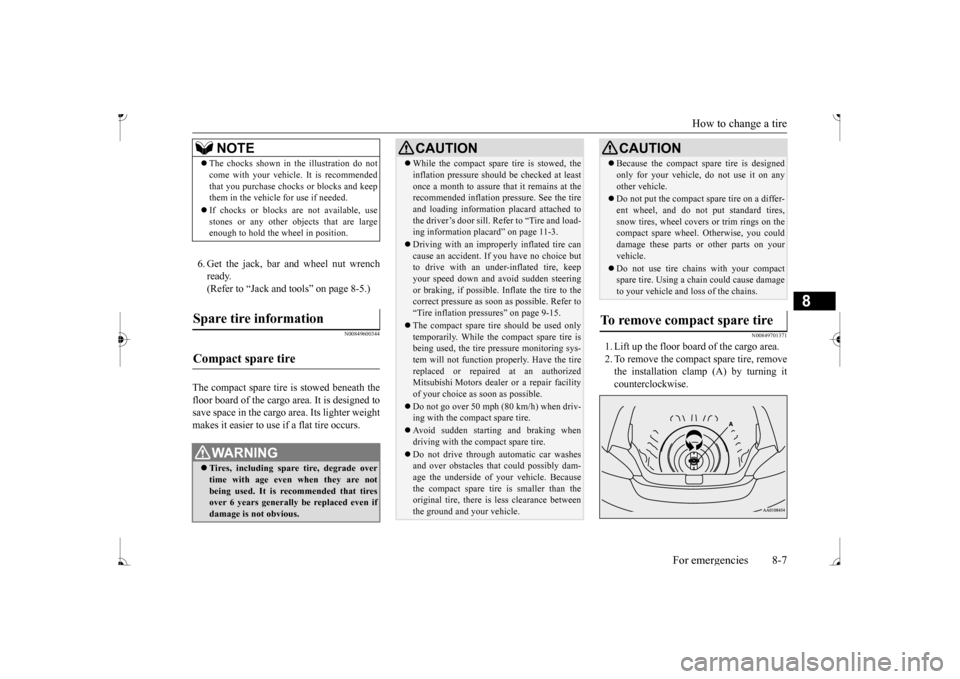
1. Lift up the floor board of the cargo area. 2. To remove the compact spare tire, remove the installation clamp (A) by turning itcounterclockwise.
NOTE
The chocks shown in the illustration do not come with your vehicl
e. It is recommended
that you purchase chocks or blocks and keepthem in the vehicle for use if needed. If chocks or blocks
are not available, use
stones or any other obj
ects that are large
enough to hold the wheel in position.
Spare tire information Compact spare tire
WA R N I N G Tires, including spar
e tire, degrade over
time with age even when they are notbeing used. It is recommended that tires over 6 years generally
be replaced even if
damage is not obvious.
CAUTION While the compact spare tire is stowed, the inflation pressure shoul
d be checked at least
once a month to assure that it remains at therecommended inflation pressure. See the tire and loading informati
on placard attached to
the driver’s door sill. Refer to “Tire and load-ing information placard” on page 11-3. Driving with an imprope
rly inflated tire can
cause an accident. If
you have no choice but
to drive with an under-inflated tire, keep your speed down and av
oid sudden steering
or braking, if possible. Inflate the tire to the correct pressure as soon as possible. Refer to “Tire inflation pressures” on page 9-15. The compact spare tire should be used only temporarily. While th
e compact spare tire is
being used, the tire pr
essure monitoring sys-
tem will not function
properly. Have the tire
replaced or repaired at an authorizedMitsubishi Motors dealer
or a repair facility
of your choice as soon as possible. Do not go over 50 mph (80 km/h) when driv- ing with the compact spare tire. Avoid sudden starting and braking when driving with the compact spare tire. Do not drive through automatic car washes and over obstacles that
could possibly dam-
age the underside of your vehicle. Becausethe compact spare tire is smaller than the original tire, there is less clearance between the ground and your vehicle.
Because the compact spare tire is designed only for your vehicle, do not use it on anyother vehicle. Do not put the compact spare tire on a differ- ent wheel, and do not put standard tires,snow tires, wheel covers
or trim rings on the
compact spare wheel. Otherwise, you could damage these parts or other parts on yourvehicle. Do not use tire chains with your compact spare tire. Using a chain could cause damage to your vehicle and loss of the chains.
To remove compact spare tire
CAUTION
BK0236100US.book 7 ページ 2016年2月1日 月曜日 午前10時15分
Page 249 of 307
How to change a tire 8-10 For emergencies
8
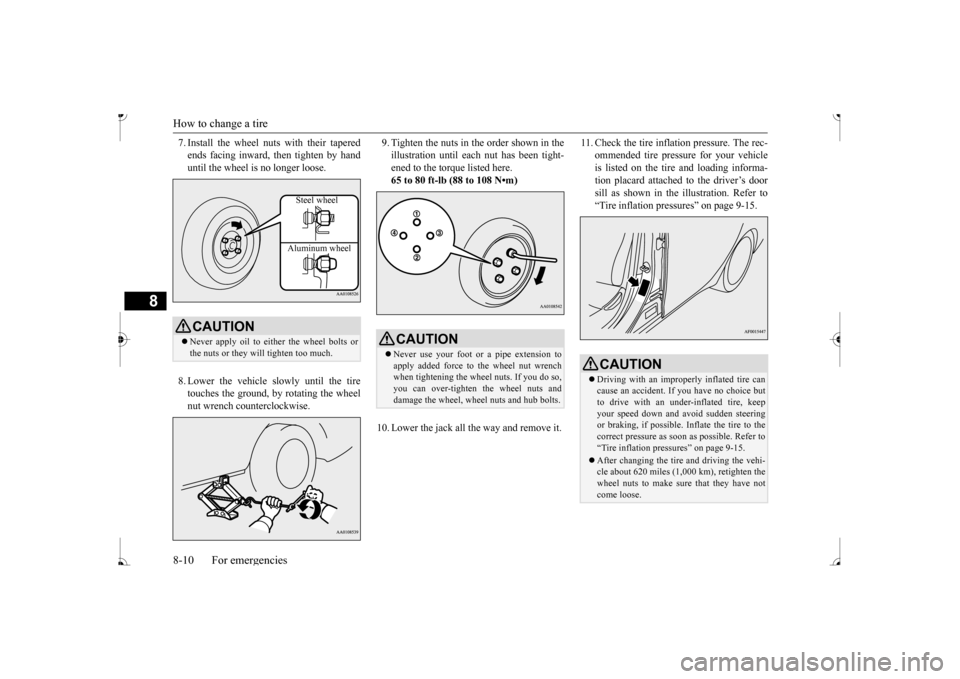
7. Install the wheel nuts with their tapered ends facing inward, then tighten by handuntil the wheel is no longer loose. 8. Lower the vehicle slowly until the tire touches the ground, by rotating the wheel nut wrench counterclockwise.
9. Tighten the nuts in the order shown in the illustration until each
nut has been tight-
ened to the torque listed here. 65 to 80 ft-lb (88 to 108 N•m)
10. Lower the jack all the way and remove it.
11. Check the tire inflation pressure. The rec-
ommended tire pressure for your vehicleis listed on the tire
and loading informa-
tion placard attached to the driver’s door sill as shown in the illustration. Refer to“Tire inflation pressures” on page 9-15.
CAUTION Never apply oil to either the wheel bolts or the nuts or they will tighten too much.
Steel wheel Aluminum wheel
CAUTION Never use your foot or a pipe extension to apply added force to the wheel nut wrench when tightening the wh
eel nuts. If you do so,
you can over-tighten the wheel nuts and damage the wheel, wheel nuts and hub bolts.
CAUTION Driving with an imprope
rly inflated tire can
cause an accident. If
you have no choice but
to drive with an under-inflated tire, keep your speed down and av
oid sudden steering
or braking, if possible. Inflate the tire to thecorrect pressure as soon as possible. Refer to “Tire inflation pressures” on page 9-15. After changing the tire
and driving the vehi-
cle about 620 miles (1,000 km), retighten the wheel nuts to make sure that they have notcome loose.
BK0236100US.book 10 ページ 2016年2月1日 月曜日 午前10時15分
Page 283 of 307
Replacement of light bulbs 9-28 Vehicle care and maintenance
9
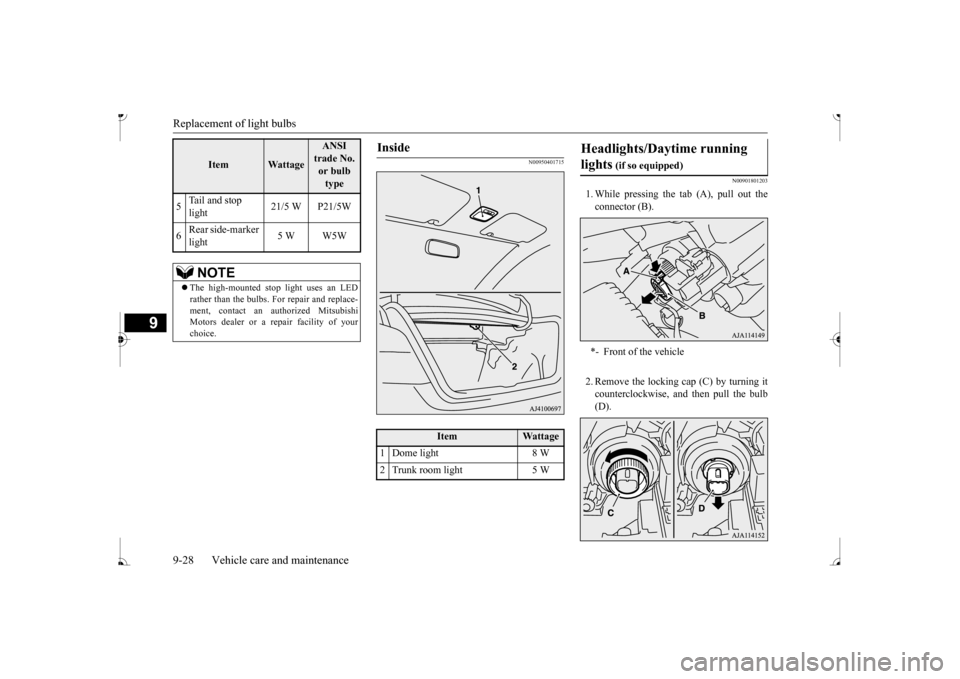
N00950401715
N00901801203
1. While pressing the tab (A), pull out the connector (B). 2. Remove the locking cap (C) by turning it counterclockwise, and then pull the bulb (D).
5
Tail and stop light
21/5 W P21/5W
6
Rear side-marker light
5 W W5W
NOTE
The high-mounted stop light uses an LED rather than the bulbs. For repair and replace-ment, contact an authorized Mitsubishi Motors dealer or a re
pair facility of your
choice.
Item
Wattage
ANSI trade No. or bulb type
Inside
Item
Wattage
1 Dome light 8 W 2 Trunk room light 5 W
Headlights/Daytime running lights
(if so equipped)
*- Front of the vehicle
BK0236100US.book 28 ページ 2016年2月1日 月曜日 午前10時15分
Page 284 of 307
Replacement of light bulbs
Vehicle care and maintenance 9-29
9
3. To install the bulb, perform the removal steps in reverse.
N00943200352
The alignment of the headlights should bechecked by an authorized Mitsubishi Motorsdealer or a repair fa
cility of your choice.
N00917301681
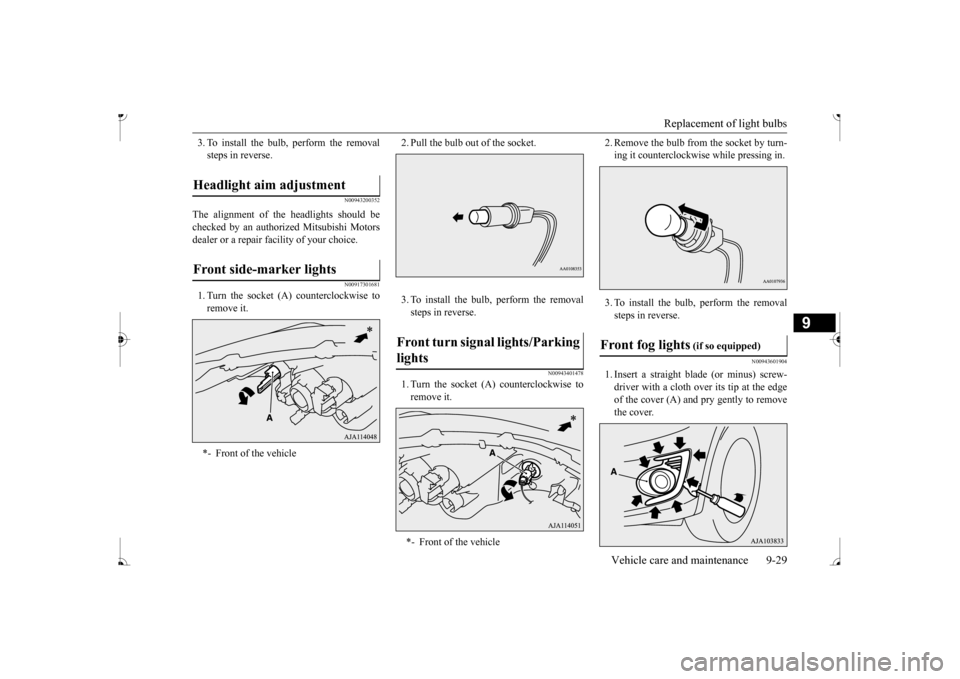
1. Turn the socket (A
) counterclockwise to
remove it.
2. Pull the bulb out of the socket. 3. To install the bulb, perform the removal steps in reverse.
N00943401478
1. Turn the socket (A) counterclockwise to remove it.
2. Remove the bulb from the socket by turn- ing it counterclockwis
e while pressing in.
3. To install the bulb, perform the removal steps in reverse.
N00943601904
1. Insert a straight blade (or minus) screw-driver with a cloth over its tip at the edge of the cover (A) and pry gently to remove the cover.
Headlight aim adjustment Front side-marker lights *- Front of the vehicle
Front turn signal lights/Parking lights *- Front of the vehicle
Front fog lights
(if so equipped)
BK0236100US.book 29 ページ 2016年2月1日 月曜日 午前10時15分