heater MITSUBISHI MIRAGE 2017 6.G User Guide
[x] Cancel search | Manufacturer: MITSUBISHI, Model Year: 2017, Model line: MIRAGE, Model: MITSUBISHI MIRAGE 2017 6.GPages: 307, PDF Size: 9.02 MB
Page 201 of 307
Manual air conditioning (if so equipped) 7-8 Comfort controls
7
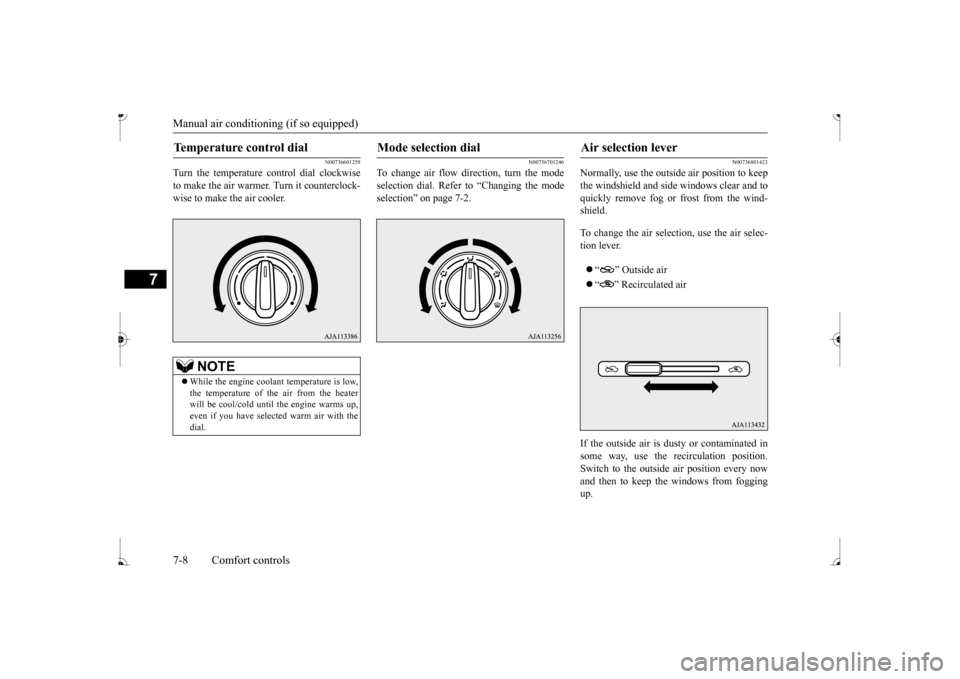
N00736601258
Turn the temperature control dial clockwise to make the air warmer
. Turn it counterclock-
wise to make the air cooler.
N00736701246
To change air flow di
rection, turn the mode
selection dial. Refer to “Changing the mode selection” on page 7-2.
N00736801423
Normally, use the outside air position to keep the windshield and side windows clear and to quickly remove fog or frost from the wind-shield. To change the air selection, use the air selec- tion lever. “ ” Outside air “ ” Recirculated air
If the outside air is dusty or contaminated in some way, use the
recirculat
ion position.
Switch to the outside
air position every now
and then to keep the windows from foggingup.
Temperature control dial
NOTE
While the engine coolant temperature is low, the temperature of the air from the heater will be cool/cold until
the engine warms up,
even if you have selected warm air with the dial.
Mode selection dial
Air selection lever
BK0236100US.book 8 ページ 2016年2月1日 月曜日 午前10時15分
Page 202 of 307
Manual air conditioning (if so equipped)
Comfort controls 7-9
7
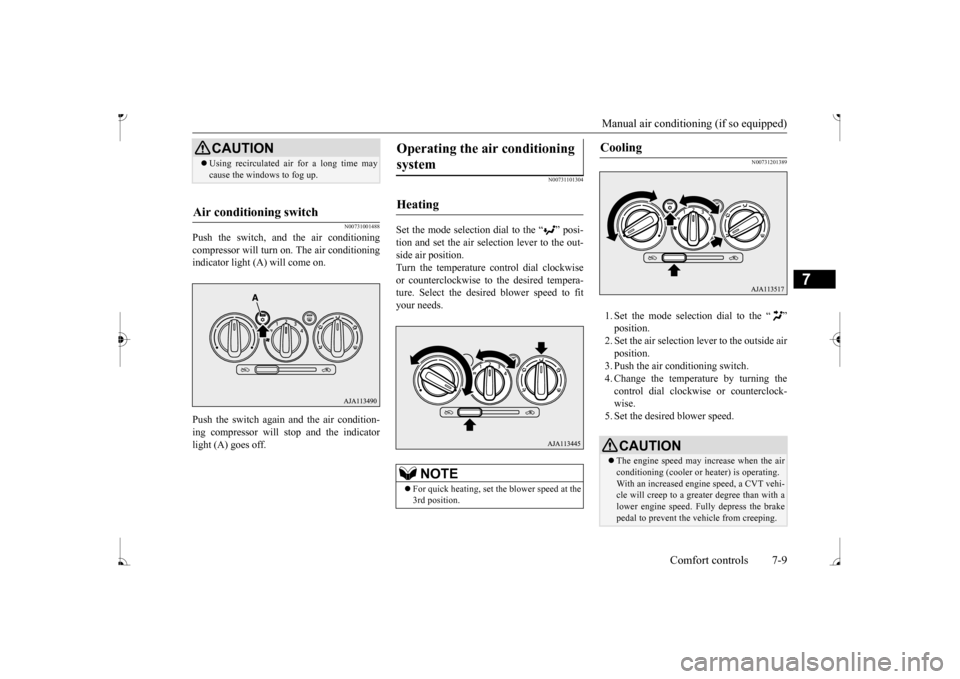
N00731001488
Push the switch, and the air conditioning compressor will turn on. The air conditioningindicator light (A) will come on. Push the switch again and the air condition- ing compressor will stop and the indicator light (A) goes off.
N00731101304
Set the mode selection dial to the “ ” posi- tion and set the air sele
ction lever to the out-
side air position. Turn the temperature control dial clockwise or counterclockwise to
the desired tempera-
ture. Select the desire
d blower speed to fit
your needs.
N00731201389
1. Set the mode selection dial to the “ ” 2. Set the air selection le
ver to the outside air
position.3. Push the air conditioning switch. 4. Change the temperature by turning the control dial clockwise or counterclock-wise. 5. Set the desired blower speed.
CAUTION Using recirculated ai
r for a long time may
cause the windows to fog up.
Air conditioning switch
Operating the ai
r conditioning
system
Heating
NOTE
For quick heating, set th
e blower speed at the
3rd position.
Cooling
CAUTION The engine speed may increase when the air conditioning (cooler or
heater) is operating.
With an increased engi
ne speed, a CVT vehi-
cle will creep to a greater degree than with a lower engine speed. Fully depress the brakepedal to prevent the vehicle from creeping.
BK0236100US.book 9 ページ 2016年2月1日 月曜日 午前10時15分
Page 206 of 307
Automatic air conditioning (if so equipped)
Comfort controls 7-13
7
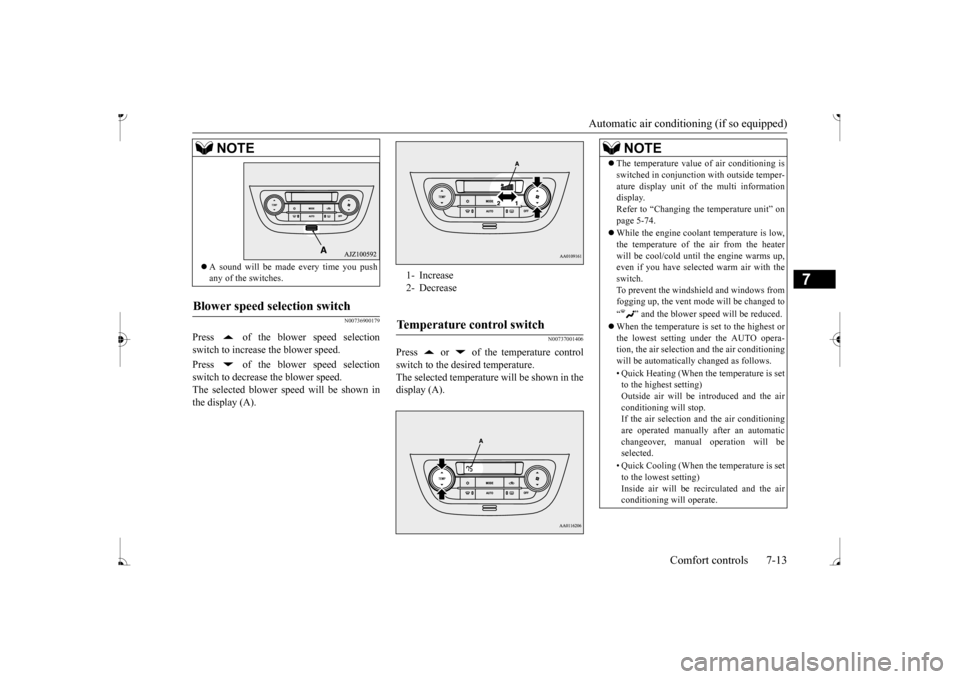
N00736900179
Press of the blower speed selection switch to increase the blower speed. Press of the blower speed selection switch to decrease the blower speed.The selected blower speed will be shown in the display (A).
N00737001406
Press or of the temperature controlswitch to the desired temperature. The selected temperature will be shown in thedisplay (A).
A sound will be made every time you push any of the switches.
Blower speed selection switch
NOTE
1- Increase 2- DecreaseTemperature control switch
NOTE
The temperature value
of air conditioning is
switched in conjunction
with outside temper-
ature display unit of the multi informationdisplay. Refer to “Changing the
temperature unit” on
page 5-74. While the engine coolant temperature is low, the temperature of the air from the heaterwill be cool/cold unti
l the engine warms up,
even if you have selected warm air with the switch.To prevent the windshield and windows from fogging up, the vent mode
will be changed to
“ ” and the blower speed will be reduced. When the temperature is set to the highest or the lowest setting under the AUTO opera-tion, the air selection
and the air conditioning
will be automatically changed as follows. • Quick Heating (When the temperature is set to the highest setting) Outside air will be introduced and the airconditioning will stop. If the air selection
and the air conditioning
are operated manually after an automaticchangeover, manual
operation will be
selected. • Quick Cooling (When th
e temperature is set
to the lowest setting) Inside air will be re
circulated and the air
conditioning will operate.
BK0236100US.book 13 ページ 2016年2月1日 月曜日 午前10時15分
Page 210 of 307
Automatic air conditioning (if so equipped)
Comfort controls 7-17
7
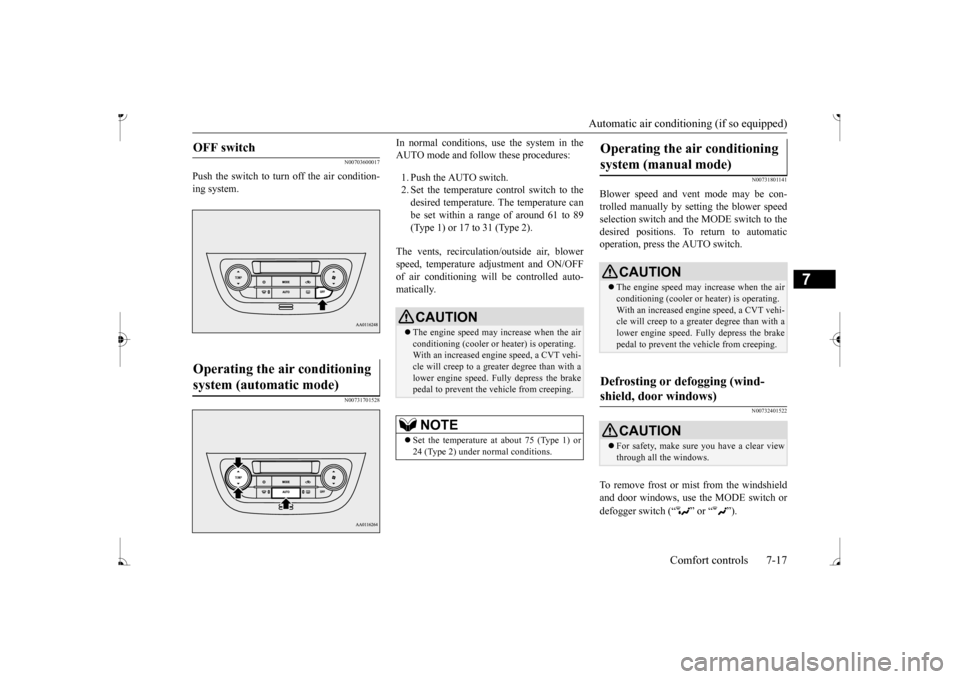
N00703600017
Push the switch to turn off the air condition- ing system.
N00731701528
In normal conditions, use the system in the AUTO mode and follow these procedures: 1. Push the AUTO switch. 2. Set the temperature control switch to the desired temperature. The temperature can be set within a range of around 61 to 89(Type 1) or 17 to 31 (Type 2).
The vents, recirculati
on/outside air, blower
speed, temperature ad
justment and ON/OFF
of air conditioning will be controlled auto- matically.
N00731801141
Blower speed and vent mode may be con- trolled manually by setting the blower speedselection switch and the MODE switch to the desired positions. To return to automatic operation, press the AUTO switch.
N00732401522
To remove frost or mist from the windshieldand door windows, use the MODE switch or defogger switch (“ ” or “ ”).
OFF switch
Operating the air conditioning system (automatic mode)
CAUTION The engine speed may increase when the air conditioning (cooler or
heater) is operating.
With an increased engine speed, a CVT vehi- cle will creep to a greater degree than with a lower engine speed. Fully depress the brakepedal to prevent the vehicle from creeping.NOTE
Set the temperature at about 75 (Type 1) or 24 (Type 2) under normal conditions.
Operating the air conditioning system (manual mode)
CAUTION The engine speed may increase when the air conditioning (cooler or
heater) is operating.
With an increased engi
ne speed, a CVT vehi-
cle will creep to a greater degree than with alower engine speed. Fully depress the brake pedal to prevent the vehicle from creeping.
Defrosting or defogging (wind- shield, door windows)
CAUTION For safety, make sure you have a clear view through all the windows.
BK0236100US.book 17 ページ 2016年2月1日 月曜日 午前10時15分
Page 236 of 307
Handling of compact discs Comfort controls 7-43
7
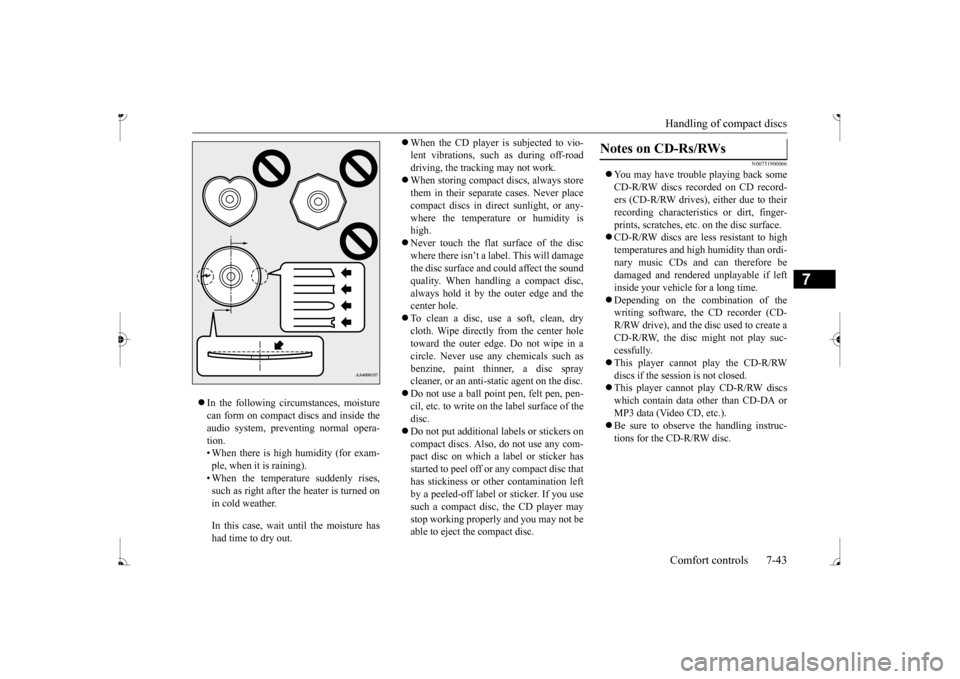
In the following circumstances, moisture can form on compact discs and inside theaudio system, preventing normal opera- tion. • When there is high humidity (for exam-ple, when it is raining). • When the temperature suddenly rises, such as right after the heater is turned onin cold weather. In this case, wait until the moisture has had time to dry out.
When the CD player is subjected to vio- lent vibrations, such as during off-roaddriving, the tracking may not work. When storing compact discs, always store them in their separate
cases. Never place
compact discs in dire
ct sunlight, or any-
where the temperature or humidity is high. Never touch the flat surface of the disc where there isn’t a label. This will damage the disc surface and
could affect the sound
quality. When handli
ng a compact disc,
always hold it by the outer edge and thecenter hole. To clean a disc, use a soft, clean, dry cloth. Wipe directly
from the center hole
toward the outer edge. Do not wipe in a circle. Never use any chemicals such as benzine, paint thinner, a disc spraycleaner, or an anti-static agent on the disc. Do not use a ball point pen, felt pen, pen- cil, etc. to write on the label surface of thedisc. Do not put additional labels or stickers on compact discs. Also, do not use any com-pact disc on which a
label or sticker has
started to peel off or any compact disc that has stickiness or othe
r contamination left
by a peeled-off label or sticker. If you use such a compact disc, the CD player may stop working properly and you may not beable to eject the compact disc.
N00751900066
You may have trouble playing back some CD-R/RW discs recorded on CD record- ers (CD-R/RW drives), either due to theirrecording characterist
ics or dirt, finger-
prints, scratches, etc.
on the disc surface.
CD-R/RW discs are less resistant to high temperatures and high humidity than ordi- nary music CDs and can therefore be damaged and rendered unplayable if left inside your vehicle for a long time. Depending on the combination of the writing software, the CD recorder (CD- R/RW drive), and the disc used to create a CD-R/RW, the disc might not play suc-cessfully. This player cannot play the CD-R/RW discs if the sessi
on is not closed.
This player cannot play CD-R/RW discs which contain data other than CD-DA or MP3 data (Video CD, etc.). Be sure to observe the handling instruc- tions for the CD-R/RW disc.
Notes on CD-Rs/RWs
BK0236100US.book 43 ページ 2016年2月1日 月曜日 午前10時15分
Page 278 of 307
Fuses
Vehicle care and maintenance 9-23
9
N00954801342
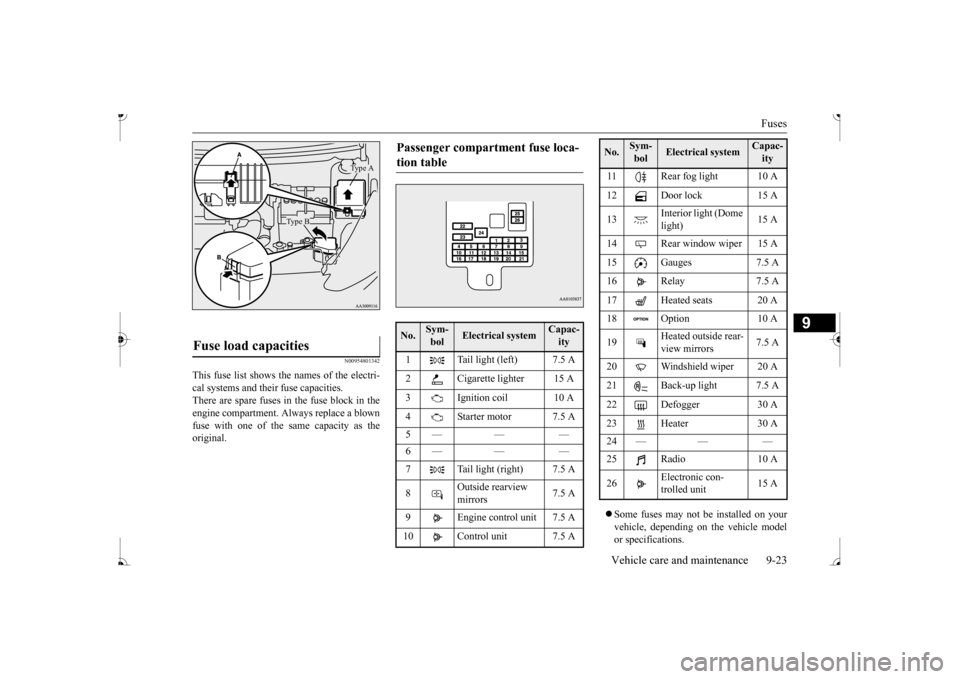
This fuse list shows the names of the electri- cal systems and their fuse capacities. There are spare fuses in the fuse block in theengine compartment. Al
ways replace a blown
fuse with one of the same capacity as the original.
Some fuses may not be installed on your vehicle, depending on
the vehicle model
or specifications.
Fuse load capacities
Type A
Type B
Passenger compartment fuse loca- tion table No.
Sym- bol
Electrical system
Capac-ity
1 Tail light (left) 7.5 A 2 Cigarette lighter 15 A3 Ignition coil 10 A 4 Starter motor 7.5 A 5— — — 6— — — 7 Tail light (right) 7.5 A 8
Outside rearview mirrors
7.5 A
9 Engine control unit 7.5 A 10 Control unit 7.5 A
11 Rear fog light 10 A12 Door lock 15 A 13
Interior light (Dome light)
14 Rear window wiper 15 A 15 Gauges 7.5 A16 Relay 7.5 A 17 Heated seats 20 A 18 Option 10 A 19
Heated outside rear- view mirrors
7.5 A
20 Windshield wiper 20 A 21 Back-up light 7.5 A22 Defogger 30 A 23 Heater 30 A 24 — — — 26
Electronic con- trolled unit
15 A
No.
Sym- bol
Electrical system
Capac-ity
BK0236100US.book 23 ページ 2016年2月1日 月曜日 午前10時15分
Page 280 of 307
Fuses
Vehicle care and maintenance 9-25
9
* : Fusible link Some fuses may not be installed on your vehicle, depending on
the vehicle model
or specifications. The table above show
s the main equip-
ment corresponding to each fuse.
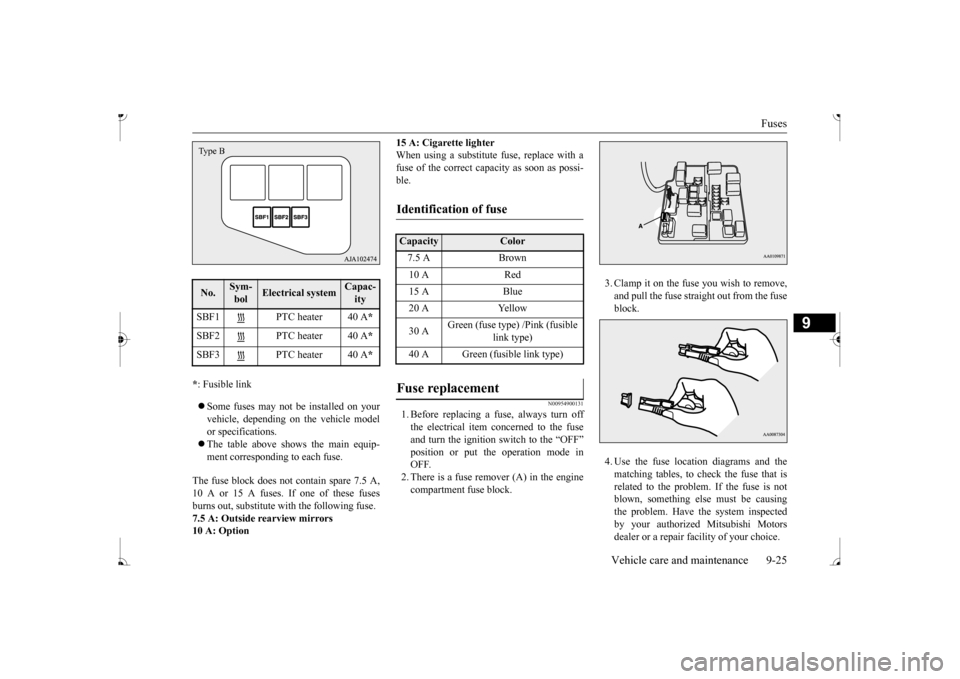
The fuse block does not contain spare 7.5 A, 10 A or 15 A fuses. If one of these fuses burns out, substitute with the following fuse. 7.5 A: Outside rearview mirrors10 A: Option
15 A: Cigarette lighter When using a substitute fuse, replace with afuse of the correct capacity as soon as possi- ble.
N00954900131
1. Before replacing a fuse, always turn off the electrical item concerned to the fuseand turn the ignition switch to the “OFF” position or put th
e operation mode in
OFF.2. There is a fuse remover (A) in the engine compartment fuse block.
3. Clamp it on the fuse you wish to remove, and pull the fuse straight out from the fuseblock. 4. Use the fuse location diagrams and the matching tables, to check the fuse that is related to the problem. If the fuse is notblown, something else must be causing the problem. Have the system inspected by your authorized Mitsubishi Motors dealer or a repair facility of your choice.
No.
Sym- bol
Electrical system
Capac-ity
SBF1 PTC heater 40 A
*
SBF2 PTC heater 40 A
*
SBF3 PTC heater 40 A
*
Type B
Identification of fuse Capacity
Color
7.5 A Brown 10 A Red 15 A Blue 20 A Yellow 30 A
Green (fuse type) /Pink (fusible
link type)
40 A Green (fusible link type)
BK0236100US.book 25 ページ 2016年2月1日 月曜日 午前10時15分
Page 304 of 307
Alphabetical index
12-3
12
H
Hazard warning
flasher switch
.............
5-82
Hazard warning lights
.........................
5-76
Head restraints
......................................
4-5
Headlights
Bulb capacity
.................................
9-27
Dimmer
.........................................
5-81
Headlight flasher
............................
5-81
Replacement
..................................
9-28
Switch
...........................................
5-79
Heater without air conditioning function
.7-4
High beam indicator
............................
5-76
High coolant temperature warning light 5-78 High-mounted stop light
Bulb capacity
.................................
9-27
Hill start assist
....................................
5-47
HomeLink® Wireless
Control System 5-110
Hood lock release me
chanism and safety
catch
................................................
9-21
Hook
Convenience hook
........................
5-118
Horn switch
........................................
5-85
I
If the vehicle breaks down
.....................
8-2
Ignition switch
....................................
5-37
Important facts to know in
case of an accident
10-3 Indicator and warning light package
.....
5-75
Indicators
..........................................
5-76
Information display
............................
5-67
Inside emergency trunk lid release
.......
5-28
Inside rearview mirror
.........................
5-34
Instrument panel li
ght dimmer control
..5-68
Interior lights
....................................
5-115
J
Jack
Garage jack up position
.....................
9-3
Storage
............................................
8-5
Jump-starting the engine
.......................
8-2
K
Key slot
.............................................
5-18
Keyless entry system
....................
5-6
, 5-21
Keys
...................................................
5-2
L
Labeling
............................................
11-2
License plate lights
Bulb capacity
.................................
9-27
Replacement
..................................
9-31
Link System
.......................................
5-85
Loading information
..............................
6-6
Lubricants
..........................................
11-5
M
Malfunction indicator light
..................
5-77
Manual air conditioning
.........................
7-7
Manual transaxle
.................................
5-40
Oil
..........................................
9-9
, 11-5
Shift points
.....................................
5-40
Manual window control
.......................
5-29
Modifications to and
racing of your vehicle
..
3-5 Multi-information display
...........
5-64
, 5-65
O
Octane rating
........................................
3-2
Oil
Engine oil
...............................
9-5
, 11-5
Manual transaxle oil
.................
9-9
, 11-5
Oil pressure warning light
....................
5-78
Operation mode
..................................
5-13
Operation under adverse driving conditions
..
8-13 Outside rearview mirrors
.....................
5-36
Overheating
..........................................
8-4
BK0236100US.book 3 ページ 2016年2月1日 月曜日 午前10時15分