service MITSUBISHI MIRAGE 2017 6.G User Guide
[x] Cancel search | Manufacturer: MITSUBISHI, Model Year: 2017, Model line: MIRAGE, Model: MITSUBISHI MIRAGE 2017 6.GPages: 307, PDF Size: 9.02 MB
Page 128 of 307
Multi-information display
Features and controls 5-67
5
N00574801054
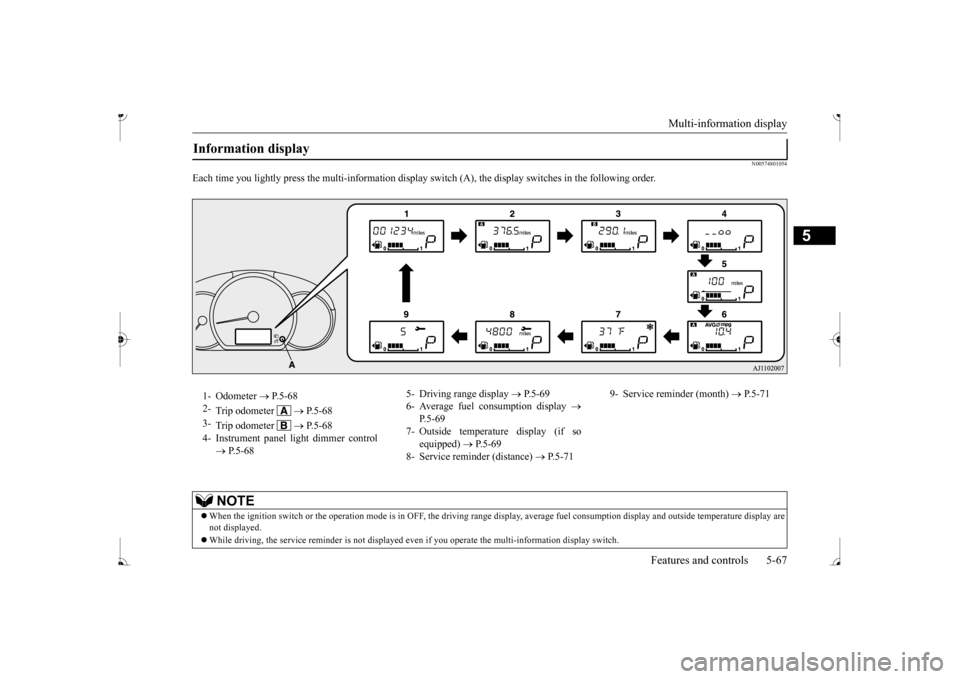
Each time you lightly press the multi-inf
ormation display switch (A), the disp
lay switches in the following order.
Information display 1- Odometer
P.5-68
2-
Trip odometer
P.5-68
3-
Trip odometer
P.5-68
4- Instrument panel li
ght dimmer control
P.5-68
5- Driving range display
P.5-69
6- Average fuel consumption display
P.5-69
7- Outside temperature display (if so
equipped)
P.5-69
8- Service reminder (distance)
P.5-71
9- Service reminder (month)
P.5-71
NOTE
When the ignition switch or the
operation mode is in OFF, the driving range di
splay, average fuel cons
umption display and outsi
de temperature display are
not displayed. While driving, the service reminder is
not displayed even if you operate th
e multi-information
display switch.
BK0236100US.book 67 ページ 2016年2月1日 月曜日 午前10時15分
Page 132 of 307
Multi-information display
Features and controls 5-71
5
N00556701312
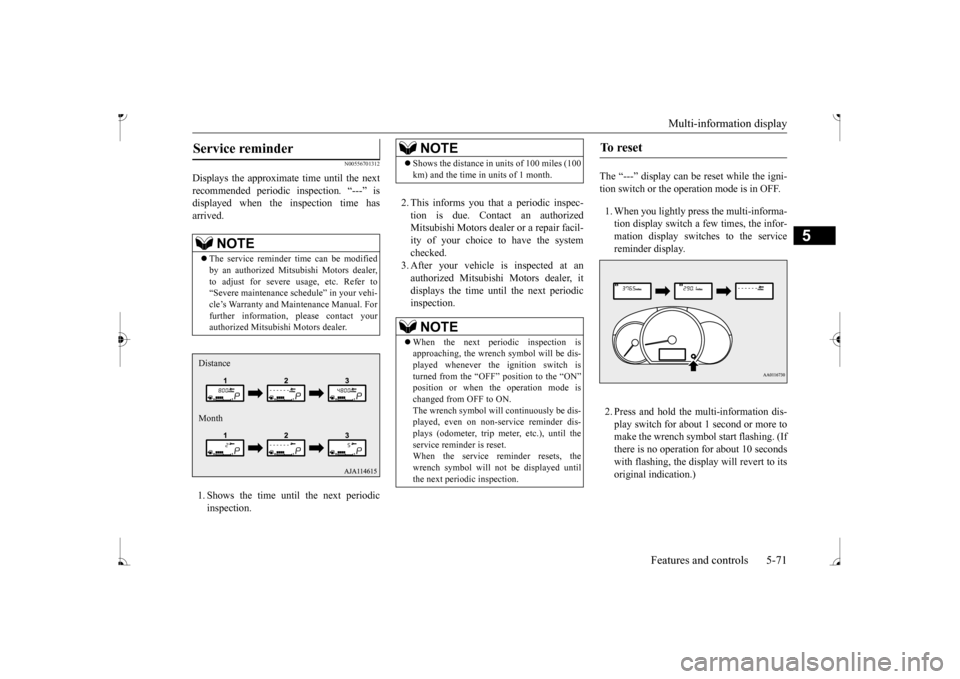
Displays the approximate time until the next recommended periodic inspection. “---” is displayed when the inspection time hasarrived. 1. Shows the time until the next periodic inspection.
2. This informs you that a periodic inspec- tion is due. Contact an authorized Mitsubishi Motors dealer or a repair facil-ity of your choice to have the system checked. 3. After your vehicle is inspected at anauthorized Mitsubishi Motors dealer, it displays the time until the next periodic inspection.
The “---” display can be
reset while the igni-
tion switch or the oper
ation mode is in OFF.
1. When you lightly press the multi-informa- tion display switch a few times, the infor-mation display switches to the service reminder display. 2. Press and hold the mu
lti-information dis-
play switch for about 1 second or more tomake the wrench symbol start flashing. (If there is no operation for about 10 seconds with flashing, the display will revert to itsoriginal indication.)
Service reminder
NOTE
The service reminder ti
me can be modified
by an authorized Mitsubishi Motors dealer,to adjust for severe usage, etc. Refer to “Severe maintenance sc
hedule” in your vehi-
cle’s Warranty and Main
tenance Manual. For
further information,
please contact your
authorized Mitsubish
i Motors dealer.
Distance Month
NOTE
Shows the distance in units of 100 miles (100 km) and the time in units of 1 month.NOTE
When the next periodic inspection is approaching, the wrench
symbol will be dis-
played whenever the ignition switch is turned from the “OFF” position to the “ON” position or when the operation mode ischanged from OFF to ON. The wrench symbol will
continuously be dis-
played, even on non-service reminder dis-plays (odometer, trip meter, etc.), until the service reminder is reset. When the service reminder resets, thewrench symbol will
not be displayed until
the next periodic inspection.
To reset
BK0236100US.book 71 ページ 2016年2月1日 月曜日 午前10時15分
Page 134 of 307
![MITSUBISHI MIRAGE 2017 6.G User Guide Multi-information display
Features and controls 5-73
5
[Except for vehicles equipped with the F. A . S . T. - k e y ]Turn the ignition switch to the “ON” posi- tion from the “ACC” or “OFFâ€](/img/19/7512/w960_7512-133.png "MITSUBISHI MIRAGE 2017 6.G User Guide Multi-information display
Features and controls 5-73
5
[Except for vehicles equipped with the F. A . S . T. - k e y ]Turn the ignition switch to the “ON” posi- tion from the “ACC” or “OFFâ€")
Multi-information display
Features and controls 5-73
5
[Except for vehicles equipped with the F. A . S . T. - k e y ]Turn the ignition switch to the “ON” posi- tion from the “ACC” or “OFF” position. [For vehicles equipped with the F.A.S.T.- key]Change the operation mode to ON from ACC or OFF. When the average fuel consumption is being displayed, if you hold down the multi-information display switch, these calculations will be reset to zero. When the engine switch or the operation mode is in the following conditions, the average fuel consumption display willautomatically reset. [Except for vehicles equipped with the F. A . S . T. - k e y ] The ignition switch has been set to the“ACC” or “OFF” position for about 4 hours or more. [For vehicles equipped with the F.A.S.T.- key]The operation mode has been set to ACC or OFF for about 4 hours or more.
N00557100156
The fuel consumption display unit can bechanged. The distance and amount units are also switched to match the selected fuel con-sumption unit. 1. When you lightly press the multi-informa- tion display switch a few times, the infor- mation display switches to the averagefuel consumption display. Refer to “Information display” on page 5-67.2. Press and hold the multi-information dis- play switch for about 5 seconds or more until buzzer sound
is heard twice.
3. Press and hold the mu
lti-information dis-
play switch to switch in sequence from“km/L”
“L/100 km”
“km/L”.
The distance units is also changed in the fol- lowing combinations to match the selected fuel consumption unit.
Auto reset mode
NOTE
The average fuel cons
umption display can be
reset separately for the auto reset mode andfor the manual reset mode. Disconnecting the batt
ery cable will erase
from memory the manual reset mode or autoreset mode setting for the average fuel con- sumption display. The initial (default) setting is “Auto reset mode”.
Changing the fuel consumption display unit
NOTE
The display units for the driving range, the average fuel consumption are changed, but the units for the indica
ting needle (speedom-
eter), the odometer, the trip odometer and theservice reminder will
remain unchanged.
If the battery is disconnected, the memory of the unit setting is erased and it returns auto- matically to fa
ctory setting.
BK0236100US.book 73 ページ 2016年2月1日 月曜日 午前10時15分
Page 138 of 307
Warning lights
Features and controls 5-77
5
N00520500804
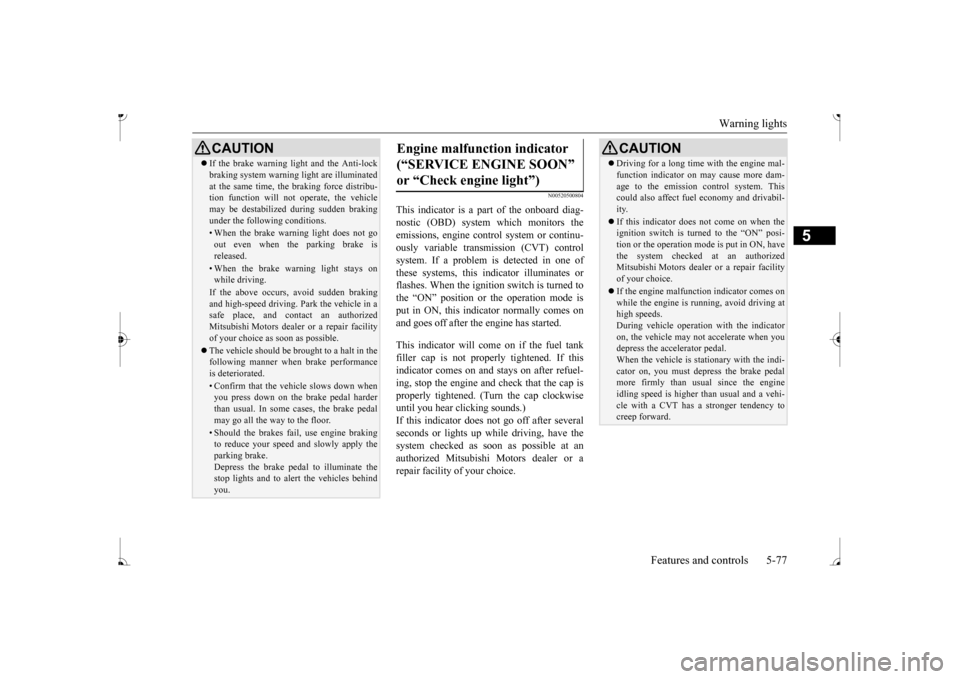
This indicator is a pa
rt of the onboard diag-
nostic (OBD) system which monitors the emissions, engine control system or continu- ously variable transmission (CVT) controlsystem. If a problem is detected in one of these systems, this indicator illuminates or flashes. When the ignition switch is turned to the “ON” position or the operation mode is put in ON, this indicator normally comes onand goes off after the engine has started. This indicator will come on if the fuel tank filler cap is not properly tightened. If this indicator comes on and stays on after refuel-ing, stop the engine and check that the cap is properly tightened. (Turn the cap clockwise until you hear clicking sounds.)If this indicator does not go off after several seconds or lights up whil
e driving, have the
system checked as s
oon as possible at an
authorized Mitsubishi Motors dealer or a repair facility of your choice.
CAUTION If the brake warning light and the Anti-lock braking system warning
light are illuminated
at the same time, the braking force distribu-tion function will not
operate, the vehicle
may be destabilized
during sudden braking
under the following conditions.• When the brake warning light does not goout even when the parking brake isreleased.• When the brake warning light stays onwhile driving.If the above occurs, avoid sudden brakingand high-speed driving.
Park the vehicle in a
safe place, and c
ontact an authorized
Mitsubishi Motors dealer or a repair facilityof your choice as soon as possible. The vehicle should be br
ought to a halt in the
following manner when
brake performance
is deteriorated.• Confirm that the vehicle slows down whenyou press down on the brake pedal harder than usual. In some cases, the brake pedalmay go all the way to the floor.• Should the brakes fail, use engine brakingto reduce your speed and slowly apply the parking brake. Depress the brake pedal to illuminate thestop lights and to aler
t the vehicles behind
you.
Engine malfunction indicator (“SERVICE ENGINE SOON” or “Check engine light”)
CAUTION Driving for a long time
with the engine mal-
function indicator on may cause more dam-age to the emission control system. Thiscould also affect fuel
economy and drivabil-
ity. If this indicator does not come on when the ignition switch is turned to the “ON” posi- tion or the operation mode is put in ON, havethe system checked at an authorized Mitsubishi Motors dealer
or a repair facility
of your choice. If the engine malfunction indicator comes on while the engine is running, avoid driving athigh speeds. During vehicle
operation with the indicator
on, the vehicle may not
accelerate when you
depress the accelerator pedal. When the vehicle is stat
ionary with the indi-
cator on, you must depr
ess the brake pedal
more firmly than usual since the engine idling speed is higher th
an usual and a vehi-
cle with a CVT has a stronger tendency tocreep forward.
BK0236100US.book 77 ページ 2016年2月1日 月曜日 午前10時15分
Page 139 of 307
Warning lights 5-78 Features and controls
5
N00520600313
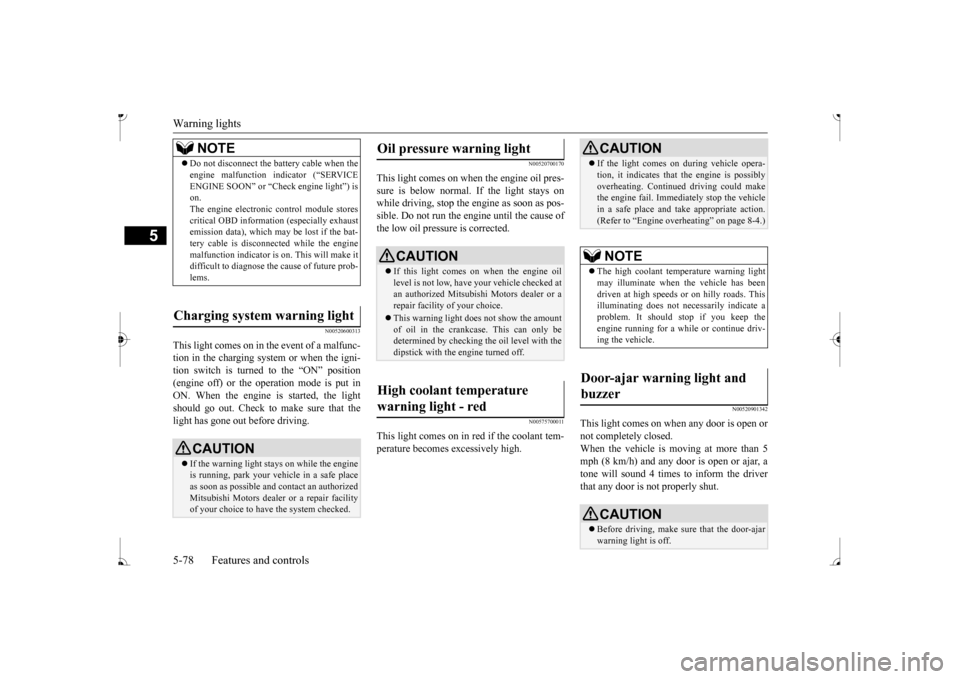
This light comes on in the event of a malfunc- tion in the charging system or when the igni-tion switch is turned to the “ON” position (engine off) or the operation mode is put in ON. When the engine
is started, the light
should go out. Check to make sure that the light has gone out before driving.
N00520700170
This light comes on when the engine oil pres-sure is below normal. If the light stays on while driving, stop the
engine as soon as pos-
sible. Do not run the e
ngine until the cause of
the low oil pressure is corrected.
N00575700011
This light comes on in red if the coolant tem- perature becomes excessively high.
N00520901342
This light comes on when any door is open ornot completely closed. When the vehicle is moving at more than 5 mph (8 km/h) and any door is open or ajar, atone will sound 4 times to inform the driver that any door is not properly shut.
NOTE
Do not disconnect the ba
ttery cable when the
engine malfunction i
ndicator (“SERVICE
ENGINE SOON” or “Che
ck engine light”) is
on. The engine electronic
control module stores
critical OBD information (especially exhaustemission data), which ma
y be lost if the bat-
tery cable is disconne
cted while the engine
malfunction indicator is
on. This will make it
difficult to diagnose th
e cause of future prob-
lems.
Charging system warning light
CAUTION If the warning light stays on while the engine is running, park your ve
hicle in a safe place
as soon as possible and
contact an authorized
Mitsubishi Motors dealer
or a repair facility
of your choice to have the system checked.
Oil pressure warning light
CAUTION If this light comes on when the engine oil level is not low, have
your vehicle checked at
an authorized Mitsubish
i Motors dealer or a
repair facility of your choice. This warning light does not show the amount of oil in the crankcase. This can only be determined by checking the oil level with the dipstick with the engine turned off.
High coolant temperature warning light - red
CAUTION If the light comes on
during vehicle opera-
tion, it indicates that
the engine is possibly
overheating. Continued driving could makethe engine fail. Immedi
ately stop the vehicle
in a safe place and ta
ke appropriate action.
(Refer to “Engine overh
eating” on page 8-4.)
NOTE
The high coolant temp
erature warning light
may illuminate when
the vehicle has been
driven at high speeds or on hilly roads. This illuminating does not ne
cessarily indicate a
problem. It should stop if you keep the engine running for a wh
ile or continue driv-
ing the vehicle.
Door-ajar warning light and buzzer
CAUTION Before driving, make sure that the door-ajar warning light is off.
BK0236100US.book 78 ページ 2016年2月1日 月曜日 午前10時15分
Page 147 of 307
Bluetooth® 2.0 interface (if so equipped) 5-86 Features and controls
5
The system is equipped with a voice recogni- tion function, which allows you to makehands-free calls by si
mple switch and voice
command operations us
ing a defined voice
tree. The Bluetooth
® 2.0 interface can be used
when the ignition switch or the operation mode is in ON or ACC. Before you can use the Bluetooth
® 2.0 inter-
face, you must pa
ir the Bluetooth
® device
and Bluetooth
® 2.0 interface. Refer to “Con-
necting the Bluetooth
® 2.0 interface and
Bluetooth
® device” on page 5-91.
Bluetooth
® is a registered trademark of
BLUETOOTH SIG, INC.
Steering control sw
itch and microphone
P.5-87Voice recognition function
P.5-88
Useful voice commands
P.5-89
Speaker enrollment function
P. 5 - 9 0
Connecting the Bluetooth
® 2.0 interface and
the Bluetooth
® device
P.5-91
Operating a music player connected via Blue- tooth
® P.5-96
How to make or r
eceive hands-free calls
P.5-96Phonebook function
P.5-98
WA R N I N GAlthough the Bluetooth
® 2.0 interface
allows you to make ha
nds-free calls, if you
choose to use the cellular phone while driving, you must not allow yourself to bedistracted from the sa
fe operation of your
vehicle. Anything, including cellular phone usage, that distracts you from thesafe operation of your vehicle increases your risk of
an accident.
Refer to and comply with all state and local laws in your area regarding cellular phone usage wh
ile driving.
NOTE
For vehicles equipped with the F.A.S.T.-key, if the operation mode is left in ACC, theaccessory power will automatically turn offafter a certain period
of time and you will no
longer be able to use the Bluetooth
® 2.0
interface. The accessory power comes on again if the engine
switch is operated.
Refer to “ACC power
auto-cutout function”
on page 5-14. The Bluetooth
® 2.0 interface
cannot be used
if the Bluetooth
® device has a dead battery
or the device power is turned off. Hands-free calls will
not be possible if your
phone does not have
service available.
If you place the Bluetooth
® device in the
cargo area, you may not be able to use the Bluetooth
® 2.0 interface.
Some Bluetooth
® devices are not compatible
with the Bluetooth
® 2.0 interface.
You can confirm the Link System software version by pressing the HANG-UP button 3 times (press and hold 2 times and then pressbriefly) within 10 seconds.
For detail of the Bluetooth
® 2.0 interface,
refer to the following website: [For vehicles sold in U.S.A.] You can access the Mits
ubishi Motors North
America website. [For vehicles so
ld in Canada]
You can access the Mitsubishi Motors web-site. Please read and agree to the “Warning about Links to the Web Sites of Other Companies”,the websites mentione
d above may connect
you to websites other than the Mitsubishi Motors website.http://www.mitsubishi
-motors.com/en/prod-
ucts/index.html Software updates by cellular phone/digital audio device manufacturers may change/alter devi
ce connectivity.
NOTE
BK0236100US.book 86 ページ 2016年2月1日 月曜日 午前10時15分
Page 149 of 307
Bluetooth® 2.0 interface (if so equipped) 5-88 Features and controls
5
Your voice will be re
cognized by a micro-
phone in the overhead console, allowing you to make hands-free ca
lls with voice com-
mands.
N00564100086
The Bluetooth
® 2.0 interface is equipped
with a voice recognition function. Simply say voice commands and you can per- form various operations
and make or receive
hands-free calls. With the Bluetooth
® 2.0 interface, voice rec-
ognition is possible for
US English, North
American Spanish, Canadian French and Jap- anese. The factory se
tting is “English.”
1. Press the SPEECH button. 2. Say “Setup.” 3. Say “Language.”
4. The voice guide wi
ll say “Select a lan-
guage: English, Spanish, French or Japa-nese.” Say the desired language. (Example: “English”) 5. The voice guide wi
ll say “English (Span-
ish, French or Japanese) selected. Is this correct?” Say “Yes.”Step 4. 6. When the voice guide says “English (Spanish, French or Japanese) selected,” the language change process will be com-pleted and the system will return to the main menu.
Call waiting and three-
way calls can be used
by the Bluetooth
® 2.0 interface, only if it is
possible to use those services with your cel- lular phone.
Microphone
NOTE
If a cellular phone is
within close proximity
of the microphone, it may distort the sound quality. In this case,
place the cellular phone
as far as possible from the microphone.
Voice recognition function
NOTE
NOTE
If the voice command
that you say differs
from the predefined command or cannot be recognised due to ambient noise or some other reason, the Bluetooth
® 2.0 interface
will ask you for the voice command again upto 3 times. For best performance and further reduction of ambient noise, the vehicle windows should be closed, lower the blower speed and refrain from conversation with your passen-gers while engaging
the voice recognition
function. Some voice commands have alternative commands. Depending on the sele
cted language, some
functions may not
be available.
Language can be change
d by using the audio
control panel besides
the following proce-
dure. For details, refer to “To change the language (vehicles with Bluetooth
® 2.0 interface)” on
page 7-27.
Selecting the language
NOTE
The voice guide will repeat the same mes- sage twice. The first message is in the cur- rent language, and th
e second message is in
the selected
language.
If many entries are regist
ered in the vehicle
phonebook, changing the language will takea longer time. Changing the language
deletes the mobile
phonebook imported to the Bluetooth
® 2.0
interface. If you wish to use it, you will haveto import it again.
BK0236100US.book 88 ページ 2016年2月1日 月曜日 午前10時15分
Page 186 of 307
Braking
Driving safety 6-5
6
Please read this section in conjunction with the “Engine coolant” on page 9-7.
N00629500521
All parts of the brake system are critical to safety. Have the vehicle serviced by an autho- rized Mitsubishi Motors dealer or a repairfacility of your choice at regular intervals according to the “WARRANTY AND MAINTENANCE MANUAL”. Check the brake system while driving at a low speed immediately
after starting, espe-
cially when the brakes are wet, to confirm they work normally. A film of water can be formed on the brakediscs or brake drums, and prevent normal braking after driving in heavy rain or through large puddles, or after the vehicle is washed.If this occurs, dry the brakes out by driving slowly while lightly depressing the brake pedal.
On snowy roads, ice can form on the braking system, making the brak
es less effective.
While driving in such conditions, pay closeattention to surrounding
vehicles and to the
condition of the road surface. From time to time, lightly depress the brake pedal andcheck how effective the brakes are. It is important to take
advantage of the engine
braking by downshifting while driving on steep downhill roads in order to prevent thebrakes from overheating.
N00629601372
When parking on a hill, set the parking brake,and turn the front wheels toward the curb on a downhill, or away from
the curb on an uphill.
If necessary, apply chocks to the wheels.
Place the gearshift lever into the “R” hill slope, into the 1st position when parking on an uphill slope. Be sure that the parking brake is firmly set when parked and that the selector lever is in the “P” (PARK) position.When parking on a hill, it is important to set the parking brake before
moving the selector
lever to the “P” (PARK) position. This pre-vents loading the parking brake against the transaxle. When this happens, it is difficult to move the selector lever out of the “P” Never leave the engine running while you take a short nap or rest. Also, never leave the engine running in a closed or poorly venti-lated place.
WA R N I N G Never open the radiator cap when the radiator is hot. You could be seriously burned.
Braking When brakes are wet
When driving in cold weather When driving downhill Parking Parking on a hill
For vehicles equipped with man- ual transaxle For vehicles equipped with contin- uously variable transmission (CVT) Parking with the engine run- ning
BK0236100US.book 5 ページ 2016年2月1日 月曜日 午前10時15分
Page 237 of 307
Antenna 7-44 Comfort controls
7
N00734201511
Turn the pole (A) counterclockwise.
Screw the pole (A) clockwise into the base (B) until it is securely retained.
N00733901524
Your vehicle’s radio receives both AM and FM stations. The quality of your reception is affected by distance, obstacles, a
nd signal interference.
FM signals do not foll
ow the earth surface
nor are they reflected by the upper atmo- sphere. For this reason,
FM broadcasts cannot
be received over long di
stances. AM signals
follow the earth’s surfa
ce and are reflected by
the upper atmosphere. For this reason, AM broadcasts can be rece
ived over longer dis-
tances. Because of the limite
d range of FM signals
and the way FM waves transmit, you may experience weak or fading FM reception.When the broadcast is blocked by mountains or similar obstructions,
reception ca
n be dis-
turbed.
WA R N I N G Operating the CD player in a manner other than specifically instructed hereinmay result in hazardous radiation expo-sure. Do not remove the cover and attempt to repair the CD playe
r by yourself. There
are no user serviceable parts inside. Incase of malfunction,
contact an authorized
Mitsubishi Motors dealer or a repair facil- ity of your choice.
Antenna To remove
To install
NOTE
Be sure to remove the roof antenna in the following cases: • When using an automatic car wash • When covering your ve
hicle with a car
cover • When driving into a structure that has a low ceiling.
General information about your radio
Signal transmission Weak reception (fading)
FM AM 25 to 40 mile radius (40 to 64 km)
(160 km)
BK0236100US.book 44 ページ 2016年2月1日 月曜日 午前10時15分
Page 253 of 307
Operation under adverse driving conditions 8-14 For emergencies
8
Do not rev the engine or spin the wheels. Constant efforts to free a stuck vehicle cancause overheating and tr
ansaxle failure. Let
the engine idle for a few minutes to cool the transaxle before trying again.If your vehicle is still
stuck after several rock-
ing attempts, call for a commercial tow truck service.
When driving on a road covered with snow or ice, use snow tires. Tire chainscannot be used on your vehicle. There may be state or local regulations about using snow tires. Always check the regu-lations in your local area before using them. Refer to “Snow tires” on page 9-18 and “Tire chains” on page 9-18. Drive slowly. Do not make sudden starts or stops, sharp turns, or slam on the brakes. Allow extra distance
between your vehi-
cle and the vehicle in front of you, and avoid sudden braking. If a skid occurs when the accelerator pedal is depressed, take your foot off the pedal. Steer gently in the direction of theskid.
Your vehicle is equipped with an anti-lock braking system (ABS). Hold the brakepedal down firmly and keep it depressed. Do not pump the brake pedal which will result in reduced braking performance. After parking on snowy or icy roads, it may be difficult to move your vehicle due to the brake being frozen. Depress theaccelerator pedal little by little to move the vehicle when safe to do so. Drive as slow as possible when driving on bumpy, rutted roads or over potholes etc.
WA R N I N G When trying to rock
your vehicle out of a
stuck position, make sure that there are no people nearby. The
rocking motion can
make your vehicle suddenly lurch forwardor backward, and inju
re any bystanders.
On wet roads
CAUTIONAvoid flooded roads. Water is often deeper than it looks, and you
could be seriously hurt
by driving into flood water. When driving in rain, on water-covered roads, or through a car wash, water could get into the brake discs and make them fail tem-porarily. In such cases, lightly press the brake pedal to see if they are working prop- erly. If they are not, press the pedal lightlyseveral times while driving to dry the brake pads or linings, then check them again.
When driving in rain, a layer of water may form between the tires and the road surface(hydroplaning). This loosens your tires