transmission MITSUBISHI MIRAGE 2017 6.G User Guide
[x] Cancel search | Manufacturer: MITSUBISHI, Model Year: 2017, Model line: MIRAGE, Model: MITSUBISHI MIRAGE 2017 6.GPages: 307, PDF Size: 9.02 MB
Page 104 of 307
Continuously variable transmission (CVT) (if so equipped)
Features and controls 5-43
5
N00563300049
When the selector lever cannot be shifted from the “P” (PARK) position to another position while the brake
pedal is pressed and
held down with the ignition switch or theoperation mode in ON, the battery may be flat or the shift-lock mechanism may be malfunc- tioning.Immediately have your
vehicle checked by an
authorized Mitsubishi Motors dealer or a repair facility
of your choice.
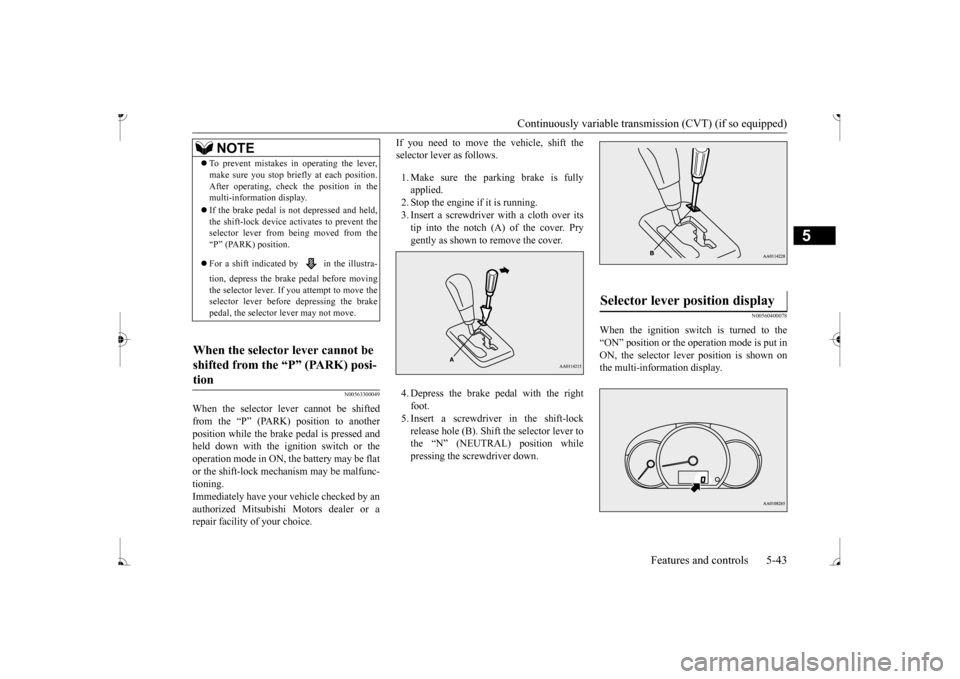
If you need to move the vehicle, shift the selector lever as follows. 1. Make sure the parking brake is fully applied. 2. Stop the engine if it is running. 3. Insert a screwdriver
with a cloth over its
tip into the notch (A) of the cover. Pry gently as shown to remove the cover. 4. Depress the brake pedal with the right foot. 5. Insert a screwdriver in the shift-lock release hole (B). Shift the selector lever tothe “N” (NEUTRAL) position while pressing the screwdriver down.
N00560400078
When the ignition switch is turned to the “ON” position or the operation mode is put in ON, the selector lever position is shown on the multi-information display.
NOTE
To prevent mistakes in operating the lever, make sure you stop brie
fly at each position.
After operating, chec
k the position in the
multi-information display. If the brake pedal is not depressed and held, the shift-lock device ac
tivates to prevent the
selector lever from being moved from the “P” (PARK) position. For a shift indicated by in the illustra- tion, depress the brake pedal before moving the selector lever. If you attempt to move the selector lever before depressing the brake pedal, the selector
lever may not move.
When the selector lever cannot be shifted from the “P” (PARK) posi-tion
Selector lever position display
BK0236100US.book 43 ページ 2016年2月1日 月曜日 午前10時15分
Page 105 of 307
Continuously variable transmission (CVT) (if so equipped) 5-44 Features and controls
5
N00560601093
This position locks the transmission to pre- vent the vehicle from
moving. The engine can
be started from the “P” (PARK) position. Move the lever to this
position only after the
vehicle has come to a complete stop. At this position, the transmission is disen- gaged. It is the same
as the neutral position on
a manual transaxle and should be used when the vehicle is not m
oving for an extended
length of time during driving, such as in atraffic jam.
This position is used fo
r most city and high-
way driving. The transmission will automati- cally and continuously ch
ange its gear ratio
depending on road and driving conditions.
Use when engine braking is needed, or for high-power sport drive. This position is for driving up very steep hills and for engine braking at low speeds when driving down steep hills.
Selector lever positions
“P” PARK
“R” REVERSE
CAUTION Never shift into the
Page 106 of 307
Continuously variable transmission (CVT) (if so equipped)
Features and controls 5-45
5
N00549500018 N00574601036
When the selector le
ver position indicator
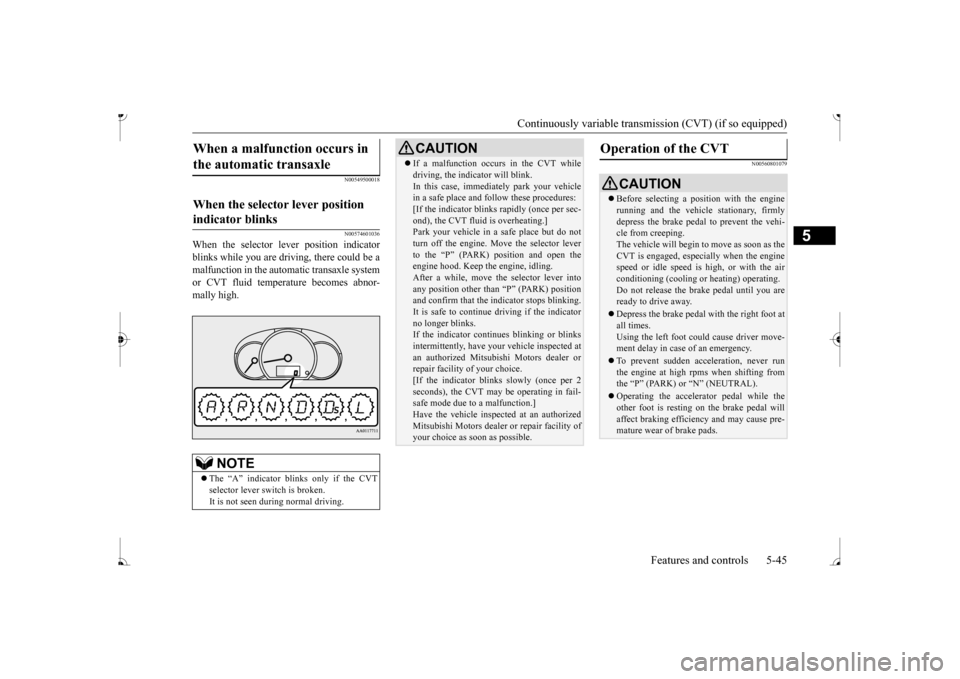
blinks while you are driv
ing, there could be a
malfunction in the automatic transaxle system or CVT fluid temperature becomes abnor- mally high.
N00560801079
When a malfunction occurs in the automatic transaxle
When the selector lever position indicator blinks
NOTE
The “A” indicator blinks only if the CVT selector lever sw
itch is broken.
It is not seen during normal driving.
CAUTION If a malfunction occurs in the CVT while driving, the indicator will blink.In this case, immediat
ely park your vehicle
in a safe place and fo
llow these procedures:
[If the indicator blinks
rapidly (once per sec-
ond), the CVT fluid is overheating.]Park your vehicle in a safe place but do not turn off the engine. M
ove the selector lever
to the “P” (PARK) position and open theengine hood. Keep th
e engine, idling.
After a while, move the selector lever into any position other than “P” (PARK) positionand confirm that the i
ndicator stops blinking.
It is safe to continue driving if the indicator no longer blinks.If the indicator conti
nues blinking or blinks
intermittently, have your
vehicle inspected at
an authorized Mitsubishi Motors dealer orrepair facility
of your choice.
[If the indicator blinks slowly (once per 2 seconds), the CVT may
be operating in fail-
safe mode due to a malfunction.] Have the vehicle inspected at an authorized Mitsubishi Motors dealer
or repair facility of
your choice as soon as possible.
Operation of the CVT
CAUTION Before selecting a pos
ition with the engine
running and the vehicl
e stationary, firmly
depress the brake pedal to prevent the vehi- cle from creeping. The vehicle will begin to move as soon as theCVT is engaged, especi
ally when the engine
speed or idle speed is
high, or with the air
conditioning (cooling or
heating) operating.
Do not release the brak
e pedal until you are
ready to drive away. Depress the brake pedal
with the right foot at
all times. Using the left foot could cause driver move-ment delay in case of an emergency. To prevent sudden acce
leration, never run
the engine at high rpms when shifting from the
Page 107 of 307
Service brake 5-46 Features and controls
5
To gain extra acceleration in “D” (DRIVE) position (when passing an
other vehicle) push
the accelerator to the floor. The CVT will automatically downshift.
For short waiting periods, such as at traffic lights, the vehicle can be
left in selector lever
position and held stationary with the servicebrake. For longer waiting periods with the engine running, place th
e selector lever in the “N”
brake, while holding the vehicle stationary with the service brake. Prior to moving off after having stopped the vehicle, make sure that the selector lever is in“D” (DRIVE) position. To park the vehicle, fi
rst bring it to a com-
plete stop, fully engage the parking brake,
and then move the selector lever to the “P” (PARK) position. If the CVT does not shift while driving, or your vehicle does not pick up enough speed when starting on an uphill slope, it may bethat there is something unusual happening in the transmission. Have your vehicle checked at an authorized Mitsubishi Motors dealer or a repair facility of your choice as soon as pos- sible.
N00517501328
Overuse of the brake can cause weakening,resulting in poor brake response and prema-ture wear of the brake pads. When driving down a long or steep hill, use engine braking by moving
the selector lever
to “Ds” (DOWNSHIFT & SPORTY DRIV- ING) or “L” (LOW) position.
Use the selector lever in the correct shift position in accordance
with driving condi-
tions.Never coast downhill backward in the driv- ing shift position “D” (DRIVE), “Ds” Engine stopping and in
creased brake pedal
and steering effort could
lead to an accident.
Do not rev the engine
with the brake pedal
pressed when the vehi
cle is stationary.
This can damage the CVT. Also, when you depress
the accelera
tor pedal
while holding down the brake pedal with the selector lever in the
Page 115 of 307
Cruise control (if so equipped)
5
N00546600119
If an abnormal condition occurs in the sys- tem, the following indicator will turn on.
N00546300031
N00518300573
Cruise control is an automatic speed control system that keeps a set speed. It can be acti-vated at speeds from about 25 mph (40 km/h). Cruise cont
rol does not work at
speeds below about 25 mph (40 km/h).
NOTE
The indicator may turn on when you start the engine. This means
that the battery volt-
age momentarily dropped when the enginewas started. It does not
indicate a malfunc-
tion, provided that
the display goes out
immediately. When a compact spare tire has been put on your vehicle, the grippi
ng ability of the tire
will be lower, making it
more likely that the
indicator will blink.
ASC warning indicator
-
ASC indicator
-
ASC OFF indicator
CAUTION The system may be malfunctioning. Park your vehicle in a
safe place and stop the
engine.Restart the engine and check whether the indicator goes out. If th
ey go out, there is no
abnormal condition. If
they do not go out or
appear frequently, it is
not necessary to stop
the vehicle imme
diately, but you should have
your vehicle inspected by an authorizedMitsubishi Motors dealer or a repair facility of your choice as soon as possible.
To w i n g
CAUTION When towing the vehicle with only the front wheels or only the rear wheels raised off theground, do not place th
e ignition switch in
the “ON” position or
do not put the operation
mode in ON. Placing
the ignition switch in
the “ON” position or
putting the operation
mode in ON could cause the ASC to operate, resulting in an accident.Note that the correct towing method dependson the transmission type
and the vehicle’s
drive configuration. For details, refer to
“Towing” on page 8-12.
Cruise control
(if so equipped)
When you do not wish to drive at a set speed, turn off the cruise control for safety. Do not use cruise control when driving con- ditions will not allow
you to stay at the same
speed, such as in heavy traffic or on roads that are winding, icy, snow-covered, wet,slippery, on a steep downhill slope. On vehicles equipped
with manual transaxle,
do not move the gearshift lever to the “N” (Neutral) position whil
e driving at a set
speed without depressi
ng the clutch pedal.
The engine will run too fast and might be damaged.NOTE
Cruise control may not
be able to keep your
speed on uphills or downhills. Your speed may decr
ease on a steep uphill.
You may use the accelerator pedal if you want to stay at your set speed.
BK0236100US.book 54 ページ 2016年2月1日 月曜日 午前10時15分
Page 138 of 307
Warning lights
Features and controls 5-77
5
N00520500804
This indicator is a pa
rt of the onboard diag-
nostic (OBD) system which monitors the emissions, engine control system or continu- ously variable transmission (CVT) controlsystem. If a problem is detected in one of these systems, this indicator illuminates or flashes. When the ignition switch is turned to the “ON” position or the operation mode is put in ON, this indicator normally comes onand goes off after the engine has started. This indicator will come on if the fuel tank filler cap is not properly tightened. If this indicator comes on and stays on after refuel-ing, stop the engine and check that the cap is properly tightened. (Turn the cap clockwise until you hear clicking sounds.)If this indicator does not go off after several seconds or lights up whil
e driving, have the
system checked as s
oon as possible at an
authorized Mitsubishi Motors dealer or a repair facility of your choice.
CAUTION If the brake warning light and the Anti-lock braking system warning
light are illuminated
at the same time, the braking force distribu-tion function will not
operate, the vehicle
may be destabilized
during sudden braking
under the following conditions.• When the brake warning light does not goout even when the parking brake isreleased.• When the brake warning light stays onwhile driving.If the above occurs, avoid sudden brakingand high-speed driving.
Park the vehicle in a
safe place, and c
ontact an authorized
Mitsubishi Motors dealer or a repair facilityof your choice as soon as possible. The vehicle should be br
ought to a halt in the
following manner when
brake performance
is deteriorated.• Confirm that the vehicle slows down whenyou press down on the brake pedal harder than usual. In some cases, the brake pedalmay go all the way to the floor.• Should the brakes fail, use engine brakingto reduce your speed and slowly apply the parking brake. Depress the brake pedal to illuminate thestop lights and to aler
t the vehicles behind
you.
Engine malfunction indicator (“SERVICE ENGINE SOON” or “Check engine light”)
CAUTION Driving for a long time
with the engine mal-
function indicator on may cause more dam-age to the emission control system. Thiscould also affect fuel
economy and drivabil-
ity. If this indicator does not come on when the ignition switch is turned to the “ON” posi- tion or the operation mode is put in ON, havethe system checked at an authorized Mitsubishi Motors dealer
or a repair facility
of your choice. If the engine malfunction indicator comes on while the engine is running, avoid driving athigh speeds. During vehicle
operation with the indicator
on, the vehicle may not
accelerate when you
depress the accelerator pedal. When the vehicle is stat
ionary with the indi-
cator on, you must depr
ess the brake pedal
more firmly than usual since the engine idling speed is higher th
an usual and a vehi-
cle with a CVT has a stronger tendency tocreep forward.
BK0236100US.book 77 ページ 2016年2月1日 月曜日 午前10時15分
Page 151 of 307
Bluetooth® 2.0 interface (if so equipped) 5-90 Features and controls
5
If a passcode has been set and the security function is enabled, the voice guide will say“Hands-free system is lo
cked. State the pass-
code to continue” when the SPEECH button is pressed to enter voice recognition mode.Say the 4-digit passcode number to enter the passcode. If the entered passcode
is wrong, the voice
guide will say “<4-digi
t passcode>, Incorrect
passcode. Please try again.” Enter the correct passcode.
Use the following procedure to turn off the security function by di
sabling the passcode.
1. Press the SPEECH button. 2. Say “Setup.” 3. Say “Passcode.”4. The voice guide w
ill say “Passcode is
enabled. Would you like to disable it?” Answer “Yes.” the passcode and return to the main menu. 5. When the disabling of the passcode iscompleted, the voice
guide will say “Pass-
code is disabled” and the system will return to the main menu.
N00564700011
The Bluetooth
® 2.0 interface can use the
speaker enrollment function to create a voicemodel for one person per language. This makes it easier for the Bluetooth
® 2.0
interface to recognise
voice commands said
by you.
You can turn a voice model registered with the speaker enrollment function on and offwhenever you want.
N00564800038
It takes about 2 to 3 minutes to complete thespeaker enrollment process. To ensure the best results, run through the process while in the driver’s seat, in an envi- ronment that is as qu
iet as possible (when
there is no rain or strong winds and the vehi-cle windows are closed). Please turn off your phone while in speaker enrollment to prevent interruption of the process.Use the following procedure for speaker enrollment. 1. Stop your vehicle in a safe area, put the gearshift lever in the “N” (Neutral) posi-tion (manual transaxle), or the selector lever in the “P” (PARK) position (contin- uously variable transmission (CVT)), andpull the parking brake lever. 2. Press the SPEECH button.
It is required for a little time after engine stop that the entered passcode is actuallyrecorded in the system.If the ignition switch
or the operation mode
is made to ACC or ON or the engine is started immediately afte
r engine stop, there
is a case when the entered passcode is not recorded in the system. At this time, please try to enter the passcode again.
Entering the passcode
NOTE
You can reenter the passcode as many times as you want. If you have forgotten your passcode, say “Cancel” to quit the voice input mode and then check with an authorized Mitsubishi Motors dealer.NOTE
Disabling the passcode
NOTE
System must be unlocke
d to disable the pass-
code.
Speaker enrollment function
Speaker enrollment
NOTE
Speaker enrollment is not possible unless the vehicle is parked. Make sure you park the vehicle in a safe area before attemptingspeaker enrollment.
BK0236100US.book 90 ページ 2016年2月1日 月曜日 午前10時15分
Page 153 of 307
Bluetooth® 2.0 interface (if so equipped) 5-92 Features and controls
5
Up to 7 Bluetooth
® devices can be paired
with the Bluetooth
® 2.0 interface.
If multiple paired Bluetooth
® devices are
available in the vehicle,
the cellular phone or
music player most recently connected is auto- matically connected to the Bluetooth
® 2.0
interface. You can also change a Bluetooth
® device to
be connected. To pair a Bluetooth
® device with the Blue-
tooth
® 2.0 interface, foll
ow the steps below.
1. Stop your vehicle in a safe area, put the gearshift lever in the “N” (Neutral) posi-tion (manual transaxle), or the selector lever in the “P” (PARK) position (contin- uously variable transmission (CVT)), andpull the parking brake lever. 2. Press the SPEECH button. 3. Say “Pair Device.”
4. The voice guide will say “Start pairing procedure on the device. See the device manual for instructi
ons.” and then will
say “The pairing code
is
NOTE
Pairing is required only when the device is used for the first time. Once the device has been paired with the Bluetooth
® 2.0 inter-
face, all you need is to
bring the device into
the vehicle next time
and the device will
connect to the Bluetooth
® 2.0 interface auto-
matically (if supported
by the device). The
device must have Bluetooth
® turned ON to
connect.
To p a i r
NOTE
You cannot pair any Bluetooth
® device with
the Bluetooth
® 2.0 interface unless the vehi-
cle is parked. Before pairing a Bluetooth
®
device with the Bluetooth
® 2.0 interface,
confirm that the vehicle is parked in a safe location.NOTE
The following procedure ( to ) can also be used instead of
saying “Pair Device.”
dure if you prefer. Say “Setup.” Say “Pairing Options.” The voice guide will
say “Select one of
the following: pair, edit, delete, list or set code.”
ady been paired, the
voice guide will say “Maximum devicespaired” and then the system will end thepairing process. To re
gister a ne
w device,
delete one device and th
en repeat the pairing
process.(Refer to
Page 186 of 307
Braking
Driving safety 6-5
6
Please read this section in conjunction with the “Engine coolant” on page 9-7.
N00629500521
All parts of the brake system are critical to safety. Have the vehicle serviced by an autho- rized Mitsubishi Motors dealer or a repairfacility of your choice at regular intervals according to the “WARRANTY AND MAINTENANCE MANUAL”. Check the brake system while driving at a low speed immediately
after starting, espe-
cially when the brakes are wet, to confirm they work normally. A film of water can be formed on the brakediscs or brake drums, and prevent normal braking after driving in heavy rain or through large puddles, or after the vehicle is washed.If this occurs, dry the brakes out by driving slowly while lightly depressing the brake pedal.
On snowy roads, ice can form on the braking system, making the brak
es less effective.
While driving in such conditions, pay closeattention to surrounding
vehicles and to the
condition of the road surface. From time to time, lightly depress the brake pedal andcheck how effective the brakes are. It is important to take
advantage of the engine
braking by downshifting while driving on steep downhill roads in order to prevent thebrakes from overheating.
N00629601372
When parking on a hill, set the parking brake,and turn the front wheels toward the curb on a downhill, or away from
the curb on an uphill.
If necessary, apply chocks to the wheels.
Place the gearshift lever into the “R” hill slope, into the 1st position when parking on an uphill slope. Be sure that the parking brake is firmly set when parked and that the selector lever is in the “P” (PARK) position.When parking on a hill, it is important to set the parking brake before
moving the selector
lever to the “P” (PARK) position. This pre-vents loading the parking brake against the transaxle. When this happens, it is difficult to move the selector lever out of the “P” Never leave the engine running while you take a short nap or rest. Also, never leave the engine running in a closed or poorly venti-lated place.
WA R N I N G Never open the radiator cap when the radiator is hot. You could be seriously burned.
Braking When brakes are wet
When driving in cold weather When driving downhill Parking Parking on a hill
For vehicles equipped with man- ual transaxle For vehicles equipped with contin- uously variable transmission (CVT) Parking with the engine run- ning
BK0236100US.book 5 ページ 2016年2月1日 月曜日 午前10時15分
Page 237 of 307
Antenna 7-44 Comfort controls
7
N00734201511
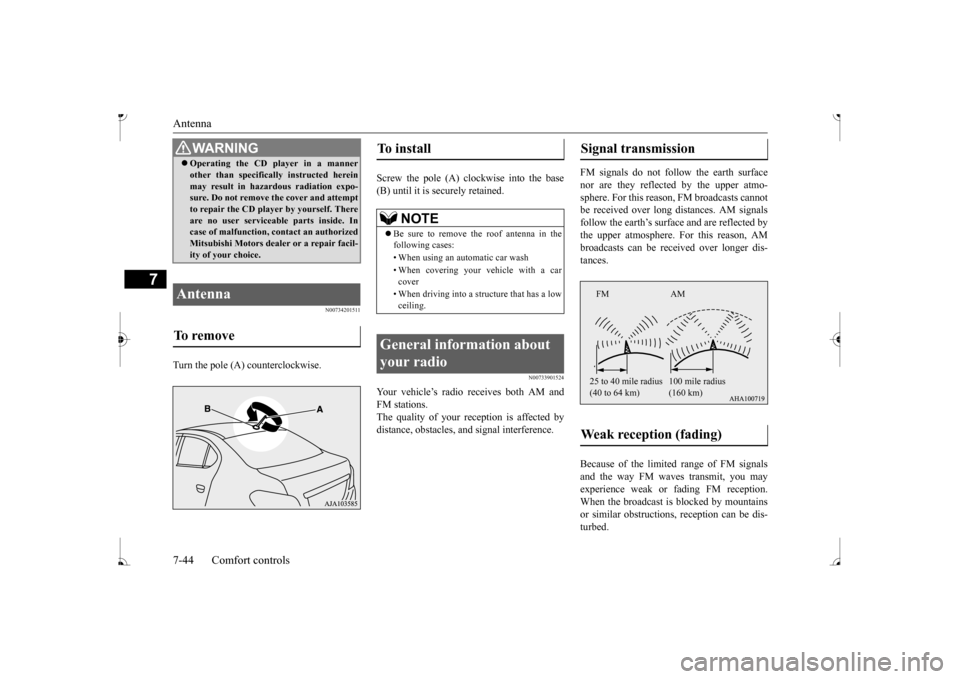
Turn the pole (A) counterclockwise.
Screw the pole (A) clockwise into the base (B) until it is securely retained.
N00733901524
Your vehicle’s radio receives both AM and FM stations. The quality of your reception is affected by distance, obstacles, a
nd signal interference.
FM signals do not foll
ow the earth surface
nor are they reflected by the upper atmo- sphere. For this reason,
FM broadcasts cannot
be received over long di
stances. AM signals
follow the earth’s surfa
ce and are reflected by
the upper atmosphere. For this reason, AM broadcasts can be rece
ived over longer dis-
tances. Because of the limite
d range of FM signals
and the way FM waves transmit, you may experience weak or fading FM reception.When the broadcast is blocked by mountains or similar obstructions,
reception ca
n be dis-
turbed.
WA R N I N G Operating the CD player in a manner other than specifically instructed hereinmay result in hazardous radiation expo-sure. Do not remove the cover and attempt to repair the CD playe
r by yourself. There
are no user serviceable parts inside. Incase of malfunction,
contact an authorized
Mitsubishi Motors dealer or a repair facil- ity of your choice.
Antenna To remove
To install
NOTE
Be sure to remove the roof antenna in the following cases: • When using an automatic car wash • When covering your ve
hicle with a car
cover • When driving into a structure that has a low ceiling.
General information about your radio
Signal transmission Weak reception (fading)
FM AM 25 to 40 mile radius (40 to 64 km)
(160 km)
BK0236100US.book 44 ページ 2016年2月1日 月曜日 午前10時15分