Cvt MITSUBISHI MIRAGE 2017 6.G Owner's Manual
[x] Cancel search | Manufacturer: MITSUBISHI, Model Year: 2017, Model line: MIRAGE, Model: MITSUBISHI MIRAGE 2017 6.GPages: 307, PDF Size: 9.02 MB
Page 119 of 307
Tire pressure monitoring
system (if so equipped)
5-58 Features and controls
5
When the active stability control (ASC) starts operating.Refer to “Active stab
ility control (ASC)”
on page 5-52.
Also, the set speed driving may be deacti- vated automatically when the engine speed rises and approaches the tachometer’s redzone (the red-colored part of the tachometer dial).
N00518900306
If the set speed driving is deactivated by thecondition described in “To deactivate” on page 5-57, you can resu
me the previously set
speed by pressing the RES + switch (C) while driving at a speed of about 25 mph (40 km/h) or higher. Under either of the
following conditions,
however, using the sw
itch does not allow you
to resume the previously set speed. In these situations, repeat the
speed setting procedure:
The CRUISE CONTROL ON/OFF switch is pressed. [Except for vehicles equipped with the F. A . S . T. - k e y ] Turn the ignition switch to the “OFF” or “ACC” position. [Vehicles equipped with the F.A.S.T.-key]
Put the operation mode in OFF or ACC. Indicator is turned OFF.
N00530201612
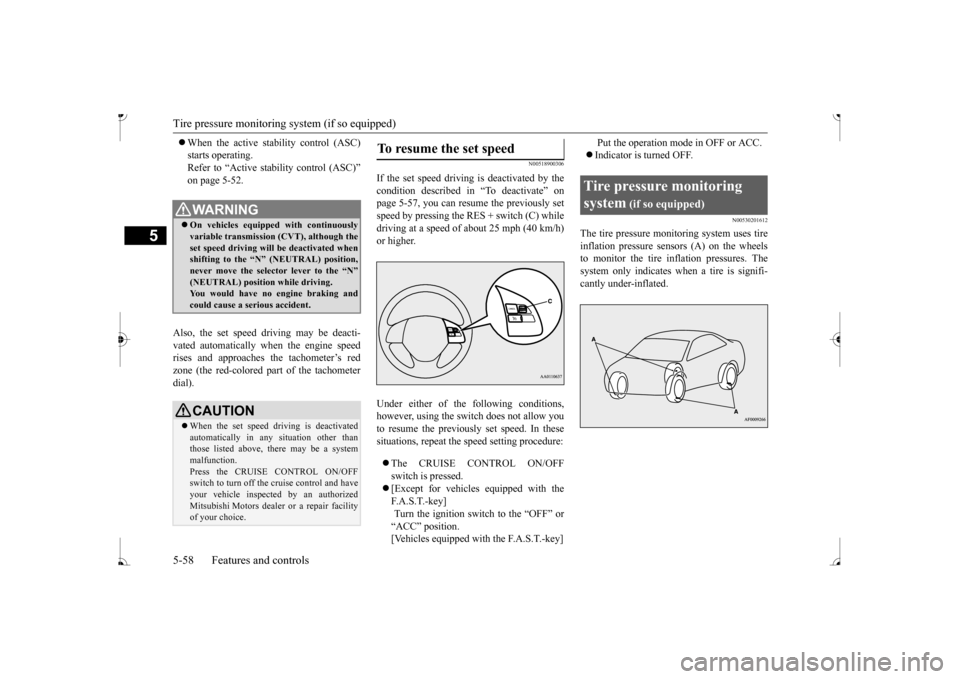
The tire pressure moni
toring system uses tire
inflation pressure sensors (A) on the wheelsto monitor the tire inflation pressures. The system only indicates wh
en a tire is signifi-
cantly under-inflated.
WA R N I N G On vehicles equipped with continuously variable transmis
sion (CVT), although the
set speed driving will be deactivated whenshifting to the “N” never move the select
or lever to the “N”
You would have no engine braking and could cause a serious accident.CAUTION When the set speed dr
iving is deactivated
automatically in any
situation other than
those listed above, there may be a systemmalfunction. Press the CRUISE CONTROL ON/OFF switch to turn off the
cruise control and have
your vehicle inspecte
d by an authorized
Mitsubishi Motors dealer
or a repair facility
of your choice.
To resume the set speed
Tire pressure monitoring system
(if so equipped)
BK0236100US.book 58 ページ 2016年2月1日 月曜日 午前10時15分
Page 126 of 307
Multi-information display
Features and controls 5-65
5
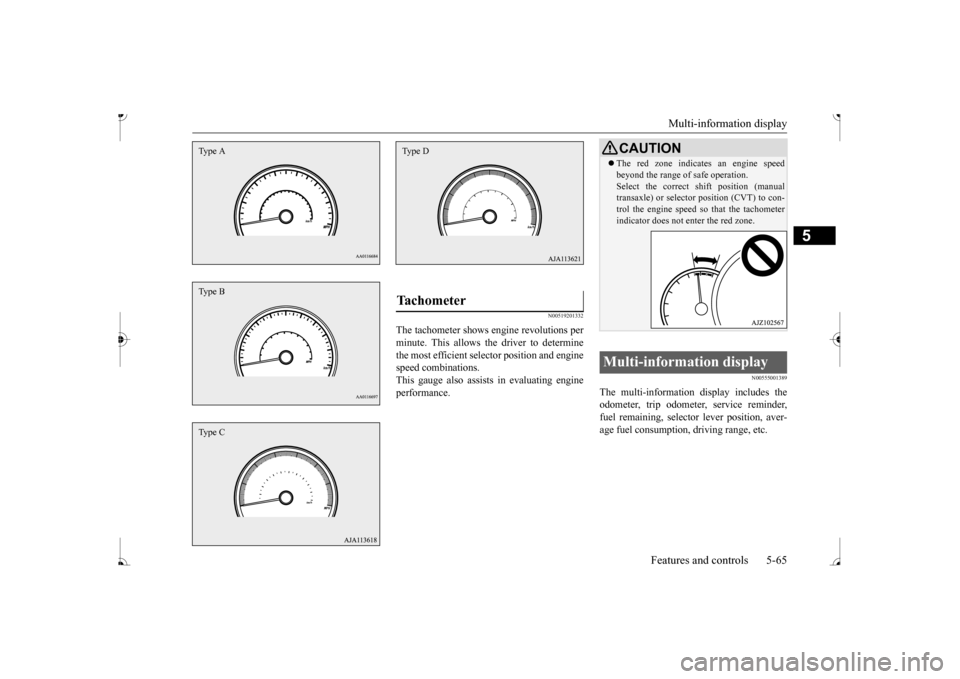
N00519201332
The tachometer shows e
ngine revolutions per
minute. This allows the driver to determine the most efficient sele
ctor position and engine
speed combinations.This gauge also assists in evaluating engine performance.
N00555001389
The multi-information display includes the odometer, trip odometer, service reminder, fuel remaining, selector lever position, aver- age fuel consumption, driving range, etc.
Type AType BType C
Tachometer Type D
CAUTION The red zone indicates an engine speed beyond the range of safe operation.Select the correct sh
ift position (manual
transaxle) or selector position (CVT) to con- trol the engine speed
so that the tachometer
indicator does not en
ter the red zone.
Multi-information display
BK0236100US.book 65 ページ 2016年2月1日 月曜日 午前10時15分
Page 138 of 307
Warning lights
Features and controls 5-77
5
N00520500804
This indicator is a pa
rt of the onboard diag-
nostic (OBD) system which monitors the emissions, engine control system or continu- ously variable transmission (CVT) controlsystem. If a problem is detected in one of these systems, this indicator illuminates or flashes. When the ignition switch is turned to the “ON” position or the operation mode is put in ON, this indicator normally comes onand goes off after the engine has started. This indicator will come on if the fuel tank filler cap is not properly tightened. If this indicator comes on and stays on after refuel-ing, stop the engine and check that the cap is properly tightened. (Turn the cap clockwise until you hear clicking sounds.)If this indicator does not go off after several seconds or lights up whil
e driving, have the
system checked as s
oon as possible at an
authorized Mitsubishi Motors dealer or a repair facility of your choice.
CAUTION If the brake warning light and the Anti-lock braking system warning
light are illuminated
at the same time, the braking force distribu-tion function will not
operate, the vehicle
may be destabilized
during sudden braking
under the following conditions.• When the brake warning light does not goout even when the parking brake isreleased.• When the brake warning light stays onwhile driving.If the above occurs, avoid sudden brakingand high-speed driving.
Park the vehicle in a
safe place, and c
ontact an authorized
Mitsubishi Motors dealer or a repair facilityof your choice as soon as possible. The vehicle should be br
ought to a halt in the
following manner when
brake performance
is deteriorated.• Confirm that the vehicle slows down whenyou press down on the brake pedal harder than usual. In some cases, the brake pedalmay go all the way to the floor.• Should the brakes fail, use engine brakingto reduce your speed and slowly apply the parking brake. Depress the brake pedal to illuminate thestop lights and to aler
t the vehicles behind
you.
Engine malfunction indicator (“SERVICE ENGINE SOON” or “Check engine light”)
CAUTION Driving for a long time
with the engine mal-
function indicator on may cause more dam-age to the emission control system. Thiscould also affect fuel
economy and drivabil-
ity. If this indicator does not come on when the ignition switch is turned to the “ON” posi- tion or the operation mode is put in ON, havethe system checked at an authorized Mitsubishi Motors dealer
or a repair facility
of your choice. If the engine malfunction indicator comes on while the engine is running, avoid driving athigh speeds. During vehicle
operation with the indicator
on, the vehicle may not
accelerate when you
depress the accelerator pedal. When the vehicle is stat
ionary with the indi-
cator on, you must depr
ess the brake pedal
more firmly than usual since the engine idling speed is higher th
an usual and a vehi-
cle with a CVT has a stronger tendency tocreep forward.
BK0236100US.book 77 ページ 2016年2月1日 月曜日 午前10時15分
Page 151 of 307
Bluetooth® 2.0 interface (if so equipped) 5-90 Features and controls
5
If a passcode has been set and the security function is enabled, the voice guide will say“Hands-free system is lo
cked. State the pass-
code to continue” when the SPEECH button is pressed to enter voice recognition mode.Say the 4-digit passcode number to enter the passcode. If the entered passcode
is wrong, the voice
guide will say “<4-digi
t passcode>, Incorrect
passcode. Please try again.” Enter the correct passcode.
Use the following procedure to turn off the security function by di
sabling the passcode.
1. Press the SPEECH button. 2. Say “Setup.” 3. Say “Passcode.”4. The voice guide w
ill say “Passcode is
enabled. Would you like to disable it?” Answer “Yes.” the passcode and return to the main menu. 5. When the disabling of the passcode iscompleted, the voice
guide will say “Pass-
code is disabled” and the system will return to the main menu.
N00564700011
The Bluetooth
® 2.0 interface can use the
speaker enrollment function to create a voicemodel for one person per language. This makes it easier for the Bluetooth
® 2.0
interface to recognise
voice commands said
by you.
You can turn a voice model registered with the speaker enrollment function on and offwhenever you want.
N00564800038
It takes about 2 to 3 minutes to complete thespeaker enrollment process. To ensure the best results, run through the process while in the driver’s seat, in an envi- ronment that is as qu
iet as possible (when
there is no rain or strong winds and the vehi-cle windows are closed). Please turn off your phone while in speaker enrollment to prevent interruption of the process.Use the following procedure for speaker enrollment. 1. Stop your vehicle in a safe area, put the gearshift lever in the “N” (Neutral) posi-tion (manual transaxle), or the selector lever in the “P” (PARK) position (contin- uously variable transmission (CVT)), andpull the parking brake lever. 2. Press the SPEECH button.
It is required for a little time after engine stop that the entered passcode is actuallyrecorded in the system.If the ignition switch
or the operation mode
is made to ACC or ON or the engine is started immediately afte
r engine stop, there
is a case when the entered passcode is not recorded in the system. At this time, please try to enter the passcode again.
Entering the passcode
NOTE
You can reenter the passcode as many times as you want. If you have forgotten your passcode, say “Cancel” to quit the voice input mode and then check with an authorized Mitsubishi Motors dealer.NOTE
Disabling the passcode
NOTE
System must be unlocke
d to disable the pass-
code.
Speaker enrollment function
Speaker enrollment
NOTE
Speaker enrollment is not possible unless the vehicle is parked. Make sure you park the vehicle in a safe area before attemptingspeaker enrollment.
BK0236100US.book 90 ページ 2016年2月1日 月曜日 午前10時15分
Page 153 of 307
Bluetooth® 2.0 interface (if so equipped) 5-92 Features and controls
5
Up to 7 Bluetooth
® devices can be paired
with the Bluetooth
® 2.0 interface.
If multiple paired Bluetooth
® devices are
available in the vehicle,
the cellular phone or
music player most recently connected is auto- matically connected to the Bluetooth
® 2.0
interface. You can also change a Bluetooth
® device to
be connected. To pair a Bluetooth
® device with the Blue-
tooth
® 2.0 interface, foll
ow the steps below.
1. Stop your vehicle in a safe area, put the gearshift lever in the “N” (Neutral) posi-tion (manual transaxle), or the selector lever in the “P” (PARK) position (contin- uously variable transmission (CVT)), andpull the parking brake lever. 2. Press the SPEECH button. 3. Say “Pair Device.”
4. The voice guide will say “Start pairing procedure on the device. See the device manual for instructi
ons.” and then will
say “The pairing code
is
NOTE
Pairing is required only when the device is used for the first time. Once the device has been paired with the Bluetooth
® 2.0 inter-
face, all you need is to
bring the device into
the vehicle next time
and the device will
connect to the Bluetooth
® 2.0 interface auto-
matically (if supported
by the device). The
device must have Bluetooth
® turned ON to
connect.
To p a i r
NOTE
You cannot pair any Bluetooth
® device with
the Bluetooth
® 2.0 interface unless the vehi-
cle is parked. Before pairing a Bluetooth
®
device with the Bluetooth
® 2.0 interface,
confirm that the vehicle is parked in a safe location.NOTE
The following procedure ( to ) can also be used instead of
saying “Pair Device.”
dure if you prefer. Say “Setup.” Say “Pairing Options.” The voice guide will
say “Select one of
the following: pair, edit, delete, list or set code.”
ady been paired, the
voice guide will say “Maximum devicespaired” and then the system will end thepairing process. To re
gister a ne
w device,
delete one device and th
en repeat the pairing
process.(Refer to
Page 186 of 307
Braking
Driving safety 6-5
6
Please read this section in conjunction with the “Engine coolant” on page 9-7.
N00629500521
All parts of the brake system are critical to safety. Have the vehicle serviced by an autho- rized Mitsubishi Motors dealer or a repairfacility of your choice at regular intervals according to the “WARRANTY AND MAINTENANCE MANUAL”. Check the brake system while driving at a low speed immediately
after starting, espe-
cially when the brakes are wet, to confirm they work normally. A film of water can be formed on the brakediscs or brake drums, and prevent normal braking after driving in heavy rain or through large puddles, or after the vehicle is washed.If this occurs, dry the brakes out by driving slowly while lightly depressing the brake pedal.
On snowy roads, ice can form on the braking system, making the brak
es less effective.
While driving in such conditions, pay closeattention to surrounding
vehicles and to the
condition of the road surface. From time to time, lightly depress the brake pedal andcheck how effective the brakes are. It is important to take
advantage of the engine
braking by downshifting while driving on steep downhill roads in order to prevent thebrakes from overheating.
N00629601372
When parking on a hill, set the parking brake,and turn the front wheels toward the curb on a downhill, or away from
the curb on an uphill.
If necessary, apply chocks to the wheels.
Place the gearshift lever into the “R” hill slope, into the 1st position when parking on an uphill slope. Be sure that the parking brake is firmly set when parked and that the selector lever is in the “P” (PARK) position.When parking on a hill, it is important to set the parking brake before
moving the selector
lever to the “P” (PARK) position. This pre-vents loading the parking brake against the transaxle. When this happens, it is difficult to move the selector lever out of the “P” Never leave the engine running while you take a short nap or rest. Also, never leave the engine running in a closed or poorly venti-lated place.
WA R N I N G Never open the radiator cap when the radiator is hot. You could be seriously burned.
Braking When brakes are wet
When driving in cold weather When driving downhill Parking Parking on a hill
For vehicles equipped with man- ual transaxle For vehicles equipped with contin- uously variable transmission (CVT) Parking with the engine run- ning
BK0236100US.book 5 ページ 2016年2月1日 月曜日 午前10時15分
Page 187 of 307
Loading information 6-6 Driving safety
6
Your front bumper can be damaged if you scrape it over curbs or parking stop blocks. Be careful when traveling up or down steepslopes where your bumper can scrape the road. More effort could be required to turn the steering wheel. Refer to “Electric power steering system(EPS)” on page 5-51.
Always carry the key and lock all doors when leaving the vehicle unattended. Always try to park your vehicle in a well litarea.
N00629900424
It is very importa
nt to know how much
weight your vehicle can carry. This weight is called the vehicle capacity weight andincludes the weight of
all occupants, cargo,
non-factory-installed options, if any, being towed. The tire and load
ing information plac-
ard located on the driver’s door sill of your vehicle will show how
much weight it may
properly carry. It is important to fami
liarize yourself with the
following terms before loading your vehicle:
Vehicle maximum load on the tire: load on an individual tire th
at is determined by
distributing to each ax
le its share of the
maximum loaded vehicle weight and dividing by two. Vehicle normal load on the tire: load on an individual tire that is
determined by dis-
tributing to each axle its share of the curbweight, accessory
weight, and normal
occupant weight and dividing by two. Maximum loaded vehicle weight: the sum of - (a) Curb weight;(b) Accessory weight; (c) Vehicle capacity weight; and (d) Production options weight. Curb weight: the weight of a motor vehi- cle with standard equipment including the maximum capacity of
fuel, oil, and cool-
ant. Accessory weight: the combined weight (in excess of those standard items whichmay be replaced) of automatic transmis- sion, power steering
, power brakes, power
windows, power seats,
radio, and heater,
to the extent that these items are available as factory- installe
d equipment (whether
installed or not). Vehicle capacity weight: the rated cargo and luggage load plus 150 lbs (68 kg)
*
times the vehicle’s designated seatingcapacity.
WA R N I N G Leaving the engine ru
nning risks injury or
death from accidentally moving the gear-shift lever (manual transaxle) or the selec-tor lever (CVT) or from the accumulation of toxic exhaust fumes in the passenger compartment.
Where you park
WA R N I N G Do not park your vehicle in areas where combustible materials such as dry grass orleaves can come in
contact with a hot
exhaust, since a fire could occur.
Do not keep the steering wheel fully turned for a long time
When leaving the vehicle Loading information
WA R N I N G Never overload your ve
hicle. Overloading
can damage your vehicl
e, adversely affect
vehicle performance, including handlingand braking, cause tire failure, and result in an accident.
BK0236100US.book 6 ページ 2016年2月1日 月曜日 午前10時15分
Page 199 of 307
Heater without air conditioning function (if so equipped) 7-6 Comfort controls
7
Turn the temperature control dial clockwise or counterclockwise to
the desired tempera-
ture. Select the desire
d blower speed to fit
your needs.
N00738401045
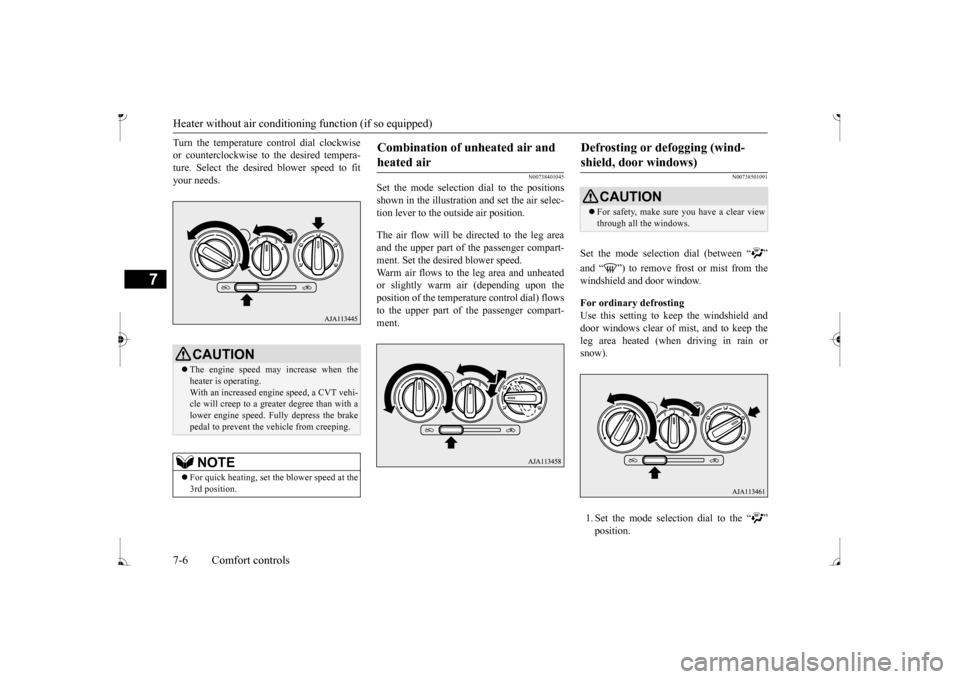
Set the mode selection
dial to the positions
shown in the illustration and set the air selec- tion lever to the outside air position. The air flow will be directed to the leg area and the upper part of the passenger compart-ment. Set the desired blower speed. Warm air flows to the leg area and unheated or slightly warm air (depending upon the position of the temperat
ure control dial) flows
to the upper part of the passenger compart-ment.
N00738501091
Set the mode selection dial (between “ ” windshield and door window. For ordinary defrosting Use this setting to ke
ep the windshield and
door windows clear of mist, and to keep the leg area heated (when driving in rain or snow). 1. Set the mode select
ion dial to the “ ”
CAUTION The engine speed may increase when the heater is operating. With an increased engi
ne speed, a CVT vehi-
cle will creep to a greater degree than with a lower engine speed. Fully depress the brake pedal to prevent the vehicle from creeping.NOTE
For quick heating, set the blower speed at the 3rd position.
Combination of unheated air and heated air
Defrosting or defogging (wind-shield, door windows)
CAUTION For safety, make sure you have a clear view through all the windows.
BK0236100US.book 6 ページ 2016年2月1日 月曜日 午前10時15分
Page 202 of 307
Manual air conditioning (if so equipped)
Comfort controls 7-9
7
N00731001488
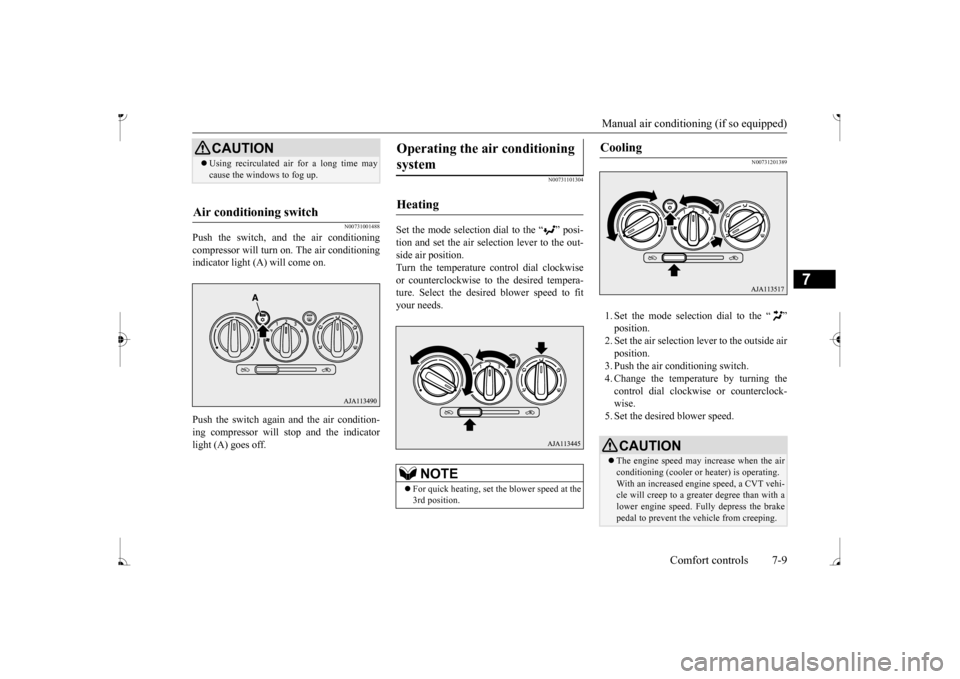
Push the switch, and the air conditioning compressor will turn on. The air conditioningindicator light (A) will come on. Push the switch again and the air condition- ing compressor will stop and the indicator light (A) goes off.
N00731101304
Set the mode selection dial to the “ ” posi- tion and set the air sele
ction lever to the out-
side air position. Turn the temperature control dial clockwise or counterclockwise to
the desired tempera-
ture. Select the desire
d blower speed to fit
your needs.
N00731201389
1. Set the mode selection dial to the “ ” 2. Set the air selection le
ver to the outside air
position.3. Push the air conditioning switch. 4. Change the temperature by turning the control dial clockwise or counterclock-wise. 5. Set the desired blower speed.
CAUTION Using recirculated ai
r for a long time may
cause the windows to fog up.
Air conditioning switch
Operating the ai
r conditioning
system
Heating
NOTE
For quick heating, set th
e blower speed at the
3rd position.
Cooling
CAUTION The engine speed may increase when the air conditioning (cooler or
heater) is operating.
With an increased engi
ne speed, a CVT vehi-
cle will creep to a greater degree than with a lower engine speed. Fully depress the brakepedal to prevent the vehicle from creeping.
BK0236100US.book 9 ページ 2016年2月1日 月曜日 午前10時15分
Page 210 of 307
Automatic air conditioning (if so equipped)
Comfort controls 7-17
7
N00703600017
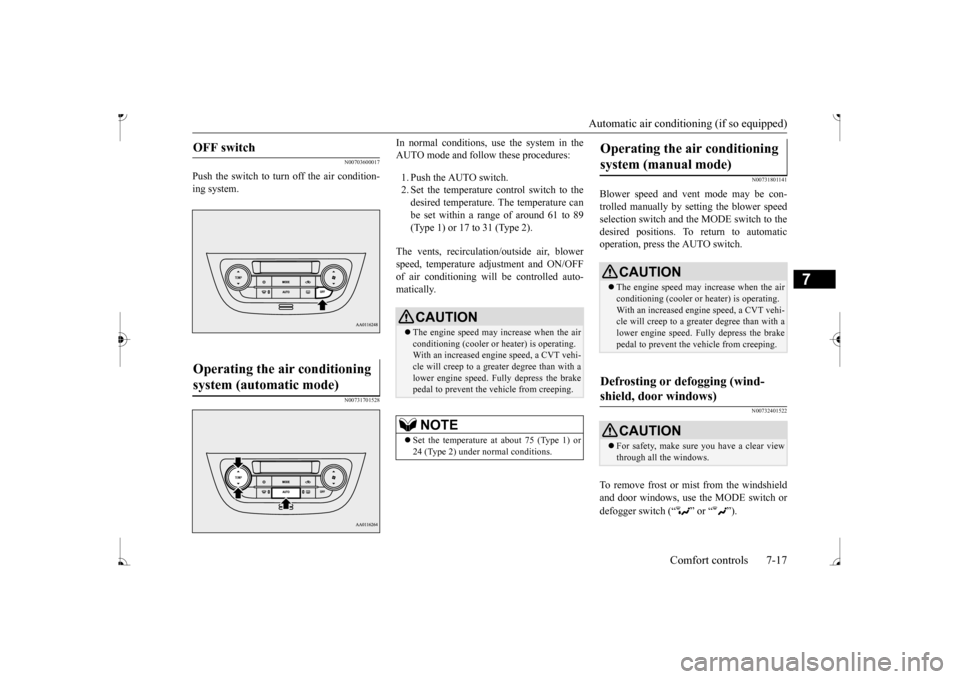
Push the switch to turn off the air condition- ing system.
N00731701528
In normal conditions, use the system in the AUTO mode and follow these procedures: 1. Push the AUTO switch. 2. Set the temperature control switch to the desired temperature. The temperature can be set within a range of around 61 to 89(Type 1) or 17 to 31 (Type 2).
The vents, recirculati
on/outside air, blower
speed, temperature ad
justment and ON/OFF
of air conditioning will be controlled auto- matically.
N00731801141
Blower speed and vent mode may be con- trolled manually by setting the blower speedselection switch and the MODE switch to the desired positions. To return to automatic operation, press the AUTO switch.
N00732401522
To remove frost or mist from the windshieldand door windows, use the MODE switch or defogger switch (“ ” or “ ”).
OFF switch
Operating the air conditioning system (automatic mode)
CAUTION The engine speed may increase when the air conditioning (cooler or
heater) is operating.
With an increased engine speed, a CVT vehi- cle will creep to a greater degree than with a lower engine speed. Fully depress the brakepedal to prevent the vehicle from creeping.NOTE
Set the temperature at about 75 (Type 1) or 24 (Type 2) under normal conditions.
Operating the air conditioning system (manual mode)
CAUTION The engine speed may increase when the air conditioning (cooler or
heater) is operating.
With an increased engi
ne speed, a CVT vehi-
cle will creep to a greater degree than with alower engine speed. Fully depress the brake pedal to prevent the vehicle from creeping.
Defrosting or defogging (wind- shield, door windows)
CAUTION For safety, make sure you have a clear view through all the windows.
BK0236100US.book 17 ページ 2016年2月1日 月曜日 午前10時15分