ignition MITSUBISHI MONTERO 1998 Owner's Manual
[x] Cancel search | Manufacturer: MITSUBISHI, Model Year: 1998, Model line: MONTERO, Model: MITSUBISHI MONTERO 1998Pages: 1501, PDF Size: 25.81 MB
Page 122 of 1501

volts or more, replace SRS-ECU. See SRS AIR BAG CONTROL UNIT (ECU)
under REMOVAL & INSTALLATION. If voltage is not as specified, check
connector C-93, C-101, and C-132, and repair if necessary. If
connectors are okay, check for trouble symptoms. If fault still
exists, check harness wire between SRS-ECU and ignition switch IG1
(A), and repair if necessary.
DTC 42: IG1 (B) POWER CIRCUIT SYSTEM
NOTE: If vehicle condition returns to normal, DTC will be erased
and SRS warning light will return to normal.
NOTE: Refer to WIRING DIAGRAMS for connector identification.
1) Before proceeding, see SERVICE PRECAUTIONS. Deactivate
SRS. See DISABLING & ACTIVATING AIR BAG SYSTEM .
2) Measure SRS Check Harness (MB991613) connector No. 5.
Disconnect SRS-ECU connector C-122 and connect SRS check harness
connector No. 3 to C-122. Check terminal No. 20 and 21 for continuity
to ground. If there is no continuity, go to next step. If there is
continuity, go to step 4).
3) Check connector C-122 and repair if necessary. If
connector is okay, check for trouble symptoms. If fault still exists,
check harness wire between SRS-ECU and ground, and repair if
necessary.
4) Measure SRS check harness connector No. 5. Disconnect SRS-
ECU connector C-122 and connect SRS harness check connector No. 3 to
C-122. Connect negative battery cable and turn ignition switch to ON
position. If voltage between terminal No. 13 and body ground is 9
volts or more, replace SRS-ECU. See SRS AIR BAG CONTROL UNIT (ECU)
under REMOVAL & INSTALLATION. If voltage is not as specified, check
connector C-80, C-93, and C-101, and repair if necessary. If
connectors are okay, check for trouble symptoms. If fault still
exists, check harness wire between SRS-ECU and ignition switch IG1
(B), and repair if necessary.
DTC 43: SRS WARNING LIGHT CIRCUIT
NOTE: Refer to WIRING DIAGRAMS for connector identification.
Light Does Not Come On
1) Before proceeding, see SERVICE PRECAUTIONS. Deactivate
SRS. See DISABLING & ACTIVATING AIR BAG SYSTEM .
2) Measure SRS Check Harness (MB991613) connector No. 5.
Disconnect SRS-ECU connector C-122 and connect SRS check harness
connector No. 3 to C-122. Check terminal No. 20 and 21 for continuity
to ground. If there is no continuity, go to next step. If there is
continuity, go to step 4).
3) Check connector C-122 and repair if necessary. If
connector is okay, check for trouble symptoms. If fault still exists,
check harness wire between SRS-ECU and ground, and repair if
necessary.
4) Measure SRS check harness connector No. 5. Disconnect SRS-
ECU connector C-122 and connect SRS harness check connector No. 3 to
C-122. Connect negative battery cable and turn ignition switch to ON
position. Connect terminal No. 15 to body ground. If SRS warning light
comes on, replace SRS-ECU. See SRS AIR BAG CONTROL UNIT (ECU) under
REMOVAL & INSTALLATION. If SRS warning light does not come on, inspect
for blown bulb and repair if necessary. If bulb is okay, check
connector C-04, C-11, C-96, and C-101, and repair if necessary. If
connectors are okay, check for trouble symptoms. If fault still
exists, check harness wire between SRS-ECU and ignition switch IG1,
and repair if necessary. If harness wire is okay, replace combination
Page 123 of 1501

meter.
Light Does Not Turn Off
1) Before proceeding, see SERVICE PRECAUTIONS. Connect
negative battery cable and turn ignition switch to ON position. If SRS
warning light stays on when C-122 is disconnected, go to next step. If
SRS warning light turns off when C-122 is disconnected, replace SRS-
ECU. See SRS AIR BAG CONTROL UNIT (ECU) under REMOVAL & INSTALLATION.
2) Check connector C-122, and repair if necessary. If
connector is okay, check trouble symptoms. If fault still exists,
check wire harness between SRS-ECU and combination meter, and repair
if necessary.
DTC 44: SRS WARNING LIGHT DRIVE CIRCUIT SYSTEM
NOTE: If vehicle condition returns to normal, DTC will be erased
and SRS warning light will return to normal.
Before proceeding, see SERVICE PRECAUTIONS. Check SRS warning
light drive circuit system. If warning light drive system is okay,
replace SRS-ECU. See SRS AIR BAG CONTROL UNIT (ECU) under REMOVAL &
INSTALLATION. Check for DTCs. See SYSTEM OPERATION CHECK.
DTC 45: SRS-ECU EEPROM & A/D CONVERTER SYSTEM
Before proceeding, see SERVICE PRECAUTIONS. Replace SRS-ECU.
See SRS AIR BAG CONTROL UNIT (ECU) under REMOVAL & INSTALLATION.
DTC 51 & 52: DRIVER-SIDE AIR BAG MODULE (SQUIB IGNITION
DRIVE CIRCUIT) SYSTEM
Before proceeding, see SERVICE PRECAUTIONS. Replace SRS-ECU.
See SRS AIR BAG CONTROL UNIT (ECU) under REMOVAL & INSTALLATION.
DTC 54 & 55: PASSENGER-SIDE AIR BAG MODULE (SQUIB
IGNITION DRIVE CIRCUIT) SYSTEM
Before proceeding, see SERVICE PRECAUTIONS. Replace SRS-ECU.
See SRS AIR BAG CONTROL UNIT (ECU) under REMOVAL & INSTALLATION.
COMPONENT TESTING
CLOCKSPRING TEST
1) Before proceeding, see SERVICE PRECAUTIONS. Deactivate
system. See DISABLING & ACTIVATING AIR BAG SYSTEM .
2) Remove driver-side air bag module and clockspring. See
DRIVER-SIDE AIR BAG MODULE & CLOCKSPRING under REMOVAL & INSTALLATION.
Check connectors, protective tubing, and case for damage, and
terminals for deformities. Check for continuity between No. 1
connector of clockspring and connectors No. 3 and 4. See Figs. 12 and
13.
3) Align paint mark of SRS Check Harness (MB991613) connecto\
r
No. 4 with notch in clockspring connector No. 2 and connect. See
Fig. 14 . Check continuity between terminals No. 22 and 23 of SRS check
harness connector No. 5. See Fig. 13.
4) Replace clockspring if any damage was found or continuity
does not exist between specified terminals. See
DRIVER-SIDE AIR BAG MODULE & CLOCKSPRING under REMOVAL & INSTALLATION.
Page 127 of 1501

ANTI-LOCK BRAKE SAFETY PRECAUTIONS
1998 Mitsubishi Montero
GENERAL INFORMATION
Anti-Lock Brake Safety Precautions
* PLEASE READ THIS FIRST *
This article is intended for general information purposes
only. This information may not apply to all makes and models. If
vehicle is equipped with Anti-Lock Brake System (ABS), refer to
appropriate ANTI-LOCK BRAKE SYSTEM article in the BRAKES section for
description, operation, depressurizing, testing, system bleeding,
trouble shooting and servicing of specific system.
WARNING: Failure to depressurize ABS could lead to physical injury.
ANTI-LOCK BRAKE SAFETY PRECAUTIONS
WARNING: Failure to depressurize ABS could lead to physical injury.
* NEVER open a bleeder valve or loosen a hydraulic line
while ABS is pressurized.
* NEVER disconnect or reconnect any electrical connectors
while ignition is on. Damage to ABS control unit may result.
* DO NOT attempt to bleed hyudarulic system without first
referring to the appropriate ANTI-LOCK BRAKE SYSTEM article
in the BRAKES section.
* Only use specially designed brake hoses/lines on ABS equipped
vehicles.
* DO NOT tap on speed sensor components (sensor, sensor rings).
Sensor rings must be pressed into hubs, NOT hammered into
hubs. Striking these components can cause demagnetization or
a loss of polarization, affecting the accuracy of the speed
signal returning to the ABS control unit.
* DO NOT mix tire sizes. Increasing the width, as long as tires
remain close to the original diameter, is acceptable. Rolling
diameter must be identical for all 4 tires. Some
manufacturers recommend tires of the same brand, style and
type. Failure to follow this precaution may cause inaccurate
wheel speed readings.
* DO NOT contaminate speed sensor components with grease. Only
use recommended coating, when system calls for an
anti-corrosion coating.
* When speed sensor components have been removed, ALWAYS check
sensor-to-ring air gaps when applicable. These specifications
can be found in each appropriate article.
* ONLY use rocommended brake fluids. DO NOT use silicone brake
fluids in an ABS equipped vehicle.
* When instlling transmittion devices (CB's, telephones, etc.)
on ABS equipped vehicles, DO NOT locate the antenna near the
ABS control unit (or any control unit).
* Disconnect all on-board computers, when using electric
welding equipment.
* DO NOT expose the ABS control unit to prolonged periods of
high heat (185
F/85C for 2 hours is generally considered a
maximum limit).
Page 129 of 1501
ADJUSTMENTS
* PLEASE READ FIRST *
NOTE: For adjustment information on brake pedal height, free play,
parking brake and stoplight switch, see BRAKE SYSTEM article.
WHEEL SPEED SENSOR (WSS)
NOTE: Rear WSS gap adjustment information is not available from
manufacturer.
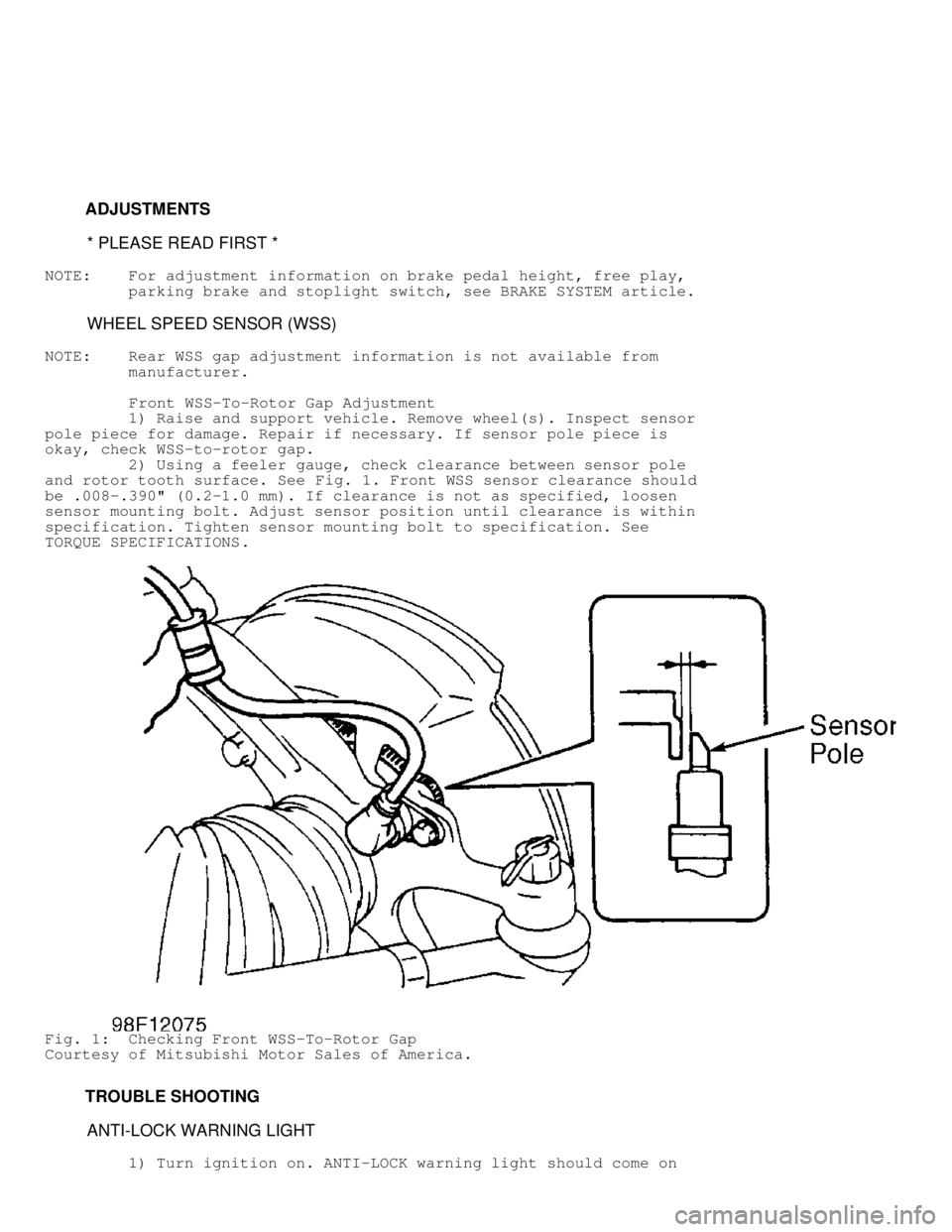
Front WSS-To-Rotor Gap Adjustment
1) Raise and support vehicle. Remove wheel(s). Inspect senso\
r
pole piece for damage. Repair if necessary. If sensor pole piece is
okay, check WSS-to-rotor gap.
2) Using a feeler gauge, check clearance between sensor pole
and rotor tooth surface. See Fig. 1. Front WSS sensor clearance should
be .008-.390" (0.2-1.0 mm). If clearance is not as specified, loosen
sensor mounting bolt. Adjust sensor position until clearance is within
specification. Tighten sensor mounting bolt to specification. See
TORQUE SPECIFICATIONS .
Fig. 1: Checking Front WSS-To-Rotor Gap
Courtesy of Mitsubishi Motor Sales of America.
TROUBLE SHOOTING
ANTI-LOCK WARNING LIGHT
1) Turn ignition on. ANTI-LOCK warning light should come on
Page 130 of 1501

for one second, and then go out. Turn ignition switch to START
position. Warning light should come on and stay on.
2) When ignition switch is turned from START to ON position,
warning light should come on for one second, and then go out. If
warning light functions as specified, go to step 3). If warning light
does not function as specified, see appropriate trouble shooting test:
* IGNITION SWITCH IN ON POSITION (ENGINE NOT RUNNING),
ANTI-LOCK WARNING LIGHT INOPERATIVE
* AFTER ENGINE STARTS, ANTI-LOCK WARNING LIGHT REMAINS ON
* IGNITION SWITCH IN START POSITION, ANTI-LOCK WARNING LIGHT
INOPERATIVE
* IGNITION SWITCH IN ON POSITION, ANTI-LOCK WARNING LIGHT
BLINKS TWICE. IN START POSITION, LIGHT STAYS ON. WHEN
IGNITION SWITCH IS CYCLED FROM START TO ON POSITION, LIGHT
BLINKS ONCE, THEN TURNS OFF
3) Test drive vehicle. If ANTI-LOCK warning light does not
come on at low speed, go to next step. If light comes on at low speed,
motor relay, solenoid valve or Wheel Speed Sensor (WSS) malfunction is\
indicated. Go to step 6). If insufficient braking force or ABS
malfunction exists, go to next step. If none of listed symptoms exist,
go to step 6).
4) Check conventional brake system components for proper
operation. Check for mechanical lock of hydraulic unit solenoid valve.
Check for plugged hydraulic line in hydraulic unit. Repair or replace
as necessary. If hydraulic unit is okay, go to next step.
5) Ensure WSS rotor gap is correct. See WHEEL SPEED SENSOR
(WSS) under ADJUSTMENTS. Check for faulty wheel speed sensor. See
WHEEL SPEED SENSOR (WSS) under COMPONENT TESTS. Replace sensor as
necessary. See WHEEL SPEED SENSOR (WSS) under REMOVAL & INSTALLATION.
Inspect ECU connectors and related wiring harness. See WIRING DIAGRAMS
. If testing indicates no mechanical or electrical failures,
substitute ECU with known-good unit and retest.
6) Enter ABS self-diagnostics and retrieve Diagnostic Trouble
Codes (DTCs). See RETRIEVING DTCs under SELF-DIAGNOSTIC SYSTEM. If no
DTCs are displayed, fault may be intermittent. Attempt to make
malfunction reoccur. If no diagnostic output exists, check and repair
wiring harness between ECU and data link connector. See
WIRING DIAGRAMS .
NOTE: Trouble shoot ANTI-LOCK warning light in following sequence:
instrument cluster circuit, ECU and valve relay.
Ignition Switch In ON position (Engine Not Running),
ANTI-LOCK Warning Light Inoperative
1) If all other warning lights come on with ignition on, go
to step 3). If other warning lights do not come on, check fuse No. 11
in main fuse panel. If fuse is blown, correct cause of blown fuse, and
replace fuse. If fuse is okay, go to next step.
2) Remove instrument cluster. Turn ignition on. Using DVOM,
check voltage between vehicle ground and instrument cluster ANTI-LOCK
warning light terminal No. 28. See Fig. 2. If light does not come on,
go to next step. If light comes on, check and repair connectors and
related wiring harness between instrument cluster, ABS valve relay and
ECU. See WIRING DIAGRAMS .
3) Turn ignition off. Check for faulty warning light bulb.
Replace bulb as necessary. If bulb is okay, check and repair
connectors and related wiring harness between instrument cluster and
ECU. See WIRING DIAGRAMS . If connectors and wiring are okay, replace
instrument cluster.
Page 131 of 1501
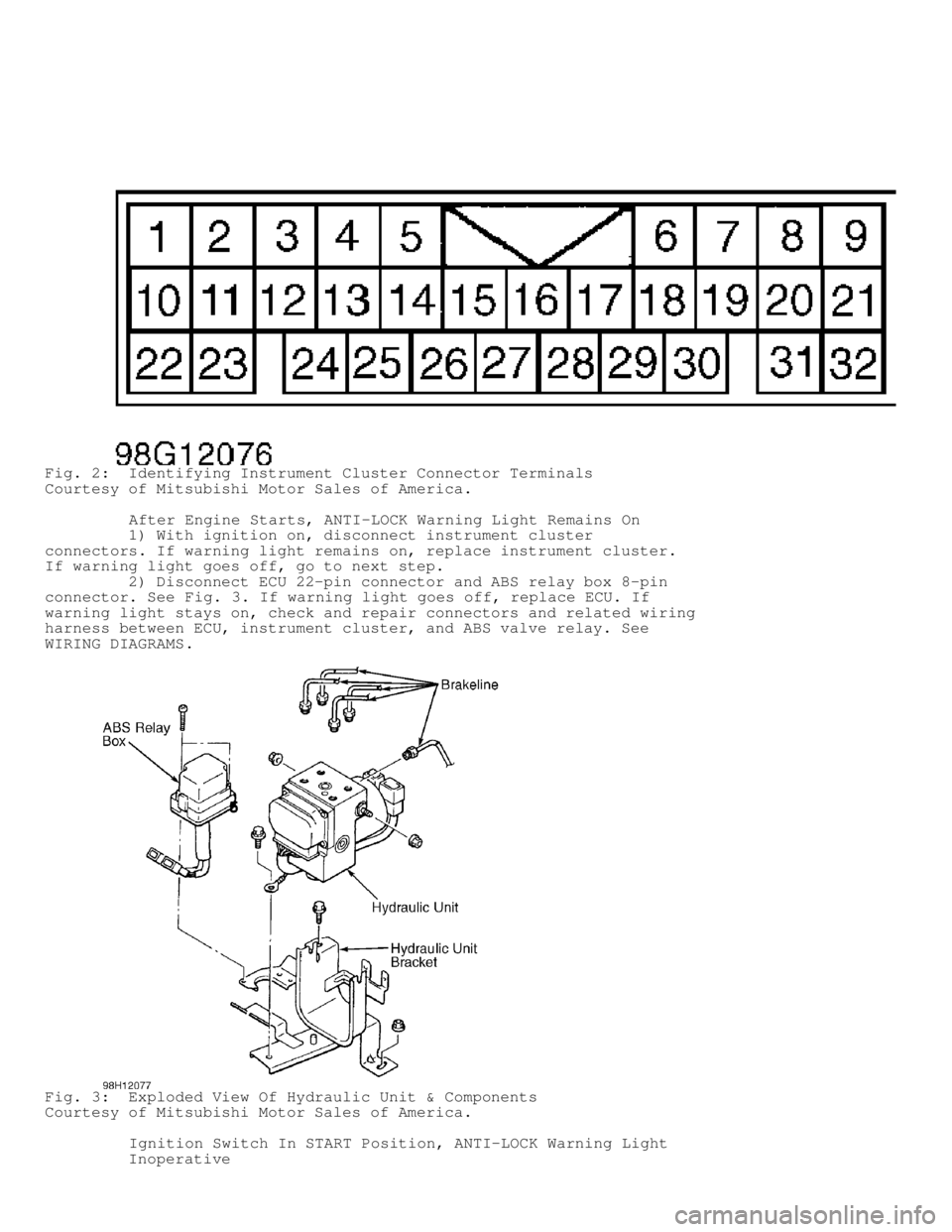
Fig. 2: Identifying Instrument Cluster Connector Terminals
Courtesy of Mitsubishi Motor Sales of America.
After Engine Starts, ANTI-LOCK Warning Light Remains On
1) With ignition on, disconnect instrument cluster
connectors. If warning light remains on, replace instrument cluster.
If warning light goes off, go to next step.
2) Disconnect ECU 22-pin connector and ABS relay box 8-pin
connector. See Fig. 3. If warning light goes off, replace ECU. If
warning light stays on, check and repair connectors and related wiring
harness between ECU, instrument cluster, and ABS valve relay. See
WIRING DIAGRAMS .
Fig. 3: Exploded View Of Hydraulic Unit & Components
Courtesy of Mitsubishi Motor Sales of America.
Ignition Switch In START Position, ANTI-LOCK Warning Light
Inoperative
Page 132 of 1501
1) Inspect ABS relay box. See Fig. 3. Replace ABS relay box
if needed. If ABS relay box is okay, go to next step.
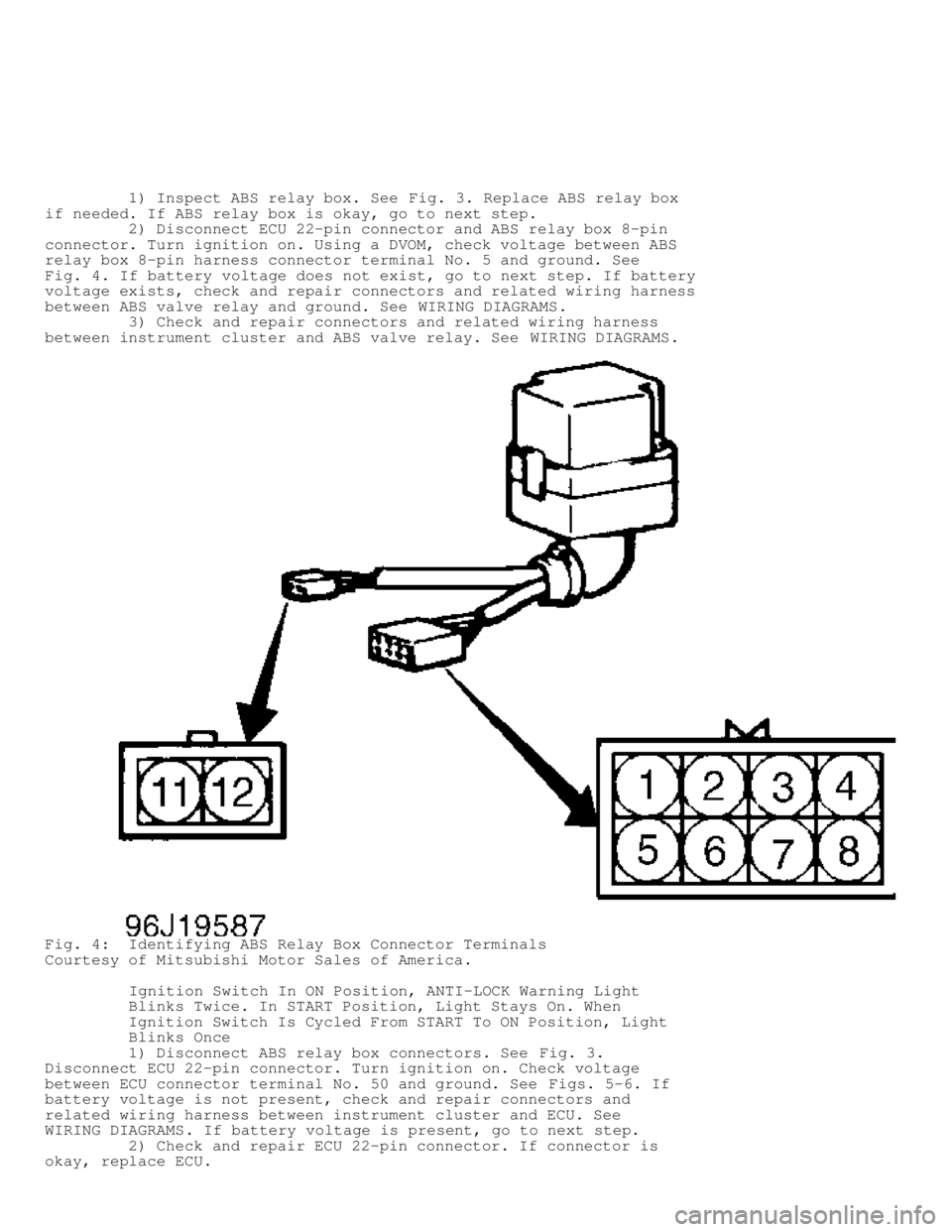
2) Disconnect ECU 22-pin connector and ABS relay box 8-pin
connector. Turn ignition on. Using a DVOM, check voltage between ABS
relay box 8-pin harness connector terminal No. 5 and ground. See
Fig. 4 . If battery voltage does not exist, go to next step. If battery
voltage exists, check and repair connectors and related wiring harness
between ABS valve relay and ground. See WIRING DIAGRAMS.
3) Check and repair connectors and related wiring harness
between instrument cluster and ABS valve relay. See WIRING DIAGRAMS.
Fig. 4: Identifying ABS Relay Box Connector Terminals
Courtesy of Mitsubishi Motor Sales of America.
Ignition Switch In ON Position, ANTI-LOCK Warning Light
Blinks Twice. In START Position, Light Stays On. When
Ignition Switch Is Cycled From START To ON Position, Light
Blinks Once
1) Disconnect ABS relay box connectors. See Fig. 3.
Disconnect ECU 22-pin connector. Turn ignition on. Check voltage
between ECU connector terminal No. 50 and ground. See Figs. 5-6. If
battery voltage is not present, check and repair connectors and
related wiring harness between instrument cluster and ECU. See
WIRING DIAGRAMS . If battery voltage is present, go to next step.
2) Check and repair ECU 22-pin connector. If connector is
okay, replace ECU.
Page 133 of 1501
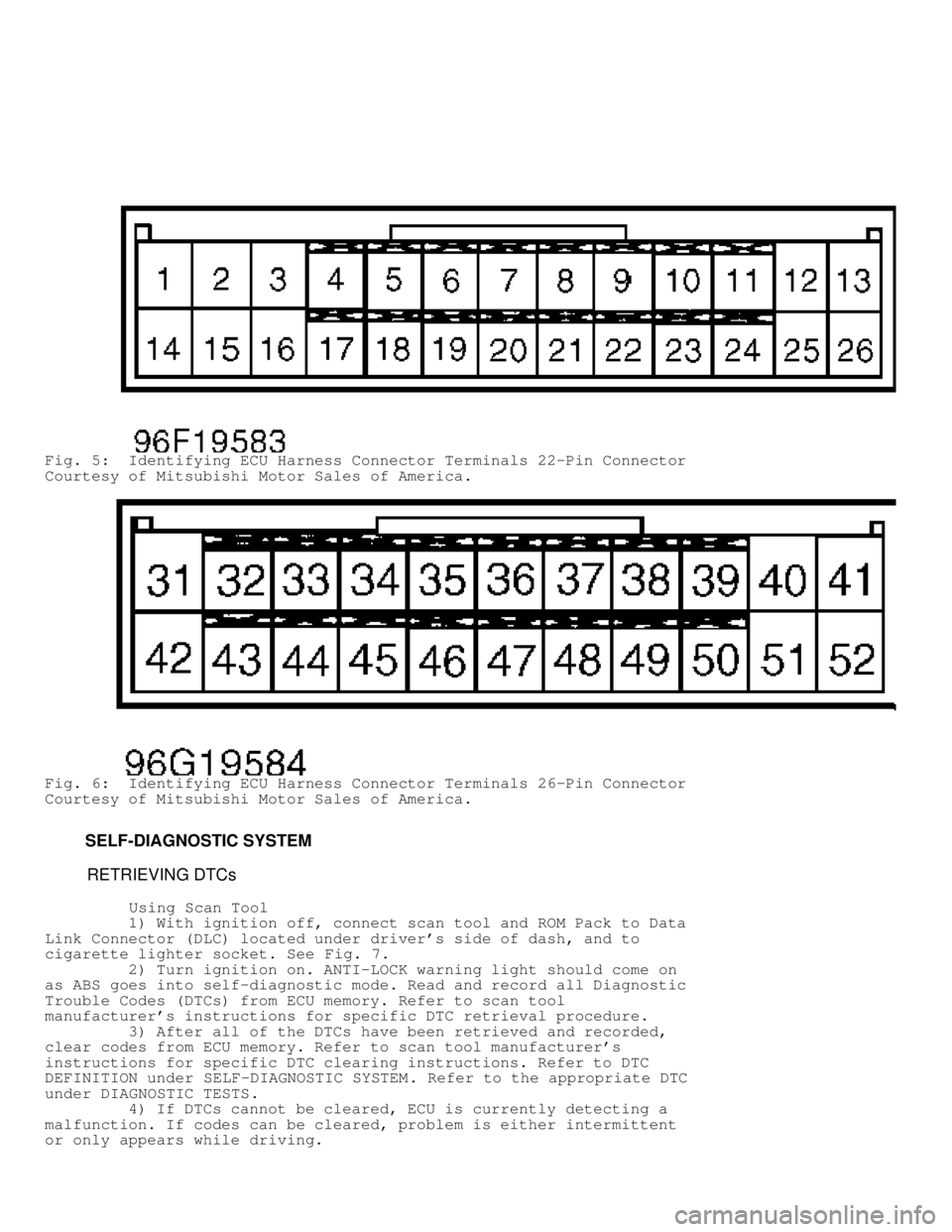
Fig. 5: Identifying ECU Harness Connector Terminals 22-Pin Connector
Courtesy of Mitsubishi Motor Sales of America.
Fig. 6: Identifying ECU Harness Connector Terminals 26-Pin Connector
Courtesy of Mitsubishi Motor Sales of America.
SELF-DIAGNOSTIC SYSTEM
RETRIEVING DTCs
Using Scan Tool
1) With ignition off, connect scan tool and ROM Pack to Data
Link Connector (DLC) located under driver's side of dash, and to
cigarette lighter socket. See Fig. 7.
2) Turn ignition on. ANTI-LOCK warning light should come on
as ABS goes into self-diagnostic mode. Read and record all Diagnostic
Trouble Codes (DTCs) from ECU memory. Refer to scan tool
manufacturer's instructions for specific DTC retrieval procedure.
3) After all of the DTCs have been retrieved and recorded,
clear codes from ECU memory. Refer to scan tool manufacturer's
instructions for specific DTC clearing instructions. Refer to DTC
DEFINITION under SELF-DIAGNOSTIC SYSTEM . Refer to the appropriate DTC
under DIAGNOSTIC TESTS .
4) If DTCs cannot be cleared, ECU is currently detecting a
malfunction. If codes can be cleared, problem is either intermittent
or only appears while driving.
Page 134 of 1501
 To retrieve stored DTCs, locate Data Link Connector (DLC)\
under left s")
Fig. 7: Connecting Scan Tool
Courtesy of Mitsubishi Motor Sales of America.
Using ANTI-LOCK Warning Light
1) To retrieve stored DTCs, locate Data Link Connector (DLC)\
under left side of dash. Turn ignition off. Ground DLC terminal No. 1.
See Fig. 8 .
2) If DTCs are stored in ECU memory, ANTI-LOCK light will
begin to flash intermittently. Long flashes represent first digit of
DTC; short flashes represent second digit. For example, 4 long flashes
and 3 short flashes indicate DTC 43. If 2 or more DTCs are stored,
lowest number will be displayed first. DTC 51 will always be displayed
if valve relay is removed.
3) After recording DTC(s), see DTC DEFINITION table and
perform appropriate DTC test(s) under DIAGNOSTIC TESTS. If no DTCs are
stored, ANTI-LOCK warning light will flash constantly.
Page 137 of 1501

7) Inspect condition of toothed rotor. Check for broken or
deformed teeth. If toothed rotor is okay, go to next step.
8) Check ECU connectors. Repair connectors as needed. If
connectors are okay, replace ECU.
DTC 15: WHEEL SPEED SENSOR OUTPUT SIGNAL (ABNORMAL)
NOTE: DTC will set if ECU detects a wheel speed sensor fault other
than an open or short circuit.
1) Ensure sensor is properly installed. See WHEEL SPEED
SENSOR (WSS) under REMOVAL & INSTALLATION . Correct installation if
needed. If installation is okay, go to next step.
2) Raise and support vehicle. Disconnect ECU connectors.
Using DVOM, backprobe specified ECU connector terminals. See
WHEEL SPEED SENSOR OUTPUT CIRCUIT IDENTIFICATION table. See Figs. 5-6.
Check voltage between each harness connector terminal while rotating
wheel at 1/2 to one rotation per second. If pulse voltage is 70 mV or
more, go to step 7). If voltage is not as specified, go to next step.
3) Inspect condition of suspect speed sensor. Ensure tip of
speed sensor is clean. If speed sensor is okay, go to next step.
4) Disconnect sensor connector. Using DVOM, check resistance
across sensor terminals. Resistance for front sensors should be 1170-
1350 ohms. Resistance for rear sensors should be 1300-1500 ohms. If
resistance is as specified, go to next step. If resistance is not as
specified, replace sensor.
5) Remove sensor. Check resistance between each sensor
terminal and sensor body. If resistance is 100,000 ohms or more, go to
next step. If resistance is not as specified, replace sensor.
6) Inspect condition of toothed rotor. Check for broken or
deformed teeth. If toothed rotor is okay, go to next step.
7) Check ECU connectors. Repair connectors as needed. If
connectors are okay, replace ECU.
DTC 16: ECU POWER SUPPLY
NOTE: DTC will set if ECU power supply voltage is not within
standard value. If voltage returns to normal, DTC will be
erased. Ensure battery is fully charged.
1) Ensure battery voltage is 10-17 volts. Turn ignition off.
Disconnect ECU 26-pin connector. Start engine. Using DVOM, check
voltage between ECU 26-pin connector terminal No. 13 and ground. See
Figs. 5 -6. If battery voltage exists, go to step 3). If battery
voltage do es not exist, go to next step.
2) Check and repair connectors and related wiring between
ignition switch and ECU. See WIRING DIAGRAMS. If connectors and wiring
are okay, check and repair battery or charging system.
3) Check voltage between ECU 26-pin connector terminal No. 26
and ground. If battery voltage exists, go to next step. If battery
voltage does not exist, check and repair connectors and wiring harness
between fusible link and ECU. See WIRING DIAGRAMS.
4) Check and repair ECU connectors. If connectors are okay,
replace ECU.
DTC 21, 22, 23 OR 24: WHEEL SPEED SENSOR (ABNORMAL)
NOTE: DTC sets if wheel speed sensor does not output a signal when
driving, and an open circuit cannot be found.
1) Ensure sensor is properly installed. See WHEEL SPEED
SENSOR (WSS) under REMOVAL & INSTALLATION . Correct installation if
needed. If installation is okay, go to next step.