oil MITSUBISHI OUTLANDER 2015 3.G MMCS Manual
[x] Cancel search | Manufacturer: MITSUBISHI, Model Year: 2015, Model line: OUTLANDER, Model: MITSUBISHI OUTLANDER 2015 3.GPages: 229, PDF Size: 58.35 MB
Page 25 of 229
Top Menu
25
Introduction Basic Operation
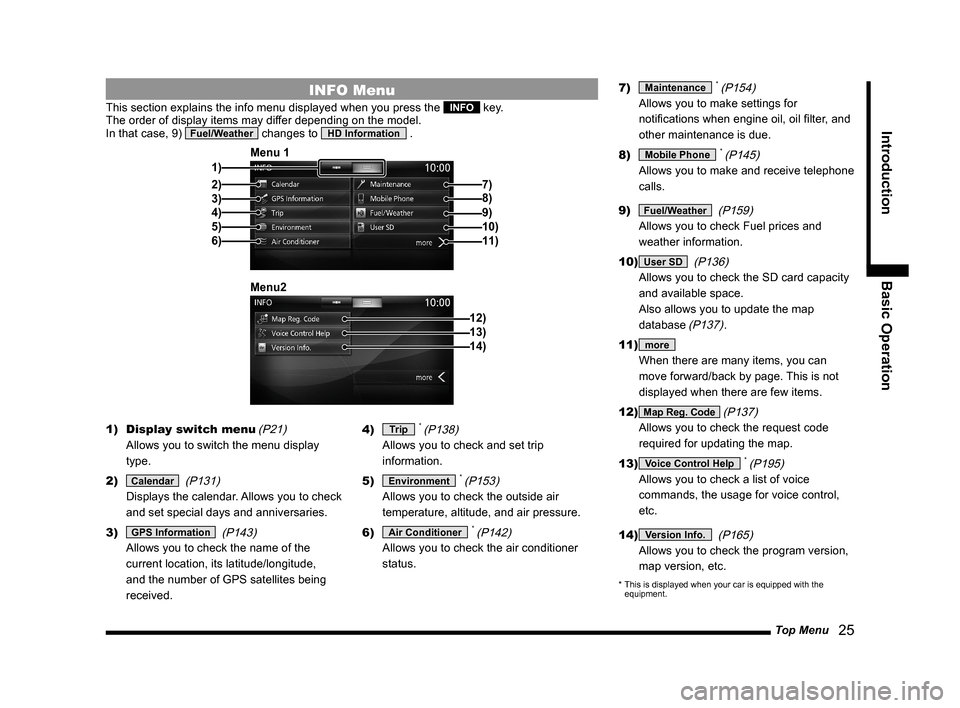
INFO Menu
This section explains the info menu displayed when you press the INFO key.
The order of display items may differ depending on the model.
In that case, 9)
Fuel/Weather changes to HD Information .
2)3)
4)
5)
6) 1)Menu 1
7)
8)
9)10)11)
12) Menu213)14)
1) Display switch menu
(P21)
Allows you to switch the menu display
type.
2)
Calendar
(P131)
Displays the calendar. Allows you to check
and set special days and anniversaries.
3)
GPS Information
(P143)
Allows you to check the name of the
current location, its latitude/longitude,
and the number of GPS satellites being
received.4)
Trip * (P138)
Allows you to check and set trip
information.
5)
Environment * (P153)
Allows you to check the outside air
temperature, altitude, and air pressure.
6)
Air Conditioner * (P142)
Allows you to check the air conditioner
status.7)
Maintenance * (P154)
Allows you to make settings for
notifi cations when engine oil, oil fi lter, and
other maintenance is due.
8)
Mobile Phone * (P145)
Allows you to make and receive telephone
calls.
9)
Fuel/Weather
(P159)
Allows you to check Fuel prices and
weather information.
10)
User SD
(P136)
Allows you to check the SD card capacity
and available space.
Also allows you to update the map
database
(P137).
11)
more
When there are many items, you can
move forward/back by page. This is not
displayed when there are few items.
12)
Map Reg. Code (P137)
Allows you to check the request code
required for updating the map.
13)
Voice Control Help * (P195)
Allows you to check a list of voice
commands, the usage for voice control,
etc.
14)
Version Info.
(P165)
Allows you to check the program version,
map version, etc.
* This is displayed when your car is equipped with the
equipment.
Page 154 of 229
154 Maintenance
Equipment by type
Maintenance
You can manage parts replacement timing
for your car.
Displaying
You can check the engine oil, oil fi lter, etc.
replacement timing.
NOTE
• The distance traveled used in the
maintenance information is calculated
by this product and does not necessarily
match the distance calculated by the car.
• During map updating, program updating,
etc., the distance traveled cannot be
calculated and the distance traveled
during this time is not refl ected in the
maintenance information.
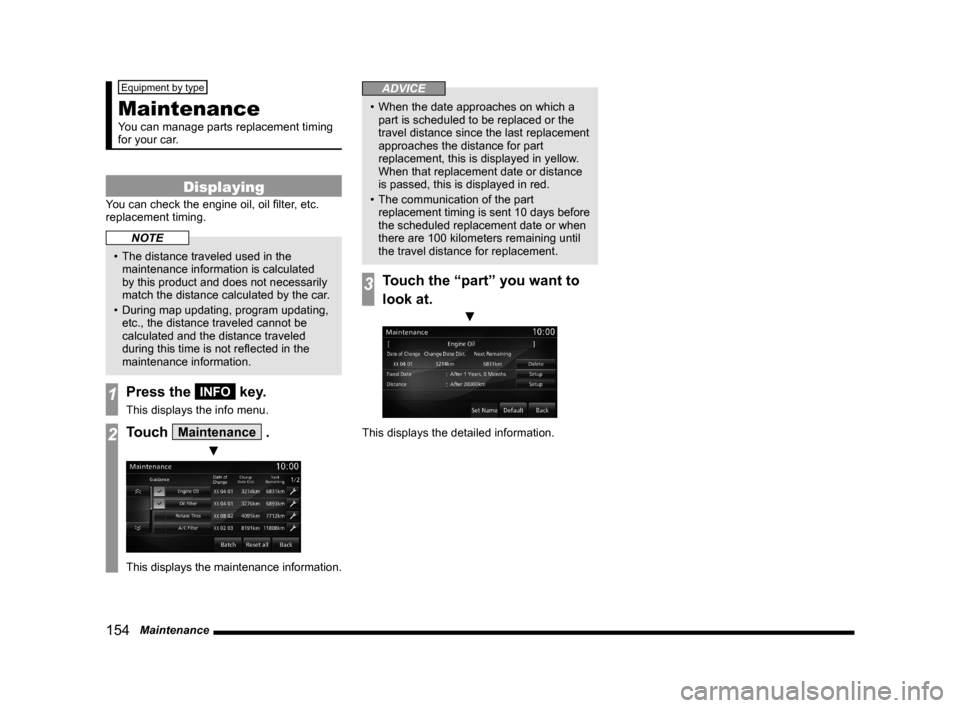
1Press the INFO key.
This displays the info menu.
2Touch Maintenance .
▼
This displays the maintenance information.
ADVICE
• When the date approaches on which a
part is scheduled to be replaced or the
travel distance since the last replacement
approaches the distance for part
replacement, this is displayed in yellow.
When that replacement date or distance
is passed, this is displayed in red.
• The communication of the part
replacement timing is sent 10 days before
the scheduled replacement date or when
there are 100 kilometers remaining until
the travel distance for replacement.
3Touch the “part” you want to
look at.
▼
This displays the detailed information.
Page 157 of 229
Maintenance
157
INFO/SETTINGS INFO
Update Maintenance
Information
When parts are replaced, the maintenance
information is updated.
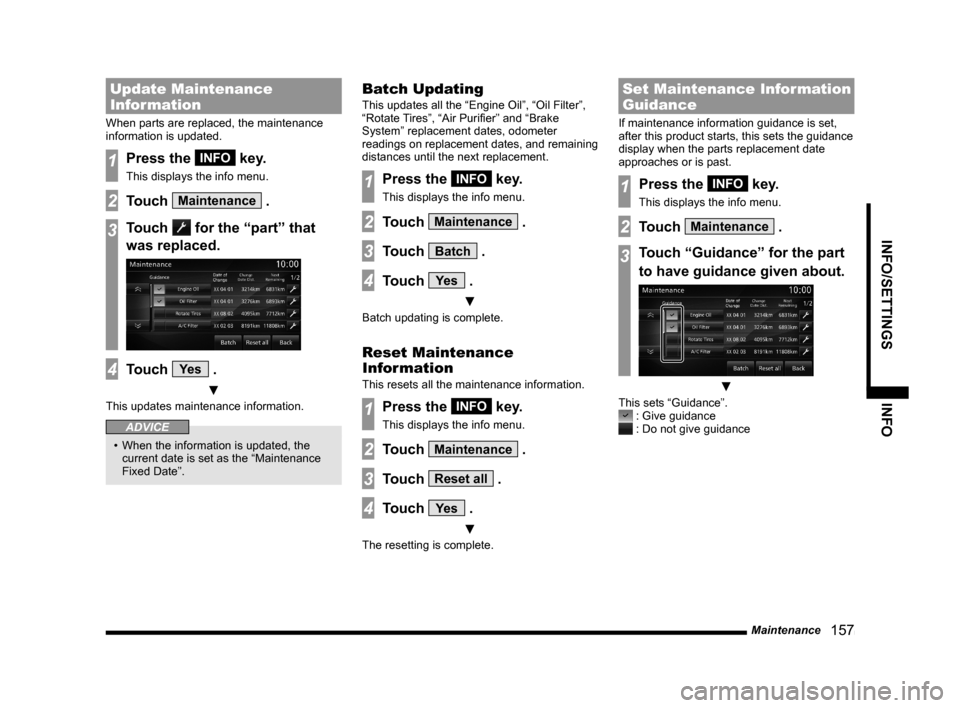
1Press the INFO key.
This displays the info menu.
2Touch Maintenance .
3Touch for the “part” that
was replaced.
4Touch Ye s .
▼
This updates maintenance information.
ADVICE
• When the information is updated, the
current date is set as the “Maintenance
Fixed Date”.
Batch Updating
This updates all the “Engine Oil”, “Oil Filter”,
“Rotate Tires”, “Air Purifi er” and “Brake
System” replacement dates, odometer
readings on replacement dates, and remaining
distances until the next replacement.
1Press the INFO key.
This displays the info menu.
2Touch Maintenance .
3Touch Batch .
4Touch Ye s .
▼
Batch updating is complete.
Reset Maintenance
Information
This resets all the maintenance information.
1Press the INFO key.
This displays the info menu.
2Touch Maintenance .
3Touch Reset all .
4Touch Ye s .
▼
The resetting is complete.
Set Maintenance Information
Guidance
If maintenance information guidance is set,
after this product starts, this sets the guidance
display when the parts replacement date
approaches or is past.
1Press the INFO key.
This displays the info menu.
2Touch Maintenance .
3Touch “Guidance” for the part
to have guidance given about.
▼
This sets “Guidance”. : Give guidance : Do not give guidance
Page 188 of 229
188 List of Accepted Commands
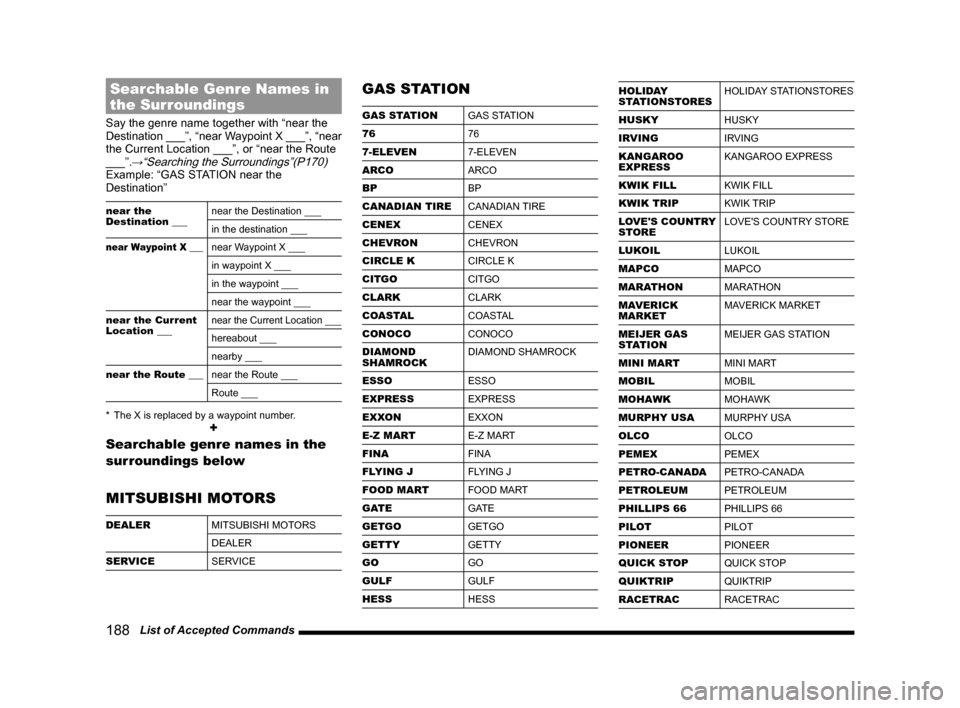
Searchable Genre Names in
the Surroundings
Say the genre name together with “near the
Destination ___”, “near Waypoint X ___”, “near
the Current Location ___”, or “near the Route
___”.
→“Searching the Surroundings”(P170)Example: “GAS STATION near the
Destination”
near the
Destination ___near the Destination ___
in the destination ___
near Waypoint X ___near Waypoint X ___
in waypoint X ___
in the waypoint ___
near the waypoint ___
near the Current
Location ___
near the Current Location ___
hereabout ___
nearby ___
near the Route ___near the Route ___
Route ___
* The X is replaced by a waypoint number.
+
Searchable genre names in the
surroundings below
MITSUBISHI MOTORS
DEALER
MITSUBISHI MOTORS
DEALER
SERVICE
SERVICE
GAS STATION
GAS STATION
GAS STATION
76
76
7-ELEVEN
7-ELEVEN
ARCO
ARCO
BP
BP
CANADIAN TIRE
CANADIAN TIRE
CENEX
CENEX
CHEVRON
CHEVRON
CIRCLE K
CIRCLE K
CITGO
CITGO
CLARK
CLARK
COASTAL
COASTAL
CONOCO
CONOCO
DIAMOND
SHAMROCKDIAMOND SHAMROCK
ESSO
ESSO
EXPRESS
EXPRESS
EXXON
EXXON
E-Z MART
E-Z MART
FINA
FINA
FLYING J
FLYING J
FOOD MART
FOOD MART
GATE
GATE
GETGO
GETGO
GETTY
GETTY
GO
GO
GULF
GULF
HESS
HESS
HOLIDAY
STATIONSTORESHOLIDAY STATIONSTORES
HUSKY
HUSKY
IRVING
IRVING
KANGAROO
EXPRESSKANGAROO EXPRESS
KWIK FILL
KWIK FILL
KWIK TRIP
KWIK TRIP
LOVE'S COUNTRY
STORELOVE'S COUNTRY STORE
LUKOIL
LUKOIL
MAPCO
MAPCO
MARATHON
MARATHON
MAVERICK
MARKETMAVERICK MARKET
MEIJER GAS
STATIONMEIJER GAS STATION
MINI MART
MINI MART
MOBIL
MOBIL
MOHAWK
MOHAWK
MURPHY USA
MURPHY USA
OLCO
OLCO
PEMEX
PEMEX
PETRO-CANADA
PETRO-CANADA
PETROLEUM
PETROLEUM
PHILLIPS 66
PHILLIPS 66
PILOT
PILOT
PIONEER
PIONEER
QUICK STOP
QUICK STOP
QUIKTRIP
QUIKTRIP
RACETRAC
RACETRAC
Page 189 of 229
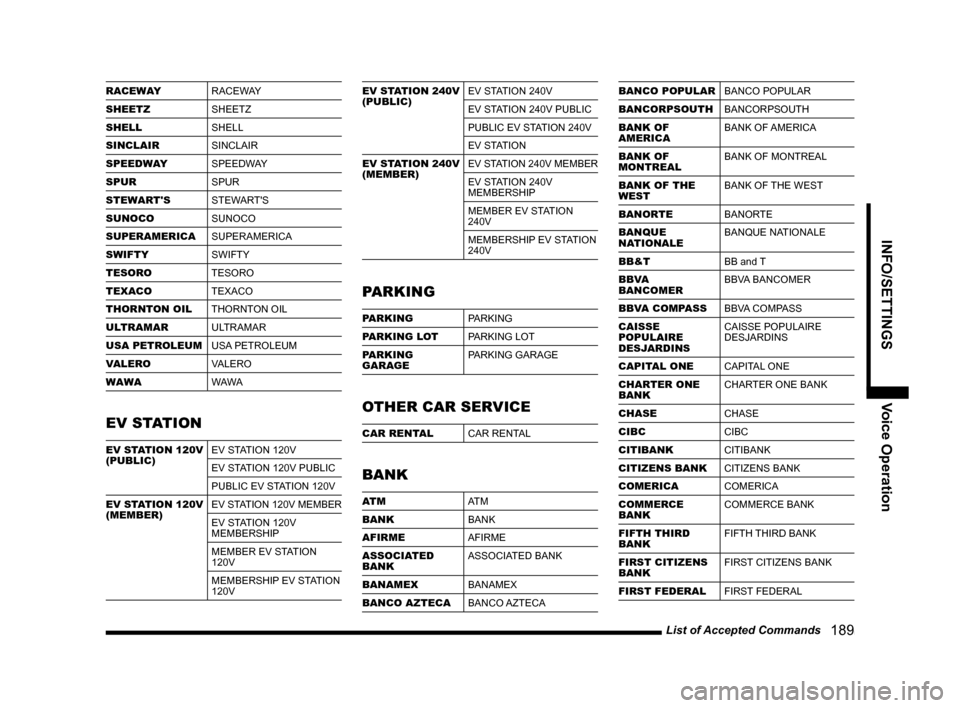
List of Accepted Commands
189
INFO/SETTINGS Voice Operation
RACEWAY
RACEWAY
SHEETZ
SHEETZ
SHELL
SHELL
SINCLAIR
SINCLAIR
SPEEDWAY
SPEEDWAY
SPUR
SPUR
STEWART'S
STEWART'S
SUNOCO
SUNOCO
SUPERAMERICA
SUPERAMERICA
SWIFTY
SWIFTY
TESORO
TESORO
TEXACO
TEXACO
THORNTON OIL
THORNTON OIL
ULTRAMAR
ULTRAMAR
USA PETROLEUM
USA PETROLEUM
VALERO
VALERO
WAWA
WAWA
EV STATION
EV STATION 120V
(PUBLIC)EV STATION 120V
EV STATION 120V PUBLIC
PUBLIC EV STATION 120V
EV STATION 120V
(MEMBER)EV STATION 120V MEMBER
EV STATION 120V
MEMBERSHIP
MEMBER EV STATION
120V
MEMBERSHIP EV STATION
120V
EV STATION 240V
(PUBLIC)EV STATION 240V
EV STATION 240V PUBLIC
PUBLIC EV STATION 240V
EV STATION
EV STATION 240V
(MEMBER)EV STATION 240V MEMBER
EV STATION 240V
MEMBERSHIP
MEMBER EV STATION
240V
MEMBERSHIP EV STATION
240V
PARKING
PARKING
PARKING
PARKING LOT
PARKING LOT
PARKING
GARAGEPARKING GARAGE
OTHER CAR SERVICE
CAR RENTAL
CAR RENTAL
BANK
AT M
AT M
BANK
BANK
AFIRME
AFIRME
ASSOCIATED
BANKASSOCIATED BANK
BANAMEX
BANAMEX
BANCO AZTECA
BANCO AZTECA
BANCO POPULAR
BANCO POPULAR
BANCORPSOUTH
BANCORPSOUTH
BANK OF
AMERICABANK OF AMERICA
BANK OF
MONTREALBANK OF MONTREAL
BANK OF THE
WESTBANK OF THE WEST
BANORTE
BANORTE
BANQUE
NATIONALEBANQUE NATIONALE
BB&T
BB and T
BBVA
BANCOMERBBVA BANCOMER
BBVA COMPASS
BBVA COMPASS
CAISSE
POPULAIRE
DESJARDINSCAISSE POPULAIRE
DESJARDINS
CAPITAL ONE
CAPITAL ONE
CHARTER ONE
BANKCHARTER ONE BANK
CHASE
CHASE
CIBC
CIBC
CITIBANK
CITIBANK
CITIZENS BANK
CITIZENS BANK
COMERICA
COMERICA
COMMERCE
BANKCOMMERCE BANK
FIFTH THIRD
BANKFIFTH THIRD BANK
FIRST CITIZENS
BANKFIRST CITIZENS BANK
FIRST FEDERAL
FIRST FEDERAL