eco MITSUBISHI OUTLANDER 2015 3.G Owners Manual
[x] Cancel search | Manufacturer: MITSUBISHI, Model Year: 2015, Model line: OUTLANDER, Model: MITSUBISHI OUTLANDER 2015 3.GPages: 446, PDF Size: 59.52 MB
Page 273 of 446
![MITSUBISHI OUTLANDER 2015 3.G Owners Manual Bluetooth® 2.0 interface (if so equipped) 5-196 Features and controls
5
[For vehicles equippe
d with the Mitsubishi
Multi-Communication System (MMCS)]Refer to the separate owner’s manual. [For ve](/img/19/7534/w960_7534-272.png "MITSUBISHI OUTLANDER 2015 3.G Owners Manual Bluetooth® 2.0 interface (if so equipped) 5-196 Features and controls
5
[For vehicles equippe
d with the Mitsubishi
Multi-Communication System (MMCS)]Refer to the separate owner’s manual. [For ve")
Bluetooth® 2.0 interface (if so equipped) 5-196 Features and controls
5
[For vehicles equippe
d with the Mitsubishi
Multi-Communication System (MMCS)]Refer to the separate owner’s manual. [For vehicles equipped with the DISPLAY AUDIO]Refer to the separate owner’s manual.
N00565501097
You can make or receive hands-free calls using a Bluetooth
® compatible cellular phone
connected to the Bluetooth
® 2.0 interface.
You can also use the phonebooks in the Blue- tooth
® 2.0 interface to make calls without
dialing telephone numbers. To make a call P.5-196 Send function P.5-198 Receiving calls P.5-198Mute function P.5-198 Switching between hand
s-free mode and pri-
vate mode P.5-198
N00565601098
You can make a call in the following 3 ways using the Bluetooth
® 2.0 interface:
By saying a telephone number By using the Bluetooth
® 2.0 interface’s
phonebook By redialing a telephone number
You can make a call by saying the telephone number. 1. Press the SPEECH button (except for vehicles with Mitsubishi Multi-Commu-nication System) or PICK-UP button (for vehicles with Mitsubishi Multi-Commu- nication System).2. Say “Dial.” 3. After the voice gui
de says “Number
please,” say the
telephone number.
4. The voice guide wi
ll say “Dialing
® 2.0 interface will then
make the call.
When the confirmation function is on, the system will confirm the telephone numberagain. To continue with that number, answer “Yes.” To change the telephone number, answer“No.” The system
will say “Number
please” then say th
e telephone number
again.
You can make calls using the vehicle phone- book or mobile phonebook of the Bluetooth
®
2.0 interface. For details on the phonebooks, refer to “Phonebook function” on page 5-198.
How to make or receive hands- free calls
NOTE
Hands-free calls may not
operate correctly
when you place or receive the call directly from your cellular phone, instead of using the Bluetooth
® 2.0 interface.
To m a k e a c a l l
Making a call by using the telephone number
NOTE
In the case of English, the system will recog- nise both “zero” and “oh”
(Letter “o”) for the
number “0.” The Bluetooth
® 2.0 interface supports num-
bers (0 to 9) and characters (+, # and
*).
The maximum supporte
d telephone number
length is as follows: • International telephone
number: + and tele-
phone numbers (to 18 digits). • Except for international telephone number: telephone numbers (to 19 digits).
Making a call using a phonebook
BK0211800US.book 196 ページ 2014年3月12日 水曜日 午後2時42分
Page 275 of 446

Bluetooth® 2.0 interface (if so equipped) 5-198 Features and controls
5
1. Press the SPEECH button (except for vehicles with Mitsubishi Multi-Commu-nication System) or
PICK-UP button (for
vehicles with Mitsubishi Multi-Commu- nication System).2. Say “Redial.”
N00565700018
During a call, press
the SPEECH button to
enter voice recognition mode, then say “
N00565801045
If an incoming phone call is received whilethe ignition switch or the operation mode is in ON or ACC, the audio
system will be auto-
matically turned on and switched to theincoming call, even when the audio system was originally off. The voice guide announcement for theincoming call will be output from the front passenger’s seat speaker.
If the CD player or radio was playing when the incoming call was received, the audio sys-tem will mute the sound from the CD player or radio and output only the incoming call. To receive the call, press the PICK-UP buttonon the steering wheel control switch. When the call is over, the audio system will return to its previous state.
N00565900010
At any time during a
call, you can mute the
vehicle microphone. Pressing the SPEECH but
ton and then saying
“Mute” during a call will turn ON the mutefunction and mute the microphone. Saying “Mute off” in the same way will turn off the mute function and cancel the mute onthe microphone.
N00566600014
The Bluetooth
® 2.0 interface can switch
between hands-free m
ode (hands-free calls)
and private mode (calls
using cellular phone).
If you press the SPEECH button and say “Transfer call” duri
ng a hands-free call, you
can stop the hands-free m
ode and talk in pri-
vate mode.
To return to hands-free mode, press the SPEECH button again and say “Transfercall.”
N00566000018
The Bluetooth
® 2.0 interface
has 2 types of
unique phonebooks that are different from the phonebook stored in the cellular phone. They are the vehicle phonebook and the mobile phonebook. These phonebooks are used to register tele-phone numbers and make
calls to desired
numbers via voice re
cognition function.
N00566101120
This phonebook is used when making calls with the voice recognition function. Up to 32 names can be registered in the vehi- cle phonebook per language.Also, each entry has 4 locations associated with: home, work, mobile and other. You can register one telephone number for each loca-tion.
Send function
Receiving calls
Mute function
Switching between hands-free mode and private mode
Phonebook function
NOTE
Disconnecting the ba
ttery cable will not
delete information registered in the phone-book.
Vehicle phonebook
BK0211800US.book 198 ページ 2014年3月12日 水曜日 午後2時42分
Page 276 of 446

Bluetooth® 2.0 interface (if so equipped)
Features and controls 5-199
5
You can register a desire
d name as a name for
any phonebook entry register
ed in the vehicle
phonebook. Names and telephone numbers can be changed later on. The vehicle phonebook ca
n be used with all
paired cellular phones.
N00580500059
You can register a telephone number in thevehicle phonebook in the following 2 ways: Reading out a telephone number, and select- ing and transferring 1 phonebook entry fromthe phonebook of the cellular phone.
N00580600063
1. Press the SPEECH button (except forvehicles with Mitsubishi Multi-Commu-nication System) or PICK-UP button (for vehicles with Mitsubishi Multi-Commu- nication System).2. Say “Phonebook.” 3. The voice guide will
say “Select one of
the following: new entry, edit number,edit name, list names, delete, erase all, or import contact.” Say “New entry.”
4. The voice guide will
say “Name please.”
Say your preferred name to register it. 5. When the name has been registered, the voice guide will
say “home, work,
mobile, or other?” Say the location for which you want to register a telephone number. 6. The voice guide will say “Number please.” Say the te
lephone number to reg-
ister it.
7. The voice guide will
repeat the telephone
number you have just read, and then reg-ister the number. When the telephone number has been reg- istered, the voice gui
de will say “Number
saved. Would you li
ke to add another
number for this entry?” To add another telephone number for anew location for the current entry, answer “Yes.” The system will return to location selection in Step 5.Answer “No” to end the registration pro- cess and return to the main menu.
To register a telephone number in the vehicle phonebook
To register by reading out a tele- phone number
NOTE
If the maximum number of entries are already registered, the
voice guide will say
“The phonebook is full. Would you like todelete a name?” Say
“Yes” if you want to
delete a registered name. If you say “No,” the system will return to themain menu.NOTE
When the confirmation function is on, the voice guide will say “
rect?” Answer “Yes.” If a telephone number has
been registered for
the selected location, th
e voice guide will say
“The current number is
number please.” If you do not want to change the telephone number, say “cancel” or the original numberto keep it registered.
NOTE
In the case of English,
the system will recog-
nise both “zero” and “oh”
(Letter “o”) for the
number “0.”NOTE
When the confirmation f
unction is on, after
repeating the telephone number you have read, the voice guide wi
ll ask “Is this cor-
rect?” Answer “Yes.”Answer “No” to retu
rn to telephone number
registration in step 6.
BK0211800US.book 199 ページ 2014年3月12日 水曜日 午後2時42分
Page 277 of 446

Bluetooth® 2.0 interface (if so equipped) 5-200 Features and controls
5
N00580700048
You can select 1 phonebook entry from the phonebook of the cellular phone and register it in the vehicle phonebook. 1. Press the SPEECH button (except for vehicles with Mitsubishi Multi-Commu- nication System) or
PICK-UP button (for
vehicles with Mitsubishi Multi-Commu- nication System).
2. Say “Phonebook.” 3. The voice guide will
say “Select one of
the following: new entry, edit number, edit name, list names, delete, erase all, or import contact.
” Say “Import contact.”
4. The voice guide will say “Would you like to import a single entr
y or all contacts?”
Say “Single entry.” The Bluetooth
® 2.0 interface will become
ready to receive transferred phonebook data. 5. After the voice guide says “Ready to receive a contact from the phone. Only a home, a work, and a mobile number can be imported,” the Bluetooth
® 2.0 inter-
face will receive the phonebook data from the Bluetooth
® compatible cellular phone.
6. Operate the Bluetooth
® compatible cellu-
lar phone to set it up so that the phone-book entry you want to register in the vehicle phonebook can be transferred to the Bluetooth
® 2.0 interface.
7. When the reception is complete, the voice guide will say “<
Number of telephone
numbers that had been registered in the import source> numbers have been imported. What name would you like touse for these numbers?” Say the name you want to register for this phonebook entry.
To select and transfer one phone- book entry from the phonebook of the cellular phone NOTE
Transfer is not permitted unless the vehicle is parked. Before transferring, make sure that the vehicle is parked in a safe location. All or part of data
may not be transferred,
even when the cellular phone supports Blue- tooth
®, depending on the compatibility of
the device. The maximum supported telephone number length is 19 digits.
Any telephone number of
20 digits or more will be truncated to the first 19 digits. If telephone numbers
contain characters
other than 0 to 9,
*, # or +, these characters
are deleted before the transfer. For the connection sett
ings on the cellular
phone side, refer to the instructions for thecellular phone.
NOTE
If the maximum number of entries are already registered, the
voice guide will say
“The phonebook is full. Would you like todelete a name?” Say
“Yes” if you want to
delete a registered name. If you say “No,” the system will return to themain menu.
NOTE
If the Bluetooth
® 2.0 interface
cannot recog-
nise the Bluetooth
® compatible cellular
phone or the connection takes too muchtime, the voice guide will say “Import con- tact has timed out” and
then the system will
cancel the registration. In such case, startover again from Step 1. Pressing the HANG-U
P button or pressing
and holding the SPEECH
button will cancel
the registration.NOTE
If the entered name is
already used for other
phonebook entry or similar to a name usedfor other phonebook entry, that name cannot be registered.
BK0211800US.book 200 ページ 2014年3月12日 水曜日 午後2時42分
Page 285 of 446
USB input terminal (if so equipped) 5-208 Features and controls
5
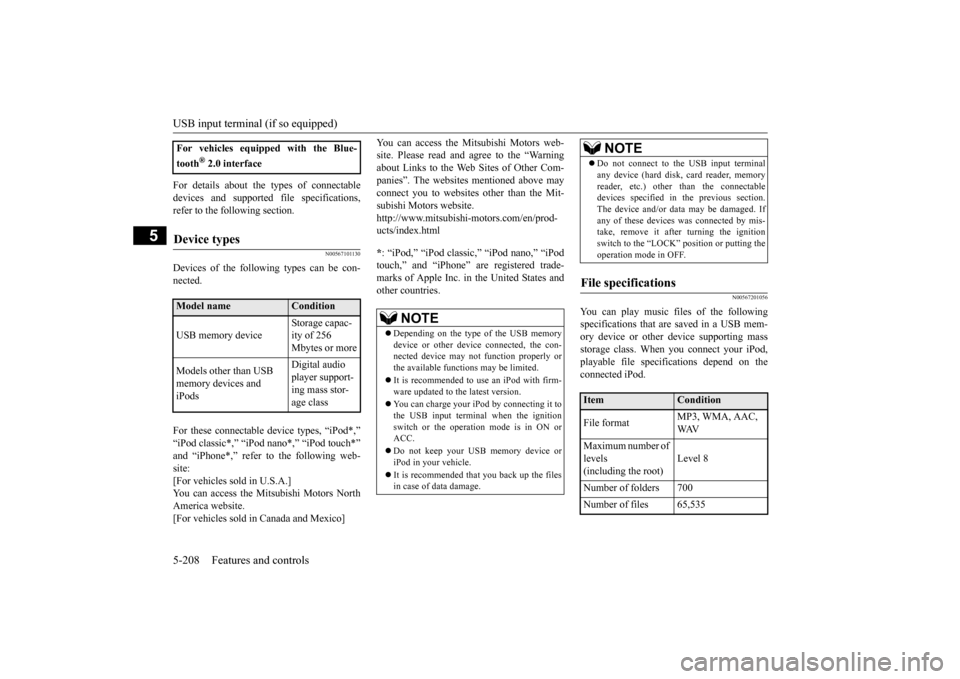
For details about the types of connectable devices and supported fi
le specifications,
refer to the following section.
N00567101130
Devices of the follow
ing types can be con-
nected. For these connectable de
vice types, “iPod*,”
“iPod classic*,” “iP
od nano*,” “iPod touch*”
and “iPhone*,” refer to the following web- site: [For vehicles sold in U.S.A.]You can access the Mitsubishi Motors North America website. [For vehicles sold in Canada and Mexico]
You can access the Mi
tsubishi Motors web-
site. Please read and agree to the “Warningabout Links to the Web Sites of Other Com- panies”. The websites
mentioned above may
connect you to websites
other than the Mit-
subishi Motors website. http://www.mitsubishi-
motors.com/en/prod-
ucts/index.html * : “iPod,” “iPod classic,” “iPod nano,” “iPod touch,” and “iPhone” are registered trade- marks of Apple Inc. in the United States and other countries.
N00567201056
You can play music files of the followingspecifications that are saved in a USB mem- ory device or other device supporting mass storage class. When you connect your iPod,playable file specifications depend on the connected iPod.
For vehicles equipped with the Blue- tooth
® 2.0 interface
Device types
Model name
Condition
USB memory device
Storage capac- ity of 256 Mbytes or more
Models other than USB memory devices and iPods
Digital audio player support-ing mass stor- age class
NOTE
Depending on the type of the USB memory device or other devi
ce connected, the con-
nected device may not
function properly or
the available functi
ons may be limited.
It is recommended to use an iPod with firm- ware updated to th
e latest version.
You can charge your iP
od by connecting it to
the USB input terminal
when the ignition
switch or the operation mode is in ON or ACC. Do not keep your USB memory device or iPod in your vehicle. It is recommended that you back up the files in case of data damage.
Do not connect to the USB input terminal any device (hard disk, card reader, memoryreader, etc.) other than the connectabledevices specified in the previous section. The device and/or data
may be damaged. If
any of these devices
was connected by mis-
take, remove it afte
r turning the ignition
switch to the “LOCK”
position or putting the
operation mode in OFF.
File specifications
Item
Condition
File format
MP3, WMA, AAC, WAV
Maximum number of levels (including the root)
Level 8
Number of folders 700 Number of files 65,535
NOTE
BK0211800US.book 208 ページ 2014年3月12日 水曜日 午後2時42分
Page 287 of 446
12 V power outlets 5-210 Features and controls
5
N00525001625
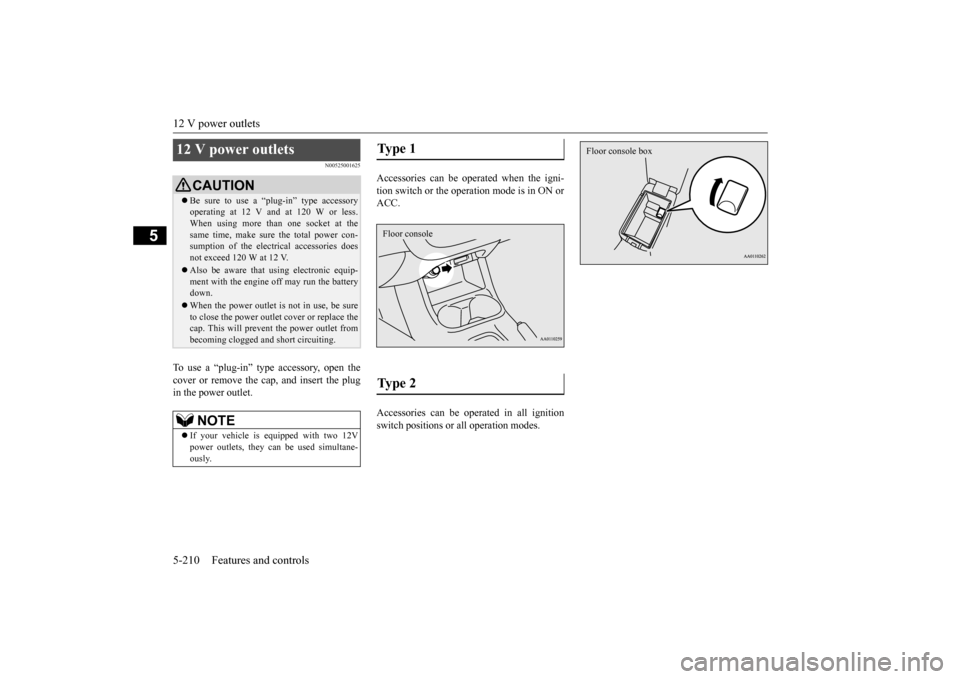
To use a “plug-in” type
accessory, open the
cover or remove the ca
p, and insert the plug
in the power outlet.
Accessories can be operated when the igni- tion switch or the operation mode is in ON or ACC. Accessories can be ope
rated in all ignition
switch positions or
all operation modes.
12 V power outlets
CAUTIONBe sure to use a “plug-in” type accessory operating at 12 V and at 120 W or less.When using more than one socket at the same time, make sure the total power con- sumption of the electrical accessories doesnot exceed 120 W at 12 V. Also be aware that
using electronic equip-
ment with the engine
off may run the battery
down. When the power outlet is not in use, be sure to close the power outle
t cover or replace the
cap. This will prevent the power outlet frombecoming clogged and short circuiting.NOTE
If your vehicle is equipped with two 12V power outlets, they ca
n be used simultane-
ously.
Type 1 Type 2 Floor console
Floor console box
BK0211800US.book 210 ページ 2014年3月12日 水曜日 午後2時42分
Page 288 of 446
Interior lights
Features and controls 5-211
5
N00525301602
N00525401469
2- (OFF) The dome light stays off regardless of any door or the liftgate being opened or closed.
Interior lights
NOTE
Be aware that leaving the light illuminated with the engine off may run the batterydown. Never leave the vehi
cle without checking
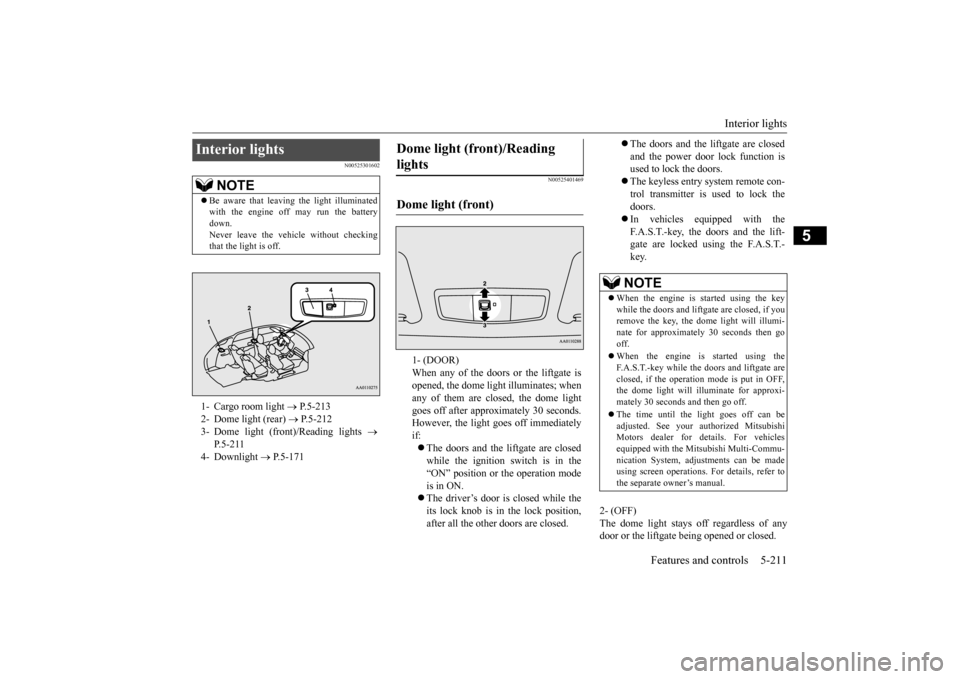
that the light is off.1- Cargo room light
P.5-213
2- Dome light (rear)
P.5-212
3- Dome light (front)/Reading lights
P.5-211
4- Downlight
P.5-171
Dome light (front)/Reading lights Dome light (front)
1- (DOOR) When any of the doors or the liftgate isopened, the dome light illuminates; when any of them are closed, the dome light goes off after approximately 30 seconds.However, the light goes off immediately if: The doors and the liftgate are closed while the ignition switch is in the “ON” position or the operation mode is in ON. The driver’s door is closed while the its lock knob is in the lock position, after all the other doors are closed.
The doors and the liftgate are closed and the power door lock function is used to lock the doors. The keyless entry system remote con- trol transmitter is used to lock the doors. In vehicles equipped with the F.A.S.T.-key, the doors and the lift- gate are locked using the F.A.S.T.-key.NOTE
When the engine is
started using the key
while the doors and liftgate are closed, if youremove the key, the dom
e light will illumi-
nate for approximately 30 seconds then go off. When the engine is started using the F.A.S.T.-key while the doors and liftgate areclosed, if the operation
mode is put in OFF,
the dome light will illu
minate for approxi-
mately 30 seconds and then go off. The time until the light goes off can be adjusted. See your authorized MitsubishiMotors dealer for details. For vehicles equipped with the Mitsubishi Multi-Commu- nication System, adjustments can be madeusing screen operations.
For details, refer to
the separate owner’s manual.
BK0211800US.book 211 ページ 2014年3月12日 水曜日 午後2時42分
Page 289 of 446
Interior lights 5-212 Features and controls
5
N00537601165
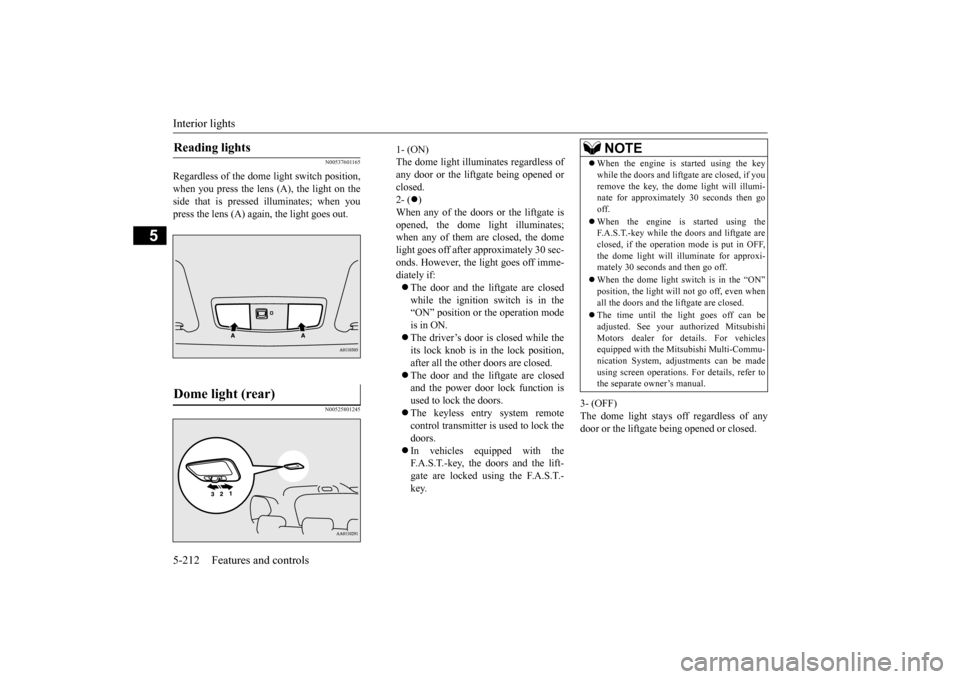
Regardless of the dome light switch position, when you press the lens (A), the light on the side that is pressed
illuminates; when you
press the lens (A) agai
n, the light goes out.
N00525801245
3- (OFF) The dome light stays off regardless of anydoor or the liftgate being opened or closed.
Reading lights Dome light (rear)
1- (ON)The dome light illumin
ates regardless of
any door or the liftgate being opened or closed. 2- (
)
When any of the doors or the liftgate is opened, the dome li
ght illuminates;
when any of them are closed, the domelight goes off after approximately 30 sec- onds. However, the light goes off imme- diately if: The door and the liftgate are closed while the ignition switch is in the“ON” position or the operation mode is in ON. The driver’s door is closed while the its lock knob is in the lock position, after all the other doors are closed. The door and the liftgate are closed and the power door lock function is used to lock the doors. The keyless entr
y system remote
control transmitter is used to lock the doors. In vehicles equipped with the F.A.S.T.-key, the doors and the lift- gate are locked using the F.A.S.T.- key.
NOTE
When the engine is started using the key while the doors and liftgate are closed, if youremove the key, the do
me light will illumi-
nate for approximately 30 seconds then go off. When the engine is started using the F.A.S.T.-key while the doors and liftgate are closed, if the operation mode is put in OFF,the dome light will il
luminate for approxi-
mately 30 seconds and then go off. When the dome light switch is in the “ON” position, the light will not go off, even when all the doors and the liftgate are closed. The time until the light goes off can be adjusted. See your authorized MitsubishiMotors dealer for details. For vehicles equipped with the Mitsubishi Multi-Commu- nication System, adjustments can be madeusing screen operations
. For details, refer to
the separate owner’s manual.
BK0211800US.book 212 ページ 2014年3月12日 水曜日 午後2時42分
Page 290 of 446
Storage spaces
Features and controls 5-213
5
N00526101186
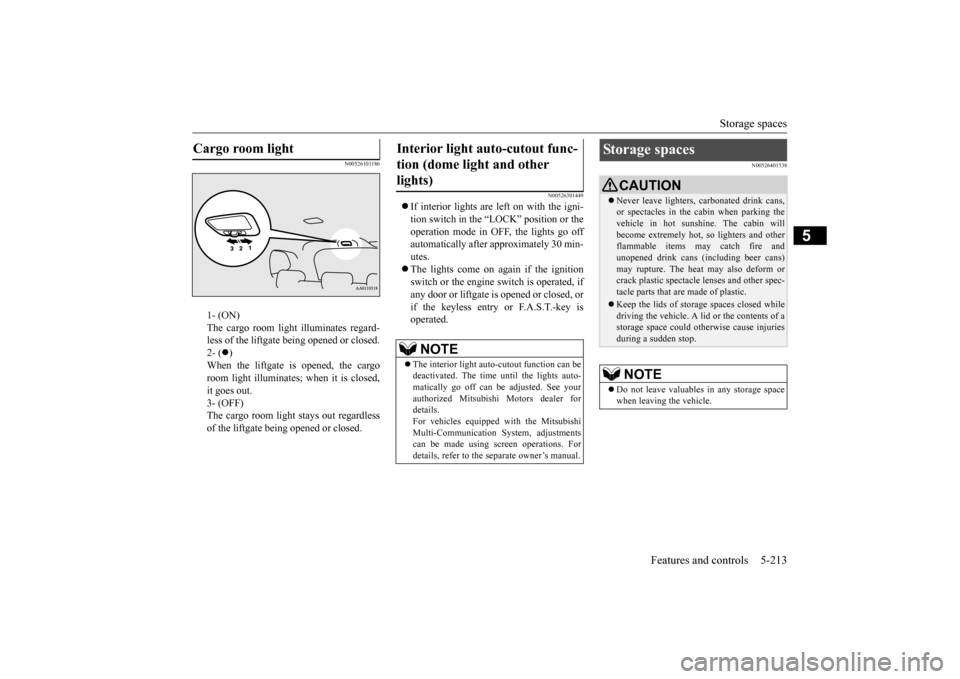
1- (ON) The cargo room light illuminates regard- less of the liftgate being opened or closed.2- (
)
When the liftgate is opened, the cargo room light illuminates;
when it is closed,
it goes out. 3- (OFF) The cargo room light
stays out regardless
of the liftgate being opened or closed.
N00526301449
If interior lights are left on with the igni- tion switch in the “LOCK” position or the operation mode in OFF, the lights go off automatically after approximately 30 min-utes. The lights come on again if the ignition switch or the engine
switch is operated, if
any door or liftgate is opened or closed, or if the keyless entry or F.A.S.T.-key isoperated.
N00526401538
Cargo room light
Interior light auto-cutout func- tion (dome light and other lights)
NOTE
The interior light auto
-cutout function can be
deactivated. The time until the lights auto- matically go off can
be adjusted. See your
authorized Mitsubishi Motors dealer fordetails. For vehicles equipped
with the Mitsubishi
Multi-Communication System, adjustmentscan be made using sc
reen operations. For
details, refer to the
separate owner’s manual.
Storage spaces
CAUTIONNever leave lighters,
carbonated drink cans,
or spectacles in the cabin when parking thevehicle in hot suns
hine. The cabin will
become extremely hot,
so lighters and other
flammable items may catch fire andunopened drink cans (i
ncluding beer cans)
may rupture. The heat may also deform or crack plastic spectacle
lenses and other spec-
tacle parts that are made of plastic. Keep the lids of storage spaces closed while driving the vehicle. A li
d or the contents of a
storage space could otherwise cause injuries during a sudden stop.NOTE
Do not leave valuables
in any storage space
when leaving the vehicle.
BK0211800US.book 213 ページ 2014年3月12日 水曜日 午後2時42分
Page 292 of 446
Storage spaces
Features and controls 5-215
5
N00551601244
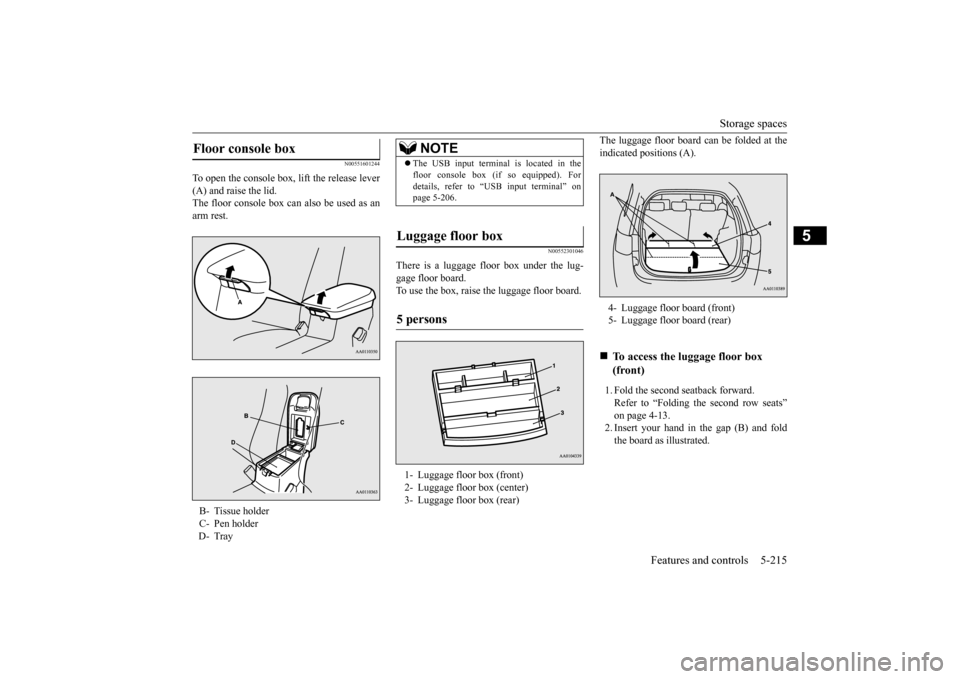
To open the console box, lift the release lever (A) and raise the lid. The floor console box can also be used as anarm rest.
N00552301046
There is a luggage floor box under the lug-gage floor board. To use the box, raise the luggage floor board.
The luggage floor board can be folded at the indicated positions (A). 1. Fold the second seatback forward. Refer to “Folding the second row seats” on page 4-13. 2. Insert your hand in the gap (B) and foldthe board as illustrated.
Floor console box B- Tissue holderC- Pen holderD- Tray
NOTE
The USB input terminal is located in the floor console box (if
so equipped). For
details, refer to “USB input terminal” onpage 5-206.
Luggage floor box 5 persons 1- Luggage floor box (front) 2- Luggage floor box (center) 3- Luggage floor box (rear)
4- Luggage floor board (front)5- Luggage floor board (rear)
To access the lu
ggage floor box
(front)
BK0211800US.book 215 ページ 2014年3月12日 水曜日 午後2時42分