ECO mode MITSUBISHI OUTLANDER 2015 3.G User Guide
[x] Cancel search | Manufacturer: MITSUBISHI, Model Year: 2015, Model line: OUTLANDER, Model: MITSUBISHI OUTLANDER 2015 3.GPages: 446, PDF Size: 59.52 MB
Page 64 of 446
Supplemental Restraint System (SRS) - airbag
Seat and restraint systems 4-37
4
To read data recorded
by an EDR, special
equipment is requi
red, and access to the vehi-
cle or the EDR is needed. In addition to thevehicle manufacturer, ot
her parties, such as
law enforcement, that have the special equip- ment, can read the information if they haveaccess to the vehicle or the EDR.
N00417900177
The driver’s seat posit
ion sensor is attached
to the seat rail and pr
ovides the airbag control
unit with information
on the seat’s fore-aft
position. The airbag control unit controlsdeployment of the driver’s front airbag in accordance with the information it receives from this sensor.If there is a problem involving the driver’s seat position sensor, the SRS warning light in
the instrument panel will come on. Refer to “SRS warning light/display” on page 4-39.
N00418001374
The passenger’s seat oc
cupant classification
sensor system is attached to the front passen- ger seat cushion and provides the airbag con-trol unit with inform
ation regarding the
occupant on the front passenger seat. The air-
bag control unit controls deployment of the passenger’s front airbag
in accordance with
the information it receives from this system. The passenger’s front airbag will not deploy in an impact when the system senses no occu-pant on the front passenge
r’s seat or a child in
a child restraint system. In this case, the pas- senger airbag off indi
cator will come on.
Refer to “Passenger’s ai
rbag off indicator” on
page 4-38. If there is a problem involving the passen- ger’s seat occupant cl
assification sensor sys-
tem, the SRS warning light in the instrumentpanel will come on. Re
fer to “SRS warning
light/display” on page 4-39.
NOTE
EDR data are recorded by your vehicle only if a non-trivial crash si
tuation occurs; no data
are recorded by the EDR under normal driv-ing conditions and no
personal data (e.g.,
name, gender, age, a
nd crash location) are
recorded. However, other parties, such aslaw enforcement, could combine the EDR data with the type of personally identifying data routinely acquire
d during a crash inves-
tigation.
Driver’s seat position sensor
WA R N I N G If the SRS warning li
ght or warning dis-
play comes on, have th
e vehicle inspected
by an authorized
Mitsubishi Motors
dealer as soon
as possible.
Please observe the following instructions to ensure that the driver’s seat positionsensor can operate correctly.• Adjust the seat to the correct position,and sit well back
against the seatback.
Refer to “Front seats” on page 4-4.• Do not recline the seatback more thannecessary when driving.• Do not place metall
ic objects or luggage
under the front seat.
If the vehicle is
involved in a severe
impact, have the SRS sensors inspected by an authorized Mitsubi
shi Motors dealer as
soon as possible.
Passenger’s seat occupant clas- sification sensor system
WA R N I N G If any of the following conditions occur, you should immediatel
y have your vehicle
inspected by an authorized Mitsubishi Motors dealer as soon as possible:• The SRS warning light does not initiallycome on when the ignition switch or the operation mode is under the followingconditions. [Except for vehicles equipped with the F. A . S . T. - k e y ]The ignition switch is in the “ON” or “START” position. [Vehicles equipped with the F.A.S.T.-key]The operation mode is in ON.• The SRS warning light does not go outafter several seconds.
BK0211800US.book 37 ページ 2014年3月12日 水曜日 午後2時42分
Page 65 of 446
Supplemental Restraint System (SRS) - airbag 4-38 Seat and restraint systems
4
N00418101346
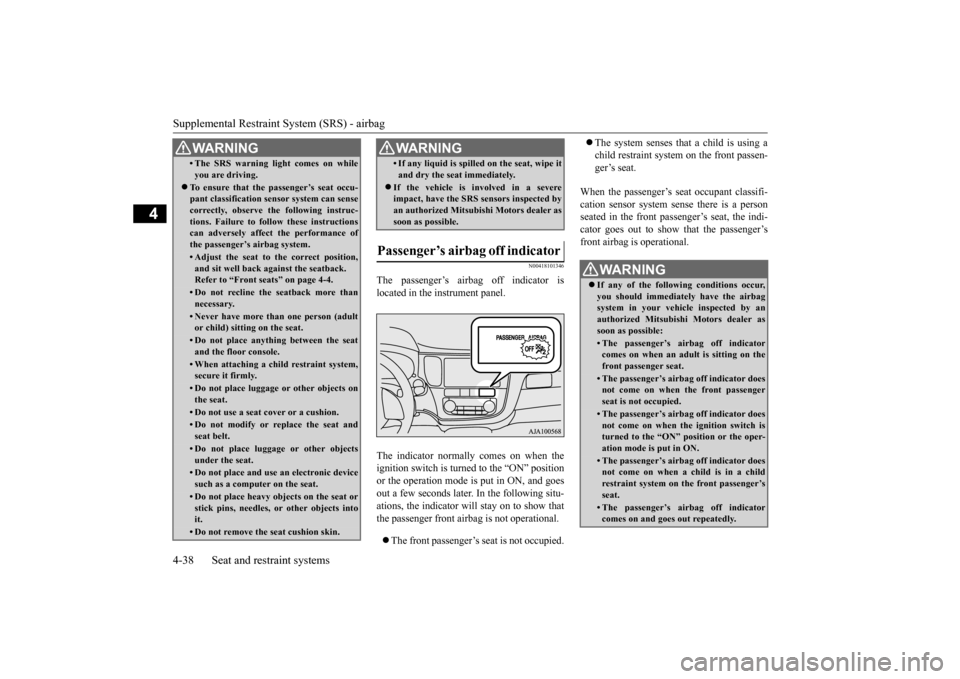
The passenger’s airbag off indicator is located in the instrument panel. The indicator normall
y comes on when the
ignition switch is turned to the “ON” position or the operation mode is put in ON, and goes out a few seconds later. In the following situ-ations, the indicator will stay on to show that the passenger front airb
ag is not operational.
The front passenger’s seat is not occupied.
The system senses that a child is using a child restraint system on the front passen-ger’s seat.
When the passenger’s seat occupant classifi- cation sensor sy
stem sense there is a person
seated in the front passenger’s seat, the indi-cator goes out to show that the passenger’s front airbag is operational.
• The SRS warning li
ght comes on while
you are driving.
To ensure that the passenger’s seat occu- pant classification sensor system can sense correctly, observe the following instruc-tions. Failure to follow these instructions can adversely affect
the performance of
the passenger’s airbag system.• Adjust the seat to the correct position,and sit well back
against the seatback.
Refer to “Front seats” on page 4-4.• Do not recline the seatback more thannecessary.• Never have more than one person (adultor child) sitting
on the seat.
• Do not place anything between the seat and the floor console.• When attaching a chil
d restraint system,
secure it firmly.• Do not place luggage or other objects onthe seat.• Do not use a seat cover or a cushion.• Do not modify or replace the seat andseat belt.• Do not place luggage or other objectsunder the seat.• Do not place and use
an electronic device
such as a computer on the seat.• Do not place heavy objects on the seat orstick pins, needles, or other objects intoit.• Do not remove the seat cushion skin.WA R N I N G
• If any liquid is spille
d on the seat, wipe it
and dry the seat immediately.
If the vehicle is involved in a severe impact, have the SRS sensors inspected by an authorized
Mitsubishi Motors dealer as
soon as possible.
Passenger’s airbag off indicator
WA R N I N G
WA R N I N G If any of the follow
ing conditions occur,
you should immediat
ely have the airbag
system in your vehicle inspected by anauthorized Mitsubishi
Motors dealer as
soon as possible:• The passenger’s airbag off indicatorcomes on when an adul
t is sitting on the
front passenger seat.• The passenger’s airb
ag off indicator does
not come on when the front passengerseat is not occupied.• The passenger’s airb
ag off indicator does
not come on when the ignition switch is turned to the “ON” position or the oper- ation mode is put in ON.• The passenger’s airb
ag off indicator does
not come on when a child is in a childrestraint system on the front passenger’s seat.• The passenger’s airbag off indicatorcomes on and goes out repeatedly.
BK0211800US.book 38 ページ 2014年3月12日 水曜日 午後2時42分
Page 79 of 446
5
Features and controlsECO mode switch ........................................................................ 5-177 Front fog light switch (if so equipped) ......................................... 5-178 Wiper and washer switch ............................................................ 5-178Electric rear window def
ogger switch ......
...........
...........
............. 5-183
Horn switch ................................................................................. 5-184 Link System (if so equipped) ....................................................... 5-184 Bluetooth
® 2.0 interface (if so equipped) .................................... 5-185
USB input terminal (if so equipped) ............................................ 5-206 Sun visors .................................................................................... 5-20912 V power outlets ...................................................................... 5-210 Interior lights ............................................................................... 5-211 Storage spaces ............................................................................. 5-213Cup holders ................................................................................. 5-217 Bottle holders .............................................................................. 5-218 Cargo area cover (if so equipped) ............................................... 5-218Assist grips .................................................................................. 5-220 Coat hooks ................................................................................... 5-220 Luggage hooks ............................................................................ 5-221BK0211800US.book 2 ページ 2014年3月12日 水曜日 午後2時42分
Page 87 of 446

Keyless entry system (if so equipped) 5-10 Features and controls
5
3. Within 5 seconds of pressing the LOCK button, release the LOCK and UNLOCKbuttons in sequence. At this time, ID codes for all remote con- trol transmitters except for the transmitterused in steps 2 and 3 are erased and the answerback function (door is locked and unlocked) informs you that the registra-tion mode has been activated. 4. Within 60 seconds after step 3, complete the following ID code
registration opera-
tion using the next remote control trans- mitter you wish to register within 4seconds. i) Press both the LOCK and UNLOCK buttons for 2 seconds.ii) Release both the LOCK and UNLOCK buttons for 1 second. iii) Press the UNLOCK button. Theanswerback function informs you that the ID code registration
of the transmitter is
completed.5. To register the ID codes of additional remote control transmitters, repeat step 4 within 60 seconds after step 4.6. If no ID code of a remote control trans- mitter is registered within 60 seconds after step 4, the regi
stration mode is can-
celed and the normal mode returns.
N00546101124
Your keyless entry syst
em operates on a radio
frequency subject to
Federal Communica-
tions Commission (FCC)
Rules (For vehicles
sold in U.S.A.) and Industry Canada Rules (For vehicles sold in
Canada). This device
complies with Part 15 of FCC Rules andIndustry Canada licenc
e-exempt RSS stan-
dard(s). Operation is subject to
the following two con-
ditions. This device may not
cause harmful inter-
ference.
NOTE
For verification purposes, try to lock and unlock the doors after the registration iscompleted. The indicator light (4)
comes on each time a
button is pressed. The keyless entry system does not work if the key is in the ignition switch. The remote control tr
ansmitter can be used
from about 40 feet (12 m) away. However,this distance may cha
nge if your vehicle is
near a TV transmitting tower, a power sta- tion, or a radio station. If the UNLOCK button (2) is pressed when all doors and the liftgate are locked and nodoors or the liftgate are opened within about 30 seconds, the doors and the liftgate will automatically re-lock.On a vehicle equippe
d with a Mitsubishi
Multi-Communication System, the functions can be adjusted on the screen. For details,refer to the separa
te operation manual.
If the following conditi
ons are observed after
pressing the LOCK (1) or UNLOCK (2) but- ton on the remote control transmitter, the battery in the remote control transmitter mayneed to be replaced. • The doors and the liftgate cannot be locked or unlocked. • The panic alarm cannot be operated.• The indicator light
(4) is dim or does not
come on.
If you lose your remote control transmitter, please contact an au
thorized Mitsubishi
Motors dealer for a replacement. If you wish to obtain
an additional remote
control transmitter, please contact an autho-rized Mitsubishi Moto
rs dealer. A maximum
of 8 remote control tr
ansmitters can be pro-
grammed for your vehicle. To use the new remote control transmitters, it is necessary to register
the key with both the
electronic immobilizer
and keyless entry sys-
tem. Also refer to “Electronic immobilizer (Anti-theft starting system): Customer key pro- gramming” on page 5-6.
General information
NOTE
BK0211800US.book 10 ページ 2014年3月12日 水曜日 午後2時42分
Page 92 of 446
Free-hand Advanced Securi
ty Transmitter (F.A.S.T.-key) (if so equipped)
Features and controls 5-15
5
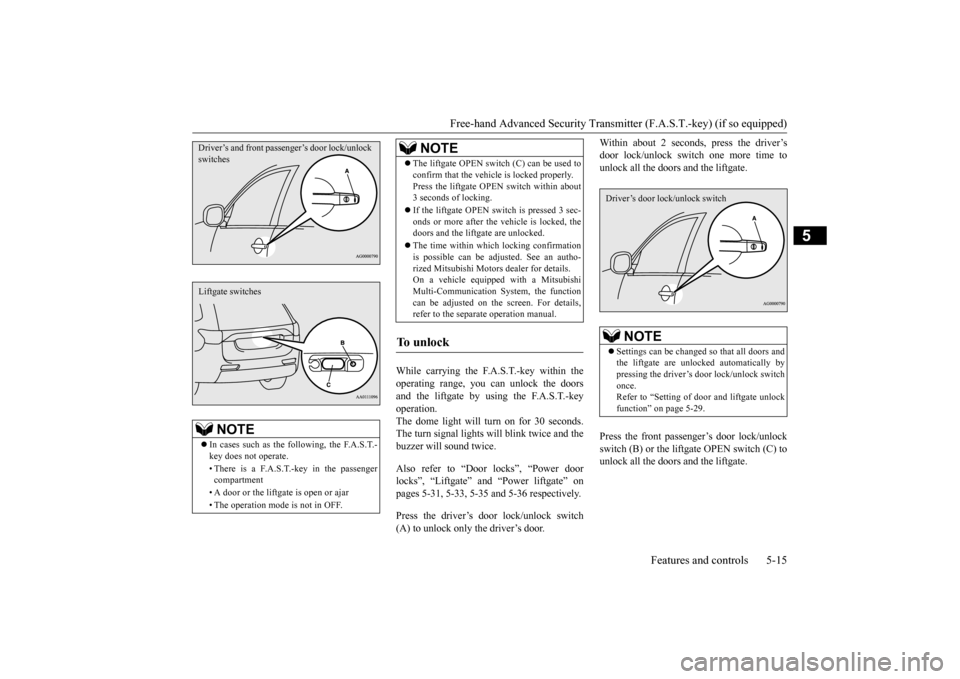
While carrying the F.A.S.T.-key within the operating range, you ca
n unlock the doors
and the liftgate by using the F.A.S.T.-key operation. The dome light will turn on for 30 seconds.The turn signal lights wi
ll blink twice and the
buzzer will sound twice. Also refer to “Door locks”, “Power door locks”, “Liftgate” and “Power liftgate” onpages 5-31, 5-33, 5-35 and 5-36 respectively. Press the driver’s door lock/unlock switch (A) to unlock only the driver’s door.
Within about 2 seconds, press the driver’s door lock/unlock sw
itch one more time to
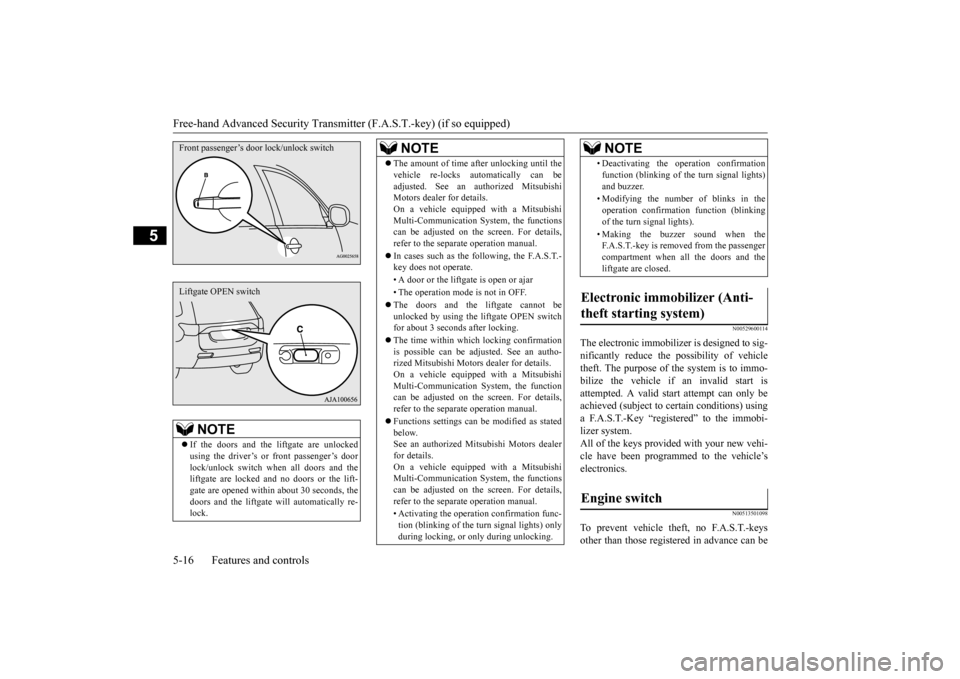
unlock all the doors and the liftgate. Press the front passenger’s door lock/unlock switch (B) or the lift
gate OPEN switch (C) to
unlock all the doors and the liftgate.
NOTE
In cases such as the following, the F.A.S.T.- key does not operate. • There is a F.A.S.T.-key in the passenger compartment • A door or the liftgate is open or ajar • The operation mode is not in OFF.Driver’s and front passenger’s door lock/unlock switchesLiftgate switches
The liftgate OPEN switch (C) can be used to confirm that the vehicl
e is locked properly.
Press the liftgate OPEN
switch within about
3 seconds of locking. If the liftgate OPEN switch is pressed 3 sec- onds or more after the vehicle is locked, the doors and the liftga
te are unlocked.
The time within which locking confirmation is possible can be adjusted. See an autho- rized Mitsubishi Motors
dealer for details.
On a vehicle equippe
d with a Mitsubishi
Multi-Communication System, the function can be adjusted on the screen. For details,refer to the separate operation manual.
To unlock
NOTE
NOTE
Settings can be changed so that all doors and the liftgate are unlocked automatically by pressing the driver’s door lock/unlock switch once.Refer to “Setting of door
and liftgate unlock
function” on page 5-29.Driver’s door lock/unlock switch
BK0211800US.book 15 ページ 2014年3月12日 水曜日 午後2時42分
Page 93 of 446
Free-hand Advanced
Security Transmitter (F.A.S
.T.-key) (if so equipped)
5-16 Features and controls
5
N00529600114
The electronic immobilize
r is designed to sig-
nificantly reduce the
possibility of vehicle
theft. The purpose of the system is to immo-bilize the vehicle if
an invalid start is
attempted. A valid st
art attempt can only be
achieved (subject to ce
rtain conditions) using
a F.A.S.T.-Key “registered” to the immobi- lizer system. All of the keys provided with your new vehi-cle have been program
med to the vehicle’s
electronics.
N00513501098
To prevent vehicle theft, no F.A.S.T.-keysother than those regist
ered in advance can be
NOTE
If the doors and the li
ftgate ar
e unlocked
using the driver’s or front passenger’s doorlock/unlock switch when all doors and the liftgate are locked and no doors or the lift- gate are opened within
about 30 seconds, the
doors and the liftgate wi
ll automati
cally re-
lock.Front passenger’s door lock/unlock switchLiftgate OPEN switch
The amount of time af
ter unlocking until the
vehicle re-locks au
tomatically can be
adjusted. See an authorized MitsubishiMotors dealer for details. On a vehicle equippe
d with a Mitsubishi
Multi-Communication System, the functionscan be adjusted on the screen. For details, refer to the separa
te operation manual.
In cases such as the following, the F.A.S.T.- key does not operate. • A door or the liftgate is open or ajar • The operation mode is not in OFF. The doors and the liftgate cannot be unlocked by using the li
ftgate OPEN switch
for about 3 seconds after locking. The time within which locking confirmation is possible can be adjusted. See an autho- rized Mitsubishi Motors
dealer for details.
On a vehicle equippe
d with a Mitsubishi
Multi-Communication System, the function can be adjusted on the screen. For details, refer to the separa
te operation manual.
Functions settings can
be modified as stated
below.See an authorized Mitsubishi Motors dealer for details. On a vehicle equippe
d with a Mitsubishi
Multi-Communication System, the functions can be adjusted on the screen. For details, refer to the separa
te operation manual.
• Activating the operati
on confirmation func-
tion (blinking of the turn signal lights) onlyduring locking, or only during unlocking.NOTE
• Deactivating the ope
ration confirmation
function (blinking of
the turn signal lights)
and buzzer. • Modifying the number of blinks in the operation confirmati
on function (blinking
of the turn signal lights). • Making the buzzer sound when the F.A.S.T.-key is removed from the passenger compartment when all the doors and the liftgate are closed.
Electronic immobilizer (Anti- theft starting system)
Engine switch
NOTE
BK0211800US.book 16 ページ 2014年3月12日 水曜日 午後2時42分
Page 95 of 446
Free-hand Advanced
Security Transmitter (F.A.S
.T.-key) (if so equipped)
5-18 Features and controls
5
N00568101023
After approximately 30
minutes has elapsed
with the operation mode in ACC, the function automatically cuts out the power for the audiosystem and other electr
ic devices that can be
operated with that mode. When the engine switch is pressed while theoperation mode is in ACC, the power is sup- plied again to
those devices.
N00503501213
With the F.A.S.T.-key, warnings are given through buzzers and di
splays on the information screen in the multi information displ
ay in order to pre-
vent mistaken operati
ons or vehicle theft.
When a warning operates, be sure to check the vehicle and the F.
A.S.T.-key. A warning is also di
splayed if there is a problem i
n the F.A.S.T.-key.
CAUTIONWhen the engine is not running, put the oper- ation mode in OFF. Leaving the operationmode in ON or ACC for a long time whenthe engine is not running may cause the bat- tery to be discharged
, making it impossible
to start the engine. When the battery is disconnected, the current operation mode is memorized. After recon-necting the battery, the memorized mode is selected auto
matically. Before disconnect-
ing the battery for repair or replacement,make sure to put the operation mode in OFF. Be careful if you are not sure which opera- tion mode the vehicle is in when the batteryis run down. The operation mode cannot be changed from OFF to ACC or ON if the F.A.S.T.-key is not detected to be in the vehicle. Refer to “Oper- ating range for starting the engine andchanging the operation mode” on page 5-14.
ACC power auto-cutout function
NOTE
It is possible to modify functions as follows: • The time until the power cuts out can be changed to approxi
mately 60 minutes.
• The ACC power auto
-cutout function can
be deactivated.
For details, we recommend you to consult anauthorized Mitsubishi Motors dealer.On vehicles equippe
d with Mitsubishi
Motors Multi-Communication System, screen operations can be
used to make the
adjustment.Refer to the separate Mitsubishi Multi-Com- munications System manual for details.NOTE
Warning activation
BK0211800US.book 18 ページ 2014年3月12日 水曜日 午後2時42分
Page 100 of 446
Free-hand Advanced Securi
ty Transmitter (F.A.S.T.-key) (if so equipped)
Features and controls 5-23
5
N00514601331
The operation mode can be in any mode to start the engine. The starter motor will be turning for up to approximately 15 seconds if the engine switch is released at once. Pressing the engine switch again while the starter motor is still turning will stop the startermotor. The starter motor will be turning for up to approximately 30 seconds while theengine switch
is pressed.
If the engine does not start, wait for a while and then attempt to start the engineagain. Trying repeatedly with the engine or starter motor still turning will damage the starter mechanism. If the engine will not start because the bat- tery is weak or discharged, refer to “Jump-starting the engine” on page 8-2for instructions. A longer warm up period will only con- sume extra fuel. The engine is warmed up enough for driv- ing when the bar graph of engine coolanttemperature display starts to move or the low coolant temperature indicator goes out. Refer to “Engine
coolant temperature
display” on page 5-128 or “Low coolant temperature indica
tor” on page 5-166.
Your vehicle is equipped with an electroni- cally controlled fuel injection system. This system automatically controls fuel injection. There is no need to depress the acceleratorpedal when starting the engine. To prevent battery drai
n, wait a few seconds
between attempts to restart the engine. 1. Make sure all occupants are properly seated with seat belts fastened. 2. Make sure the parking brake is applied. 3. Press and hold the brake pedal downfirmly with your right foot. 4. Make sure the selector
lever is in the “P”
(PARK) position.
If there is a fault in the steering wheel lock, the warning display will
appear. Immediately
stop the vehicle in a sa
fe place and contact
an authorized Mitsubishi Motors dealer. Warning display
Starting and stopping the engine
Tips for starting
NOTE
WA R N I N G Never run the engine in
a closed or poorly
ventilated area any longer than is neededto move your vehicle
out of the area. Car-
bon monoxide gas, wh
ich is odorless and
extremely poisonous, could build up andcause serious injury or death.CAUTION Do not push-start the vehicle.
Do not run the engine at high rpms or drive at high speeds until the engine has had achance to warm up.
Starting the engine
NOTE
After the engine has not started for a while, the brake pedal effort needed to start the engine may become grea
ter. If this occurs,
depress the brake pedal more firmly thanusual.CAUTION
BK0211800US.book 23 ページ 2014年3月12日 水曜日 午後2時42分
Page 101 of 446
Free-hand Advanced
Security Transmitter (F.A.S
.T.-key) (if so equipped)
5-24 Features and controls
5
5. Press the engine switch. 6. Confirm that all warning lights and warn-ing displays are functioning properly.
After several attempts
, you may experience
that the engine still does not start. 1. Make sure that all electric devices, such as lights, air conditi
oning blower and rear
window defogger, are turned off. 2. While depressing the brake pedal, pressthe accelerator peda
l halfway and hold it
there, then crank th
e engine. Release the
accelerator pedal, immediately after theengine starts.
3. If the engine still wi
ll not start, the engine
could be flooded with too much gasoline.While depressing the brake pedal, push the accelerator pedal all the way down and hold it there, then press the engineswitch to crank the engine. If the engine does not start after 5 to 6 seconds, push the engine switch to stop cranking theengine, and release th
e accelerator pedal.
Put the operation mode in OFF. Wait a few seconds, and then press the engine switch to crank the engine again while depressing the brake pedal, but do notpush the accelerator pedal. If the engine fails to start, repeat these procedures. If the engine still will
not start, contact your
local Mitsubishi Motors dealer or a repair facility of your choi
ce for assistance.
Startability of the en
gine with an ambient
temperature of -22 °F (-30 °C) or lowerWhen the ambient temperature is -22 °F (-30 °C) or lower, it may not be possible to start from a standstill even wi
th the selector lever
in the “D” (DRIVE) position. This phenomenon occurs because the trans- axle has not warmed up sufficiently; it doesnot indicate a problem.
If this occurs, place
the selector lever in the “P” (PARK) position and let the engine idle
for at least 10 minutes.
The transaxle will wa
rm up, and you will be
able to start normally.
Do not leave the vehicle during warm-up operation. The MIVEC engine automatically switches its intake-valve contro
l between a low-speed
mode and a high-speed mode in accordancewith driving conditions for maximum engine performance.
N00568201024
NOTE
The engine can only be started when the selector lever is in the “P” (PARK) or “N”(NEUTRAL) position.For safety reasons,
the engine should be
started when the selector lever is in the “P” (PARK) position in which the driving wheelslock.NOTE
Minor noises may be he
ard on engine start-
up. These will disappear
as the engine warms
up.
When the engine is hard to start
Using the MIVEC engine
NOTE
To protect the engine, the high-speed mode may not be selected wh
ile the engine coolant
temperature is low. In such a case, the enginerevolutions do not rise to over 5,000 rpm even if the accelerator pedal is depressed.
Stopping the engine
WA R N I N G Do not operate the en
gine switch while
driving except in an emergency. If theengine is stopped whil
e driving, the brake
servomechanism will ce
ase to function and
braking efficiency will deteriorate. Also, the power steering system will not func-tion and it will require greater manual effort to operate the steering. This could result in a serious accident.
BK0211800US.book 24 ページ 2014年3月12日 水曜日 午後2時42分
Page 102 of 446
Free-hand Advanced Securi
ty Transmitter (F.A.S.T.-key) (if so equipped)
Features and controls 5-25
5
1. Stop the vehicle. 2. Fully engage the parking brake while depressing the brake pedal. 3. Move the selector lever to the “P”(PARK) position, and then press the engine switch to
stop the engine.
N00568301041
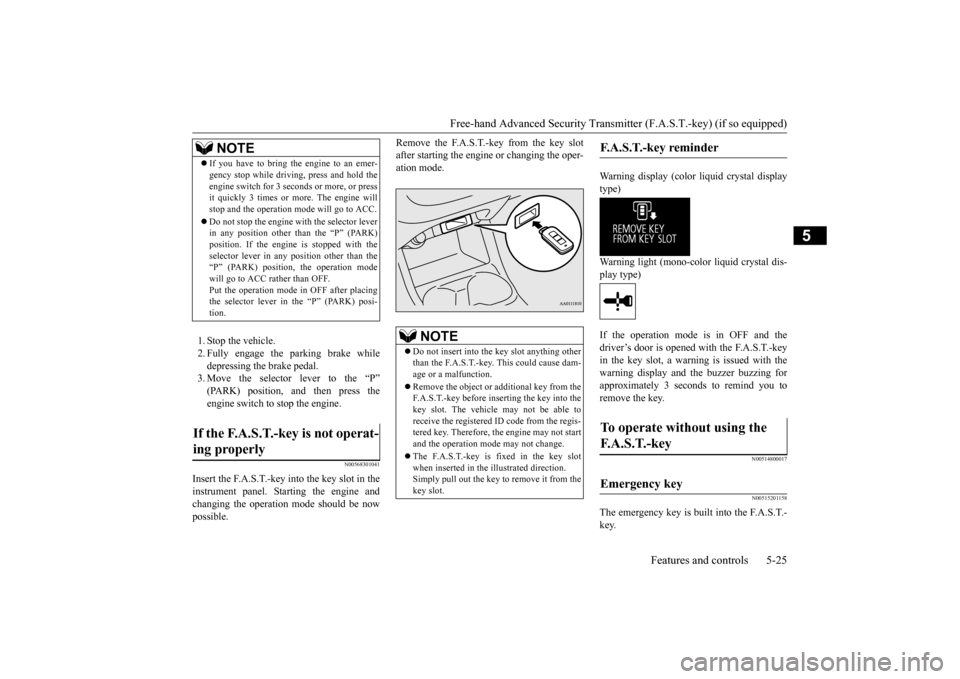
Insert the F.A.S.T.-key into the key slot in the instrument panel. St
arting the engine and
changing the operation
mode should be now
possible.
Remove the F.A.S.T.-key from the key slot after starting the engine or changing the oper-ation mode.
Warning display (color liquid crystal display type) Warning light (mono-color liquid crystal dis- play type) If the operation mode is in OFF and the driver’s door is opened with the F.A.S.T.-key in the key slot, a warning is issued with thewarning display and the buzzer buzzing for approximately 3 seconds to remind you to remove the key.
N00514800017 N00515201158
The emergency key is built into the F.A.S.T.- key.
NOTE
If you have to bring the engine to an emer- gency stop while drivi
ng, press and hold the
engine switch for 3 sec
onds or more, or press
it quickly 3 times or more. The engine will stop and the operation mode will go to ACC. Do not stop the engine wi
th the selector lever
in any position other than the “P” (PARK) position. If the engine
is stopped with the
selector lever in any
position other than the
“P” (PARK) position, the operation mode will go to ACC rather than OFF.Put the operation mode
in OFF after placing
the selector lever in the “P” (PARK) posi- tion.
If the F.A.S.T.-key is not operat- ing properly
NOTE
Do not insert into the
key slot anything other
than the F.A.S.T.-key. This could cause dam- age or a malfunction. Remove the object or
additional key from the
F.A.S.T.-key before inserting the key into the key slot. The vehicle may not be able toreceive the registered ID code from the regis- tered key. Therefore, the engine may not start and the operation mode
may not change.
The F.A.S.T.-key is fixed in the key slot when inserted in the illustrated direction.Simply pull out the key to
remove it from the
key slot.
F.A.S.T.-key reminder
To operate without using the F. A . S . T. - k e y
Emergency key
BK0211800US.book 25 ページ 2014年3月12日 水曜日 午後2時42分