ECU MITSUBISHI OUTLANDER 2015 3.G Workshop Manual
[x] Cancel search | Manufacturer: MITSUBISHI, Model Year: 2015, Model line: OUTLANDER, Model: MITSUBISHI OUTLANDER 2015 3.GPages: 446, PDF Size: 59.52 MB
Page 142 of 446
Automatic transaxle (if so equipped)
Features and controls 5-65
5
N00538801180
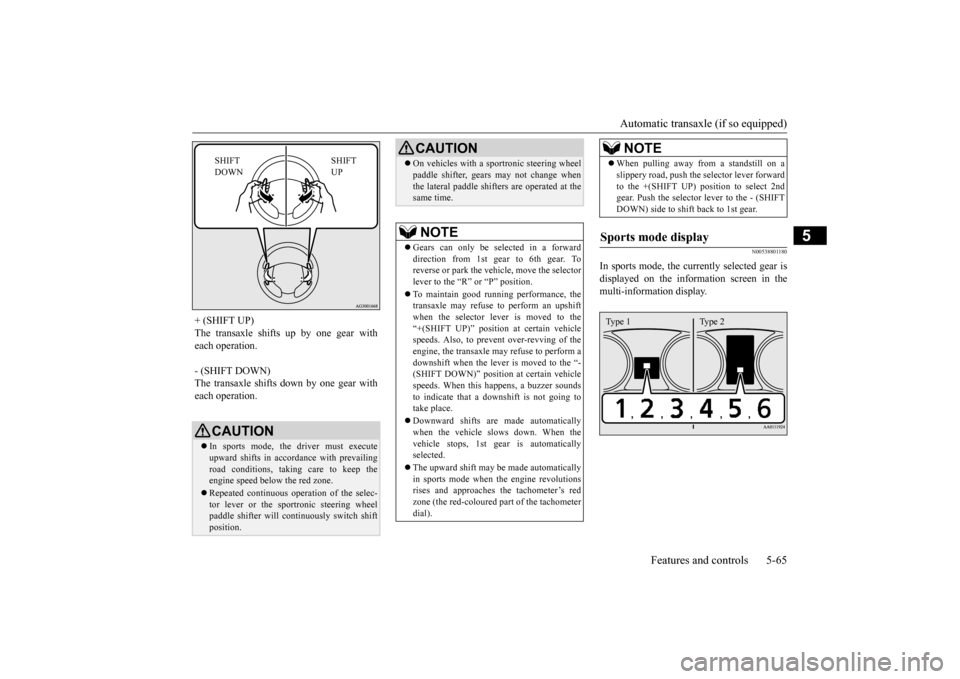
In sports mode, the curre
ntly selected gear is
displayed on the information screen in the multi-information display.
+ (SHIFT UP) The transaxle shifts up by one gear with each operation. - (SHIFT DOWN) The transaxle shifts down by one gear witheach operation.
CAUTION In sports mode, the driver must execute upward shifts in accordance with prevailing road conditions, taking care to keep theengine speed below the red zone. Repeated continuous ope
ration of the selec-
tor lever or the sportronic steering wheel paddle shifter will co
ntinuously switch shift
position.
SHIFT UP
SHIFT DOWN
On vehicles with a s
portronic steering wheel
paddle shifter, gears
may not change when
the lateral paddle shifters are operated at thesame time. NOTE
Gears can only be selected in a forward direction from 1st gear to 6th gear. To reverse or park the vehi
cle, move the selector
lever to the “R” or “P” position. To maintain good running performance, the transaxle may refuse to perform an upshiftwhen the selector lever is moved to the “+(SHIFT UP)” positi
on at certain vehicle
speeds. Also, to prevent over-revving of theengine, the transaxle may refuse to perform a downshift when the lever is moved to the “- (SHIFT DOWN)” position
at certain vehicle
speeds. When this happens, a buzzer sounds to indicate that a dow
nshift is not going to
take place. Downward shifts are made automatically when the vehicle slows down. When thevehicle stops, 1st ge
ar is automatically
selected. The upward shift may be made automatically in sports mode when the engine revolutions rises and approaches
the tachometer’s red
zone (the red-coloured
part of the tachometer
dial).CAUTION
When pulling away from a standstill on a slippery road, push the
selector lever forward
to the +(SHIFT UP) pos
ition to select 2nd
gear. Push the selector
lever to the - (SHIFT
DOWN) side to shift back to 1st gear.
Sports mode display
NOTE
Type 1 Type 2
BK0211800US.book 65 ページ 2014年3月12日 水曜日 午後2時42分
Page 161 of 446
Service brake 5-84 Features and controls
5
N00517500275
Overuse of the brake can cause weakening, resulting in poor brake response and prema- ture wear of the brake pads. When driving down a long or steep hill, useengine braking by downshifting.
N00517600364
Your vehicle is equipped with power brakes for more braking force with less brake pedal effort.Your brakes are designed to operate at full capacity, even if the power assist is not being used.If the power assist is not being used, the effort needed to press the brake pedal is greater. If you should lose the power assist for somereason, the brakes will still work. If the power brake unit or either of the two brake hydraulic systems stops working prop-erly, the rest of the brake system will still work, but the vehicle will not slow down as quickly.You will know this has happened if you find you need to press the brake down farther, or harder when slowing down or stopping, or ifthe brake warning light and the warning dis- play in the multi-information display come on.
N00550700124
The disc brakes have an alarm that makes a metallic squeal when the brake pads have worn down enough to need service.If you hear this sound, have the brake pads replaced at an authorized Mitsubishi Motors dealer or a repair facility of your choice.
Jacking up a 4-wheel drive vehicle
WA R N I N G Do not crank the engine while jacking up the vehicle. The tire on the ground may turn and thevehicle may roll off the jack.
Service brake Brake pedal
WA R N I N G Do not leave any obje
cts near the brake
pedal or let a floor
mat slide under it;
doing so could prevent the full pedal stroke that would be necessary in an emergency. Make sure that the pedal canbe operated freely at
all times. Make sure
the floor mat is securely held in place.
CAUTION It is important not to
drive the vehicle with
your foot resting on the brake pedal whenbraking is not required. This practice canresult in very high brake temperatures, pre- mature lining wear, a
nd possible damage to
the brakes.
Power brakes
WA R N I N G Never coast downhill
with the engine OFF.
Keep the engine running whenever yourvehicle is in motion.
If you turn off the
engine while driving, the power brake booster will stop wo
rking and your brakes
will not work as well. If the power assist is lost or if either brake hydraulic system stops working properly,take your vehicle to
an authorized Mit-
subishi Motors dealer
or a repair facility
of your choice immediately.
Brake pad wear alarm
WA R N I N G Driving with worn brake pads will make it harder to stop, and can cause an accident.
BK0211800US.book 84 ページ 2014年3月12日 水曜日 午後2時42分
Page 196 of 446
Rear-view camera (if so equipped)
Features and controls 5-119
5
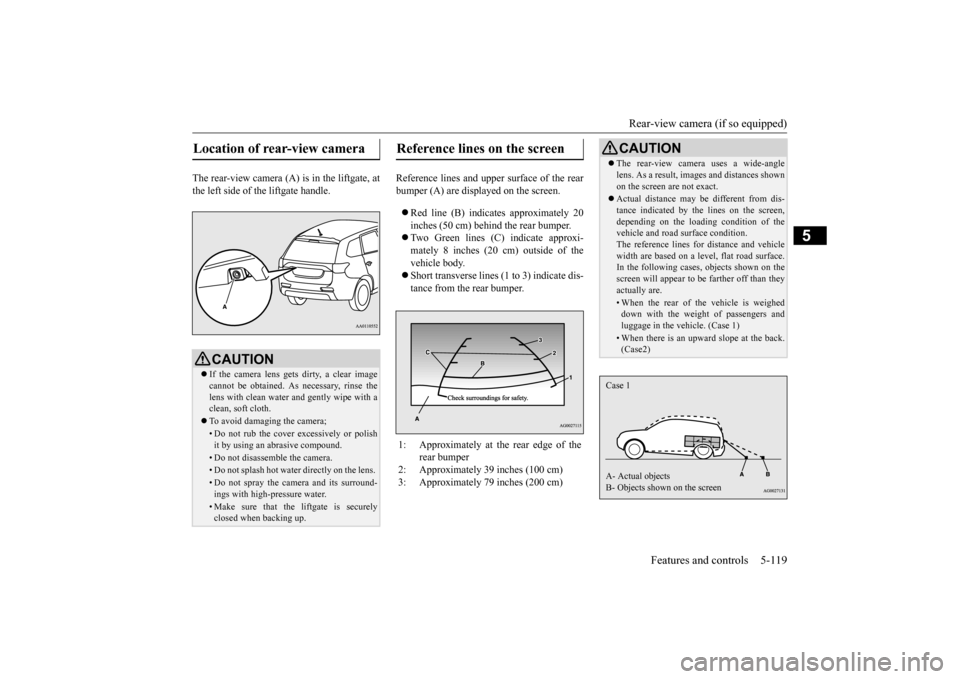
The rear-view camera (A) is in the liftgate, at the left side of
the liftgate handle.
Reference lines and uppe
r surface of the rear
bumper (A) are displayed on the screen. Red line (B) indicates approximately 20 inches (50 cm) behind the rear bumper. Two Green lines (C) indicate approxi- mately 8 inches (20 cm) outside of the vehicle body. Short transverse lines (1
to 3) indicate dis-
tance from the rear bumper.
Location of rear-view camera
CAUTION If the camera lens gets
dirty, a clear image
cannot be obtained. As
necessary, rinse the
lens with clean water a
nd gently wipe with a
clean, soft cloth. To avoid damaging the camera;• Do not rub the cover excessively or polish it by using an abrasive compound. • Do not disassemble the camera.• Do not splash hot wate
r directly on the lens.
• Do not spray the camera and its surround- ings with high-
pressure water.
• Make sure that the liftgate is securely closed when backing up.
Reference lines on the screen
1: Approximately at the rear edge of the
rear bumper
2: Approximately 39 inches (100 cm) 3: Approximately 79 inches (200 cm)
CAUTION The rear-view camera uses a wide-angle lens. As a result, images and distances shownon the screen are not exact. Actual distance may be different from dis- tance indicated by the
lines on the screen,
depending on the loadi
ng condition of the
vehicle and road surface condition. The reference lines for distance and vehiclewidth are based on a level, flat road surface. In the following cases, objects shown on the screen will appear to
be farther off than they
actually are.• When the rear of th
e vehicle is weighed
down with the weight of passengers and luggage in the vehicle. (Case 1)• When there is an upward slope at the back.(Case2)
Case 1 A- Actual objects B- Objects shown on the screen
BK0211800US.book 119 ページ 2014年3月12日 水曜日 午後2時42分
Page 228 of 446
Indicator light, warning light, and information screen display list (multi information display - Type 1)
Features and controls 5-151
5
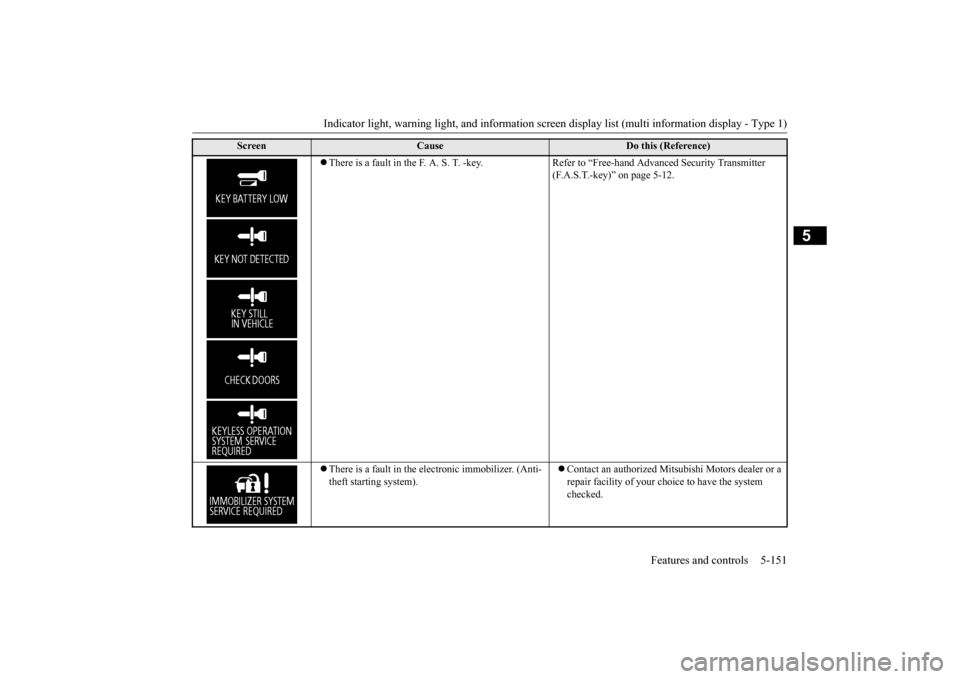
There is a fault in the F. A. S. T. -key. Refer to “Free-hand Advanced Security Transmitter
(F.A.S.T.-key)” on page 5-12.
There is a fault in the electronic immobilizer. (Anti- theft starting system).
Contact an authorized Mitsubishi Motors dealer or a repair facility of your choi
ce to have the system
checked.
Screen
Cause
Do this (Reference)
BK0211800US.book 151 ページ 2014年3月12日 水曜日 午後2時42分
Page 266 of 446

Bluetooth® 2.0 interface (if so equipped)
Features and controls 5-189
5
allows you to decrease
the possibility that a
setting is accident
ally changed.
The confirmation function can be turned on or off by following the steps below. 1. Press the SPEECH button (except for vehicles with Mitsubishi Multi-Commu-nication System) or PICK-UP button (for vehicles with Mitsubishi Multi-Commu- nication System).2. Say “Setup.” 3. Say “Confirmation prompts.” 4. The voice guide will say “Confirmation prompts are
N00564601105
It is possible to use
a passcode as a security
function by setting a passcode of your choice for the Bluetooth
® 2.0 interface.
When the security function is turned on, it is necessary to make a voice input of a 4-digit passcode in order to us
e all functions of the
Bluetooth
® 2.0 interface, except for recep-
tion.
Use the following procedure to turn on the security function by setting a passcode. 1. Press the SPEECH button (except for vehicles with Mitsubishi Multi-Commu- nication System) or
PICK-UP button (for
vehicles with Mitsubishi Multi-Commu-nication System). 2. Say “Setup.” 3. Say “Passcode.” 4. The voice guide will
say “Passcode is dis-
abled. Would you like to enable it?”Answer “Yes.” Answer “No” to cancel the setting of the passcode and return to the main menu. 5. The voice guide will say “Please say a 4- digit passcode. Remember this passcode. It will be required to use this system.” Say a 4-digit number which you want to set as a passcode. 6. For confirmation purposes, the voiceguide will say “Passc
ode <4-digit pass-
code>. Is this correct?” Answer “Yes.” Answer “No” to return to the passcodeinput in Step 5. 7. When the registration of the passcode is completed, the voice
guide will say “Pass-
code is enabled”
and the system will
return to the main menu.
If a passcode has been
set and the security
function is enabled, the voice guide will say “Hands-free system is
locked. State the pass-
code to continue” when the SPEECH button (except for vehicles with Mitsubishi Multi- Communication System) or PICK-UP button(for vehicles with Mitsubishi Multi-Commu- nication System) is pres
sed to enter voice rec-
ognition mode. Say th
e 4-digit passcode
number to enter the passcode. If the entered passcode is wrong, the voice guide will say “<4-digit passcode>, Incorrect passcode. Please try again.” Enter the correctpasscode.
Security function
Setting the passcode
NOTE
Passcode will be requi
red to access the sys-
tem after the next ignition cycle. It is required for a little time after engine stop that the entered
passcode is actually
recorded in the system.If the ignition switch
or the operation mode
is made to ACC or ON or the engine is started immediately afte
r engine stop, there
is a case when the entered passcode is not recorded in the system. At this time, please try to enter the passcode again.
Entering the passcode
BK0211800US.book 189 ページ 2014年3月12日 水曜日 午後2時42分
Page 267 of 446

Bluetooth® 2.0 interface (if so equipped) 5-190 Features and controls
5
Use the following procedure to turn off the security function by di
sabling the passcode.
1. Press the SPEECH button (except for vehicles with Mitsubishi Multi-Commu-nication System) or
PICK-UP button (for
vehicles with Mitsubishi Multi-Commu- nication System).2. Say “Setup.” 3. Say “Passcode.” 4. The voice guide will say “Passcode isenabled. Would you like to disable it?” Answer “Yes.” Answer “No” to cancel the disabling ofthe passcode and return to the main menu.
5. When the disabling of the passcode is completed, the voice
guide will say “Pass-
code is disabled” and the system will return to the main menu.
N00564700011
The Bluetooth
® 2.0 interface can use the
speaker enrollment function to create a voice model for one person per language. This makes it easier for the Bluetooth
® 2.0
interface to recognise
voice commands said
by you. You can turn a voice model registered with the speaker enrollment function on and offwhenever you want.
N00564801110
It takes about 2 to 3 mi
nutes to complete the
speaker enrollment process. To ensure the best results, run through the process while in the driver’s seat, in an envi-ronment that is as quiet as possible (when there is no rain or strong winds and the vehi- cle windows are closed).
Please turn off your
phone while in speaker enrollment to prevent interruption of the process. Use the following procedure for speakerenrollment.
1. Stop your vehicle in a safe area, put the selector lever in the “P” (PARK) positionand pull the parking brake lever. 2. Press the SPEECH button (except for vehicles with Mitsubishi Multi-Commu-nication System) or
PICK-UP button (for
vehicles with Mitsubishi Multi-Commu- nication System).3. Say “Voice training.” 4. The voice guide will
say “This operation
must be performed in
a quiet environment
while the vehicle is stopped. See the owner’s manual for th
e list of required
training phrases. Pr
ess and release the
SPEECH button when you are ready to begin. Press the HANG-UP button to can- cel at any time.”Press the SPEECH button to start the speaker enrollment process.
NOTE
You can reenter the passcode as many times as you want. If you have forgotten your passcode, say “Cancel” to quit the voice input mode and then check with an authorized MitsubishiMotors dealer.
Disabling the passcode
NOTE
System must be unlocked to disable the pass- code.
Speaker enrollment function
Speaker enrollment
NOTE
Speaker enrollment is not possible unless the vehicle is parked. Make sure you park the vehicle in a safe area before attempting speaker enrollment.
BK0211800US.book 190 ページ 2014年3月12日 水曜日 午後2時42分
Page 279 of 446

Bluetooth® 2.0 interface (if so equipped) 5-202 Features and controls
5
N00580100055
1. Press the SPEECH button (except for vehicles with Mitsubishi Multi-Commu- nication System) or
PICK-UP button (for
vehicles with Mitsubishi Multi-Commu- nication System). 2. Say “Phonebook.”3. The voice guide will say “Select one of the following: new entry, edit number, edit name, list names, delete, erase all, or import contact.”
Say “Edit name.”
4. The voice guide will say “Please say thename of the entry you would like to edit, or say list names.”
Say the name you want
to edit. 5. The voice guide
will say “Changing
6. The voice guide will say “Name please.” Say the new name you
want to register.
7. The registered name will be changed. When the change is complete, the system will return to the main menu.
N00580200043
1. Press the SPEECH button (except forvehicles with Mitsubishi Multi-Commu-nication System) or PICK-UP button (for vehicles with Mitsubishi Multi-Commu- nication System). 2. Say “Phonebook.” 3. The voice guide will
say “Select one of
the following: new entry, edit number, edit name, list names, delete, erase all, or import contact.” Sa
y “List names.”
4. Bluetooth
® 2.0 interface will read out the
entries in the phonebook in order. 5. When the voice guide is done reading thelist, it will say “End of list, would you like to start from the beginning?” When you want to check the list again from thebeginning, answer “Yes.” When you are done, answer “No” to return to the previous or main menu.
N00580300057
1. Press the SPEECH button (except forvehicles with Mitsubishi Multi-Commu-nication System) or
PICK-UP button (for
vehicles with Mitsubishi Multi-Commu- nication System).2. Say “Phonebook.” 3. The voice guide will say “Select one of the following: new entry, edit number,edit name, list names, delete, erase all, or import contact.” Say “Delete.”
Editing a name
NOTE
Say “List names,” and the names registered in the phonebook are read out in order. Referto “Vehicle phonebook: Listening to the list of registered na
mes” on page 5-202.
Listening to the list of registered names
NOTE
You can call, edit or
delete a name that is
being read out.Press the SPEECH button and say “Call” tocall the name, “Edit name” to edit it, or “Delete” to delete it. The system will beep and then execute yourcommand. If you press the SPEECH button and say “Continue” or “Previous” while the list is being read, the system will advance or rewind the list. Say “C
ontinue” to proceed to
the next entry or “Previous” to return to the previous entry.
Deleting a telephone number
BK0211800US.book 202 ページ 2014年3月12日 水曜日 午後2時42分
Page 294 of 446
Cup holders
Features and controls 5-217
5
N00527301417
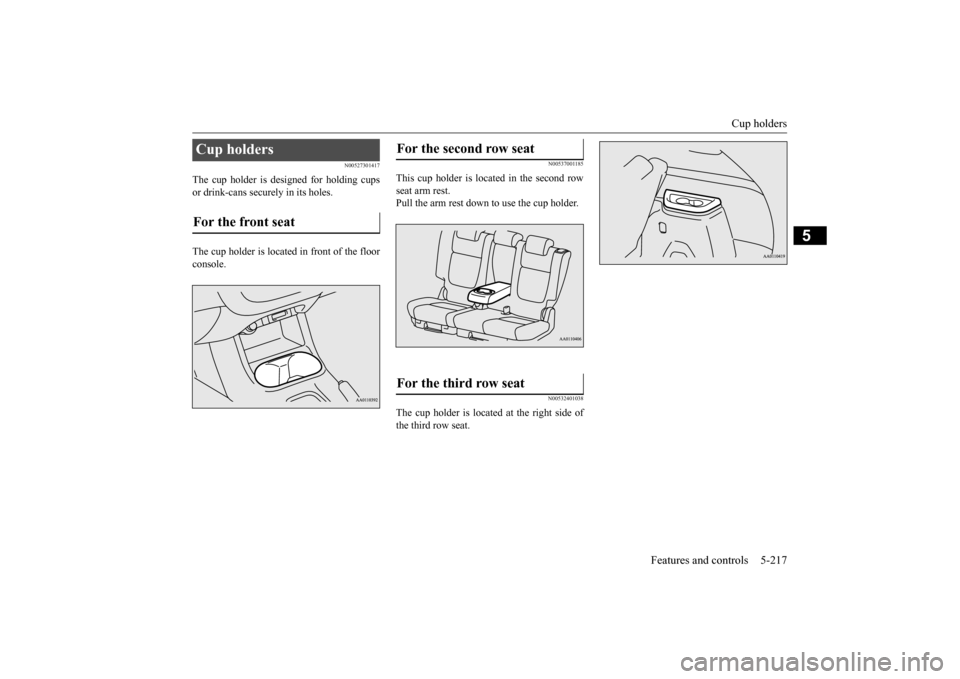
The cup holder is designed for holding cups or drink-cans secu
rely in its holes.
The cup holder is located in front of the floor console.
N00537001185
This cup holder is located in the second rowseat arm rest. Pull the arm rest down to use the cup holder.
N00532401038
The cup holder is located at the right side of the third row seat.
Cup holders For the front seat
For the second row seat For the third row seat
BK0211800US.book 217 ページ 2014年3月12日 水曜日 午後2時42分
Page 296 of 446
Cargo area cover (if so equipped)
Features and controls 5-219
5
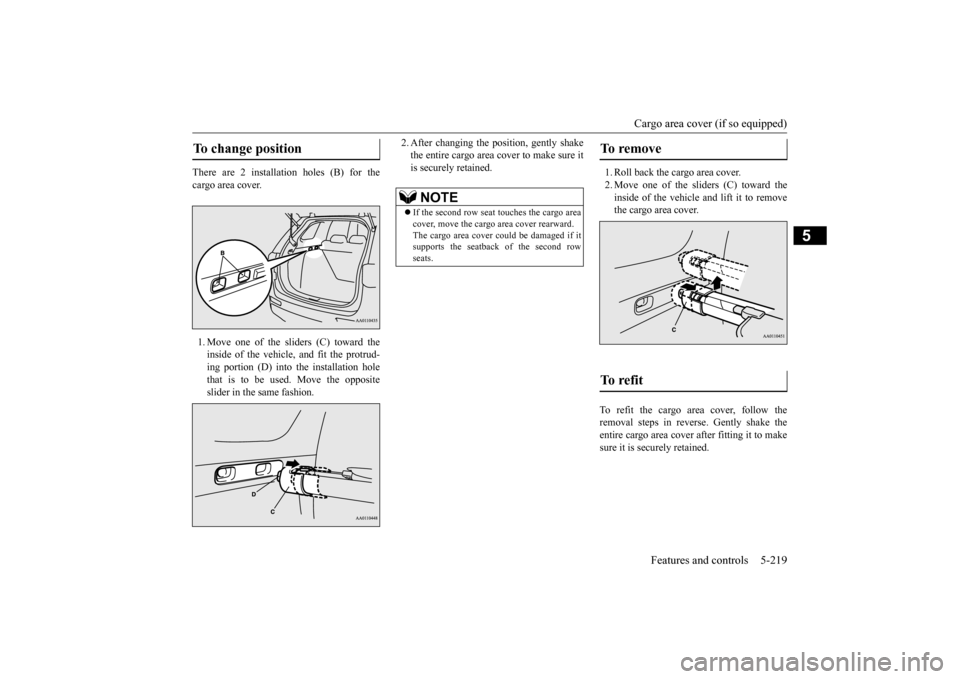
There are 2 installation holes (B) for the cargo area cover. 1. Move one of the sliders (C) toward the inside of the vehicle, and fit the protrud- ing portion (D) into the installation hole that is to be used. Move the oppositeslider in the same fashion.
2. After changing the position, gently shake the entire cargo area cover to make sure itis securely retained.
1. Roll back the cargo area cover. 2. Move one of the sliders (C) toward the inside of the vehicle and lift it to remove the cargo area cover.
To refit the cargo area cover, follow the removal steps in reverse. Gently shake theentire cargo area cover after fitting it to make sure it is securely retained.
To change position
NOTE
If the second row seat
touches the cargo area
cover, move the cargo
area cover rearward.
The cargo area cover co
uld be damaged if it
supports the seatback of the second row seats.
To remove To refit
BK0211800US.book 219 ページ 2014年3月12日 水曜日 午後2時42分
Page 298 of 446
Luggage hooks
Features and controls 5-221
5
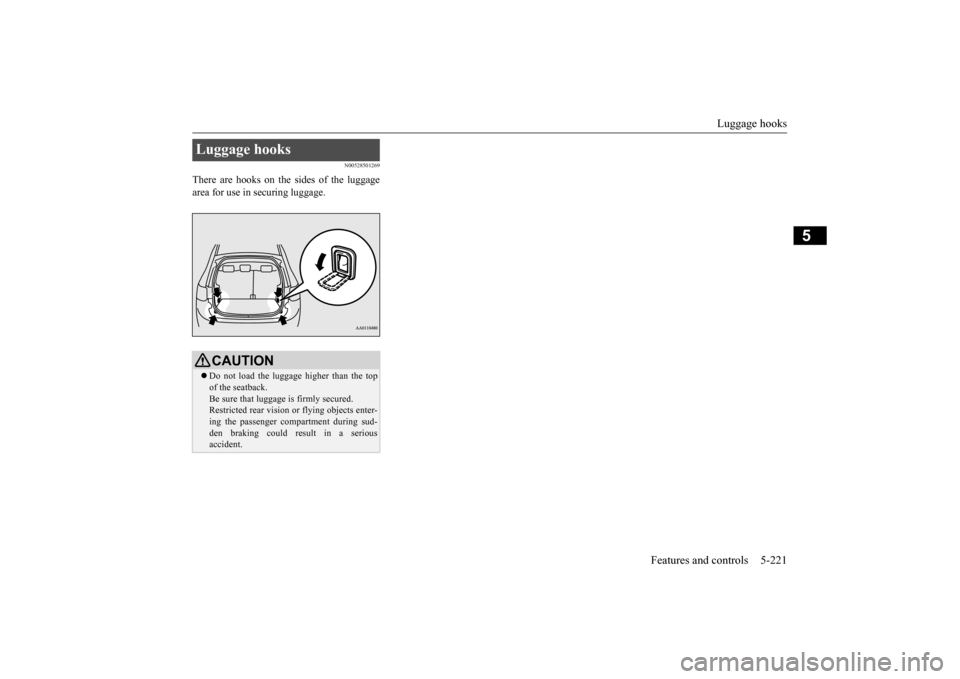
N00528501269
There are hooks on the sides of the luggage area for use in securing luggage.Luggage hooks
CAUTION Do not load the luggage higher than the top of the seatback.Be sure that luggage
is firmly secured.
Restricted rear vision
or flying objects enter-
ing the passenger compartment during sud-den braking could re
sult in a serious
accident.
BK0211800US.book 221 ページ 2014年3月12日 水曜日 午後2時42分