nel MITSUBISHI OUTLANDER 2017 3.G User Guide
[x] Cancel search | Manufacturer: MITSUBISHI, Model Year: 2017, Model line: OUTLANDER, Model: MITSUBISHI OUTLANDER 2017 3.GPages: 521, PDF Size: 14.91 MB
Page 79 of 521
![MITSUBISHI OUTLANDER 2017 3.G User Guide Supplemental Restraint System (SRS) - airbag 4-50 Seat and restraint systems
4
• Steering wheel • Instrument panel[For vehicles so
ld in U.S.A.]
To contact Mitsubishi Motors NorthAmerica, Inc. c](/img/19/7536/w960_7536-78.png "MITSUBISHI OUTLANDER 2017 3.G User Guide Supplemental Restraint System (SRS) - airbag 4-50 Seat and restraint systems
4
• Steering wheel • Instrument panel[For vehicles so
ld in U.S.A.]
To contact Mitsubishi Motors NorthAmerica, Inc. c")
Supplemental Restraint System (SRS) - airbag 4-50 Seat and restraint systems
4
• Steering wheel • Instrument panel[For vehicles so
ld in U.S.A.]
To contact Mitsubishi Motors NorthAmerica, Inc. call 1-888-648-7820 or write to: Mitsubishi Motors North America, Inc.Customer Relations Department P.O. Box 6400 Cypress, CA 90630-0064 [For vehicles sold in Canada] To contact Mitsubishi Motor Sales ofCanada, Inc. call 1-888-576-4878 or write to: Mitsubishi Motor Sales of Canada, Inc.Customer Relations Department P.O. Box 41009 4141 Dixie RoadMississauga, ON L4W 5C9NOTE
[For vehicles sold in Puerto Rico]To contact Mitsubishi Motor Sales ofCaribbean, Inc. call 1-787-251-8715 or write to: Mitsubishi Motor Sales of Caribbean,Inc. Customer Service Department P.O. Box 192216SAN JUAN PR 00919-2216 [For vehicles
sold in Guam]
To contact Triple J Enterprises Inc. call (671) 649-3673 or write to:Triple J Enterprises, Inc. P.O. Box 6066 TAMUNINGGUAM 96931 [For vehicles so
ld in Saipan]
To contact Triple J Motors call (670) 234-7133 or write to: Triple J MotorsP.O. Box 500487 SAIPAN, MP96950-0487
[For vehicles sold
in American Samoa]
To contact Pacific Marketing Inc.call 684 (699) 9140 or write to: Pacific Marketing, Inc. P.O. Box 698PA G O PA G O , AMERICAN SAMOA AS, 96799
BK0239700US.book 50 ページ 2016年6月16日 木曜日 午前10時58分
Page 96 of 521
Free-hand Advanced Securi
ty Transmitter (F.A.S.T.-key) (if so equipped)
Features and controls 5-15
5
N00503301077
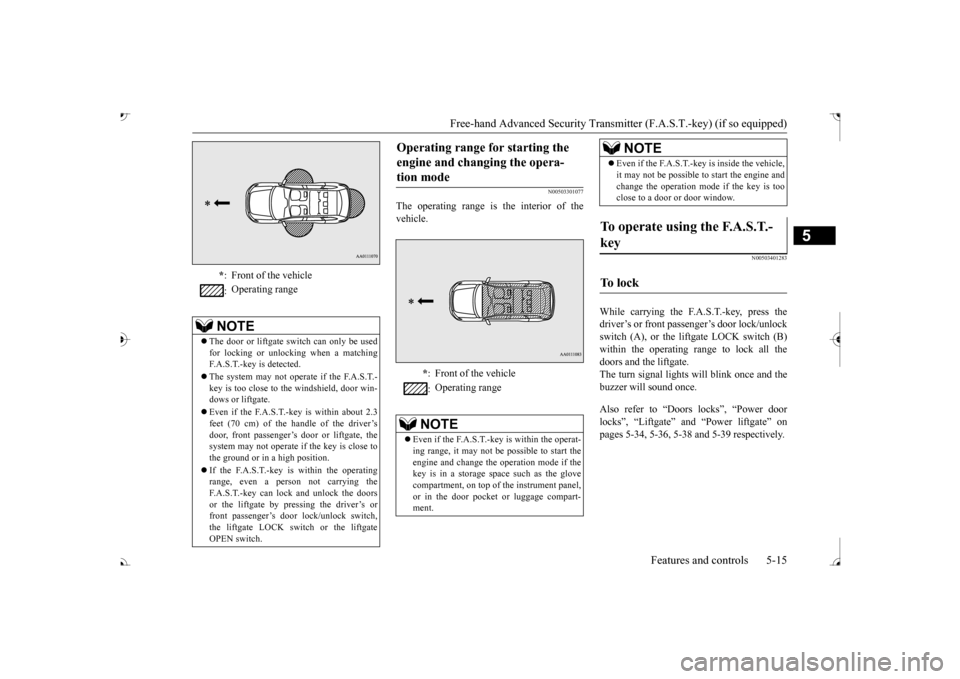
The operating range is the interior of the vehicle.
N00503401283
While carrying the F.A.S.T.-key, press thedriver’s or front passenger’s door lock/unlock switch (A), or the liftgate LOCK switch (B) within the operating range to lock all thedoors and the liftgate. The turn signal lights will blink once and the buzzer will sound once. Also refer to “Doors locks”, “Power door locks”, “Liftgate” and “Power liftgate” on pages 5-34, 5-36, 5-38 and 5-39 respectively.
* : Front of the vehicle : Operating range
NOTE
The door or liftgate
switch can only be used
for locking or unlocking when a matching F.A.S.T.-key is detected. The system may not operate if the F.A.S.T.- key is too close to th
e windshield, door win-
dows or liftgate. Even if the F.A.S.T.-key is within about 2.3 feet (70 cm) of the handle of the driver’sdoor, front passenger’s door or liftgate, the system may not operate if the key is close to the ground or in a high position. If the F.A.S.T.-key is within the operating range, even a person not carrying theF.A.S.T.-key can lock and unlock the doors or the liftgate by pressing the driver’s or front passenger’s door lock/unlock switch,the liftgate LOCK switch or the liftgate OPEN switch.
Operating range for starting the engine and changing the opera-tion mode
* : Front of the vehicle : Operating range
NOTE
Even if the F.A.S.T.-key is within the operat- ing range, it may not be possible to start theengine and change the
operation mode if the
key is in a storage space such as the glove compartment, on top of the instrument panel,or in the door pocket or luggage compart- ment.
Even if the F.A.S.T.-key is inside the vehicle, it may not be possible to start the engine andchange the operation mode if the key is tooclose to a door or door window.
To operate using the F.A.S.T.- key
To l o c k
NOTE
BK0239700US.book 15 ページ 2016年6月16日 木曜日 午前10時58分
Page 108 of 521
Free-hand Advanced Securi
ty Transmitter (F.A.S.T.-key) (if so equipped)
Features and controls 5-27
5
1. Stop the vehicle. 2. Fully engage the parking brake while depressing the brake pedal. 3. Move the selector lever to the “P”(PARK) position, and then press the engine switch to
stop the engine.
N00568301083
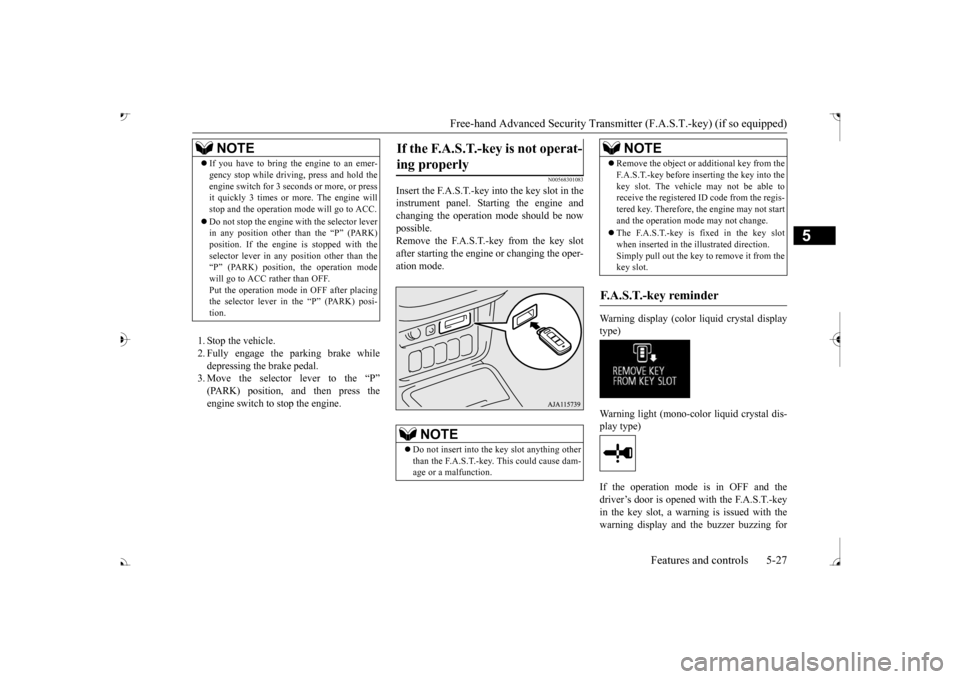
Insert the F.A.S.T.-key into the key slot in the instrument panel. St
arting the engine and
changing the operation mode should be now possible. Remove the F.A.S.T.-key from the key slotafter starting the engine or changing the oper- ation mode.
Warning display (color liquid crystal display type) Warning light (mono-color liquid crystal dis- play type) If the operation mode is in OFF and the driver’s door is opened with the F.A.S.T.-keyin the key slot, a warning is issued with the warning display and the buzzer buzzing for
NOTE
If you have to bring the engine to an emer- gency stop while drivi
ng, press and hold the
engine switch for 3 sec
onds or more, or press
it quickly 3 times or more. The engine will stop and the operation mode will go to ACC. Do not stop the engine wi
th the selector lever
in any position other than the “P” (PARK) position. If the engine
is stopped with the
selector lever in any
position other than the
“P” (PARK) position, the operation mode will go to ACC rather than OFF.Put the operation mode
in OFF after placing
the selector lever in the
Page 193 of 521
Adaptive Cruise Control System (ACC) (if so equipped) 5-112 Features and controls
5
N00581500027
There are two ways to increase the set speed. The set speed will increase by 1 mph (1 km/h) every time you push up the “RES +” switch while the ACC is activated. If youhold the switch pushed up, the set speed increases in 5 mph (5 km/h) increments.
• When the height of a vehicle in front is extremely low or the road clearance ofthe vehicle is extremely high.• When driving on a r
oad with alternating
up and down surfaces.• When driving on a curve.• When driving on a bumpy or rough road.• When driving in a tunnel.• When driving in construction zones.• When the rear of your vehicle is weighed down with the weight of passengers and luggage• For up to two minutes after starting driv-ing.• When driving in curved sections of roadincluding their entrance/outlet or run-ning beside a closed lane in a traffic work or similar zone.• When the surface of th
e sensor is covered
with dirt, snow, ice, etc.• When a front vehicle or an oncomingvehicle is splashing wa
ter, snow or dirt.
WA R N I N G
• When driving on
a winding road.
Never use the ACC in the following situa- tions:• In heavy traffic.• On winding roads.• On slippery roads, such as icy, snow-cov-ered or dirt roads.• In adverse weather conditions, such asrain, snow or sand storms, etc.• On steep downslopes.• When the inclination of a road fre-quently changes.• When the approach alarm frequentlysounds.• When your vehicle is towed or is towinganother vehicle.• When your vehicle is on a chassis dyna-mometer or free rollers.• When tire inflation pressures are notadequate.• When the temporary sp
are tire is being
used.• When the radar sensor and/or its sur-rounding area are damaged or deformed.WA R N I N G
CAUTION To maintain proper performance of the ACC:• Always clean the surface of the radar sen- sor.• Avoid impacting the radar sensor or its sur-rounding area.• Do not put a sticker on the radar sensor orits surrounding area.• Do not paint the radar sensor.• Do not install a grill guard.• Do not modify the radar sensor or its sur- rounding area.• Always use tires of the same size, sametype, and same brand, and which have no significant wear differences.• Do not modify the vehicle’s suspension.
To increase the set speed
By using the “RES +” switch:
BK0239700US.book 112 ページ 2016年6月16日 木曜日 午前10時58分
Page 201 of 521
Forward Collision Mitigation System (FCM) (if so equipped) 5-120 Features and controls
5
• When a vehicle ahead is not completely in your path.• When your vehicle ch
anged lanes, and
your vehicle approac
hed immediately
behind the vehicle ahead.• When a vehicle ahead
is towing a trailer.
• When a vehicle ahead is a truck loaded with freight that protrudes rearward from the cargo bed.• When the height of a vehicle ahead isextremely low or its road clearance isextremely high.• When a vehicle ahead is extremely dirty.• When a vehicle ahea
d is covered with
snow.• When a vehicle ahea
d has a large glass
surface.• When a vehicle ahead does not havereflectors (light reflector) or the positionof the reflector is low.• When a vehicle ahead is a car carrier ora similar shaped vehicle.• When accelerating and deceleratingquickly.• When driving on a sl
ippery road covered
by rain water, snow, ice, etc.• When driving on a r
oad with alternating
up and down steep slopes.• When driving on a curve.• When driving on a bumpy or rough road.• When driving in dark areas, such as in a tunnel or at night.WA R N I N G
• When the system recognizes driver’s steering, accelerati
ng, braking or gear
shifting actions as
evasive actions to
avoid collision.• When the rear of your vehicle is weigheddown with the weight of passengers and luggage.• Up to several seconds after starting driv-ing.• In adverse weather conditions, such asrain, snow, fog or sand-storm.• When the windshield of the sensor por-tion is covered with
dirt, water droplets,
snow and ice, etc.• When a vehicle ahea
d or an oncoming
vehicle is splashing water, snow or dirt. • When using a windshield washer.• If windshield wipers are not Mitsubishi Motors Genuine parts or equivalent. • When the sensor becomes extremely hotor cold.• If the battery becomes weak or runsdown.• When the sensor is affected by stronglight, such as direct sunlight or the head- lights of an oncoming vehicle.
The FCM may not detect a pedestrian in certain situations. Some of these include:• If the pedestrian is
shorter than approxi-
mately 3.2 feet (1 m) or taller thanapproximately 6.5 feet (2 m).WA R N I N G
• If the pedestrian is
wearing loose-fitting
clothes.• If part of a pedestrian’s body is hidden, such as when holding an umbrella, large bag, etc.• If a pedestrian bends forward, sits or lieson the road.• When a pedestrian is pushing/pullingsomething, such as a stroller, bicycle orwheelchair.• When pedestrians gather in a group.• When a pedestrian
clothing appears to
be nearly the same color or brightness asits surroundings.• When a pedestrian is very close to anobject, such as a vehicle.• When a pedestrian is in a dark area, suchas at night or in a tunnel.• When a pedestrian is walking fast orrunning.• When a pedestrian suddenly rushes infront of the vehicle.• When the position of
a pedestrian is close
to the edge of the vehicle.
When the system recognizes driver’s steering or accelerati
ng actions as evasive
actions to avoid a collision, FCM control and alarm functions
may be canceled.
In certain situations,
though there is little
or no risk of a collision, the FCM mayactivate. Examples include: • When overtaking a vehicle.WA R N I N G
BK0239700US.book 120 ページ 2016年6月16日 木曜日 午前10時58分
Page 202 of 521
Forward Collision Mitigation System (FCM) (if so equipped)
Features and controls 5-121
5
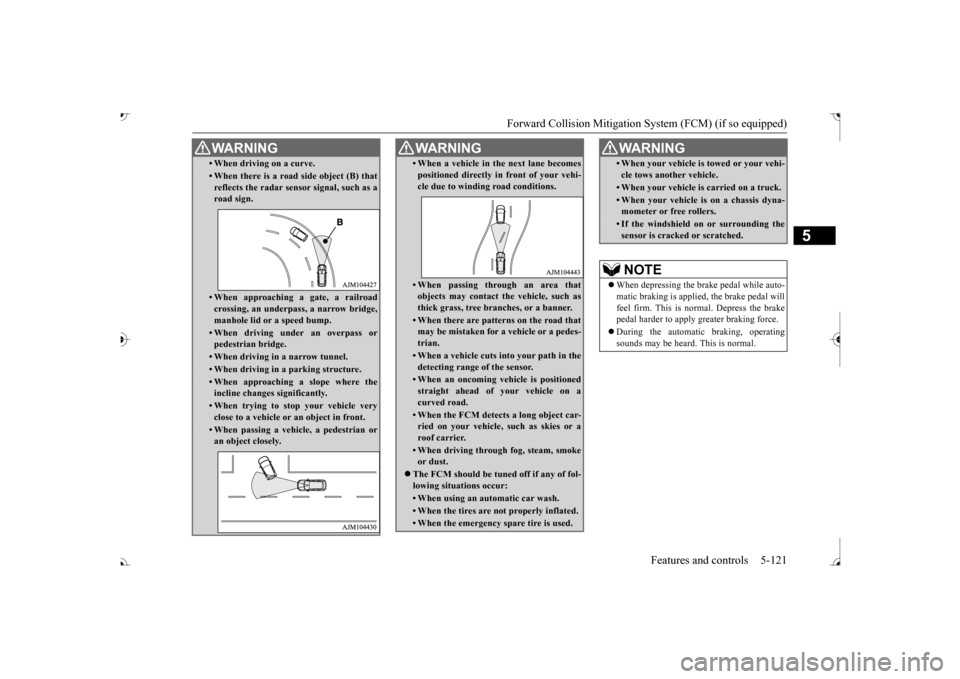
• When driving on a curve.• When there is a road
side object (B) that
reflects the radar sensor signal, such as a road sign.• When approaching a gate, a railroad crossing, an underpa
ss, a narrow bridge,
manhole lid or
a speed bump.
• When driving unde
r an overpass or
pedestrian bridge.• When driving in
a narrow tunnel.
• When driving in a parking structure.• When approaching a slope where the incline changes
significantly.
• When trying to stop your vehicle very close to a vehicle or
an object in front.
• When passing a vehicle, a pedestrian or an object closely.WA R N I N G
• When a vehicle in the next lane becomespositioned directly in
front of your vehi-
cle due to winding road conditions.• When passing through an area that objects may contact the vehicle, such as thick grass, tree br
anches, or a banner.
• When there are patterns on the road that may be mistaken for
a vehicle or a pedes-
trian.• When a vehicle cuts in
to your path in the
detecting range of the sensor.• When an oncoming vehicle is positionedstraight ahead of your vehicle on a curved road.• When the FCM detects a long object car-ried on your vehicle, such as skies or a roof carrier.• When driving through fog, steam, smokeor dust.
The FCM should be tuned off if any of fol- lowing situations occur:• When using an automatic car wash.• When the tires are not properly inflated. • When the emergency spare tire is used.WA R N I N G
• When your vehicle is
towed or
your vehi-
cle tows another vehicle.• When your vehicle is
carried on a truck.
• When your vehicle is on a chassis dyna- mometer or free rollers.• If the windshield on or surrounding thesensor is cracke
d or scratched.
NOTE
When depressing the brake pedal while auto- matic braking is applie
d, the brake pedal will
feel firm. This is normal. Depress the brake pedal harder to apply
greater braking force.
During the automatic braking, operating sounds may be heard. This is normal. WA R N I N G
BK0239700US.book 121 ページ 2016年6月16日 木曜日 午前10時58分
Page 210 of 521
Ultrasonic misacceleration Miti
gation System (if so equipped) Features and controls 5-129
5
Under certain circumstances, the system may not operate or may not detect cor-rectly an object in
front or behind the
vehicle. When your ve
hicle is approaching
the object too closely, take all necessary actions to avoid a collis
ion, such as brak-
ing and steering, regar
dless of whether the
Ultrasonic misaccel
eration Mitigation
System is activated or not. The Ultrasonic misacc
eleration Mitigation
System is not designed to detect a pedes-trian or bicycle. When propulsion power is immediately required while the Ultrasonic misaccelera- tion Mitigation System is activated, take one of the following actions. • Release the foot from the acceleratorpedal and lightly de
press the pedal again.
• Press and hold the Forward collision mit- igation system (FCM) and Ultrasonicmisacceleration Mitigation System ON/OFF switch for three seconds or more to turn off the Ultrasonic misaccel-eration Mitigation System.• Keep depressing the accelerator pedalfor 5 seconds or more.• Fully depress and release the acceleratorpedal three times or more in quick suc- cession.
Never attempt to test the Ultrasonic misacceleration Mitigation System. Doing so could result in an accident.WA R N I N G
While the Active Stability Control system (ASC) is turned off
by operating the ASC
OFF switch, the Ultrasonic misaccelera-tion Mitigation System does not operate. Refer to “ASC OF
F switch” on page
5-101. The Ultrasonic misacc
eleration Mitigation
System may not operate in certain situa-tions. Some of these include:• The sensors or surr
oundings have been
wiped by hand.• The stickers or ac
cessories have been
attached to the sens
ors or surroundings.
• When the ambient temperature is rap- idly changing. For e
xample, immediately
after the vehicle has exited from a tunnel or a garage.
Page 222 of 521
Lane Departure Warning System (LDW) (if so equipped)
Features and controls 5-141
5
N00578100045
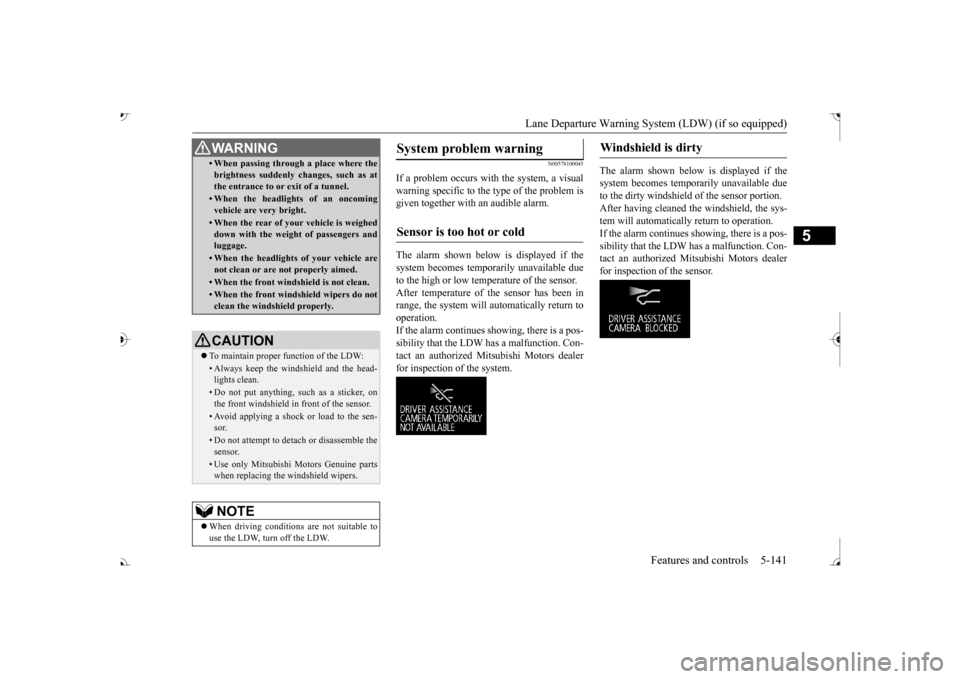
If a problem occurs with the system, a visual warning specific to the type of the problem is given together with an audible alarm. The alarm shown below is displayed if the system becomes tempor
arily unavailable due
to the high or low temperature of the sensor. After temperature of the sensor has been in range, the system will automatically return tooperation. If the alarm continues s
howing, there is a pos-
sibility that the LDW has a malfunction. Con-tact an authorized Mitsubishi Motors dealer for inspection of the system.
The alarm shown below is displayed if the system becomes temporarily unavailable due to the dirty windshield of the sensor portion. After having cleaned the windshield, the sys-tem will automatically return to operation. If the alarm continues showing, there is a pos- sibility that the LDW has a malfunction. Con-tact an authorized Mitsubishi Motors dealer for inspection of the sensor.
• When passing through a place where the brightness suddenly changes, such as atthe entrance to or exit of a tunnel.• When the headlights of an oncomingvehicle are very bright. • When the rear of your vehicle is weigheddown with the weight of passengers andluggage.• When the headlights
of your vehicle are
not clean or are not properly aimed.• When the front windshield is not clean.• When the front windshield wipers do notclean the windshield properly.CAUTION To maintain proper function of the LDW:• Always keep the windshield and the head- lights clean.• Do not put anything, such as a sticker, onthe front windshield in front of the sensor.• Avoid applying a shock or load to the sen-sor.• Do not attempt to deta
ch or disassemble the
sensor.• Use only Mitsubishi Motors Genuine parts when replacing the
windshield wipers.
NOTE
When driving conditions are not suitable to use the LDW, turn off the LDW.WA R N I N G
System problem warning
Sensor is too hot or cold
Windshield is dirty
BK0239700US.book 141 ページ 2016年6月16日 木曜日 午前10時58分
Page 261 of 521
Multi Information display - Type 1 5-180 Features and controls
5
N00557201154
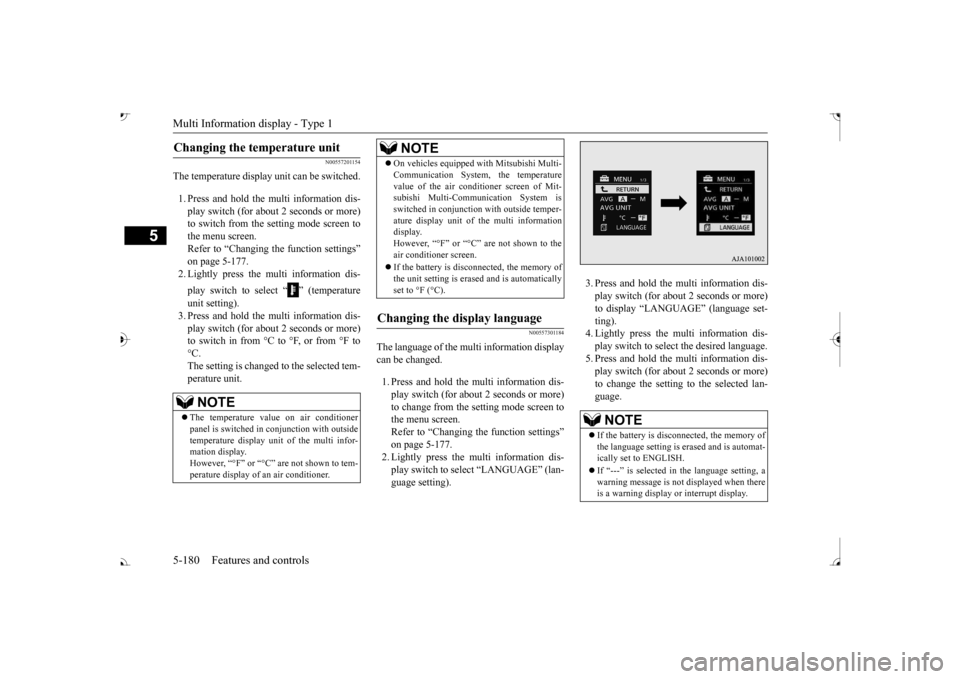
The temperature display unit can be switched. 1. Press and hold the multi information dis- play switch (for about 2 seconds or more) to switch from the setting mode screen tothe menu screen. Refer to “Changing the function settings” on page 5-177.2. Lightly press the multi information dis- play switch to select “ ” (temperature unit setting). 3. Press and hold the multi information dis- play switch (for about 2 seconds or more)to switch in from °C to °F, or from °F to °C. The setting is changed to the selected tem-perature unit.
N00557301184
The language of the multi information displaycan be changed. 1. Press and hold the mu
lti information dis-
play switch (for about 2 seconds or more) to change from the setting mode screen to the menu screen.Refer to “Changing th
e function settings”
on page 5-177. 2. Lightly press the multi information dis-play switch to se
lect “LANGUAGE” (lan-
guage setting).
3. Press and hold the multi information dis- play switch (for about 2 seconds or more)to display “LANGUAGE” (language set- ting). 4. Lightly press the multi information dis-play switch to select
the desired language.
5. Press and hold the multi information dis- play switch (for about 2 seconds or more)to change the setting to the selected lan- guage.
Changing the temperature unit
NOTE
The temperature value on air conditioner panel is switched in
conjunction with outside
temperature display unit of the multi infor-mation display. However, “°F” or “°C” are not shown to tem- perature display of
an air conditioner.
On vehicles equipped
with Mitsubishi Multi-
Communication System, the temperaturevalue of the air conditioner screen of Mit-subishi Multi-Communication System is switched in conjunction
with outside temper-
ature display unit of the multi informationdisplay. However, “°F” or “°C” air conditioner screen. If the battery is disconnected, the memory of the unit setting is erased and is automaticallyset to °F (°C).
Changing the display language
NOTE
NOTE
If the battery is disconnected, the memory of the language setting is erased and is automat- ically set to ENGLISH. If “---” is selected in the language setting, a warning message is not displayed when there is a warning display or interrupt display.
BK0239700US.book 180 ページ 2016年6月16日 木曜日 午前10時58分
Page 271 of 521
Multi Information display - Type 2 5-190 Features and controls
5
N00557101179
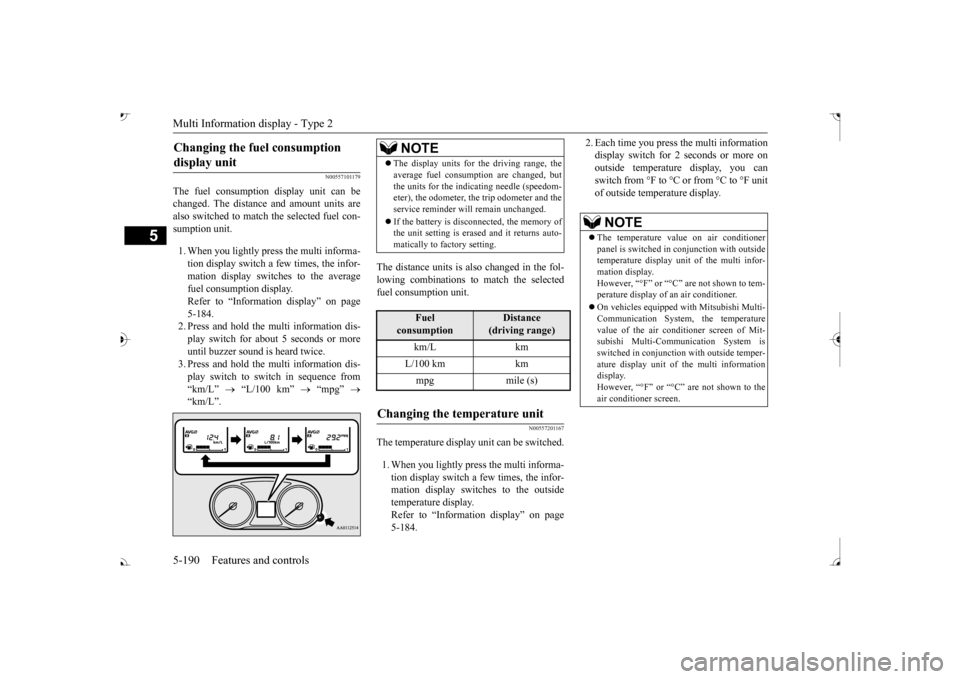
The fuel consumption display unit can be changed. The distance and amount units are also switched to match the selected fuel con- sumption unit. 1. When you lightly press the multi informa- tion display switch a few times, the infor- mation display switches to the average fuel consumption display. Refer to “Information display” on page 5-184.2. Press and hold the multi information dis- play switch for about 5 seconds or more until buzzer sound is
heard twice.
3. Press and hold the multi information dis- play switch to swit
ch in sequence from
“km/L”
“L/100 km”
“mpg”
The distance units is also changed in the fol- lowing combinations to match the selected fuel consumption unit.
N00557201167
The temperature display unit can be switched. 1. When you lightly press the multi informa- tion display switch a few times, the infor- mation display switches to the outsidetemperature display. Refer to “Information display” on page 5-184.
2. Each time you press the multi information display switch for 2 seconds or more onoutside temperatur
e display, you can
switch from °F to °C or from °C to °F unit of outside temperature display.
Changing the fuel consumption display unit
NOTE
The display units for the driving range, the average fuel consumption are changed, butthe units for the indica
ting needle (speedom-
eter), the odometer, the trip odometer and the service reminder will
remain unchanged.
If the battery is disconnected, the memory of the unit setting is erased and it returns auto- matically to factory setting.
Fuel
consumption
Distance
(driving range)
L/100 km km mpg mile (s)
Changing the temperature unit
NOTE
The temperature value on air conditioner panel is switched in
conjunction with outside
temperature display unit of the multi infor- mation display.However, “°F” or “°C” are not shown to tem- perature display of
an air conditioner.
On vehicles e
quipped with Mitsubishi Multi-
Communication System, the temperature value of the air condi
tioner screen of Mit-
subishi Multi-Communication System is switched in conjunction
with outside temper-
ature display unit of
the multi information
display. However, “°F” or “°C” air conditioner screen.
BK0239700US.book 190 ページ 2016年6月16日 木曜日 午前10時58分