Seat MITSUBISHI OUTLANDER 2017 3.G Manual PDF
[x] Cancel search | Manufacturer: MITSUBISHI, Model Year: 2017, Model line: OUTLANDER, Model: MITSUBISHI OUTLANDER 2017 3.GPages: 521, PDF Size: 14.91 MB
Page 279 of 521
Indicator light, warning light, and information screen display list (multi information display - Type 1)
5
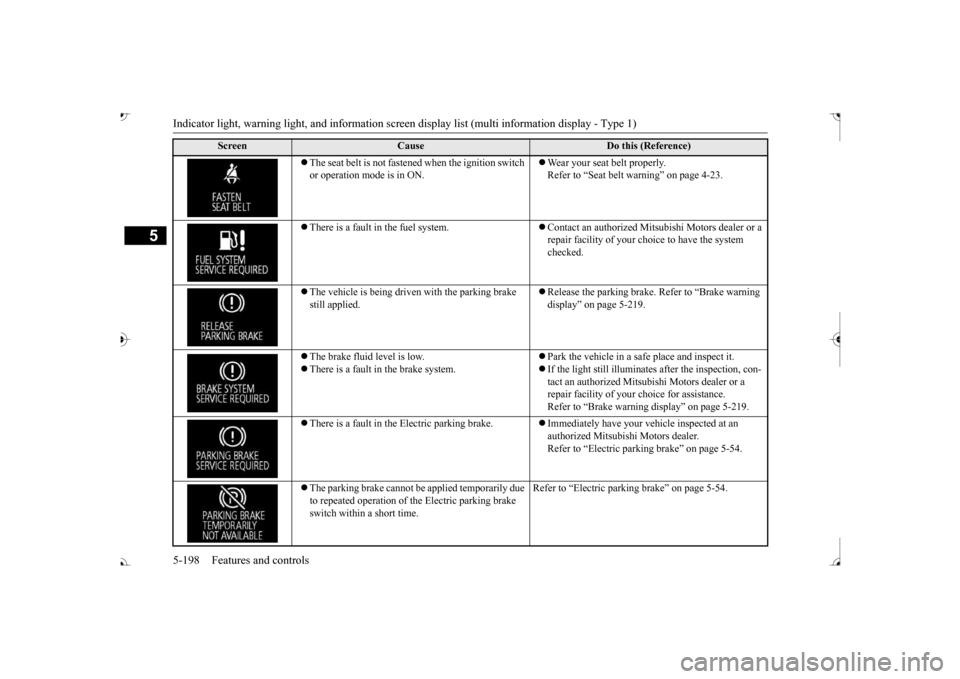
The seat belt is not fasten
ed when the ignition switch
or operation mode is in ON.
Wear your seat belt properly. Refer to “Seat belt
warning” on page 4-23.
There is a fault in the fuel system.
Contact an authorized Mits
ubishi Motors dealer or a
repair facility of your c
hoice to have the system
checked.
The vehicle is being driven with the parking brake still applied.
Release the parking brake. Refer to “Brake warning display” on page 5-219.
The brake fluid level is low. There is a fault in the brake system.
Park the vehicle in a safe place and inspect it. If the light still illuminates after the inspection, con- tact an authorized Mitsub
ishi Motors dealer or a
repair facility of your
choice for assistance.
Refer to “Brake warning
display” on page 5-219.
There is a fault in the Electric parking brake.
Immediately have your ve
hicle inspected at an
authorized Mitsubishi Motors dealer. Refer to “Electric parking brake” on page 5-54.
The parking brake cannot be
applied temporarily due
to repeated operation of the Electric parking brake switch within a short time.
Refer to “Electric parkin
g brake” on page 5-54.
Screen
Cause
Do this (Reference)
BK0239700US.book 198 ページ 2016年6月16日 木曜日 午前10時58分
Page 281 of 521
Indicator light, warning light, and information screen display list (multi information display - Type 1)
5
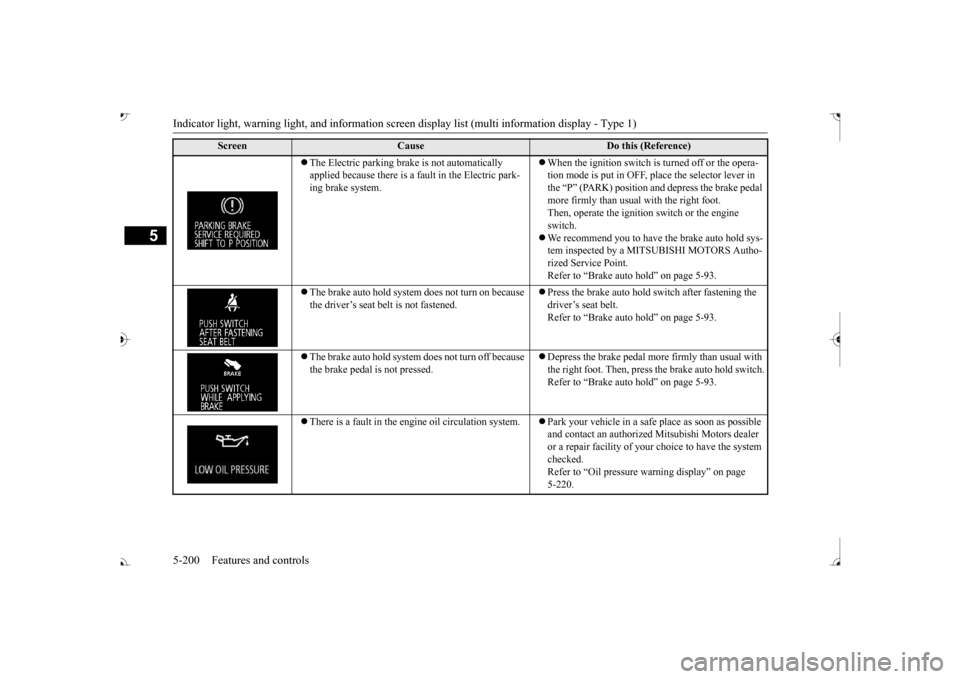
The Electric parking brake is not automatically applied because there is a fa
ult in the Electric park-
ing brake system.
When the ignition switch is
turned off or the opera-
tion mode is put in OFF, place the selector lever in the “P” (PARK) position and depress the brake pedal more firmly than usual with the right foot. Then, operate the ignition
switch or the engine
switch. We recommend you to have the brake auto hold sys- tem inspected by a MITSUBISHI MOTORS Autho-rized Service Point. Refer to “Brake auto hold” on page 5-93.
The brake auto hold system does not turn on because the driver’s seat belt is not fastened.
Press the brake auto hold switch after fastening the driver’s seat belt. Refer to “Brake auto hold” on page 5-93.
The brake auto hold system does not turn off because the brake pedal is not pressed.
Depress the brake pedal more firmly than usual with the right foot. Then, press
the brake auto hold switch.
Refer to “Brake auto hold” on page 5-93.
There is a fault in the engi
ne oil circulation system.
Park your vehicle in a safe place as soon as possible and contact an authorized
Mitsubishi Motors dealer
or a repair facility of your
choice to have the system
checked.Refer to “Oil pressure wa
rning display” on page
5-220.
Screen
Cause
Do this (Reference)
BK0239700US.book 200 ページ 2016年6月16日 木曜日 午前10時58分
Page 296 of 521
Indicators
Features and controls 5-215
5
N00519900127 N00520000216
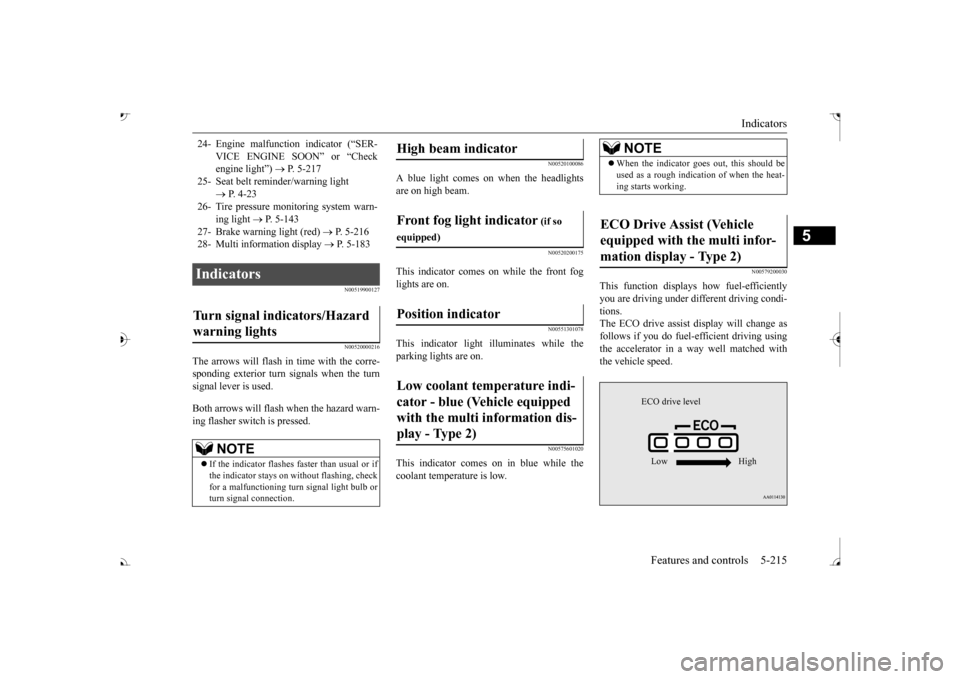
The arrows will flash in time with the corre- sponding exterior turn signals when the turnsignal lever is used. Both arrows will flash when the hazard warn- ing flasher switch is pressed.
N00520100086
A blue light comes on when the headlightsare on high beam.
N00520200175
This indicator comes on while the front foglights are on.
N00551301078
This indicator light illuminates while theparking lights are on.
N00575601020
This indicator comes on in blue while thecoolant temperature is low.
N00579200030
This function displays
how fuel-efficiently
you are driving under different driving condi- tions. The ECO drive assist display will change asfollows if you do fuel-efficient driving using the accelerator in a way well matched with the vehicle speed.
24- Engine malfuncti
on indicator (“SER-
VICE ENGINE SOON” or “Check engine light”)
P. 5-217
25- Seat belt
reminder/warning light
P. 4-23
26- Tire pressure moni
toring system warn-
ing light
P. 5-143
27- Brake warning light (red)
P. 5-216
28- Multi information display
P. 5-183
Indicators Turn signal indicators/Hazard warning lights
NOTE
If the indicator flashes faster than usual or if the indicator stays on wi
thout flashing, check
for a malfunctioning turn signal light bulb or turn signal connection.
High beam indicator Front fog light indicator
(if so
equipped)Position indicator Low coolant temperature indi- cator - blue (Vehicle equipped with the multi information dis- play - Type 2)
NOTE
When the indicator goes out, this should be used as a rough indication of when the heat-ing starts working.
ECO Drive Assist (Vehicle equipped with the multi infor-mation display - Type 2)
ECO drive level Low High
BK0239700US.book 215 ページ 2016年6月16日 木曜日 午前10時58分
Page 322 of 521
Bluetooth® 2.0 interface
Features and controls 5-241
5
Steering control switch and microphone P.5-241 Voice recognition function
P.5-243
Useful voice commands
P.5-244
Speaker enrollment function
P.5-245
Connecting the Bluetooth
® 2.0 interface and
the Bluetooth
® device
P.5-247
Operating a music player connected via Blue- tooth
® P.5-253
How to make or receive hands-free calls P.5-253 Phonebook function
P.5-255
N00564001109
Press this button to increase the volume.
If you place the Bluetooth
® device in the
vehicle’s third seat or luggage compartment, you may not be able to use the Bluetooth
®
2.0 interface. Some Bluetooth
® devices are not compatible
with the Bluetooth
® 2.0 interface.
You can confirm the Link System software version by pressing the HANG-UP button 3 times (press and hold 2 times and then press briefly) within 10 seconds. For detail of the Bluetooth
® 2.0 interface,
refer to the following website: [For vehicles sold in U.S.A.] You can access the Mitsubishi Motors NorthAmerica website. [For vehicles sold in Canada and Mexico] You can access the Mitsubishi Motors web-site. Please read and agree to the “Warning about Links to the Web Sites of Other Companies”,the websites mentioned above may connect you to websites other than the Mitsubishi Motors website.http://www.mitsubishi-motors.com/en/prod- ucts/index.html Software updates by ce
llular phone/digital
audio device manufacturers may change/alter devi
ce connectivity.
NOTE
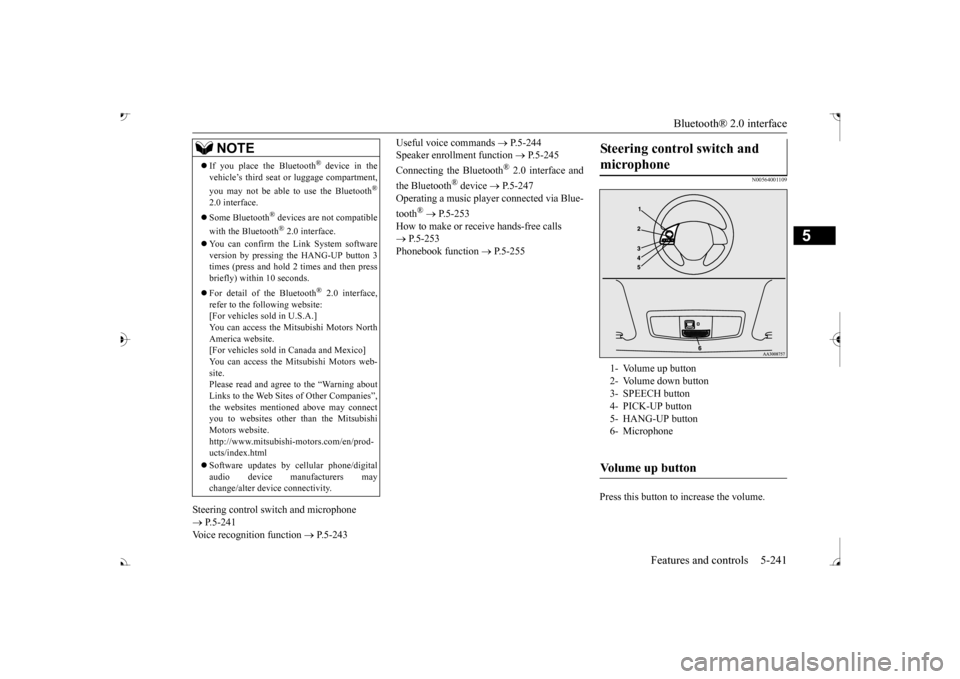
Steering control switch and microphone 1- Volume up button 2- Volume down button 3- SPEECH button4- PICK-UP button 5- HANG-UP button 6- MicrophoneVolume up button
BK0239700US.book 241 ページ 2016年6月16日 木曜日 午前10時58分
Page 326 of 521

Bluetooth® 2.0 interface
Features and controls 5-245
5
7. When the registration of the passcode is completed, the voice
guide will say “Pass-
code is enabled” and the system will return to the main menu.
If a passcode has been
set and the security
function is enabled, the voice guide will say “Hands-free system is
locked. State the pass-
code to continue” when the SPEECH button (except for vehicles with Mitsubishi Multi- Communication System) or PICK-UP button(for vehicles with Mitsubishi Multi-Commu- nication System) is pres
sed to enter voice rec-
ognition mode. Say th
e 4-digit passcode
number to enter the passcode. If the entered passcode is wrong, the voice guide will say “<4-digit passcode>, Incorrect
passcode. Please try again.” Enter the correct passcode. Use the following procedure to turn off the security function by di
sabling the passcode.
1. Press the SPEECH button (except for vehicles with Mitsubishi Multi-Commu- nication System) or
PICK-UP button (for
vehicles with Mitsubishi Multi-Commu-nication System). 2. Say “Setup.” 3. Say “Passcode.”4. The voice guide will say “Passcode is enabled. Would you like to disable it?” Answer “Yes.” the passcode and return to the main menu.
5. When the disabling of the passcode is completed, the voice
guide will say “Pass-
code is disabled”
and the system will
return to the main menu.
N00564700011
The Bluetooth
® 2.0 interface can use the
speaker enrollment function to create a voice model for one person per language. This makes it easier for the Bluetooth
® 2.0
interface to recognise
voice commands said
by you. You can turn a voice model registered with the speaker enrollment function on and offwhenever you want.
N00564801181
It takes about 2 to 3 mi
nutes to complete the
speaker enrollment process. To ensure the best results, run through the process while in the driver’s seat, in an envi-ronment that is as quiet as possible (when there is no rain or strong winds and the vehi- cle windows are closed).
Please turn off your
phone while in speaker enrollment to prevent interruption of the process. Use the following procedure for speakerenrollment.
NOTE
Passcode will be requi
red to access the sys-
tem after the next ignition cycle. It is required for a little time after engine stop that the entered
passcode is actually
recorded in the system.If the ignition switch
or the operation mode
is made to ACC or
ON or the engine is
started immediately afte
r engine stop, there
is a case when the entered passcode is not recorded in the system. At this time, please try to enter the passcode again.
Entering the passcode
NOTE
You can reenter the passcode as many times as you want. If you have forgotten your passcode, say “Cancel” to quit the voice input mode and then check with an authorized Mitsubishi Motors dealer.
Disabling the passcode
NOTE
System must be unlocked to disable the pass- code.
Speaker enrollment function Speaker enrollment
BK0239700US.book 245 ページ 2016年6月16日 木曜日 午前10時58分
Page 336 of 521

Bluetooth® 2.0 interface
Features and controls 5-255
5
You can redial the last
number called, based
on the history of dialed calls in the paired cel-lular phone. Use the following procedure to redial. 1. Press the SPEECH button (except for vehicles with Mitsubishi Multi-Commu- nication System) or PICK-UP button (forvehicles with Mitsubishi Multi-Commu- nication System). 2. Say “Redial.”
N00565700018
During a call, press the SPEECH button toenter voice recognitio
n mode, then say
“
a call you need to sim-
ulate the pressing of a phone button as a
response to an automated system, press the SPEECH button and speak “1 2 3 4 poundsend” and the 1234# will be sent via your cel- lular phone.
N00565801045
If an incoming phone call is received whilethe ignition switch or
the operation mode is in
ON or ACC, the audio sy
stem will be auto-
matically turned on and switched to the incoming call, even when the audio systemwas originally off. The voice guide a
nnouncement for the
incoming call will be output from the frontpassenger’s seat speaker. If the CD player or radio was playing when the incoming call was received, the audio sys-tem will mute the sound from the CD player or radio and output onl
y the incoming call.
To receive the call, press the PICK-UP buttonon the steering wheel control switch. When the call is over, the audio system will return to its previous state.
N00565900010
At any time during a ca
ll, you can mute the
vehicle microphone.
Pressing the SPEECH button and then saying “Mute” during a call will turn ON the mutefunction and mute the microphone. Saying “Mute off” in the same way will turn off the mute function and cancel the mute onthe microphone.
N00566600014
The Bluetooth
® 2.0 interface can switch
between hands-free m
ode (hands-free calls)
and private mode (calls
using cellular phone).
If you press the SPEECH button and say“Transfer call” duri
ng a hands-free call, you
can stop the hands-free m
ode and talk in pri-
vate mode. To return to hands-free mode, press the SPEECH button again and say “Transfer call.”The Bluetooth
® 2.0 interface has 2 types of
unique phonebooks that are different from thephonebook stored in the cellular phone. They are the vehicle phonebook and the mobile phonebook.
NOTE
When the confirmation function is on, the system will check if
the name and location of
the receiver are correct. If the name is cor-rect, answer “Yes.”
or location to call,
answer “No.” The system will return to Step3.
RedialingSend function
Receiving calls Mute function
Switching between hands-free mode and private mode Phonebook function
BK0239700US.book 255 ページ 2016年6月16日 木曜日 午前10時58分
Page 357 of 521
Storage spaces 5-276 Features and controls
5
The lights come on again if the ignition switch or the engine
switch is operated, if
any door or liftgate is opened or closed, or if the keyless entry or F.A.S.T.-key is operated.
N00526401567
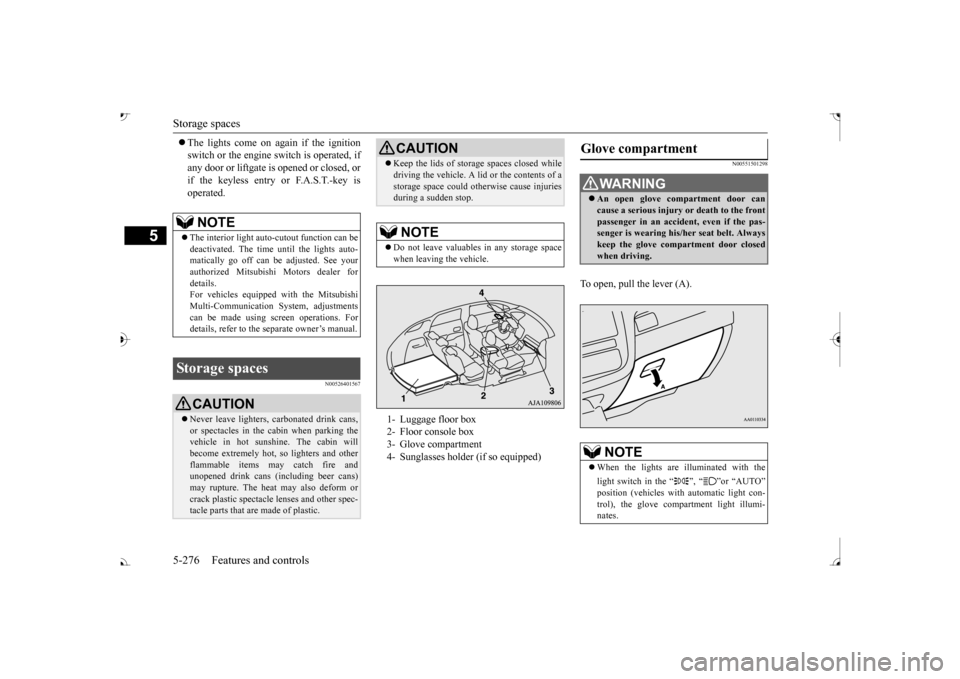
N00551501298
To open, pull the lever (A).
NOTE
The interior light auto
-cutout function can be
deactivated. The time until the lights auto- matically go off can be
adjusted. See your
authorized Mitsubishi Motors dealer fordetails. For vehicles equipped
with the Mitsubishi
Multi-Communication System, adjustmentscan be made using sc
reen operations. For
details, refer to the se
parate owner’s manual.
Storage spaces
CAUTIONNever leave lighters,
carbonated drink cans,
or spectacles in the cabin when parking thevehicle in hot sunshine. The cabin willbecome extremely hot,
so lighters and other
flammable items ma
y catch fire and
unopened drink cans (i
ncluding beer cans)
may rupture. The heat may also deform or crack plastic spectacle
lenses and other spec-
tacle parts that ar
e made of plastic.
Keep the lids of storage spaces closed while driving the vehicle. A lid or the contents of astorage space could ot
herwise cause injuries
during a sudden stop.NOTE
Do not leave valuables in any storage space when leaving the vehicle.1- Luggage floor box 2- Floor console box 3- Glove compartment 4- Sunglasses holder (if so equipped)CAUTION
Glove compartment
WA R N I N G An open glove comp
artment door can
cause a serious injury or death to the frontpassenger in an accident, even if the pas- senger is wearing his/
her seat be
lt. Always
keep the glove comp
artment door closed
when driving.NOTE
When the lights are illuminated with the light switch in the “ ”, “ ”or “AUTO”
automatic light con-
trol), the glove compartment light illumi- nates.
BK0239700US.book 276 ページ 2016年6月16日 木曜日 午前10時58分
Page 359 of 521
Storage spaces 5-278 Features and controls
5
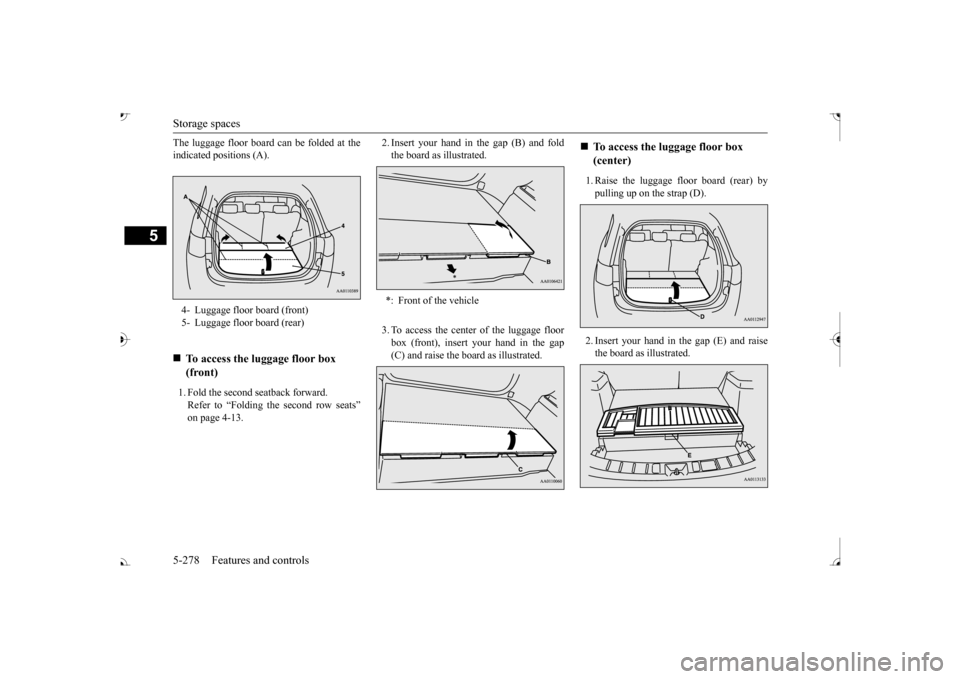
The luggage floor board can be folded at the indicated positions (A). 1. Fold the second seatback forward. Refer to “Folding
the second row seats”
on page 4-13.
2. Insert your hand in the gap (B) and fold the board as illustrated. 3. To access the center of the luggage floor box (front), insert your hand in the gap (C) and raise the boa
rd as illustrated.
1. Raise the luggage floor board (rear) by pulling up on the strap (D). 2. Insert your hand in the gap (E) and raise the board as illustrated.
4- Luggage floor board (front) 5- Luggage floor board (rear)
To access the luggage floor box (front)
*: Front of the vehicle
To access the luggage floor box (center)
BK0239700US.book 278 ページ 2016年6月16日 木曜日 午前10時58分
Page 360 of 521
Cup holders
Features and controls 5-279
5
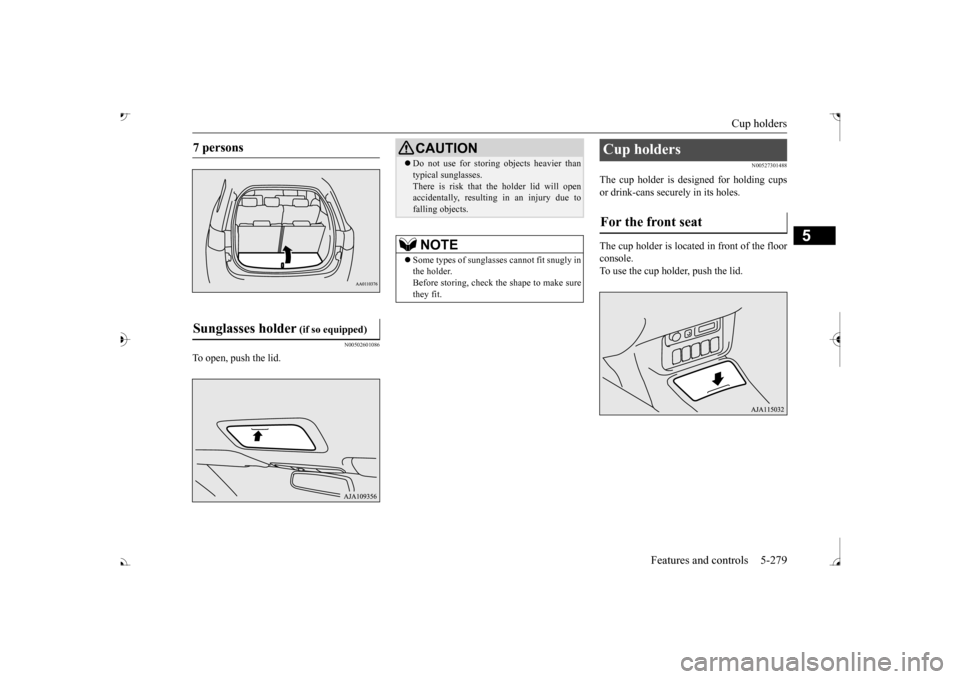
N00502601086
To open, push the lid.
N00527301488
The cup holder is designed for holding cups or drink-cans secu
rely in its holes.
The cup holder is located in front of the floor console. To use the cup holder, push the lid.
7 persons Sunglasses holder
(if so equipped)
CAUTION Do not use for stori
ng objects heavier than
typical sunglasses.There is risk that th
e holder lid will open
accidentally, resulting in an injury due to falling objects.NOTE
Some types of sunglas
ses cannot fit snugly in
the holder.Before storing, check the shape to make sure they fit.
Cup holders For the front seat
BK0239700US.book 279 ページ 2016年6月16日 木曜日 午前10時58分
Page 361 of 521
Bottle holders 5-280 Features and controls
5
N00537001228
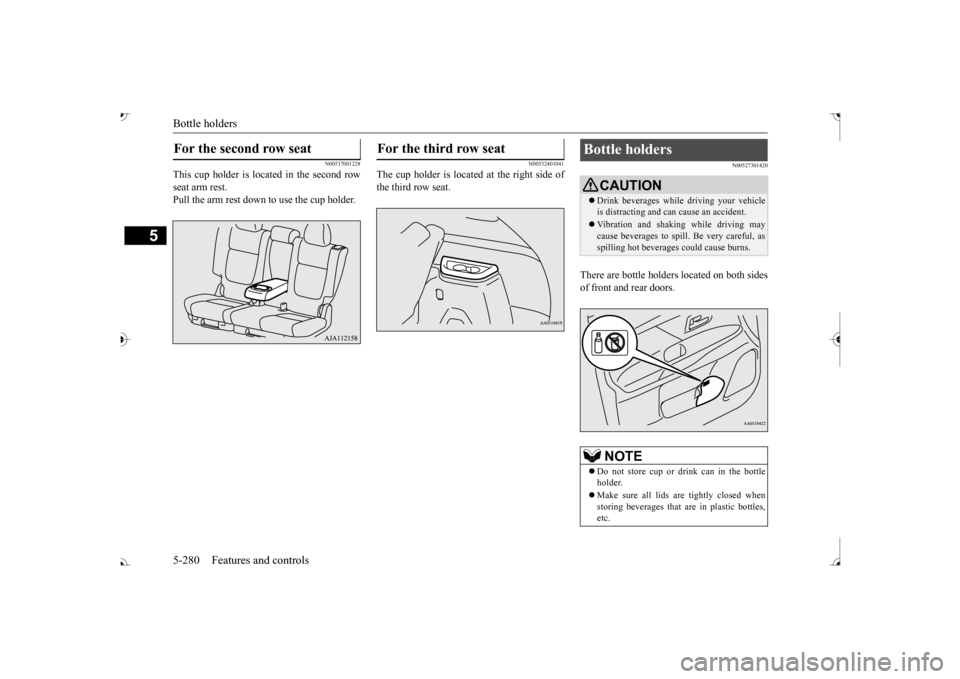
This cup holder is located in the second row seat arm rest. Pull the arm rest down to use the cup holder.
N00532401041
The cup holder is located at the right side of the third row seat.
N00527301420
There are bottle holders located on both sides of front and rear doors.
For the second row seat
For the third row seat
Bottle holders
CAUTION Drink beverages while
driving your vehicle
is distracting and ca
n cause an accident.
Vibration and shaking while driving may cause beverages to spill.
Be very careful, as
spilling hot beverage
s could cause burns.
NOTE
Do not store cup or drink can in the bottle holder. Make sure all lids ar
e tightly closed when
storing beverages that
are in plastic bottles,
etc.
BK0239700US.book 280 ページ 2016年6月16日 木曜日 午前10時58分