service MITSUBISHI OUTLANDER 2020 (in English) User Guide
[x] Cancel search | Manufacturer: MITSUBISHI, Model Year: 2020, Model line: OUTLANDER, Model: MITSUBISHI OUTLANDER 2020Pages: 443, PDF Size: 60.03 MB
Page 158 of 443
Continuously variable transmission (CVT) (if so equipped)
Features and controls 5-77
5
According to the condi
tions, the transmission
will automatically shift to a lower gear ratio to achieve stronger engi
ne braking. This may
help reduce your need to use the service brake.
N00560301090
As an additional safe
ty precaution, models
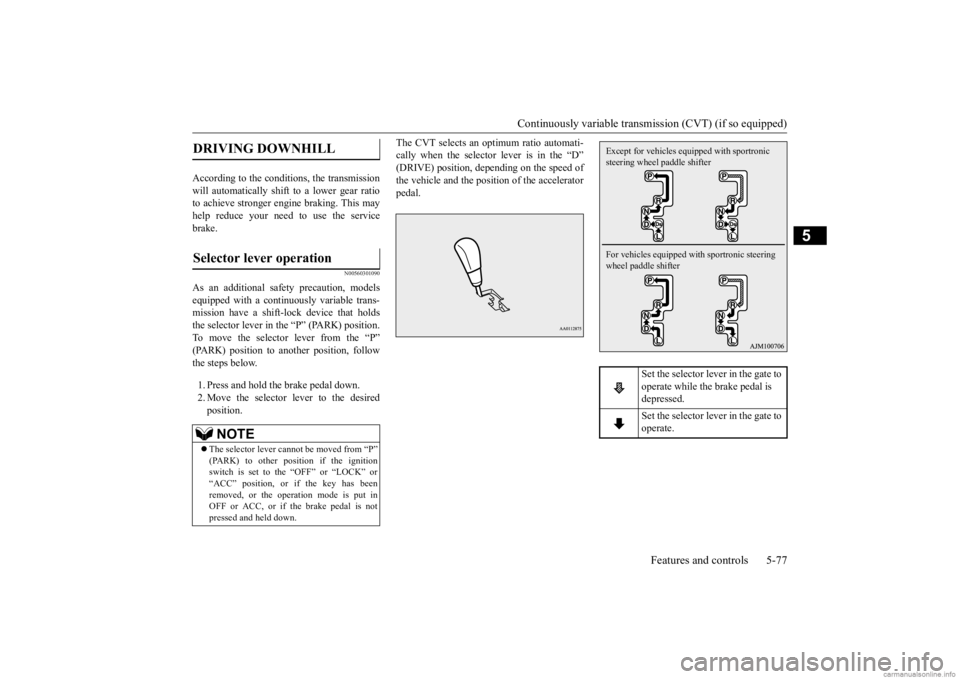
equipped with a continuously variable trans-mission have a shift-lock device that holds the selector lever in the “P” (PARK) position. To move the selector lever from the “P”(PARK) position to another position, follow the steps below. 1. Press and hold the brake pedal down. 2. Move the selector lever to the desiredposition.
The CVT selects an optimum ratio automati- cally when the selector lever is in the “D”(DRIVE) position, depending on the speed of the vehicle and the posit
ion of the accelerator
pedal.
DRIVING DOWNHILL
Selector lever operation
NOTE
The selector lever cannot
be moved from “P”
(PARK) to other position if the ignition switch is set to the “OFF” or “LOCK” or“ACC” position, or if the key has been removed, or the opera
tion mode is put in
OFF or ACC, or if the brake pedal is notpressed and held down.
Set the selector lever in the gate to operate while the brake pedal is depressed. Set the selector lever in the gate to operate.
Except for vehicles equipped with sportronic steering wheel paddle shifter For vehicles equipped with sportronic steering wheel paddle shifter
BK0278200US.book 77 ページ 2019年4月10日 水曜日 午前10時59分
Page 164 of 443
Electronically controlled 4WD system (if so equipped)
Features and controls 5-83
5
To gain extra acceleration in “D” (DRIVE) position (when passing another vehicle) push the accelerator to the floor. The CVT willautomatically downshift. For short waiting periods, such as at traffic lights, the vehicle can be
left in selector lever
position and held stationary with the service brake.For longer waiting periods with the engine running, place th
e selector lever in the “N”
(NEUTRAL) position and apply the parkingbrake, while holding th
e vehicle stationary
with the service brake. Prior to moving off after having stopped thevehicle, make sure that the selector lever is in “D” (DRIVE) position or Sports mode posi- tion.
To park the vehicle, first bring it to a com- plete stop, firmly apply the parking brake, and then move the selector lever to the “P” (PARK) position. If the CVT does not shift while driving, or your vehicle does not pick up enough speed when starting on an uphill slope, it may bethat there is something unusual happening in the transmission, causi
ng a safety device to
activate. Have your ve
hicle checked at an
authorized Mitsubishi Motors dealer or a repair facility of your choice immediately.
N00548301061
The electronically c
ontrolled 4WD system
helps improve accelerati
on and vehicle stabil-
ity by controlling the front-rear distribution ofdriving torque using the electronic control coupling in the rear differential assembly. Select the drive mode from the following three types to suit the driving conditions.
Passing acceleration
NOTE
In sports mode, downshi
fts do not take place
when the accelerator is depressed all the wayto the floor.
Waiting
CAUTION To avoid transmission
overheating, never try
to keep your vehicle st
ationary on a hill by
using the accelerator
pedal. Always apply
the parking brake and/or service brake. Do not rev the engine unnecessarily while the vehicle is stationary. Unexpected acceler- ation may occur if the selector lever is in a position other than “P” (PARK) or “N”(NEUTRAL).
Parking
When the CVT makes no speed change
NOTE
When the warning display and “SLOW DOWN” or the warning display and “SERVICE REQUIRED” appear on the information screen in
the multi-information
display, there could be
a malfunction in the
CVT. Refer to “Continuously variable trans- mission (CVT): Warning display” on page5-79.
Electronically controlled 4WD system
(if so equipped)
Drive mode
BK0278200US.book 83 ページ 2019年4月10日 水曜日 午前10時59分
Page 169 of 443
4-wheel drive operation 5-88 Features and controls
5
N00542501117
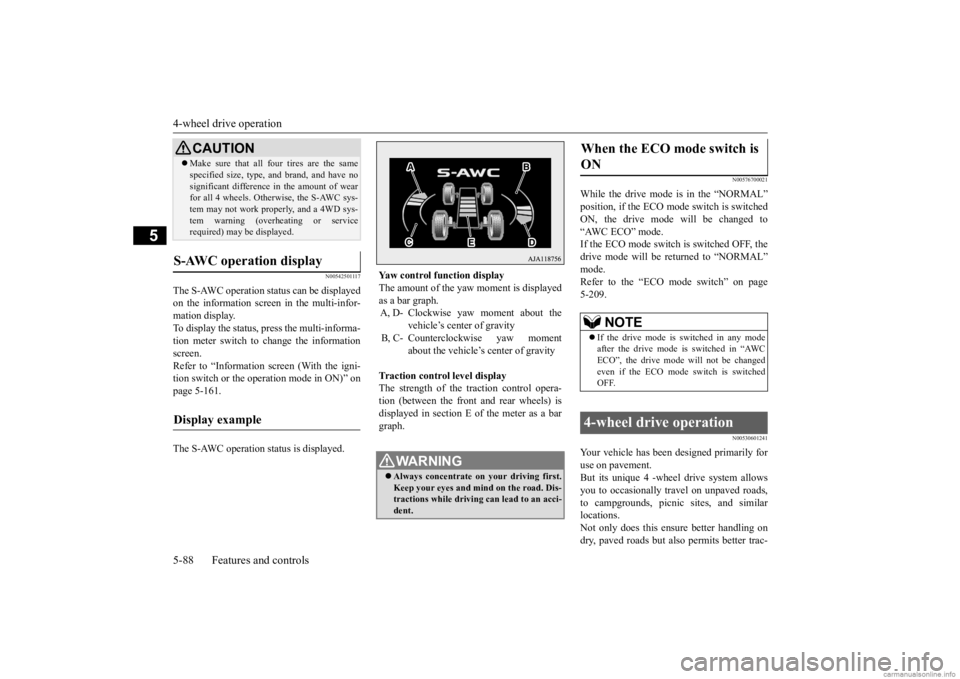
The S-AWC operation status can be displayed on the information screen in the multi-infor-mation display. To display the status,
press the multi-informa-
tion meter switch to change the informationscreen. Refer to “Information screen (With the igni- tion switch or the operation mode in ON)” onpage 5-161. The S-AWC operation status is displayed.
N00576700021
While the drive mode is in the “NORMAL” position, if the ECO mode switch is switchedON, the drive mode will be changed to “AWC ECO” mode. If the ECO mode switch is switched OFF, thedrive mode will be returned to “NORMAL” mode. Refer to the “ECO mode switch” on page 5-209.
N00530601241
Your vehicle has been designed primarily foruse on pavement. But its unique 4 -wheel
drive system allows
you to occasionally travel on unpaved roads, to campgrounds, picnic
sites, and similar
locations.Not only does this ensu
re better handling on
dry, paved roads but also permits better trac-
Make sure that all four tires are the same specified size, type, a
nd brand, and have no
significant difference
in the amount of wear
for all 4 wheels. Otherwise, the S-AWC sys- tem may not work properly, and a 4WD sys- tem warning (overh
eating or service
required) may be displayed.
S-AWC operation display
Display example
CAUTION
Yaw control function display The amount of the yaw moment is displayed as a bar graph. A, D- Clockwise yaw
moment about the
vehicle’s center of gravity
B, C- Counterclockwise yaw moment
about the vehicle’s center of gravity
Traction control level display The strength of the traction control opera-tion (between the front
and rear wheels) is
displayed in section E of the meter as a bar graph.
WA R N I N G Always concentrate on your driving first. Keep your eyes and mi
nd on the road. Dis-
tractions while driving
can lead to an acci-
dent.
When the ECO mode switch is ON
NOTE
If the drive mode is switched in any mode after the drive mode is switched in “AWCECO”, the drive mode
will not be changed
even if the ECO mode switch is switched OFF.
4-wheel drive operation
BK0278200US.book 88 ページ 2019年4月10日 水曜日 午前10時59分
Page 170 of 443
4-wheel drive operation
Features and controls 5-89
5
tion when driving on sl
ippery, wet or snow-
covered roads and when moving out of mud.But it is not suitable
for heavy off road use or
towing in rough conditions. It is particularly im
portant to note that 4-
wheel drive may not give sufficient hill climbing ability and engine braking on steep slopes. You should try to avoid driving onsteep slopes. Also, you must exercise caution when driving on sand and mud and when driving through water because sufficie
nt traction may not be
available in certain circumstances.Please avoid driving the vehicle through areas where the tires may get stuck in deep sand or mud.
When turning a sharp corner in “4WD LOCK” (Electronically controlled 4WD) or“GRAVEL” (S-AWC) position at low speed, a slight difference in
steering may be experi-
enced similar to feeling as if the brakes wereapplied. This is called tight corner braking and results from each of the four tires being at a different distance from the corner. The phe-nomenon is typical of 4-wheel drive vehicles. If this occurs, either straighten out the steer- ing wheel or change to another mode. Set the drive mode-selector to “4WD AUTO”, “4WD LOCK” (Electronically con-trolled 4WD) or “SNOW” (S-AWC) in accor- dance with the road conditions, and then gradually depress the ac
celerator pedal for a
smooth start.
WA R N I N G Do not over-rely on th
e 4-wheel drive vehi-
cles. Even 4-wheel drive vehicles have lim- its to the system and ability to maintaincontrol and traction.
Reckless driving may
lead to accidents. Always drive carefully, taking account of the road conditions. Improperly operating
this vehicle on or
off-pavement can cause an accident orrollover in which you
and your passengers
could be seriously
injured or killed.
• Follow all instructions and guidelines in the owner’s manual.• Keep your speed low and do not drivefaster than conditions.
NOTE
Driving on rough roads can be hard on a vehicle. Before you le
ave the pavement, be
sure all scheduled ma
intenance and service
has been done, and that
you have inspected
your vehicle. Pay spec
ial attenti
on to the
condition of the tires, a
nd check the tire pres-
sures. Mitsubishi Motors is not
responsible to the
operator for any damage or injury caused or liability incurred by improper and negligent operation of a vehicl
e. All techniques of
vehicle operation depe
nd on the skill and
experience of the oper
ator and other partici-
pating parties. Any de
viation from the rec-
ommended operating instru
ctions above is at
their own risk. Note that the stopping distance required of the 4-wheel drive vehicl
e differs very little
from that of the front-wheel drive vehicle.When driving on a snow-covered road or a slippery, muddy surface,
make sure that you
keep a sufficient dist
ance between your vehi-
cle and the one ahead of you. The driving posture should be more upright; adjust the seat to a good position for easy steering and pedal operati
on. Be sure to wear
the seat belt. After driving on rough roads, check each part of the vehicle and wash it thoroughlywith water. Refer to the “Inspection and maintenance following rough road opera- tion” section and “Vehic
le care and Mainte-
nance” sections.
CAUTION Setting the drive mode-selector to “4WD LOCK” (Electronically
controlled 4WD) or
“GRAVEL” (S-AWC) position to drive ondry paved road will in
crease fuel consump-
tion, with possible
noise generation.
Turning sharp corners On snowy or icy roads
BK0278200US.book 89 ページ 2019年4月10日 水曜日 午前10時59分
Page 171 of 443
4-wheel drive operation 5-90 Features and controls
5
Set the drive mode-selector to “4WD LOCK” (Electronically controlled 4WD) or“GRAVEL” (S-AWC) and then gradually depress the accelerator pedal for a smooth start. Keep the pressure on the acceleratorpedal as constant as pos
sible, and drive at low
speed.
Your vehicle may not pr
ovide sufficient hill
climbing ability and e
ngine braking on steep
slope. Avoid driving on steep slopes even though the vehicle is an 4-wheel drive vehi-cle.
N00537800085
If the electrical circuits become wet, furtheroperation of the vehicl
e will be impossible;
therefore, avoid driv
ing through water unless
absolutely necessary. If driving through wateris unavoidable, use th
e following procedure:
NOTE
The use of snow tires is recommended. Maintain a safe distan
ce between vehicles,
avoid sudden braking,
and use engine brak-
ing (downshifting).CAUTION Avoid sudden braking,
sudden ac
celeration
and sharp turning. Skidding occurs and con-trol of the vehicl
e could be lost.
Driving on sandy or muddy roads
CAUTION Do not force the vehicle or drive recklessly on sandy surfaces. In comparison with nor-mal road surfaces, th
e engine and other
drive-system components are put under excessive strain when driving on such a sur-face. This could le
ad to accidents.
If any of the follow
ing conditions occur
while the vehicle is
being driven, immedi-
ately park your vehicle
in a safe place and
follow these procedures:• If the engine coolan
t temperature display
flashes on the information screen in the multi-information display or the engine power drops suddenly. Refer to “Engine overh
eating” on page 8-4.
• If the “ ” warning
display and “SLOW
DOWN” or the “ ” warning display and “SERVICE REQUIRED” appear on the information screen in the multi-informationdisplay. Refer to “Warning di
splay” on page 5-72,
5-79.WA R N I N G When attempting to rock your vehicle out of a stuck position, be
sure that the area
around the vehicle is clear of people andphysical objects. The rocking motion may cause the vehicle to suddenly launch for- ward/backward, caus
ing injury or dam-
age to nearby people or objects.CAUTION
NOTE
Avoid sudden braking,
sudden ac
celeration
and sharp turning; such operations couldresult in the vehi
cle becoming stuck.
If the vehicle become
s stuck in sandy or
muddy roads, it can often be moved with arocking motion. Move the selector lever alternately between the “D” (DRIVE) and “R” (REVERSE) positions while pressinglightly on the ac
celerator pedal.
Driving on rough road can cause rust on the vehicle; wash the ve
hicle thoroughly as soon
as possible after such use.
Climbing/descending sharp grades Driving through water
BK0278200US.book 90 ページ 2019年4月10日 水曜日 午前10時59分
Page 173 of 443
Service brake 5-92 Features and controls
5
N00517500275
Overuse of the brake can cause weakening, resulting in poor brake response and prema- ture wear of the brake pads.When driving down a long or steep hill, use engine braking by downshifting.
CAUTION Always use tires of th
e same size, type, and
brand that have no wear differences. Usingtires of different size, type, brands or degreeof wear, will increase the differential oil tem- perature and result in possible damage to the driving system. Further, the drive train willbe subject to excessi
ve loading, possibly
leading to oil leakage,
component seizure, or
other serious failures.
To w i n g
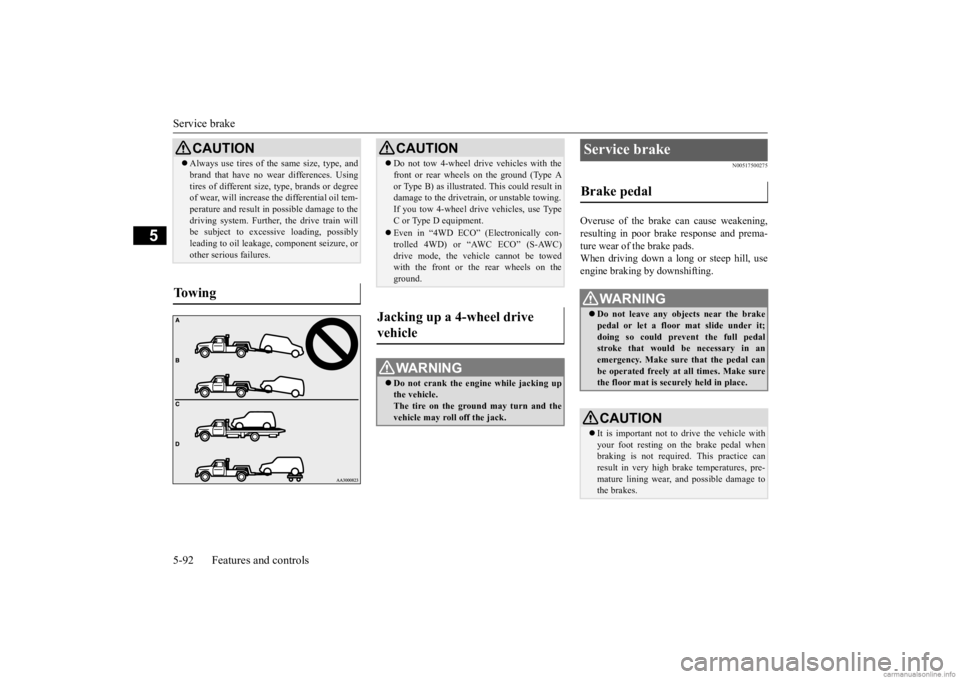
CAUTION Do not tow 4-wheel drive vehicles with the front or rear wheels on the ground (Type Aor Type B) as illustrated. This could result indamage to the drivetra
in, or unstable towing.
If you tow 4-wheel drive vehicles, use Type C or Type D equipment. Even in “4WD ECO” (Electronically con- trolled 4WD) or “AWC ECO” (S-AWC)drive mode, the vehicle cannot be towed with the front or the rear wheels on the ground.
Jacking up a 4-wheel drive vehicle
WA R N I N G Do not crank the engine while jacking up the vehicle.The tire on the ground may turn and the vehicle may roll off the jack.
Service brake Brake pedal
WA R N I N G Do not leave any obje
cts near the brake
pedal or let a floor
mat slide under it;
doing so could prevent the full pedalstroke that would be necessary in an emergency. Make sure that the pedal can be operated freely at
all times. Make sure
the floor mat is securely held in place.CAUTION It is important not to drive the vehicle with your foot resting on the brake pedal when braking is not required.
This practice can
result in very high brake temperatures, pre-mature lining wear, a
nd possible damage to
the brakes.
BK0278200US.book 92 ページ 2019年4月10日 水曜日 午前10時59分
Page 174 of 443
Brake auto hold (if so equipped)
Features and controls 5-93
5
N00517600364
Your vehicle is equipped with power brakes for more braking force with less brake pedal effort.Your brakes are designed to operate at full capacity, even if the power assist is not being used.If the power assist is not being used, the effort needed to press the brake pedal is greater. If you should lose the power assist for some reason, the brakes will still work. If the power brake unit or either of the twobrake hydraulic systems stops working prop- erly, the rest of the brake system will still work, but the vehicle will not slow down asquickly. You will know this ha
s happened if you find
you need to press the brake down farther, orharder when slowing down or stopping, or if the brake warning light and the warning dis- play in the multi-information display comeon.
N00550700124
The disc brakes have an alarm that makes a metallic squeal when
the brake pads have
worn down enough to need service.If you hear this sound, have the brake pads replaced at an authorized Mitsubishi Motors dealer or a repair facility of your choice.
N00592000080
When the vehicle is st
opped at traffic lights
etc., the vehicle can be
held stationary with
the brake auto hold system even if yourelease your foot from the brake pedal. When the accelerator pedal is depressed, the brakes are released.
Power brakes
WA R N I N G Never coast downhill
with the engine OFF.
Keep the engine running whenever your vehicle is in motion. If you turn off the engine while driving, the power brakebooster will stop wo
rking and your brakes
will not work as well.
If the power assist is lost or if either brake hydraulic system stops working properly,take your vehicle to
an authorized Mit-
subishi Motors dealer or a repair facility of your choice immediately.
Brake pad wear alarm
WA R N I N G Driving with worn brake pads will make it harder to stop, and can cause an accident.
Brake auto hold
(if so equipped)
WA R N I N G
WA R N I N G Do not overly rely on the brake auto hold system. On steep slope, depress the brakepedal firmly because the system may nothold the vehicle stationary. Never leave the vehicle while it is being stopped by the brake auto hold system. When leaving the vehi
cle, apply the park-
ing brake and move th
e selector lever to
the “P” (PARK) position. Do not use brake auto hold system when driving on slippery roads. The system may not hold the vehicle stationary and could result in an accident. NOTE
While operating the brake auto hold system, you may hear an operati
on noise to increase
braking force when the system detected the movement of the vehicl
e. This does not indi-
cate a malfunction.
BK0278200US.book 93 ページ 2019年4月10日 水曜日 午前10時59分
Page 207 of 443
Forward Collision Mitigation System (FCM) (if so equipped) 5-126 Features and controls
5
N00593400094
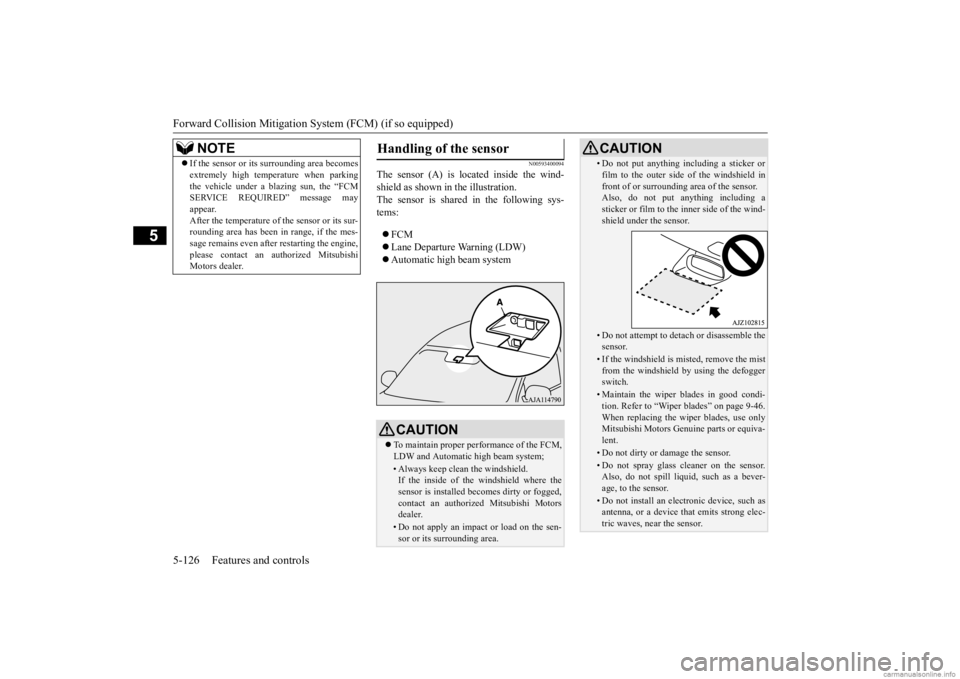
The sensor (A) is lo
cated inside the wind-
shield as shown in the illustration. The sensor is shared in the following sys-tems: FCM Lane Departure Warning (LDW) Automatic high beam system
NOTE
If the sensor or its surrounding area becomes extremely high temperature when parkingthe vehicle under a blazing sun, the “FCMSERVICE REQUIRED” message may appear. After the temperature of the sensor or its sur-rounding area has been in range, if the mes- sage remains even afte
r restarting the engine,
please contact an au
thorized Mitsubishi
Motors dealer.
Handling of the sensor
CAUTION To maintain proper performance of the FCM, LDW and Automatic high beam system;• Always keep clea
n the windshield.
If the inside of the windshield where the sensor is installed be
comes dirty or fogged,
contact an authorized Mitsubishi Motors dealer.• Do not apply an impact or load on the sen-sor or its surrounding area.
• Do not put anything including a sticker or film to the outer side of the windshield infront of or surrounding area of the sensor.Also, do not put anything including a sticker or film to the inner side of the wind- shield under the sensor.• Do not attempt to deta
ch or disassemble the
sensor.• If the windshield is misted, remove the mistfrom the windshield by
using the defogger
switch.• Maintain the wiper blades in good condi-tion. Refer to “Wiper blades” on page 9-46.When replacing the wiper blades, use only Mitsubishi Motors Genui
ne parts or equiva-
lent.• Do not dirty or damage the sensor.• Do not spray glass cleaner on the sensor. Also, do not spill liquid, such as a bever- age, to the sensor.• Do not install an elec
tronic device, such as
antenna, or a device that emits strong elec- tric waves, near the sensor.CAUTION
BK0278200US.book 126 ページ 2019年4月10日 水曜日 午前10時59分
Page 221 of 443
Tire pressure monitoring system 5-140 Features and controls
5
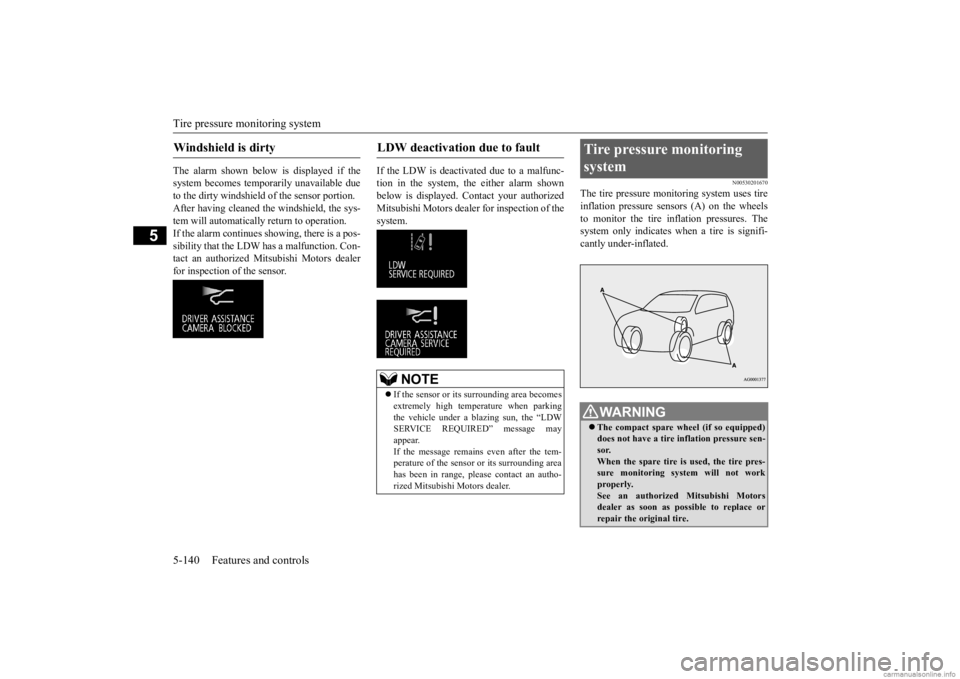
The alarm shown below is displayed if the system becomes temporarily unavailable due to the dirty windshield of the sensor portion. After having cleaned the windshield, the sys-tem will automatically return to operation. If the alarm continues s
howing, there is a pos-
sibility that the LDW
has a malfunction. Con-
tact an authorized Mitsubishi Motors dealer for inspection of the sensor.
If the LDW is deactiva
ted due to a malfunc-
tion in the system, the either alarm shown below is displayed.
Contact your authorized
Mitsubishi Motors dealer for inspection of thesystem.
N00530201670
The tire pressure moni
toring system uses tire
inflation pressure sensors (A) on the wheels to monitor the tire inflation pressures. Thesystem only indicates wh
en a tire is signifi-
cantly under-inflated.
Windshield is dirty
LDW deactivation due to fault
NOTE
If the sensor or its surrounding area becomes extremely high temperature when parking the vehicle under a bl
azing sun, the “LDW
SERVICE REQUIRED” message may appear. If the message remains even after the tem-perature of the sensor or its surrounding area has been in range, plea
se contact an autho-
rized Mitsubishi Motors dealer.
Tire pressure monitoring system
WA R N I N G The compact spare wheel (if so equipped) does not have a tire inflation pressure sen-sor. When the spare tire is used, the tire pres- sure monitoring system will not workproperly. See an authorized
Mitsubishi Motors
dealer as soon as po
ssible to replace or
repair the original tire.
BK0278200US.book 140 ページ 2019年4月10日 水曜日 午前10時59分
Page 238 of 443
Multi Information display
Features and controls 5-157
5
N00554901323
Each time you press this button, there is a sound and the brightness
of the instruments
changes.
N00555001477
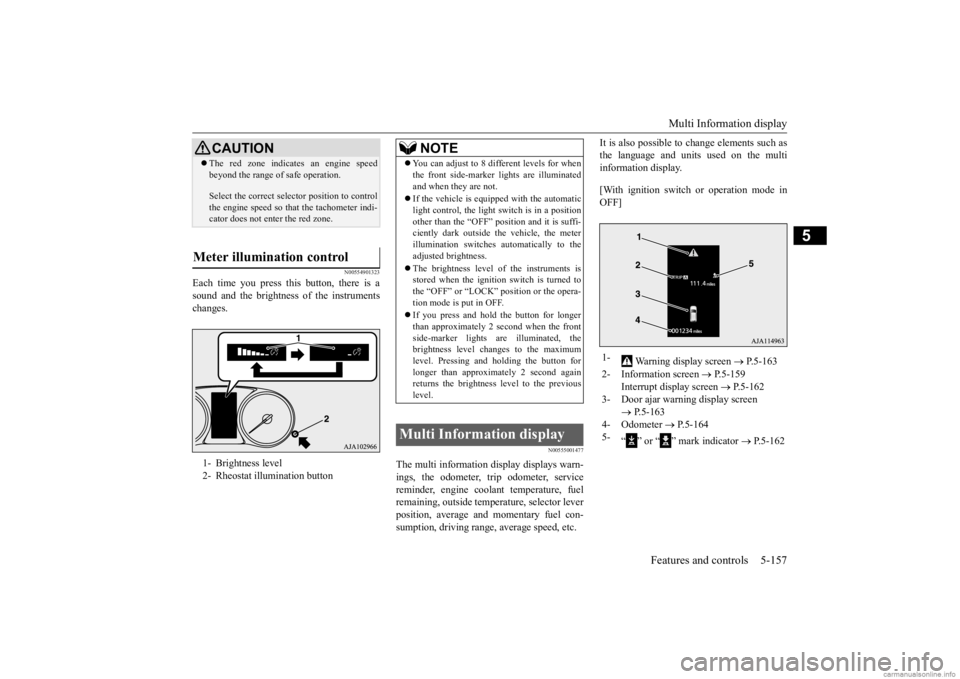
The multi information display displays warn- ings, the odometer, trip odometer, service reminder, engine cool
ant temperature, fuel
remaining, outside temper
ature, selector lever
position, average and momentary fuel con- sumption, driving range
, average speed, etc.
It is also possible to change elements such as the language and units used on the multiinformation display. [With ignition switch
or operation mode in
OFF]
CAUTION The red zone indicates an engine speed beyond the range of safe operation. Select the correct select
or position to control
the engine speed so that
the tachometer indi-
cator does not enter the red zone.
Meter illumination control 1- Brightness level 2- Rheostat illumination button
NOTE
You can adjust to 8 different levels for when the front side-marker
lights are illuminated
and when they are not. If the vehicle is equippe
d with the automatic
light control, the light
switch is in a position
other than the “OFF” pos
ition and it is suffi-
ciently dark outside th
e vehicle, the meter
illumination switches automatically to theadjusted brightness. The brightness level
of the instruments is
stored when the ignition switch is turned to the “OFF” or “LOCK”
position or the opera-
tion mode is put in OFF. If you press and hold the button for longer than approximately 2 second when the frontside-marker lights ar
e illuminated, the
brightness level changes to the maximum level. Pressing and holding the button forlonger than approximately 2 second again returns the brightness
level to the previous
level.
Multi Information display
1-
Warning display screen
P.5-163
2- Information screen
P.5-159
Interrupt display screen
P.5-162
3- Door ajar warning display screen
P.5-163
4- Odometer
P.5-164
5-
“ ” or “ ” mark indicator
P.5-162
BK0278200US.book 157 ページ 2019年4月10日 水曜日 午前10時59分