odometer MITSUBISHI OUTLANDER III 2017 User Guide
[x] Cancel search | Manufacturer: MITSUBISHI, Model Year: 2017, Model line: OUTLANDER III, Model: MITSUBISHI OUTLANDER III 2017Pages: 521, PDF Size: 14.95 MB
Page 265 of 521
Multi Information display - Type 2 5-184 Features and controls
5
N00574801067
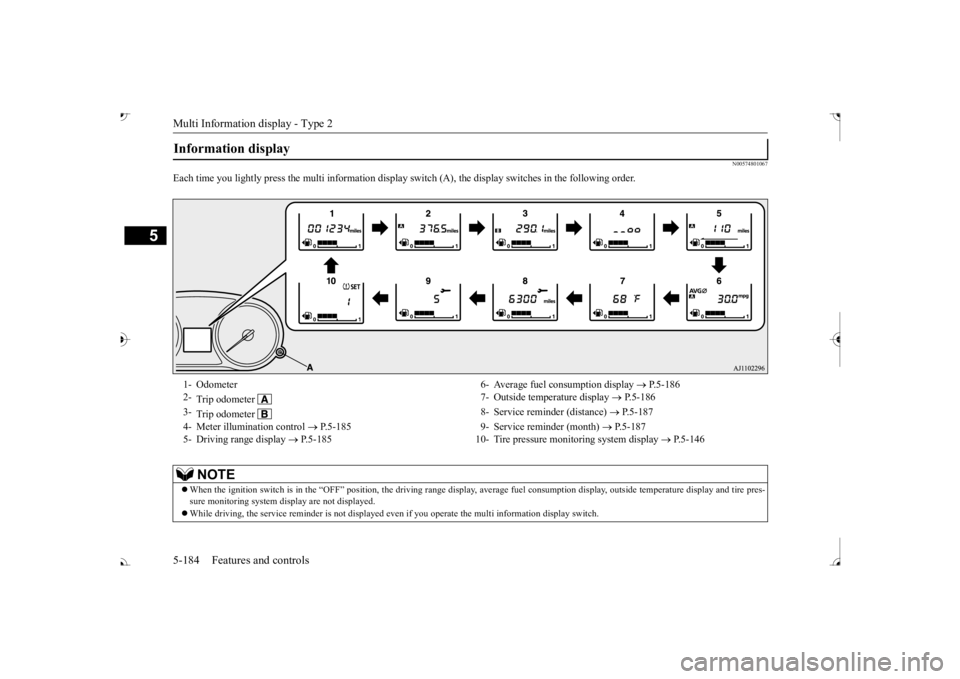
Each time you lightly press th
e multi information display switch (A), th
e display switches in
the following order.
Information display 1- Odometer 6- Average fuel
consumption display
P.5-186
2-
Trip odometer
7- Outside temperature display
P.5-186
3-
Trip odometer
8- Service reminder (distance)
P.5-187
4- Meter illumination control
P.5-185 9- Service reminder (month)
P.5-187
5- Driving range display
P.5-185 10- Tire pressure monitoring system display
P.5-146
NOTE
When the ignition switch is in the “OFF” position, the driving ra
nge display, average fuel consum
ption display, outside tempera
ture display and tire pres-
sure monitoring system di
splay are not displayed.
While driving, the service reminder is
not displayed even if you operate th
e multi information display switch.
BK0239700US.book 184 ページ 2016年6月16日 木曜日 午前10時58分
Page 266 of 521
Multi Information display - Type 2
Features and controls 5-185
5
N00574901039
The odometer indicates the total distance the vehicle has traveled.
N00575001037
The trip odometer indicates the distance trav-eled between two points. To return the display to 0, hold down the multi information display switch for about 2 seconds or more. Only the currently dis- played value wi
ll be reset.
Example If trip odometer is displayed, only tripodometer will be reset.
Both trip odometers and can count up to 9999.9 m
iles/kilometers.
When a trip odometer goes past 9999.9miles/kilometers, it returns to 0.0 miles/ kilometers. When disconnecting th
e battery terminal,
the memories of trip odometer displays
and are cleared, and their displays
return to “0.0 miles/kilometers”.
N00578900030
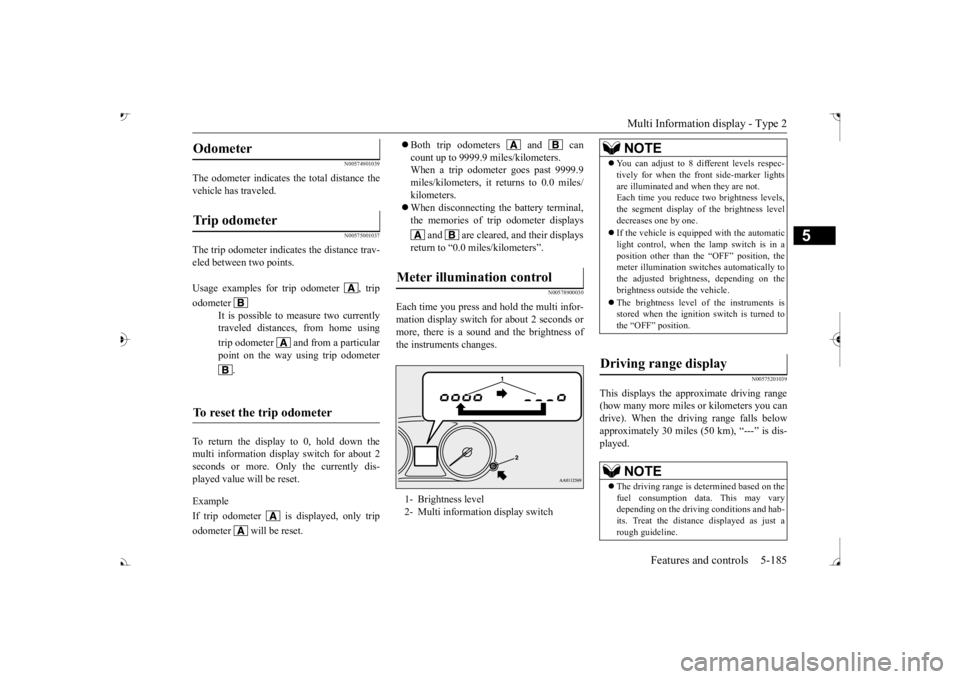
Each time you press a
nd hold the multi infor-
mation display switch for about 2 seconds ormore, there is a sound and the brightness of the instruments changes.
N00575201039
This displays the approximate driving range (how many more miles or
kilometers you can
drive). When the driving range falls below approximately 30 miles (
50 km), “---” is dis-
played.
Odometer Trip odometer Usage examples for trip odometer , trip odometer
It is possible to
measure two currently
traveled distances, from home using trip odometer and from a particular point on the way using trip odometer
.
To reset the trip odometer
Meter illumination control 1- Brightness level 2- Multi information display switch
NOTE
You can adjust to 8 di
fferent levels respec-
tively for when the front side-marker lightsare illuminated and when they are not.Each time you reduce tw
o brightness levels,
the segment display of
the brightness level
decreases one by one. If the vehicle is equi
pped with the automatic
light control, when the lamp switch is in aposition other than the
“OFF” position, the
meter illumination switches automatically to the adjusted bright
ness, depending on the
brightness outsi
de the vehicle.
The brightness level of the instruments is stored when the ignition switch is turned to the “OFF” position.
Driving range display
NOTE
The driving range is determined based on the fuel consumption data. This may vary depending on the drivi
ng conditions and hab-
its. Treat the distance displayed as just arough guideline.
BK0239700US.book 185 ページ 2016年6月16日 木曜日 午前10時58分
Page 271 of 521
Multi Information display - Type 2 5-190 Features and controls
5
N00557101179
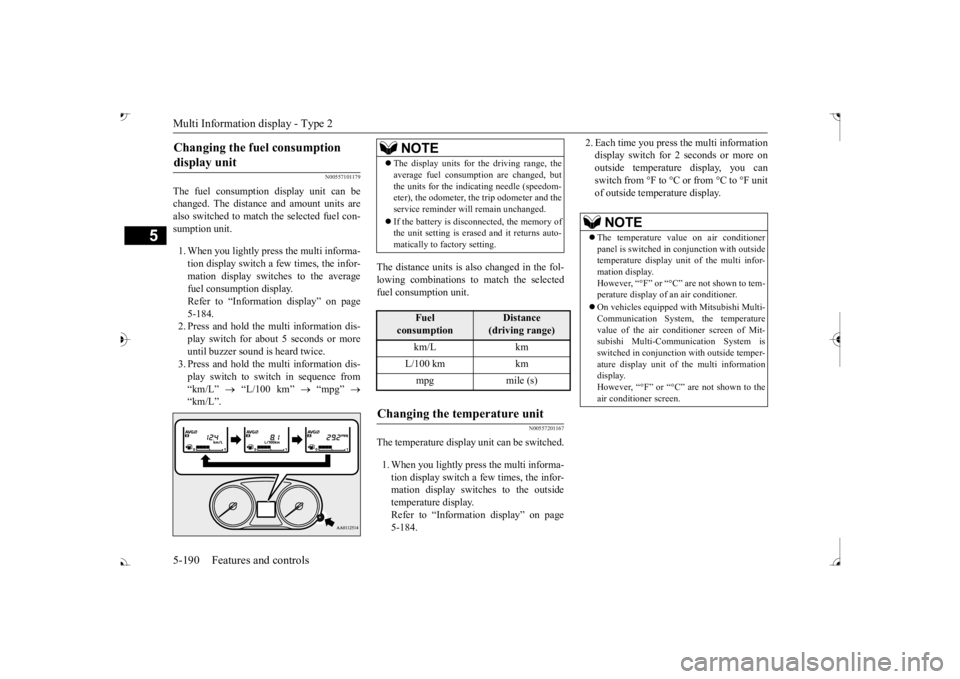
The fuel consumption display unit can be changed. The distance and amount units are also switched to match the selected fuel con- sumption unit. 1. When you lightly press the multi informa- tion display switch a few times, the infor- mation display switches to the average fuel consumption display. Refer to “Information display” on page 5-184.2. Press and hold the multi information dis- play switch for about 5 seconds or more until buzzer sound is
heard twice.
3. Press and hold the multi information dis- play switch to swit
ch in sequence from
“km/L”
“L/100 km”
“mpg”
The distance units is also changed in the fol- lowing combinations to match the selected fuel consumption unit.
N00557201167
The temperature display unit can be switched. 1. When you lightly press the multi informa- tion display switch a few times, the infor- mation display switches to the outsidetemperature display. Refer to “Information display” on page 5-184.
2. Each time you press the multi information display switch for 2 seconds or more onoutside temperatur
e display, you can
switch from °F to °C or from °C to °F unit of outside temperature display.
Changing the fuel consumption display unit
NOTE
The display units for the driving range, the average fuel consumption are changed, butthe units for the indica
ting needle (speedom-
eter), the odometer, the trip odometer and the service reminder will
remain unchanged.
If the battery is disconnected, the memory of the unit setting is erased and it returns auto- matically to factory setting.
Fuel
consumption
Distance
(driving range)
L/100 km km mpg mile (s)
Changing the temperature unit
NOTE
The temperature value on air conditioner panel is switched in
conjunction with outside
temperature display unit of the multi infor- mation display.However, “°F” or “°C” are not shown to tem- perature display of
an air conditioner.
On vehicles e
quipped with Mitsubishi Multi-
Communication System, the temperature value of the air condi
tioner screen of Mit-
subishi Multi-Communication System is switched in conjunction
with outside temper-
ature display unit of
the multi information
display. However, “°F” or “°C” air conditioner screen.
BK0239700US.book 190 ページ 2016年6月16日 木曜日 午前10時58分