change time MITSUBISHI OUTLANDER III 2017 Owner's Manual
[x] Cancel search | Manufacturer: MITSUBISHI, Model Year: 2017, Model line: OUTLANDER III, Model: MITSUBISHI OUTLANDER III 2017Pages: 521, PDF Size: 14.95 MB
Page 214 of 521
Blind Spot Warning (BSW) (with Lane Change Assist) (if so equipped)
Features and controls 5-133
5
N00593500037
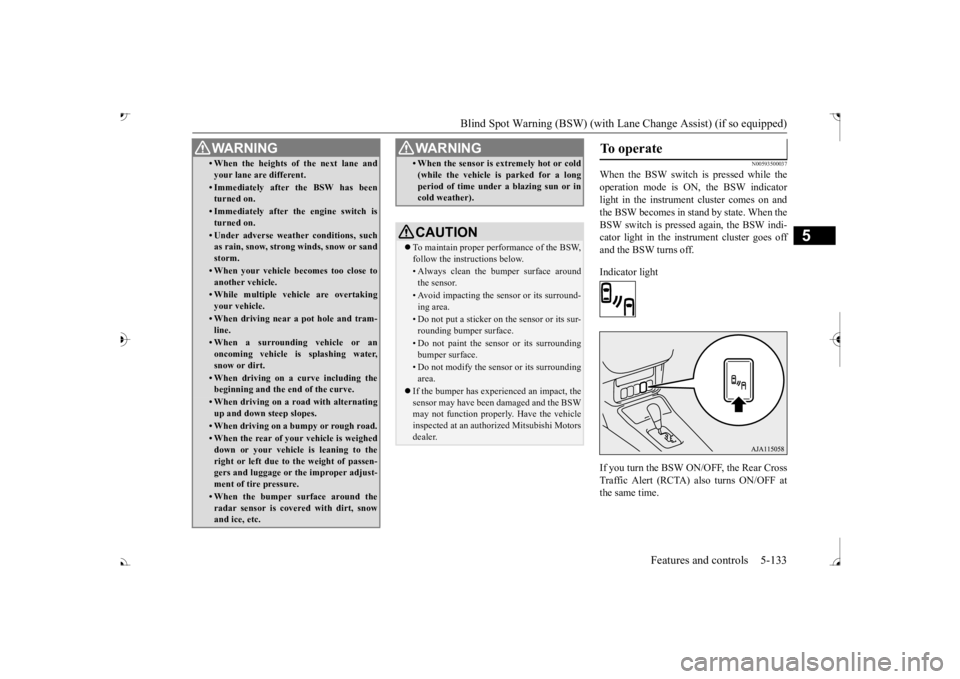
When the BSW switch is pressed while the operation mode is ON, the BSW indicator light in the instrument cluster comes on andthe BSW becomes in stand by state. When the BSW switch is pressed again, the BSW indi- cator light in the instrument cluster goes offand the BSW turns off. Indicator light If you turn the BSW ON/OFF, the Rear Cross Traffic Alert (RCTA) also turns ON/OFF atthe same time.
• When the heights of the next lane and your lane are different.• Immediately after the BSW has been turned on.• Immediately after the engine switch isturned on.• Under adverse weather conditions, suchas rain, snow, strong winds, snow or sand storm.• When your vehicle becomes too close toanother vehicle.• While multiple ve
hicle are overtaking
your vehicle.• When driving near a pot hole and tram-line.• When a surroundin
g vehicle or an
oncoming vehicle is splashing water,snow or dirt.• When driving on a
curve including the
beginning and the end of the curve.• When driving on a r
oad with alternating
up and down steep slopes.• When driving on a bumpy or rough road.• When the rear of your vehicle is weigheddown or your vehicle
is leaning to the
right or left due to the weight of passen- gers and luggage or th
e improper adjust-
ment of tire pressure. • When the bumper su
rface around the
radar sensor is covered with dirt, snowand ice, etc.WA R N I N G
• When the sensor is extremely hot or cold(while the vehicle is parked for a longperiod of time unde
r a blazing sun or in
cold weather).CAUTION To maintain proper performance of the BSW, follow the instructions below.• Always clean the bumper surface aroundthe sensor.• Avoid impacting the sensor or its surround-ing area.• Do not put a sticker on the sensor or its sur-rounding bumper surface.• Do not paint the sensor or its surroundingbumper surface.• Do not modify the sensor or its surroundingarea.
If the bumper has experienced an impact, the sensor may have been
damaged and the BSW
may not function properl
y. Have the vehicle
inspected at an authorized Mitsubishi Motorsdealer.WA R N I N G
To operate
BK0239700US.book 133 ページ 2016年6月16日 木曜日 午前10時58分
Page 215 of 521
Blind Spot Warning (BSW) (with Lane Change Assist) (if so equipped)
5
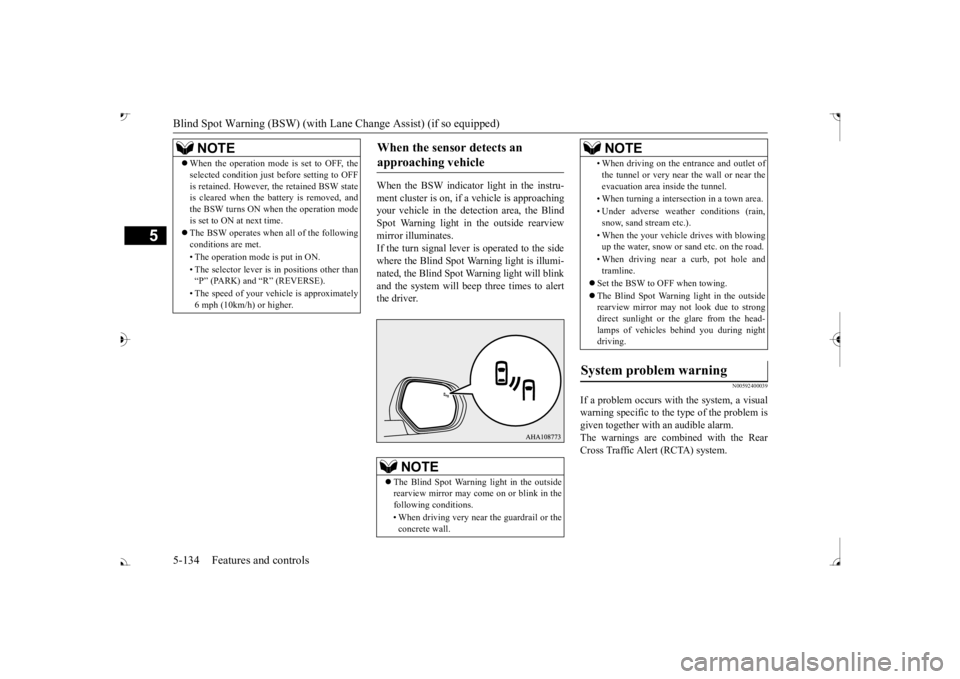
When the BSW indicator light in the instru- ment cluster is on, if
a vehicle is approaching
your vehicle in the detection area, the Blind Spot Warning light in
the outside rearview
mirror illuminates.If the turn signal lever is operated to the side where the Blind Spot Wa
rning light is illumi-
nated, the Blind Spot Wa
rning light will blink
and the system will beep three times to alert the driver.
N00592400039
If a problem occurs with the system, a visualwarning specific to the type of the problem isgiven together with an audible alarm. The warnings are combined with the Rear Cross Traffic Alert (RCTA) system.
NOTE
When the operation mode is set to OFF, the selected condition just before setting to OFFis retained. However, the retained BSW stateis cleared when the battery is removed, and the BSW turns ON when the operation mode is set to ON at next time. The BSW operates when all of the following conditions are met. • The operation mode
is put in ON.
• The selector lever is
in positions other than
Page 227 of 521
Tire pressure monitoring system 5-146 Features and controls
5
N00584300026
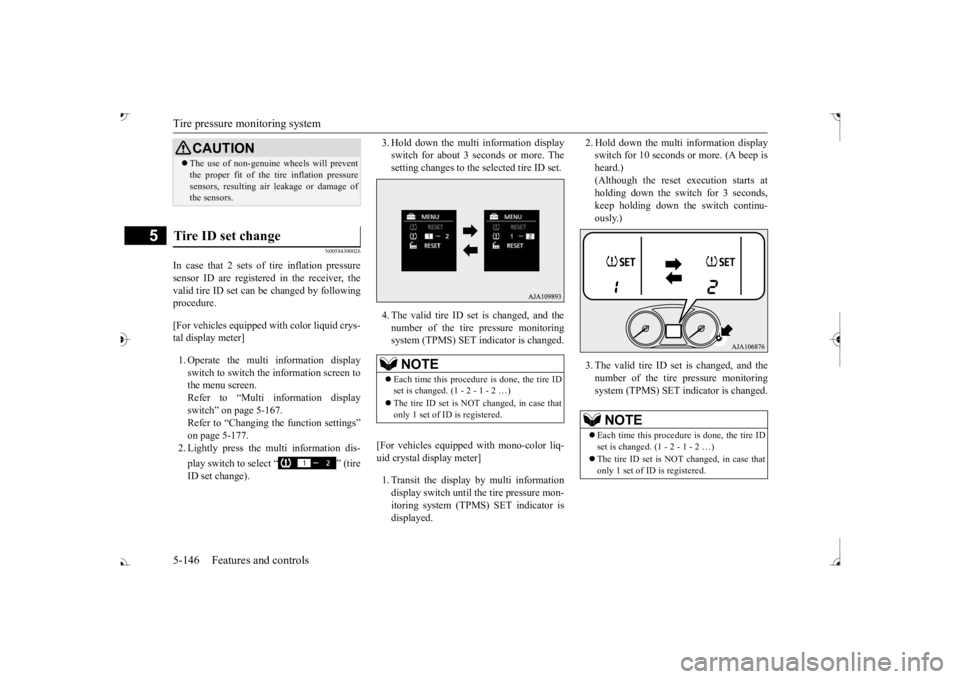
In case that 2 sets of tire inflation pressure sensor ID are registered in the receiver, the valid tire ID set can be changed by following procedure. [For vehicles equipped
with color liquid crys-
tal display meter] 1. Operate the multi information display switch to switch the information screen to the menu screen.Refer to “Multi in
formation display
switch” on page 5-167. Refer to “Changing the function settings”on page 5-177. 2. Lightly press the multi information dis- play switch to select “ ” (tire ID set change).
3. Hold down the multi information display switch for about 3 seconds or more. Thesetting changes to the selected tire ID set. 4. The valid tire ID se
t is changed, and the
number of the tire pressure monitoring system (TPMS) SET in
dicator is changed.
[For vehicles equipped
with mono-color liq-
uid crystal display meter] 1. Transit the display by multi information display switch until th
e tire pressure mon-
itoring system (TPMS) SET indicator isdisplayed.
2. Hold down the multi information display switch for 10 seconds or more. (A beep isheard.) (Although the reset execution starts at holding down the switch for 3 seconds,keep holding down the switch continu- ously.) 3. The valid tire ID set is changed, and the number of the tire
pressure monitoring
system (TPMS) SET i
ndicator is changed.
CAUTIONThe use of non-genuine wheels will prevent the proper fit of the tire inflation pressuresensors, resulting air
leakage or damage of
the sensors.
Tire ID set change
NOTE
Each time this procedure is done, the tire ID set is changed. (1 - 2 - 1 - 2 …) only 1 set of ID is registered.
NOTE
Each time this procedure is done, the tire ID set is changed. (1 - 2 - 1 - 2 …) only 1 set of ID is registered.
BK0239700US.book 146 ページ 2016年6月16日 木曜日 午前10時58分
Page 229 of 521
Parking sensors (Front/Rear) (if so equipped) 5-148 Features and controls
5
“Normal mode” and “Tow
ing hitch mode” for
a vehicle equipped with a towing hitch can beselected.
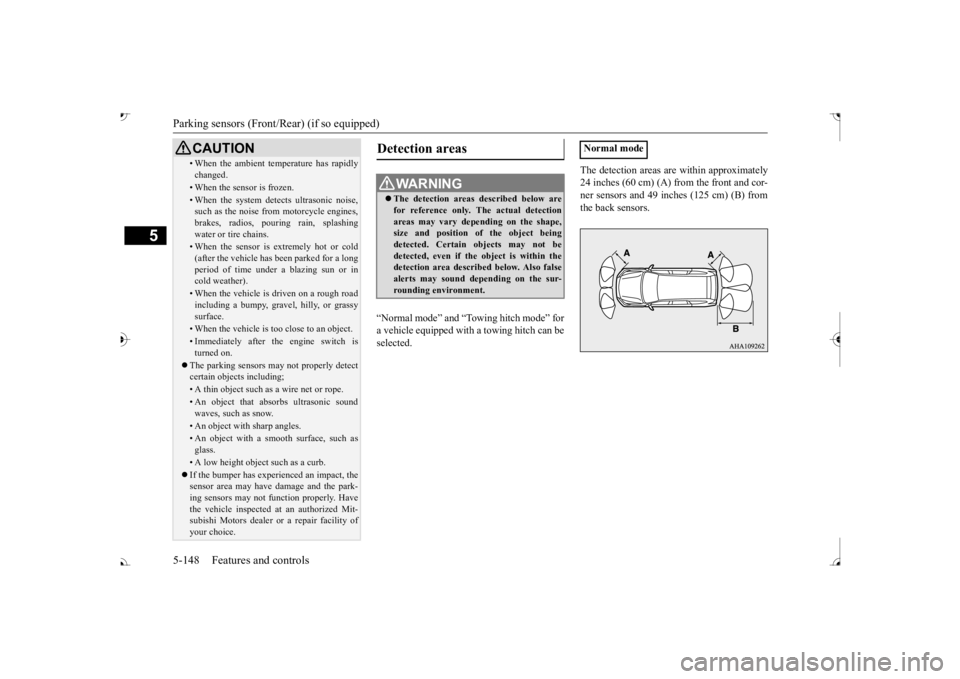
The detection areas are within approximately 24 inches (60 cm) (A) from the front and cor-ner sensors and 49 inches (125 cm) (B) from the back sensors.
• When the ambient temp
erature has rapidly
changed.• When the sensor is frozen.• When the system detects ultrasonic noise,such as the noise from motorcycle engines, brakes, radios, pouring rain, splashing water or tire chains.• When the sensor is extremely hot or cold(after the vehicle has
been parked for a long
period of time under
a blazing sun or in
cold weather).• When the vehicle is driven on a rough roadincluding a bumpy, gravel, hilly, or grassy surface.• When the vehicle is too close to an object.• Immediately after the engine switch is turned on.
The parking sensors may not properly detect certain objects including;• A thin object such as a wire net or rope.• An object that absorbs ultrasonic sound waves, such as snow.• An object with sharp angles.• An object with a sm
ooth surface, such as
glass.• A low height object such as a curb. If the bumper has experienced an impact, the sensor area may have
damage and the park-
ing sensors may not f
unction properly. Have
the vehicle inspected at an authorized Mit- subishi Motors dealer or a repair facility of your choice.CAUTION
Detection areas
WA R N I N G The detection areas described below are for reference only. The actual detectionareas may vary depend
ing on the shape,
size and position of
the object being
detected. Certain objects may not bedetected, even if the object is within the detection area described below. Also false alerts may sound de
pending on the sur-
rounding environment.
Normal mode
BK0239700US.book 148 ページ 2016年6月16日 木曜日 午前10時58分
Page 245 of 521
Multi Information display - Type 1 5-164 Features and controls
5
N00554901248
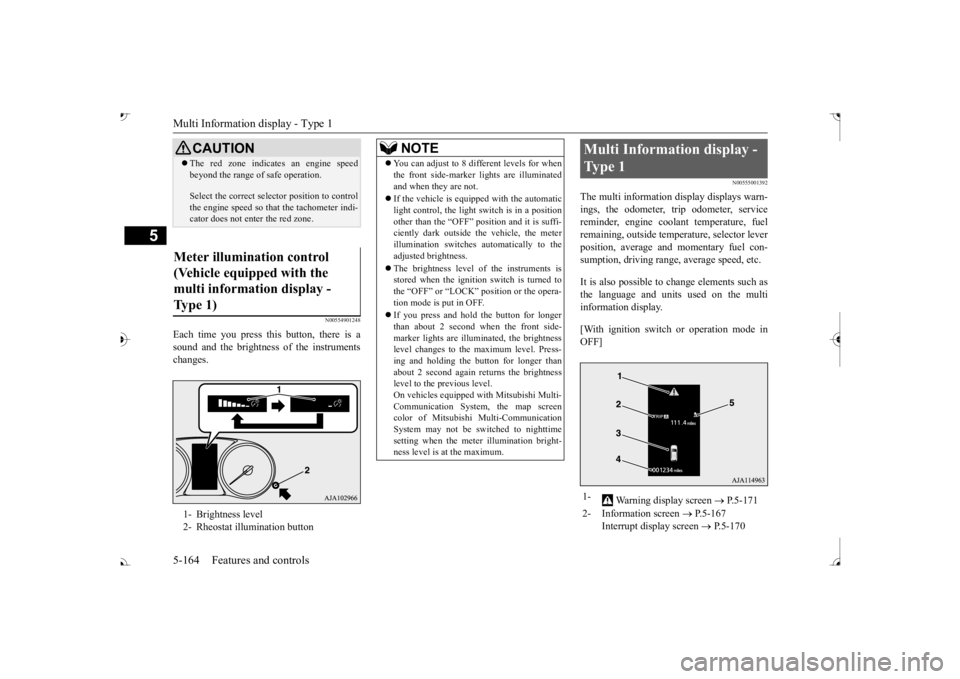
Each time you press this button, there is a sound and the brightness of the instruments changes.
N00555001392
The multi information display displays warn- ings, the odometer, trip odometer, service reminder, engine cool
ant temperature, fuel
remaining, outside temper
ature, selector lever
position, average and momentary fuel con- sumption, driving range, average speed, etc. It is also possible to change elements such as the language and units used on the multi information display. [With ignition switch or operation mode in OFF]
CAUTION The red zone indicate
s an engine speed
beyond the range of
safe operation.
Select the correct selector position to control the engine speed so that
the tachometer indi-
cator does not ente
r the red zone.
Meter illumination control (Vehicle equipped with the multi information display - Type 1) 1- Brightness level 2- Rheostat illumination button
NOTE
You can adjust to 8 different levels for when the front side-marker
lights are illuminated
and when they are not. If the vehicle is equi
pped with the automatic
light control, the light switch is in a positionother than the “OFF” position and it is suffi- ciently dark outside th
e vehicle, the meter
illumination switches automatically to theadjusted brightness. The brightness level of the instruments is stored when the ignition switch is turned to the “OFF” or “LOCK”
position or the opera-
tion mode is put in OFF. If you press and hold the button for longer than about 2 second when the front side-marker lights are illumi
nated, the brightness
level changes to the maximum level. Press- ing and holding the button for longer thanabout 2 second again returns the brightness level to the previous level. On vehicles equipped
with Mitsubishi Multi-
Communication System
, the map screen
color of Mitsubishi Multi-Communication System may not be sw
itched to nighttime
setting when the meter illumination bright- ness level is at the maximum.
Multi Information display - Type 1 1-
Warning display screen
P.5-171
2- Information screen
P.5-167
Interrupt display screen
P.5-170
BK0239700US.book 164 ページ 2016年6月16日 木曜日 午前10時58分
Page 248 of 521
Multi Information display - Type 1
Features and controls 5-167
5
N00555101205
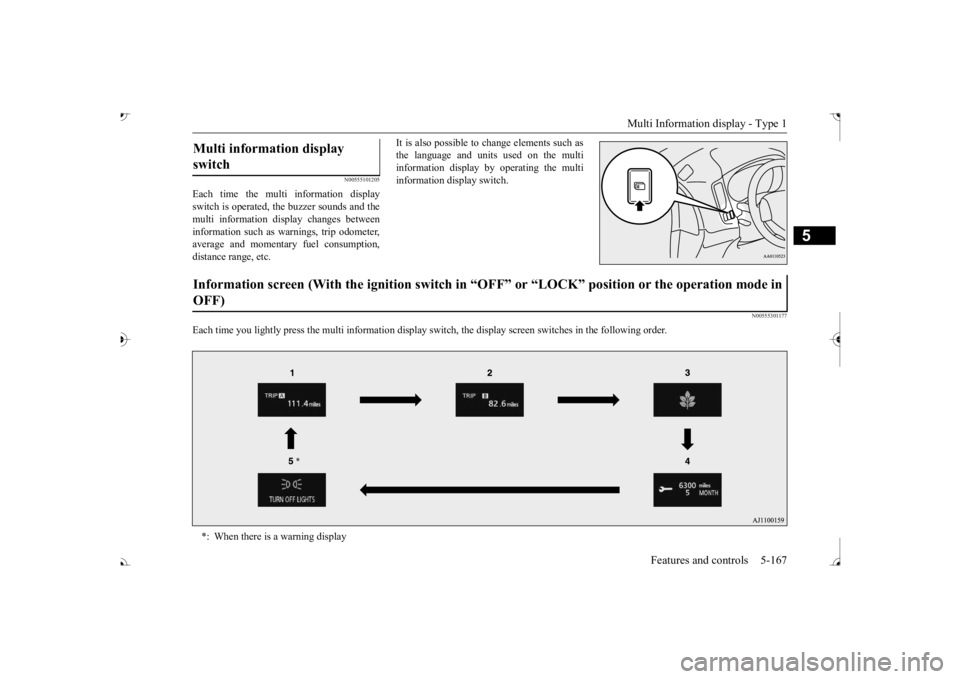
Each time the multi information display switch is operated, th
e buzzer sounds and the
multi information disp
lay changes between
information such as wa
rnings, trip odometer,
average and momentary fuel consumption,distance range, etc.
It is also possible to change elements such as the language and units used on the multiinformation display by operating the multi information display switch.
N00555301177
Each time you lightly press the multi in
formation display switch, th
e display screen switches
in the following order.
Multi information display switch Information screen (With the igniti
on switch in “OFF” or “LOCK” po
sition or the operation mode in
OFF) *: When there is a warning display
BK0239700US.book 167 ページ 2016年6月16日 木曜日 午前10時58分
Page 249 of 521
Multi Information display - Type 1 5-168 Features and controls
5
N00555801244
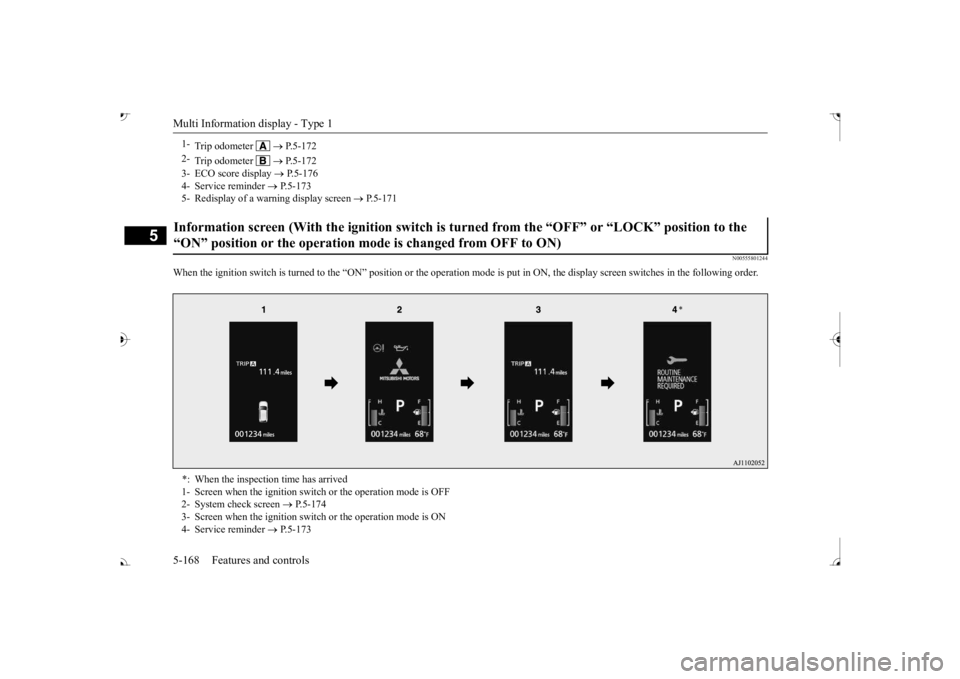
When the ignition switch is turned to the “ON” position or the
operation mode is put in ON, the
display screen switches in the
following order.
1-
Trip odometer
P.5-172
2-
Trip odometer
P.5-172
3- ECO score display
P.5-176
4- Service reminder
P.5-173
5- Redisplay of a warning display screen
P.5-171
Information screen (With the ignition switch is tu
rned from the “OFF” or
“LOCK” position to the
“ON” position or the operation mode is changed from OFF to ON) *: When the inspection time has arrived 1- Screen when the ignition switc
h or the operation mode is OFF
2- System check screen
P.5-174
3- Screen when the ignition switch or the operation mode is ON 4- Service reminder
P.5-173
BK0239700US.book 168 ページ 2016年6月16日 木曜日 午前10時58分
Page 254 of 521
Multi Information display - Type 1
Features and controls 5-173
5
To return the display to 0, hold down the multi information display switch for about 2 seconds or more. Only the currently dis- played value wi
ll be reset.
Example If trip odometer is displayed, only tripodometer will be reset. Both trip odometers and can count up to 9999.9 miles/kilometers.When a trip odometer goes past 9999.9 miles/kilometers, it returns to 0.0 miles/ kilometers. When disconnecting th
e battery terminal,
the memories of trip odometer displays
and are cleared, and their displays
return to “0.0 miles/kilometers”.
N00556701237
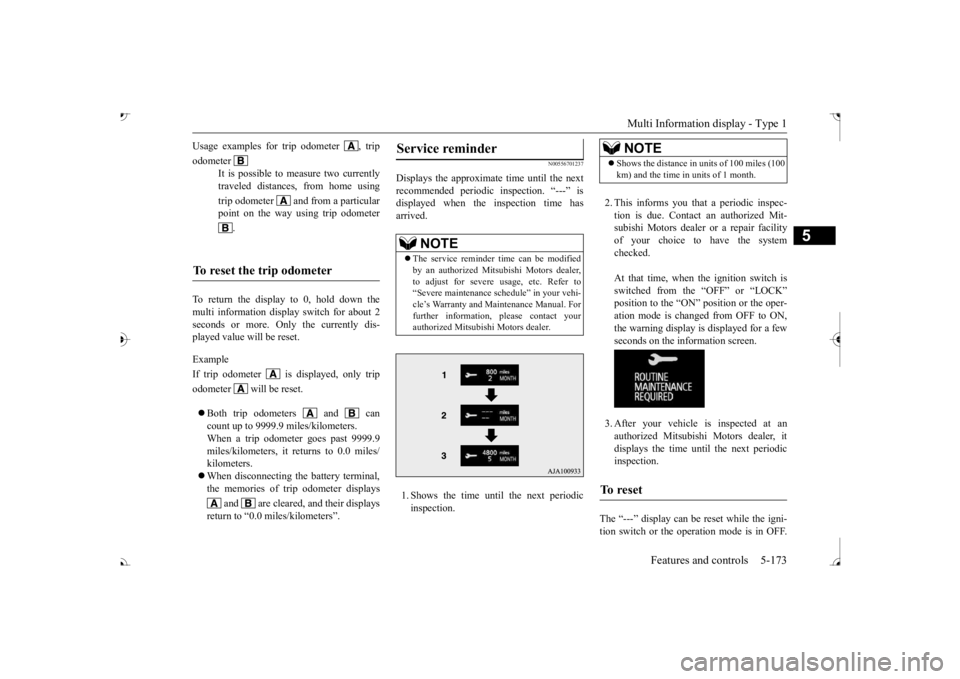
Displays the approximate time until the next recommended periodic
inspection. “---” is
displayed when the inspection time hasarrived. 1. Shows the time until
the next periodic
inspection.
2. This informs you that a periodic inspec- tion is due. Contact
an authorized Mit-
subishi Motors dealer or a repair facilityof your choice to have the system checked. At that time, when the ignition switch is switched from the “OFF” or “LOCK” position to the “ON” position or the oper-ation mode is changed from OFF to ON, the warning display is displayed for a few seconds on the information screen. 3. After your vehicle
is inspected at an
authorized Mitsubishi Motors dealer, it displays the time unt
il the next periodic
inspection.
The “---” display can be
reset while the igni-
tion switch or the operation mode is in OFF.
Usage examples for trip odometer , trip odometer
It is possible to
measure two currently
traveled distances, from home using trip odometer and from a particular point on the way using trip odometer
.
To reset the trip odometer
Service reminder
NOTE
The service reminder time can be modified by an authorized Mitsubishi Motors dealer,to adjust for severe usage, etc. Refer to “Severe maintenance sc
hedule” in your vehi-
cle’s Warranty and Ma
intenance Manual. For
further information,
please contact your
authorized Mitsubishi Motors dealer.
NOTE
Shows the distance in units of 100 miles (100 km) and the time in units of 1 month.
To reset
BK0239700US.book 173 ページ 2016年6月16日 木曜日 午前10時58分
Page 255 of 521
Multi Information display - Type 1 5-174 Features and controls
5
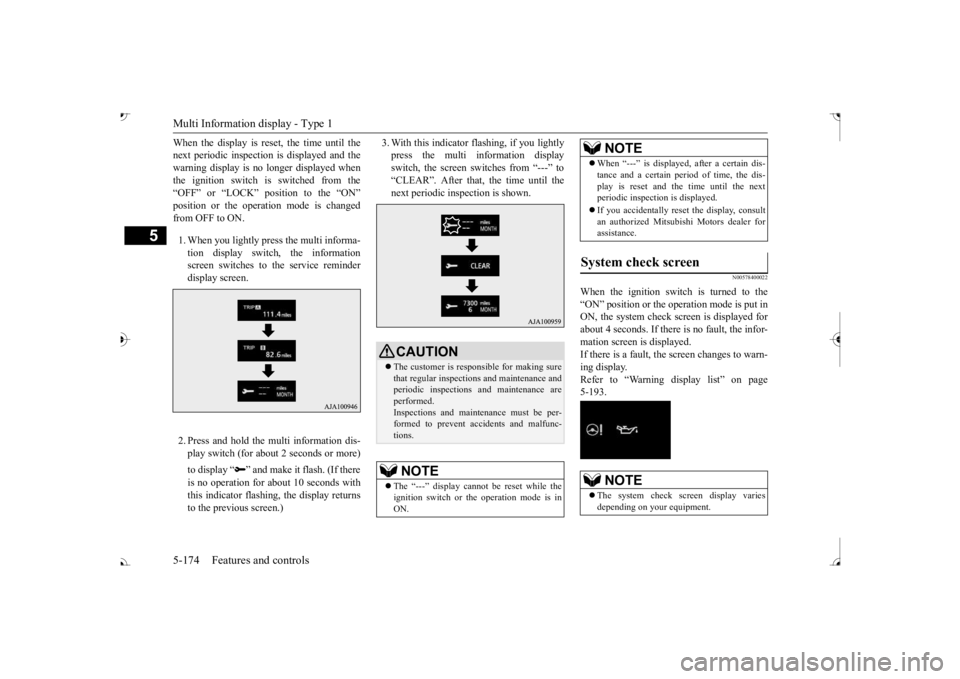
When the display is reset, the time until the next periodic inspection
is displayed and the
warning display is no longer displayed when the ignition switch is switched from the “OFF” or “LOCK” position to the “ON” from OFF to ON. 1. When you lightly press the multi informa- tion display switch, the informationscreen switches to the service reminder display screen. 2. Press and hold the multi information dis- play switch (for about 2 seconds or more) to display “ ” and make it flash. (If there is no operation for
about 10 seconds with
this indicator flashing, the display returns to the previous screen.)
3. With this indicator
flashing, if you lightly
press the multi information displayswitch, the screen switches from “---” to “CLEAR”. After that, the time until the next periodic inspection is shown.
N00578400022
When the ignition switch is turned to the “ON” position or the ope
ration mode is put in
ON, the system check sc
reen is displayed for
about 4 seconds. If there is no fault, the infor- mation screen is displayed. If there is a fault, the screen changes to warn-ing display. Refer to “Warning di
splay list” on page
5-193.
CAUTION The customer is responsible for making sure that regular inspections and maintenance and periodic inspections
and maintenance are
performed.Inspections and mainte
nance must be per-
formed to prevent accidents and malfunc- tions.NOTE
The “---” display cannot
be reset while the
ignition switch or the operation mode is inON.
When “---” is displayed, after a certain dis- tance and a certain pe
riod of time, the dis-
play is reset and th
e time until the next
periodic inspection is displayed. If you accidentally reset
the display, consult
an authorized Mitsubishi Motors dealer for assistance.
System check screen
NOTE
The system check screen display varies depending on your equipment.NOTE
BK0239700US.book 174 ページ 2016年6月16日 木曜日 午前10時58分
Page 258 of 521
![MITSUBISHI OUTLANDER III 2017 Owners Manual Multi Information display - Type 1
Features and controls 5-177
5
[When the ignition switch is turned to the “OFF” or “LOCK” position or the operationmode is put in OFF] The display shows the](/img/19/58146/w960_58146-257.png "MITSUBISHI OUTLANDER III 2017 Owners Manual Multi Information display - Type 1
Features and controls 5-177
5
[When the ignition switch is turned to the “OFF” or “LOCK” position or the operationmode is put in OFF] The display shows the")
Multi Information display - Type 1
Features and controls 5-177
5
[When the ignition switch is turned to the “OFF” or “LOCK” position or the operationmode is put in OFF] The display shows the overall ECO score the function has counted from the time when theignition switch is turn
ed to the “ON” position
to the time when it is turned to the “OFF” or “LOCK” or “ACC” position, or from the timewhen the operation mode is set to “ON” to the time when it is set to “OFF”.
N00556801270
1. Park your vehicle in a safe place.Firmly apply the parking brake and move the selector lever into the “P” (PARK)position.
2. When you lightly press the multi informa- tion meter switch, the information screenswitches to the function setting screen. Refer to “Information screen” on page 5-169. 3. Press and hold the multi information dis- play switch (for about 2 seconds or more) to switch from the setting mode screen to the menu screen.
4. Select the item to change on the menu screen and change to
the desired setting.
For further details on the operation meth- ods, refer to the following sections. Refer to “Changing the reset mode for average fuel consumption and average speed” on page 5-178.Refer to “Changing the fuel consumption display unit” on page 5-179. Refer to “Changing the temperature unit”on page 5-180. Refer to “Changing the display language” on page 5-180.Refer to “Changing the language on other system to match the multi information display” on page 5-181.Refer to “Operation
sound setting” on
page 5-181.
Changing the function settings
ECO drive level
Low High
CAUTION For safety, stop the vehicle before operating. While driving, even if you operate the multi information display switch, the function set- ting screen is not displayed.
NOTE
To return the menu screen to the function set- ting screen, press and hold the multi infor-mation display switch
(for about 2 seconds
or more). If no operations are made within about 30 seconds of the menu screen being displayed, the display returns to the function setting screen.
BK0239700US.book 177 ページ 2016年6月16日 木曜日 午前10時58分