display MITSUBISHI OUTLANDER III 2018 Owners Manual
[x] Cancel search | Manufacturer: MITSUBISHI, Model Year: 2018, Model line: OUTLANDER III, Model: MITSUBISHI OUTLANDER III 2018Pages: 441, PDF Size: 13.71 MB
Page 297 of 441
Headlight leveling swit
ch (if so equipped)
5-216 Features and controls
5
3. Within 60 seconds of turning the ignitionswitch to the “OFF” or “LOCK” positionor putting the operation mode in OFF, pullthe turn signal lever toward you.4. The headlights will come on in the lowbeam setting for approximately 30 sec-onds. After the headlights go off, theheadlights can be turned on again in thelow beam setting for approximately 30seconds by pulling the turn signal levertoward you within 60 seconds of turningthe ignition switch to the “OFF” or“LOCK” position or putting the operationmode in OFF. To turn on the headlightsagain after 60 seconds of turning the igni-tion switch to the “OFF” or “LOCK”position or putting th
e operation mode in
OFF, repeat the process from step 1.
N00537101115
The direction of the headlight beam (thedirection in which th
e light shines) alters
according to the number of people and theload in the vehicle. Lo
wer the headlight angle
if it is too high due to the number of people
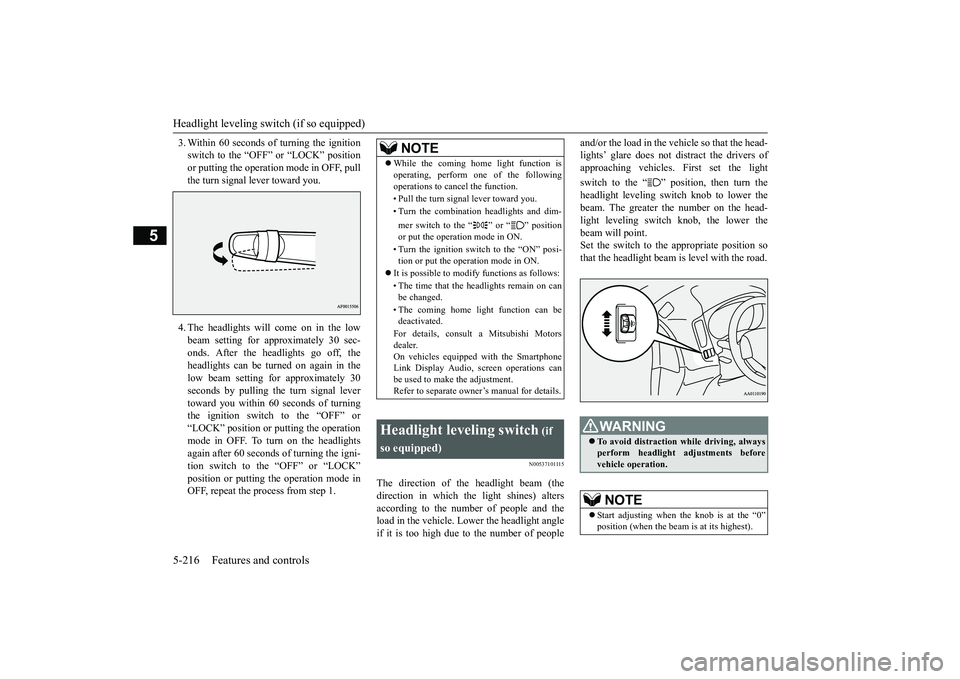
and/or the load in the vehicle so that the head-lights’ glare does not distract the drivers ofapproaching vehicles. First set the lightswitch to the “ ” position, then turn theheadlight leveling switch knob to lower thebeam. The greater the number on the head-light leveling switch knob, the lower thebeam will point.Set the switch to the appropriate position sothat the headlight beam is level with the road.
NOTE
While the coming home light function isoperating, perform one of the followingoperations to canc
el the function.
• Pull the turn signal lever toward you.• Turn the combination headlights and dim-mer switch to the “ ” or “ ” positionor put the operation mode in ON.• Turn the ignition switch to the “ON” posi-tion or put the opera
tion mode in ON.
It is possible to modify functions as follows:• The time that the headlights remain on canbe changed.• The coming home light function can bedeactivated.For details, consult a Mitsubishi Motorsdealer.On vehicles equipped with the SmartphoneLink Display Audio, sc
reen operations can
be used to make the adjustment.Refer to separate owne
r’s manual for details.
Headlight leveling switch
(if
so equipped)
WA R N I N GTo avoid distraction wh
ile driving, always
perform headlight adjustments beforevehicle operation.NOTE
Start adjusting when the knob is at the “0”
is at its highest).
BK0249100US.book 216 ページ 2017年5月10日 水曜日 午前8時49分
Page 298 of 441

Turn signal lever
Features and controls 5-217
5
N00522601590
When changing lanes, or
to making a gradual
turn, hold the lever in the “lane change” posi-tion (1). It will return
to the neutral position
when you let go. Use the full position (2)when making a normal turn. The lever willreturn to the neutral position when the turn iscomplete. There may be times when the leverdoes not return to the neutral position. Thisusually happens when the steering wheel isturned only slightly. You
can easily return the
lever by hand.Also, when you move the lever to (1) slightlythen release it, the turn signal lights and theindicator light in the instrument cluster willflash three times.
Keep the knob in the “0” position exceptwhen using the knob to lower the headlightbeam angle.Always return the knob to the “0” positionwhen the load is removed and the peoplehave left
the vehicle.
NOTE
Turn signal lever
NOTE
A light in the instrument panel flashes toshow when the front and rear turn signallights are working properly.If this light flashes fa
ster than usual, check
for a burned out turn signal light bulb or mal-functioning connection in the signal.If the panel light does not come on when thelever is moved, check for a blown fuse or aburned out bulb in the panel.Have the system inspected by your autho-rized Mitsubishi Motors dealer or a repairfacility of your choice.It is possible to modi
fy functions as follows:
• Deactivate the turn signal light 3-flashfunction for lane changes.• Adjust the time required to operate thelever for the 3-flash function.See your authorized Mitsubishi Motorsdealer for details.For vehicles equipped with the SmartphoneLink Display Audio, adjustments can bemade using screen ope
rations. For further
details, refer to the
separate owner’s manual.
It is possible to change the tone of a sound-ing buzzer as the turn signal lights flash.[Vehicle equipped with the multi informationdisplay - type 1]Refer to “Changing the turn-signal sound”on page 5-172.[Vehicle equipped with the multi informationdisplay - type 2]See your authorized Mitsubishi Motorsdealer for details.
BK0249100US.book 217 ページ 2017年5月10日 水曜日 午前8時49分
Page 301 of 441
Wiper and washer switch5-220 Features and controls
5
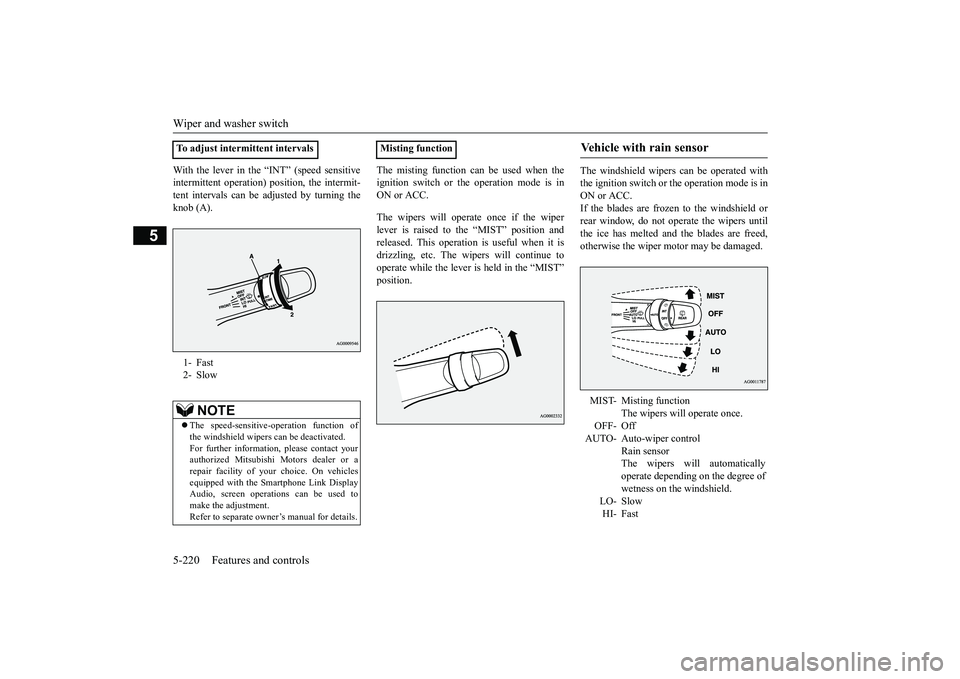
With the lever in the “INT” (speed sensitiveintermittent operation) position, the intermit-tent intervals can be adjusted by turning theknob (A).
The misting function can be used when theignition switch or th
e operation mode is in
ON or ACC.The wipers will operate once if the wiperlever is raised to the “MIST” position andreleased. This operation
is useful when it is
drizzling, etc. The wi
pers will continue to
operate while the lever is held in the “MIST”
The windshield wipers can be operated withthe ignition switch or
the operation mode is in
ON or ACC.If the blades are frozen to the windshield orrear window, do not operate the wipers untilthe ice has melted and the blades are freed,otherwise the wiper mo
tor may be damaged.
To adjust intermittent intervals1- Fast2- Slow
NOTE
The speed-sensitive-
operation function of
the windshield wipers
can be deactivated.
For further information, please contact yourauthorized Mitsubishi Motors dealer or arepair facility of your
choice. On vehicles
equipped with the Sm
artphone Link Display
Audio, screen operati
ons can be used to
make the adjustment.Refer to separate owne
r’s manual for details.
Misting function
Vehicle with rain sensor MIST- Misting function
The wipers will operate once.
OFF- OffAUTO- Auto-wiper control
Rain sensorThe wipers will automaticallyoperate depending on the degree ofwetness on the windshield.
LO- SlowHI- Fast
BK0249100US.book 220 ページ 2017年5月10日 水曜日 午前8時49分
Page 303 of 441
Wiper and washer switch5-222 Features and controls
5
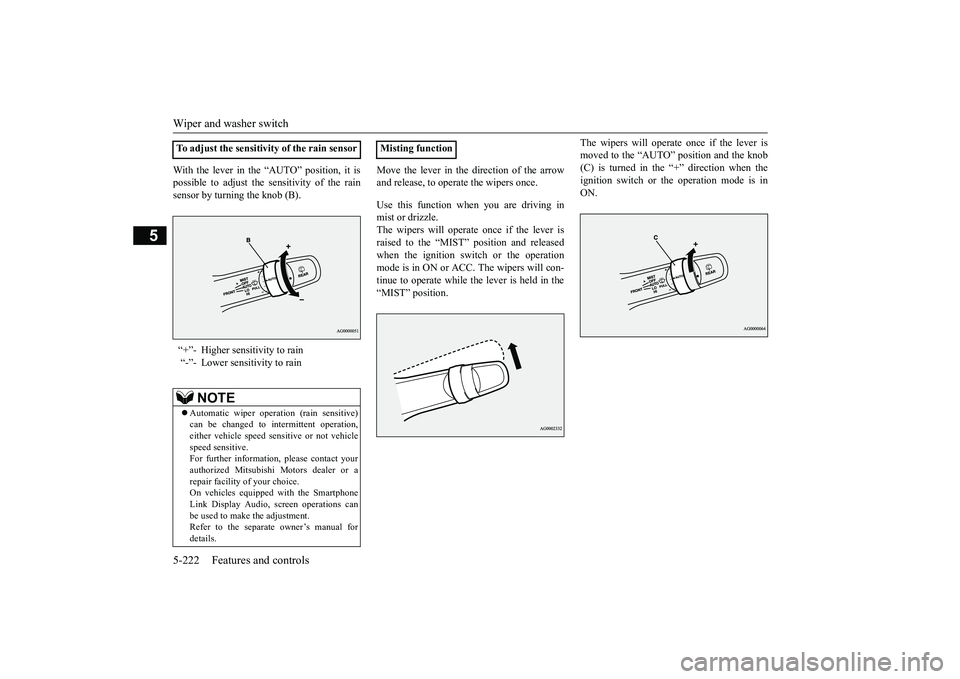
With the lever in the “AUTO” position, it ispossible to adjust the sensitivity of the rainsensor by turning the knob (B).
Move the lever in the direction of the arrowand release, to opera
te the wipers once.
Use this function when you are driving inmist or drizzle.The wipers will operate once if the lever israised to the “MIST” position and releasedwhen the ignition switch or the operationmode is in ON or ACC.
The wipers will con-
tinue to operate while the lever is held in the“MIST” position.
The wipers will operate once if the lever ismoved to the “AUTO” position and the knob(C) is turned in the “+” direction when theignition switch or the operation mode is inON.
To adjust the sensitivity of the rain sensor“+”- Higher sensitivity to rain“-”- Lower sensitivity to rain
NOTE
Automatic wiper operation (rain sensitive)can be changed to in
termittent operation,
either vehicle speed se
nsitive or not vehicle
speed sensitive.For further information, please contact yourauthorized Mitsubishi Motors dealer or arepair facility of your choice.On vehicles equippe
d with the Smartphone
Link Display Audio, sc
reen operations can
be used to make the adjustment.Refer to the separate
owner’s manual for
details.
Misting function
BK0249100US.book 222 ページ 2017年5月10日 水曜日 午前8時49分
Page 304 of 441
Wiper and washer switch
Features and controls 5-223
5
N00504601400
The windshield washer can be operated withthe ignition switch or the operation mode inON or ACC.The washer fluid will be sprayed onto thewindshield by pulling th
e lever toward you.
When the wipers are not in operation or inintermittent operation,
by pulling the lever
toward you, the wipers will operate severaltimes while the washer fluid is being sprayed.
By releasing the lever soon after pulling ittoward you, the washer
fluid will be sprayed
several times while the wipers are operatingseveral times.Intelligent washer will stop operating withany operation of the lever.
N00523201463
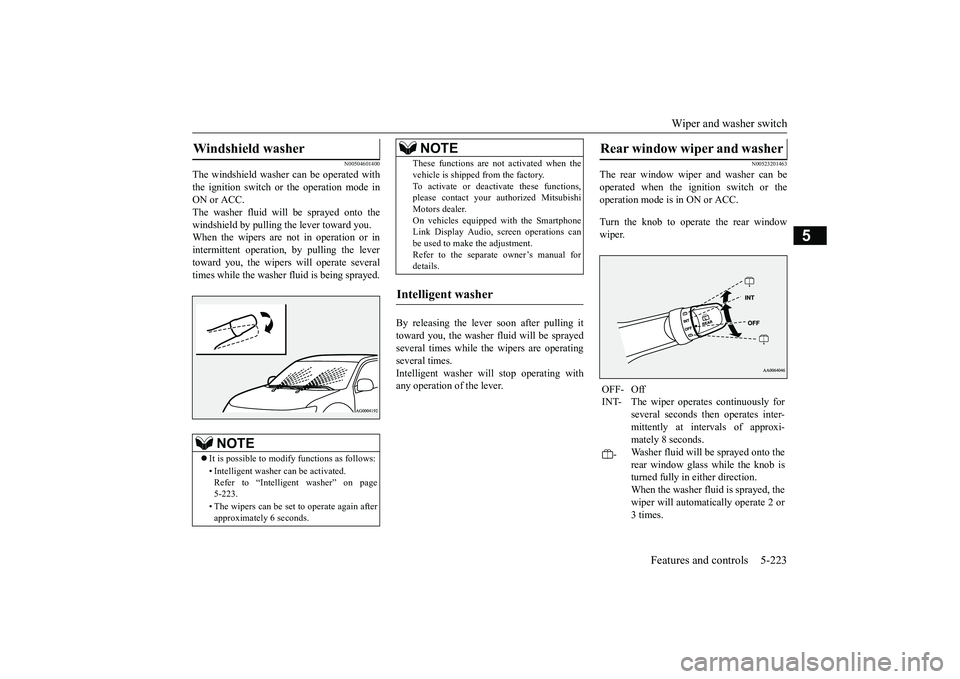
The rear window wiper and washer can beoperated when the ignition switch or theoperation mode is in ON or ACC.Turn the knob to operate the rear windowwiper.
Windshield washer
NOTE
It is possible to modify functions as follows:• Intelligent washer
can be activated.
Refer to “Intelligent washer” on page5-223.• The wipers can be set
to operate again after
approximately 6 seconds.
These functions are not activated when thevehicle is shipped from the factory.To activate or deacti
vate these functions,
please contact your authorized MitsubishiMotors dealer.On vehicles equippe
d with the Smartphone
Link Display Audio, sc
reen operations can
be used to make the adjustment.Refer to the separate
owner’s manual for
details.
Intelligent washer
NOTE
Rear window wiper and washer OFF- OffINT- The wiper operates continuously for
several seconds then operates inter-mittently at intervals of approxi-mately 8 seconds.
-
Washer fluid will be sprayed onto therear window glass while the knob isturned fully in either direction.When the washer fluid is sprayed, thewiper will automatically operate 2 or3 times.
BK0249100US.book 223 ページ 2017年5月10日 水曜日 午前8時49分
Page 305 of 441
Wiper deicer switch (if so equipped)5-224 Features and controls
5
N00523501277
N00584400027
The electric rear window defogger switch canbe operated when the engine is running.
NOTE
The rear window wipe
r will automatically
perform several conti
nuous operations if the
selector lever is put in the “R” position whilethe windshield wipers
or the rear window
wiper is operating.(a
utomatic operation
mode)After the automatic operation, the rear win-dow wiper will stop operating if the knob isin the “OFF” position. If the knob is in the“INT” position, the re
ar window wiper will
return to the intermittent operation.It is possible to set the rear window wiper toperform the automatic operation only if theselector lever is put in the “R” position whilethe rear window wiper
is operating with the
knob in the “INT” position.See your authorized Mitsubishi Motorsdealer for details.If the knob is in the “OFF” position, turn theknob to the “INT” position twice quickly tooperate the rear window
wiper continuously.
(continuous ope
ration mode)
Turn the knob to the “OFF” position to stopthe rear window wipe
r continuous operation.
The wiper intermittent
operation time can be
adjusted.See your authorized Mitsubishi Motorsdealer for details.For vehicles equipped with the SmartphoneLink Display Audio, adjustments can bemade using screen ope
rations. For further
details, refer to the se
parate owner’s manual.
The washer fluid reservoir is located in theengine compartment.Check the fluid level re
gularly and refill if
necessary. (Refer to
“Washer fluid” on page
9-12.)
Precautions to observe when using wipers and washers
CAUTIONIf the washer is used
in cold weather, the
washer fluid sprayed onto the glass mightfreeze, blocking your vi
ew. Heat the glass
with the defroster befo
re using the washer.
NOTE
Do not use the wipers when the windshield isdry. This could scratch the glass and wear thewiper blades prematurely.Before using the wipe
rs in cold weather,
check to be sure that the wiper blades are notfrozen to the windshield or rear window.Using the wipers while the blades are frozencould cause the wiper motor to burn out.NOTE
If the moving wipers be
come blocked part-
way through a sweep by ic
e or other deposits
on the glass, the wipers may temporarily stopoperating to prevent the motor from over-heating. In this case, park the vehicle in asafe place, turn the ignition switch to the“OFF” position or put the operation mode inOFF, and then remove
the ice or other depos-
its.Because the wipers will start operating againafter the wiper motor cools down, check thatthe wipers operate
before using them.
Avoid using the washer for more than 20 sec-onds at a time. Do not operate the washerwhen the washer fluid reservoir is empty orthe pump may fail.During cold weather, add a recommendedwasher solution that will not freeze in thewasher fluid reservoir. Otherwise the washermay not work or may be damaged.Replace the wiper blades when they areworn. Use the proper size replacementblades. For further info
rmation, please con-
tact your authorized
Mitsubishi Motors
dealer.
Wiper deicer switch
(if so
equipped)
BK0249100US.book 224 ページ 2017年5月10日 水曜日 午前8時49分
Page 307 of 441
Heated steering wheel sw
itch (if so equipped)
5-226 Features and controls
5
N00589100032
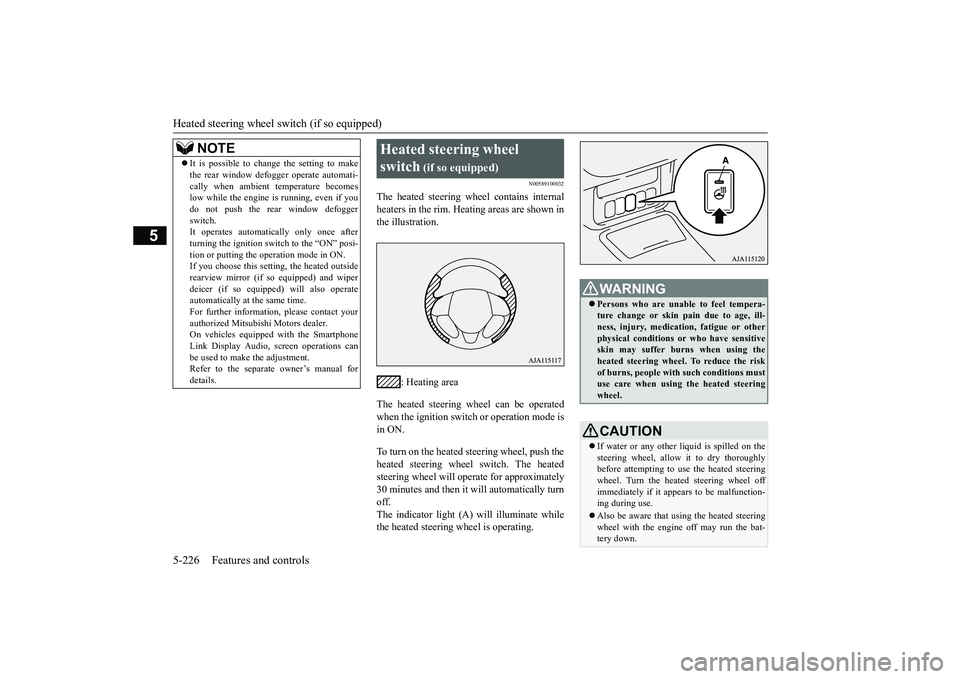
The heated steering wheel contains internalheaters in the rim. Heating areas are shown inthe illustration.
: Heating area
The heated steering wheel can be operatedwhen the ignition switch or operation mode isin ON.To turn on the heated steering wheel, push theheated steering wheel switch. The heatedsteering wheel will ope
rate for approximately
30 minutes and then it
will automatically turn
off.The indicator light (A) will illuminate whilethe heated steering wheel is operating.
It is possible to change the setting to makethe rear window def
ogger operate automati-
cally when ambient temperature becomeslow while the engine is running, even if youdo not push the rear window defoggerswitch.It operates automatica
lly only once after
turning the ignition switch to the “ON” posi-tion or putting the ope
ration mode in ON.
If you choose this setti
ng, the heated outside
rearview mirror (if so
equipped) and wiper
deicer (if so equippe
d) will also operate
automatically at the same time.For further information, please contact yourauthorized Mitsubishi Motors dealer.On vehicles equippe
d with the Smartphone
Link Display Audio, sc
reen operations can
be used to make the adjustment.Refer to the separate
owner’s manual for
details.NOTE
Heated steering wheel switch
(if so equipped)
Persons who are unable
to feel tempera-
ture change or skin
pain due to age, ill-
ness, injury, medicati
on, fatigue or other
physical conditions or
who have sensitive
skin may suffer burns when using theheated steering wheel. To reduce the riskof burns, people with such conditions mustuse care when using the heated steeringwheel.CAUTIONIf water or any other li
quid is spilled on the
steering wheel, allow it to dry thoroughlybefore attempting to use the heated steeringwheel. Turn the heated steering wheel offimmediately if it appe
ars to be malfunction-
ing during use.Also be aware that us
ing the heated steering
wheel with the engine off may run the bat-tery down.
BK0249100US.book 226 ページ 2017年5月10日 水曜日 午前8時49分
Page 315 of 441
HomeLink® Wireless Control System (if so equipped)5-234 Features and controls
5
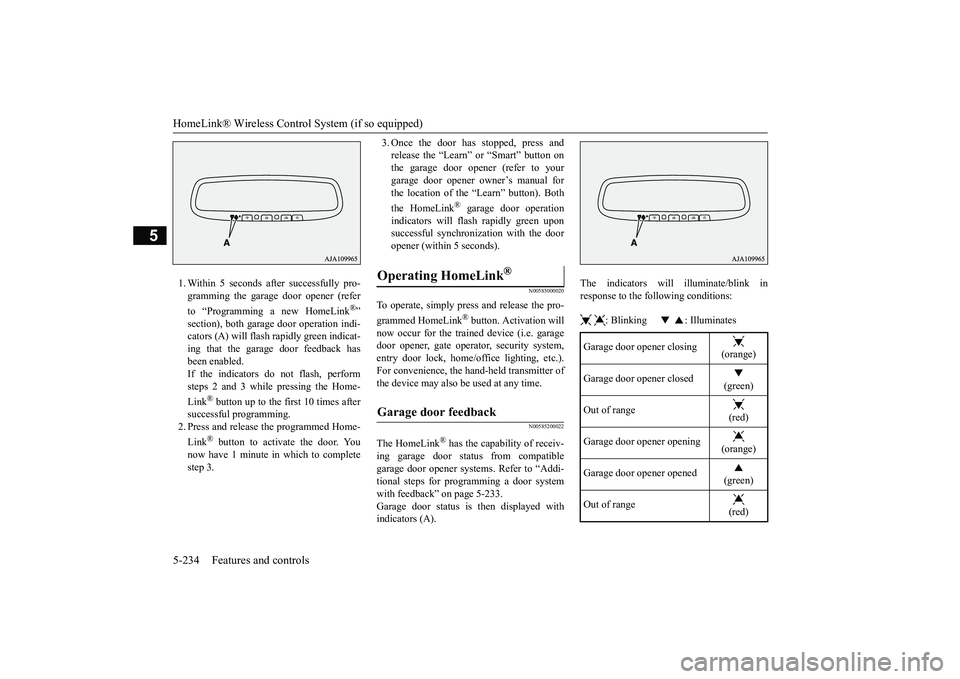
1. Within 5 seconds after successfully pro-gramming the garage door opener (referto “Programming a new HomeLink
®”
section), both garage
door operation indi-
cators (A) will flash
rapidly green indicat-
ing that the garage door feedback hasbeen enabled.If the indicators do not flash, performsteps 2 and 3 while pressing the Home-Link
® button up to the first 10 times after
successful programming.2. Press and release
the programmed Home-
Link
® button to activate the door. You
now have 1 minute in which to completestep 3.
3. Once the door has stopped, press andrelease the “Learn” or “Smart” button onthe garage door opener (refer to yourgarage door opener owner’s manual forthe location of the “Learn” button). Boththe HomeLink
® garage door operation
indicators will fl
ash rapidly green upon
successful synchronization with the dooropener (within 5 seconds).
N00585000020
To operate, simply press and release the pro-grammed HomeLink
® button. Activation will
now occur for the trained device (i.e. garagedoor opener, gate opera
tor, security system,
entry door lock, home/office lighting, etc.).For convenience, the ha
nd-held transmitter of
the device may also be
used at any time.
N00585200022
The HomeLink
® has the capability of receiv-
ing garage door status from compatiblegarage door opener systems. Refer to “Addi-tional steps for programming a door systemwith feedback” on page 5-233.Garage door status is
then displayed with
indicators (A).
The indicators will illuminate/blink inresponse to the following conditions: : Blinking : Illuminates
Operating HomeLink
®
Garage door feedback
Garage door opener closing
(orange)
Garage door opener closed
(green)
Out of range
(red)
Garage door opener opening
(orange)
Garage door opener opened
(green)
Out of range
(red)
BK0249100US.book 234 ページ 2017年5月10日 水曜日 午前8時49分
Page 316 of 441
HomeLink® Wireless Control System (if so equipped)
Features and controls 5-235
5
The HomeLink
® has the capability of listen-
ing to these messages at a range up to 820.2feet (250 m) (open line
of sight), but range
may be reduced by obstacles such as housesor trees. You may have to slow your vehiclespeed to receive the CLOSED or OPENEDmessage feedback from the garage dooropener. If the unit is out of range beforereceiving either the UP or DOWN messagefrom the door opener, both the UP andDOWN indicators will fl
ash red followed by
a continuous lit orange
indicator in the direc-
tion the door was last moving.Recall of the door stat
e after initial feedback
is possible by simultane
ously pressing either
HomeLink
® buttons 1 and 2 or buttons 2 and
3 for 2 seconds. The la
st recorded message
will be displayed for 3
seconds, again follow-
ing the garage door st
atus indication of the
figure above.
N00585300023
To erase programming from the 3 buttons(individual buttons cannot
be erased but can
be “reprogrammed” as
outlined below), fol-
low the steps noted:
1. Press and hold the 2 outer HomeLink
®
buttons for at least
10 seconds. The indi-
cator will change
from continuous yellow
to rapidly flashing green.2. Release both buttons.3. HomeLink
® is now in the train (or learn-
ing) mode and can be programmed at anytime beginning with “Programming a newHomeLink
®” step 1.
N00585400024
To reprogram a HomeLink
® button, complete
the following.1. Press and hold the desired HomeLink
®
button. Do not release the button.2. The indicator light will begin to slowlyflash orange after 20
seconds. The Home-
Link
® button can be released at this point.
Proceed with “P
rogramming a new
HomeLink
®” step 2.
N00585600026
Your HomeLink
® system operates on a radio
frequency subject to
Federal Communica-
tions Commission (FCC)
Rules (For vehicles
sold in U.S.A.) and Industry Canada Rules(For vehicles sold in Canada). This devicecomplies with Part 15 of the FCC Rules andRSS- 210 of the Industry Canada Rules.Operation is subject to the following two con-ditions.This device may not
cause harmful inter-
ference.This device must ac
cept any interference
that may be received, including interfer-ence that may cause undesired operation.
Clearing the programmed information
NOTE
Do not hold for longer than 20 seconds.
Reprogramming a single HomeLink
® button
NOTE
If you do not complete the programming of anew device to the button,
it will revert to the
previously stored programming.For questions or
comments, visit
www.homelink.com,www.youtube.com/HomeLinkGentex, or bycalling the HomeLink
® Hotline.
General information
BK0249100US.book 235 ページ 2017年5月10日 水曜日 午前8時49分
Page 318 of 441
Interior lights
Features and controls 5-237
5
2- (OFF)The dome light stays off regardless of anydoor or the liftgate being opened or closed.
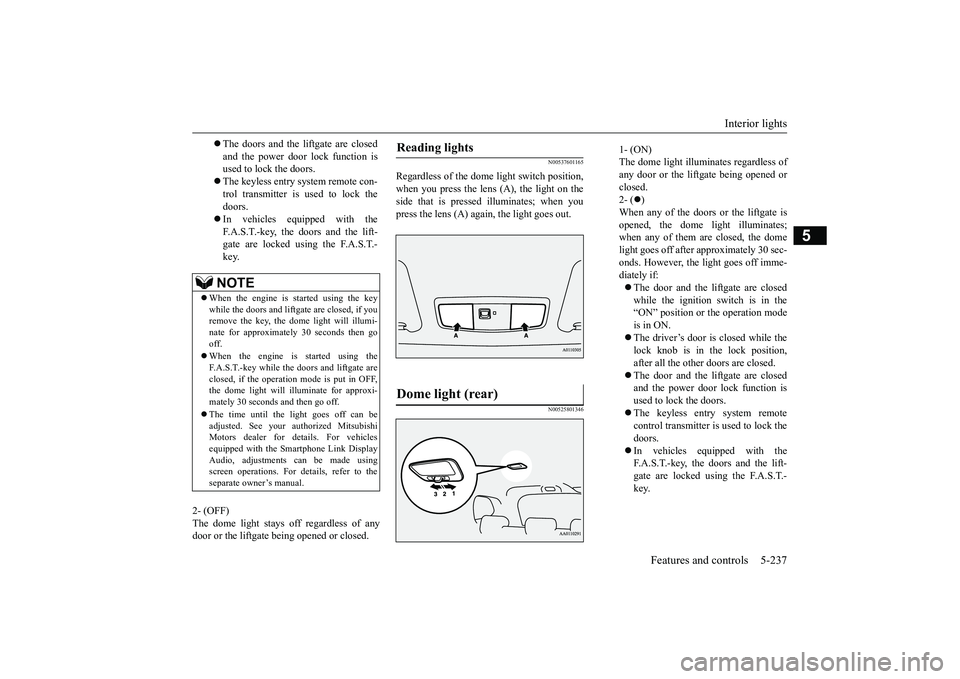
N00537601165
Regardless of the dome light switch position,when you press the lens (A), the light on theside that is pressed illuminates; when youpress the lens (A) agai
n, the light goes out.
N00525801346
The doors and the liftgate are closedand the power door lock function isused to lock the doors.The keyless entry system remote con-trol transmitter is used to lock thedoors.In vehicles equipped with theF.A.S.T.-key, the doors and the lift-gate are locked using the F.A.S.T.-key.NOTE
When the engine is
started using the key
while the doors and liftgate are closed, if youremove the key, the dom
e light will illumi-
nate for approximately 30 seconds then gooff.When the engine is started using theF.A.S.T.-key while the doors and liftgate areclosed, if the operation
mode is put in OFF,
the dome light will illuminate for approxi-mately 30 seconds and then go off.The time until the light goes off can beadjusted. See your authorized MitsubishiMotors dealer for details. For vehiclesequipped with the Smar
tphone Link Display
Audio, adjustments can be made usingscreen operations. For details, refer to theseparate owner’s manual.
Reading lights Dome light (rear)
1- (ON)The dome light illumin
ates regardless of
any door or the liftgate being opened orclosed.2- (
)
When any of the doors or the liftgate isopened, the dome li
ght illuminates;
when any of them are closed, the domelight goes off after approximately 30 sec-onds. However, the li
ght goes off imme-
diately if:The door and the liftgate are closedwhile the ignition switch is in the“ON” position or the operation modeis in ON.The driver’s door is closed while thelock knob is in the lock position,after all the other doors are closed.The door and the liftgate are closedand the power door lock function isused to lock the doors.The keyless entry system remotecontrol transmitter is used to lock thedoors.In vehicles equipped with theF.A.S.T.-key, the doors and the lift-gate are locked using the F.A.S.T.-key.
BK0249100US.book 237 ページ 2017年5月10日 水曜日 午前8時49分