display MITSUBISHI OUTLANDER III 2018 Owners Manual
[x] Cancel search | Manufacturer: MITSUBISHI, Model Year: 2018, Model line: OUTLANDER III, Model: MITSUBISHI OUTLANDER III 2018Pages: 441, PDF Size: 13.71 MB
Page 319 of 441
Interior lights5-238 Features and controls
5
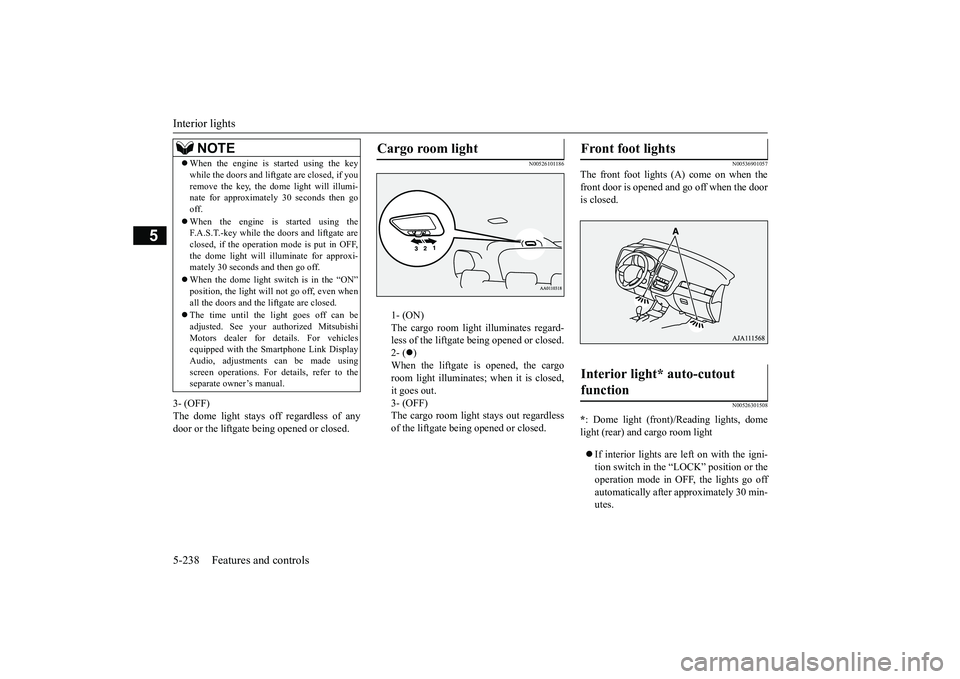
3- (OFF)The dome light stays off regardless of anydoor or the liftgate being opened or closed.
N00526101186
1- (ON)The cargo room light illuminates regard-less of the liftgate being opened or closed.2- (
)
When the liftgate is opened, the cargoroom light illuminates;
when it is closed,
it goes out.3- (OFF)The cargo room light
stays out regardless
of the liftgate bei
ng opened or closed.
N00536901057
The front foot lights (A) come on when thefront door is opened and go off when the dooris closed.
N00526301508
*: Dome light (front)/
Reading lights, dome
light (rear) and cargo room lightIf interior lights are left on with the igni-tion switch in the “LOCK” position or theoperation mode in OFF, the lights go offautomatically after approximately 30 min-utes.
NOTE
When the engine is started using the keywhile the doors and liftga
te are closed, if you
remove the key, the do
me light will illumi-
nate for approximately 30 seconds then gooff.When the engine is started using theF.A.S.T.-key while the doors and liftgate areclosed, if the operation mode is put in OFF,the dome light will il
luminate for approxi-
mately 30 seconds and then go off.When the dome light switch is in the “ON”position, the light will not go off, even whenall the doors and the liftgate are closed.The time until the light goes off can beadjusted. See your authorized MitsubishiMotors dealer for details. For vehiclesequipped with the Sm
artphone Link Display
Audio, adjustments can be made usingscreen operations. For details, refer to theseparate owner’s manual.
Cargo room light
Front foot lights Interior light* auto-cutout function
BK0249100US.book 238 ページ 2017年5月10日 水曜日 午前8時49分
Page 320 of 441
Storage spaces
Features and controls 5-239
5
The lights come on again if the ignitionswitch or the engine switch is operated, ifany door or liftgate is opened or closed, orif the keyless entry or F.A.S.T.-key isoperated.
N00526401567
N00551501298
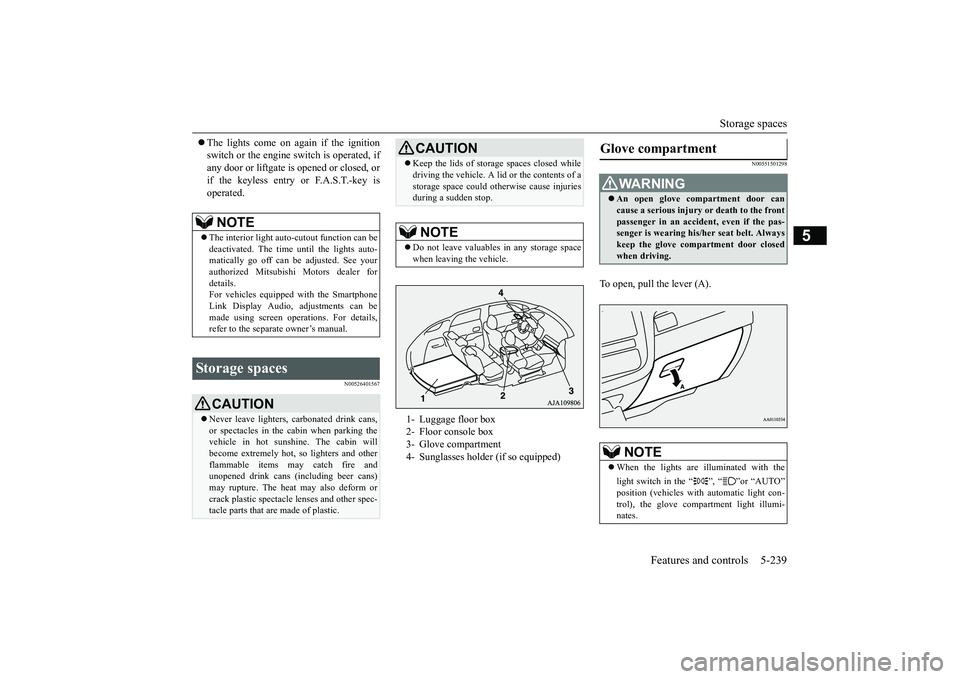
To open, pull the lever (A).
NOTE
The interior light auto-cutout function can bedeactivated. The time until the lights auto-matically go off can
be adjusted. See your
authorized Mitsubishi Motors dealer fordetails.For vehicles equipped with the SmartphoneLink Display Audio, adjustments can bemade using screen ope
rations. For details,
refer to the separa
te owner’s manual.
Storage spaces
CAUTIONNever leave lighters,
carbonated drink cans,
or spectacles in the cabin when parking thevehicle in hot suns
hine. The cabin will
become extremely hot,
so lighters and other
flammable items may catch fire andunopened drink cans (i
ncluding beer cans)
may rupture. The heat may also deform orcrack plastic spectacle
lenses and other spec-
tacle parts that ar
e made of plastic.
Keep the lids of storage spaces closed whiledriving the vehicle. A lid or the contents of astorage space could ot
herwise cause injuries
during a sudden stop.NOTE
Do not leave valuables in any storage spacewhen leaving the vehicle.1- Luggage floor box2- Floor console box3- Glove compartment4- Sunglasses holder (if so equipped)
Glove compartment
WA R N I N GAn open glove compartment door cancause a serious injury or death to the frontpassenger in an accident, even if the pas-senger is wearing his/
her seat be
lt. Always
keep the glove comp
artment door closed
when driving.NOTE
When the lights are illuminated with thelight switch in the “ ”, “ ”or “AUTO”
automatic light con-
trol), the glove compartment light illumi-nates.
BK0249100US.book 239 ページ 2017年5月10日 水曜日 午前8時49分
Page 333 of 441
Vehicle preparation before driving6-4 Driving safety
6
N00629001709
For a safer and more enjoyable trip, alwayscheck for the following:Before starting the vehicle, make certainthat you and all passengers are seated andwearing their seat
belts properly (with
children in the rear seat, in appropriaterestraints), and that all the doors and theliftgate are locked.
Move the driver’s seat as far backward aspossible, while keeping good visibility,and good control of the steering wheel,brakes, accelerator, and controls. Checkthe instrument panel indicators and multi-information display
for any possible prob-
lem.Similarly, the front
passenger seat should
also be moved as fa
r back as possible.
Make sure that infants and small childrenare properly restrained in accordance withall laws and
regulations.
Check these by selecting the defroster mode,and set the blower swit
ch on high. You should
be able to feel the air blowing against thewindshield. Refer to “Defrosti
ng or defogging (wind-
shield, door windows)” on page 7-12Check all the tires for heavy tread wear oruneven wear patterns. Look for stones, nails,glass, or other objects
stuck in the tread. Look
for any tread cuts or
sidewall cracks. Check
the wheel nuts for tightness, and the tires(including spare tire) for proper pressure.
Replace your tires before they are heavilyworn out.As your vehicle is equi
pped with a tire pres-
sure monitoring system, there is a risk ofdamage to the tire inflation pressure sensorswhen the tire is replaced on the rim. Tirereplacement should, onl
y, be performed by an
authorized Mitsubishi Motors dealer.Have someone watch wh
ile you turn all the
exterior lights on and off. Also check the turnsignal indicators and hi
gh-beam indicators on
the instrument panel.Check the ground under the vehicle afterparking overnight, for
fuel, water, oil, or
other leaks. Make sure
all the fluid levels are
correct. Also, if you
can smell fuel, you need
to find out why imme
diately and have it
fixed.
N00629201134
Even this vehicle’s sa
fety equipment, and
your safest driving, ca
nnot guarantee that you
can avoid an accident or injury. However, if
Vehicle preparation before driving Seat belts and seats
Defrosters Tires
Lights Fluid leaks Safe driving techniques
BK0249100US.book 4 ページ 2017年5月10日 水曜日 午前8時49分
Page 344 of 441
Trailer towing
Driving safety 6-15
6
You’ll need more passing distance up aheadwhen you’re towing a trailer. And, becauseyou’re a good deal longer, you’ll need to gomuch farther beyond the passed vehiclebefore you can return to your lane.Hold the bottom of the steering wheel withone hand. Then, to move the trailer to the left,just move that hand to the left. To move thetrailer to the right, move your hand to theright. Always back up sl
owly and, if possible,
have someone guide you.When you’re turning with a trailer, makewider than normal turns to help prevent thetrailer from striking shoulders, curbs, roadsigns, trees or other objects.
Avoid jerky or sudden maneuvers. Signalwell in advance.Towing a trailer puts additional burden on theengine and transaxle,
which may cause over-
heating. Following ar
e some suggestions to
reduce overheating:When towing at high al
titudes, engine coolant
and automatic transaxle oil will overheat at alower temperature than at normal altitudes.If you turn your engine off immediately aftertowing at high altitude
on steep uphill grades,
your vehicle may show
signs similar to over-
heating. To avoid this
, let the engine run
while parked (preferably on level ground)with the automatic transaxle in the “P”turning the engine off.
If the engine coolant temperature indica-tor flashes on the information screen inthe multi-information display or theengine power drops suddenly, refer to“Engine overheati
ng” on page 8-4.
If the warning display or warningdisplay illuminates, re
fer to “Warning dis-
play” on page 5-70, 5-78.
Reduce speed and downshift before you startdown a long or steep downgrade. If you don’tdownshift, over using the brakes can causereduced brake efficiency.You can tow in “D” (DRIVE) position. Youmay want to shift the selector lever to the 3rdor a lower position, under heavy loads or hillyconditions.Always place chocks or blocks under both thevehicle and trailer wheels when parking. Besure that the parking brake is firmly set andthat the selector lever is in the “P” (PARK)position. Avoid parki
ng on a hill with a
trailer, but if it cannot be avoided, do so onlyafter performing the following:
Passing Backing up Making turns
CAUTIONMaking sharp turns while towing a trailercould cause the
trailer to come in contact
with the vehicle. Your
vehicle could be dam-
aged. Avoid making sharp turns while tow-ing a trailer.
Overheating Cause of overheating
Solution
Air conditioning on Turn offHighway speeds Reduce speedGoing up hills Select lower gear posi-
tion
Stop-and-go city traf-fic
With the vehicle stopped, shift to the “N” (NEUTRAL) position and idle the engine at high idle.
Driving on hills Parking
BK0249100US.book 15 ページ 2017年5月10日 水曜日 午前8時49分
Page 348 of 441
Vents
Comfort controls 7-3
7
N00736401692
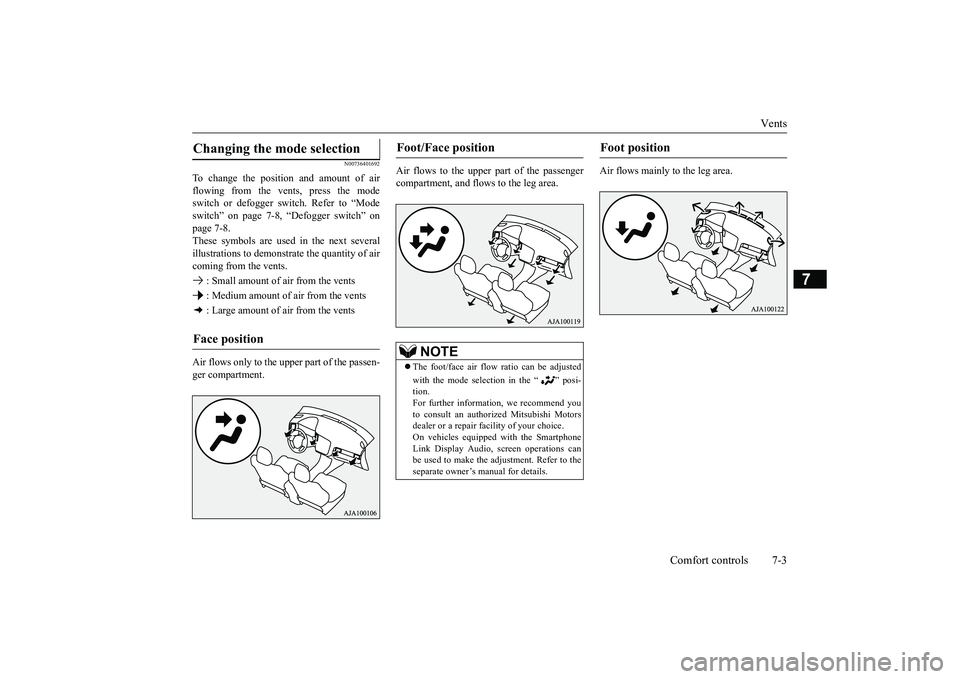
To change the position and amount of airflowing from the vents, press the modeswitch or defogger switch. Refer to “Modeswitch” on page 7-8, “Defogger switch” onpage 7-8.These symbols are used in the next severalillustrations to demonstr
ate the quantity of air
coming from the vents. : Small amount of air from the vents : Medium amount of air from the vents : Large amount of air from the ventsAir flows only to the upper part of the passen-ger compartment.
Air flows to the upper part of the passengercompartment, and flows to the leg area.
Air flows mainly to the leg area.
Changing the mode selection Face position
Foot/Face position
NOTE
The foot/face air flow ratio can be adjustedwith the mode selection in the “ ” posi-tion.For further information, we recommend youto consult an authorized Mitsubishi Motorsdealer or a repair fa
cility of your choice.
On vehicles equippe
d with the Smartphone
Link Display Audio, sc
reen operations can
be used to make the ad
justment. Refer to the
separate owner’s
manual for details.
Foot position
BK0249100US.book 3 ページ 2017年5月10日 水曜日 午前8時49分
Page 349 of 441
Vents7-4 Comfort controls
7
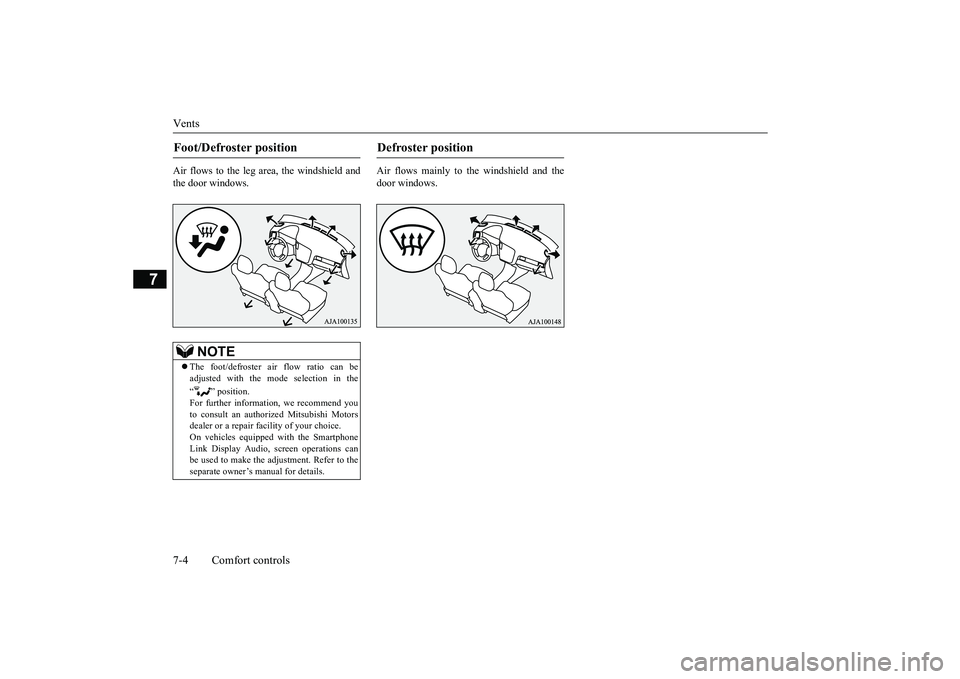
Air flows to the leg area, the windshield andthe door windows.
Air flows mainly to the windshield and thedoor windows.
Foot/Defroster position
NOTE
The foot/defroster air flow ratio can beadjusted with the mode selection in the“ ” position.For further information, we recommend youto consult an authorized Mitsubishi Motorsdealer or a repair fa
cility of your choice.
On vehicles equippe
d with the Smartphone
Link Display Audio, sc
reen operations can
be used to make the adjustment. Refer to theseparate owner’s
manual for details.
Defroster position
BK0249100US.book 4 ページ 2017年5月10日 水曜日 午前8時49分
Page 351 of 441
Dual-zone automatic climate
control air conditioner
7-6 Comfort controls
7
N00736901206
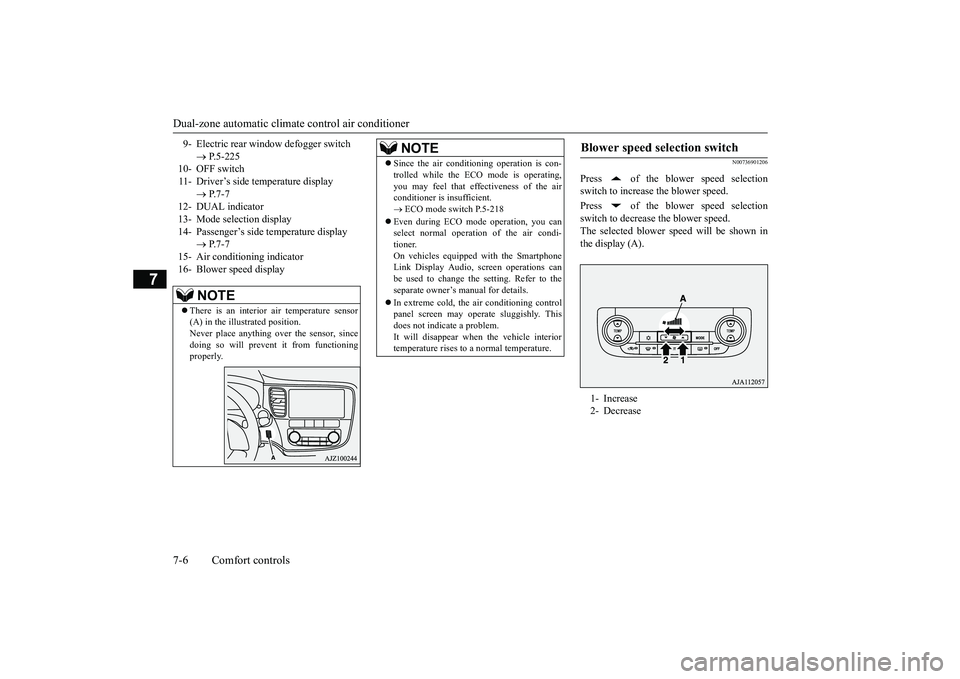
Press of the blower speed selectionswitch to increase the blower speed.Press of the blower speed selectionswitch to decrease the blower speed.The selected blower sp
eed will be shown in
the display (A).
9- Electric rear window
defogger switch
P.5-225
10- OFF switch11- Driver’s side temperature display
P.7-7
12- DUAL indicator13- Mode selection display14- Passenger’s side temperature display
P.7-7
15- Air conditioning indicator16- Blower speed display
NOTE
There is an interior air temperature sensor(A) in the illustrated position.Never place anything ove
r the sensor, since
doing so will prevent it from functioningproperly.
NOTE
Since the air conditi
oning operation is con-
trolled while the ECO mode is operating,you may feel that effectiveness of the airconditioner is insufficient. ECO mode switch P.5-218
Even during ECO mode operation, you canselect normal operati
on of the air condi-
tioner.On vehicles equipped with the SmartphoneLink Display Audio, sc
reen operations can
be used to change the setting. Refer to theseparate owner’s manual for details.In extreme cold, the air conditioning controlpanel screen may ope
rate sluggishly. This
does not indicate a problem.It will disappear when the vehicle interiortemperature rises to a normal temperature.
Blower speed selection switch 1- Increase2- Decrease
BK0249100US.book 6 ページ 2017年5月10日 水曜日 午前8時49分
Page 352 of 441
Dual-zone automatic climat
e control air conditionerComfort controls 7-7
7
N00737001448
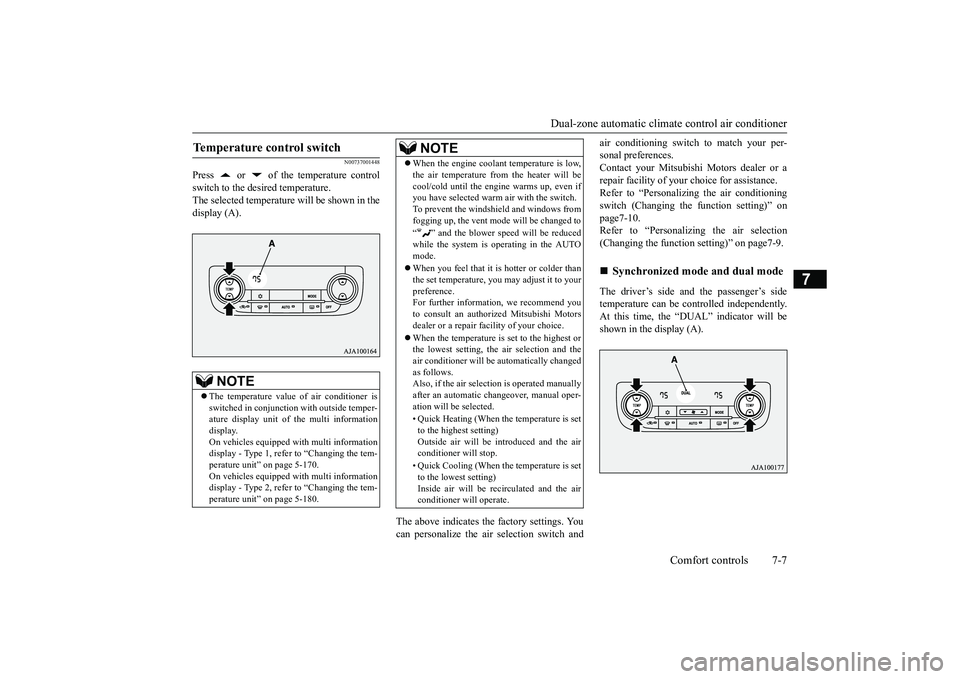
Press or of the temperature controlswitch to the desired temperature.The selected temperature will be shown in thedisplay (A).
The above indicates the
factory settings. You
can personalize the air
selection switch and
air conditioning switch to match your per-sonal preferences.Contact your Mitsubishi
Motors dealer or a
repair facility of your
choice for assistance.
Refer to “Personalizi
ng the air conditioning
switch (Changing the function setting)” onpage7-10.Refer to “Personalizing the air selection(Changing the function setting)” on page7-9.The driver’s side and the passenger’s sidetemperature can be controlled independently.At this time, the “
DUAL” indicato
r will be
shown in the display (A).
Temperature control switch
NOTE
The temperature value
of air conditioner is
switched in conjunction
with outside temper-
ature display unit of the multi informationdisplay.On vehicles equipped with multi informationdisplay - Type 1, refer to “Changing the tem-perature unit” on page 5-170.On vehicles equipped with multi informationdisplay - Type 2, refer to “Changing the tem-perature unit” on page 5-180.
When the engine coolan
t temperature is low,
the air temperature from the heater will becool/cold until the engi
ne warms up, even if
you have selected warm
air with the switch.
To prevent the windshield and windows fromfogging up, the vent mode will be changed to“ ” and the blower speed will be reducedwhile the system is operating in the AUTOmode.When you feel that it is hotter or colder thanthe set temperature, you may adjust it to yourpreference.For further information, we recommend youto consult an authorized Mitsubishi Motorsdealer or a repair fa
cility of your choice.
When the temperature is set to the highest orthe lowest setting, the air selection and theair conditioner will be automatically changedas follows.Also, if the air select
ion is operated manually
after an automatic ch
angeover, manual oper-
ation will be selected.• Quick Heating (When th
e temperature is set
to the highest setting)Outside air will be introduced and the airconditioner will stop.• Quick Cooling (When the temperature is setto the lowest setting)Inside air will be reci
rculated and the air
conditioner wi
ll operate.
NOTE
Synchronized mode and dual mode
BK0249100US.book 7 ページ 2017年5月10日 水曜日 午前8時49分
Page 353 of 441
Dual-zone automatic climate
control air conditioner
7-8 Comfort controls
7
Synchronized modeIf the driver’s side temperature controlswitch is pressed, the passenger’s sidetemperature will also be controlled to thesame setting temperature as the driver’sside.Dual modeIf the passenger’s side temperature con-trol switch is pressed under synchronizedmode, the system will switch to dualmode. In dual mode, the driver’s side andthe passenger’s side
temperature can be
set separately by usi
ng each temperature
control switch.Press the AUTO switch to return to syn-chronized mode.
N00737101234
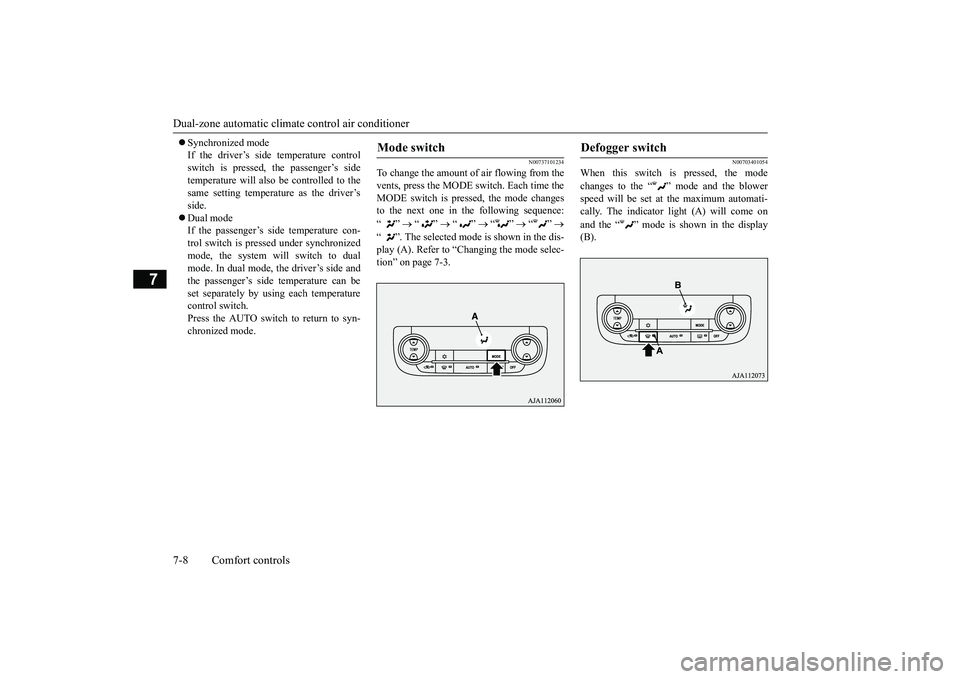
To change the amount of air flowing from thevents, press the MODE switch. Each time theMODE switch is pressed, the mode changesto the next one in the following sequence:“”
“”
“”
“”
“”
“ ”. The selected mode is shown in the dis-play (A). Refer to “Ction” on page 7-3.
N00703401054
When this switch is pressed, the modechanges to the “ ”
mode and the blower
speed will be set at the maximum automati-cally. The indicator light (A) will come onand the “ ” mode is shown in the display(B).
Mode switch
Defogger switch
BK0249100US.book 8 ページ 2017年5月10日 水曜日 午前8時49分
Page 355 of 441
Dual-zone automatic climate
control air conditioner
7-10 Comfort controls
7
• When the setting has changed fromenabled to disabled,
the system will beep
three times and the indicator light willflash three times.• When the setting has changed from dis-abled to enabled, the system will beeptwo times and the i
ndicator light will
flash three times.On vehicles equipped with the Smart-phone Link Display Audi
o, screen opera-
tions can also be used to change thesetting. Refer to th
e separate owner’s
manual for details.
N00737301467
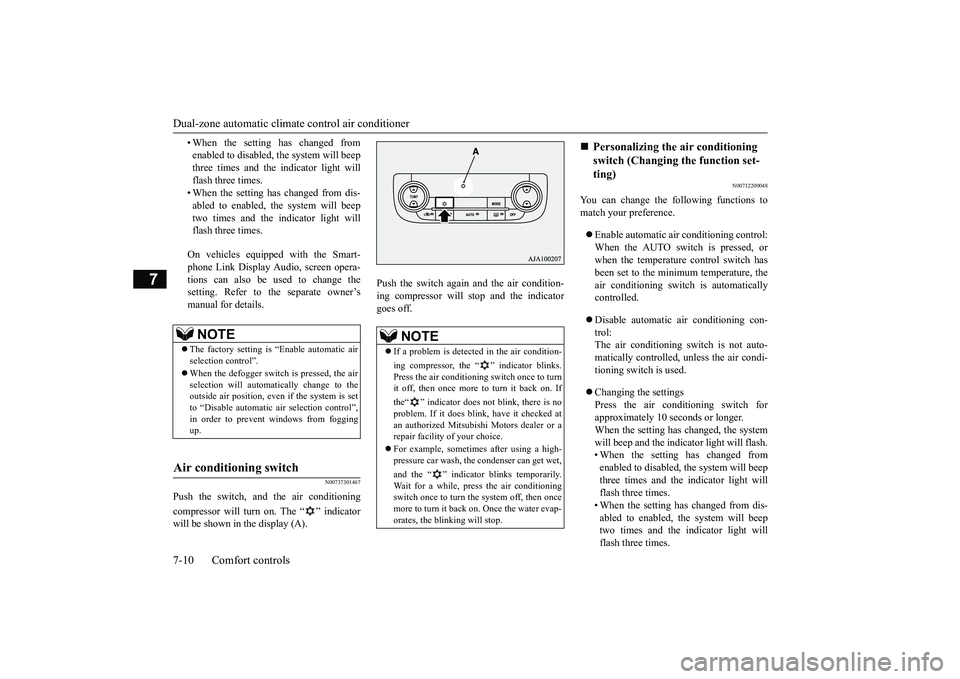
Push the switch, and the air conditioningcompressor will turn on. The “ ” indicatorwill be shown in the display (A).
Push the switch again and the air condition-ing compressor will st
op and the indicator
goes off.
N00712200048
You can change the following functions tomatch your preference.Enable automatic air conditioning control:When the AUTO switch is pressed, orwhen the temperature control switch hasbeen set to the minimum temperature, theair conditioning switch is automaticallycontrolled.Disable automatic air conditioning con-trol:The air conditioning switch is not auto-matically controlled,
unless the air condi-
tioning switch is used.Changing the settingsPress the air conditioning switch forapproximately 10
seconds or longer.
When the setting has changed, the systemwill beep and the indi
cator light will flash.
• When the setting has changed fromenabled to disabled, the system will beepthree times and the indicator light willflash three times.• When the setting has changed from dis-abled to enabled, the system will beeptwo times and the i
ndicator light will
flash three times.
NOTE
The factory setting is “Enable automatic airselection control”.When the defogger switch is pressed, the airselection will automatically change to theoutside air position, even if the system is setto “Disable automatic air selection control”,in order to prevent windows from foggingup.
Air conditioning switch
NOTE
If a problem is detect
ed in the air condition-
ing compressor, the “ ” indicator blinks.Press the air conditioni
ng switch once to turn
it off, then once more to turn it back on. Ifthe“ ” indicator does not blink, there is noproblem. If it does blink,
have it checked at
an authorized Mitsubish
i Motors dealer or a
repair facility of your choice.For example, sometimes after using a high-pressure car wash, the
condenser can get wet,
and the “ ” indicator blinks temporarily.Wait for a while, pres
s the air conditioning
switch once to turn the system off, then oncemore to turn it back on. Once the water evap-orates, the blinking will stop.
Personalizing the air conditioning switch (Changing the function set-ting)
BK0249100US.book 10 ページ 2017年5月10日 水曜日 午前8時49分