parking brake MITSUBISHI OUTLANDER III 2018 User Guide
[x] Cancel search | Manufacturer: MITSUBISHI, Model Year: 2018, Model line: OUTLANDER III, Model: MITSUBISHI OUTLANDER III 2018Pages: 441, PDF Size: 13.71 MB
Page 138 of 441
Steering wheel height
and reach adjustment
Features and controls 5-57
5
Warning light (yellow)Warning displayIf there is a malfunction in the system, thewarning light will come on. In addition, thewarning display appears on the informationscreen in the multi information display.
Under normal conditions, the warning lightonly comes on when the operation mode isput in ON and goes off a few seconds later.
N00511501241
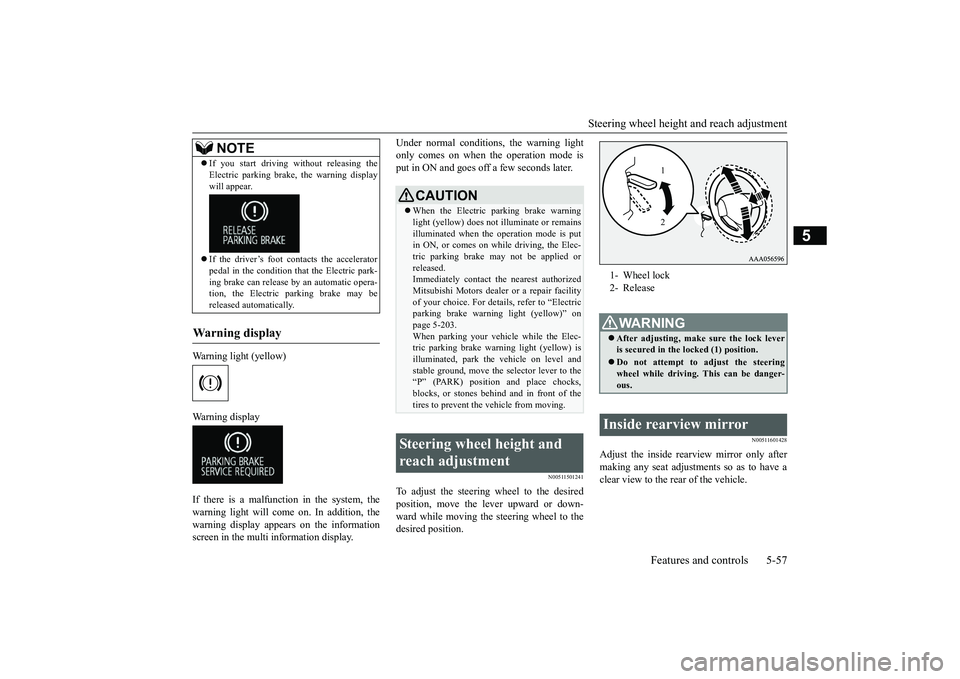
To adjust the steering wheel to the desiredposition, move the lever upward or down-ward while moving the steering wheel to thedesired position.
N00511601428
Adjust the inside rearview mirror only aftermaking any seat adjustme
nts so as to have a
clear view to the rear of the vehicle.
If you start driving wi
thout releasing the
Electric parking brake, the warning displaywill appear.If the driver’s foot contacts the acceleratorpedal in the condition th
at the Electric park-
ing brake can release by an automatic opera-tion, the Electric parking brake may bereleased automatically.
Wa r n i n g d is p la y
NOTE
CAUTIONWhen the Electric parking brake warninglight (yellow) does not
illuminate or remains
illuminated when the operation mode is putin ON, or comes on while driving, the Elec-tric parking brake may not be applied orreleased.Immediately contact the nearest authorizedMitsubishi Motors dealer
or a repair facility
of your choice. For detail
s, refer to “Electric
parking brake warni
ng light (yellow)” on
page 5-203.When parking your vehi
cle while the Elec-
tric parking brake warning light (yellow) isilluminated, park th
e vehicle on level and
stable ground, move the
selector lever to the
“P” (PARK) position and place chocks,blocks, or stones behind and in front of thetires to prevent the vehicle from moving.
Steering wheel height and reach adjustment
1- Wheel lock2- ReleaseWA R N I N GAfter adjusting, make sure the lock leveris secured in the locked (1) position.Do not attempt to adjust the steeringwheel while driving. This can be danger-ous.
Inside rearview mirror
12
BK0249100US.book 57 ページ 2017年5月17日 水曜日 午後2時31分
Page 150 of 441
Automatic transaxle (if so equipped)
Features and controls 5-69
5
N00563101086
When the selector lever cannot be shiftedfrom the “P” (PARK) position to anotherposition while the brake pedal is pressed andheld down with the operation mode in ON,the battery may be flat or the shift-lock mech-anism may be malfunctioning.Immediately have your
vehicle checked by an
authorized Mitsubishi Motors dealer or arepair facility of your choice.If you need to move the vehicle, shift theselector lever as follows.1. Make sure the parking brake is firmlyapplied.2. Stop the engine if it is running.
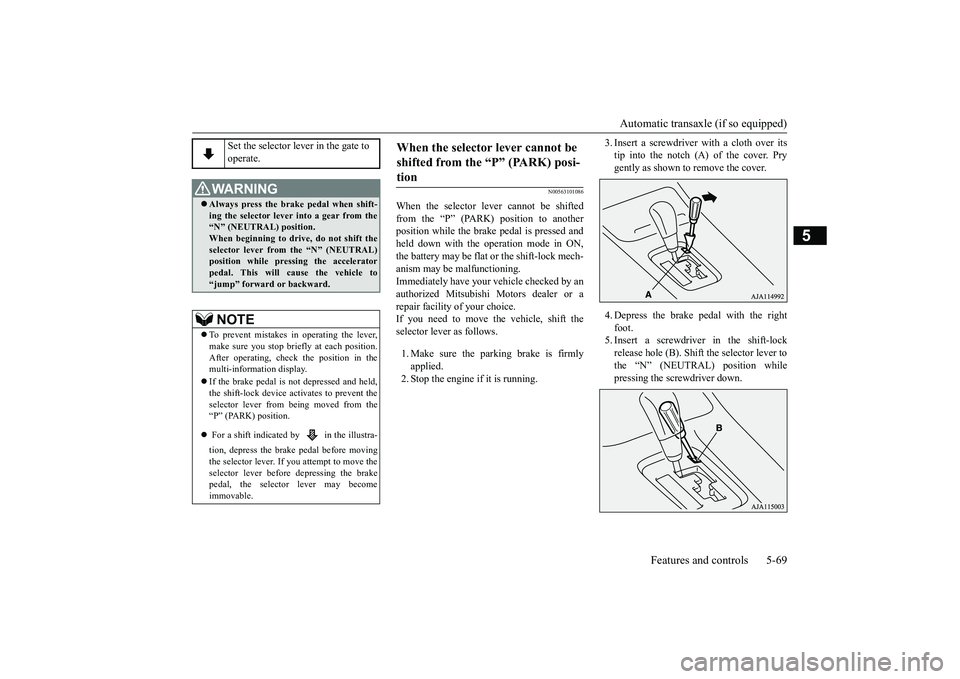
3. Insert a screwdrive
r with a cloth over its
tip into the notch (A) of the cover. Prygently as shown to remove the cover.4. Depress the brake
pedal with the right
foot.5. Insert a screwdriver in the shift-lockrelease hole (B). Shift the selector lever tothe “N” (NEUTRAL) position whilepressing the screwdriver down.
Set the selector lever in the gate to operate.
WA R N I N GAlways press the brake pedal when shift-ing the selector
lever into a gear from the
“N” (NEUTRAL) position. When beginning to drive, do not shift theselector lever from
the “N” (NEUTRAL)
position while pressing the acceleratorpedal. This will cause the vehicle to“jump” forward or backward.NOTE
To prevent mistakes in operating the lever,make sure you stop brie
fly at each position.
After operating, chec
k the position in the
multi-information display.If the brake pedal is not depressed and held,the shift-lock device ac
tivates to prevent the
selector lever from being moved from the“P” (PARK) position. For a shift indicated by in the illustra-tion, depress the brake pedal before movingthe selector lever. If you attempt to move theselector lever before depressing the brakepedal, the selector lever may becomeimmovable.
When the selector lever cannot be shifted from the “P” (PARK) posi-tion
BK0249100US.book 69 ページ 2017年5月10日 水曜日 午前8時49分
Page 157 of 441
Continuously variable transmission (CVT) (if so equipped)5-76 Features and controls
5
N00563301062
When the selector lever cannot be shiftedfrom the “P” (PARK) position to anotherposition while the brake pedal is pressed andheld down with the ignition switch at the“ON” position or the operation mode in ON,the battery may be flat or the shift-lock mech-anism may be malfunctioning.Immediately have your
vehicle checked by an
authorized Mitsubishi Motors dealer or arepair facility of your choice.If you need to move the vehicle, shift theselector lever as follows.1. Make sure the parking brake is firmlyapplied.2. Stop the engine if it is running.
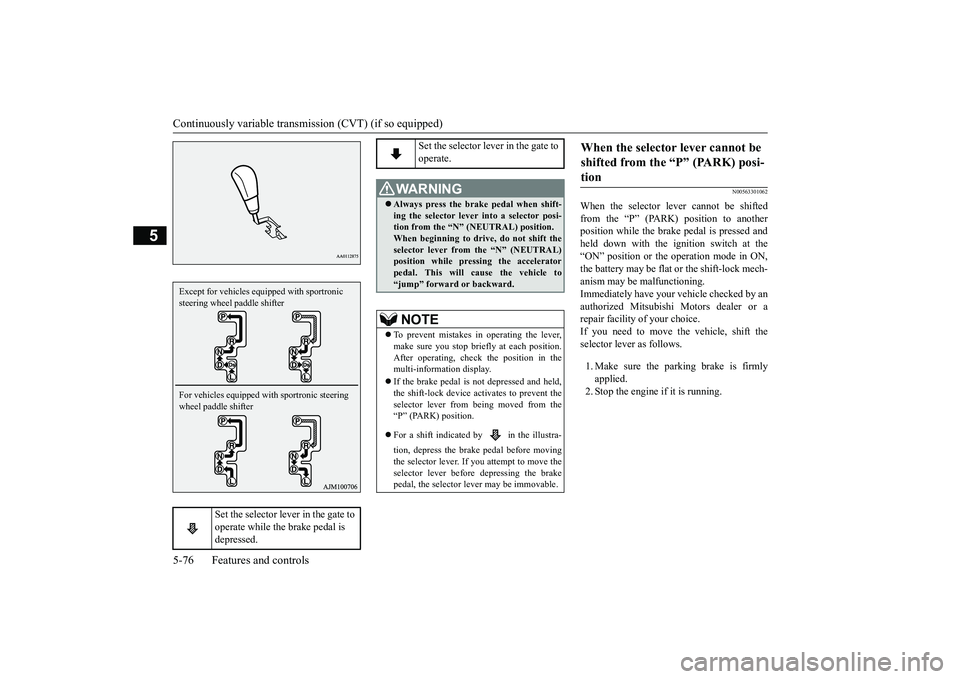
Set the selector lever in the gate to operate while the brake pedal is depressed.
Except for vehicles equipped with sportronic steering wheel paddle shifterFor vehicles equipped with sportronic steering wheel paddle shifter
Set the selector lever in the gate to operate.
WA R N I N GAlways press the brake pedal when shift-ing the selector lever into a selector posi-tion from the
Page 163 of 441
Electronically controlled 4W
D system (if so equipped)
5-82 Features and controls
5
To gain extra acceleration in “D” (DRIVE)position (when passing an
other vehicle) push
the accelerator to the floor. The CVT willautomatically downshift.For short waiting periods, such as at trafficlights, the vehicle can be
left in selector lever
position and held stationary with the servicebrake.For longer waiting periods with the enginerunning, place th
e selector lever in the “N”
(NEUTRAL) position a
nd apply the parking
brake, while holding the vehicle stationarywith the service brake.Prior to moving off after having stopped thevehicle, make sure that
the selector lever is in
Page 164 of 441
Electronically controlled 4WD system (if so equipped)
Features and controls 5-83
5
Select the drive mode from the following 3types to suit the driving conditions.
4-wheel drive operation requires special driv-ing skills.Carefully read the “4-wheel drive operation”section on page 5-88 and take care to drivesafely.
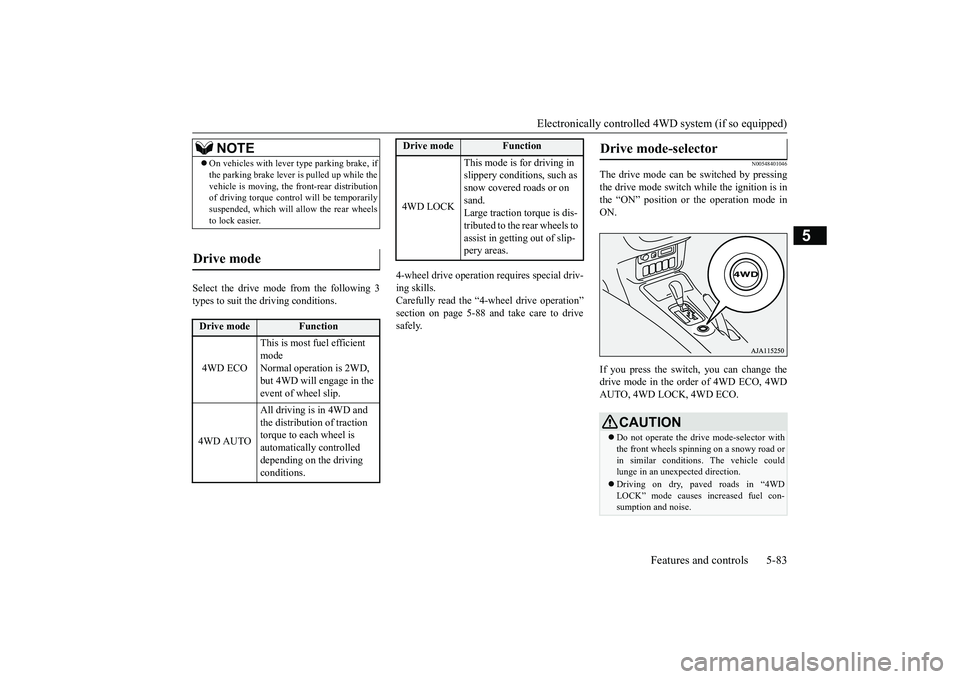
N00548401046
The drive mode can be switched by pressingthe drive mode switch while the ignition is inthe “ON” position or the operation mode inON.If you press the switch, you can change thedrive mode in the order of 4WD ECO, 4WDAUTO, 4WD LOCK, 4WD ECO.
NOTE
On vehicles with lever
type parking brake, if
the parking brake lever is pulled up while thevehicle is moving, the
front-rear distribution
of driving torque contro
l will be temporarily
suspended, which will allow the rear wheelsto lock easier.
Drive mode
Drive mode
Function
4WD ECO
This is most fuel efficient modeNormal operation is 2WD, but 4WD will engage in the event of wheel slip.
4WD AUTO
All driving is in 4WD and the distribution of traction torque to each wheel is automatically controlled depending on the driving conditions.
4WD LOCK
This mode is for driving in slippery conditions, such as snow covered roads or on sand.Large traction torque is dis-tributed to the rear wheels to assist in getting out of slip-pery areas.
Drive mode
Function
Drive mode-selector
CAUTIONDo not operate the drive mode-selector withthe front wheels spinning on a snowy road orin similar conditions
. The vehicle could
lunge in an unexpe
cted direction.
Driving on dry, paved roads in “4WDLOCK” mode causes increased fuel con-sumption and noise.
BK0249100US.book 83 ページ 2017年5月10日 水曜日 午前8時49分
Page 176 of 441
Hill start assist (if so equipped)Features and controls 5-95
5
Depress the acceleration pedal with the selec-tor lever in any position other than “P”The brakes are released, and the brake autohold indicator light in the instrument clusterwill go off.
Press the brake auto hold switch to turn offthe brake auto hold. Th
e indicator light on the
switch goes off.If you want to turn off the system while thebrake auto hold indicato
r light is illuminated,
press the switch with
depressing the brake
pedal.
N00562601097
The hill start assist make
s it easy to start off
on a steep uphill slope by preventing thevehicle from moving back
wards. It keeps the
braking force for about 2 second when youmove your foot from the brake pedal to theaccelerator pedal.
• When shifting the selector lever to the “P”(PARK) or “R” (REVERSE) position withdepressing the brake pedal.• When the Electric park
ing brake is applied
by using the Electric
parking brake switch.
While the vehicle is held stationary with thebrake auto hold system, the Electric parkingbrake will be automatic
ally applied under the
following conditions
, and a buzzer will
sound and the message
will appear on the
information screen in the multi informationdisplay.• After approximately
10 minutes has elapsed
with applying the brake auto hold system.• When the driver’s seat
belt is unfastened.
• When the driver’s door is opened.• When the operation mode is put in OFF.• When the system detects the vehicle slidingdown a slope.NOTE
If the Electric park
ing brake cannot be
applied automatically due to the system mal-function, the message
will appear on the
information screen in the multi informationdisplay. Depress the brake pedal.If the operation mode is
put in OFF with the
selector lever in any
position other than “P”
(PARK) position, the message may appearon the information screen in the multi infor-mation display.If the message appears, shift the selectorlever to the “P” (P
ARK) position while
depressing the brake pedal.
To start the vehicle
NOTE
To turn off brake auto hold
NOTE
If the brake auto hold system is turned offwithout the brake peda
l being depressed, a
buzzer will sound and the message willappear on the information screen in the multiinformation display.
Hill start assist
(if so equipped)
BK0249100US.book 95 ページ 2017年5月10日 水曜日 午前8時49分
Page 180 of 441
Electric power steering system (EPS)
Features and controls 5-99
5
The anti-lock braking system and brake forcedistribution function ma
y not work, so hard
braking could make the vehicle unstable.Avoid hard braking and high-speed driving.Stop the vehicle in a safe place and contact anauthorized Mitsubishi Mo
tors dealer or repair
facility of your choice.
N00529201090
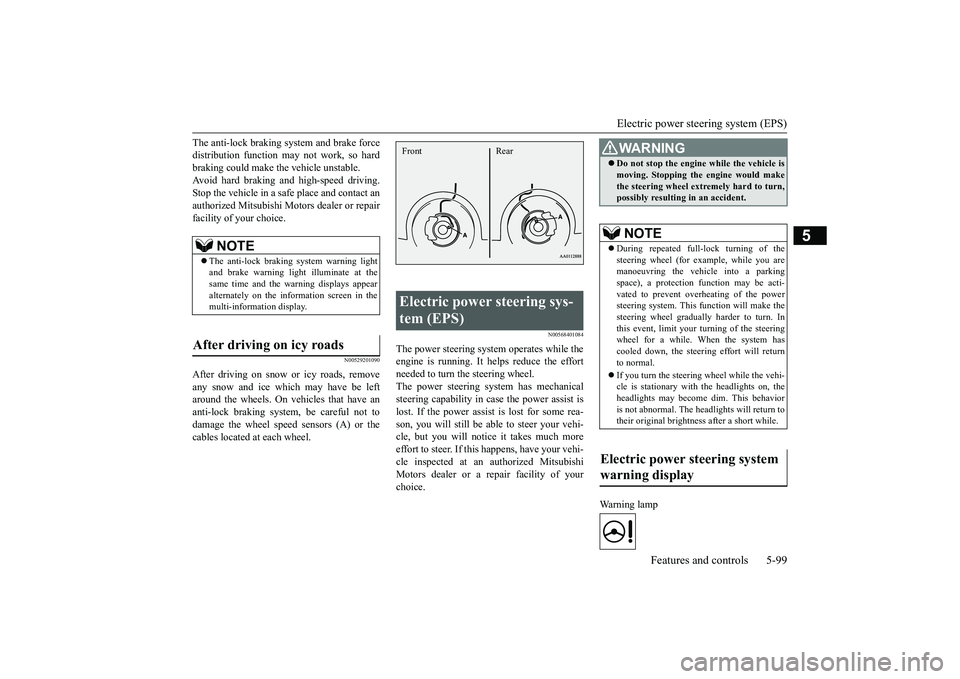
After driving on snow or icy roads, removeany snow and ice which may have be leftaround the wheels. On vehicles that have ananti-lock braking syst
em, be careful not to
damage the wheel spee
d sensors (A) or the
cables located at each wheel.
N00568401084
The power steering system operates while theengine is running. It helps reduce the effortneeded to turn the steering wheel.The power steering sy
stem has mechanical
steering capability in case the power assist islost. If the power assist is lost for some rea-son, you will still be able to steer your vehi-cle, but you will notice it takes much moreeffort to steer. If this happens, have your vehi-cle inspected at an authorized MitsubishiMotors dealer or a repair facility of yourchoice.
Warning lamp
NOTE
The anti-lock braking
system warning light
and brake warning light illuminate at thesame time and the wa
rning displays appear
alternately on the information screen in themulti-information display.
After driving on icy roads
Electric power steering sys-tem (EPS) Front Rear
WA R N I N GDo not stop the engine while the vehicle ismoving. Stopping the engine would makethe steering wheel extremely hard to turn,possibly resulting
in an accident.
NOTE
During repeated full-lock turning of thesteering wheel (for example, while you aremanoeuvring the vehicle into a parkingspace), a protection f
unction may be acti-
vated to prevent overheating of the powersteering system. This f
unction will make the
steering wheel graduall
y harder to turn. In
this event, limit your turning of the steeringwheel for a while. When the system hascooled down, the steering effort will returnto normal.If you turn the steering wheel while the vehi-cle is stationary with the headlights on, theheadlights may become
dim. This behavior
is not abnormal. The he
adlights will return to
their original brightness after a short while.
Electric power steering system warning display
BK0249100US.book 99 ページ 2017年5月10日 水曜日 午前8時49分
Page 197 of 441

Adaptive Cruise Control System (ACC) (if so equipped)5-116 Features and controls
5
In any of the situations listed below, the ACCcontrol is automatica
lly canceled, a buzzer
sounds and a message is shown in the multi-information display.When your vehicle stops.When the ASC is turned off.While ABS, ASC or TCL is activated.When the selector lever is in a positionother than “D” (DRIVE) and “Ds”(DOWNSHIFT & SPORTY DRIVING).When the parking brake is applied.
When the ACC system determines that itsperformance has been degraded, a buzzer willsound and a message will be displayed in themulti information display.This can occur whenForeign objects, such as dirt, snow or ice,adhere to the surface
of the radar sensor.
In adverse weather conditions, such asrain, snow or sand storms, etc.A front vehicle or an oncoming vehicle issplashing water, snow or dirt.Driving on a nonbusy road with a fewvehicles and obsta
cles in front.
The brake system is
overheating due to
continuous brake control on long down-hill slope.
If the display keeps showing the message,there is a possibility that the ACC has a mal-function. Contact your authorized MitsubishiMotors dealer.When the ACC system
detects an abnormal-
ity in the system, the ACC system will beturned off, a buzzer will sound and a messagewill be displayed in the multi information dis-play. If the message remains after the opera-tion mode has been tu
rned to the “OFF”
position, contact your au
thorized Mitsubishi
Motors dealer.
N00581800059
After the ACC control has been canceled withthe ACC turned on, the ACC control can beresumed by pushing up
and releasing the
“RES +” switch.To resume the control
BK0249100US.book 116 ページ 2017年5月10日 水曜日 午前8時49分
Page 248 of 441
![MITSUBISHI OUTLANDER III 2018 User Guide Multi Information display - Type 1
Features and controls 5-167
5
[When the ignition switch is turned to the“OFF” or “LOCK” position or the operationmode is put in OFF]The display shows the ove](/img/19/58144/w960_58144-247.png "MITSUBISHI OUTLANDER III 2018 User Guide Multi Information display - Type 1
Features and controls 5-167
5
[When the ignition switch is turned to the“OFF” or “LOCK” position or the operationmode is put in OFF]The display shows the ove")
Multi Information display - Type 1
Features and controls 5-167
5
[When the ignition switch is turned to the“OFF” or “LOCK” position or the operationmode is put in OFF]The display shows the overall ECO score thefunction has counted from the time when theignition switch is turn
ed to the “ON” position
to the time when it is turned to the “OFF” or“LOCK” or “ACC” position, or from the timewhen the operation mode is set to “ON” tothe time when it is set to “OFF”.
N00556801270
1. Park your vehicle in a safe place.Firmly apply the parking brake and movethe selector lever into the “P” (PARK)position.
2. When you lightly press the multi informa-tion meter switch, the information screenswitches to the function setting screen.Refer to “Information screen” on page5-159.3. Press and hold the multi information dis-play switch (for about 2 seconds or more)to switch from the setting mode screen tothe menu screen.
4. Select the item to change on the menuscreen and change to
the desired setting.
For further details on the operation meth-ods, refer to the following sections.Refer to “Changing the reset mode foraverage fuel consumption and averagespeed” on page 5-168.Refer to “Changing the fuel consumptiondisplay unit” on page 5-169.Refer to “Changing the temperature unit”on page 5-170.Refer to “Changing the display language”on page 5-170.Refer to “Changing the language on othersystem to match the multi informationdisplay” on page 5-171.Refer to “Operation
sound setting” on
page 5-171.
Changing the function settings
ECO drive level
Low High
CAUTIONFor safety, stop the vehicle before operating.While driving, even if you operate the multiinformation display switch, the function set-ting screen is not displayed.
NOTE
To return the menu screen to the function set-ting screen, press and hold the multi infor-mation display switch
(for about 2 seconds
or more).If no operations are made within about 30seconds of the menu screen being displayed,the display returns to the function settingscreen.
BK0249100US.book 167 ページ 2017年5月10日 水曜日 午前8時49分
Page 262 of 441
Indicator light, warning light, and information screen display list (multi information display - Type 1)
Features and controls 5-181
5
N00557701074N00557801349
Indicator light, warning light, and information
screen display list (multi information display -
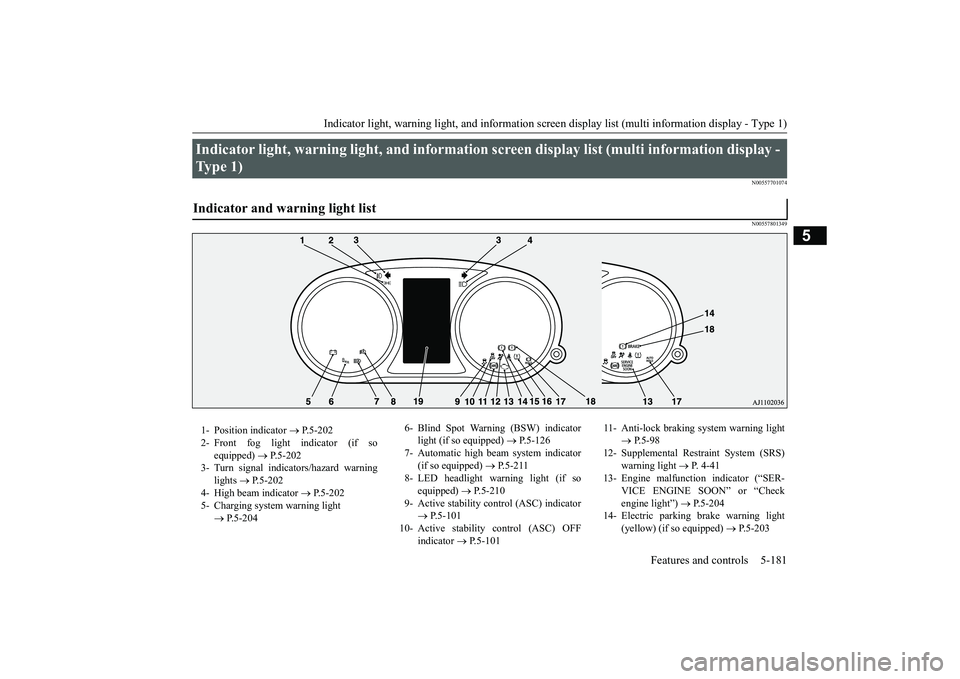
Type 1) Indicator and warning light list 1- Position indicator
P.5-202
2- Front fog light indicator (if so
equipped)
P.5-202
3- Turn signal indicators/hazard warning
lights
P.5-202
4- High beam indicator
P.5-202
5- Charging system warning light
P.5-204
6- Blind Spot Warning (BSW) indicator
light (if so equipped)
P.5-126
7- Automatic high beam system indicator
(if so equipped)
P.5-211
8- LED headlight warning light (if so
equipped)
P.5-210
9- Active stability control (ASC) indicator
P.5-101
10- Active stability
control (ASC) OFF
indicator
P.5-101
11- Anti-lock braking
system warning light
P.5-98
12- Supplemental Restra
int System (SRS)
warning light
P. 4 - 4 1
13- Engine malfuncti
on indicator (“SER-
VICE ENGINE SOON” or “Checkengine light”)
P.5-204
14- Electric parking
brake warning light
(yellow) (if so equipped)
P.5-203
BK0249100US.book 181 ページ 2017年5月10日 水曜日 午前8時49分