tire type MITSUBISHI OUTLANDER III 2018 User Guide
[x] Cancel search | Manufacturer: MITSUBISHI, Model Year: 2018, Model line: OUTLANDER III, Model: MITSUBISHI OUTLANDER III 2018Pages: 441, PDF Size: 13.71 MB
Page 219 of 441
Tire pressure monitoring system5-138 Features and controls
5
N00532701334
When the ignition switch is turned to the“ON” position or the operation mode is put inON, the tire pressure monitoring system
warning light normally
illuminates and goes
off a few seconds later.If one or more of the vehicle tires (except forthe spare tire) is signi
ficantly under-inflated,
the warning light will remain illuminatedwhile the ignition switch is in the “ON” posi-tion or the operation mode is put in ON.Refer to “If the warning light / display illumi-nates while driving” on page 5-140 and takethe necessary measures.
NOTE
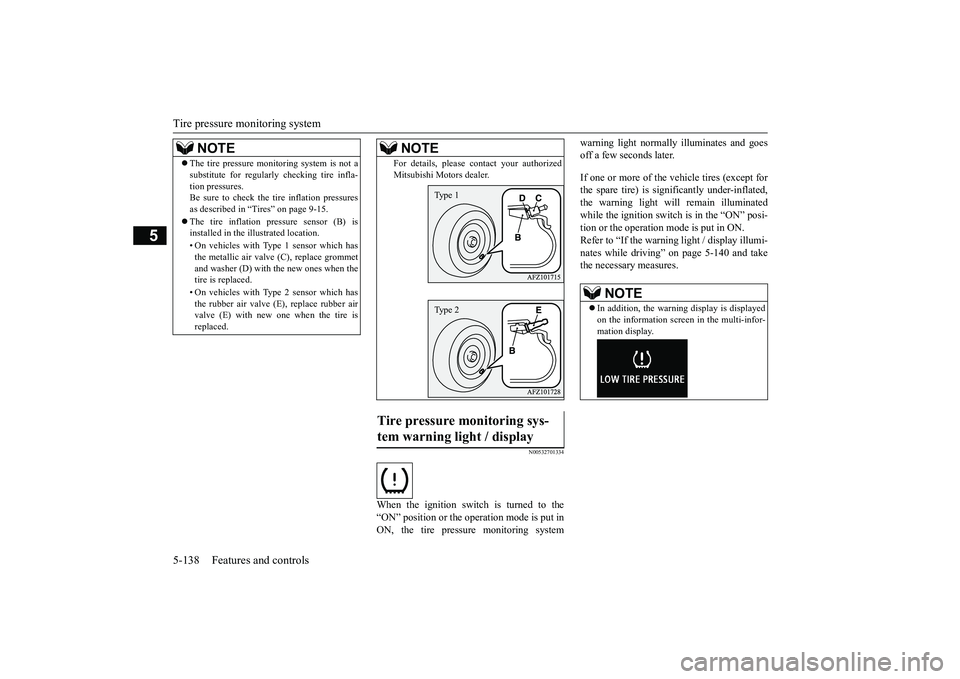
The tire pressure monitoring system is not asubstitute for regularly
checking tire infla-
tion pressures.Be sure to check the tire inflation pressuresas described in “Tires” on page 9-15.The tire inflation pressure sensor (B) isinstalled in the illustrated location.• On vehicles with Type 1 sensor which hasthe metallic air valve (C), replace grommetand washer (D) with the new ones when thetire is replaced.• On vehicles with Type 2 sensor which hasthe rubber air valve (E), replace rubber airvalve (E) with new one when the tire isreplaced.
For details, please
contact your authorized
Mitsubishi Motors dealer.
Tire pressure monitoring sys-tem warning light / display
NOTE
Type 1Type 2
NOTE
In addition, the warni
ng display is displayed
on the information screen in the multi-infor-mation display.
BK0249100US.book 138 ページ 2017年5月10日 水曜日 午前8時49分
Page 249 of 441
Multi Information display - Type 15-168 Features and controls
5
Refer to “Changing the time until “RESTREMINDER” is displayed” on page5-172.Refer to “Changing the turn signal sound”on page 5-172.Refer to “Changing the momentary fuelconsumption display” on page 5-172.Refer to “Tire ID set change” on page5-141.Refer to “Returning to the factory set-tings” on page 5-172.
N00557001240
You can change the mode condition for theaverage fuel consumption and average speeddisplay to “Auto reset”
or “Manual reset.”
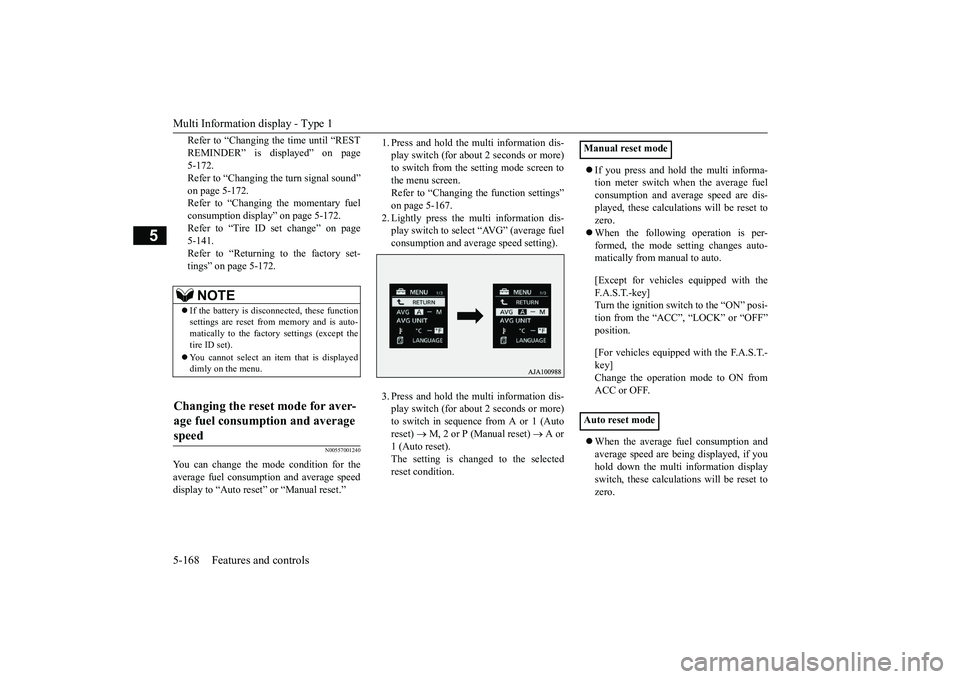
1. Press and hold the mu
lti information dis-
play switch (for about 2 seconds or more)to switch from the setting mode screen tothe menu screen.Refer to “Changing th
e function settings”
on page 5-167.2. Lightly press the multi information dis-play switch to select “AVG” (average fuelconsumption and average speed setting).3. Press and hold the mu
lti information dis-
play switch (for about 2 seconds or more)to switch in sequence from A or 1 (Autoreset)
M, 2 or P (Manual reset)
A or
1 (Auto reset).The setting is changed to the selectedreset condition.
If you press and hold the multi informa-tion meter switch when the average fuelconsumption and average speed are dis-played, these calculati
ons will be reset to
zero.When the following operation is per-formed, the mode setting changes auto-matically from manual to auto.[Except for vehicles
equipped with the
F. A . S . T. - k e y ]Turn the ignition switch to the “ON” posi-tion from the “ACC”, “LOCK” or “OFF”position.[For vehicles equipped
with the F.A.S.T.-
key]Change the operation mode to ON fromACC or OFF.When the average fuel consumption andaverage speed are being displayed, if youhold down the multi in
formation display
switch, these calculations will be reset tozero.
NOTE
If the battery is disc
onnected, these function
settings are reset from
memory and is auto-
matically to the factory settings (except thetire ID set).You cannot select an it
em that is displayed
dimly on the menu.
Changing the reset mode for aver-age fuel consumption and average speed
Manual reset modeAuto reset mode
BK0249100US.book 168 ページ 2017年5月10日 水曜日 午前8時49分
Page 254 of 441
Multi Information display - Type 2
Features and controls 5-173
5
1. Press and hold the mu
lti information dis-
play switch (for about 2 seconds or more)to switch from the setting mode screen tothe menu screen.Refer to “Changing th
e function settings”
on page 5-167.2. Lightly press the multi information dis-play switch to select “RESET” (return tothe factory settings).3. Press and hold the mu
lti information dis-
play switch (for about 5 seconds or more),the buzzer sounds and all of the functionsettings are returned to the factory set-tings.
N00555001291
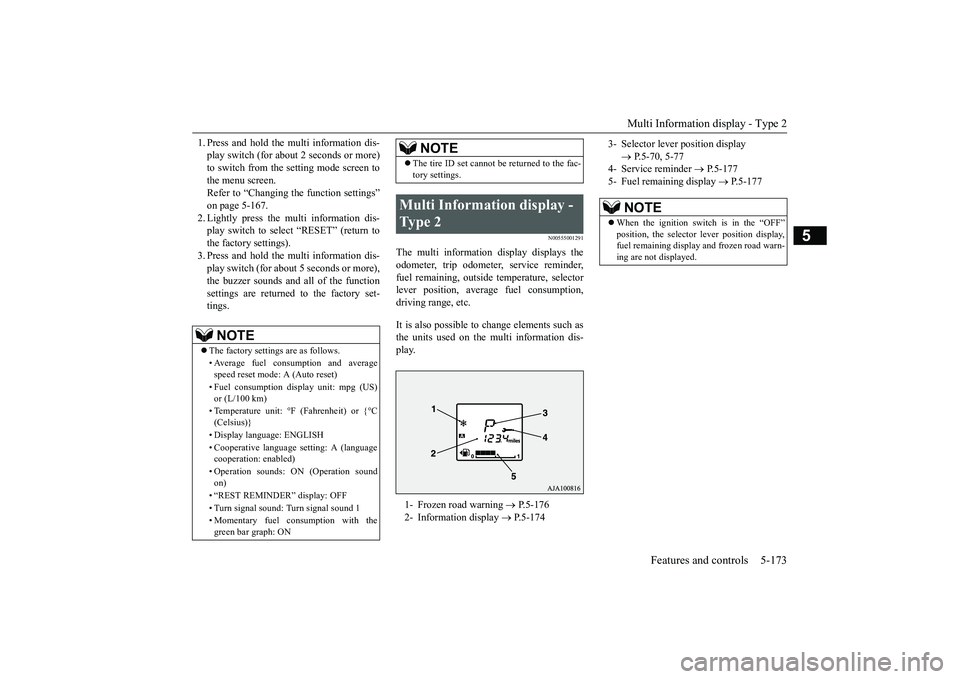
The multi information display displays theodometer, trip odometer, service reminder,fuel remaining, outside
temperature, selector
lever position, averag
e fuel consumption,
driving range, etc.It is also possible to change elements such asthe units used on the multi information dis-play.
NOTE
The factory settings are as follows.• Average fuel consumption and averagespeed reset mode: A (Auto reset)• Fuel consumption di
splay unit: mpg (US)
or (L/100 km)• Temperature unit: °F (Fahrenheit) or {°C(Celsius)}• Display language: ENGLISH• Cooperative language
setting: A (language
cooperation: enabled)• Operation sounds: ON (Operation soundon)• “REST REMINDER” display: OFF• Turn signal sound: Turn signal sound 1• Momentary fuel consumption with thegreen bar graph: ON
The tire ID set cannot be returned to the fac-tory settings.
Multi Information display - Type 2 1- Frozen road warning
P.5-176
2- Information display
P.5-174
NOTE
3- Selector lever position display
P.5-70, 5-77
4- Service reminder
P.5-177
5- Fuel remaining display
P.5-177
NOTE
When the ignition switch is in the “OFF”
lever position display,
fuel remaining display and frozen road warn-ing are not displayed.
BK0249100US.book 173 ページ 2017年5月10日 水曜日 午前8時49分
Page 255 of 441
Multi Information display - Type 25-174 Features and controls
5
N00574801070
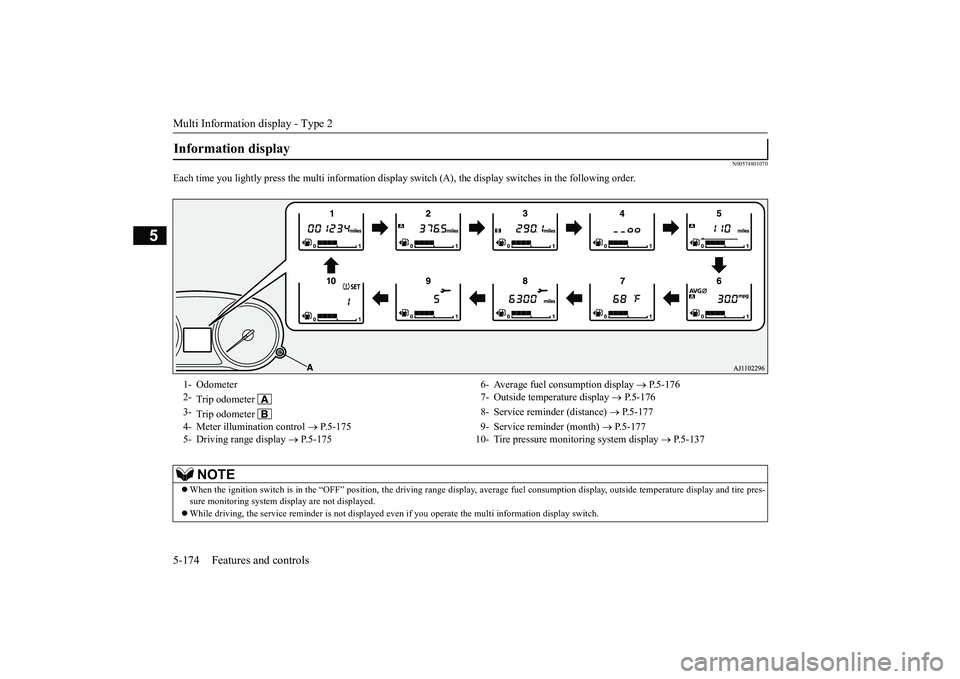
Each time you lightly press th
e multi information display switch (A), th
e display switches in
the following order.
Information display 1- Odometer 6- Average fuel
consumption display
P.5-176
2-
Trip odometer
7- Outside temperature display
P.5-176
3-
Trip odometer
8- Service reminder (distance)
P.5-177
4- Meter illumination control
P.5-175 9- Service reminder (month)
P.5-177
5- Driving range display
P.5-175 10- Tire pressure monitoring system display
P.5-137
NOTE
When the ignition switch is in the “OFF” position, the driving ra
nge display, average fuel consum
ption display, outside tempera
ture display and tire pres-
sure monitoring system di
splay are not displayed.
While driving, the service reminder is
not displayed even if you operate th
e multi information display switch.
BK0249100US.book 174 ページ 2017年5月10日 水曜日 午前8時49分
Page 263 of 441

Indicator light, warning light, and information screen display list (multi information display - Type 1)
5
N00557901119
When there is information to be announced,
such as light reminder, the
tone sounds and the screen sw
itches to the displays show
n below. Refer to
the appropriate page and ta
ke the necessary measures.
When the cause of the warning display is elimin
ated, the warning displa
y goes out automatically.
Refer to Warning disp
lay list on page 5-183.
Refer to Other interrupt displays on page 5-197.15- Seat belt remi
nder/warning light
P.4-23
16- Tire pressure monitoring system warn-
ing light
P.5-138
17- Brake auto hold indicator (if so
equipped)
P.5-93
18- Brake warning light (red)
P.5-203
19- Information screen display list
P.5-182
Information screen display list
NOTE
In the following cases, a warning may be
displayed on the information screen and th
e buzzer may sound for a
few seconds, at tim
es.
This is caused by the system picking up in
terference such as strong el
ectromagnetic waves
or noise, and is not a functional pro
blem.
• An extremely strong electrom
agnetic wave is received from a s
ource such as an illegal radio se
t, a spark from a wire, or a rad
ar station.
• Abnormal voltage or a static
electricity disc
harge is generated by the operation of
your vehicle’s electr
onics (including afte
r-market parts).
If the warning display has oc
curred a number of times, take your
vehicle to an author
ized Mitsubishi Motors
dealer or a repair
facility of your choice and
have the system checked.
BK0249100US.book 182 ページ 2017年5月10日 水曜日 午前8時49分
Page 267 of 441
Indicator light, warning light, and information screen display list (multi information display - Type 1)
5
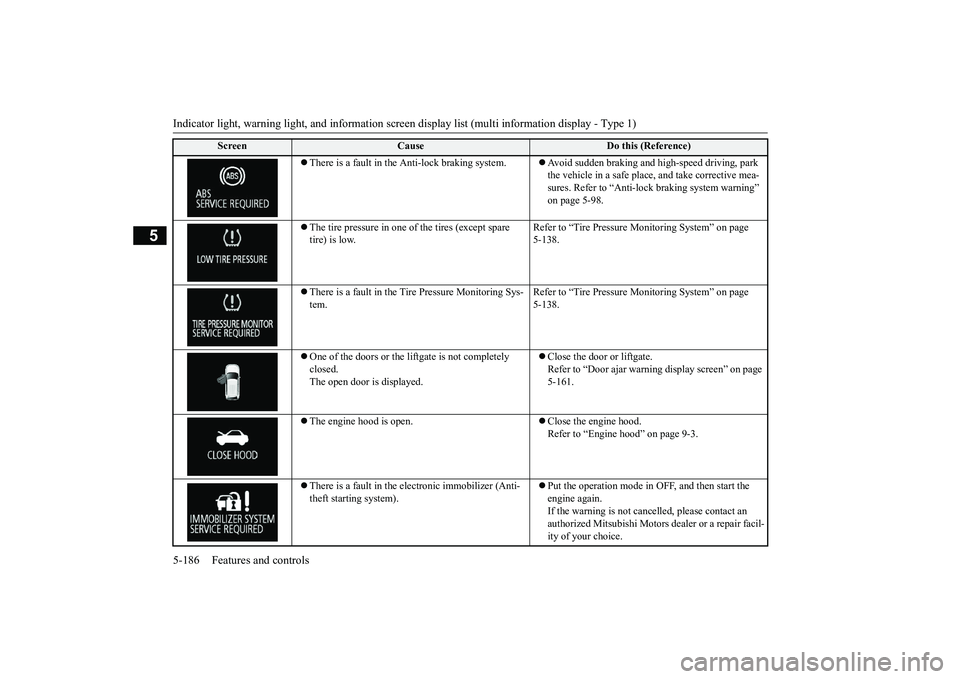
There is a fault in the Anti-lock braking system.
Avoid sudden braking and high-speed driving, park the vehicle in a safe place, and take corrective mea-sures. Refer to “Anti-lock
braking system warning”
on page 5-98.
The tire pressure in one of the tires (except spare tire) is low.
Refer to “Tire Pressure Monitoring System” on page 5-138.
There is a fault in the Tire Pressure Monitoring Sys-tem.
Refer to “Tire Pressure Monitoring System” on page 5-138.
One of the doors or the liftgate is not completely closed.The open door is displayed.
Close the door or liftgate.Refer to “Door ajar warnin
g display screen” on page
5-161.
The engine hood is open.
Close the engine hood.Refer to “Engine hood” on page 9-3.
There is a fault in the electronic immobilizer (Anti-theft starting system).
Put the operation mode in OFF, and then start the engine again.If the warning is not cancel
led, please contact an
authorized Mitsubishi Motors dealer or a repair facil-ity of your choice.
Screen
Cause
Do this (Reference)
BK0249100US.book 186 ページ 2017年5月10日 水曜日 午前8時49分
Page 283 of 441
Indicators5-202 Features and controls
5
N00519900127N00520000216
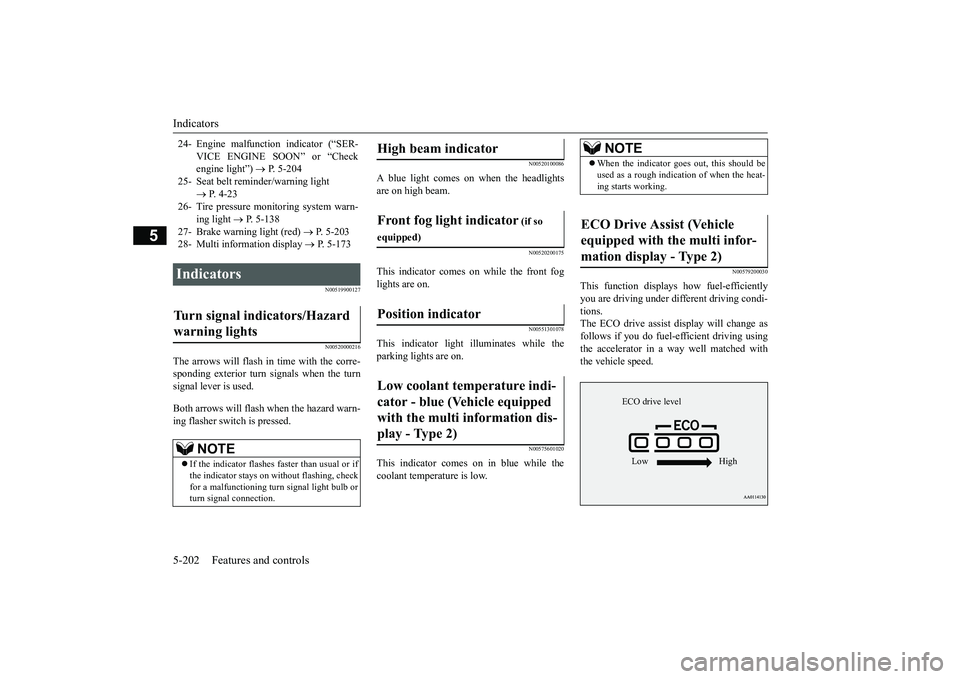
The arrows will flash in time with the corre-sponding exterior turn signals when the turnsignal lever is used.Both arrows will flash
when the hazard warn-
ing flasher swit
ch is pressed.
N00520100086
A blue light comes on when the headlightsare on high beam.
N00520200175
This indicator comes on while the front foglights are on.
N00551301078
This indicator light illuminates while theparking lights are on.
N00575601020
This indicator comes on in blue while thecoolant temperature is low.
N00579200030
This function displays
how fuel-efficiently
you are driving under different driving condi-tions.The ECO drive assist di
splay will change as
follows if you do fuel-efficient driving usingthe accelerator in a way well matched withthe vehicle speed.
24- Engine malfuncti
on indicator (“SER-
VICE ENGINE SOON” or “Checkengine light”)
P. 5-204
25- Seat belt remi
nder/warning light
P. 4-23
26- Tire pressure moni
toring system warn-
ing light
P. 5-138
27- Brake warning light (red)
P. 5-203
28- Multi information display
P. 5-173
Indicators Turn signal indicators/Hazard warning lights
NOTE
If the indicator flashes faster than usual or ifthe indicator stays on wi
thout flashing, check
for a malfunctioning turn signal light bulb orturn signal connection.
High beam indicator Front fog light indicator
(if so
equipped)Position indicator Low coolant temperature indi-cator - blue (Vehicle equipped with the multi information dis-play - Type 2)
NOTE
When the indicator go
es out, this should be
used as a rough indication of when the heat-ing starts working.
ECO Drive Assist (Vehicle equipped with the multi infor-mation display - Type 2)
ECO drive levelLow High
BK0249100US.book 202 ページ 2017年5月10日 水曜日 午前8時49分
Page 331 of 441
Driving precaution6-2 Driving safety
6
N00629301092
Your vehicle has been designed for both nor-mal and occasional off-road use. However,avoid driving the vehicle through areas wherethe tires may get stuck in deep sand or mud asyour vehicle is designe
d primarily for use on
pavement, unlike a conventional off-roadvehicle.Keep in mind that 2-wheel drive vehicles areless capable than 4-wh
eel drive vehicles for
driving on muddy, slippery, wet or snow-cov-ered roads.Utility vehicles have
higher ground clearance
and a narrower track, which enables them toperform in a wide variety of off-road situa-tions. Because of the higher ground clear-ance, these vehicles have a higher center ofgravity, which makes them handle differentlythan ordinary vehicles when driving on pave-ment. They are not designed to maneuver orcorner at the same speed on pavement as con-ventional 2-wheel driv
e passenger cars any
more than low-slung sports cars are designed
to perform satisfactorily in off-road condi-tions.Always drive safely
and steer the vehicle
carefully. Avoid operating the vehicle in amanner that might require sharp turns orabrupt maneuvers. As wi
th other vehicles of
this type, failure to operate this vehicle cor-rectly can result in lo
ss of control or vehicle
rollover.In a rollover crash, an unbelted person is sig-nificantly more likely to die than a personwearing a seat belt. Be
fore starting the vehi-
cle, always make cert
ain that you and all your
passengers are properly wearing their seatbelts (with children in the rear seat, in appro-priate restraints).
N00628801191
Fuel economy is depe
ndent on many factors.
Your personal driving habits can have a sig-nificant effect on your fuel consumption.Several recommendations
for achieving the
greatest fuel economy are listed below.Whenever accelerating from a stop,always accelerate
slowly and smoothly.
When parked for even a short period, donot idle the engine. Shut it off.Plan your trips to avoid unnecessarystops.
Keep your tires inflated to the recom-mended pressures.When driving a 4-wheel drive vehicle onhighways or dry improved roads, set thedrive mode to “4WD ECO” or “4WDAUTO” (Electronically controlled 4WD),or “AWC ECO” or “NORMAL” (S-AW C ) .For freeway driving, maintain a speed ofapproximately 50 mph (80 km/h) whentraffic, roadway and weather conditionssafely permit.Keep your air filter clean and your vehiclelubricated according
to the recommenda-
tions in this manual.Always keep your ve
hicle well main-
tained. A poorly maintained enginewastes fuel and costs money.Never overload your vehicle.
N00628900049
Drunk driving is one of the most frequentcauses of accidents.Your driving ability ca
n be seriously impaired
even with blood alcohol levels far below thelegal minimum. If you
have been drinking,
don’t drive. Ride with a designated non-drinking driver, call a cab or a friend, or usepublic transportation. Drinking coffee or tak-ing a cold shower will not make you sober.
Driving precaution
WA R N I N GUtility vehicles have
a significantly higher
rollover rate than othe
r types of vehicles.
Avoid abrupt maneuvers and excessivespeed. Always buckle up.
Fuel economy
Driving, alcohol and drugs
BK0249100US.book 2 ページ 2017年5月10日 水曜日 午前8時49分
Page 343 of 441
Trailer towing6-14 Driving safety
6
Trailer lights and equipment must complywith federal, state,
and local regulations.
Check with your loca
l recreational vehicle
dealer for the requirements in your area, anduse only equipment designed for your vehi-cle.Since lighting and wiring
vary by trailer type
and brand, you should have a qualified tech-nician install a suitable connector between thevehicle and the trailer.
Improper equipment or
installation can cause da
mage to your vehi-
cle’s electrical system
and affect your vehicle
warranty.Many states and Canadi
an provinces require
special outside mirrors when towing a trailer.Even if not required,
you should install spe-
cial mirrors if you ca
nnot clearly see behind
you, or if the trailer
creates a blind spot.
Ask your trailer sales or
rental agency if any
other items are recomm
ended or required for
your towing situation.
Towing a trailer requires a certain amount ofexperience.Before setting out for the open road, you’llwant to get to know your trailer. Acquaint
yourself with the feel of handling and brakingwith the added weight of the trailer. Alwayskeep in mind that the vehicle you are drivingis now a good deal longer and not nearly asresponsive as your vehicl
e is without a trailer.
Before you start, check the trailer hitch,safety chains, tires
and mirror adjustment.
Be sure your vehicle’s ti
res are inflated to the
cold inflation pressure listed in the manual.You’ll find these numbe
rs on the tire and
loading information placard at the sill of thedriver’s door.Refer to “Tire inflati
on pressures” on page
9-19.Stay at least twice as far behind the vehicleahead as you would when driving your vehi-cle without a trailer.
This can help you avoid
situations that require
heavy braking and sud-
den turns.
Trailer lights Additional trailer equipment
Operating hints
WA R N I N GIf you have a rear window open and youtow a trailer with
your vehicle, carbon
monoxide gas which
you cannot see or
smell could come into your vehicle. It cancause unconsciousness or death. Refer to“Exhaust system” on page 9-24.To maximize your safe
ty when towing a
trailer:Have your exhaust system inspected forleaks, and make necessary repairs beforestarting on your trip.Keep the rear windows closed.If exhaust does come into your vehiclethrough a window or
another opening,
drive with your front, main heating orcooling system on an
d with the blower on
any speed. This will
bring fresh, outside
air into your vehicle. Do not use recircula-tion because it only recirculates the airinside your vehicle. Refer to “Air selectionswitch” on page 7-9.
Driver preparation
Vehicle preparation Tire Following distance
BK0249100US.book 14 ページ 2017年5月10日 水曜日 午前8時49分
Page 371 of 441
How to change a tire8-10 For emergencies
8
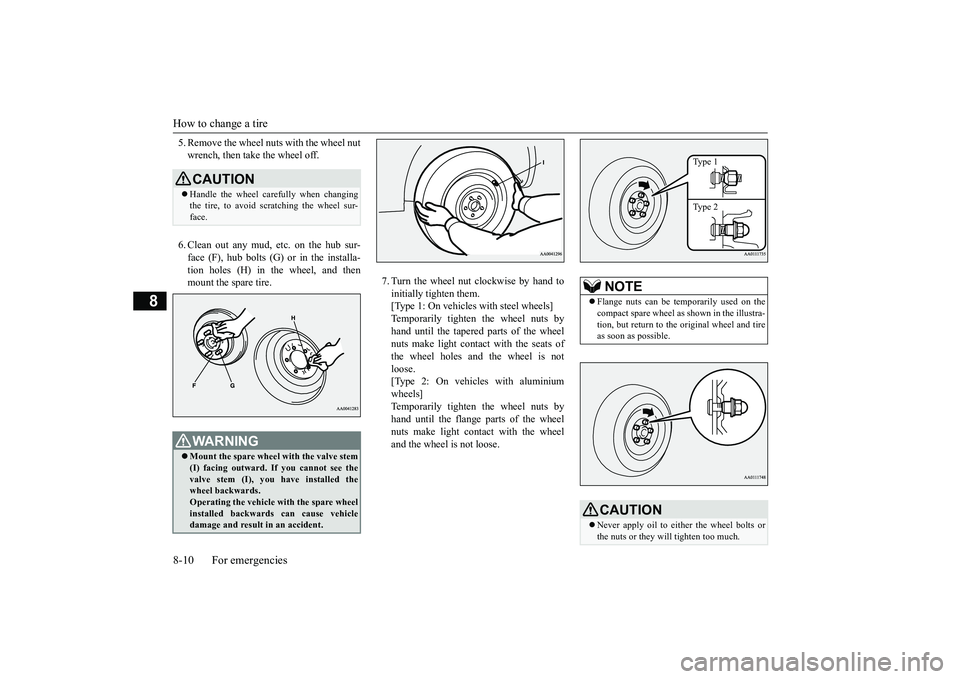
5. Remove the wheel nuts with the wheel nutwrench, then take the wheel off.6. Clean out any mud, etc. on the hub sur-face (F), hub bolts (G)
or in the installa-
tion holes (H) in the wheel, and thenmount the spare tire.
7. Turn the wheel nut clockwise by hand toinitially tighten them.[Type 1: On vehicles
with steel wheels]
Temporarily tighten the wheel nuts byhand until the tapered parts of the wheelnuts make light contac
t with the seats of
the wheel holes and the wheel is notloose.[Type 2: On vehicles with aluminiumwheels]Temporarily tighten the wheel nuts byhand until the flange parts of the wheelnuts make light cont
act with the wheel
and the wheel is not loose.
CAUTIONHandle the wheel carefully when changingthe tire, to avoid scratching the wheel sur-face.WA R N I N GMount the spare wheel with the valve stem(I) facing outward. If
you cannot see the
valve stem (I), you
have installed the
wheel backwards.Operating the vehicle with the spare wheelinstalled backwards can cause vehicledamage and result
in an ac
cident.
NOTE
Flange nuts can be te
mporarily used on the
compact spare wheel as shown in the illustra-tion, but return to the original wheel and tireas soon as possible.CAUTIONNever apply oil to either the wheel bolts orthe nuts or they will tighten too much.
Type 1Type 2
BK0249100US.book 10 ページ 2017年5月10日 水曜日 午前8時49分