audio MITSUBISHI OUTLANDER III 2018 Owner's Manual
[x] Cancel search | Manufacturer: MITSUBISHI, Model Year: 2018, Model line: OUTLANDER III, Model: MITSUBISHI OUTLANDER III 2018Pages: 441, PDF Size: 13.71 MB
Page 251 of 441
Multi Information display - Type 15-170 Features and controls
5
N00557201196
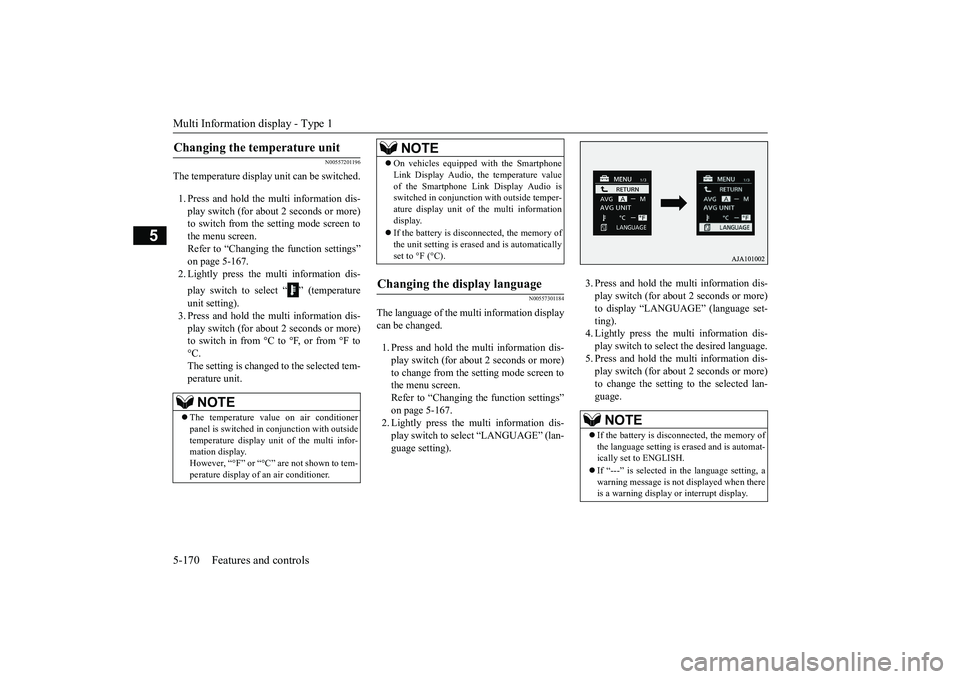
The temperature display unit can be switched.1. Press and hold the multi information dis-play switch (for about 2 seconds or more)to switch from the setting mode screen tothe menu screen.Refer to “Changing the function settings”on page 5-167.2. Lightly press the multi information dis-play switch to select “ ” (temperatureunit setting).3. Press and hold the multi information dis-play switch (for about 2 seconds or more)to switch in from °C to °F, or from °F to°C.The setting is changed to the selected tem-perature unit.
N00557301184
The language of the multi information displaycan be changed.1. Press and hold the mu
lti information dis-
play switch (for about 2 seconds or more)to change from the setting mode screen tothe menu screen.Refer to “Changing th
e function settings”
on page 5-167.2. Lightly press the multi information dis-play switch to se
lect “LANGUAGE” (lan-
guage setting).
3. Press and hold the multi information dis-play switch (for about 2 seconds or more)to display “LANGUAGE” (language set-ting).4. Lightly press the multi information dis-play switch to select
the desired language.
5. Press and hold the multi information dis-play switch (for about 2 seconds or more)to change the setting to the selected lan-guage.
Changing the temperature unit
NOTE
The temperature value on air conditionerpanel is switched in
conjunction with outside
temperature display unit of the multi infor-mation display.However, “°F” or “°C” are not shown to tem-perature display of
an air conditioner.
On vehicles equipped with the SmartphoneLink Display Audio, the temperature valueof the Smartphone Link Display Audio isswitched in conjunction
with outside temper-
ature display unit of the multi informationdisplay.If the battery is disconnected, the memory ofthe unit setting is erased and is automaticallyset to °F (°C).
Changing the display language
NOTE
NOTE
If the battery is disconnected, the memory ofthe language setting is erased and is automat-ically set to ENGLISH.If “---” is selected in the language setting, awarning message is not displayed when thereis a warning display or interrupt display.
BK0249100US.book 170 ページ 2017年5月10日 水曜日 午前8時49分
Page 252 of 441
Multi Information display - Type 1
Features and controls 5-171
5
N00529801331
The language used in Multi Around Monitor(if so equipped) can be
changed automatically
to the same language as
that shown in the
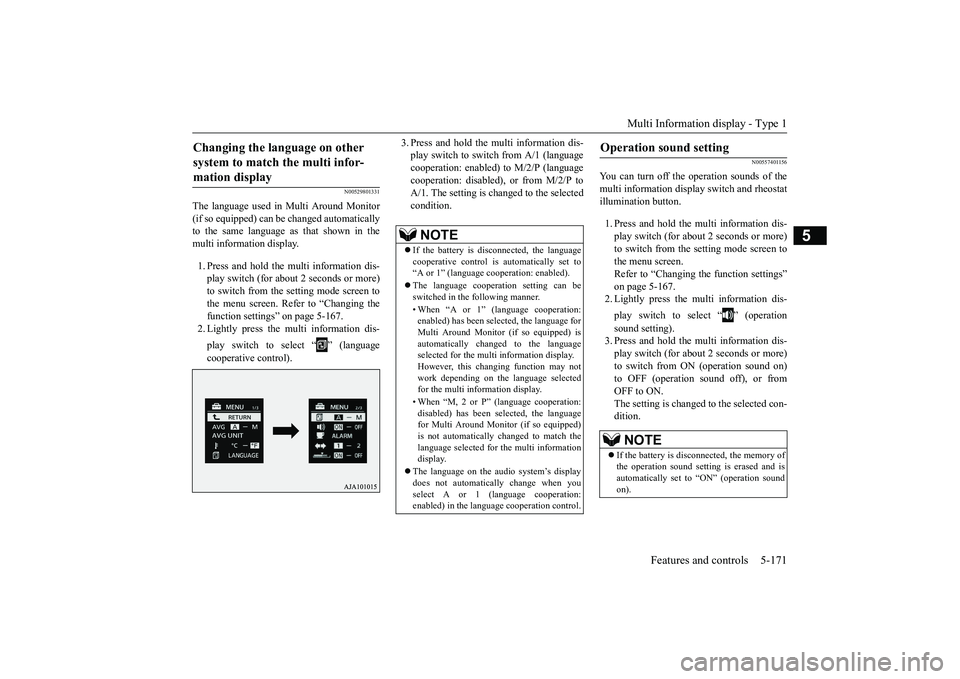
multi information display. 1. Press and hold the mu
lti information dis-
play switch (for about 2 seconds or more)to switch from the setting mode screen tothe menu screen. Refer to “Changing thefunction settings” on page 5-167. 2. Lightly press the multi information dis-play switch to select “ ” (languagecooperative control).
3. Press and hold the multi information dis-play switch to swit
ch from A/1 (language
cooperation: enabled)
to M/2/P (language
cooperation: disabled
), or from M/2/P to
A/1. The setting is changed to the selectedcondition.
N00557401156
You can turn off the operation sounds of themulti information displa
y switch and rheostat
illumination button.1. Press and hold the multi information dis-play switch (for about 2 seconds or more)to switch from the setting mode screen tothe menu screen.Refer to “Changing th
e function settings”
on page 5-167.2. Lightly press the multi information dis-play switch to select “ ” (operationsound setting).3. Press and hold the multi information dis-play switch (for about 2 seconds or more)to switch from ON (operation sound on)to OFF (operation sound off), or fromOFF to ON.The setting is changed to the selected con-dition.
Changing the language on other system to match the multi infor-mation display
NOTE
If the battery is disconnected, the languagecooperative control is
automatically set to
“A or 1” (language
cooperation: enabled).
The language coopera
tion setting can be
switched in the following manner.• When “A or 1” (l
anguage cooperation:
enabled) has been selected, the language forMulti Around Monitor (if so equipped) isautomatically cha
nged to the language
selected for the multi information display.However, this changing function may notwork depending on the language selectedfor the multi information display.• When “M, 2 or P”
(language cooperation:
disabled) has been
selected, the language
for Multi Around Monitor (if so equipped)is not automatically changed to match thelanguage selected for the multi informationdisplay.
The language on the audio system’s displaydoes not automatically change when youselect A or 1 (l
anguage cooperation:
enabled) in the langua
ge cooperation control.
Operation sound setting
NOTE
If the battery is disconnected, the memory ofthe operation sound setting is erased and isautomatically
set to “ON” (operation sound
on).
BK0249100US.book 171 ページ 2017年5月10日 水曜日 午前8時49分
Page 261 of 441
Multi Information display - Type 25-180 Features and controls
5
N00557101179
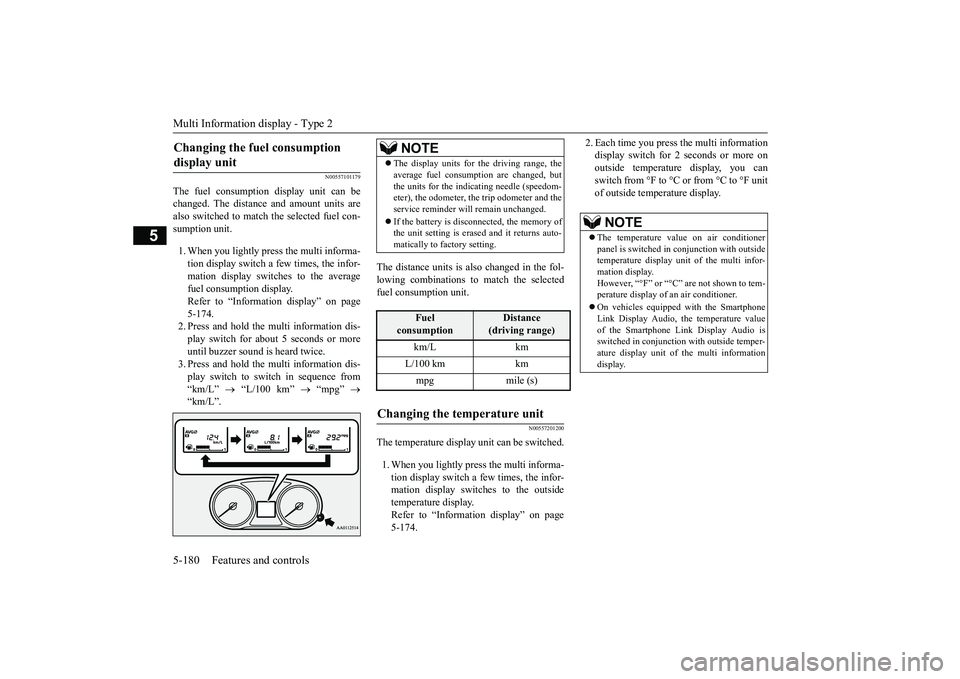
The fuel consumption display unit can bechanged. The distance and amount units arealso switched to match the selected fuel con-sumption unit.1. When you lightly press the multi informa-tion display switch a few times, the infor-mation display switches to the averagefuel consumption display.Refer to “Information display” on page5-174.2. Press and hold the multi information dis-play switch for about 5 seconds or moreuntil buzzer sound is
heard twice.
3. Press and hold the multi information dis-play switch to swit
ch in sequence from
“km/L”
“L/100 km”
“mpg”
The distance units is also changed in the fol-lowing combinations to match the selectedfuel consumption unit.
N00557201200
The temperature display unit can be switched.1. When you lightly press the multi informa-tion display switch a few times, the infor-mation display switches to the outsidetemperature display.Refer to “Information display” on page5-174.
2. Each time you press the multi informationdisplay switch for 2 seconds or more onoutside temperatur
e display, you can
switch from °F to °C or from °C to °F unitof outside temperature display.
Changing the fuel consumption display unit
NOTE
The display units for the driving range, theaverage fuel consumption are changed, butthe units for the indica
ting needle (speedom-
eter), the odometer, the trip odometer and theservice reminder will
remain unchanged.
If the battery is disconnected, the memory ofthe unit setting is erased and it returns auto-matically to factory setting.
Fuel
consumption
Distance
(driving range)
L/100 km kmmpg mile (s)
Changing the temperature unit
NOTE
The temperature value on air conditionerpanel is switched in
conjunction with outside
temperature display unit of the multi infor-mation display.However, “°F” or “°C” are not shown to tem-perature display of
an air conditioner.
On vehicles equippe
d with the Smartphone
Link Display Audio, the temperature valueof the Smartphone Li
nk Display Audio is
switched in conjunction
with outside temper-
ature display unit of
the multi information
display.
BK0249100US.book 180 ページ 2017年5月10日 水曜日 午前8時49分
Page 290 of 441
![MITSUBISHI OUTLANDER III 2018 Owners Manual Combination headlights and dimmer switch
Features and controls 5-209
5
[When the engine is not
running, or when the
engine is running but the parking brake is notreleased]The engine starts when the l](/img/19/58144/w960_58144-289.png "MITSUBISHI OUTLANDER III 2018 Owners Manual Combination headlights and dimmer switch
Features and controls 5-209
5
[When the engine is not
running, or when the
engine is running but the parking brake is notreleased]The engine starts when the l")
Combination headlights and dimmer switch
Features and controls 5-209
5
[When the engine is not
running, or when the
engine is running but the parking brake is notreleased]The engine starts when the lights are off.
N00532601649
If the following operation is performedwith the combination headlights and dim-mer switch in the “ ” or “ ” position,the lights automatically turn off.[Except for vehicles equipped with theF. A . S . T. - k e y ]The ignition switch is turned to the “OFF”
the key is removed
from the ignition switch and the driver’sdoor is opened.[For vehicles equipped with the F.A.S.T.-key]The operation mode is changed to OFF orACC and the driver’s door is opened.If the following operation is performedwith the combination headlights and dim-mer switch in the “ ” or “ ” position,the lights automatically turn off afterapproximately 3 minutes.[Except for vehicles equipped with theF. A . S . T. - k e y ]The ignition switch is turned to the “OFF”
the key is removed
from the ignition switch and the driver’sdoor is not opened.
The daytime running lights illumi-natedTail, front and re
ar side-marker
lights, license pl
ate, instrument
panel lights and downlight onHeadlights and other lights on
NOTE
Once the daytime running light come on,they do not go out until the ignition switch isturned to the “OFF” or “ACC” position orthe operation mode is changed to OFF orACC.OFF All lights offAUTO
Headlights and other lights turn on and off automatically in accor-dance with outside light level.Parking, tail, front
and rear side-
marker lights, license plate, instru-ment panel lights and downlight onHeadlights and other lights on
NOTE
The sensitivity of the automatic on/off con-trol can be adjusted.For further informati
on, please contact your
authorized Mitsubishi
Motors dealer or a
repair facility
of your choice.
On vehicles equippe
d with the Smartphone
Link Display Audio, sc
reen operations can
be used to make the adjustment.Refer to the separate
owner’s manual for
details.Do not cover the sensor (A) for the automaticon/off control by affixing
a sticker or label to
the windshield.If the lights do not turn on or off with theswitch in the “AUTO”operate the switch. Have the system checkedby an authorized Mitsubishi Motors dealer ora repair facility of your choice.
Light auto-cutout function (headlights and other lights)
BK0249100US.book 209 ページ 2017年5月10日 水曜日 午前8時49分
Page 291 of 441
![MITSUBISHI OUTLANDER III 2018 Owners Manual Combination headlights and dimmer switch5-210 Features and controls
5
[For vehicles equipped
with the F.A.S.T.-
key]The operation mode is changed to OFF orACC and the driver’s door is not opened.
I](/img/19/58144/w960_58144-290.png "MITSUBISHI OUTLANDER III 2018 Owners Manual Combination headlights and dimmer switch5-210 Features and controls
5
[For vehicles equipped
with the F.A.S.T.-
key]The operation mode is changed to OFF orACC and the driver’s door is not opened.
I")
Combination headlights and dimmer switch5-210 Features and controls
5
[For vehicles equipped
with the F.A.S.T.-
key]The operation mode is changed to OFF orACC and the driver’s door is not opened.
If the combination headlights and dimmerswitch is turned to the “ ” or “ ” posi-tion again after the engine is turned off, theapproximately 3-minute
auto-cutout function
described above will not
work. The lights (the
parking lights, tail li
ghts and license plate
lights) will stay on and will not turn off auto-matically.
N00584500028
This warning light will illuminate when thereis a malfunction in the LED headlights.
N00549801236
[When using a key to start the engine]If the driver’s door is opened with the key inthe “OFF” or “LOCK” or “ACC” position orremoved from the ignition switch while thelights are on, the tone
will sound to remind
you to turn off the lights.[When using the F.A.S.T.-key to start theengine]If the driver’s door is opened with the opera-tion mode is put in OFF or ACC, or if theoperation mode is changed to OFF while thelights are on, the tone
will sound to remind
you to turn off the lights.In either case, the lights will turn off automat-ically and so will the tone. Or you can turnthe light switch to the “OFF” position to stopthe tone.
N00549901178
To change the headlights from high beam tolow beam and vice vers
a, pull the turn signal
lever to (1). Switch the headlights to lowbeam as a courtesy whenever there areoncoming vehicles, or when there is trafficmoving ahead of you. An illuminated blue
NOTE
The light auto-cutout
function can be deacti-
vated.See your authorized Mitsubishi Motorsdealer for details.For vehicles equipped with the SmartphoneLink Display Audio, adjustments can bemade using screen ope
rations. For further
details, refer to the se
parate owner’s manual.
When you want to keep the lights on:
LED headlight warning light
(if
so equipped)If the warning light il
luminates, there may be
a malfunction in the unit. Contact an autho-rized Mitsubishi Motors dealer or a repairfacility of your choice to have the systemchecked.Type 1Type 2
Headlight reminder buzzer Dimmer (high/low beam change)
BK0249100US.book 210 ページ 2017年5月10日 水曜日 午前8時49分
Page 296 of 441
Combination headlights and dimmer switch
Features and controls 5-215
5
If the automatic high beam system determinesthat its performance has been degraded, thewarning display will appear.This can occur whenForeign objects, such as dirt, snow or ice,adhere to the windshield of the sensorportion.In adverse weather conditions, such asrain, snow, sand storms, etc.A front vehicle or an oncoming vehicle issplashing water, snow or dirt.
When the sensor performance returns, theautomatic high beam system will resumeoperation.If the warning display does not disappearafter waiting for a while, there is a possibilitythat the sensor has a
malfunction. Contact an
authorized Mitsubishi Motors dealer forinspection of the sensor.
N00563201250
This function turns on the front side-markerand parking lights for approximately 30 sec-onds after the UNLOCK button on the remotecontrol transmitter is pressed when the com-bination headlights and dimmer switch is inthe “OFF” or “AUTO” position (vehiclesequipped with the automatic light control).The welcome light func
tion will operate only
when it is dark outside the vehicle.
N00547301181
This function turns on the headlights in thelow beam setting for approximately 30 sec-onds after the ignition switch is turned to the“OFF” or “LOCK” position or the operationmode is put in OFF.1. Turn the combination headlights and dim-mer switch to the “OFF” or “AUTO”
pped with the auto-
matic light control).2. Turn the ignition switch to the “OFF” or“LOCK” position or put the operationmode in OFF. Also, if a key was used tostart the engine, rem
ove the key from the
ignition switch.
Windshield is dirty
Welcome light
NOTE
While the welcome light function is operat-ing, perform one of
the following operations
to cancel the function.• Push the LOCK button on the remote con-trol transmitter.• Turn the combination headlights and dim-mer switch to the “ ” or “ ” position.• Turn the ignition switch to the “ON” posi-tion or put the operation mode in ON.
It is possible to modify functions as follows:• The headlights can be set to come on in thelow beam setting.• The welcome light f
unction can be deacti-
vated.
For details, consult a Mitsubishi Motorsdealer.On vehicles equipped with the SmartphoneLink Display Audio, sc
reen operations can
be used to make the adjustment.Refer to the separate owner’s manual fordetails.
Coming home light
NOTE
BK0249100US.book 215 ページ 2017年5月10日 水曜日 午前8時49分
Page 297 of 441
Headlight leveling swit
ch (if so equipped)
5-216 Features and controls
5
3. Within 60 seconds of turning the ignitionswitch to the “OFF” or “LOCK” positionor putting the operation mode in OFF, pullthe turn signal lever toward you.4. The headlights will come on in the lowbeam setting for approximately 30 sec-onds. After the headlights go off, theheadlights can be turned on again in thelow beam setting for approximately 30seconds by pulling the turn signal levertoward you within 60 seconds of turningthe ignition switch to the “OFF” or“LOCK” position or putting the operationmode in OFF. To turn on the headlightsagain after 60 seconds of turning the igni-tion switch to the “OFF” or “LOCK”position or putting th
e operation mode in
OFF, repeat the process from step 1.
N00537101115
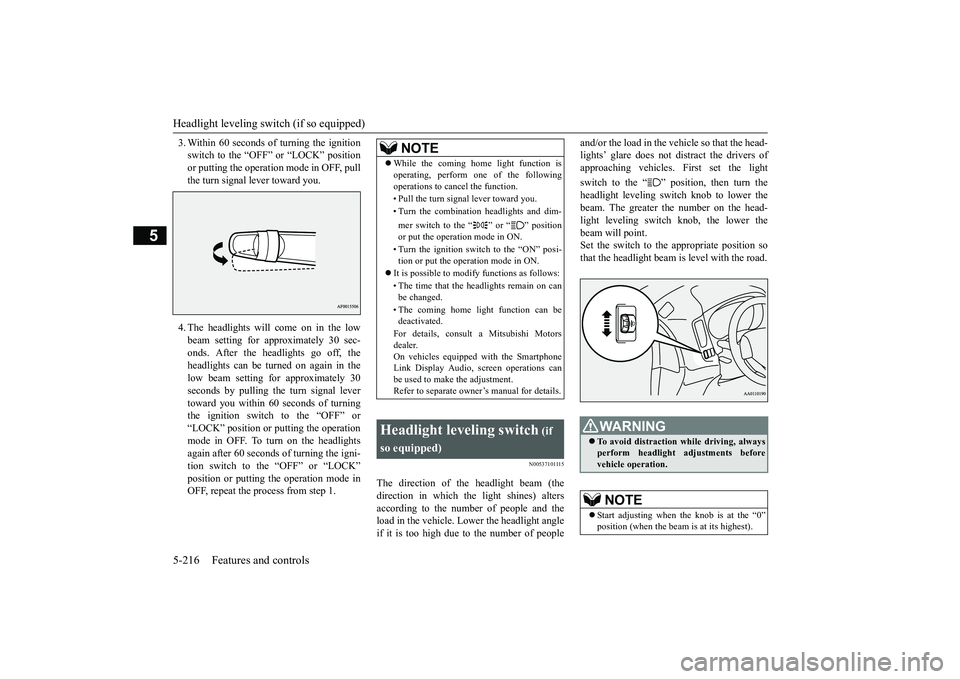
The direction of the headlight beam (thedirection in which th
e light shines) alters
according to the number of people and theload in the vehicle. Lo
wer the headlight angle
if it is too high due to the number of people
and/or the load in the vehicle so that the head-lights’ glare does not distract the drivers ofapproaching vehicles. First set the lightswitch to the “ ” position, then turn theheadlight leveling switch knob to lower thebeam. The greater the number on the head-light leveling switch knob, the lower thebeam will point.Set the switch to the appropriate position sothat the headlight beam is level with the road.
NOTE
While the coming home light function isoperating, perform one of the followingoperations to canc
el the function.
• Pull the turn signal lever toward you.• Turn the combination headlights and dim-mer switch to the “ ” or “ ” positionor put the operation mode in ON.• Turn the ignition switch to the “ON” posi-tion or put the opera
tion mode in ON.
It is possible to modify functions as follows:• The time that the headlights remain on canbe changed.• The coming home light function can bedeactivated.For details, consult a Mitsubishi Motorsdealer.On vehicles equipped with the SmartphoneLink Display Audio, sc
reen operations can
be used to make the adjustment.Refer to separate owne
r’s manual for details.
Headlight leveling switch
(if
so equipped)
WA R N I N GTo avoid distraction wh
ile driving, always
perform headlight adjustments beforevehicle operation.NOTE
Start adjusting when the knob is at the “0”
is at its highest).
BK0249100US.book 216 ページ 2017年5月10日 水曜日 午前8時49分
Page 298 of 441

Turn signal lever
Features and controls 5-217
5
N00522601590
When changing lanes, or
to making a gradual
turn, hold the lever in the “lane change” posi-tion (1). It will return
to the neutral position
when you let go. Use the full position (2)when making a normal turn. The lever willreturn to the neutral position when the turn iscomplete. There may be times when the leverdoes not return to the neutral position. Thisusually happens when the steering wheel isturned only slightly. You
can easily return the
lever by hand.Also, when you move the lever to (1) slightlythen release it, the turn signal lights and theindicator light in the instrument cluster willflash three times.
Keep the knob in the “0” position exceptwhen using the knob to lower the headlightbeam angle.Always return the knob to the “0” positionwhen the load is removed and the peoplehave left
the vehicle.
NOTE
Turn signal lever
NOTE
A light in the instrument panel flashes toshow when the front and rear turn signallights are working properly.If this light flashes fa
ster than usual, check
for a burned out turn signal light bulb or mal-functioning connection in the signal.If the panel light does not come on when thelever is moved, check for a blown fuse or aburned out bulb in the panel.Have the system inspected by your autho-rized Mitsubishi Motors dealer or a repairfacility of your choice.It is possible to modi
fy functions as follows:
• Deactivate the turn signal light 3-flashfunction for lane changes.• Adjust the time required to operate thelever for the 3-flash function.See your authorized Mitsubishi Motorsdealer for details.For vehicles equipped with the SmartphoneLink Display Audio, adjustments can bemade using screen ope
rations. For further
details, refer to the
separate owner’s manual.
It is possible to change the tone of a sound-ing buzzer as the turn signal lights flash.[Vehicle equipped with the multi informationdisplay - type 1]Refer to “Changing the turn-signal sound”on page 5-172.[Vehicle equipped with the multi informationdisplay - type 2]See your authorized Mitsubishi Motorsdealer for details.
BK0249100US.book 217 ページ 2017年5月10日 水曜日 午前8時49分
Page 301 of 441
Wiper and washer switch5-220 Features and controls
5
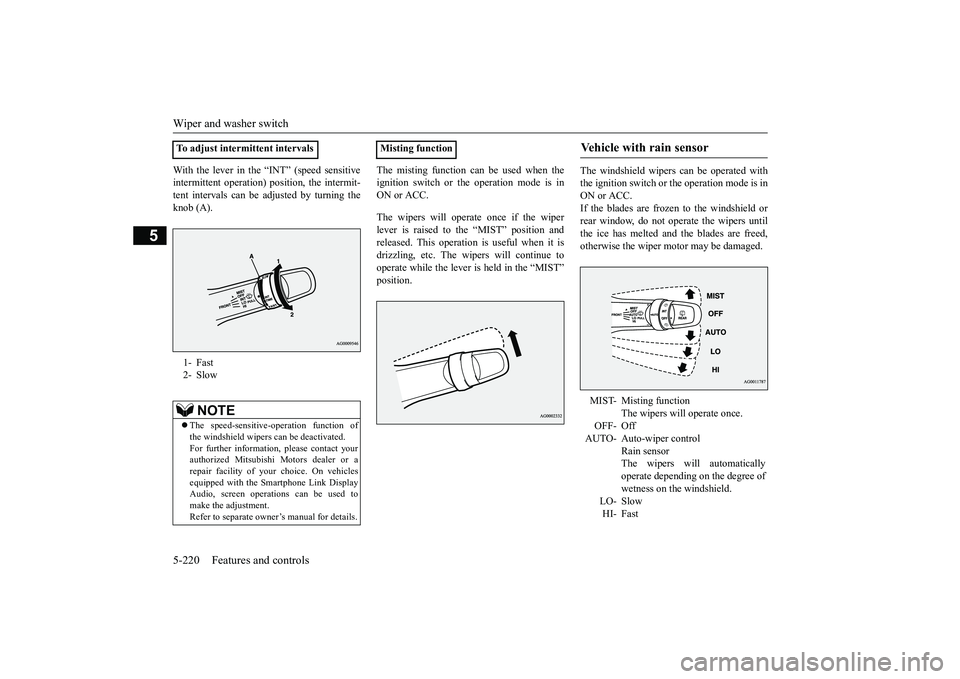
With the lever in the “INT” (speed sensitiveintermittent operation) position, the intermit-tent intervals can be adjusted by turning theknob (A).
The misting function can be used when theignition switch or th
e operation mode is in
ON or ACC.The wipers will operate once if the wiperlever is raised to the “MIST” position andreleased. This operation
is useful when it is
drizzling, etc. The wi
pers will continue to
operate while the lever is held in the “MIST”
The windshield wipers can be operated withthe ignition switch or
the operation mode is in
ON or ACC.If the blades are frozen to the windshield orrear window, do not operate the wipers untilthe ice has melted and the blades are freed,otherwise the wiper mo
tor may be damaged.
To adjust intermittent intervals1- Fast2- Slow
NOTE
The speed-sensitive-
operation function of
the windshield wipers
can be deactivated.
For further information, please contact yourauthorized Mitsubishi Motors dealer or arepair facility of your
choice. On vehicles
equipped with the Sm
artphone Link Display
Audio, screen operati
ons can be used to
make the adjustment.Refer to separate owne
r’s manual for details.
Misting function
Vehicle with rain sensor MIST- Misting function
The wipers will operate once.
OFF- OffAUTO- Auto-wiper control
Rain sensorThe wipers will automaticallyoperate depending on the degree ofwetness on the windshield.
LO- SlowHI- Fast
BK0249100US.book 220 ページ 2017年5月10日 水曜日 午前8時49分
Page 303 of 441
Wiper and washer switch5-222 Features and controls
5
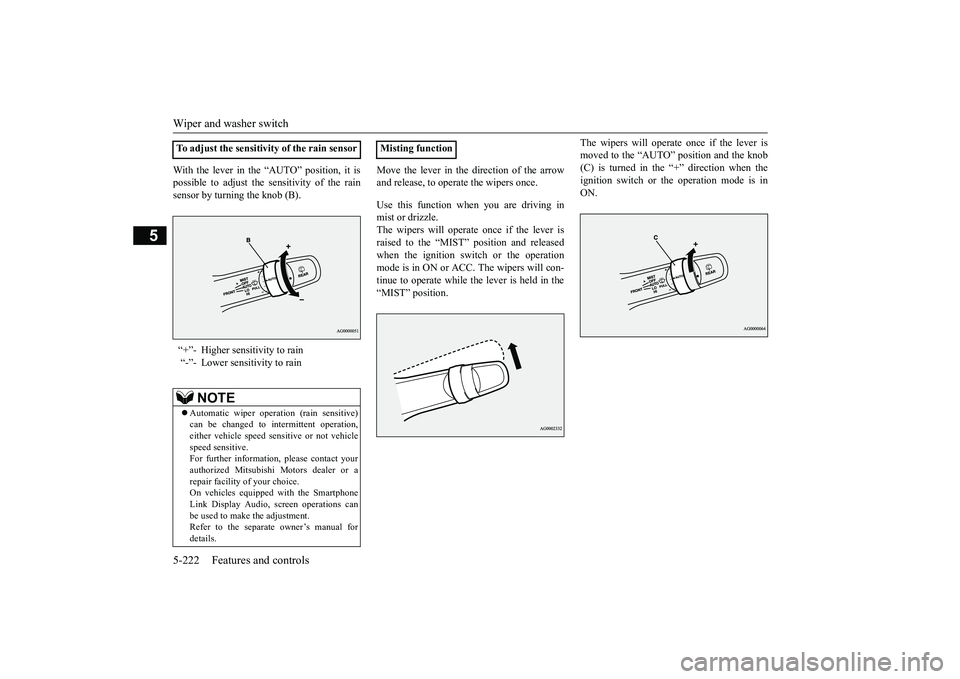
With the lever in the “AUTO” position, it ispossible to adjust the sensitivity of the rainsensor by turning the knob (B).
Move the lever in the direction of the arrowand release, to opera
te the wipers once.
Use this function when you are driving inmist or drizzle.The wipers will operate once if the lever israised to the “MIST” position and releasedwhen the ignition switch or the operationmode is in ON or ACC.
The wipers will con-
tinue to operate while the lever is held in the“MIST” position.
The wipers will operate once if the lever ismoved to the “AUTO” position and the knob(C) is turned in the “+” direction when theignition switch or the operation mode is inON.
To adjust the sensitivity of the rain sensor“+”- Higher sensitivity to rain“-”- Lower sensitivity to rain
NOTE
Automatic wiper operation (rain sensitive)can be changed to in
termittent operation,
either vehicle speed se
nsitive or not vehicle
speed sensitive.For further information, please contact yourauthorized Mitsubishi Motors dealer or arepair facility of your choice.On vehicles equippe
d with the Smartphone
Link Display Audio, sc
reen operations can
be used to make the adjustment.Refer to the separate
owner’s manual for
details.
Misting function
BK0249100US.book 222 ページ 2017年5月10日 水曜日 午前8時49分