wheel MITSUBISHI OUTLANDER III 2018 Workshop Manual
[x] Cancel search | Manufacturer: MITSUBISHI, Model Year: 2018, Model line: OUTLANDER III, Model: MITSUBISHI OUTLANDER III 2018Pages: 441, PDF Size: 13.71 MB
Page 222 of 441
Tire pressure monitoring system
Features and controls 5-141
5
A window tint that affects the radio wavesignals is installed.
N00532900081
If new wheels with new tire inflation pressuresensors are installed,
their ID codes must be
programmed into the tire pressure monitoringsystem. Have tire and
wheel replacement per-
formed by an authorized Mitsubishi Motorsdealer to avoid the ri
sk of damaging the tire
inflation pressure sensors. If the wheelreplacement is not done by an authorizedMitsubishi Motors dealer
, it is not covered by
your warranty.
N00584300026
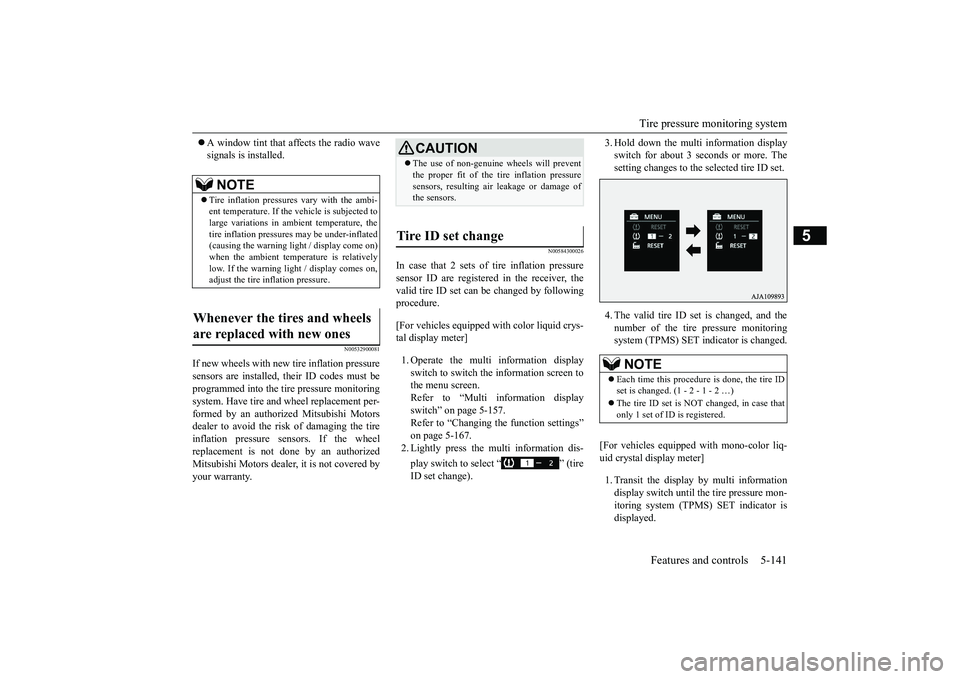
In case that 2 sets of tire inflation pressuresensor ID are registered in the receiver, thevalid tire ID set can be changed by followingprocedure.[For vehicles equipped with color liquid crys-tal display meter]1. Operate the multi information displayswitch to switch the information screen tothe menu screen.Refer to “Multi information displayswitch” on page 5-157.Refer to “Changing the function settings”on page 5-167.2. Lightly press the multi information dis-play switch to select “ ” (tireID set change).
3. Hold down the multi information displayswitch for about 3 seconds or more. Thesetting changes to the selected tire ID set.4. The valid tire ID se
t is changed, and the
number of the tire pressure monitoringsystem (TPMS) SET indicator is changed.
[For vehicles equipped
with mono-color liq-
uid crystal display meter]1. Transit the display by multi informationdisplay switch until th
e tire pressure mon-
itoring system (TPMS) SET indicator isdisplayed.
NOTE
Tire inflation pressures vary with the ambi-ent temperature. If the
vehicle is subjected to
large variations in ambient temperature, thetire inflation pressures may be under-inflated(causing the warning light / display come on)when the ambient temperature is relativelylow. If the warning light / display comes on,adjust the tire inflation pressure.
Whenever the tires and wheels are replaced with new ones
CAUTIONThe use of non-genuine wheels will preventthe proper fit of the tire inflation pressuresensors, resulting air
leakage or damage of
the sensors.
Tire ID set change
NOTE
Each time this procedure is done, the tire IDset is changed. (1 - 2 - 1 - 2 …)only 1 set of ID is registered.
BK0249100US.book 141 ページ 2017年5月10日 水曜日 午前8時49分
Page 230 of 441
Multi Around Monitor (if so equipped)
Features and controls 5-149
5
If the camera switch is pressed, the mode ofMulti Around Monitor is switched, Bird’seye-view/Rear-view mode
Side-
view/Rear-view modeIf the camera switch is pressed, the mode ofMulti Around Monitor is switched, Bird’seye-view/Front-view mode
Side-
view/Front-view mode
OFF
N00587600033
In any mode other than the Bird’s eye-viewmode, the lines in the screen give the follow-ing information. Use them only as a guide.
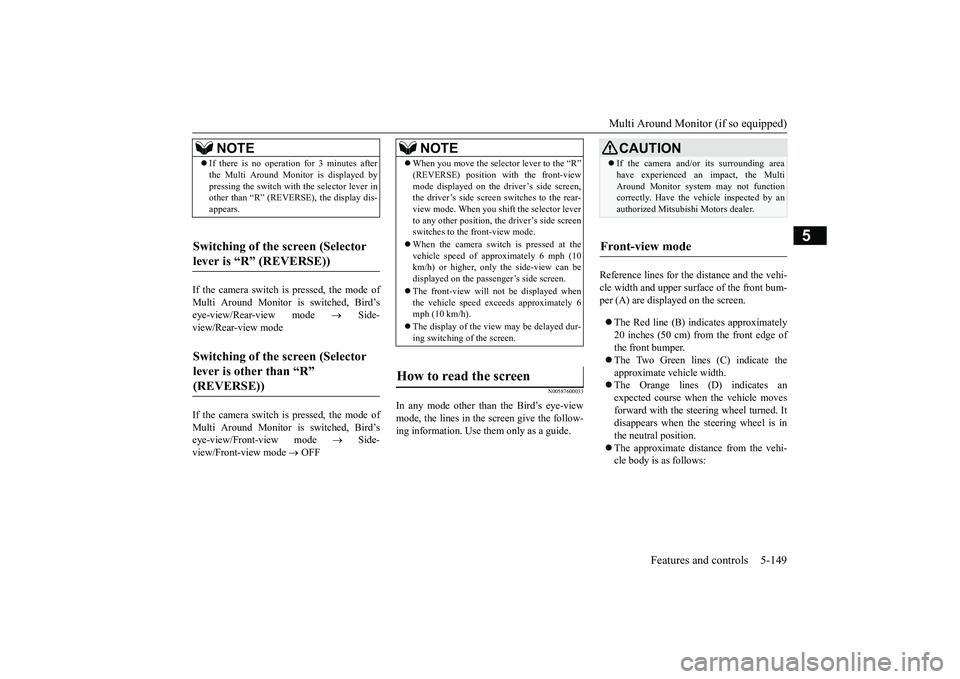
Reference lines for the
distance and the vehi-
cle width and upper surface of the front bum-per (A) are displayed on the screen.The Red line (B) i
ndicates approximately
20 inches (50 cm) from the front edge ofthe front bumper.The Two Green lines (C) indicate theapproximate vehicle width.The Orange lines (D) indicates anexpected course when the vehicle movesforward with the steering wheel turned. Itdisappears when the steering wheel is inthe neutral position.The approximate distance from the vehi-cle body is as follows:
NOTE
If there is no operation for 3 minutes afterthe Multi Around Monitor is displayed bypressing the switch with the selector lever inother than “R” (REVERSE), the display dis-appears.
Switching of the screen (Selector lever is “R” (REVERSE))
Switching of the screen (Selector lever is other than “R”
NOTE
When you move the selector lever to the “R”mode displayed on the driver’s side screen,the driver’s side screen switches to the rear-view mode. When you shift the selector leverto any other position, the driver’s side screenswitches to the front-view mode.When the camera switch is pressed at thevehicle speed of appr
oximately 6 mph (10
km/h) or higher, only
the side-view can be
displayed on the passenger’s side screen.The front-view will not
be displayed when
the vehicle speed exce
eds approximately 6
mph (10 km/h).The display of the view
may be delayed dur-
ing switching of the screen.
How to read the screen
CAUTIONIf the camera and/or its surrounding areahave experienced an impact, the MultiAround Monitor system may not functioncorrectly. Have the vehicle inspected by anauthorized Mitsubish
i Motors dealer.
Front-view mode
BK0249100US.book 149 ページ 2017年5月17日 水曜日 午後2時31分
Page 231 of 441
Multi Around Monitor (if so equipped)
5
N00587700021
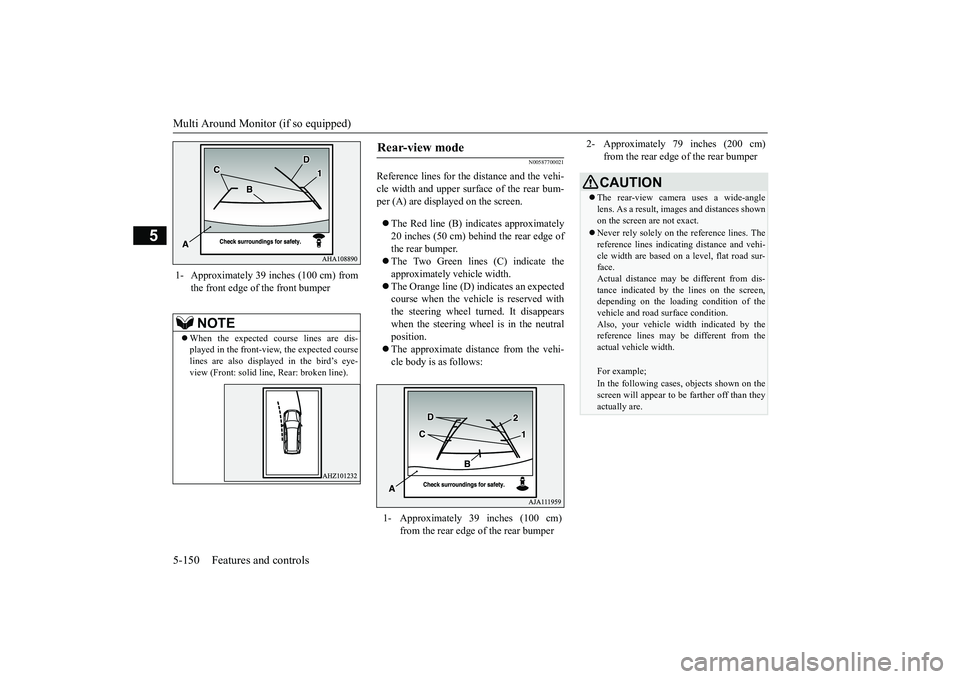
Reference lines for the
distance and the vehi-
cle width and upper surface of the rear bum-per (A) are displayed on the screen.The Red line (B) i
ndicates approximately
20 inches (50 cm) behind the rear edge ofthe rear bumper.The Two Green lines (C) indicate theapproximately vehicle width.The Orange line (D) indicates an expectedcourse when the vehicle is reserved withthe steering wheel turned. It disappearswhen the steering wheel is in the neutralposition.The approximate distance from the vehi-cle body is as follows:
1- Approximately 39 inches (100 cm) from
the front edge of the front bumperNOTE
When the expected course lines are dis-played in the front-view, the expected courselines are also displayed in the bird’s eye-view (Front: solid li
ne, Rear: broken line).
Rear-view mode
1- Approximately 39 inches (100 cm)
from the rear edge of the rear bumper
2- Approximately 79 inches (200 cm)
from the rear edge of the rear bumperCAUTIONThe rear-view camera uses a wide-anglelens. As a result, imag
es and distances shown
on the screen are not exact.Never rely solely on the reference lines. Thereference lines indicati
ng distance and vehi-
cle width are based on a
level, flat road sur-
face.Actual distance may be
different from dis-
tance indica
ted by the lines on the screen,
depending on the loading condition of thevehicle and road
surface condition.
Also, your vehicle wi
dth indicated by the
reference lines may be different from theactual vehicle width.For example;In the following cases, objects shown on thescreen will appear to be farther off than theyactually are.
BK0249100US.book 150 ページ 2017年5月10日 水曜日 午前8時49分
Page 233 of 441
Multi Around Monitor (if so equipped)
5
N00587900023
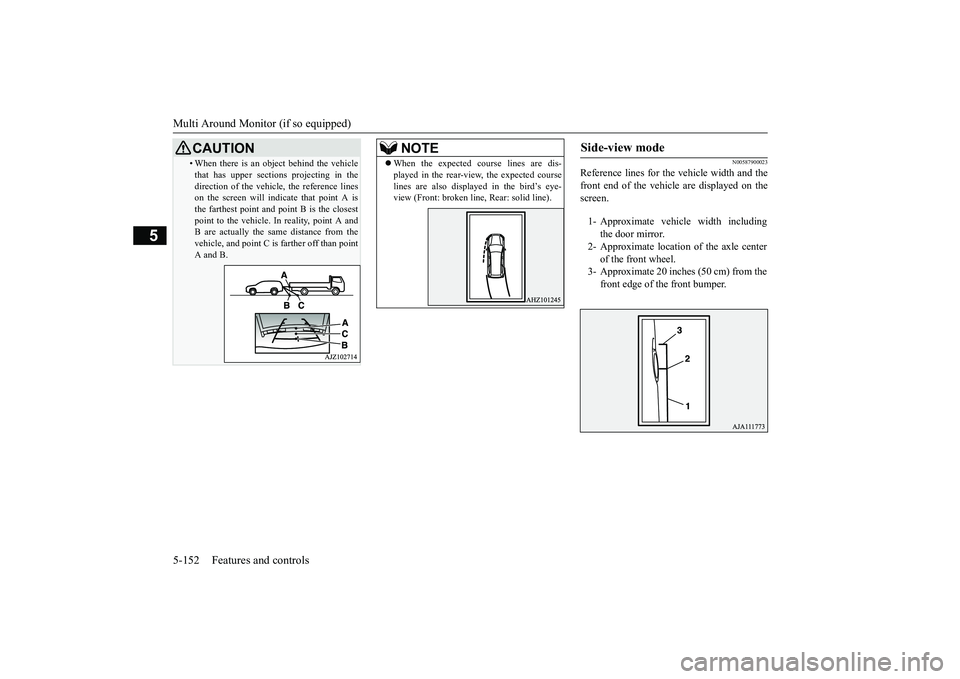
Reference lines for the
vehicle width and the
front end of the vehicle are displayed on thescreen.
• When there is an obj
ect behind the vehicle
that has upper sections
projecting in the
direction of the vehicle, the reference lineson the screen will indi
cate that point A is
the farthest point and point B is the closestpoint to the vehicle. In
reality, point A and
B are actually the same distance from thevehicle, and point C is farther off than pointA and B.CAUTION
NOTE
When the expected course lines are dis-played in the rear-view, the expected courselines are also displayed in the bird’s eye-view (Front: broken line, Rear: solid line).
Side-view mode
1- Approximate vehicle width including
the door mirror.
2- Approximate location of the axle center
of the front wheel.
3- Approximate 20 inches (50 cm) from the
front edge of the front bumper.
BK0249100US.book 152 ページ 2017年5月10日 水曜日 午前8時49分
Page 247 of 441
Multi Information display - Type 15-166 Features and controls
5
N00578600024
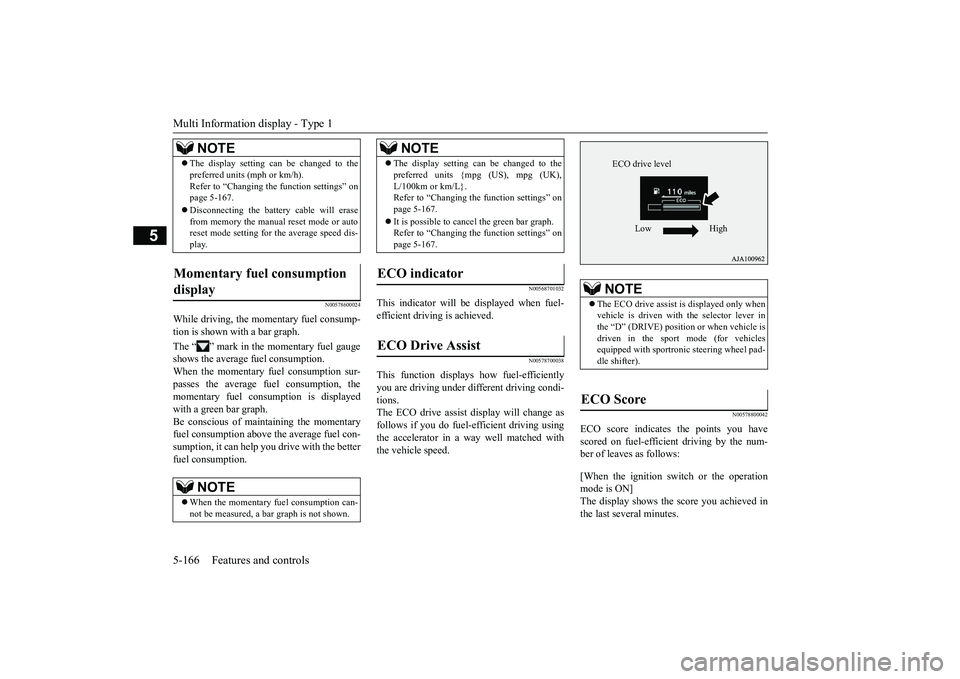
While driving, the momentary fuel consump-tion is shown with a bar graph.The “ ” mark in the momentary fuel gaugeshows the average fuel consumption.When the momentary fuel consumption sur-passes the average fuel consumption, themomentary fuel consumption is displayedwith a green bar graph.Be conscious of maintaining the momentaryfuel consumption above the average fuel con-sumption, it can help you drive with the betterfuel consumption.
N00568701032
This indicator will be displayed when fuel-efficient driving is achieved.
N00578700038
This function displays
how fuel-efficiently
you are driving under different driving condi-tions.The ECO drive assist display will change asfollows if you do fuel-efficient driving usingthe accelerator in a way well matched withthe vehicle speed.
N00578800042
ECO score indicates the points you havescored on fuel-efficient driving by the num-ber of leaves as follows:[When the ignition switch or the operationmode is ON]The display shows the score you achieved inthe last several minutes.
The display setting can be changed to thepreferred units (mph or km/h).Refer to “Changing th
e function settings” on
page 5-167.Disconnecting the batt
ery cable will erase
from memory the manual reset mode or autoreset mode setting for the average speed dis-play.
Momentary fuel consumption display
NOTE
When the momentary fuel consumption can-not be measured, a ba
r graph is not shown.
NOTE
The display setting can be changed to thepreferred units {mpg (US), mpg (UK),L/100km or km/L}.Refer to “Changing the
function settings” on
page 5-167.It is possible to cancel the green bar graph.Refer to “Changing the
function settings” on
page 5-167.
ECO indicator ECO Drive Assist
NOTE
NOTE
The ECO drive assist is displayed only whenvehicle is driven with
the selector lever in
the “D” (DRIVE) positi
on or when vehicle is
driven in the sport mode (for vehiclesequipped with sportroni
c steering wheel pad-
dle shifter).
ECO Score
ECO drive level
Low High
BK0249100US.book 166 ページ 2017年5月10日 水曜日 午前8時49分
Page 266 of 441
Indicator light, warning light, and information screen display list (multi information display - Type 1)
Features and controls 5-185
5
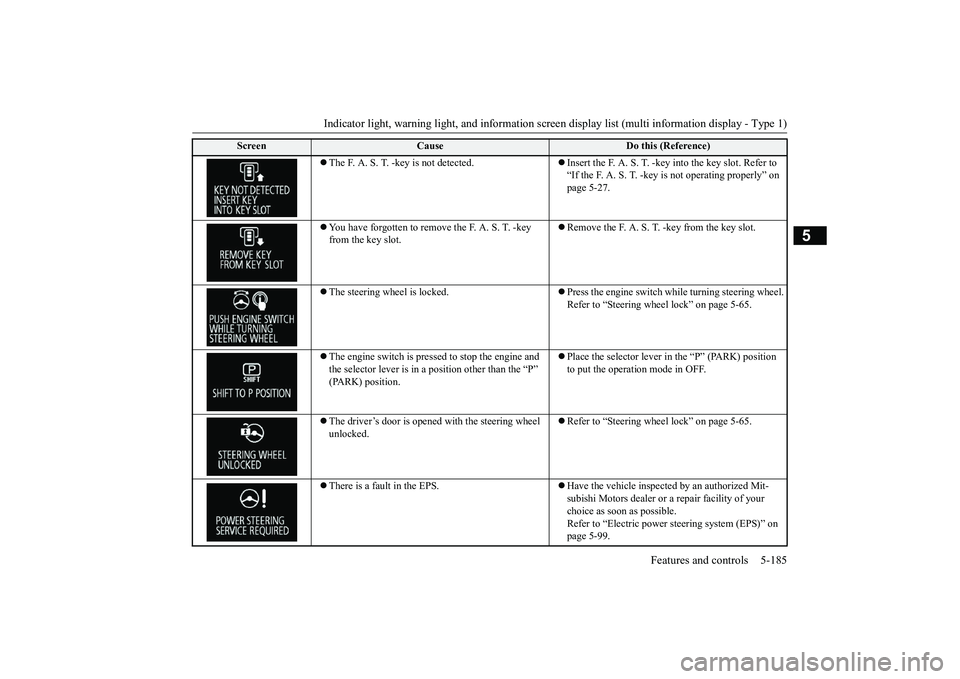
The F. A. S. T. -key is not detected.
Insert the F. A. S. T. -key into the key slot. Refer to “If the F. A. S. T. -key
is not operating properly” on
page 5-27.
You have forgotten to remove
the F. A. S. T. -key
from the key slot.
Remove the F. A. S. T.
-key from the key slot.
The steering wheel is locked.
Press the engine switch wh
ile turning steering wheel.
Refer to “Steering wheel lock” on page 5-65.
The engine switch is pre
ssed to stop the engine and
the selector lever is in a position other than the “P”
Place the selector lever in
the “P” (PARK) position
to put the operati
on mode in OFF.
The driver’s door is opened with the steering wheel unlocked.
Refer to “Steering wheel lock” on page 5-65.
There is a fault in the EPS.
Have the vehicle inspected by an authorized Mit-subishi Motors dealer or a
repair facility of your
choice as soon as possible.Refer to “Electric power
steering system (EPS)” on
page 5-99.
Screen
Cause
Do this (Reference)
BK0249100US.book 185 ページ 2017年5月10日 水曜日 午前8時49分
Page 268 of 441
Indicator light, warning light, and information screen display list (multi information display - Type 1)
Features and controls 5-187
5
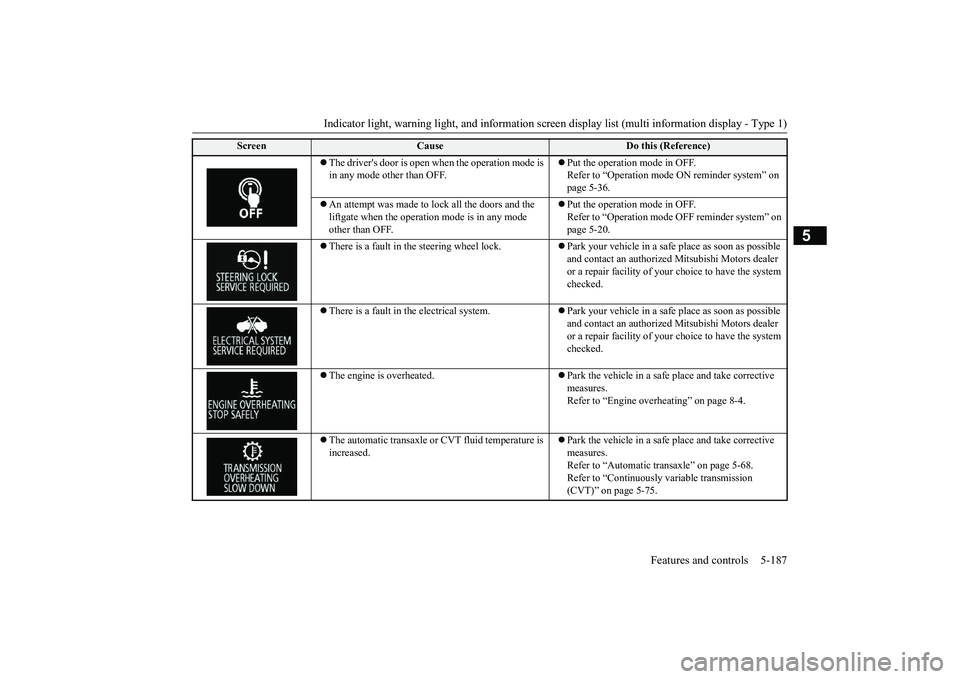
The driver's door is open when the operation mode is in any mode other than OFF.
Put the operation mode in OFF.Refer to “Operation mode
ON reminder system” on
page 5-36.
An attempt was made to lock all the doors and the liftgate when the operati
on mode is in any mode
other than OFF.
Put the operation mode in OFF.Refer to “Operation mode
OFF reminder system” on
page 5-20.
There is a fault in the steering wheel lock.
Park your vehicle in a safe
place as soon as possible
and contact an authorized
Mitsubishi Motors dealer
or a repair facility of your
choice to have the system
checked.
There is a fault in the electrical system.
Park your vehicle in a safe
place as soon as possible
and contact an authorized
Mitsubishi Motors dealer
or a repair facility of your
choice to have the system
checked.
The engine is overheated.
Park the vehicle in a safe place and take corrective measures.Refer to “Engine overh
eating” on page 8-4.
The automatic transaxle or CVT fluid temperature is increased.
Park the vehicle in a safe place and take corrective measures.Refer to “Automatic tr
ansaxle” on page 5-68.
Refer to “Continuously variable transmission (CVT)” on page 5-75.
Screen
Cause
Do this (Reference)
BK0249100US.book 187 ページ 2017年5月10日 水曜日 午前8時49分
Page 272 of 441
Indicator light, warning light, and information screen display list (multi information display - Type 1)
Features and controls 5-191
5
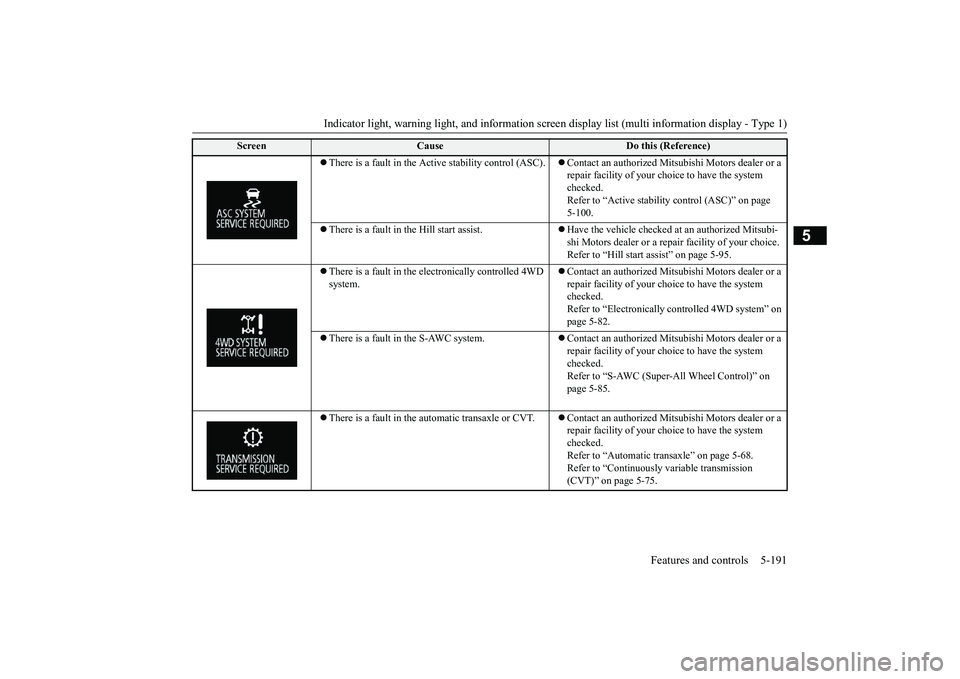
There is a fault in the Active stability control (ASC).
Contact an authorized Mitsubishi Motors dealer or a repair facility of your choi
ce to have the system
checked.Refer to “Active stability control (ASC)” on page 5-100.
There is a fault in the Hill start assist.
Have the vehicle checked at
an authorized Mitsubi-
shi Motors dealer or a repa
ir facility of your choice.
Refer to “Hill start
assist” on page 5-95.
There is a fault in the electronically controlled 4WD system.
Contact an authorized Mitsubishi Motors dealer or a repair facility of your choi
ce to have the system
checked.Refer to “Electronically
controlled 4WD system” on
page 5-82.
There is a fault in the S-AWC system.
Contact an authorized Mitsubishi Motors dealer or a repair facility of your choi
ce to have the system
checked.Refer to “S-AWC (Super-All Wheel Control)” on page 5-85.
There is a fault in the automatic transaxle or CVT.
Contact an authorized Mitsubishi Motors dealer or a repair facility of your choi
ce to have the system
checked.Refer to “Automatic tr
ansaxle” on page 5-68.
Refer to “Continuously variable transmission (CVT)” on page 5-75.
Screen
Cause
Do this (Reference)
BK0249100US.book 191 ページ 2017年5月10日 水曜日 午前8時49分
Page 273 of 441
Indicator light, warning light, and information screen display list (multi information display - Type 1)
5
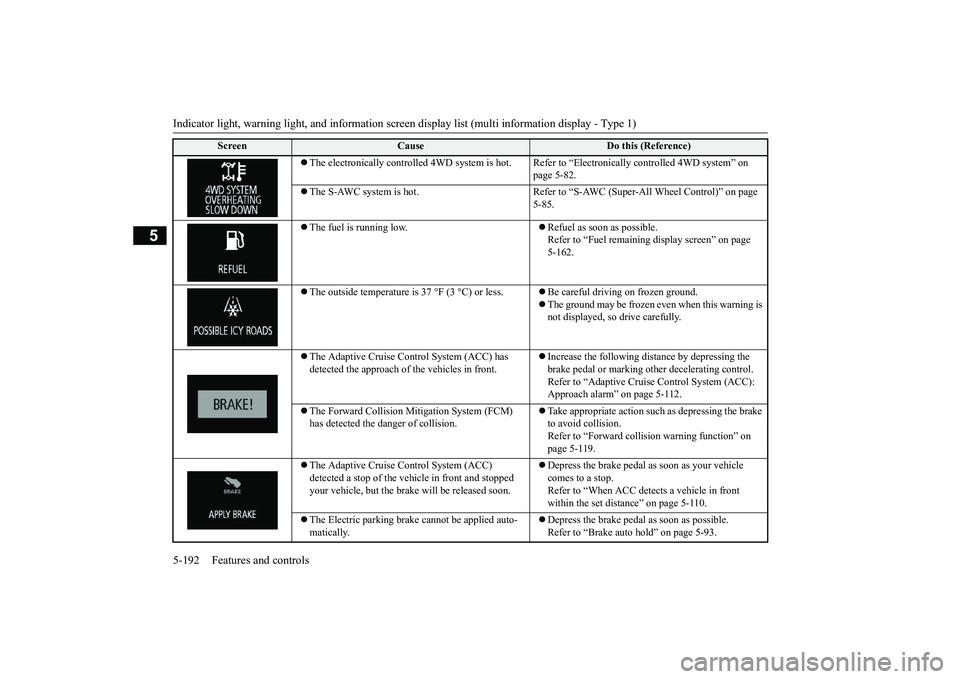
The electronically controlled 4WD
system is hot. Refer to “Electr
onically controlled
4WD system” on
page 5-82.
The S-AWC system is hot. Refer to “S-A
WC (Super-All Wheel Control)” on page
5-85.
The fuel is running low.
Refuel as soon as possible. Refer to “Fuel remaining
display screen” on page
5-162.
The outside temperature is
37 °F (3 °C) or less.
Be careful driving on frozen ground.The ground may be frozen even when this warning is not displayed, so drive carefully.
The Adaptive Cruise Control System (ACC) has detected the approach of
the vehicles in front.
Increase the following di
stance by depressing the
brake pedal or marking ot
her decelerating control.
Refer to “Adaptive Cruise
Control System (ACC):
Approach alarm” on page 5-112.
The Forward Collision Mitigation System (FCM) has detected the da
nger of collision.
Take appropriate action such
as depressing the brake
to avoid collision.Refer to “Forward colli
sion warning function” on
page 5-119.
The Adaptive Cruise Control System (ACC) detected a stop of the vehi
cle in front and stopped
your vehicle, but the brake
will be released soon.
Depress the brake pedal as soon as your vehicle comes to a stop.Refer to “When ACC dete
cts a vehicle in front
within the set distance” on page 5-110.
The Electric parking brake
cannot be applied auto-
matically.
Depress the brake pedal as soon as possible.Refer to “Brake auto hold” on page 5-93.
Screen
Cause
Do this (Reference)
BK0249100US.book 192 ページ 2017年5月10日 水曜日 午前8時49分
Page 279 of 441
Indicator light, warning light, and information screen display list (multi information display - Type 1)
5
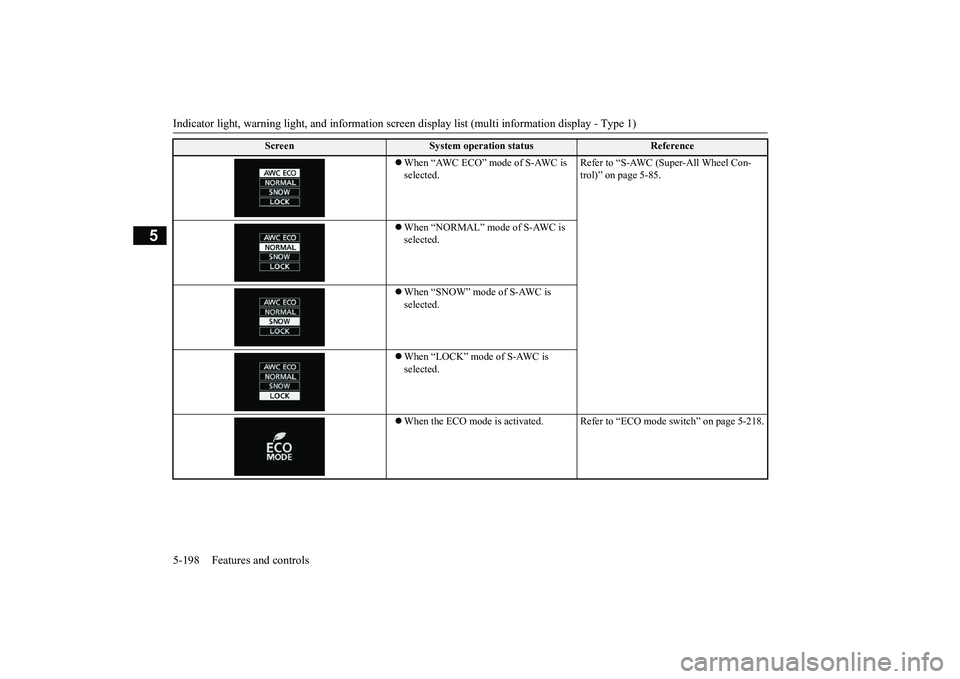
When “AWC ECO” mode of S-AWC is selected.
Refer to “S-AWC (Super-All Wheel Con-trol)” on page 5-85.
When “NORMAL” mode of S-AWC is selected.When “SNOW” mode of S-AWC is selected.When “LOCK” mode of S-AWC is selected.When the ECO mode is ac
tivated. Refer to “ECO m
ode switch” on page 5-218.
Screen
System operation status
Reference
BK0249100US.book 198 ページ 2017年5月10日 水曜日 午前8時49分