USB MITSUBISHI OUTLANDER PHEV 2016 (in English) Owner's Guide
[x] Cancel search | Manufacturer: MITSUBISHI, Model Year: 2016, Model line: OUTLANDER PHEV, Model: MITSUBISHI OUTLANDER PHEV 2016Pages: 490, PDF Size: 22.02 MB
Page 372 of 490
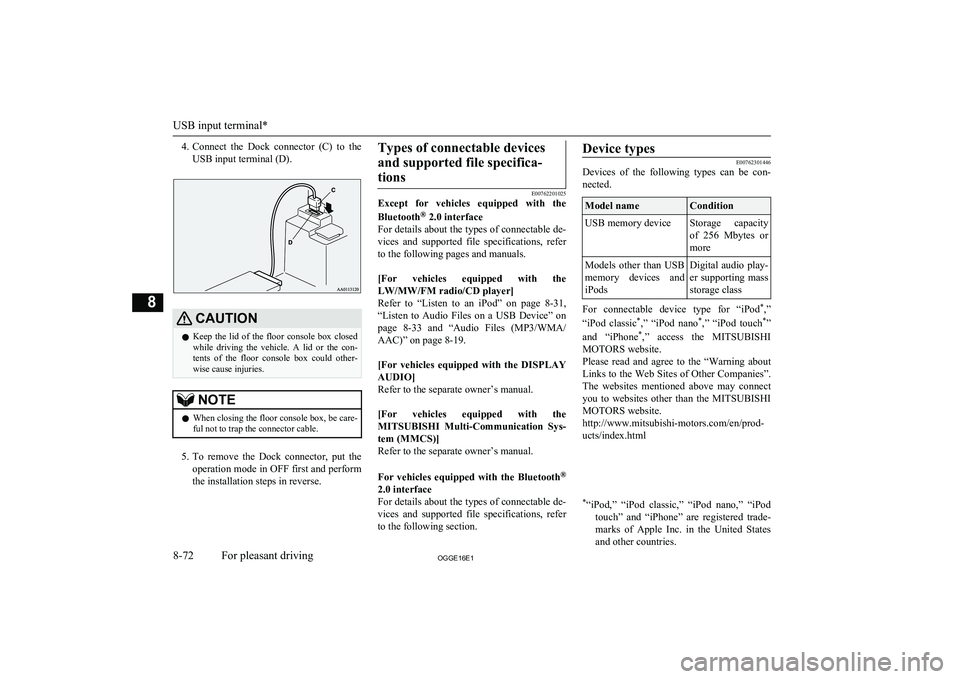
4.Connect the Dock connector (C) to the
USB input terminal (D).CAUTIONl Keep the lid of the floor console box closed
while driving the vehicle. A lid or the con- tents of the floor console box could other-
wise cause injuries.NOTEl When closing the floor console box, be care-
ful not to trap the connector cable.
5. To remove the Dock connector, put the
operation mode in OFF first and perform the installation steps in reverse.
Types of connectable devices
and supported file specifica-tions
E00762201025
Except for vehicles equipped with the
Bluetooth ®
2.0 interface
For details about the types of connectable de- vices and supported file specifications, referto the following pages and manuals.
[For vehicles equipped with the LW/MW/FM radio/CD player]
Refer to “Listen to an iPod” on page 8-31,
“Listen to Audio Files on a USB Device” on page 8-33 and “Audio Files (MP3/WMA/
AAC)” on page 8-19.
[For vehicles equipped with the DISPLAY
AUDIO]
Refer to the separate owner’s manual.
[For vehicles equipped with the MITSUBISHI Multi-Communication Sys-
tem (MMCS)]
Refer to the separate owner’s manual.
For vehicles equipped with the Bluetooth ®
2.0 interface
For details about the types of connectable de- vices and supported file specifications, referto the following section.
Device types
E00762301446
Devices of the following types can be con-
nected.
Model nameConditionUSB memory deviceStorage capacity
of 256 Mbytes or
moreModels other than USB memory devices andiPodsDigital audio play-
er supporting mass
storage class
For connectable device type for “iPod *
,”
“iPod classic *
,” “iPod nano *
,” “iPod touch *
”
and “iPhone *
,” access the MITSUBISHI
MOTORS website.
Please read and agree to the “Warning about Links to the Web Sites of Other Companies”.
The websites mentioned above may connect you to websites other than the MITSUBISHI
MOTORS website.
http://www.mitsubishi-motors.com/en/prod-
ucts/index.html
* “iPod,” “iPod classic,” “iPod nano,” “iPod
touch” and “iPhone” are registered trade-marks of Apple Inc. in the United States
and other countries.
USB input terminal*
8-72OGGE16E1For pleasant driving8
Page 373 of 490
NOTElDepending on the type of the USB memory
device or other device connected, the con-
nected device may not function properly or the available functions may be limited.
l It is recommended to use an iPod with firm-
ware updated to the latest version.
l You can charge your iPod by connecting it
to the USB input terminal when the opera- tion mode is in ON or ACC.
l Do not keep your USB memory device or
iPod in your vehicle.
l It is recommended that you back up files in
case of data damage.
l Do not connect to the USB input terminal
any device (hard disk, card reader, memory reader, etc.) other than the connectable devi-
ces specified in the previous section. The de- vice and/or data may be damaged. If any of these devices was connected by mistake, re-
move it after putting the operation mode in OFF.File specifications
E00762401056
You can play music files of the following
specifications that are saved in a USB memo-ry device or other device supporting mass
storage class. When you connect your iPod, playable file specifications depend on the connected iPod.
ItemConditionFile formatMP3, WMA, AAC,
WAVMaximum number of levels
(including the root)
Level 8
Number of folders700Number of files65,535Sun visors
E00711202277
1- To eliminate front glare2- To eliminate side glare
Vanity mirror
A vanity mirror is fitted to the back of the sun visor.
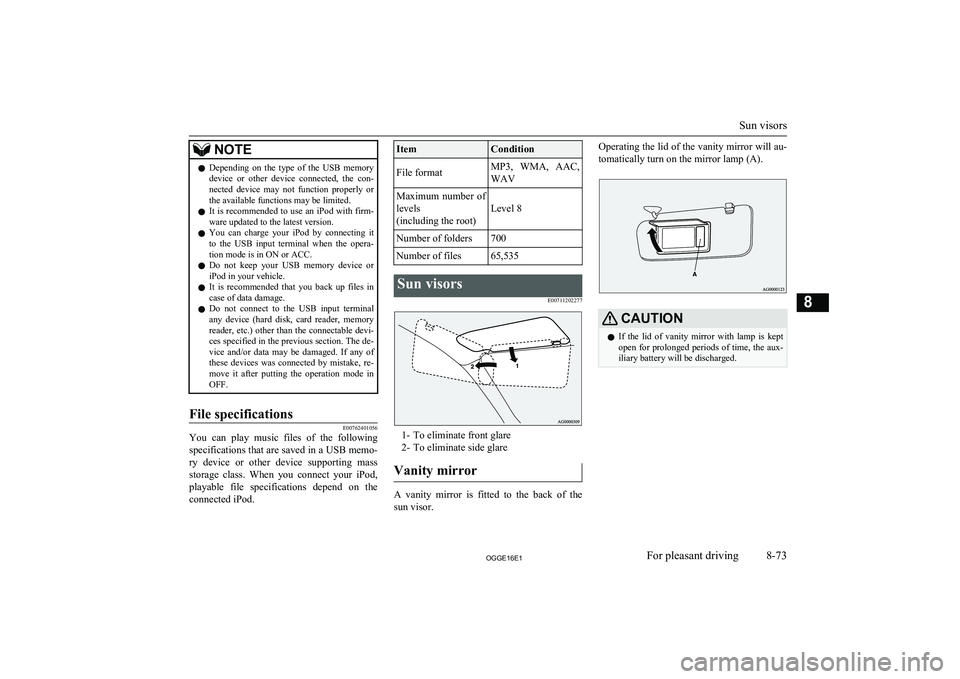
Operating the lid of the vanity mirror will au-
tomatically turn on the mirror lamp (A).CAUTIONl If the lid of vanity mirror with lamp is kept
open for prolonged periods of time, the aux-
iliary battery will be discharged.
Sun visors
8-73OGGE16E1For pleasant driving8
Page 379 of 490
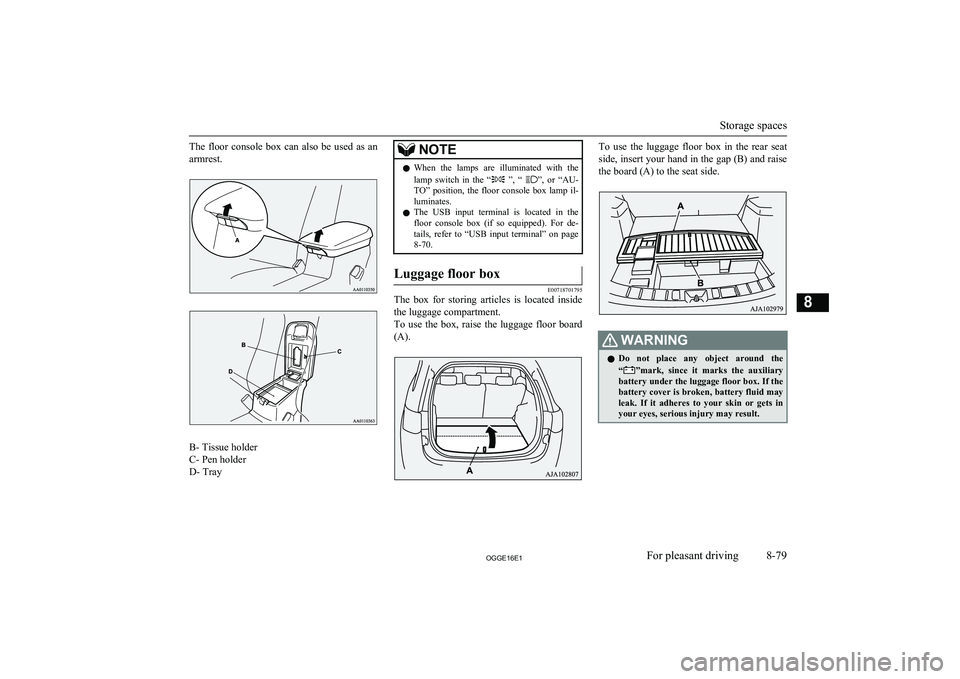
The floor console box can also be used as anarmrest.
B- Tissue holder
C- Pen holder
D- Tray
NOTEl When the lamps are illuminated with the
lamp switch in the “ ”, “ ”, or “AU-
TO” position, the floor console box lamp il- luminates.
l The USB input terminal is located in the
floor console box (if so equipped). For de-
tails, refer to “USB input terminal” on page 8-70.Luggage floor box
E00718701795
The box for storing articles is located inside
the luggage compartment.
To use the box, raise the luggage floor board (A).
To use the luggage floor box in the rear seat
side, insert your hand in the gap (B) and raise the board (A) to the seat side.WARNINGl Do not place any object around the
“”mark, since it marks the auxiliary
battery under the luggage floor box. If the battery cover is broken, battery fluid may
leak. If it adheres to your skin or gets in
your eyes, serious injury may result.
Storage spaces
8-79OGGE16E1For pleasant driving8
Page 449 of 490
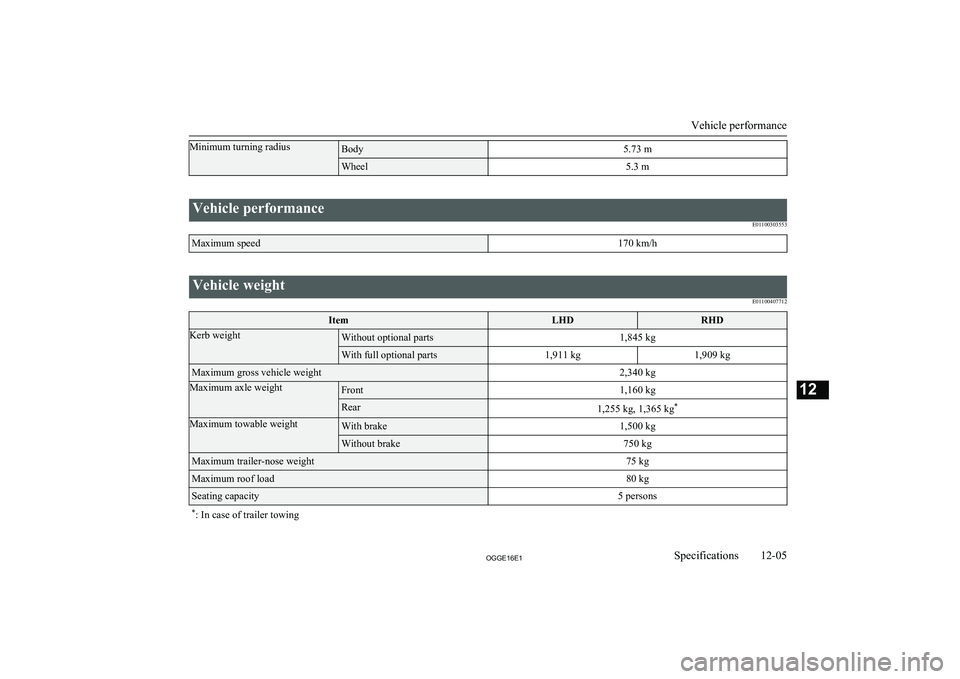
Minimum turning radiusBody5.73 mWheel5.3 m
Vehicle performanceE01100303553Maximum speed170 km/h
Vehicle weightE01100407712ItemLHDRHDKerb weightWithout optional parts1,845 kgWith full optional parts1,911 kg1,909 kgMaximum gross vehicle weight2,340 kgMaximum axle weightFront1,160 kgRear1,255 kg, 1,365 kg*Maximum towable weightWith brake1,500 kgWithout brake750 kgMaximum trailer-nose weight75 kgMaximum roof load80 kgSeating capacity5 persons*
: In case of trailer towing
Vehicle performance
12-05OGGE16E1Specifications12
Page 461 of 490
U
Ultrasonic misacceleration Mitigation System. 7-63
USB input terminal............................................8-70 How to connect a USB memory device........ 8-70
How to connect an iPod................................ 8-71
V
Vanity mirror lampBulb capacity.............................................. 11-24
Vehicle care precautions................................. 10-02
Vehicle dimensions......................................... 12-04
Vehicle identification number......................... 12-02
Vehicle identification number plate................ 12-02
Vehicle information code plate....................... 12-02
Vehicle labeling...............................................12-02
Vehicle performance....................................... 12-05
Vehicle weight.................................................12-05
Ventilators......................................................... 8-02
W
Warning lamps.................................................. 6-44
Washer Fluid.................................................. 11-08,12-10
Switch........................................... 6-55,6-59,6-60
Washing...........................................................10-03
Waxing............................................................ 10-04
Weight............................................................. 12-05
Wheel Covers........................................................... 9-17
Specification............................................... 12-08
Wiper de-icer switch......................................... 6-60
Wiper Rear window................................................. 6-59Windscreen................................................... 6-55
Wiper blades............................................... 11-13
Alphabetical index
13- 5
OGGE16E1Alphabetical index