remote control MITSUBISHI OUTLANDER PHEV 2016 Owner's Manual (in English)
[x] Cancel search | Manufacturer: MITSUBISHI, Model Year: 2016, Model line: OUTLANDER PHEV, Model: MITSUBISHI OUTLANDER PHEV 2016Pages: 490, PDF Size: 22.02 MB
Page 4 of 490
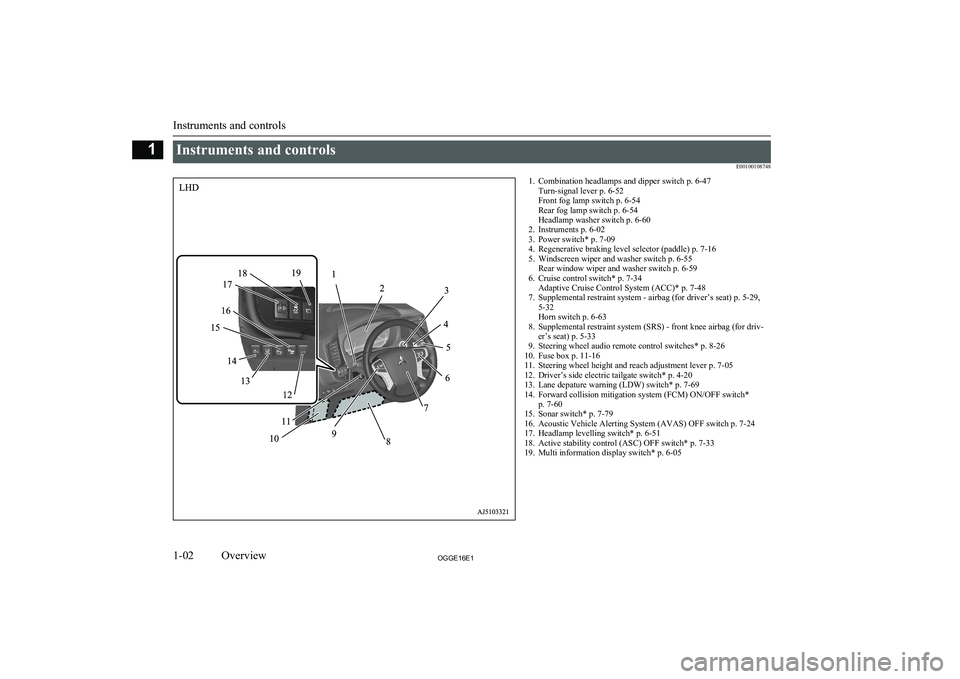
Instruments and controlsE001001087481. Combination headlamps and dipper switch p. 6-47Turn-signal lever p. 6-52
Front fog lamp switch p. 6-54
Rear fog lamp switch p. 6-54
Headlamp washer switch p. 6-60
2. Instruments p. 6-02
3. Power switch* p. 7-09
4. Regenerative braking level selector (paddle) p. 7-16
5. Windscreen wiper and washer switch p. 6-55 Rear window wiper and washer switch p. 6-59
6. Cruise control switch* p. 7-34 Adaptive Cruise Control System (ACC)* p. 7-48
7. Supplemental restraint system - airbag (for driver’s seat) p. 5-29, 5-32
Horn switch p. 6-63
8. Supplemental restraint system (SRS) - front knee airbag (for driv- er’s seat) p. 5-33
9. Steering wheel audio remote control switches* p. 8-26
10. Fuse box p. 11-16
11. Steering wheel height and reach adjustment lever p. 7-05
12. Driver’s side electric tailgate switch* p. 4-20
13. Lane depature warning (LDW) switch* p. 7-69
14. Forward collision mitigation system (FCM) ON/OFF switch* p. 7-60
15. Sonar switch* p. 7-79
16. Acoustic Vehicle Alerting System (AVAS) OFF switch p. 7-24
17. Headlamp levelling switch* p. 6-51
18. Active stability control (ASC) OFF switch* p. 7-33
19. Multi information display switch* p. 6-05
Instruments and controls
1-02OGGE16E1Overview1
Page 5 of 490
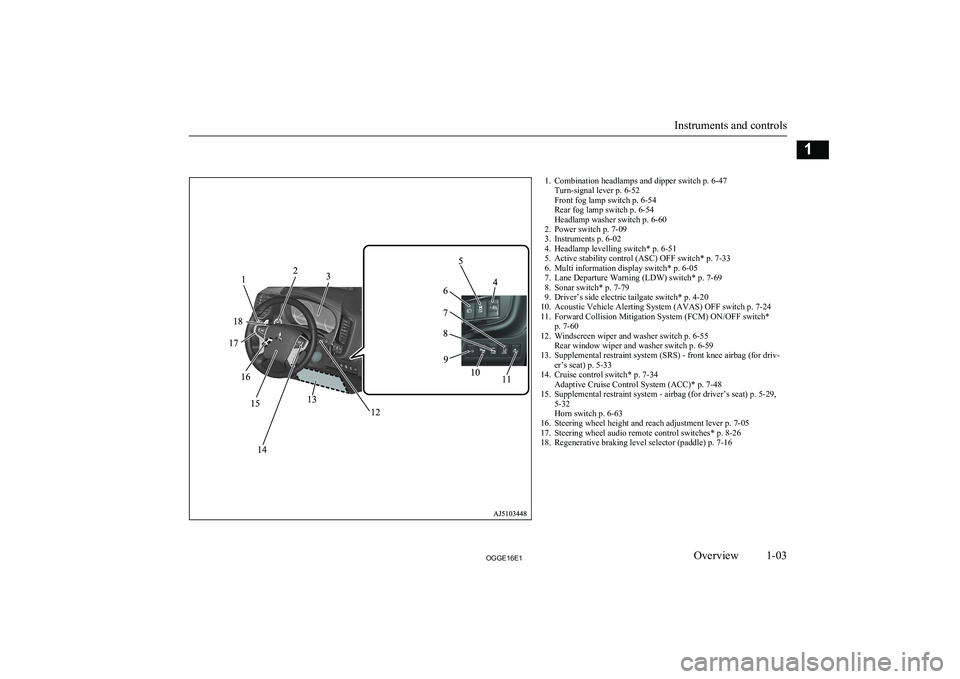
1. Combination headlamps and dipper switch p. 6-47Turn-signal lever p. 6-52
Front fog lamp switch p. 6-54
Rear fog lamp switch p. 6-54
Headlamp washer switch p. 6-60
2. Power switch p. 7-09
3. Instruments p. 6-02
4. Headlamp levelling switch* p. 6-51
5. Active stability control (ASC) OFF switch* p. 7-33
6. Multi information display switch* p. 6-05
7. Lane Departure Warning (LDW) switch* p. 7-69
8. Sonar switch* p. 7-79
9. Driver’s side electric tailgate switch* p. 4-20
10. Acoustic Vehicle Alerting System (AVAS) OFF switch p. 7-24
11. Forward Collision Mitigation System (FCM) ON/OFF switch* p. 7-60
12. Windscreen wiper and washer switch p. 6-55 Rear window wiper and washer switch p. 6-59
13. Supplemental restraint system (SRS) - front knee airbag (for driv- er’s seat) p. 5-33
14. Cruise control switch* p. 7-34 Adaptive Cruise Control System (ACC)* p. 7-48
15. Supplemental restraint system - airbag (for driver’s seat) p. 5-29, 5-32
Horn switch p. 6-63
16. Steering wheel height and reach adjustment lever p. 7-05
17. Steering wheel audio remote control switches* p. 8-26
18. Regenerative braking level selector (paddle) p. 7-16
Instruments and controls
1-03OGGE16E1Overview1
Page 8 of 490
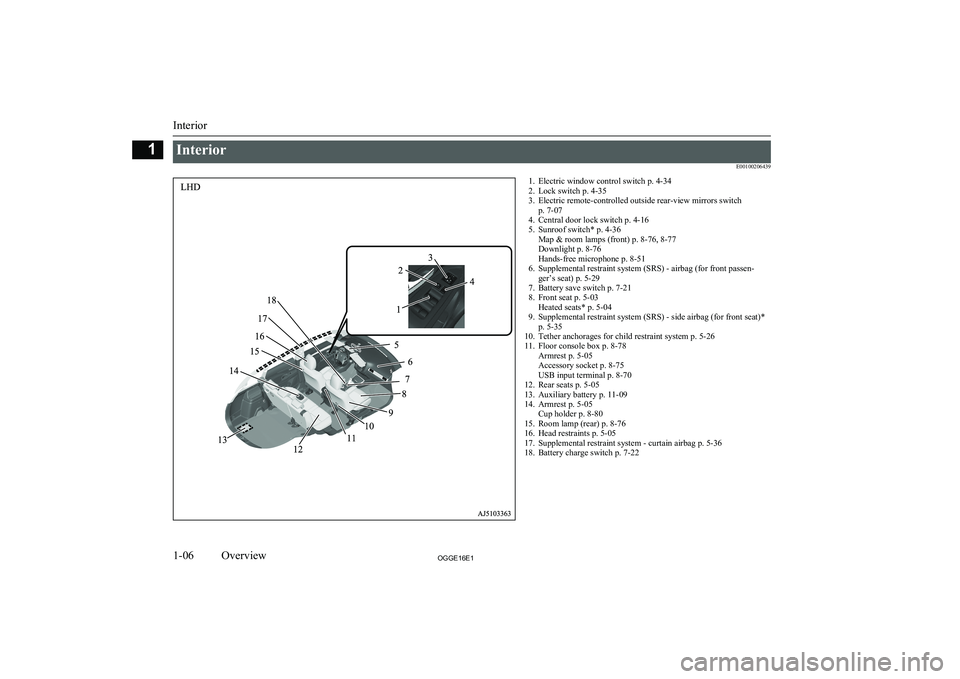
InteriorE001002064391. Electric window control switch p. 4-34
2. Lock switch p. 4-35
3. Electric remote-controlled outside rear-view mirrors switch p. 7-07
4. Central door lock switch p. 4-16
5. Sunroof switch* p. 4-36 Map & room lamps (front) p. 8-76, 8-77
Downlight p. 8-76
Hands-free microphone p. 8-51
6. Supplemental restraint system (SRS) - airbag (for front passen- ger’s seat) p. 5-29
7. Battery save switch p. 7-21
8. Front seat p. 5-03 Heated seats* p. 5-04
9. Supplemental restraint system (SRS) - side airbag (for front seat)* p. 5-35
10. Tether anchorages for child restraint system p. 5-26
11. Floor console box p. 8-78 Armrest p. 5-05
Accessory socket p. 8-75
USB input terminal p. 8-70
12. Rear seats p. 5-05
13. Auxiliary battery p. 11-09
14. Armrest p. 5-05 Cup holder p. 8-80
15. Room lamp (rear) p. 8-76
16. Head restraints p. 5-05
17. Supplemental restraint system - curtain airbag p. 5-36
18. Battery charge switch p. 7-22
Interior
1-06OGGE16E1Overview1
Page 9 of 490
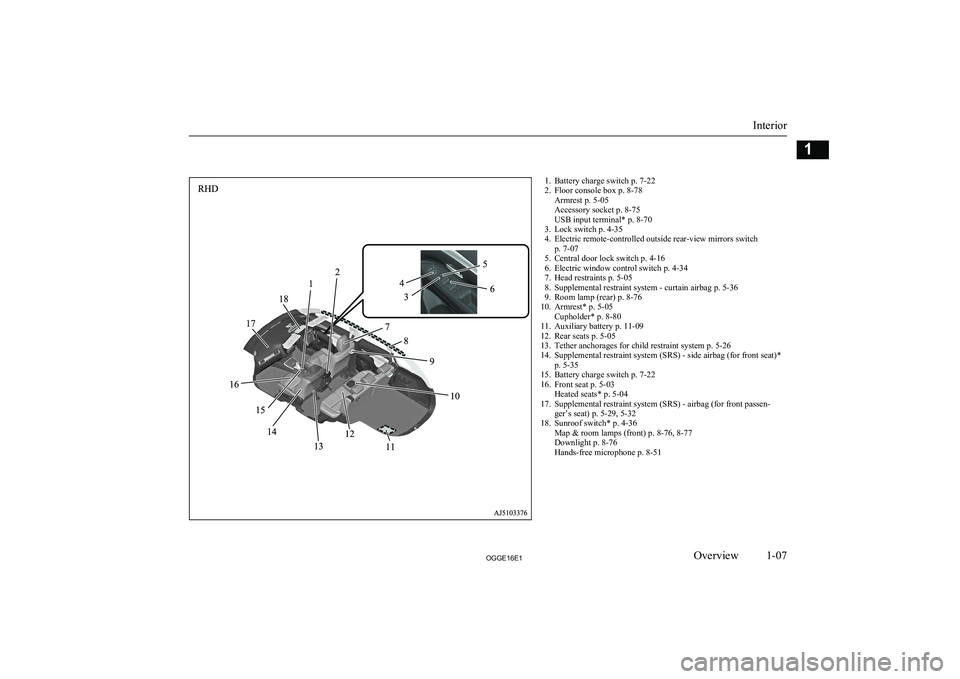
1. Battery charge switch p. 7-22
2. Floor console box p. 8-78 Armrest p. 5-05
Accessory socket p. 8-75
USB input terminal* p. 8-70
3. Lock switch p. 4-35
4. Electric remote-controlled outside rear-view mirrors switch p. 7-07
5. Central door lock switch p. 4-16
6. Electric window control switch p. 4-34
7. Head restraints p. 5-05
8. Supplemental restraint system - curtain airbag p. 5-36
9. Room lamp (rear) p. 8-76
10. Armrest* p. 5-05 Cupholder* p. 8-80
11. Auxiliary battery p. 11-09
12. Rear seats p. 5-05
13. Tether anchorages for child restraint system p. 5-26
14. Supplemental restraint system (SRS) - side airbag (for front seat)* p. 5-35
15. Battery charge switch p. 7-22
16. Front seat p. 5-03 Heated seats* p. 5-04
17. Supplemental restraint system (SRS) - airbag (for front passen- ger’s seat) p. 5-29, 5-32
18. Sunroof switch* p. 4-36 Map & room lamps (front) p. 8-76, 8-77
Downlight p. 8-76
Hands-free microphone p. 8-51
Interior
1-07OGGE16E1Overview1
Page 25 of 490
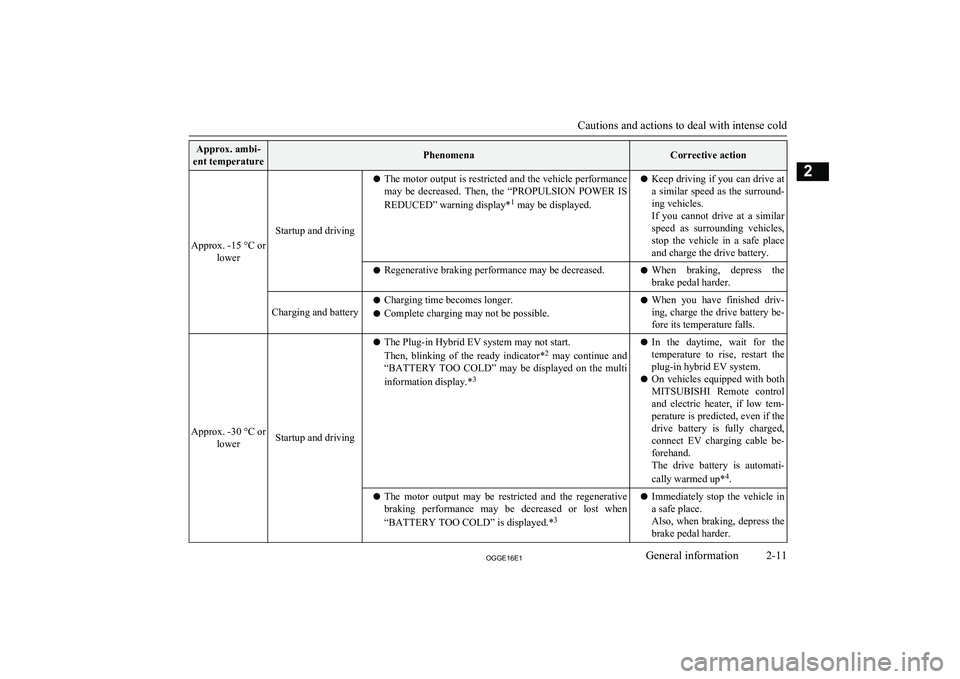
Approx. ambi-
ent temperaturePhenomenaCorrective action
Approx. -15 °C or lower
Startup and driving
lThe motor output is restricted and the vehicle performance
may be decreased. Then, the “PROPULSION POWER IS
REDUCED” warning display* 1
may be displayed.l Keep driving if you can drive at
a similar speed as the surround-
ing vehicles.
If you cannot drive at a similar
speed as surrounding vehicles, stop the vehicle in a safe placeand charge the drive battery.l Regenerative braking performance may be decreased.lWhen braking, depress the
brake pedal harder.Charging and batteryl Charging time becomes longer.
l Complete charging may not be possible.lWhen you have finished driv-
ing, charge the drive battery be- fore its temperature falls.
Approx. -30 °C or lowerStartup and driving
lThe Plug-in Hybrid EV system may not start.
Then, blinking of the ready indicator* 2
may continue and
“BATTERY TOO COLD” may be displayed on the multi
information display.* 3l
In the daytime, wait for the
temperature to rise, restart the plug-in hybrid EV system.
l On vehicles equipped with both
MITSUBISHI Remote control
and electric heater, if low tem-
perature is predicted, even if the drive battery is fully charged, connect EV charging cable be-
forehand.
The drive battery is automati-
cally warmed up* 4
.l The motor output may be restricted and the regenerative
braking performance may be decreased or lost when
“BATTERY TOO COLD” is displayed.* 3l
Immediately stop the vehicle in
a safe place.
Also, when braking, depress the
brake pedal harder.
Cautions and actions to deal with intense cold
2-11OGGE16E1General information2
Page 26 of 490
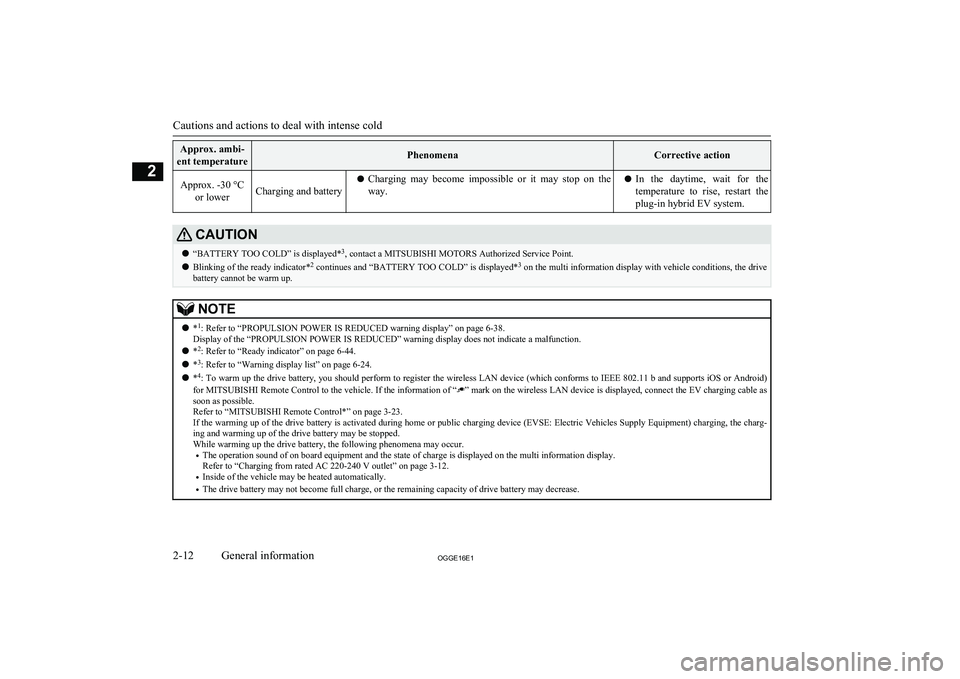
Approx. ambi-
ent temperaturePhenomenaCorrective actionApprox. -30 °C or lowerCharging and batterylCharging may become impossible or it may stop on the
way.l In the daytime, wait for the
temperature to rise, restart theplug-in hybrid EV system.CAUTIONl “BATTERY TOO COLD” is displayed* 3
, contact a MITSUBISHI MOTORS Authorized Service Point.
l Blinking of the ready indicator* 2
continues and “BATTERY TOO COLD” is displayed* 3
on the multi information display with vehicle conditions, the drive
battery cannot be warm up.NOTEl *1
: Refer to “PROPULSION POWER IS REDUCED warning display” on page 6-38.
Display of the “PROPULSION POWER IS REDUCED” warning display does not indicate a malfunction.
l *2
: Refer to “Ready indicator” on page 6-44.
l *3
: Refer to “Warning display list” on page 6-24.
l *4
: To warm up the drive battery, you should perform to register the wireless LAN device (which conforms to IEEE 802.11 b and supports iOS or Android)
for MITSUBISHI Remote Control to the vehicle. If the information of “
” mark on the wireless LAN device is displayed, connect the EV charging cable as
soon as possible.
Refer to “MITSUBISHI Remote Control*” on page 3-23.
If the warming up of the drive battery is activated during home or public charging device (EVSE: Electric Vehicles Supply Equipment) charging, the charg-
ing and warming up of the drive battery may be stopped.
While warming up the drive battery, the following phenomena may occur.
• The operation sound of on board equipment and the state of charge is displayed on the multi information display.
Refer to “Charging from rated AC 220-240 V outlet” on page 3-12.
• Inside of the vehicle may be heated automatically.
• The drive battery may not become full charge, or the remaining capacity of drive battery may decrease.
Cautions and actions to deal with intense cold
2-12OGGE16E1General information2
Page 33 of 490
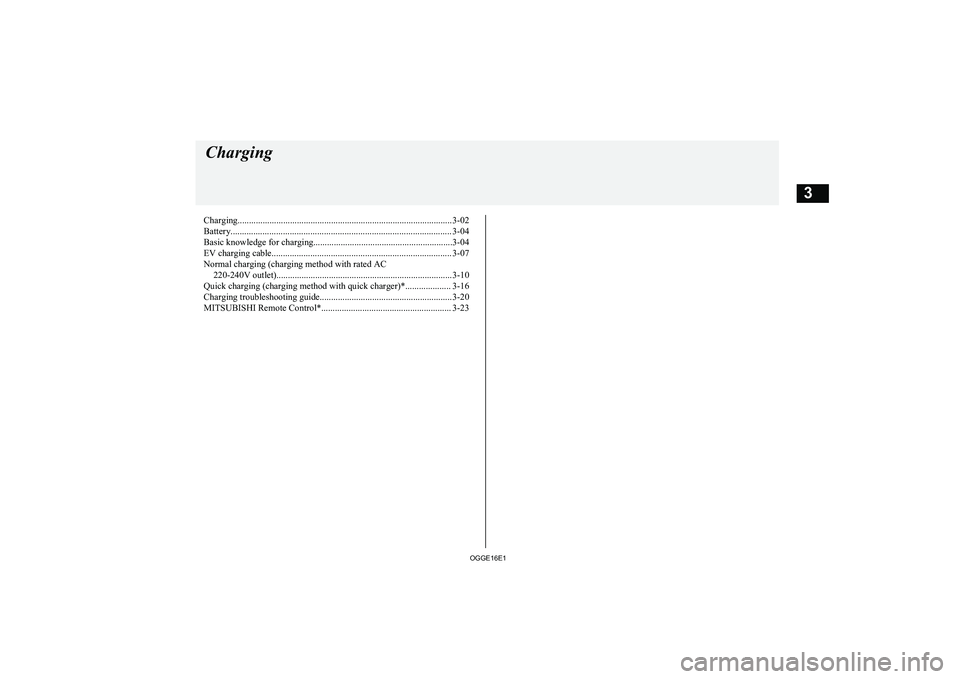
Charging.............................................................................................. 3-02
Battery................................................................................................. 3-04 Basic knowledge for charging.............................................................3-04
EV charging cable............................................................................... 3-07
Normal charging (charging method with rated AC 220-240V outlet).............................................................................3-10
Quick charging (charging method with quick charger)*.................... 3-16
Charging troubleshooting guide.......................................................... 3-20 MITSUBISHI Remote Control*......................................................... 3-23Charging
OGGE16E13
Page 38 of 490
NOTE•Do not repeat charging near the full
charge level.
l The quick charging gives priority when the
normal charging and the quick charging are performed at the same time. At this time, thenormal charging will be stopped.
l Even if the operation mode of the power
switch is OFF, you may hear the operating sound of the cooling fan for cooling the
drive battery during charging.
This is not a malfunction.
l If your vehicle is not used for a long time,
check the energy level gauge every 3 months. If the gauge shows 0, charge thedrive battery until some indication appears.
Alternately, put the operation mode of the
power switch in “ON” to start the engine au- tomatically, wait for the engine to stop auto-matically, then put the operation mode of the
power switch in “OFF”.
l In the event of an electrical power outage
while charging, charging restarts automati- cally with the restoration of electricity.Charging port courtesy lamp
E08304300027
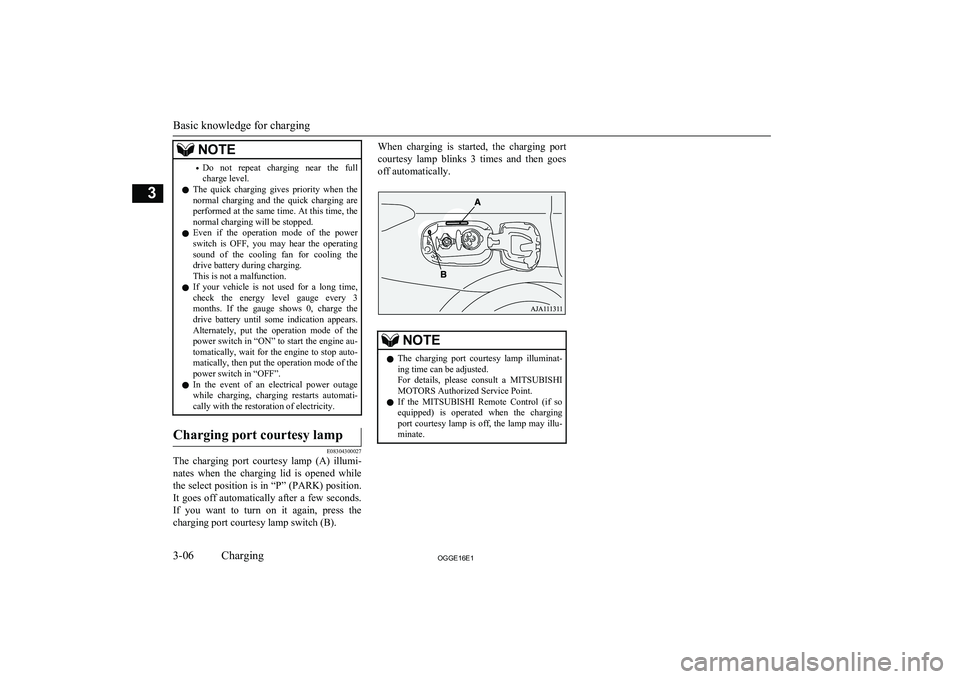
The charging port courtesy lamp (A) illumi-
nates when the charging lid is opened while
the select position is in “P” (PARK) position. It goes off automatically after a few seconds.If you want to turn on it again, press the charging port courtesy lamp switch (B).
When charging is started, the charging port
courtesy lamp blinks 3 times and then goes off automatically.NOTEl The charging port courtesy lamp illuminat-
ing time can be adjusted.
For details, please consult a MITSUBISHI
MOTORS Authorized Service Point.
l If the
MITSUBISHI Remote Control (if so
equipped) is operated when the charging
port courtesy lamp is off, the lamp may illu-
minate.
Basic knowledge for charging
3-06OGGE16E1Charging3
Page 53 of 490
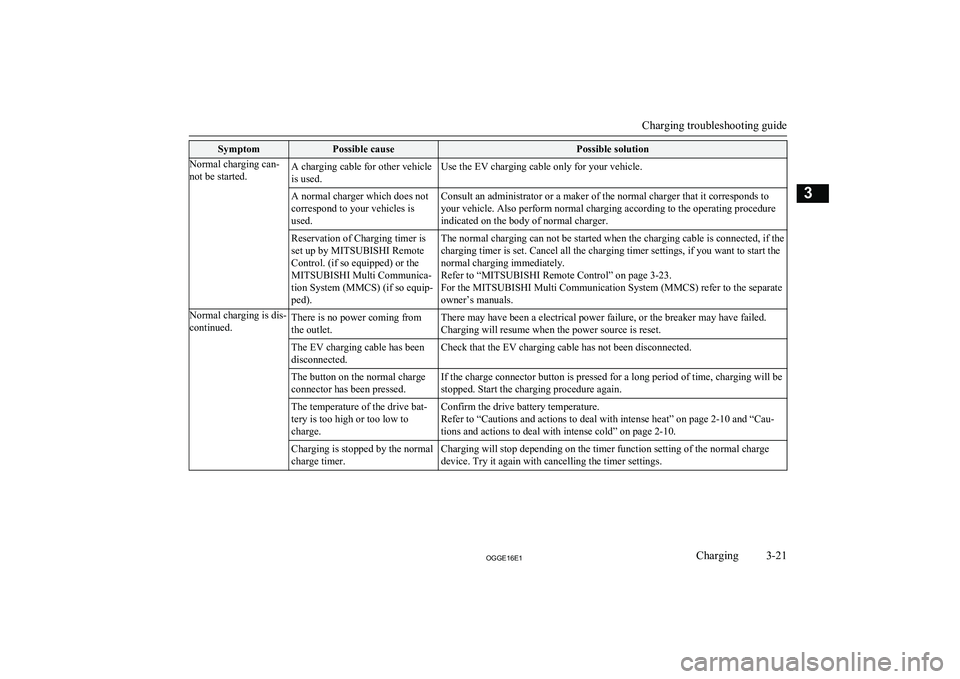
SymptomPossible causePossible solutionNormal charging can-
not be started.A charging cable for other vehicle
is used.Use the EV charging cable only for your vehicle.A normal charger which does not
correspond to your vehicles is
used.Consult an administrator or a maker of the normal charger that it corresponds to
your vehicle. Also perform normal charging according to the operating procedure
indicated on the body of normal charger.Reservation of Charging timer is
set up by MITSUBISHI Remote
Control. (if so equipped) or the
MITSUBISHI Multi Communica-
tion System (MMCS) (if so equip-
ped).The normal charging can not be started when the charging cable is connected, if the
charging timer is set. Cancel all the charging timer settings, if you want to start the
normal charging immediately.
Refer to “MITSUBISHI Remote Control” on page 3-23.
For the MITSUBISHI Multi Communication System (MMCS) refer to the separate
owner’s manuals.Normal charging is dis-
continued.There is no power coming from
the outlet.There may have been a electrical power failure, or the breaker may have failed.
Charging will resume when the power source is reset.The EV charging cable has been
disconnected.Check that the EV charging cable has not been disconnected.The button on the normal charge
connector has been pressed.If the charge connector button is pressed for a long period of time, charging will be
stopped. Start the charging procedure again.The temperature of the drive bat-
tery is too high or too low to
charge.Confirm the drive battery temperature.
Refer to “Cautions and actions to deal with intense heat” on page 2-10 and “Cau-
tions and actions to deal with intense cold” on page 2-10.Charging is stopped by the normal
charge timer.Charging will stop depending on the timer function setting of the normal charge
device. Try it again with cancelling the timer settings.
Charging troubleshooting guide
3-21OGGE16E1Charging3
Page 54 of 490
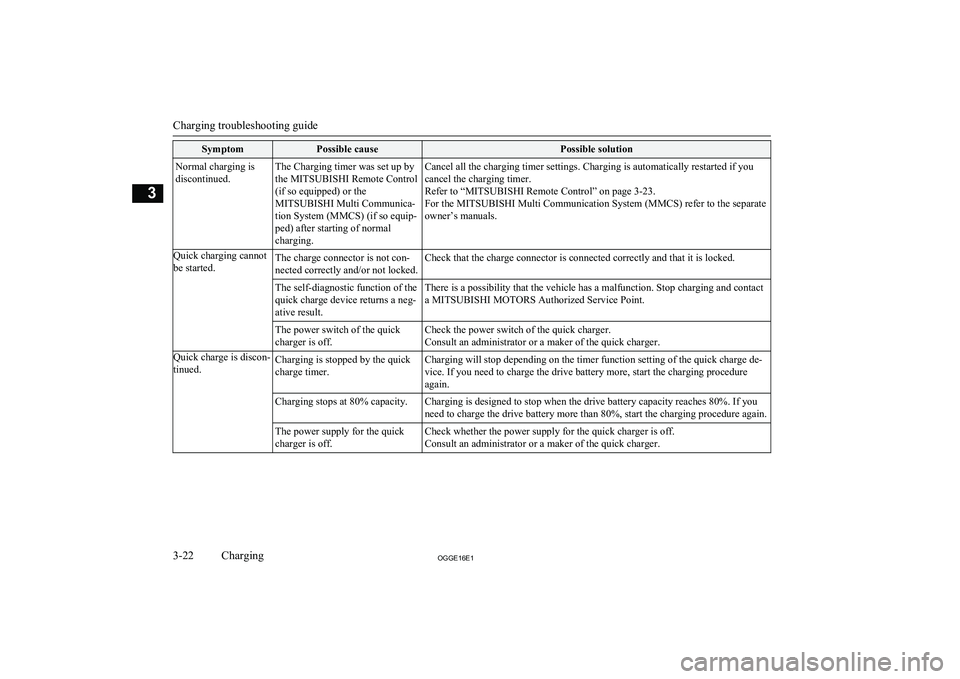
SymptomPossible causePossible solutionNormal charging is
discontinued.The Charging timer was set up by
the MITSUBISHI Remote Control
(if so equipped) or the
MITSUBISHI Multi Communica-
tion System (MMCS) (if so equip-
ped) after starting of normal
charging.Cancel all the charging timer settings. Charging is automatically restarted if you
cancel the charging timer.
Refer to “MITSUBISHI Remote Control” on page 3-23.
For the MITSUBISHI Multi Communication System (MMCS) refer to the separate owner’s manuals.Quick charging cannot
be started.The charge connector is not con-
nected correctly and/or not locked.Check that the charge connector is connected correctly and that it is locked.The self-diagnostic function of the
quick charge device returns a neg-
ative result.There is a possibility that the vehicle has a malfunction. Stop charging and contact
a MITSUBISHI MOTORS Authorized Service Point.The power switch of the quick
charger is off.Check the power switch of the quick charger.
Consult an administrator or a maker of the quick charger.Quick charge is discon-
tinued.Charging is stopped by the quick
charge timer.Charging will stop depending on the timer function setting of the quick charge de-
vice. If you need to charge the drive battery more, start the charging procedure again.Charging stops at 80% capacity.Charging is designed to stop when the drive battery capacity reaches 80%. If you
need to charge the drive battery more than 80%, start the charging procedure again.The power supply for the quick
charger is off.Check whether the power supply for the quick charger is off. Consult an administrator or a maker of the quick charger.
Charging troubleshooting guide
3-22OGGE16E1Charging3